Ransomware attacks reached USD 1.1 billion in 2023. That number shows how exposed business systems still are. Many teams depend on outdated backup systems. Those systems often miss critical gaps in disaster recovery planning.
Disaster recovery SaaS helps close those gaps. It protects business data and keeps operations running during unexpected events. DRaaS uses automated backup, disaster recovery, and faster recovery processes. It also improves recovery time objective (RTO) and recovery point objective (RPO).
A strong SaaS disaster recovery plan reduces downtime and data loss. It supports cloud environments and modern workloads. Businesses gain better control, faster recovery, and stronger data protection.
What Is Disaster Recovery As A Service (DRaaS) For SaaS
Disaster recovery as a service (DRaaS) for SaaS is a cloud-based recovery solution that protects critical data and ensures business continuity. It helps organizations recover fast when disaster strikes, whether from cyberattacks, human error, or natural disasters. Disaster recovery SaaS replaces traditional backup systems with automated failover, continuous data protection, and real-time data synchronization. It secures customer data, cloud data, and mission-critical workloads across cloud environments.
A strong disaster recovery plan defines the recovery time objective and the recovery point objective. It shows how much data loss is acceptable and how fast recovery time should be. DRaaS supports rapid recovery with minimal manual intervention. It uses multiple regions, virtual machines, and infrastructure as code tools to initiate recovery operations smoothly.
SaaS providers use DRaaS to minimize downtime and protect business operations. It strengthens data protection, supports compliance requirements, and, combined with modern SaaS security best practices, ensures effective disaster recovery across multi-cloud environments.
DRaaS reshapes how organizations protect critical systems and maintain business continuity through five fundamental capabilities that traditional disaster recovery solutions can’t match.
Automated Backup And Recovery Processes
Automation removes manual intervention that introduces human error into your disaster recovery operations. Automated backup systems create scheduled copies of designated data without requiring staff involvement. Your disaster recovery saas solution monitors replication status and system health around the clock and catches potential issues before they disrupt recovery operations.
Automated failover and failback processes execute naturally during disasters. The system triggers failover to backup environments on its own and cuts downtime. Automated failback transfers operations back without manual steps once your primary environment is restored. This orchestration restores critical systems and applications in the correct sequence and prioritizes mission-critical workloads. Automated testing verifies recovery processes without affecting the production environment.
Faster Recovery Time Objectives (RTO) And Recovery Point Objectives (RPO)
DRaaS cuts both recovery time and data loss during critical incidents. Service providers compete to deliver lower RTOs and RPOs. These metrics become your starting point when you evaluate disaster recovery solutions. RPOs can be reduced to seconds and RTOs to minutes with continuous data protection.
Real-time data replication keeps backup environments synchronized with primary systems. This automation maintains up-to-date recovery points and cuts data loss. Continuous data protection enables real-time replication of changes for workloads requiring near-zero data loss. Critical systems can be recovered almost right after an outage. Cloud-based failover happens in minutes instead of hours or days and helps you meet aggressive recovery objectives that traditional methods can’t achieve.
Protection Against Ransomware And Cyber Threats
Ransomware attacks cost organizations an average of 24 days of downtime. DRaaS addresses this threat through layered defense strategies. Disaster recovery as a service (DRaaS) delivers protection when paired with immutable backups and air-gapped storage. You can spin up clean copies of your environment without paying ransoms.
74% of organizations plan to utilize DRaaS for ransomware recovery by 2026. This adoption reflects how DRaaS enables rapid failover to a clean environment and cuts downtime from days to minutes. Immutable backups prevent ransomware from spreading to your backup copies or starting from them. DRaaS providers deploy the strongest cybersecurity and encryption measures available. Data security is the foundation of their business.
Scalability For Growing Business Needs
Cloud environments enable your disaster recovery strategy to scale without physical infrastructure investments. DRaaS platforms allocate resources based on demand during failover and maintain optimal performance even under stress. This flexibility supports scalable SaaS growth strategies during disasters.
You can upgrade your service as per your company’s needs without maintaining redundant capacity. DRaaS adjusts on its own as your organization adds new workloads or expands into multiple regions, supporting scalable SaaS tools that power global business growth. This makes disaster recovery as a service attractive for small and mid-sized businesses seeking enterprise-grade protection without the price tag.
Reduced Infrastructure And Maintenance Costs
DRaaS helps businesses lower costs by nearly 55% compared to conventional recovery solutions. You remove the need for pricey physical servers or recovery sites through subscription-based or pay-as-you-go models. This cuts upfront investment in IT infrastructure.
Service providers handle infrastructure, orchestration, and testing. Your internal staff can focus on business growth rather than maintaining a DR site that might sit idle for years. You avoid expenses associated with procuring hardware, software licenses, and establishing backup sites. Your IT team redirects time spent on disaster recovery testing and maintenance toward higher-value initiatives.
Essential Features Of A SaaS Disaster Recovery Plan
Your disaster recovery saas needs specific features to protect critical data and ensure rapid recovery when disaster strikes. These capabilities determine whether your recovery plan delivers on its promises or leaves gaps that compromise business continuity.
Continuous Data Replication And Monitoring
Continuous data replication captures changes to your critical systems in live or near-live time and minimizes how much data loss occurs during disasters. The approach tracks modifications at the block or transaction level and transmits only changed data to backup systems rather than copying entire datasets over and over. Log-based replication reduces bandwidth consumption while maintaining current copies of mission critical workloads.
Your disaster recovery solutions can operate in synchronous or asynchronous modes depending on recovery objectives. Synchronous replication writes data to primary and backup locations at the same time. Zero data loss is guaranteed, but more bandwidth is required. Asynchronous replication proves more bandwidth-friendly and remains suitable when you can accept targets with a higher recovery point objective. Continuous monitoring within a scalable software architecture for high-growth products will give every transaction a mirror to minimize potential data loss for mission-critical databases.
Point-In-Time Recovery Capabilities
Point-in-time recovery lets you restore data to any specific moment before corruption, ransomware attacks or human error occurred. Recovery precision varies by provider. To cite an instance, AWS Backup enables restoring resources within 1 second of precision and goes back a maximum of 35 days. Google Spanner retains data versions for up to seven days at microsecond granularity.
Full backups are created first and then transaction logs are backed up constantly. The system accesses your full backup during recovery process and replays transaction logs to the exact timestamp you specify. You can recover portions of databases through targeted queries or restore entire systems by backing up at specific past timestamps.
Multi-Platform Support And Integration
Protecting workloads across heterogeneous environments is what an effective disaster recovery strategy requires. Your saas disaster recovery plan should support multiple operating systems, including x86, IBM Z Mainframe, IBM Power, Windows, and Linux platforms, and align with best practices of SaaS architecture. Comprehensive data protection is provided, whatever IT infrastructure you use.
Multi-cloud environments add complexity to recovery operations. Your disaster recovery DR solution needs compatibility across AWS, Azure, and multiple cloud providers to enable uninterrupted data synchronization and failover processes, especially when planning smooth cloud migration for growing teams. Integration with infrastructure as code tools accelerates deployment and will give consistent configurations during recovery testing.
Compliance And Data Retention Policies
Compliance requirements drive how long you retain customer data and maintain audit trails. Industries face specific mandates. Healthcare organizations must follow HIPAA guidelines and financial services must adhere to SOX requirements. Any business processing EU citizen information complies with GDPR regulations. Your disaster recovery saas should provide built-in compliance support for SOC 2, GDPR, HIPAA and PCI-DSS standards.
Data retention policies define storage duration for different data types based on regulatory and business needs. Standard schedules often retain daily backups for 7 days, weekly backups for 4 weeks, monthly backups for 12 months and annual backups for 7 years. Automated reporting and detailed audit trails prove compliance during regulatory audits. Service level agreements should specify how your cloud provider maintains encryption for data at rest and in transit, role-based access controls and geographic storage requirements for data residency.
5 Steps To Implement Disaster Recovery As A Service
Implementing disaster recovery as a service requires careful planning that arranges recovery capabilities with business needs. These five steps guide your organization from assessment through full operational readiness and should be aligned with your broader SaaS product development lifecycle.
Step 1: Review Your Business Impact And Recovery Requirements
A business impact analysis identifies potential disaster causes and reviews how disruptions affect business functions. Your analysis should calculate financial impact, operational consequences and recovery priorities for each critical system. To name just one example, a consumer products company may need to resume deliveries within three days to retain customers, while banks face much tighter timelines for account access.
Determine your recovery time objective and recovery point objective for each application. Mission-critical workloads need aggressive targets with higher costs, while non-critical applications tolerate longer downtimes. This prioritization guides resource allocation during recovery operations and helps you avoid overprovisioning less vital systems, and it should be reflected in your long-term SaaS product roadmap and prioritization.
Step 2: Select The Right DRaaS Provider And Solution
Choose providers that meet your RTO and RPO requirements with documented service level agreements. Verify their compliance certifications match your industry regulations, whether GDPR, HIPAA, ISO 27001 or SOC 2. Review scalability to ensure the solution grows with your business across hybrid environments and multiple cloud providers.
Testing capabilities separate strong providers from weak ones. Conduct full disaster recovery testing at least once per year to verify effectiveness. Your provider should offer testing services with minimal disruption to production environment and provide detailed reports on system health and performance.
Step 3: Develop And Document Your Recovery Procedures
Create visual-based documentation with flowcharts, checklists and diagrams instead of lengthy manuals. Organizations that use this approach are 30% more likely to find disaster recovery plan maintenance easy. Begin with high-level recovery workflows, then build supporting documentation for systems and processes.
Document clear roles and responsibilities so everyone knows their tasks when disaster strikes. Include communication protocols, asset inventories with recovery times and detailed procedures to restore critical systems. Keep documentation available and updated through change management processes rather than annual reviews.
Step 4: Schedule Testing And Verification
Test your disaster recovery plan quarterly to verify components without overextending resources. Annual full-scale tests should simulate real disaster scenarios and recover critical systems in test environments. Conduct ad-hoc testing after major system changes, cyber incidents or infrastructure modifications to ensure recovery procedures remain effective.
Step 5: Train Your Team On Recovery Protocols
Assign roles to team members and conduct drills to build familiarity with recovery processes. Training ensures your staff can execute recovery operations during actual disasters and minimizes human error that disrupts failover processes. Exercises prepare teams to respond under pressure with confidence.
How To Measure The Impact Of DRaaS On Business Resilience
Calculating the value of disaster recovery SaaS requires tracking specific metrics that demonstrate improved resilience. These measurements prove how disaster recovery as a service protects business operations and justifies your investment.
Improved Uptime And Availability Metrics
Uptime statistics reveal your system’s reliability over time. A service achieving 99.9% uptime experiences 8 hours of downtime each year. 99.99% reduces this to 52 minutes. Organizations targeting mission critical workloads want 99.999% uptime, which translates to just 5 minutes of annual downtime.
Recovery time objective and recovery point objective metrics define your disaster recovery plan’s effectiveness. DRaaS substantially optimizes these targets based on individual business needs. Critical systems return within minutes while data loss stays minimal. Service level agreements guarantee these recovery objectives and provide measurable standards for availability.
Boosted Security Posture Against Data Breaches
Data breaches carried an average cost of USD 4.45 million in 2023, representing a 15% increase over three years. DRaaS providers deliver top-tier security features, including encryption and multi-factor authentication. These help prevent data breaches while customer data remains protected. This added security layer provides measurable risk reduction against cyber threats.
Cost Savings Compared To Traditional DR Models
DRaaS eliminates the need for expensive on-premises infrastructure by using cloud environments. Organizations gain predictable and adaptable disaster recovery solutions at a fraction of traditional costs. Small and medium-sized businesses benefit most, getting enterprise-grade protection without massive infrastructure costs.
Conclusion
Disaster recovery saas has changed how we protect critical data and ensure business continuity. Downtime costs USD 9,000 per minute, so you can’t afford gaps in your disaster recovery plan. DRaaS delivers what traditional solutions can’t: automated backup and rapid recovery times while protecting against cyber threats.
The best part? You’ll achieve better recovery time objective and recovery point objective targets at 55% lower cost than conventional approaches. Your organization gains enterprise-grade disaster recovery solutions without maintaining expensive infrastructure.
Implementing a disaster recovery strategy isn’t optional anymore. Choose a provider that lines up with your recovery objectives and test regularly. You’ll minimize downtime when disaster strikes.
FAQs
How Does Disaster Recovery SaaS Handle Cross-Region Failover in Multi-Cloud Environments?
Disaster recovery SaaS uses automated failover across multiple regions and multiple cloud providers to keep critical systems active. It relies on data synchronization and predefined recovery procedures to initiate recovery operations with minimal manual intervention.
Can Disaster Recovery SaaS Meet Strict Compliance Requirements Across Different Data Jurisdictions?
Yes, disaster recovery services support compliance requirements like GDPR, HIPAA, and SOC 2 through audit trails and data retention policies. Providers also align cloud data storage with geographic and legal regulations.
What Role Does Infrastructure As Code Play In Disaster Recovery SaaS Recovery Operations?
Infrastructure as code tools automate recovery operations by recreating cloud environments and virtual machines quickly. It ensures consistency across recovery processes and reduces human error during disaster recovery testing.
Is Continuous Data Protection Necessary for Mission-Critical Workloads In SaaS Disaster Recovery?
Yes, continuous data protection is essential for mission-critical workloads where minimal data loss is required. It supports near real-time recovery point objective and strengthens the overall disaster recovery strategy.
How Do Service Level Agreements Impact Recovery Time And Data Integrity In DRaaS?
No, weak service level agreements can limit recovery time and affect data integrity. Strong SLAs define recovery time objective, recovery point objective, and ensure rapid recovery with reliable disaster recovery solutions.
Companies now rely on far more SaaS products than before. Over the past decade, the average number of SaaS subscriptions in a company grew from about 20 to more than 120. That rapid growth creates real challenges. Teams often struggle to maintain visibility across their entire SaaS portfolio. Costs increase, operations become harder to manage, and security risks appear when tools remain unchecked.
SaaS monitoring tools help solve those issues. They track performance, system availability, and user activity across applications. SaaS application monitoring focuses on response times and real user experience, helping teams detect problems early.
With the help of SaaS application performance monitoring, businesses improve reliability, reduce downtime, and deliver smoother experiences for users.
What Are SaaS Monitoring Tools
SaaS monitoring tools help companies monitor SaaS applications, cloud infrastructure, and connected services from one place. Modern businesses rely on many SaaS apps such as Microsoft Office and other third-party services. Without proper SaaS monitoring, teams struggle to see performance issues, response times, or uptime problems. A strong monitoring solution tracks application performance, availability monitoring, and infrastructure monitoring across systems. It collects log data, API calls, and other data points from network devices and cloud platforms to provide comprehensive visibility, which should be a core requirement in any SaaS product development initiative.
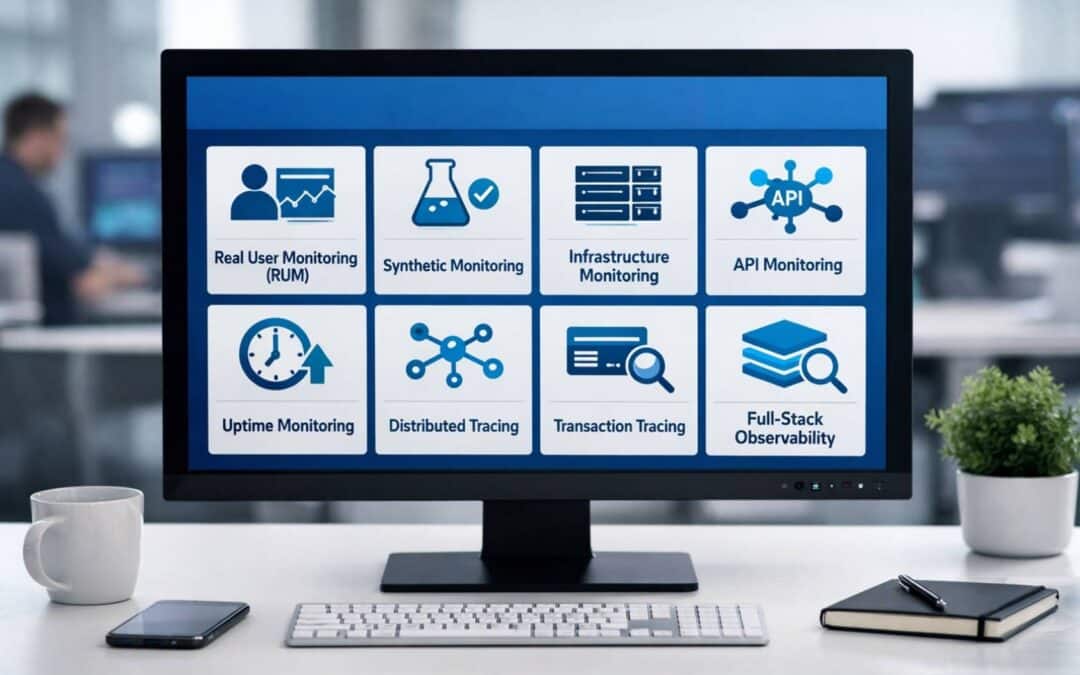
SaaS monitoring also uses real user monitoring and synthetic monitoring to evaluate user experience. Real user data shows how active users interact with SaaS services, while synthetic and real user tests simulate traffic from multiple locations. Performance monitoring, API monitoring, and uptime monitoring reveal performance problems before they affect end users, and pairing this visibility with AI-driven automation in SaaS can further streamline detection and response. Teams analyze monitoring data through custom dashboards, distributed tracing, and transaction tracing to diagnose issues quickly.
An effective monitoring strategy helps teams detect critical issues, reduce alert fatigue, and accelerate issue resolution. Monitoring systems also support incident handling, route incidents with escalation policies, and generate actionable insights to optimize performance and improve SaaS performance outcomes.
How SaaS Monitoring Tools Detect Performance Issues Before Users Notice
Catching problems before customers experience them separates good monitoring from great monitoring. Organizations that implemented complete monitoring slashed their disruptions by 50-60%. The change from reactive firefighting to proactive detection alters how teams operate. You handle potential problems during regular maintenance windows instead of emergency weekend fixes.
Synthetic Monitoring For Proactive Issue Detection
Synthetic monitoring uses automated scripts that simulate user interactions to test functionality and identify performance issues. Robot users test your application around the clock from various regions globally. These scripts replicate what potential users might do: filling out forms, clicking buttons, logging in, making purchases, and browsing pages.
Your synthetic monitors work while your team sleeps. They execute pre-scripted transactions every 1, 5, or 10 minutes from locations matching your user base. Advanced scripts complete full user journeys: log in, search for product, add to cart, apply promo code, checkout, and receive confirmation. You test what matters most before real users have to.
Proactive teams run synthetic tests in staging and development environments. So they identify performance regressions before code reaches production. Scripts flag a login page crawling past the 3-second mark, search results getting wonky, or payment forms throwing mysterious errors. You know immediately. Bump your page load time by just one second and watch conversions drop by 7%.
Real User Monitoring Captures Actual Experience
Real user monitoring collects data from actual users interacting with your application live. It gathers insights on user actions, page views, and performance metrics from users’ devices and browsers, showing where a consistent SaaS design system for scalable products can remove UX inconsistencies. RUM captures what happens when real people use your product.
Synthetic monitoring shows controlled experiments while RUM reveals messy reality. Your synthetic tests might show everything looks good, but RUM might reveal iPhone users on cellular networks in rural areas bounce because pages take 15+ seconds to load. Chrome users experience JavaScript errors that Safari users don’t.
Multi-Location Performance Tracking
You can deploy synthetic agents in different geographical regions to detect variations in application performance based on geolocation. Multi-location failure confirmation only alerts when two or more locations fail. This eliminates the risk of false positives at a single point. Your team avoids chasing phantom issues that only affect one test location for a short time.
Geographic testing surfaces edge cases that controlled tests miss. Users in different regions experience vastly different network conditions, latency, and third party service performance, so you need robust SaaS scalability strategies to maintain consistency as you grow. Performance degradation affecting specific regions only appears under real conditions.
Response Time And Latency Measurement
Response time monitoring assesses the time it takes for a system or application to respond to user requests. It tracks the duration between request initiation and response receipt. Faster response times lead to improved satisfaction and engagement while reducing downtime and business operation disruptions.
Effective monitoring establishes a baseline for response time and identifies data points that vary from it by a margin of at least 100% or greater. A variation of such degree warrants investigation into why it happens. An anomaly isn’t always an indicator of a serious issue, but a pattern of subpar or worsening response times almost always is.
You can customize threshold values to alert and define what constitutes abnormal response time for your specific environment. Tools can adjust thresholds based on observed patterns and help distinguish between normal variations like end-of-month processing spikes and genuine problems that need attention, which is critical when implementing best practices of SaaS architecture that must stay resilient under changing loads.
Impact Of SaaS Application Monitoring On User Experience
When users visit your application, performance determines whether they stay or leave. Application speed isn’t just a technical metric. It shapes how customers see your entire product and brand. SaaS monitoring tools give you the visibility needed to optimize what matters most: the actual experience your end users receive.
Faster Page Load Times And Application Responsiveness
Page load speed affects every business metric you care about. Research shows that a one-second load time yields conversion rates three times higher than a five-second load time. The numbers get more dramatic when you look at revenue. Amazon found that every 100ms of latency cost them 1% in sales. Milliseconds translate to millions of dollars lost for a company generating billions in revenue.
Bounce rates tell the same story from a different angle. Websites that load in 1-2 seconds maintain an average bounce rate of 9.6%, compared to a 38% bounce rate for sites that take 5 seconds or longer to load. Users make split-second judgments about quality and reliability based on responsiveness alone. You impact how users see your platform when you monitor Core Web Vitals and optimize frontend performance, and strong UX that reduces SaaS churn and improves retention turns those gains into long-term loyalty. Organizations using observability solutions experience 20% higher conversion rates due to rapid, stable experiences.
Reduced Downtime And Service Interruptions
Downtime doesn’t just frustrate users. It costs revenue, breaks SLA commitments, and drives customer churn. SaaS businesses depend on consistent availability because users expect always-on access. Organizations that implemented observability reduced incident resolution time by up to 85% during events while following SaaS security best practices to protect sensitive data. Faster resolution means fewer disruptions and improved trust with customers.
Proactive monitoring helps teams maintain uptime targets that seemed impossible before. Studies suggest that organizations preferring observability achieve up to 98% uptime for key services, often leading to double-digit improvements in retention and brand loyalty. Well-designed scalable SaaS tools that power global business growth rely on this visibility to keep user experience consistent at scale. Teams get alerts when performance degrades, and you can fix critical issues before end users notice problems. Support tickets decrease and user satisfaction climbs as a result.
Improved Transaction Success Rates
Failed transactions kill revenue at the moment of highest customer intent. Card payment failures average 10% to 15% globally. This rate jumps to 40% in emerging markets. Each failed payment represents lost revenue and damaged relationships. Equally concerning, 62% of customers will avoid a website after experiencing a failed payment. Another study found that 40% of customers won’t return to a merchant if their card gets declined, and 52% will abandon checkout if it takes more than two minutes to process a purchase.
SaaS app monitoring tracks API calls to payment processors, monitors third party dependencies, and identifies where transactions fail. You can optimize performance at each step when you analyze monitoring data from checkout flows, much like AI features that increased engagement by 34% used behavioral insights to remove friction. Transaction tracing reveals bottlenecks in payment processing, authentication delays, and integration failures with external dependencies.
Regional Performance Optimization
Users in different locations experience vastly different performance levels. You reduce latency and improve responsiveness by placing applications close to users. CDN monitoring ensures users experience low latency and fast load times whatever their location. Synthetic monitoring across multiple locations detects regional network issues, DNS delays, or CDN misconfigurations that affect certain areas more than others. This global view helps ensure consistent and optimized performance for every end user, turning geographic coverage into a competitive advantage rather than a technical challenge.
Key Features Of SaaS Monitoring Tools
Modern saas monitoring tools pack features that reshape how you manage application performance. These capabilities separate simple uptime checks from systems that prevent problems and accelerate issue resolution.
Automated Discovery And Continuous Tracking
Full stack observability platforms discover and begin monitoring newly deployed services automatically. Manual configuration slows teams down. Your monitoring solution should detect new microservices or containers the moment you launch them, especially when you depend on scalable software architecture for high-growth products. Automated discovery updates relationship maps continuously across Kubernetes, AWS, and other cloud environments.
SaaS Manager Plus scans your IT environment to detect and track all saas applications, even those acquired outside traditional procurement channels, giving you clearer visibility into your overall software services landscape. You get immediate insights into applications used within your organization without building manual inventories.
API Monitoring And Endpoint Health Checks
API monitoring tracks response times from multiple locations, verifies payload accuracy, and identifies performance trends across time and geography. Health endpoint monitoring uses functional checks that external tools access at regular intervals through exposed endpoints. Your application performs necessary checks and returns status indications.
A status code of 200 indicates healthy operation. The server remains initializing or temporarily unable to serve requests when readyz endpoints return failure codes, so traffic should route away. This prevents users from hitting services that aren’t ready.
Infrastructure Monitoring And Resource Optimization
Infrastructure monitoring tracks availability, performance, and resource utilization of hosts, containers, and backend components. You collect CPU utilization percentages, memory usage, and storage consumption to spot problems before they escalate.
This visibility helps you optimize costs. You can decommission overprovisioned or idle servers and run workloads on fewer hosts. Organizations predict future resource consumption by reviewing historical infrastructure metrics regularly.
Full Stack Observability For End-To-End Visibility
Full stack observability monitors IT environments in real time using correlated telemetry data. It removes silos by unifying telemetry into a single source of truth for observability data. Teams trace problems through the entire stack when performance issues arise, reducing mean time to repair from hours to minutes by a lot.
Platforms collect data through agents, SDKs, and auto-instrumentation. They correlate it to map relationships between components. Modern platforms use machine learning and AIOps to detect anomalies automatically, predict failures, and deliver immediate insights. Platforms perform automated root cause analysis in minutes rather than hours by correlating telemetry data across all layers.
Intelligent Alerting And Incident Management
Smart alerting techniques distinguish genuine issues from noise and enable teams to detect anomalies promptly. Xurrent IMR detects and correlates related alerts across your monitoring stack automatically, filtering out duplicates and false positives. Engineers get a single, clear incident view instead of drowning in redundant notifications.
Alerts deliver via phone, SMS, email, Slack, Microsoft Teams, or mobile push. Direct voice escalation routes calls to on-call responders instantly for high-severity incidents.
How To Implement SaaS App Monitoring For Maximum Performance Impact
Getting saas monitoring tools working right takes more than installation. You need a monitoring strategy that reflects how users interact with your product.
Start With Critical User Journeys And Workflows
Define monitoring targets based on real product workflows. Your critical user journeys are where your business meets your users. The business breaks at the time they break. Start by identifying high-stakes paths users take when they engage with your platform and make sure they are reflected in your SaaS product roadmap. Retail sites need product search, cart operations and checkout monitored. Healthcare apps require close monitoring of appointment scheduling and test result access. SaaS platforms must track login flows and dashboard loading.
Monitor specific routes users depend on: authentication endpoints that every session uses, dashboard data APIs called on page load, and billing endpoints during subscription changes. These flows should already be prioritized in your SaaS product development lifecycle. Users still cannot complete purchases if a monitored server shows healthy but your checkout endpoint fails.
Set Useful Alert Thresholds Based On User Impact
Alert thresholds must reflect sustained deviation, not isolated spikes. Trigger alerts at the time response time exceeds defined limits for multiple consecutive checks or error rates cross percentage thresholds within rolling time windows. Each alert should correspond to a clear investigation path.
Tailor notification thresholds to match your organization’s needs. Logins from European IP addresses might flag one business but not another with global operations. Alerts should be useful and provide enough context for teams to understand the issue and determine appropriate response.
Monitor Third-Party Dependencies And Integrations
The average web application depends on 10-30 external services. Payment processors, authentication providers, CDNs and email delivery systems all create potential failure points you don’t control. Track API performance to ensure integrations run smoothly. Monitor availability, response time, error rates and data validation for all third-party dependencies.
Establish Clear Escalation Paths And Response Procedures
Set up escalation prompts that alert the right personnel at the time incidents occur. Define specific conditions under which incidents should be escalated. Time-based escalation moves alerts up the chain when acknowledgment doesn’t happen within defined windows. Critical production alerts need 5-minute timeouts, while high-severity issues allow 10-15 minutes. Pre-approve mitigation actions for predicted scenarios to speed incident resolution.
How To Measure The Business Value Of SaaS Application Performance Monitoring
SaaS platforms support critical operations in modern companies. Poor performance quickly affects revenue, user satisfaction, and product adoption. SaaS application performance monitoring helps teams track application performance, user impact, and system health. Clear metrics allow businesses to measure how monitoring tools improve stability, reliability, and overall performance.
System Uptime And Service Availability
System uptime remains one of the most direct indicators of business value. SaaS monitoring tools track uptime monitoring, availability monitoring, and uptime checks across SaaS applications and cloud infrastructure. Reliable monitoring systems alert teams when outages or performance problems appear.
Research from Gartner shows that the average cost of IT downtime can reach $5,600 per minute for many organizations. A strong monitoring solution reduces this risk. SaaS monitoring helps detect issues early and protects uptime for SaaS services, third-party dependencies, and external dependencies. Stable application performance leads to stronger customer trust and better business outcomes.
User Experience And Real User Data
User experience strongly influences retention and product growth. Real user monitoring collects real user data from active users across multiple locations and devices. Teams review response times, network conditions, and user impact to understand how SaaS applications perform for end users.
Google research shows that 53% of mobile users abandon a site if load time exceeds three seconds. SaaS monitoring tools measure response times and performance tracking to prevent such problems. Synthetic monitoring and real user monitoring together provide full visibility into user experience. Better insights help teams optimize performance and reduce support tickets, which is especially critical when you’re under pressure to launch an MVP in 90 days and must validate experience quickly.
Faster Incident Detection And Resolution
Performance issues often start small but escalate quickly without proper monitoring setup. Application performance monitoring, distributed tracing, and transaction tracing help teams identify root cause faster, forming the foundation for broader SaaS performance optimization best practices. Monitoring systems collect log data, API calls, and infrastructure monitoring signals to provide deeper insights.
A report from IBM shows that organizations with strong observability practices reduce incident resolution time by up to 50%. Alert thresholds, status pages, and escalation policies help teams route incidents quickly. SaaS monitoring tools accelerate issue resolution and improve incident handling before users experience major disruption.
Operational Efficiency And Resource Optimization
Operational efficiency improves when teams gain comprehensive visibility into SaaS applications and cloud infrastructure. Performance monitoring and infrastructure monitoring track network devices, API monitoring, and third-party services in one monitoring platform, and partnering with custom software development services helps tailor these capabilities to your exact workflows.
A better monitoring strategy allows teams to regularly review monitoring data and detect performance problems early. Full-stack observability helps teams analyze data points from SaaS apps, identity services, and external dependencies. Companies that adopt advanced monitoring tools often reduce troubleshooting time and improve overall performance across SaaS services, especially when those tools complement custom software that transformed companies by fitting unique operational needs.
Security Signals And Risk Reduction
Security risks often appear through abnormal behavior in SaaS applications or unusual API calls. SaaS monitoring tools track monitoring data across identity services, network devices, and cloud infrastructure to detect critical issues early, while strong UI/UX design services for SaaS products ensure that surfaced security alerts and workflows remain usable for teams.
A strong monitoring solution also observes third-party services and external dependencies that connect with SaaS applications. Error tracking, uptime monitoring, and API monitoring reveal suspicious activity and system failures. Alert systems notify teams before security threats affect end users. Better monitoring supports SaaS management, protects sensitive data, and reduces operational risk for modern SaaS environments.
How GainHQ Strengthens SaaS Monitoring And Performance Visibility
GainHQ helps companies improve SaaS monitoring and gain full visibility across SaaS applications and cloud infrastructure. Modern SaaS environments depend on multiple tools, APIs, and third-party services. Without a strong monitoring strategy, teams struggle to detect performance issues or user impact. GainHQ supports businesses with practical monitoring solutions that combine application performance monitoring, infrastructure monitoring, and performance tracking, sharing additional insights through the GainHQ blog on software development and digital transformation. Teams collect monitoring data, analyze log data, and monitor SaaS applications across distributed systems.
GainHQ also focuses on real user monitoring and synthetic monitoring to improve user experience. Real user data reveals how active users interact with SaaS apps across different network conditions and locations. Monitoring tools track response times, uptime monitoring, and API calls to detect critical issues early. Custom dashboards and actionable insights give teams a better understanding of application performance and root cause, while user-centered design for SaaS platforms that scale turns those insights into better product decisions. Strong monitoring systems help accelerate issue resolution and improve overall performance for scalable SaaS services.
FAQs
How Do SaaS Monitoring Tools Handle Performance Issues Across Multiple Third Party Dependencies?
SaaS monitoring tools track API calls, response times, and error tracking across third party services and external dependencies. Monitoring systems collect log data and performance monitoring metrics to detect failures quickly. Teams analyze monitoring data to identify the root cause and reduce user impact.
Can Real User Monitoring And Synthetic Monitoring Work Together In A Monitoring Strategy?
Yes. Real user monitoring collects real user data from active users, while synthetic monitoring simulates user journeys from multiple locations. A combined monitoring strategy offers full visibility into user experience and application performance. Teams gain deeper insights into performance issues across SaaS applications and cloud infrastructure.
Do SaaS Monitoring Tools Help Reduce Alert Fatigue In Large Monitoring Systems?
Yes. Modern monitoring solutions apply alert thresholds, incident handling rules, and escalation policies to filter unnecessary alerts. Monitoring systems correlate related data points and route incidents to the right teams. This process reduces alert fatigue and improves incident response efficiency.
What Role Does Distributed Tracing Play In Diagnosing Complex SaaS Performance Problems?
Distributed tracing tracks requests across services inside cloud infrastructure and SaaS applications. Transaction tracing reveals where latency or performance problems occur within microservices or API integrations. Engineers gain a better understanding of system behavior and diagnose issues faster.
Can Full Stack Observability Improve Performance Tracking For High Traffic SaaS Apps?
Yes. Full stack observability connects infrastructure monitoring, application performance monitoring, and network monitoring in one monitoring solution. Teams track performance data points across network devices, SaaS services, and cloud platforms. This visibility helps optimize performance and accelerate issue resolution.
Artificial intelligence has become a core layer of modern SaaS platforms. Companies rely on advanced AI capabilities to automate workflows, analyze large datasets, and improve product experiences. As organizations expand the use of AI tools across operations, governance becomes essential to ensure AI systems operate responsibly and align with business priorities.
Building a comprehensive framework for AI governance helps SaaS teams guide model development, manage AI investments, and maintain transparency in how AI technologies influence decisions. This structure also helps organizations address societal expectations around fairness, privacy, and accountability in digital systems.
A strong governance approach ensures responsible AI use across every stage of the AI lifecycle. From development to deployment, companies must monitor how teams use AI and evaluate the impact of advanced AI solutions on customers, employees, and partners while supporting broader economic co operation across technology ecosystems.
What Is An AI Governance Framework
Think of an AI governance framework as your roadmap plus guardrails for every AI initiative your company runs. It systematically guides how you design, deploy, and monitor AI technologies across your organization. The goal is simple: keep your AI systems aligned with your business objectives, legal requirements, and ethical standards.
A comprehensive AI governance framework combines three distinct lenses. First, there is legal compliance covering regulations like GDPR, CCPA, and the European Union’s AI Act. Second, you have ethical principles such as fairness, transparency, and human-centricity. Third comes the technical controls including data quality standards, model registries, and automated bias detection tools.
Why Your Organization Needs AI Governance In 2026
Generative AI now powers daily workflows across SaaS platforms. From support automation to sales insights, organizations rely on AI-driven automation within SaaS platforms to manage operations, improve productivity, and scale digital services responsibly.
AI Adoption And Governance Foundations
Rapid ai adoption introduced complex ai systems that influence hiring, support, and revenue decisions. Organizations deploying ai solutions must build ai governance practices that guide responsible development and maintain ethical AI software principles across products. An effective approach to ai governance helps teams deploy autonomous and intelligent systems responsibly while balancing innovation with accountability. When companies implement effective ai governance, leaders can manage algorithmic risks and encourage teams to ai responsibly while improving operational reliability through continuous improvement.
AI Regulations And Legal Risks
Global ai regulations now shape how organizations deploy artificial intelligence in real products. Governments expect businesses to maintain regulatory compliance when building trustworthy ai systems used in high impact decisions. Without governance structures, companies face serious legal risks related to data misuse and algorithmic bias. A robust ai governance structure helps organizations manage oversight while collaborating with internal and external stakeholders to support responsible economic co operation across industries.
Governance For Customer Data Protection
Organizations must ensure that ai systems operate safely when processing customer information. Support platforms and SaaS products handle sensitive data daily. Governance policies enforce ethical ai practices and build safeguards that protect users while maintaining transparent operations.
Governance Builds Trustworthy AI Systems
Leaders recognize ai governance important for long term success. Governance frameworks help teams deploy innovation responsibly while maintaining trust in trustworthy ai systems. Through structured oversight and clear accountability, organizations build confidence among customers, partners, and regulators.
Key Principles Behind AI Governance Frameworks
Most AI governance frameworks developed by 2025 converge on remarkably similar core principles. Whether you look at the NIST AI Risk Management Framework, OECD AI Principles, UNESCO’s 2021 Recommendation, or the Artificial Intelligence Act from the EU, you will find roughly 90% overlap in foundational tenets. These include accountability, fairness, privacy, transparency, and safety as the pillars of responsible AI development.
Accountability And Human Oversight
Humans bear ultimate responsibility for AI outcomes regardless of how much automation you deploy. This principle requires you to designate clear ownership of every AI model in production. Assign model owners who understand the technical behavior and product owners who approve operational thresholds.
For example, you might establish that your support bot can auto-respond only when confidence scores exceed 80%. Below that threshold, a human agent reviews before sending. Practical tools support this oversight. Audit logs track every prompt change and model update. RACI matrices clarify who is responsible for what decisions. Cross-functional committees review incidents quarterly. IBM implemented this approach through CAIO oversight and reduced error escalations by 40%.
Fairness And Non Discrimination
Fairness ensures that AI does not treat customers differently based on protected characteristics without valid business reasons. Your governance framework should require auditing AI models against potential proxies for discrimination like gender, ethnicity, or geographic location.
Here is a concrete scenario. Your ticket routing model might inadvertently deprioritize customers from certain regions by 10-15% compared to others. Monthly checks using metrics like demographic parity can catch this before customers notice or complain. Tools like IBM’s AI Fairness 360 detect biases in 92% of tested cases. This aligns with OECD AI Principles requirements and Colorado law prohibiting disparate impact without justification.
Privacy And Data Protection
Any AI governance framework in 2026 must be compatible with data protection regulations worldwide. GDPR and CCPA set the baseline, but your framework needs to go beyond checkbox compliance.
Data minimization means using only the fields necessary for each AI task. Purpose limitation restricts support ticket data to support purposes only, not unrelated model training. Retention caps might specify 90 days post-resolution for transcript storage. Specific techniques matter here. Pseudonymization hashes email addresses before they enter training pipelines. Role-based access control limits which team members can view training data. A support example: mask health details in chat transcripts before fine-tuning your models. This discipline prevented the 2025 breaches that affected 18% of SaaS firms operating without these controls.
Transparency And Explainability
Teams need to understand, at least at a high level, how AI models reach decisions and when they are likely to fail. This does not mean every agent needs to interpret neural network weights. It means providing appropriate visibility into AI behavior.
For ticket triage, explainable scoring that shows keyword weights helps agents trust and verify AI recommendations. Studies show this approach boosts agent confidence by 35%. Visible indicators marking when a response comes from a large language model versus a knowledge base article prevent confusion. The EU AI Act requires documentation for high-risk systems making more than 25% of decisions automatically. This includes recording prompts, training data sources, and evaluation results.
Safety, Security And Reliability
Protecting AI systems from attack and failure is just as important as protecting traditional software. Threats specific to AI include prompt injection attacks that jailbreak LLMs successfully 40% of the time without proper filters. Data poisoning can corrupt model behavior. Model theft through watermarking detection requires constant vigilance, making alignment with broader SaaS security best practices for 2026 an essential part of AI governance.
Practical controls include rate limiting to perhaps 100 queries per minute per user. Content filters block hate speech and harmful outputs. Sandboxed APIs isolate public foundation models from sensitive internal systems. Ongoing monitoring detects accuracy drift when performance drops by 5% or more. This is particularly critical as customer behaviors shift quarterly with product changes and market conditions.
Major AI Governance Frameworks And Regulations To Know
The 2026 regulatory landscape features both binding laws and voluntary standards, with over 60 countries now regulating AI in some form. SaaS firms serving customers in the EU or US face extraterritorial requirements that demand adaptive frameworks blending multiple standards.
EU AI Act
The EU AI Act uses a risk-tiered approach that categorizes AI systems from unacceptable to minimal risk. Unacceptable uses like social scoring and certain biometric systems are banned outright. High-risk applications including some HR screening tools face extensive obligations.
Key dates span 2024 through 2026 with staged application of different provisions. General-purpose AI models face additional requirements starting August 2025, including technical documentation and adversarial testing. Obligations for high-risk AI systems include documented risk management, transparency measures, and proper oversight mechanisms.
Fines are substantial. Up to 35 million euros or 7% of global revenue for the worst violations. Non-EU SaaS companies marketing services within the European Union remain liable under these rules.
United States Federal And State Rules
The US lacks a single comprehensive AI law, but Executive Order 14110 from 2023 mandated safety testing for certain AI applications. Subsequent orders extended focus to civil rights and federal procurement requirements.
Meanwhile, states are moving independently. Colorado’s 2024 AI Act requires discrimination impact assessments for high-stakes decisions. New York and California have emerging hiring-focused rules requiring bias audits. Sector regulations like HIPAA add additional layers for health-related AI applications.
This patchwork means your governance framework must address privacy, discrimination, and sector-specific requirements simultaneously. About 45% of US firms now use the NIST AI RMF as their compliance backbone while also reviewing the broader landscape of artificial intelligence software, its meaning and uses to understand where governance needs to be most rigorous.
Canada And Asia Pacific Developments
Canada’s upcoming AIDA legislation mirrors the EU approach with risk scoring and mandatory human intervention for high-impact AI decisions. This would affect support escalation automation and similar functions.
China’s 2023 Interim Measures for generative AI services require safety evaluations, content labeling, and attention to user rights. Singapore’s 2024 generative AI governance framework emphasizes verifiable safety and has been adopted by roughly 70% of APAC SaaS companies as a regional reference.
Non Binding Global Frameworks
Several influential frameworks exist without legal force but provide excellent templates for internal governance. The OECD AI Principles emphasize robust, human-centered AI design. The NIST AI Risk Management Framework uses a Govern, Map, Measure, Manage cycle that structures ongoing risk management. UNESCO’s Recommendation focuses on ethics and societal values.
Though not laws, these frameworks are widely used for aligning governance across borders and demonstrating responsible AI practices to partners and customers. A mid-size SaaS team can adopt NIST AI RMF plus OECD principles as a backbone, reducing setup time by roughly 50% through available templates.
When To Design Your Own AI Governance Framework
Small and mid-size teams do not need a 200-page policy document. What you need is clarity on roles, risks, and guardrails. A lightweight framework of 10-20 pages focusing on your specific AI applications will serve you far better than an exhaustive but ignored policy binder. Research shows an 80% success rate when teams build governance step by step rather than attempting comprehensive coverage immediately.
Map Your AI Use Cases
Start with a simple inventory process. List every AI-powered feature or tool your organization uses, from internal assistants to customer-facing chatbots. A basic spreadsheet works fine at this stage.
Common SaaS use cases include ticket classification aiming for 95% accuracy, reply draft suggestions, knowledge base summarization, and churn prediction models. As you catalog these, consider where AI software development for smarter, faster products intersects with governance requirements. For each use case, capture the data sources involved, which vendors you rely on, what user groups are affected, and the business criticality level. A ticket classifier touching customer PII daily is higher priority than an internal meeting scheduler.
Assess Risk By Use Case
Use a lightweight risk matrix inspired by the EU AI Act approach. Rate each use case by potential impact on individuals and likelihood of harm occurring.
A support copilot that drafts responses for human review sits at lower risk than an AI system that automatically processes refunds without agent involvement. A chatbot suggesting knowledge base articles differs significantly from one making credit decisions. High-risk use cases require multi-layer approvals, stricter testing, and more frequent monitoring. Low-risk applications can operate with lighter oversight.
Define Policies, Standards And Guardrails
Write your policies in plain language that support agents and product managers can understand without legal training. Avoid jargon and be specific about requirements.
Policies might specify data retention periods of 30-90 days, prohibitions against AI making final credit decisions, and requirements for human approval on refunds above certain thresholds. Standards could include 90% confidence minimums for autonomous responses and quarterly reviews of all prompt templates. Instead of writing “implement appropriate safeguards,” write “Humans approve all refund decisions over $500.”
Set Up Roles And Governance Structure
Even in smaller companies where people wear multiple hats, you need clear role assignments. Typical roles include an AI governance lead at the C-suite level, a data protection officer, product owners responsible for specific AI features, and a security lead who can connect governance decisions to broader SaaS product development and scaling practices.
Establish a simple committee or working group that meets monthly to review incidents, approve new use cases, and update policies as needed. Include representatives from legal, security, product, and customer support. This cross-functional mix keeps your framework grounded in daily operational realities rather than abstract compliance theory.
Operationalize Across The AI Lifecycle
Governance should touch every phase of the AI lifecycle. During design, conduct impact assessments and document intended uses. In development, test for bias, accuracy, and data quality. At deployment, implement proper access controls and monitoring aligned with future-ready SaaS development in a cloud-first world. Throughout production, maintain dashboards and alerts for drift detection so your AI-driven automation in SaaS continues operating safely at scale.
Practical tools help here. Mandatory pre-launch checklists ensure nothing gets missed. Structured rollouts with smaller pilot groups of perhaps 10% of users catch issues before full deployment. Simple templates let teams adopt the process quickly. You can add more sophisticated tooling later, but start with what you can implement consistently.
How To Implement AI Governance In Customer Support Workflows
Customer support is often where businesses first deploy AI at scale. About 65% of SaaS companies start their AI initiatives here, handling billions of tickets annually through AI-assisted workflows. Case studies of AI features that increased engagement by 34% show how thoughtful design plus governance can drive both performance and trust, making support an ideal place to demonstrate practical governance in action.
Responsible Use Of Generative AI In Support
AI can draft responses, summarize conversations, and suggest knowledge base articles while keeping agents firmly in control. The key is establishing clear boundaries for when AI operates independently versus when humans must intervene.
Set rules requiring mandatory human review for refunds, legal topics, and security-related tickets before sending any AI-drafted responses. This typically covers about 30% of ticket volume. For lower-risk inquiries like product questions or how-to guidance, AI can draft and agents can approve with a quick review. Label AI-assisted replies internally within your ticketing system so agents know which content requires extra attention.
Data Governance For Tickets And Chats
Support platforms handle names, emails, and sometimes financial or health-adjacent details. All of this must be treated as sensitive data requiring proper protection.
Mask PII fields before any data enters training pipelines. Limit exports of transcripts to external vendors and enforce IP-based access controls. Establish clear retention policies aligned with legal requirements. Financial services might need 7-year retention while general support tickets could be anonymized after 90 days. Document these decisions and review them annually.
Monitoring Quality, Bias And Customer Impact
Regular review of AI-powered replies catches problems before they escalate. Have senior agents spot-check roughly 5% of AI-assisted responses weekly, rating them for accuracy and appropriateness.
Track metrics separately for AI-assisted versus non-assisted interactions. Compare resolution times, CSAT scores, and complaint rates. Look for patterns in complaints or escalations that might indicate biased or low-quality AI behavior. If customers from certain regions or using certain languages show consistently lower satisfaction, investigate whether your AI models are performing equitably.
How GainHQ Supports Responsible AI Governance
GainHQ streamlines AI governance for SaaS support teams with built-in compliance tools matching EU AI Act and NIST AI RMF standards. The platform automates PII masking in tickets, enforces human review workflows for high-risk replies, and provides real-time drift monitoring with 99% uptime. Leaders can explore broader perspectives on these topics through the GainHQ blog on SaaS and AI.
Teams using GainHQ cut compliance audit time by 60%, as dashboards track bias metrics and audit logs for instant reporting. Integration with LLMs ensures content filters block 98% of risky outputs, while customizable guardrails align with CCPA and GDPR data minimization requirements.
GainHQ’s governance module supports role-based access, reducing breach risks by 75% in 2025 pilots. Customer stories highlight 40% faster resolutions without trust erosion, positioning it as essential for scaling trustworthy AI in support operations.
Frequently Asked Questions
How AI Governance Connects With SaaS Product Development
Governance integrates through lifecycle gates that catch issues before launch. Development teams conduct bias tests before MVP release. Product owners approve features using RACI matrices that clarify decision authority. This ensures AI capabilities like automated triage launch compliant from day one. Gartner research indicates 70% of SaaS delays stem from governance issues ignored during development phases.
Which Governance Controls Reduce AI Model Risk
Input sanitization cuts prompt injection attacks by 90%. Output filters catch inappropriate content before customers see it. Version control maintains complete records of model changes. Human-in-the-loop requirements for decisions where uncertainty exceeds 10% prevent confident but wrong responses. Together these controls reduce hallucination risks by roughly 50% compared to ungoverned deployments.
How SaaS Platforms Monitor AI Model Behavior In Production
Production monitoring uses dashboards tracking accuracy against 95% targets, drift alerts when performance drops 5%, and A/B testing for measuring real impact. Tools like Databricks Unity Catalog log 100% of interactions for audit purposes. This continuous monitoring, combined with smarter AI-powered tools that simplify day-to-day work, enables rapid response when models start underperforming.
What Governance Policies Guide Responsible AI Deployment
Effective policies establish data provenance requirements, red-lines prohibiting AI from making high-stakes decisions alone, and mandatory transparency documentation. Pre-deployment checklists enforce these policies consistently across all AI features regardless of which team builds them.
How SaaS Companies Audit AI Systems For Compliance
Quarterly third-party audits review high-risk AI systems against regulatory requirements. Model cards document capabilities and limitations. Incident logs track every problem and resolution. These governance insights should feed into your SaaS product roadmap for 2026 and decisions about custom software that can transform companies by embedding compliant AI from the ground up. This covers 100% of high-risk systems and aligns with both EU and US regulatory expectations. With proper tooling, audit cycles average 20 hours compared to weeks for manual reviews.
Downtime costs businesses $5,600 per minute on average. Then 42% of SaaS users switch platforms due to reliability issues. Site Reliability Engineering SaaS frameworks address this challenge by treating reliability as an engineering problem rather than an operational one.
We combine development and operations expertise to build flexible software systems that maintain uptime through service level objectives and error budgets. In this article, we will explore what site reliability engineering means for SaaS platforms, the role of a site reliability engineer, site reliability engineering best practices, and how our site reliability engineering services help you implement proven SRE practices.
What Is Site Reliability Engineering For SaaS Applications
Site reliability engineering SaaS focuses on keeping a SaaS platform stable, scalable, and reliable while the software grows. Site reliability engineering (SRE) connects software development with operations teams so both sides work toward the same reliability goals. SRE teams define service level objectives (SLOs) and track service level indicators (SLIs) to measure software reliability, system health, and overall performance metrics. Clear service level agreements (SLAs) help development teams maintain consistent service for every customer.
In modern software systems, site reliability engineering SRE introduces reliability principles across the software development lifecycle. Teams monitor production environments, manage error budgets, and rely on monitoring tools such as Azure Monitor to detect issues early. Strong SRE practices reduce manual tasks, automate repetitive tasks, and create feedback loops between development and operations teams.
As SaaS platforms scale, SRE strategies support scalable software systems, better incident response, and faster delivery pipeline updates for new features. Automation, key metrics, and reliable infrastructure help maintain uptime, improve performance, reduce costs, and ensure optimal service across cloud applications by aligning with broader SaaS scalability strategies for sustainable growth.
Why SaaS Companies Need An SRE Framework
Financial losses from system failures go way beyond immediate revenue disruption. The average cost of downtime has climbed to $9,000 per minute across all industries. This figure represents more than lost transactions for SaaS companies. It has idle employee payroll, emergency remediation costs, and long-term reputational damage that persists after systems recover.
The Cost Of Downtime In SaaS Businesses
Downtime costs scale with company size and complexity. Research shows that 90% of mid-size and large companies lose over $300,000 per hour during outages. The effect intensifies further for enterprise organizations. So 41% report hourly losses between $1 million and $5 million.
Smaller SaaS providers face severe consequences. Downtime costs range from $137 to $427 per minute for businesses with 20-100 employees. A two-hour outage at $50,000 in lost revenue might represent an entire quarter’s profit margin. The business cost isn’t just immediate but threatens future viability.
Ground incidents show these financial effects clearly. Apple lost about $25 million during a 12-hour outage. Facebook’s 14-hour downtime cost nearly $90 million. Delta suffered $150 million in losses over five hours. These examples show how minutes translate into massive financial damage quickly.
Customer Retention And Revenue Protection
Reliability influences whether customers renew subscriptions or switch providers. Gross Revenue Retention should sit at 90% or higher for healthy SaaS businesses, with top performers exceeding 95%. Research shows that improving retention by just 5% can increase profits by 25% or more, especially when combined with strong UX that reduces SaaS churn and improves retention.
More than half of enterprise buyers reevaluate their renewal decisions after recurring downtime incidents. This behavior underscores how reliability concerns override other factors like features or pricing. Trust becomes the deciding factor, and downtime erodes that trust faster than service credits can repair it.
Enterprise SLA Requirements For Scalable Systems
Enterprise customers just need contractual guarantees for system availability. The old rule states that each additional ‘nine’ of availability costs ten times more than the previous one. Moving from 99.9% to 99.99% uptime requires investment in redundant infrastructure and monitoring solutions that are grounded in best practices of SaaS architecture.
Multi-tenant architecture complicates SLA management for SaaS platforms. One tenant’s heavy usage can affect others when resources are shared across customers. SLA-based tiering allows businesses to offer different service levels that arrange with customer needs and willingness to pay. This flexibility supports both enterprise clients requiring premium reliability and smaller customers accepting standard service.
Missed SLAs carry financial consequences. Service providers must compensate customers through credits against future fees or direct refunds. Customers gain termination rights for egregious violations and can exit contracts without penalty.
Competitive Advantage Through Reliability
Reliability has become a main differentiator in crowded SaaS markets. Consumer research indicates that 78% of people stick with brands that meet their expectations consistently, even when competitors offer newer or flashier alternatives. This loyalty stems from risk aversion. Customers value stability over novelty after experiencing uncertainty.
Reliable SaaS platforms attract premium clients and command higher contract values. Companies known for consistent uptime build stronger customer relationships that generate repeat business and referrals. Poor reliability pushes users toward competitors offering more dependable service. Trust compounds over time through each successful login, on-time delivery, and helpful support interaction, supported by thoughtful UI/UX design services for SaaS products.
Core Components Of The SRE Framework For SaaS
Building reliable SaaS platforms requires structured components that work together as an integrated framework. These elements revolutionize reliability from an abstract goal into measurable targets that guide development and operations teams through daily decisions.
Service Level Indicators (SLIs) For User Experience
Service level indicators are quantitative measurements that capture specific aspects of service performance from a user’s viewpoint. The four golden signals are the foundations of monitoring that works: latency, traffic, errors, and saturation. Latency measures how long requests take to complete. Traffic tracks the load placed on your system. Errors count failed requests. Saturation indicates how full your service runs.
SLIs should relate directly to customer happiness. Your SLIs should reflect that degradation at the time users experience problems. The equation is straightforward: divide good events by total valid events, then multiply by 100 to express as a percentage. To name just one example, if 9,990 of 10,000 HTTP requests succeed, your availability SLI sits at 99.9%.
Service Level Objectives (SLOs) And Target Setting
Service level objectives define target values for SLIs over specific time periods. An SLO might state that 99% of API requests must complete within 300 milliseconds over a rolling 30-day window. These targets balance ambition with realism.
The industry expresses high availability using “nines.” Three nines equals 99.9% uptime. Four nines reaches 99.99%. Each additional nine costs roughly ten times more than the previous one in infrastructure and engineering resources.
Setting 100% reliability as a target is unrealistic and counterproductive. Everything fails eventually. Setting overly aggressive SLOs locks teams into heroic efforts without room for planned maintenance or system changes that just need to happen. Start with historical data to establish baselines, then set targets slightly better than current performance.
Service Level Agreements (SLAs) And Customer Commitments
Service level agreements are contractual promises to customers that include financial consequences at the time targets are missed. SLAs typically contain multiple SLOs and specify remedies like service credits or subscription extensions.
Your internal SLO should be stricter than your external SLA. This buffer provides room to detect problems and fix them before violating customer contracts. Target 99.95% availability internally while promising 99.9% in your SLA, to cite an instance.
Error Budgets And Risk Management
Error budgets represent acceptable unreliability. A 99.9% SLO creates a 0.1% error budget. This translates to roughly 43 minutes of allowable downtime on a monthly basis.
Burn rate measures how quickly you consume error budget. A burn rate above 1 means you’ll exhaust your budget before the measurement window ends. Teams should halt feature releases and focus exclusively on stability work at the time error budgets deplete.
Monitoring And Observability Systems
Monitoring answers what’s broken. Observability explains why. The difference matters for complex distributed systems where traditional monitoring alone proves insufficient, especially when teams pursue continuous SaaS performance optimization best practices.
Observability relies on three data types: metrics for time-series numbers, logs for detailed event records, and traces to track requests across services. SRE teams just need unified visibility to jump from failing metrics to related traces to specific log entries quickly.
Automation And Self-Healing Infrastructure
Self-healing infrastructure detects and resolves issues without human intervention automatically. Automated remediation scripts restart services, reallocate resources, or roll back deployments at the time monitoring detects degraded performance.
Automation reduces operational toil. SRE teams spend less time on repetitive manual tasks and more time improving system resilience. This move from reactive firefighting to proactive reliability engineering separates successful SaaS platforms from those plagued by constant outages.
Site Reliability Engineering Best Practices For Scalability
Scaling SaaS platforms demands architectural decisions that prioritize resilience among growth. Site reliability engineering best practices provide repeatable processes to handle increased traffic without sacrificing system health.
Multi-Cloud Architecture And Redundancy
Multi-cloud strategies distribute workloads across multiple cloud providers and eliminate single points of failure. Automated failover redirects traffic to backup systems running on different infrastructure at the time one provider experiences an outage. This redundancy reduces downtime risk and protects revenue during provider-specific incidents, which is central to the future of SaaS development in a cloud-first world.
Applications that run across providers like AWS and Azure prevent vendor lock-in. SRE teams learn flexibility and can select optimal services for specific tasks. One provider might offer superior database performance while another excels at content delivery.
Automated Deployment And Rollback Strategies
Automated testing during deployments catches problems before they reach production systems. Automated rollback reverts to the previous stable version within seconds at the time tests fail. Manual rollbacks under pressure are slow and prone to human error.
Recovery time separates effective rollback strategies. The fastest approach uses blue-green deployments where two production environments run at the same time. Traffic switches instantly between versions through load balancer updates. Rollback becomes a configuration change rather than a redeployment.
Capacity Planning For Growth
Forecasting future resource needs prevents performance issues during traffic spikes. Capacity planning analyzes historical data and predicts when infrastructure requires scaling. SRE teams allocate resources before demand increases rather than reacting to outages.
Cloud applications benefit from elastic scaling that adjusts compute and storage on its own. Cost optimization balances resource availability against budget constraints. Overprovisioning wastes money. Underprovisioning creates bottlenecks that degrade user experience.
Incident Response And Blameless Postmortems
Blameless postmortems treat failures as learning opportunities rather than occasions for punishment. SRE teams document what happened, the effect, actions taken and mechanisms at the time incidents occur. The goal focuses on preventing recurrence through systemic improvements that can directly inform a company’s longer-term SaaS product roadmap in 2026.
Postmortems assume everyone acted with good intentions based on available information. This psychological safety encourages honest discussion about what went wrong. Teams identify process gaps and technical weaknesses without fear of reprisal. Effective postmortems generate applicable follow-up items tracked to completion and create feedback loops that strengthen reliability over time.
The Role Of A Site Reliability Engineer In SaaS
Site reliability engineers occupy a unique position bridging software engineering and operations. Their daily work combines coding automation tools with maintaining production systems at scale.
Core Responsibilities And Daily Tasks
Site reliability engineers spend roughly half their time on operational work including emergency incident response, change management, and IT infrastructure management. The other half focuses on development tasks such as building new automation capabilities and improving observability.
System health monitoring ranks as a top priority. SREs track service level indicators, analyze availability metrics, and watch for performance issues before users notice them. They break down root causes, coordinate responses, and implement fixes at the time incidents occur. They document problems and solutions in postmortems that create feedback loops for continuous improvement once they resolve issues.
Required Skills And Technical Expertise
Python, Go, or Java programming proficiency are the foundations. Strong Linux system administration knowledge is a must, as most cloud applications run on Linux infrastructure. Experience with AWS, Azure, or Google Cloud Platform matters for managing services in cloud environments and implementing scalable software architecture for high-growth products.
Monitoring tools like Prometheus, Grafana, and Datadog help SREs collect and interpret performance metrics. CI/CD pipeline expertise supports rapid software delivery. Communication skills help with collaboration across development and operations teams, especially when they adopt modern DevOps best practices in 2026.
Site Reliability Engineering Salary Expectations
The average annual pay for a site reliability engineer in the United States reaches $152,939. Salaries range from $116,500 at the 25th percentile to $179,000 at the 75th percentile. Top earners make $222,000 annually. Location affects compensation by a lot. San Francisco pays $194,350 on average, while Palo Alto offers $190,909.
Building An Effective SRE Team
Your first SRE needs resilience and flexibility to balance velocity against reliability goals. They must understand the service’s current problems and required toil at first. Implementing these tools becomes their engineering priority if SLOs don’t exist. Avoid renaming operations teams to SRE without applying actual sre practices, and be ready to invest in the kind of custom software that transforms companies when off-the-shelf tools no longer fit reliability goals.
Tools And Technologies For SRE Implementation
The right tooling transforms site reliability engineering from theory into operational practice. SRE teams rely on specialized software to monitor performance metrics, automate infrastructure, manage incidents, and test system resilience, often working alongside scalable SaaS tools that power global business growth.
Prometheus excels at collecting time-series data from applications and infrastructure. Its query language PromQL filters and combines metrics to analyze them. Grafana transforms raw data into visual dashboards that track system health. Its drag-and-drop interface creates custom views tailored to monitoring needs. Datadog provides unified observability across metrics and logs in one platform. AI-powered insights identify anomalies before they escalate into outages.
Infrastructure As Code (Terraform, Kubernetes)
Terraform enables teams to define infrastructure using declarative code. It supports AWS, Azure, Google Cloud Platform, and Kubernetes through a large provider ecosystem. Kubernetes coordinates containers at scale with automated rollouts, rollbacks, and self-healing capabilities. Both tools reduce human error by version-controlled code that replaces manual configuration and fit naturally into well-planned cloud migration strategies for growing teams.
Incident Management Platforms
Xurrent IMR automates alert routing and runbook execution during incidents. PagerDuty handles on-call scheduling and escalation policies. Rootly integrates with Slack for live collaboration and provides post-incident analytics.
Chaos Engineering Tools
Gremlin injects failures into production systems to verify resilience. Chaos Mesh targets Kubernetes environments with pod, network, and I/O fault injection. LitmusChaos integrates chaos testing into CI/CD pipelines, supporting both SaaS performance optimization best practices and better planning around the SaaS development cost guide for businesses.
Use Cases Of Site Reliability Engineering SaaS
Site reliability engineering SaaS helps modern platforms stay reliable as products scale and customer demand grows. SRE teams apply reliability principles, automation, and monitoring tools to improve system health, reduce outages, and maintain consistent performance across complex cloud applications and production systems, all of which depend on resilient scalable software architecture for high-growth products.
Improve SaaS Platform Reliability
Site reliability engineering SaaS helps teams maintain strong software reliability across large SaaS platforms. SRE teams define service level objectives and service level indicators to measure system health and performance. Google reports that organizations that adopt structured SRE practices reduce major incidents by nearly 30 percent, especially when they embed ongoing SaaS performance optimization best practices.
Development teams and operations teams work together to apply reliability principles across software systems. Monitoring tools and automation detect performance issues before they affect customers. Strong feedback loops help teams quickly resolve software problems and maintain optimal performance in production environments.
Support Scalable Software Systems
Rapid growth creates pressure on software systems and infrastructure. Site reliability engineering supports scalable software systems by focusing on repeatable processes and automation. According to the 2023 Accelerate State of DevOps report, elite DevOps teams deploy code 973 times more frequently than low-performing teams, a capability that depends on robust SaaS scalability strategies for sustainable SaaS growth.
SRE strategies guide architectural decisions that allow SaaS platforms to scale without affecting reliability. Development and operations teams monitor key metrics such as latency, success rate, and error budgets. Reliable infrastructure and monitoring solutions ensure consistent service across large cloud applications and align closely with future-focused SaaS product development to build, launch, and scale successfully.
Strengthen Incident Response
Site reliability engineering improves incident response across SaaS production systems. SRE teams rely on monitoring tools such as Azure Monitor and other data platforms to detect issues early. Faster detection reduces downtime and protects system health.
Clear incident response processes help teams respond to software problems quickly. Automation removes manual tasks and reduces human error during critical events. Reliable SRE practices allow development teams to restore service faster and maintain uptime across customer-facing platforms.
Improve Delivery Pipeline Stability
Modern SaaS products release new features frequently. Site reliability engineering helps stabilize the delivery pipeline across the software development lifecycle. DevOps teams use build testing, monitoring solutions, and automated processes to maintain reliability during rapid releases as part of disciplined SaaS product development to build, launch, and scale.
Error budgets guide development teams when balancing reliability and innovation. Teams release updates without risking production systems or service level agreements. Reliable feedback loops between development and operations teams improve software quality and reduce performance issues after deployment.
Reduce Infrastructure And Operations Costs
Site reliability engineering also supports cost optimization for SaaS businesses. Automation reduces repetitive tasks and lowers the need for constant manual intervention. Google research shows that automation in operations can reduce operational workload by more than 40 percent, which directly influences overall SaaS development cost planning for businesses.
SRE strategies focus on efficient infrastructure usage and performance metrics. Teams track key metrics such as resource usage, system load, and service performance. Strong reliability engineering practices reduce downtime, protect business revenue, and deliver stable service for every customer while maximizing the benefits of modern software services like SaaS, PaaS, and IaaS.
How GainHQ Supports Site Reliability Engineering For SaaS Platforms
GainHQ helps SaaS companies implement site reliability engineering SaaS practices across modern cloud applications. Development teams and operations teams work together to build scalable software systems with strong reliability principles. GainHQ supports the software development lifecycle with automation, monitoring tools, and structured DevOps processes, sharing ongoing insights through the GainHQ blog on software and SaaS topics. Teams track service level indicators, service level objectives, and key performance metrics to maintain software reliability and system health across production systems.
SRE teams also use GainHQ to reduce manual tasks and repetitive operations through automation and reliable workflows. Monitoring solutions detect performance issues early and support faster incident response. Clear feedback loops help development and operations teams improve architectural decisions and infrastructure stability, backed by Gain Solutions’ broader custom software development services.
With better monitoring, performance metrics, and reliable infrastructure, SaaS platforms maintain uptime, improve service performance, and deliver stable experiences for every customer.
FAQs
Can Small SaaS Startups Benefit From Site Reliability Engineering SaaS Practices?
Yes. Site reliability engineering SaaS practices help small SaaS teams build reliable software systems early. Clear service level objectives, monitoring tools, and automation reduce manual tasks, improve system health, and prevent performance issues as the SaaS platform grows, especially when paired with scalable SaaS tools that power global business growth.
Does Site Reliability Engineering SRE Replace Traditional DevOps Processes?
No. Site reliability engineering SRE complements DevOps processes rather than replacing them. SRE teams apply reliability principles, error budgets, and service level indicators to strengthen the software development lifecycle while development and operations teams maintain fast delivery pipelines.
What Metrics Define Success In Site Reliability Engineering For SaaS Platforms?
Key metrics include service level indicators such as latency, availability, success rate, and error rate. SRE teams also track error budgets, system health metrics, and infrastructure performance data to maintain uptime and optimal performance in cloud applications.
Can Automation Improve Reliability In SaaS Production Systems?
Yes. Automation removes repetitive tasks and reduces human error in production environments. SRE practices use monitoring tools, automated incident response, and infrastructure automation to detect issues faster and maintain software reliability across scalable SaaS systems.
Is Site Reliability Engineering Important For Security And Compliance In SaaS?
Yes. Reliability engineering improves security and stability across SaaS platforms. Monitoring systems, performance metrics, and structured incident response help teams detect risks early while protecting customer data, infrastructure, and service reliability, and should be paired with dedicated SaaS security best practices for 2026.
Most businesses today run critical workflows on SaaS platforms. From project management and customer support to HR systems and finance tools, cloud applications handle sensitive data across every department. This shift brings enormous flexibility but also introduces security risks that traditional on-premises defenses cannot address.
SaaS security architecture refers to the overall design of controls that protect data, users, and integrations within cloud-hosted applications. Unlike older models focused on network perimeters, modern security architecture must account for browser based access, mobile devices, API connections, and multiple customers sharing the same infrastructure.
The numbers tell a compelling story. According to industry research, 76% of organizations now rank SaaS as their top security concern. Around 44% experienced data breaches in the past year, with average incident costs reaching $4.45 million. Enterprises typically use over 300 SaaS apps, and roughly 27% of those apps operate as unmanaged shadow IT outside security team oversight.
This article walks through the building blocks of effective saas security, from identity and access management to infrastructure hardening and continuous monitoring. The focus stays practical, with patterns that growing companies can implement without enterprise scale budgets or dedicated security staff.
Essential SaaS Security Architecture Patterns
Strong saas security posture starts with proven architecture patterns that address common vulnerabilities at every layer. These patterns work together to create a robust defense system where multiple controls overlap, so one failure does not expose everything.
Research shows that misconfigurations cause 80% of cloud security breaches. This statistic highlights why architecture patterns matter more than individual tools. When teams follow established security protocols consistently, they address security risks before attackers find them.
Zero Trust Security Model
Zero trust operates on a simple principle: never trust, always verify. Every access request gets authenticated and authorized regardless of where it originates. Traditional perimeter security assumed internal network traffic was safe. Zero trust eliminates that assumption.
Implementing zero trust means verifying user identities at every step. When someone requests access to sensitive data, the system checks their identity, device health, location, and behavior patterns before granting permission. Multi factor authentication plays a central role here. Microsoft reports that MFA blocks 99% of automated attacks against accounts.
For saas applications, zero trust extends beyond the identity provider into app level actions. Exporting customer records, changing billing settings, or adding new integrations should trigger additional verification steps. This approach limits damage even when credentials get compromised.
Multi Tenant Data Isolation
Multi tenant architecture allows multiple customers to share the same application infrastructure while keeping each tenant’s data completely separate. This isolation forms the foundation of trust in saas environments.
Strong tenant isolation combines database level separation with application layer checks. Some providers use separate schemas or databases for each customer. Others implement row level security that filters data based on tenant identifiers. Both approaches validate tenant context on every query to prevent cross tenant access.
Dropbox provides a helpful example. The company uses zero knowledge encryption where even Dropbox staff cannot access user files. This approach combines client side encryption with granular access controls, meeting compliance requirements for healthcare and finance customers who handle sensitive data.
Role Based Access Control
Role based access control assigns permissions based on job functions rather than individual users. This pattern enforces least privilege by default, ensuring only authorized users can access sensitive data or perform critical actions.
Effective RBAC starts with mapping typical roles in your application. Common examples include admin, manager, editor, and viewer. Each role receives specific permissions aligned with job responsibilities. An agent in a support system needs access to customer tickets but probably does not need billing information.
User access control becomes easier to audit when permissions flow from roles rather than ad hoc assignments. Quarterly reviews help catch situations where employees changed positions but kept old permissions. Identity and access management platforms automate much of this work.
Secure API Gateway Architecture
Modern saas platforms expose internal and external APIs that connect web apps, mobile clients, and third party integrations. API security requires dedicated attention because APIs often handle authentication, data transfer, and business logic in a single request.
API gateways centralize security controls like rate limiting, input validation, and authentication checks. Rate limiting prevents denial of service attacks and brute force attempts. Input validation catches injection attacks before they reach backend systems. OAuth 2.0 and API keys manage authorization for different client types.
Monitoring API traffic reveals abuse patterns that other tools might miss. Unusual spikes in failed authentication attempts, unexpected data volumes, or requests from suspicious locations all warrant investigation.
Encryption Strategy For SaaS Platforms
Data encryption protects information even when other security layers fail. Encryption in transit uses TLS 1.3 to secure browser sessions and API calls. Encryption at rest uses standards like AES 256 to protect data stored in databases and file systems.
Key management deserves careful attention. Encryption keys should rotate regularly and stay separate from encrypted data. Some organizations use hardware security modules for additional protection. Others leverage cloud provider key management services that handle rotation automatically.
Identity And Access Management Integration
Centralized identity management system connects authentication across all saas apps through single sign on. When employees join or leave, access changes happen in one place rather than dozens of individual applications.
Strong IAM integration also enables consistent policy enforcement. Password requirements, MFA settings, and session timeouts apply uniformly across the SaaS stack. Cloud access security brokers extend visibility and control to shadow IT applications that employees adopt without approval.
Infrastructure Security For SaaS Applications
Even in cloud environments where the saas provider manages underlying infrastructure, security architecture decisions significantly impact overall security posture. Teams building saas applications must consider how cloud configuration hardening, network design, and deployment pipelines either strengthen or weaken defenses.
Gartner predicts that by 2027, 99% of SaaS failures will stem from preventable misconfigurations. This forecast underscores the importance of infrastructure security controls that catch problems automatically rather than relying on manual reviews.
Cloud Configuration Hardening
Cloud environments offer hundreds of configuration options, and many default settings prioritize convenience over security. Hardening involves systematically reviewing each setting and aligning it with security best practices.
Common hardening steps include restricting public access to storage buckets, enabling audit logging on all services, and disabling unused features. Security posture management sspm tools automate these checks by scanning configurations against baseline policies and flagging deviations.
Regular reviews matter because cloud providers frequently add features and change defaults. What was secure last year might need adjustment today.
Network Segmentation And Firewalls
Network security in cloud environments uses virtual private clouds, security groups, and access control lists to limit traffic between components. Proper segmentation ensures that a compromised web server cannot reach database servers directly.
Intrusion detection systems monitor network traffic for suspicious patterns. Combined with firewalls that block known malicious IP ranges, these controls reduce exposure to cyber threats from external sources.
Container And Kubernetes Security
Many saas applications run in containers orchestrated by Kubernetes. Container security starts with secure base images that receive regular updates. Image scanning catches known vulnerabilities before deployment.
Kubernetes security involves restricting pod privileges, limiting network communication between pods, and protecting the control plane from unauthorized access. Secret management prevents credentials from appearing in container images or environment variables.
Secure CI CD Pipelines
Deployment pipelines that build and release software become attack targets because they have access to production systems. Securing CI CD involves limiting who can trigger deployments, scanning code and dependencies for vulnerabilities, and signing artifacts to verify integrity.
Separation between development, staging, and production environments prevents test code from reaching customers. Infrastructure as code captures security baselines so changes go through review.
Continuous Monitoring And Threat Detection
Continuous monitoring assumes security incidents will occur and focuses on fast detection and response. Security teams aggregate logs from applications, authentication systems, and infrastructure into centralized platforms.
Effective monitoring tracks specific high value events: repeated failed logins, new admin account creation, bulk data exports, and integration token changes. Automated alerts notify responders within minutes rather than days.
Backup And Disaster Recovery Planning
Disaster recovery planning ensures business continuity when security incidents or infrastructure failures occur. Regular backups with offsite storage protect against ransomware and accidental deletion.
Recovery testing validates that backups work as expected. Industry guidance suggests recovery point objectives under 15 minutes for critical systems, with quarterly drills to keep response plans current.
Application Layer Security Controls
Application layer security focuses on the code and configurations that handle user requests and process sensitive data. Security vulnerabilities at this layer often lead directly to data breaches because attackers can bypass network and infrastructure controls entirely.
Secure coding practices and strong authentication methods reduce common saas security risks. Regular security testing catches problems before they reach production. Industry data shows that organizations conducting regular security audits experience 50% fewer security incidents than those relying on ad hoc reviews.
Secure Authentication Mechanisms
Authentication methods determine how applications verify user identities. Passwords alone provide weak protection, with credential stuffing attacks compromising millions of accounts annually. Multi factor authentication adds additional verification steps that block most automated attacks.
Phishing resistant MFA like FIDO2 security keys offers stronger protection than SMS codes, which remain vulnerable to SIM swapping attacks. For administrative accounts handling sensitive data, hardware tokens provide the highest assurance.
Session management also requires attention. Short session timeouts force re authentication for sensitive actions. Session tokens should be random, expire appropriately, and invalidate on logout.
Strong Authorization Policies
Authorization determines what authenticated users can do within an application. Strong policies check permissions on every request rather than assuming prior checks remain valid.
Tenant boundary validation deserves special attention in multi tenant systems. Every database query and API call should verify that the requesting user belongs to the appropriate tenant. Automated tests that attempt cross tenant access catch regressions before release.
Secure Coding Standards
Error handling mechanisms and input validation prevent common web vulnerabilities like cross site scripting and SQL injection. Development teams should follow OWASP guidelines and conduct regular code reviews focused on security.
Dependency scanning identifies vulnerable third party libraries before they reach production. Many security breach incidents trace back to unpatched dependencies with known vulnerabilities.
Web Application Firewall Setup
Web application firewalls inspect incoming traffic and block requests matching known attack patterns. WAFs complement secure coding by catching attacks that slip through application level checks.
Configuration requires balance. Overly aggressive rules block legitimate traffic while permissive settings miss attacks. Regular tuning based on blocked requests and false positives keeps protection effective.
API Security Best Practices
API security extends application controls to programmatic interfaces. Authentication using OAuth 2.0 or API keys verifies client identity. Authorization checks ensure clients can only access permitted resources.
Rate limiting prevents abuse and denial of service attacks. Input validation sanitizes data before processing. Detailed logging supports incident investigation and compliance requirements.
Regular Security Testing And Audits
Penetration testing simulates real attacks against applications to find vulnerabilities before attackers do. Annual tests provide baseline assurance while more frequent testing catches issues introduced by new features.
Vulnerability scanners automate detection of common security weaknesses. Combined with manual review, these automated tools help security teams maintain compliance and protect data continuously.
Data Protection And Privacy Controls
Data protection controls ensure that sensitive data stays confidential even when other defenses fail. With average GDPR fines reaching €4.3 million and 92% of Fortune 500 companies adopting encryption, data security has become a board level priority.
Effective data protection combines technical controls like encryption with organizational practices like classification and access logging. Privacy by design embeds protection into applications from the start rather than adding it later.
Data Classification Framework
Data classification assigns sensitivity levels to different information types. Personal customer data, payment details, and health records require stricter controls than public marketing content.
Classification drives access decisions. Only employees with legitimate business needs should access sensitive data. Classification labels also inform retention and disposal policies required by data protection regulations.
Encryption Key Management
Encryption protects data but key management determines whether that protection holds. Keys should rotate on schedule, typically every 90 days for high sensitivity data. Compromised keys require immediate rotation.
Separation between keys and encrypted data limits exposure from any single breach. Hardware security modules provide tamper resistant key storage for the most sensitive applications.
Access Logging And Audit Trails
Audit trails record who accessed what data and when. These logs support incident investigation, compliance reporting, and detection of unauthorized data access.
Logs should be immutable to prevent tampering. Retention periods align with regulatory requirements, often seven years for financial records. Regular review identifies suspicious access patterns.
Secure Data Storage Architecture
Storage architecture determines how data flows between application layers and where it rests. Sensitive data deserves dedicated storage with encryption and access controls.
Database activity monitoring tracks queries and alerts on unusual patterns like bulk exports or after hours access. File storage should disable public access by default and require explicit sharing decisions.
Privacy By Design Implementation
Privacy by design builds data protection into applications from initial architecture rather than retrofitting controls later. This approach collects only necessary data, limits retention, and provides user controls over their information.
Default settings should favor privacy. Features that share data externally require explicit opt in rather than opt out. Clear user interfaces explain what data applications collect and how they use it.
Compliance With Global Regulations
Data protection regulations like GDPR, HIPAA, and CCPA impose specific requirements on saas applications handling personal data. Compliance requires understanding which regulations apply based on user locations and data types.
Regular compliance gap analysis identifies areas needing improvement. Automated compliance mapping tools track requirements across hundreds of regulations, though human judgment remains essential for interpretation.
Common SaaS Security Architecture Mistakes
Security incidents often trace back to predictable mistakes rather than sophisticated attacks. Understanding common pitfalls helps teams avoid repeating errors that others have already learned from.
Industry research attributes 80% of cloud breaches to misconfigurations. Human error compounds this problem when teams lack security awareness training or face pressure to move fast without security review.
Weak Access Control Policies
Weak access controls create easy entry points for attackers. Overprivileged accounts, shared passwords, and missing MFA appear frequently in breach post mortems.
Many teams give everyone admin rights early on because it seems easier. As the organization grows, this pattern becomes a major liability. Creating purpose built roles with minimal necessary permissions requires more upfront work but pays dividends in reduced risk.
Service accounts pose similar challenges. Automation scripts and integrations often receive powerful access that persists indefinitely without review. Documenting service account purposes and owners enables regular cleanup.
Misconfigured Cloud Environments
Cloud misconfigurations expose data through publicly accessible storage, overly permissive firewall rules, or disabled logging. Default settings frequently favor convenience over security.
Regular configuration audits catch drift from security baselines. SaaS security posture management tools automate these scans across hundreds of applications with faster remediation than manual reviews.
Poor Secrets Management
Hardcoded credentials in source code, environment variables, or configuration files create persistent vulnerabilities. When repositories become public or employees leave, these secrets can expose production systems.
Dedicated secrets management systems encrypt credentials and limit access to authorized services. Rotation policies ensure that compromised secrets expire before attackers can use them.
Lack Of Incident Response Planning
Without incident response plans, teams waste critical time during security incidents figuring out who does what. Delayed response allows attackers more time to exfiltrate data or establish persistence.
Documented playbooks covering common scenarios like credential leaks, malware, and data exposure accelerate response. Quarterly tabletop exercises keep plans realistic and familiar to key staff.
Ignoring Third Party Risk
Third party integrations often maintain persistent access even after initial authorization. Attackers increasingly target these connections as backdoors into otherwise well protected systems.
Integration approval processes ensure security review before new connections go live. Regular audits identify unused integrations for removal. Monitoring detects anomalous activity from third party accounts.
Inadequate Security Monitoring
Security threats evolve continuously, but many teams set up monitoring once and never revisit it. Alerts become noise rather than actionable signals. Critical events get lost in the volume.
Effective monitoring focuses on high value events with clear response procedures. Regular tuning removes noise while adding coverage for emerging threats. Centralized dashboards provide visibility across the entire saas stack.
How To Evaluate SaaS Security Architecture
Evaluating security architecture provides visibility into current posture and identifies gaps before attackers exploit them. Structured evaluation frameworks ensure consistent, thorough reviews rather than ad hoc checks.
Research suggests organizations conducting quarterly reviews experience 40 to 60% faster incident response times compared to annual review cycles. Continuous improvement processes keep security aligned with evolving potential threats.
Security Risk Assessment Framework
Risk assessment identifies assets, threats, and vulnerabilities to prioritize security investments. Frameworks like NIST and ISO 27001 provide structured approaches adaptable to different organization sizes.
Assessment starts with asset inventory. What saas apps does the organization use? What sensitive data do they contain? Who has access? Risk scoring combines likelihood and impact to focus resources on highest priority items.
Architecture Review And Threat Modeling
Architecture reviews examine how security controls connect and where gaps exist. Threat modeling identifies attack paths that adversaries might follow and evaluates whether existing controls would detect or prevent them.
Regular reviews should accompany significant changes like new features, integrations, or geographic expansion. Including both technical staff and business stakeholders ensures risk decisions reflect real priorities.
Security Performance Metrics
Metrics track security posture over time and demonstrate improvement to stakeholders. Useful metrics include mean time to detect and respond to incidents, percentage of applications with MFA enabled, and vulnerability remediation timelines.
Benchmarking against industry peers provides context for internal metrics. Security frameworks often publish benchmark data that helps organizations understand their relative position.
Penetration Testing And Audits
Penetration tests simulate real attacks to validate that theoretical controls work in practice. Annual tests provide baseline assurance while continuous testing catches issues from ongoing development.
Third party audits bring fresh perspective and credibility with customers. SOC 2 and ISO 27001 certifications demonstrate commitment to security through independent verification.
Compliance Gap Analysis
Gap analysis compares current practices against regulatory requirements to identify deficiencies. Automated tools map controls to multiple frameworks simultaneously, reducing duplicate effort.
Gap remediation plans should include timelines and ownership. Regular progress reviews ensure compliance work stays on track alongside other priorities.
Continuous Improvement Process
Security architecture requires ongoing attention rather than one time fixes. Continuous improvement embeds security into development workflows, product planning, and operational processes.
Retrospectives after security incidents identify root causes and prevent recurrence. Emerging threat briefings keep teams aware of evolving attack techniques. Architecture updates incorporate lessons learned and industry developments.
How GainHQ Strengthens SaaS Security Architecture
SaaS security important for any growth-focused business that handles sensitive data across distributed cloud environments. GainHQ designs its security architecture to protect sensitive data through layered security measures that address both external and internal threats. This structured approach helps organizations identify security gaps early and build a resilient defense model.
GainHQ enforces strict access controls supported by centralized identity systems and clearly defined user permissions. Every access request follows policy driven validation to reduce unauthorized exposure. By securing SaaS applications at the infrastructure and application layers, the platform limits risk across APIs, databases, and user interfaces.
Continuous monitoring, audit trails, and proactive risk assessment help teams mitigate risks before they escalate into incidents. GainHQ aligns its framework with SaaS security best practices to ensure compliance, maintain trust, and strengthen long term security posture across evolving SaaS ecosystems.
FAQs
What Is SaaS Security Architecture?
SaaS security architecture refers to the overall design of controls protecting cloud hosted applications, their data, and their users. It encompasses identity and access management, data encryption, network security, application hardening, and monitoring capabilities. Unlike traditional perimeter security, SaaS architecture must account for browser based access from anywhere, API integrations with third party services, and multi tenant environments where multiple customers share infrastructure.
Why Is Zero Trust Important For SaaS?
Zero trust security eliminates the assumption that internal network traffic is automatically safe. In SaaS environments where users access applications from various devices and locations, traditional perimeter defenses provide little value. Zero trust verifies every access request regardless of origin, checking user identity, device health, and behavior patterns before granting permissions. Microsoft research shows multi factor authentication blocks 99% of automated attacks, demonstrating how zero trust principles translate to measurable protection.
What Are The Most Common SaaS Security Risks?
Misconfigurations cause approximately 80% of cloud security breaches, making them the most common risk. Weak access controls including missing MFA and overprivileged accounts create easy entry points. Shadow IT applications operating outside security team oversight introduce security risks without visibility. Third party integrations maintaining persistent access become attractive targets for attackers seeking backdoors into otherwise protected systems.
How Often Should Security Architecture Be Reviewed?
Annual architecture reviews provide baseline assurance, with additional reviews accompanying significant changes like new features, integrations, or geographic expansion. Organizations handling highly sensitive data or operating in regulated industries often conduct quarterly reviews. Critical applications benefit from continuous posture monitoring that catches configuration drift between formal reviews. Industry data suggests teams with quarterly review cycles respond 40 to 60% faster to security incidents.
Can Startups Implement Enterprise Level SaaS Security?
Startups can implement the same security principles as enterprises, though with simpler implementations appropriate to their scale. Multi factor authentication, role based access control, and encryption require minimal investment but provide substantial protection. Cloud provider security features handle much infrastructure hardening automatically. As organizations grow past headcount milestones like 20, 50, and 100 employees, security controls mature accordingly. Starting with lightweight security foundations proves far easier than retrofitting controls after incidents or compliance demands.
SaaS performance optimization has become a critical priority as user expectations continue to rise in 2026. Customers expect fast load times, seamless interactions, and consistent reliability across devices. Even minor performance issues can reduce engagement, increase churn, and negatively impact customer satisfaction. For SaaS businesses, performance no longer depends only on infrastructure. It now requires a strategic approach that combines system architecture, data handling, automation, and user experience optimization.
Modern SaaS platforms must focus on scalability, monitoring, and continuous improvement to stay competitive. Performance optimization also plays a direct role in operational efficiency, cost control, and long-term growth. By applying proven best practices, companies can deliver smoother experiences, support higher user volumes, and maintain stable performance while expanding their customer base.
What SaaS Performance Optimization Means
Saas optimization goes beyond fixing a slow page. It represents a continuous process of improving speed, stability, and scalability across your full tech stack. Frontend rendering, backend APIs, database efficiency, and third-party integrations all play a role in the user experience.
Consider a common scenario. Your internal CRM slows down every quarter end when sales teams run reports. Or your project management app stalls when teams upload large files. These performance issues compound over time, frustrating users and driving support tickets higher.
Performance affects trial-to-paid conversion, net revenue retention, and support volume. When saas tools feel fast and reliable, users complete workflows without friction. When they feel slow, users hesitate, abandon tasks, and eventually churn. Understanding this connection sets the foundation for everything that follows.
Why SaaS Performance Optimization Is Critical For Modern Teams
Small performance issues compound quickly. When hundreds of people run workflows every day, a 500ms delay on a common action wastes hours of collective productivity each week. These costs remain invisible until you measure them.
The User Experience Connection
Users form opinions about your product within seconds of interaction. Slow dashboards and unresponsive buttons signal low quality, regardless of your feature set. Superior performance creates user confidence that encourages deeper adoption and advocacy.
Response times under 200 milliseconds feel instant to most users. When your saas application performance hits this target for core actions, users flow through workflows without conscious awareness of the technology. This invisible excellence drives the satisfaction scores that predict retention.
Infrastructure Cost Efficiency
Performance optimization reduces infrastructure waste. Efficient queries and proper caching mean you need fewer servers to handle the same load. Teams report 30-50% cost savings by right-sizing resources and eliminating unnecessary compute.
Cloud bills on AWS, Azure, or GCP grow quickly without attention. Saas spend on infrastructure should scale with actual usage patterns, not with poor architectural choices. Optimization pays for itself through reduced operational costs.
Security And Compliance Considerations
Misconfigured services and overloaded nodes increase incident risk. When systems run at capacity, they become more vulnerable to cascading failures. Performance bottlenecks can extend breach windows by slowing incident response.
Data integrity depends on system reliability. Databases under stress may drop transactions or corrupt records. Protecting sensitive data requires maintaining headroom in your infrastructure.
Organizational Benefits
Happier users mean fewer escalations for your support team. When saas apps perform well, tickets shift from complaints about slowness to feature requests. This change frees your team to focus on growth instead of firefighting.
Release cycles become more predictable when performance is part of the culture. Teams that test performance before shipping catch regressions early. This practice reduces emergency hotfixes and weekend deployments.
The Competitive Advantage
Your competitors are optimizing too. Users compare your product against alternatives daily. Consistent performance becomes a differentiator that compounds over time as you build reputation for operational excellence.
Core Technical Pillars Of SaaS Performance Optimization
Effective optimization strategies address four practical areas: frontend, backend, database, and infrastructure. Each layer contributes to the overall experience users feel. Neglecting any one creates bottlenecks that limit your entire system.
The following sections provide practitioner-level tactics rather than abstract advice. Metrics include specific numeric ranges that mid-sized B2B teams can target. These recommendations apply to modern stacks using frameworks like React or Vue on the frontend, containerized services, and managed databases such as PostgreSQL or MySQL.
Frontend And Client-Side Performance
Users notice frontend delays first. Even when your backend APIs respond in 50ms, poor frontend rendering makes everything feel slow. Investing in client-side optimization delivers immediate, visible results.Bundling and asset optimization form your foundation. Code splitting reduces initial payload by loading only what users need for the current view. Tree shaking eliminates dead code from your bundles. Compressing assets and using HTTP/2 or HTTP/3 reduces blocking and improves parallel loading.
Content delivery networks cache static content geographically close to users. A modern CDN reduces first-byte time by 100-300 milliseconds for international users. This improvement matters especially for global teams with users across North America, Europe, and Asia. Perceived performance techniques help users feel speed even during necessary loading. Skeleton screens show structure immediately while data loads. Lazy loading defers non-critical content until users scroll. Prioritizing above-the-fold content ensures users see something useful within the first second.
Backend, API, And Service Performance
Backend performance is usually measured through P95 and P99 latency for critical endpoints. A target of 200ms at P95 means 95% of requests complete within that window. Tracking these percentiles reveals slowdowns that averages hide. Asynchronous processing handles heavy tasks without blocking user requests. Job queues and background workers process bulk imports, report generation, and notification delivery. Users receive quick confirmation while work completes behind the scenes.
Third-party API calls inside request flows introduce unpredictable latency. Limit synchronous external calls where possible. When you must call external services, implement timeouts, retries, and circuit breakers. These patterns prevent one slow dependency from cascading failures across your system. API design choices affect both server load and browser rendering time. Clear contracts and pagination prevent huge payloads that slow everything down. Returning 10,000 records when users need 50 wastes bandwidth and processing on both ends.
Database And Storage Optimization
Database queries are behind many slow screens and timeouts in saas products. Before scaling infrastructure, optimize what your database is doing. Inefficient queries account for 60-80% of performance bottlenecks in typical applications. Indexing strategies dramatically improve query speed. Adding proper indexes can cut query times by 90%. Query profiling identifies the slow operations that need attention. Avoiding N+1 query patterns in ORM usage prevents the database load that scales linearly with result sets.
Caching patterns reduce repeated work. Read-through caches serve frequently accessed data from memory instead of hitting the database. Redis yields 70-90% of reads from memory when properly configured. Short-lived caches work well for dashboard aggregates that tolerate slight staleness. Connection pooling reuses database connections, avoiding 20-50 milliseconds of overhead per new connection. Read replicas distribute query load across multiple instances. Partitioning and sharding become necessary as data volume grows beyond what a single primary instance can handle.
Infrastructure, Cloud, And Scalability
Cloud resources must be sized and managed to match real saas usage. Over-provisioning wastes money. Under-provisioning creates outages. Right-sizing requires continuous attention to actual traffic patterns. Horizontal scaling with containers or Kubernetes distributes load across multiple instances. Auto-scaling groups add capacity when utilization crosses thresholds, typically around 70%. Managed load balancers distribute traffic evenly, preventing single-server overloads.
Infrastructure as code makes performance-related changes repeatable and testable. Version-controlled configurations enable rollback when changes cause problems. This discipline prevents the configuration drift that causes mysterious performance degradation over time. Regional deployment strategies reduce latency for distributed user bases. Edge computing via CDNs processes requests closer to users. For global teams, multiple data centers ensure consistent performance regardless of where users connect from.
7 SaaS Performance Optimization Best Practices In 2026
SaaS performance optimization in 2026 demands deeper operational intelligence, not surface-level tweaks. Businesses must align infrastructure, usage behavior, and governance to maintain optimal performance while balancing costs, scalability, and long-term system resilience.
1. Build Performance Around Real Usage Behavior
Many saas solutions fail to reach optimal performance because teams optimize based on assumptions rather than real saas application usage. Studying user loads, session durations, and interaction patterns helps identify hidden performance characteristics. Monitoring performance data tied to peak activity windows reveals how different segments of users interact across saas ecosystems.
Teams that analyze usage behavior can adjust resource allocation dynamically. This approach prevents overprovisioning while ensuring consistent value during traffic spikes. Understanding how device capabilities influence response times also allows engineers to tailor experiences for diverse environments, which directly improves user satisfaction.
2. Prioritize Database Health As A Core Strategy
Database performance remains the backbone of system reliability. Slow queries, unoptimized indexing, and inefficient storage structures create bottlenecks that ripple across the entire saas ecosystem. Strong performance management requires continuous monitoring of database performance trends, not just periodic maintenance checks.
Organizations should also evaluate how data architecture supports evolving saas adoption. As systems scale, data models must accommodate growing performance data volumes without affecting responsiveness. Regular tuning and capacity forecasting help maintain optimal performance while preventing long-term degradation risks.
3. Embed Resilience Through Automated Recovery Systems
Unexpected disruptions can undermine optimal performance if recovery mechanisms are weak. Automated failover systems reduce downtime by rerouting workloads instantly when failures occur. Such systems strengthen performance management frameworks and ensure service continuity during infrastructure disruptions.
Resilience planning should extend across saas ecosystems to address risks like data breaches or hardware failures. Integrating automated workflows into recovery processes accelerates incident response while preserving operational stability. This proactive approach protects user satisfaction and supports uninterrupted business operations.
4. Manage SaaS Portfolio With Performance Governance
Uncontrolled saas portfolio expansion leads to fragmented systems and hidden performance risks. Strategic saas procurement must evaluate how new tools affect resource allocation and system compatibility. Monitoring saas licenses and usage helps identify redundant applications that drain capacity and increase saas costs.
Performance governance also requires visibility across the entire saas ecosystem. Businesses should regularly assess how integrated platforms interact and whether they contribute to consistent value. Rationalizing the portfolio strengthens performance management and prevents inefficiencies caused by overlapping saas solutions.
5. Align Development Process With Performance Objectives
Optimal performance cannot be achieved through post-deployment fixes alone. Teams must embed performance considerations into the development process from the earliest stages. Evaluating performance characteristics during design ensures that applications scale effectively as saas adoption grows.
Continuous testing should also examine how system behavior changes under varying user loads. Integrating performance monitoring into development workflows helps teams identify risks early and build more resilient saas ecosystems that sustain long-term operational efficiency.
6. Use Data-Driven Decision Making For Resource Allocation
Performance data provides critical insights for optimizing infrastructure investments. Tracking key performance indicators such as response time, throughput, and system availability allows leaders to make informed resource allocation decisions. Data-driven planning helps maintain optimal performance without excessive spending.
Analyzing trends in saas application usage also reveals which services require scaling and which can be consolidated. Strategic adjustments based on real metrics improve performance management and ensure that infrastructure supports evolving business demands.
7. Strengthen Security As A Performance Strategy
Security incidents directly impact performance by causing downtime and eroding user trust. Data breaches disrupt operations and introduce recovery overhead that affects optimal performance. Strong security frameworks must therefore be treated as integral components of performance management.
Protecting sensitive data across interconnected saas ecosystems ensures stable operations. Continuous monitoring, access controls, and compliance practices help maintain consistent value while safeguarding system reliability and long-term business resilience.
Performance Monitoring, Benchmarking, And SLAs
You cannot optimize what you do not measure. Performance monitoring must be continuous, not a periodic audit. Real user monitoring captures what customers actually experience, while synthetic monitoring tests specific scenarios consistently.
Key application metrics include request latency, error rate, saturation, uptime, and throughput. Practical targets for B2B saas applications include P95 latency under 200ms for critical APIs, error rates below 0.1%, and uptime of 99.9% or higher.
User experience metrics focus on what users perceive. Page load time, time to interactive, and task completion time for core workflows like project creation or approval flows. These metrics connect technical performance to business outcomes.
Establishing Baselines And Benchmarks
Capture a baseline over 30-60 days of normal traffic using existing monitoring tools. This baseline reveals your current state before optimization efforts begin. Without a baseline, you cannot prove improvements or detect regressions. Use that baseline to set performance budgets for pages, APIs, and key workflows. Define maximum acceptable latency for each critical path. These budgets become guardrails that prevent gradual degradation.
Compare internal metrics with public benchmarks for similar B2B saas products where possible. Industry standards recommend response times under 200ms and page loads under two seconds. These external references validate whether your targets are reasonable. Seasonal and event-based benchmarking accounts for predictable traffic patterns. Quarter-end reporting, annual planning cycles, and product launches create load spikes. Plan capacity for these events rather than being surprised by them.
Alerting, Incident Response, And Continuous Improvement
Design alerts that focus on user-impacting issues. Elevated error rates, slow logins, and rising queue times deserve immediate attention. Avoid alert fatigue by tuning thresholds to filter noise while catching real problems. Clear on-call rotations and escalation paths ensure rapid response when performance degrades. Runbooks document common scenarios and remediation steps. These processes reduce mean time to resolution and limit user impact.
Post-incident reviews focus on root causes and preventive changes rather than blame. Learning from failures improves system reliability over time. Document findings and track action items to completion. Track recurring performance incidents in a simple internal registry. Patterns emerge when you see the same service or dependency causing problems repeatedly. This registry helps prioritize architectural improvements.
How To Build Performance Into Product And Engineering Processes
Making performance a routine concern requires cultural change. One-off optimization projects deliver temporary gains. Sustainable performance comes from embedding practices into daily work.
Integrate performance tests into CI pipelines. Load tests for critical APIs should run before major releases. Automated performance testing catches regressions before they reach production.
Add performance acceptance criteria to user stories for large features. Response time targets for new dashboards create accountability during development. Design reviews should include performance considerations.
Optimizing For Real User Journeys
Map end-to-end flows like new customer onboarding or monthly reporting instead of tuning screens in isolation. Users experience journeys, not individual pages. Optimizing the complete path delivers better results than random improvements. Usage data reveals which paths users rely on most heavily. Prioritize optimization work on high-traffic journeys. A 10% improvement on a flow used daily matters more than a 50% improvement on something used monthly.
Session replay and structured event analytics show where users experience slowness or friction. These tools connect performance trends to specific user actions. Real world usage patterns often differ from what teams assume. Validate performance improvements with both metrics and qualitative user feedback. Numbers show improvement happened. Feedback confirms users noticed and valued the change.
Balancing Performance, Features, And Cost
Real budget constraints require trade-offs between perfect performance and sustainable cloud bills. Acknowledging these constraints enables honest planning and realistic expectations. Create a simple internal framework that weighs user impact, engineering effort, and cost before each major optimization. Not every improvement deserves investment. Prioritize work that moves business metrics.
Accepting slightly higher latency for noncritical operations keeps infrastructure lean. Background syncs and batch reports can tolerate delays that would frustrate interactive workflows. Different performance tiers for different use cases reduce complexity and cost. Periodic reviews of feature bloat and infrastructure waste keep your product focused and responsive. Removing unused features improves performance while simplifying maintenance. Data driven optimization decisions require ongoing attention to what your system actually does.
How GainHQ Helps Teams With SaaS Performance Optimization
GainHQ provides a saas management platform designed for teams who value speed and clarity in their operations. The platform consolidates visibility across your saas stack, helping you identify optimization opportunities before performance issues impact users.
Centralized dashboards aggregate performance metrics from multiple saas apps, benchmarking against industry standards. This visibility helps teams spot underperformers early and prioritize improvements based on business impact.
Automated alerting with custom thresholds notifies teams when degradations affect key workflows. Usage analytics identify low-adoption tools that consume resources without delivering value. This intelligence supports saas discovery and rationalization, freeing budget for performance upgrades where they matter most.
GainHQ helps teams control saas sprawl while maintaining operational efficiency. By connecting saas contracts, usage data, and cost insights in one place, the platform enables proactive scaling decisions aligned with business growth. Teams gain advanced analytics capabilities that transform raw data into actionable insights for controlling costs and optimizing performance.
Frequently Asked Questions
How Often Should A SaaS Team Review Performance Metrics?
Core metrics like latency, error rate, and uptime deserve daily attention through dashboards and alerts. Automated monitoring handles the continuous watching, so humans focus on anomalies and trends. A deeper monthly review analyzes performance trends and identifies emerging issues before they become critical. Quarterly reviews adjust benchmarks, update capacity plans, and align optimization priorities with business goals.
What Is A Reasonable Response Time Target For B2B SaaS Applications?
Most interactive B2B workflows feel smooth when critical API calls stay below 200-300ms at the P95 level. Users perceive responses under 100ms as instant. Above 500ms, delays become noticeable and frustrating. Full page loads for authenticated dashboards should stay under three seconds, with faster times for lightweight actions like modal opens or dropdown selections. First meaningful paint should happen within one second to maintain user productivity.
Do Small SaaS Teams Need Complex Performance Tooling?
Early-stage teams can start with built-in cloud metrics, simple uptime checks, and browser developer tools. These free or low-cost options provide essential visibility without overhead. Add more advanced APM and real user monitoring tools as traffic and complexity grow. The investment becomes worthwhile when debugging performance issues takes hours instead of minutes.
How Can Nontechnical Leaders Influence Performance Optimization?
Product and business leaders set expectations that shape engineering priorities. Including explicit performance requirements in roadmap discussions legitimizes optimization work alongside feature development. Protecting engineering time for technical debt reduction, refactoring, and architecture work prevents the slow degradation that accumulates without attention. Leaders who understand this trade-off enable sustainable performance.
When Is It Better To Refactor Versus Scale Infrastructure?
When profiling shows a small number of inefficient queries or algorithms causing problems, refactoring delivers better long-term value than adding servers. Fixing the root cause eliminates recurring costs and reduces complexity. Scaling infrastructure provides immediate relief for predictable seasonal spikes or sudden traffic increases. It buys time while you plan deeper fixes. However, scaling should not replace sound code and schema design.
Used by Google Analytics to determine which links on a page are being clicked
30 seconds
_ga_
ID used to identify users
2 years
_gid
ID used to identify users for 24 hours after last activity
24 hours
_gat
Used to monitor number of Google Analytics server requests when using Google Tag Manager
1 minute
_gac_
Contains information related to marketing campaigns of the user. These are shared with Google AdWords / Google Ads when the Google Ads and Google Analytics accounts are linked together.
90 days
__utma
ID used to identify users and sessions
2 years after last activity
__utmt
Used to monitor number of Google Analytics server requests
10 minutes
__utmb
Used to distinguish new sessions and visits. This cookie is set when the GA.js javascript library is loaded and there is no existing __utmb cookie. The cookie is updated every time data is sent to the Google Analytics server.
30 minutes after last activity
__utmc
Used only with old Urchin versions of Google Analytics and not with GA.js. Was used to distinguish between new sessions and visits at the end of a session.
End of session (browser)
__utmz
Contains information about the traffic source or campaign that directed user to the website. The cookie is set when the GA.js javascript is loaded and updated when data is sent to the Google Anaytics server
6 months after last activity
__utmv
Contains custom information set by the web developer via the _setCustomVar method in Google Analytics. This cookie is updated every time new data is sent to the Google Analytics server.
2 years after last activity
__utmx
Used to determine whether a user is included in an A / B or Multivariate test.
18 months
PostHog is used to collect anonymous usage statistics and product interaction data to help improve website performance and user experience.
Used by PostHog to store anonymous analytics and track user interactions.
1 year
Functional cookies enable additional features such as live chat and personalized interactions. Some features may not work properly if these cookies are disabled.
Enables live chat functionality and session continuity.
Name
Description
Duration
chat_session_id
Maintains the user’s chat session during interactions with live chat.