7 DevSecOps Best Practices To Build Secure CI/CD Pipelines
by Rhea Collins | Jul 16, 2026 | Software Development Insights
Table of Contents
- What Is DevSecOps?
- Why CI/CD Pipelines Need DevSecOps
- Security Risks Hidden Inside CI/CD Pipelines
- DevSecOps Best Practices: How To Build A Secure DevSecOps Pipeline
- Security Controls Every CI/CD Pipeline Should Include
- DevSecOps Metrics That Matter
- Common DevSecOps Mistakes That Slow Secure Delivery
- Why GainHQ Helps Build Secure Software Delivery
- DevSecOps FAQs
Every CI/CD pipeline moves fast, and that speed can work against you if security gets bolted on at the end. Teams that treat security as an afterthought end up patching problems that should never have shipped. That's why DevSecOps best practices matter so much right now. They shift security left, baking it into every stage of the pipeline instead of leaving it for a final review, which closely aligns with a structured software development life cycle for better delivery.
Static application security testing catches flawed code before it merges. Dynamic application security testing checks how the running app actually behaves under real conditions. Together, they form the backbone of solid security practices for modern development teams. This guide breaks down seven security testing steps that keep your pipeline fast, reliable, and genuinely secure.
What Is DevSecOps?
DevSecOps means weaving security into every stage of the software development lifecycle, not just at the end. Instead of security teams reviewing code after it's built, they work alongside developers from day one. Secure coding practices become part of daily work, not a final checklist.
In a CI CD pipeline, this looks like automated security controls running on every commit. Vulnerabilities and security threats get caught early, when they're cheap to fix, rather than after deployment, when the damage is already done.
Why CI/CD Pipelines Need DevSecOps
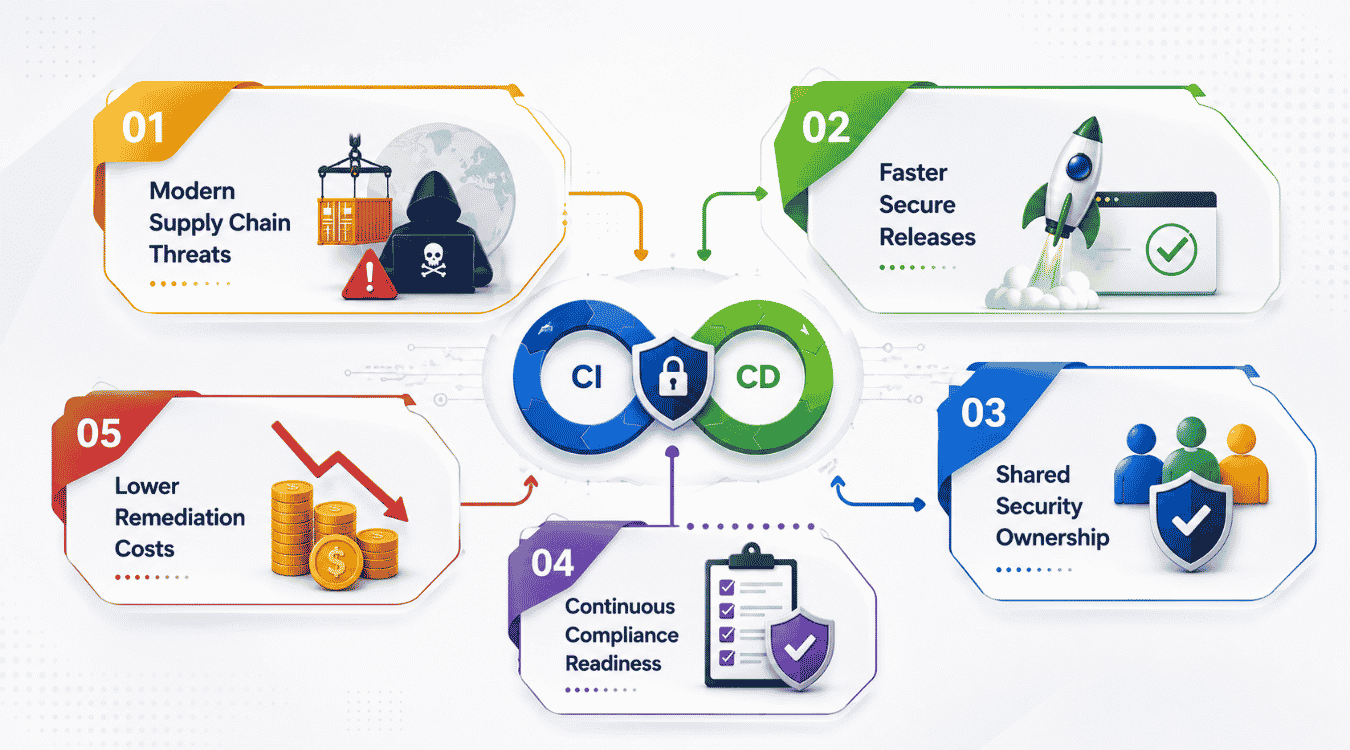
CI/CD pipelines move code fast, but speed without security creates real risk. Automated builds and deployments can push vulnerabilities into production just as quickly as they push features. DevSecOps closes that gap, and many of the same principles appear in broader DevOps best practices for modern teams.
Modern Supply Chain Threats
Today's applications lean heavily on open source packages, third-party APIs, and container images pulled from public registries. Any one of these can carry hidden vulnerabilities or malicious code. Attackers know this, and supply chain attacks have grown more targeted and more damaging in recent years. A single compromised dependency can ripple through an entire pipeline before anyone notices. DevSecOps addresses this by scanning dependencies and container images automatically, flagging risky components before they ever reach production.
Faster Secure Releases
Manual security reviews slow everything down, especially when they happen right before a release deadline. DevSecOps flips that model. Security checks run automatically alongside every build, so teams get instant feedback instead of waiting days for a review. Developers fix issues while the code is still fresh in their minds. This keeps release cycles short without cutting corners on safety, letting teams ship features and patches on schedule instead of pushing dates back for last-minute security fire drills.
Shared Security Ownership
Security used to sit with one team, separate from developers and operations. That setup created bottlenecks and finger-pointing when something went wrong. DevSecOps changes this by making security everyone's job. Developers write secure code from the start, operations teams monitor for threats in real time, and security teams guide the process instead of gatekeeping it. This shared responsibility means problems get caught by whoever is closest to them, not passed along a chain until they reach the one team responsible for security.
Continuous Compliance Readiness
Regulations like HIPAA, SOC 2, and GDPR don't wait for a scheduled audit to matter. DevSecOps builds compliance checks directly into the pipeline, so every deployment already meets required standards. This means audit prep stops being a scramble. Instead of digging through logs and configurations right before an assessment, teams already have documentation and controls in place. Continuous monitoring also means compliance gaps get caught immediately, not months later when a regulator or client asks for proof, especially when supported by a periodic SaaS technical audit for security and scale.
Lower Remediation Costs
Fixing a vulnerability after release costs far more than catching it during development. A bug found in production might mean emergency patches, customer notifications, or even data breach fallout. DevSecOps catches issues early, when a fix is just a code change instead of an incident response. Teams save money, save time, and avoid the reputational damage that comes with public security failures. Early detection turns expensive emergencies into routine fixes.
Security Risks Hidden Inside CI/CD Pipelines
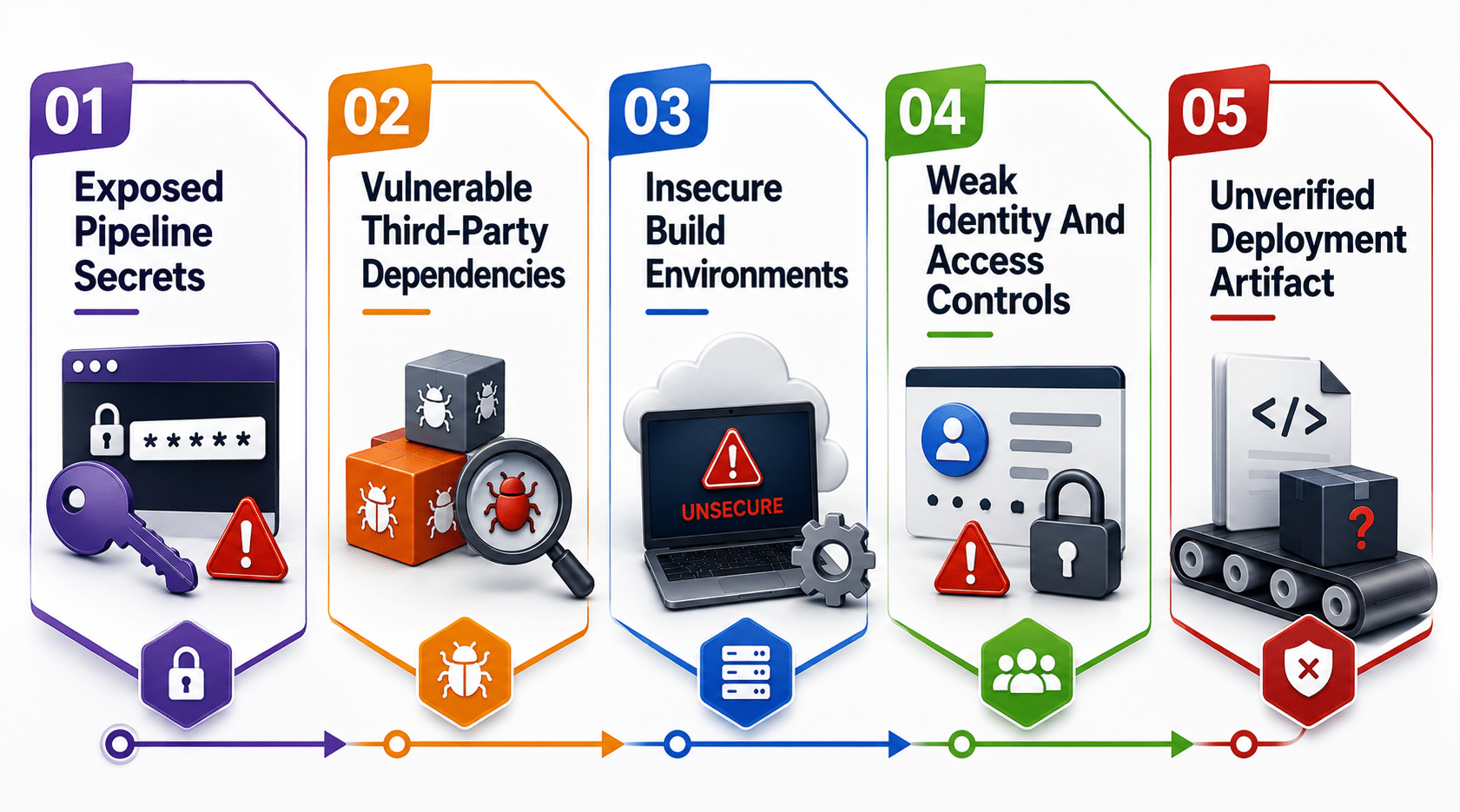
CI CD pipelines automate everything, including the paths attackers use to get in. Without the right security checks, small gaps turn into serious security risks that surface later in the development lifecycle.
Exposed Pipeline Secrets
API keys, database passwords, and access tokens often end up hardcoded in scripts or configuration files without anyone meaning to leave them there. Developers copy a working script from one project to another, and the secret comes along with it. Once a pipeline is compromised, these secrets hand attackers a direct path into production systems, sometimes without triggering a single alert until the damage is already done.
Continuous monitoring helps catch secrets before they get committed, and secret scanning tools flag them automatically during every build. Rotating credentials regularly and storing them in a dedicated vault instead of plain text closes this gap for good. Teams that treat secrets management as routine, not optional, keep their security posture solid from the very first commit.
Vulnerable Third-Party Dependencies
Modern applications pull in dozens, sometimes hundreds, of open source libraries just to handle basic functionality. Any one of them might carry a known vulnerability that attackers actively scan for across public repositories. Most teams don't even realize how deep their dependency tree runs until something breaks, and by then, a vulnerable package may already be deployed across multiple services.
Software composition analysis identifies these risky dependencies before they merge into your codebase, giving teams a clear picture of what's actually running in production. It also tracks license risks and outdated versions that manual reviews tend to miss. Without this kind of visibility, a single outdated package can quietly expose an entire application to security incidents that one automated scan could have caught early, especially in complex SaaS security architecture environments.
Insecure Build Environments
Build servers often get overlooked when teams think about security standards, but they hold enormous power over what actually gets deployed. A misconfigured build environment can let attackers inject malicious code without anyone noticing, especially when the same server handles builds for multiple projects with shared credentials.
Locking down build servers, isolating environments between projects, and applying secure coding standards to infrastructure as code all reduce this exposure. Regular audits of build configurations catch drift before it becomes a real problem, since small permission changes or leftover test configs tend to pile up unnoticed over time.
Weak Identity And Access Controls
Too many pipelines still run on broad, shared permissions instead of tightly scoped access. When every developer or service has admin-level rights, one compromised account can affect the entire pipeline instead of just a single piece of it. This kind of setup makes it hard to trace who did what when something goes wrong, and it directly undermines core SaaS security architecture best practices.
Role-based access control limits what each user and service can touch, cutting down the blast radius of any single breach. Operations teams should review permissions on a regular schedule, removing access that's no longer needed and enforcing multi-factor authentication wherever pipelines connect to sensitive systems. Tight access controls are one of the simplest fixes with one of the biggest payoffs.
Unverified Deployment Artifacts
Code that gets built isn't always the code that gets deployed, especially without proper verification steps in place. Attackers can swap artifacts between build and deployment if there's no way to confirm integrity, slipping malicious code into a pipeline that already passed every earlier check.
Automated security testing paired with cryptographic signing verifies that what ships is exactly what was built and scanned. This closes a gap that manual checks often miss, since a visual review can't detect a tampered binary the way a signature verification can. Keeping this check in place means the last step before deployment stays just as secure as the first.
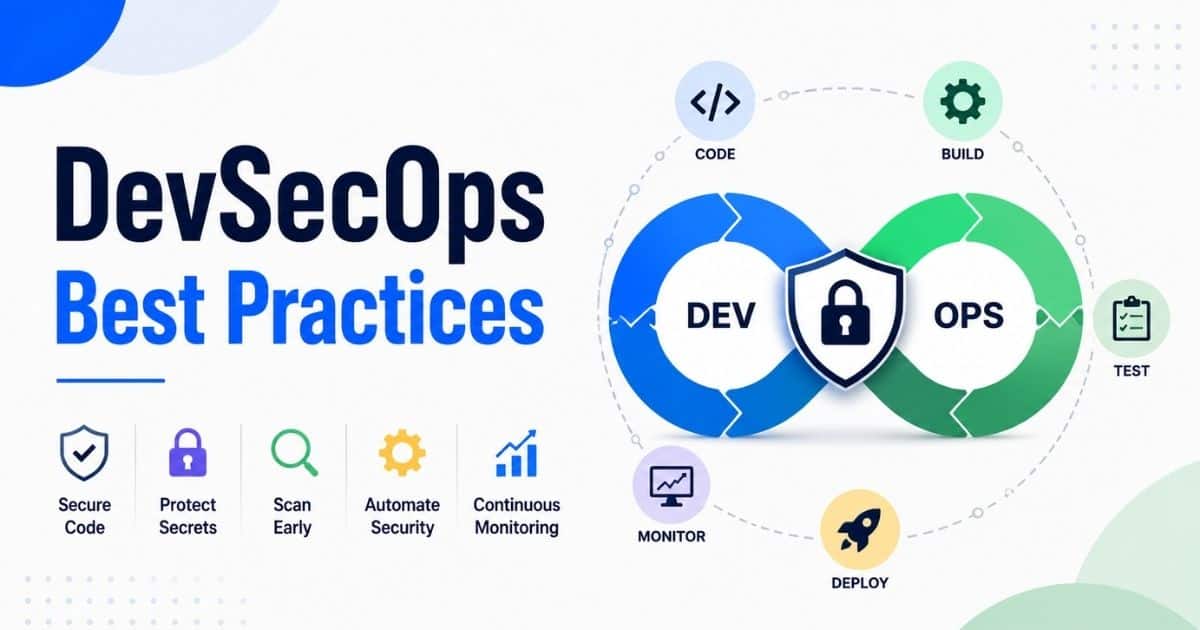
DevSecOps Best Practices: How To Build A Secure DevSecOps Pipeline
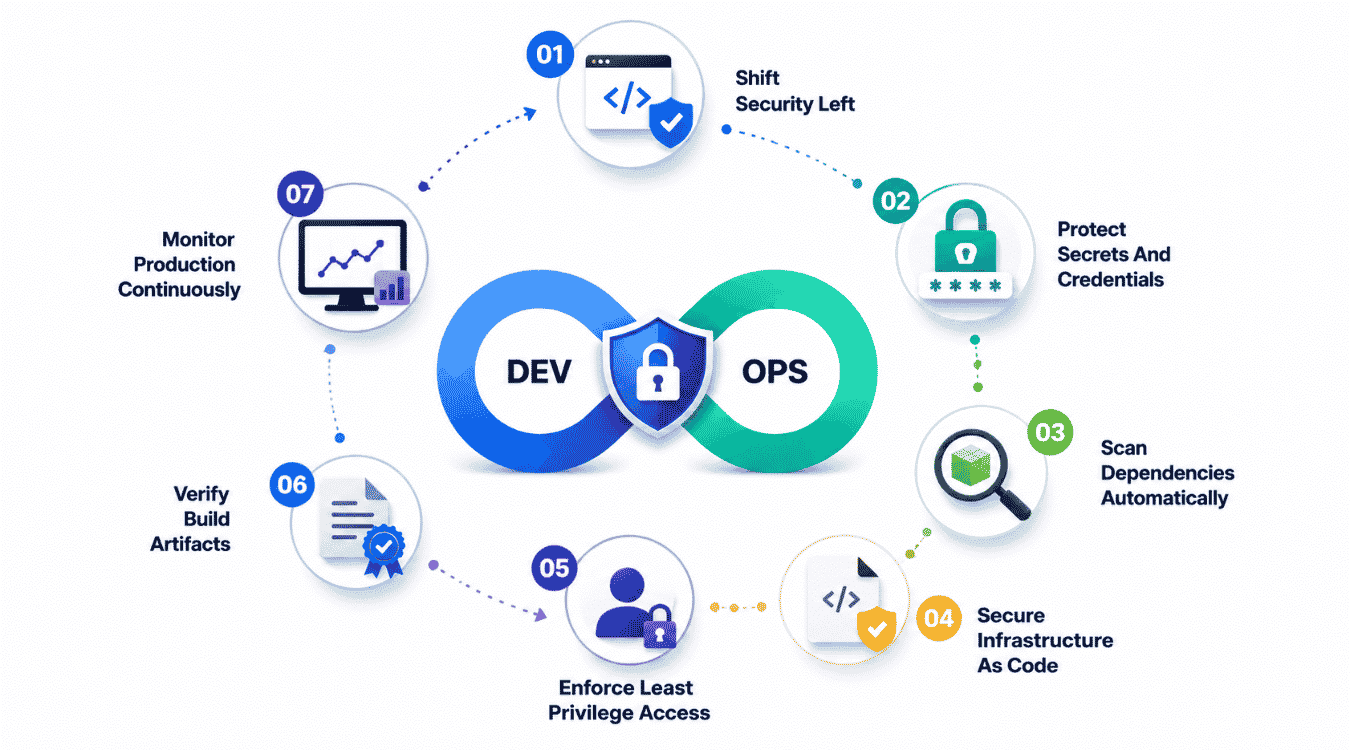
Building a secure pipeline takes more than adding a scanner at the end. These best practices show how integrating security into every stage of the development process actually works in practice.
1. Shift Security Left
Shifting left means catching security vulnerabilities while code is still being written, not after it's already merged and deployed. Security and development teams work together from the first line of code, running checks during development instead of treating security as a final gate before release. This approach turns security tasks into a normal part of daily work rather than a separate phase that slows everyone down.
Developers get instant feedback on security flaws right inside their editor or during a pull request, which makes fixes faster and cheaper. Waiting until staging or production to catch issues means more rework and more risk. Shifting left keeps potential security risks small and manageable instead of letting them snowball into bigger problems later, which also reduces many hidden costs in software development that come from late-stage rework and incident response.
2. Protect Secrets And Credentials
Every pipeline handles sensitive credentials, from API keys to database passwords, and these need protection at every stage. A dedicated secrets vault keeps this information encrypted and out of the source code entirely, removing one of the most common paths attackers use to break in. Automated tools scan every commit for exposed secrets before they ever reach a shared repository.
Rotating credentials on a set schedule limits how long a leaked secret stays useful if it does slip through. Strong security policies around who can access these secrets and for how long close off unnecessary exposure. This is one of the simplest security practices to implement, yet it prevents some of the most damaging breaches and lays the groundwork for a thorough software product audit for security and compliance.
3. Scan Dependencies Automatically
Modern software leans heavily on open source components, and your software supply chain is only as strong as its weakest package. Automated dependency scanning checks every library against known vulnerability databases the moment it enters your codebase, flagging issues before they compound across your services.
Security professionals recommend running these scans on every build, not just on a schedule, since new vulnerabilities get disclosed constantly. Pairing this with automatic version updates for low-risk patches keeps dependencies current without adding manual work. This step alone catches a huge share of common security issues before they ever reach production.
4. Secure Infrastructure As Code
Infrastructure as code makes environments repeatable, but it also means a single misconfigured template can spread security flaws across every environment it touches. Scanning configuration files for open ports, weak permissions, or missing encryption settings before deployment stops these mistakes from multiplying.
Security tools built for infrastructure scanning catch drift between what's defined in code and what's actually running, which matters since manual environment changes tend to go undocumented. Treating infrastructure configs with the same scrutiny as application code brings real consistency to code security across the entire stack and pairs well with robust SaaS monitoring tools for performance and UX.
5. Enforce Least Privilege Access
Every user, service, and pipeline stage should have exactly the access it needs, nothing more. Broad permissions might feel convenient, but they turn a single compromised account into a much bigger problem. Role-based access control paired with regular permission reviews keeps access scoped tightly and easy to audit.
Multi-factor authentication adds another layer wherever pipelines connect to sensitive systems or production environments. These controls take some upfront setup, but they pay off by shrinking the blast radius of any breach and making it far easier to trace what happened when something does go wrong.
6. Verify Build Artifacts
What gets built should be exactly what gets deployed, with no room for tampering in between. Cryptographic signing confirms artifact integrity at every handoff, so security teams can trust that a scanned and approved build hasn't been swapped or altered before it reaches production.
This verification step catches issues that manual review simply can't, since a tampered binary often looks identical to the original on the surface. Building this into your pipeline creates a clear chain of custody from code commit to live deployment, strengthening overall security outcomes across every release.
7. Monitor Production Continuously
Security doesn't stop once code ships. Continuous monitoring tracks application behavior, network traffic, and system logs in real time, catching threats that only appear once software is live and handling real traffic.
Automated alerts let teams respond to anomalies fast, often before they escalate into full incidents. This ongoing visibility closes the loop between development and operations, making sure the work put into earlier stages actually holds up under real-world conditions.
Security Controls Every CI/CD Pipeline Should Include
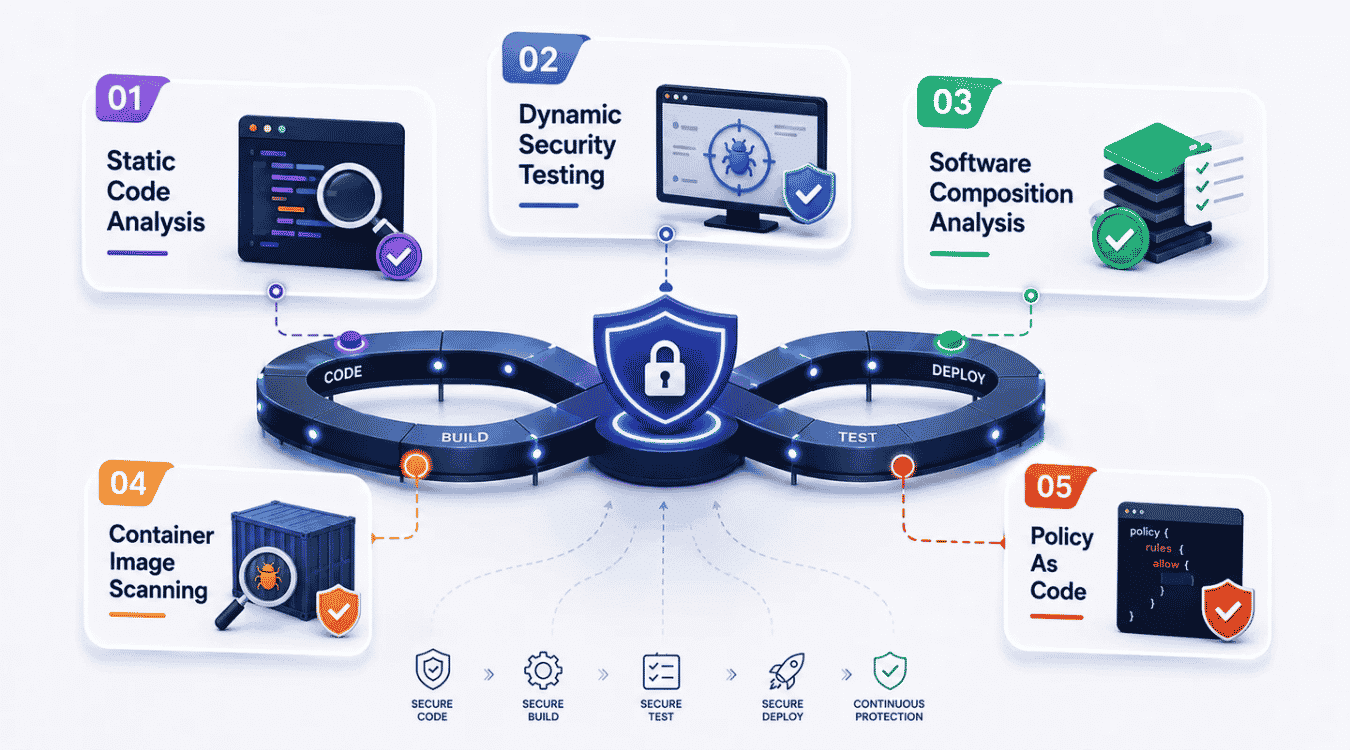
A secure pipeline runs on the right combination of automated checks, not just one tool doing all the work. These five controls give development and operations teams continuous visibility into risk at every stage.
Static Code Analysis
Static code analysis scans source code without ever running it, catching flaws like SQL injection risks, buffer overflows, and insecure function calls right at the point they're written. This is a core piece of shifting security left, since it flags problems the moment code gets committed instead of weeks later during a security review.
Running static analysis as part of every pull request keeps feedback fast and specific. Developers see exactly which line caused the issue, which makes fixes quick instead of turning into a hunt through the codebase. Paired with dynamic testing, static and dynamic analysis together cover both what the code looks like and how it actually behaves.
Dynamic Security Testing
Dynamic security testing checks an application while it's actually running, simulating real attacks against a live environment to see how the system responds. This catches issues static analysis can't, like authentication flaws or misconfigurations that only show up under real traffic conditions.
Running dynamic tests in staging before every release gives development security and operations teams a realistic picture of exploitable weaknesses. It's a key layer in any risk management strategy, since it tests the application the way an actual attacker would, not just the way the code reads on paper.
Software Composition Analysis
Most applications are built on a foundation of open source packages, and any one of them can carry a known vulnerability. Software composition analysis scans these dependencies against public vulnerability databases, flagging risky components before they reach production.
This control also helps track license compliance alongside security, which matters for meeting organizational or regulatory standards. Running it on every build, not just occasionally, keeps pace with how often new vulnerabilities get disclosed in widely used packages.
Container Image Scanning
Containers package up an entire application environment, including its base image, libraries, and configurations, and any one of these layers can hide a vulnerability. Container image scanning checks every layer before deployment, catching outdated packages or insecure defaults baked into the image itself.
This matters as much for infrastructure security as it does for application code, since a compromised base image can affect every service built on top of it. Scanning images as part of the build process, not after deployment, keeps vulnerable containers from ever reaching a live cluster.
Policy As Code
Policy as code turns security and compliance rules into automated, version-controlled checks instead of manual approval steps. This means role based access control, encryption requirements, and other organizational or regulatory standards get enforced automatically on every deployment, with no room for a rule getting skipped under deadline pressure.
Writing policies as code also makes them auditable and easy to update as standards change, giving teams a clear record of exactly what was enforced and when.
DevSecOps Metrics That Matter
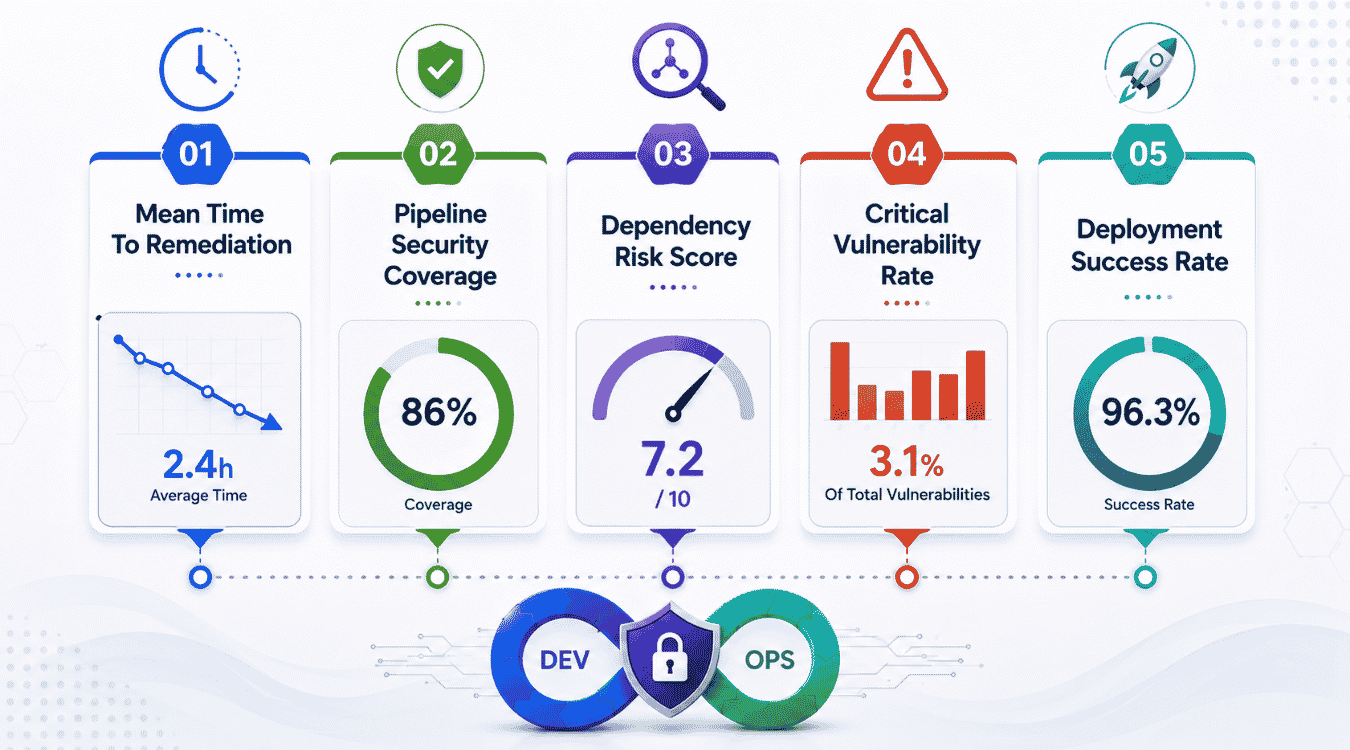
Tracking the right numbers tells you whether your software security program actually works or just looks good on paper. These five metrics give devsecops teams a clear read on real progress.
Mean Time To Remediation
This metric measures how long it takes to fix a vulnerability once it's found, from initial detection to a verified patch in production. A shorter remediation time means teams identify vulnerabilities and act on them fast, instead of letting known issues sit exposed for weeks.
Tracking this over time shows whether secure coding habits are actually improving, or whether the same types of flaws keep resurfacing. Teams that treat security as a shared responsibility, not just a job for one group, tend to see this number drop steadily as fixes get handled closer to where the code gets written.
Pipeline Security Coverage
This measures how much of your pipeline actually has automated security checks running, from static analysis at commit time to scanning at deployment. Gaps in coverage are often where real breaches happen, since attackers look for the one stage nobody's watching.
Mapping out every stage and confirming a check exists there gives a clear picture of where policy enforcement is solid and where it's missing. This also helps when you define security policies, since coverage data shows exactly which stages need a rule added or a tool turned on.
Dependency Risk Score
This score rolls up the number and severity of known vulnerabilities across every third-party package your application uses. A high score signals real exposure sitting quietly inside your software supply chain, often in packages nobody's touched in months.
Tracking this score over time helps teams prioritize which dependencies need an update first, instead of treating every alert as equally urgent. It also ties directly into threat modeling, since understanding which components carry risk shapes where to focus deeper review.
Critical Vulnerability Rate
This tracks how many critical or high-severity vulnerabilities show up per release, whether they're found through application security testing SAST or later scans. A rising rate usually points to a gap earlier in the process, often in secure coding practices during initial development.
Watching this number by team or by service also highlights where extra training or tooling might help most, rather than applying a blanket fix everywhere.
Deployment Success Rate
This measures how often deployments pass every required security gate on the first attempt, without needing a rollback or emergency patch afterward. A low rate often means checks are catching real problems late, which points back to gaps in earlier static analysis or testing stages.
A steadily improving rate is one of the clearest signs that security is actually built into the process, not bolted on at the end.
Common DevSecOps Mistakes That Slow Secure Delivery
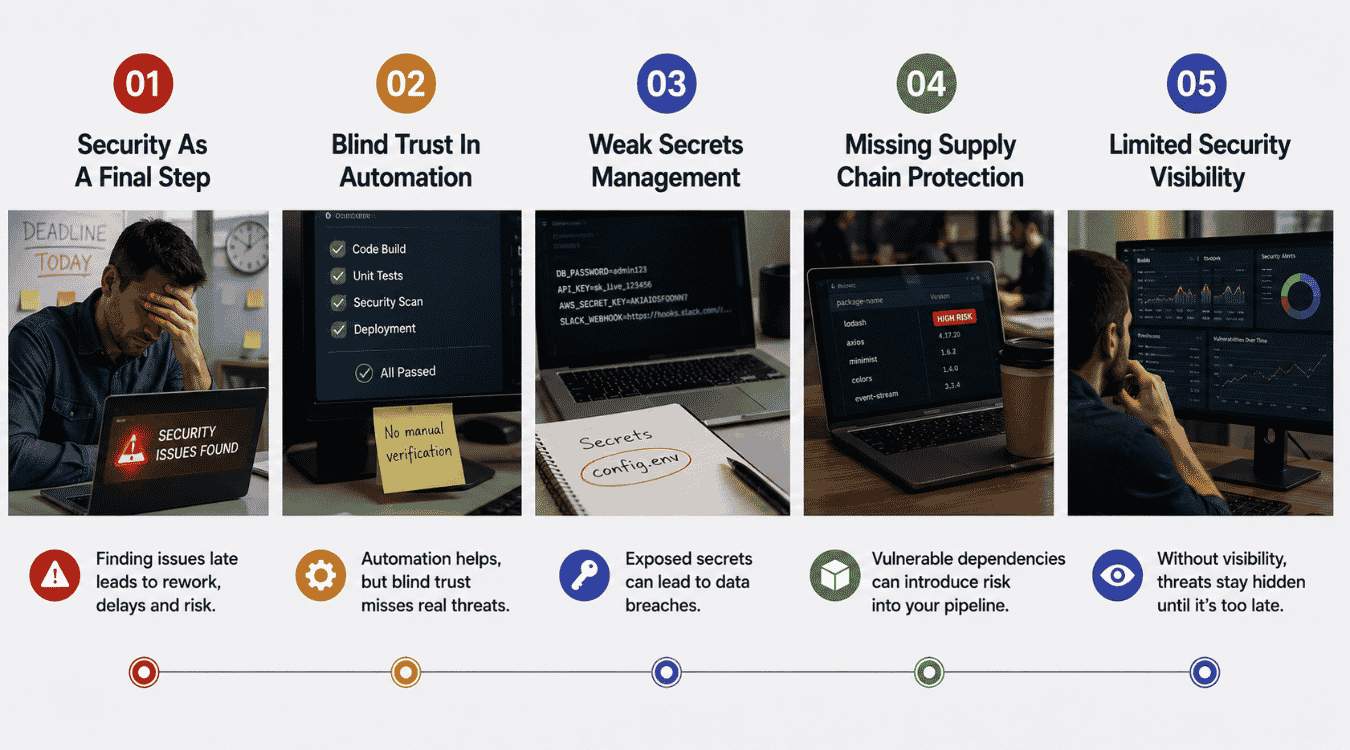
Even teams with good intentions fall into patterns that quietly work against them. These five mistakes show up again and again, slowing down delivery while compromising security along the way.
Security As A Final Step
Treating security as the last checkpoint before release means problems get caught after most of the work is already done. By that point, fixing a flaw often means reworking code that's already been tested and approved, which pushes release dates back and frustrates everyone involved.
Making security part of continuous integration, not a separate gate at the end, avoids this bottleneck entirely. Seamless integration of security checks into every commit means issues surface early, when they're still cheap and quick to fix, instead of piling up right before a deadline.
Blind Trust In Automation
Automated tools are a huge part of any DevSecOps pipeline, but treating their output as the final word skips a step that still matters. Automated scanners miss context, flag false positives, and sometimes overlook new security threats that don't match known patterns yet.
Pairing automated tools with periodic manual review keeps security processes grounded in reality. Security training for developers also helps here, since a trained eye can catch what a scanner's rules simply weren't written to detect.
Weak Secrets Management
Hardcoded credentials and loosely managed access controls remain among the most common ways pipelines get compromised. This usually comes down to human error rather than a deliberate shortcut; someone copies a working script, and the secret comes along with it.
Centralizing secrets in a dedicated vault and rotating credentials regularly closes this gap. Strong access controls around who can view or use these secrets, especially across cloud environments and cloud resources, cut off one of the easiest paths attackers use to get in.
Missing Supply Chain Protection
Skipping dependency and container scanning leaves a wide-open door for vulnerabilities buried in third-party code. Teams often assume popular packages are automatically safe, but popularity doesn't mean a library gets patched quickly when a flaw is found.
Building supply chain checks into infrastructure management, not just application code, gives a fuller picture of what's actually running in production. This closes gaps that a narrow focus on your own codebase would otherwise miss entirely.
Limited Security Visibility
Without clear security metrics and dashboards, teams often don't know where their real weak points are until something breaks. This lack of visibility makes it hard to prioritize fixes or track whether security awareness is actually improving across the team.
Centralized dashboards that pull data from every stage of the pipeline give a real-time view of risk. This kind of visibility turns security from a guessing game into something teams can actually measure and improve over time, especially when combined with a structured SaaS technical audit process.
Why GainHQ Helps Build Secure Software Delivery
At GainHQ, DevSecOps embeds security into every stage of the development pipeline, not just the final review. Our security specialists work alongside development teams from day one, running automated security checks on every commit instead of waiting for a pre-release scan.
We pair application security testing DAST with dependency and infrastructure scanning, catching potential threats before they ever reach production. Our security scanning covers code, containers, and configurations, giving clients a full picture of risk across their entire stack.
We build DevSecOps practices around each client's actual workflow, not a generic template. Whether you're building a fintech platform or a healthcare app, we bring the same rigor to keeping your pipeline fast and genuinely secure. Beyond DevSecOps, our team delivers end-to-end custom software development services, drawing on real-world examples of how custom software transformed companies and nuanced guidance on SaaS vs custom software for flexibility and scale. Our portfolio also includes case studies such as software build vs buy, where custom software won, and we regularly share these lessons on the GainHQ blog.
DevSecOps FAQs
Which DevSecOps Practice Should Teams Implement First?
Start with shifting security left through static code analysis. This catches the most common vulnerabilities right at the point of commit, before code moves any further down the pipeline. It's low cost to set up, doesn't require major infrastructure changes, and gives developers immediate feedback on their own code. Once this is running smoothly, teams can layer in dependency scanning and dynamic testing without overwhelming everyone at once.
How Does DevSecOps Improve Software Supply Chain Security?
DevSecOps adds automated scanning at every point where outside code enters your pipeline, from open source libraries to container base images. Instead of trusting that a popular package is automatically safe, every dependency gets checked against known vulnerability databases on every build. This continuous check closes the gap that a one-time audit would miss, since new vulnerabilities get disclosed constantly.
Can DevSecOps Work Without Kubernetes?
Yes. DevSecOps principles apply to any deployment model, not just containerized or Kubernetes-based environments. Teams running traditional servers, serverless functions, or virtual machines can still shift security left, scan dependencies, and enforce access controls. The tools might differ slightly, but the core practice of embedding security into every stage stays the same regardless of infrastructure choice.
How Often Should Security Gates Run Inside CI/CD Pipelines?
Security gates should run on every commit and every build, not on a fixed schedule. Waiting for a weekly or monthly scan leaves a window where vulnerable code can sit undetected in the pipeline. Running checks continuously catches issues the moment they're introduced, keeping remediation fast and cheap.
What Is The Difference Between Policy As Code And Infrastructure As Code?
Infrastructure as code defines what gets built, like servers, networks, and storage. Policy as code defines the rules that infrastructure and deployments must follow, like access limits or encryption requirements. Infrastructure as code creates the environment. Policy as code makes sure that the environment stays compliant and secure.