Growing companies often rely on legacy apps and outdated systems that limit scalability and slow down business operations. Over time, these systems increase high maintenance costs and create barriers to innovation. A structured migration checklist helps organizations align modernization objectives with real business needs while minimizing risks.
Modernizing legacy applications allows companies to transition into a modern environment that supports flexibility, security, and integration with newer tools. This shift not only improves efficiency but also delivers significant benefits such as better performance and streamlined workflows. With the right approach, businesses can achieve long-term cost savings while ensuring continuity during the migration process and preparing systems for future growth.
What Is Legacy Software Migration
Legacy software migration is the structured process of moving business-critical systems from outdated platforms to modern infrastructure. Examples include migrating on-premise ERPs from 2010, Microsoft Access databases with VBA macros, or custom FoxPro line-of-business apps to platforms such as AWS, Azure, or current SaaS products like NetSuite or Dynamics 365.
Migration typically includes several layers beyond just databases. Application code, data schemas, integrations, user access, monitoring, and operational processes all require attention. Legacy applications often become harder to maintain and more expensive to run as they rely on outdated technology and unsupported hardware, which leads to increased operational risks.
Migration differs from full modernization. Standard migration paths include rehosting (lift and shift), replatforming, refactoring versus rebuilding, rearchitecting, rebuilding, and replacing. Rehosting involves moving an application to the cloud environment with minimal changes to its architecture, making it a quick migration strategy but often yielding fewer cloud native benefits. Refactoring modifies the application’s existing code and architecture to optimize it for cloud platforms, allowing businesses to leverage modern technologies for improved performance and scalability.
7 Key Legacy Software Migration Checklist
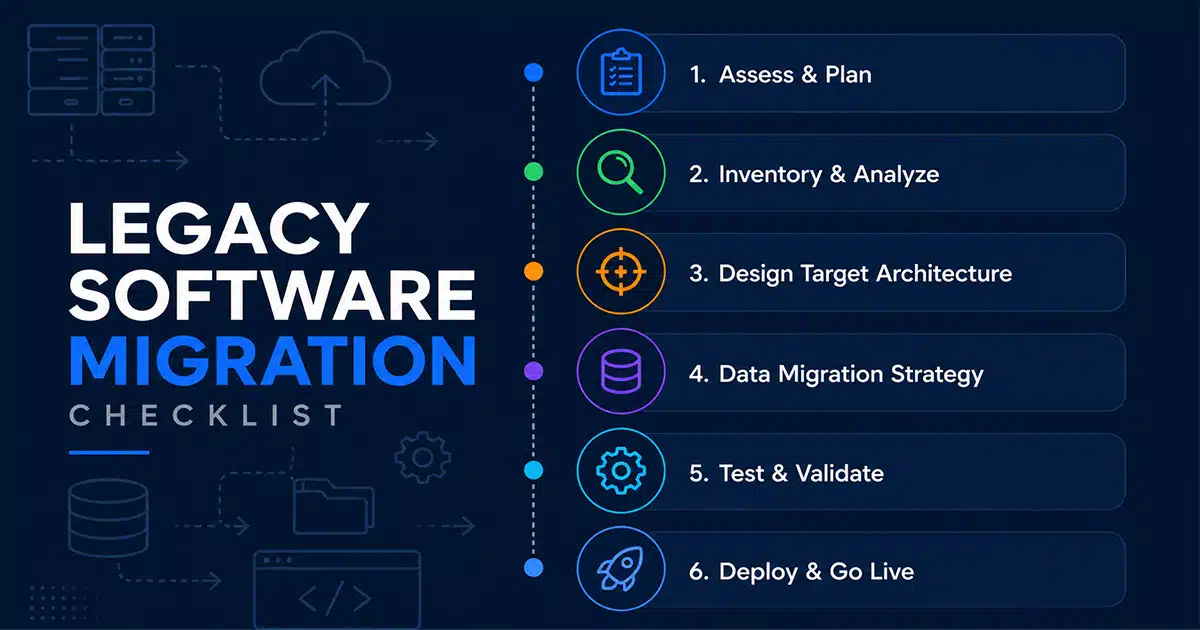
This section serves as the core, most actionable part of this article. Project owners can use this checklist to track progress across several months. Each phase represents a distinct stage from early assessment through go-live and stabilization.
1. Assess Your Current Legacy Landscape
Start by inventorying all legacy systems older than 7 years, including internal tools built between 2010 and 2018 on outdated frameworks. Document versions (Windows Server 2012, Oracle 11g, SQL Server 2012), user counts, business owners, uptime requirements, and known pain points such as slow month-end close or frequent manual workarounds.
A thorough assessment of existing applications is crucial for successful legacy application migration. The assessment phase should include evaluating the current state of older systems, documenting workflows, integrations, performance requirements, and known risks to inform a realistic migration strategy.
Conducting a thorough data audit before migration can uncover hidden risks in system dependencies, hardware requirements, and data structures. Organizations must assess key technical gaps between legacy systems and new systems, including hardware infrastructure and programming languages, to develop a comprehensive migration plan.
Map integrations including file drops, batch jobs, and point-to-point APIs. Identify “spider web” dependencies that make single-system migrations risky. Use a simple scoring model rating risk, business value, and technical debt on a 1 to 5 scale to prioritize which systems must be addressed in 2026 versus later.
2. Clarify Business Drivers And Success Metrics
Link technical change to business outcomes. A manufacturing firm reduced order processing from 45 minutes to 12 via migration, cutting errors by 35%. Set measurable KPIs before migration: performance benchmarks, expected license savings, or security posture goals aligned with SOC 2 plans.
Establish a steering committee format with CFO, COO, IT lead, and a line-of-business owner meeting monthly to track these metrics. Clearly defined success criteria make it easier to secure executive sponsorship and defend budget requests to the board.
Choosing the right technical path based on a system’s complexity and business value is critical. Document how migration supports software modernization for modern businesses, future growth, improved business efficiency, and reduced maintenance costs.
3. Select Target Architecture And Migration Approach
Contrast tangible options: moving a 2013 monolithic app to Azure virtual machines (rehosting), replatforming versus rebuilding for long-term growth on Azure App Service with managed SQL Database, or replacing it with a 2026 SaaS alternative.
Replatforming is a migration strategy that makes minimal changes to an application to move it to a new platform, preserving its core functionality while allowing for some benefits of modern infrastructure. A hybrid integration approach allows organizations to expose legacy assets or data without fully migrating them, providing balance between maintaining critical capabilities and adopting modern cloud services.
Decide on cloud platforms (AWS, Azure, or GCP) and core patterns (single-tenant versus multi-tenant, regional data residency) early to avoid expensive reversals later. GainHQ typically defines a SaaS architecture best practices “target reference architecture” diagram at this stage, including identity provider, observability stack, and integration layer.
4. Plan Data Migration And Integrity Controls
The data migration process starts with profiling existing SQL, Oracle, or Access databases and flat files. Smooth cloud migration planning for growing teams emphasizes that handling legacy data is one of the most challenging aspects of migration due to its complexity, age, and inconsistent structure, which can lead to errors and inconsistencies if not properly managed.
A thorough data audit is essential before migration, as it helps identify errors, redundancies, and structural defects in legacy data, ensuring that the foundation of the new platform is clean and reliable. Prioritizing data integrity involves cleansing data and ensuring accurate mapping between old and new schemas before migration.
Choose between big-bang versus phased cutover. Phased batches migrate historical data over several weekends while switching live transactions on a specific Friday night. Establish reconciliation procedures with trial migrations where totals by day or customer are matched between old and new systems before sign-off.
Validation and testing are critical to ensuring data integrity during migration. Execute a test migration in a controlled environment to reconcile the new data set against the original data from legacy sources.
5. Design Security, Compliance, And Access Controls
Move from local Active Directory accounts or hard-coded credentials to single sign-on with Azure AD, Okta, or similar providers, enforcing multi-factor authentication. Implementing security measures from the start is essential for compliance with regulations like GDPR or HIPAA during migration.
Modern cloud providers offer built-in security features such as encryption, identity and access management, and automated patching, which can significantly enhance the security posture of migrated legacy systems. Apply SaaS security best practices for 2026 and set up network segmentation and logging for regulatory compliance with industry-specific frameworks.
Design role-based access control where finance, sales, and operations teams have clearly defined permissions from day one in the new environment. Security design must be finalized before test environments are populated with production-like data.
Security and compliance risks are heightened during legacy system migration, as outdated applications may not meet current security standards, increasing the likelihood of cyberattacks or data leaks. Modern security controls help address these security concerns.
6. Execute Migration, Testing, And Cutover
Create rehearsal environments and run at least one full trial migration with masked or sampled data. Schedule user acceptance testing with real world scenarios from 2025 operations. Pilot testing with small-scale releases can identify issues before a full migration rollout.
The cutover plan should detail exact timings (Friday 18:00 to Sunday 12:00), responsible individuals, rollback criteria, and communication steps to all affected teams. Phased or parallel rollouts can ensure that the new environment works correctly before final cutover.
Execute layered testing: unit, integration, performance, and failover tests. Simulate a spike of end-of-month invoices in the new system. A comprehensive cloud migration strategy for enterprises testing plan reduces risk of data loss during cutover.
The “Strangler Pattern” involves incrementally replacing legacy features until the old system is completely decommissioned, aligning with a structured monolith to microservices migration guide. Document what changed during migration, including configuration, scripts, and environment variables, so operations teams can support the system from day one.
7. Stabilize, Optimize, And Decommission Legacy Systems
Cover the first 30 to 90 days after go-live by monitoring incidents, performance metrics, and user feedback. Make targeted configuration or capacity adjustments as needed.
Safe decommissioning steps include retaining read-only access to old databases for a defined period, archiving valuable data and data backup copies in compliant storage, and formally shutting down old servers to reduce operational costs and risk, which is especially important during ERP modernization for digital business growth.
Capture lessons learned from the migration project and update internal standards so future migrations or modernization projects follow improved patterns. Turn this one-off project into a repeatable playbook aligned with your 2026 to 2028 technology roadmap.
Key Benefits Of Legacy Software Migration For Growing Companies
Each benefit below links to practical outcomes a growth-stage company would notice within 6 to 18 months after migration.
Scalability To Match Headcount And Customer Growth
Migrating legacy systems to cloud platforms can significantly improve performance, operations, and cost structure, with organizations often seeing value quickly after the first applications move. A company can handle seasonal traffic spikes (Black Friday 2026) without buying hardware months in advance.
Cloud migration enhances agility by allowing teams to roll out updates faster, experiment safely, and scale capacity without waiting for new hardware. A SaaS startup growing from 2,000 to 10,000 customers needs automated, elastic scaling rather than manual server tuning, supported by proven SaaS scalability strategies for sustainable growth. Scale storage and compute resources within minutes, compared to multi-week procurement cycles typical of on-premise environments built before 2015.
Improved Reliability And Performance
Move from single on-premise servers prone to hardware failure to redundant cloud deployments across multiple availability zones. Modern software observability practices and alerting reduce mean time to recovery, enabling support teams to act on real-time metrics instead of user complaints.
Reduce average page load times or report generation times after migration, improving employee productivity and customer satisfaction. Seamless integration with modern observability tools makes troubleshooting faster.
Lower Operational And Maintenance Costs
Migrating legacy applications can lead to reduced operational costs and improved efficiency, as organizations can modernize their infrastructure, streamline workflows, and prepare for future growth by leveraging modern software services like SaaS, PaaS, and IaaS. Retire maintenance contracts for aging hardware, reduce data-center leases, and cut down manual patching work by adopting managed services.
Right-sizing cloud resources and eliminating unused servers aligns spending more closely with real usage. Although migration has upfront costs, the total cost of ownership over 3 to 5 years often decreases when legacy licensing, emergency support, and opportunity costs are included. McKinsey 2025 analysis shows 25 to 40% TCO reduction for well-planned modernization efforts.
Enhanced Security And Compliance Readiness
Modern platforms provide built-in features such as automatic security patching, centralized identity management, and detailed audit logging that legacy environments often lack. Migration can eliminate unsupported operating systems and databases that can no longer receive security updates, thereby reducing exposure to known vulnerabilities.
Connect these capabilities to audit requirements common in 2026, such as SOC 2 reports requested by enterprise customers. Companies have improved SOC 2 controls from 60% to 95% compliance after migration.
Faster Innovation And Integration Potential
Moving off monolithic legacy stacks makes it easier to adopt new tools like analytics platforms, marketing automation, or AI assistants via standardized APIs and embrace cloud native development practices. After migration, a company can integrate CRM, billing, and support tools to produce consolidated dashboards and automate renewals.
A modernized environment shortens the time required to prototype and launch new features. Digital transformation becomes possible when existing systems no longer create bottlenecks for business processes.
Better Employee And Customer Experience
Legacy interfaces and slow response times frustrate both staff and customers. Updated systems provide cleaner user experiences and predictable performance. Examples include self-service portals, mobile-friendly applications, and more accurate real-time status updates.
Improved experience directly influences retention of both customers and key talent, which is vital for business growth. Reduced frustration with outdated software contributes to better employee productivity and satisfaction.
Common Challenges In Legacy Software Migration
Many migrations between 2020 and 2025 ran over budget or schedule. Understanding challenges early improves planning quality and reinforces the value of smooth cloud migration planning for growing teams.
Underestimated Complexity And Dependencies
Migrating legacy systems can improve performance, security, and scalability but is complex due to deep integration in core business infrastructure and lack of documentation. Undocumented integrations, custom scripts, and one-off data feeds built over a decade can surface late in projects.
Deloitte 2024 surveys found that 65% of projects reveal 20 to 50 hidden dependencies. Use dependency mapping workshops with business users and log analysis to uncover hidden connections between existing systems.
Data Quality Issues And Historical Baggage
Legacy systems often contain duplicate records (25%), inconsistent identifiers, and obsolete data accumulated since the early 2010s. Handling legacy data is the most challenging part of the migration effort due to its complexity, volume, and inconsistent structure.
Treat migration as a chance to clean data: deduplicating customers, standardizing addresses, and aligning product catalogs. Failing to resolve these issues before loading into modern platforms can undermine analytics and decision-making after go-live.
Organizational Resistance And Change Fatigue
Human resistance is a common challenge. Employees who have used the same on-premise tools for a decade may fear loss of control or productivity dips.
Early communication, clear benefits for each role, and involving key users in testing and feedback cycles help overcome resistance. Staggered rollouts for certain departments and targeted training sessions reduce anxiety and support smoother adoption.
Budget Overruns And Timeline Slippage
Project delays and cost overruns are common challenges in legacy modernization projects, often due to the complexity of transferring large volumes of data and the need for accurate budgeting. Scope creep, underestimated testing, and parallel-run costs often cause migrations to exceed initial estimates.
Build realistic contingency into budget and timeline. Reserve 20% of funds and several weeks specifically for unexpected work. Maintain tight change control with formal approval when new requirements are added mid-project.
Knowledge Gaps And Dependence On Key Individuals
A small number of long-tenured engineers or administrators may be the only people who truly understand how a 2013 system works. This creates bottlenecks and risks during migration.
Capture specialized knowledge through documentation sessions, pair programming, and recorded walkthroughs well before critical migration windows. External partners can supplement skills in areas like cloud infrastructure or data engineering, but internal knowledge of business rules is irreplaceable.
Post Migration Support And Capability Shortfalls
Teams that successfully deliver the migration project may not have capacity or processes to operate the new system effectively afterward. Without adequate support, early wins from migration can erode into user frustration and unplanned outages.
Plan for run-state operations with ongoing maintenance structures: on-call rotations, incident management procedures, and performance review cycles. Successful migration requires a structured, strategic approach rather than just a technical “rip-and-replace”.
Best Practices For Planning And Executing Legacy Software Migration
These principles and habits make complex migrations more predictable and less stressful. For ongoing insights on modernization and digital transformation, explore the broader GainHQ blog on software and cloud migration.
Start With A Pilot Project Before Full Rollout
Select a medium-impact, moderately complex application as a first migration candidate. This validates methods, tooling, and team coordination and aligns with an enterprise-grade cloud migration strategy for 2026. Migrating legacy software to modern systems is most successful when approached as an incremental transformation rather than a single event.
Pilot results inform updated estimates, reveal gaps in documentation, and build organizational confidence before taking on mission-critical systems. A successful pilot in 2025 paves the way for larger migrations in 2026.
Involve Business Stakeholders From Day One
Migration decisions about cutover timing, data retention, and feature parity affect sales, finance, and operations. Regular cross-functional workshops document requirements, constraints, and acceptance criteria.
Clear ownership for each system, including a named business sponsor, reduces ambiguity during critical decisions. Business needs must drive technical choices throughout the modernization process.
Invest In Automation And Repeatable Tooling
Infrastructure as code, scripted data migrations, and automated testing reduce human error. Specialized tools make environments reproducible across development, staging, and production.
Reuse pipelines and templates developed in early phases for later systems. Tooling requires upfront investment but pays off as the number of applications and data sources grows. Leverage modern technologies and Site Reliability Engineering frameworks for SaaS for consistent results.
Design For Observability And Operational Insight
Incorporate logging, metrics, and traces into the new environment from the outset rather than treating monitoring as an afterthought. Dashboards for latency, error rates, and resource utilization empower teams to detect issues early.
Use standardized alert thresholds and on-call rotations aligned with business hours and customer commitments. Observability prevents 70% of incidents according to industry studies.
Manage Parallel Run And Cutover Carefully
Running old and new systems side by side is beneficial for reconciling financial reports across both systems for one closing cycle. Define clear rules for which system is the source of truth at each stage.
Avoid dual data entry traps that frustrate users. Cutover communications must be precise: who can log in where, when, and what to do if they encounter issues during the transition window.
Build Migration Skills Inside Your Organization
Treat each migration as a learning opportunity. Capture runbooks, patterns, and anti-patterns for future initiatives. Formal training, mentoring, and knowledge-sharing sessions help younger team members become comfortable with cloud architectures.
By 2027, organizations that cultivate internal technical expertise in areas like SaaS product development from build to scale will be better positioned for further digital technologies adoption and acquisitions.
Final Discussion
Legacy system migration is not just a technical upgrade but a strategic move that shapes long-term business growth. Careful planning, clear priorities, and the right tools ensure a smooth transition without disrupting daily operations. Organizations that approach migration with defined goals can reduce risks, control costs, and improve overall system performance.
A well-executed strategy strengthens scalability, enhances data security, and supports evolving business needs. Teams gain better visibility, faster processes, and improved decision-making capabilities. Consistent monitoring and optimization after migration ensure systems remain efficient and aligned with future demands.
Success depends on balancing innovation with stability, allowing companies to modernize confidently while maintaining operational continuity and delivering measurable business value.
Frequently Asked Questions
How Long Does A Typical Legacy Software Migration Take For A Growing Company
Realistic timelines vary based on scope. A single mid-sized application typically requires 3 to 6 months from assessment to stabilization. Portfolios of many systems may span 12 to 24 months.
Factors affecting duration include data volume, integration complexity, and availability of key staff during busy seasons like year-end closing. Plan for 20 to 50% extension if data exceeds 10TB or if Q4 freezes restrict cutover windows.
How Should We Budget For Legacy Software Migration
Common cost components include internal staff time (40%), external partners (30%), cloud infrastructure during testing and parallel runs (20%), and training (10%). Set aside contingency funds of at least 20% for unexpected data or integration work.
Multi-year total cost of ownership models typically show 25% savings when comparing legacy licensing, emergency support, and opportunity costs against modern platform expenses. Consider 3 to 5 year payback when evaluating return on investment.
Can We Migrate Only Part Of A Legacy System Instead Of Everything
Partial migrations are common. Companies often keep a legacy reporting module while moving transactional components, or migrate only recent data while archiving older records to storage like S3 Glacier.
This approach requires clear boundaries and integration plans so users understand which system handles which functions. API bridges connect old and new systems during transition periods.
How Do We Keep The Business Running During Migration
Schedule cutovers during low-activity periods such as weekends. Use phased rollouts for specific departments and maintain robust backout plans if critical issues appear. Target backout completion within 4 hours if needed.
Transparent communication with staff and customers about planned changes and expected impact reduces confusion. Document data formats and system behaviors so support teams can respond quickly to questions.
When Is The Right Time To Start Planning A Legacy Migration
Start planning as soon as signs appear: vendor end-of-support notices, repeated outages, or difficulty integrating with tools adopted after 2022. Unsupported operating system versions and obsolete technology create compliance risks that grow over time.
Begin assessment 6 to 12 months before a desired go-live date. This timeline allows room for thorough discovery, design, and testing without rushed decisions that compromise quality or increase security risks.