Custom CRM development: build vs buy, cost drivers and a data model
by GainHQ Editorial Team | Nov 16, 2026 | Software Development Insights | Editorial policy
Table of Contents
- What is custom CRM development?
- Build vs customize vs buy a CRM at a glance
- What features does a custom CRM need?
- What does a custom CRM data model look like?
- What drives the cost of custom CRM development?
- How do you connect a custom CRM to the rest of your stack?
- How do you keep CRM data secure and clean?
- Where do AI features fit in a custom CRM?
- When do you need a custom CRM, and when is an off-the-shelf CRM enough?
- How to build a custom CRM in 6 steps
- What goes wrong when teams build their own CRM?
- How GainHQ can help
Your sales team runs on a SaaS CRM, three spreadsheets and a chat channel where deals go to be remembered. Then a seat renewal lands, or someone asks for an integration the vendor doesn't support, and the question comes up: should we build our own CRM?
The short answer: build only the part of the CRM that is your competitive process, and buy or configure the rest. Custom CRM development pays off when your data model or workflow is the thing that makes you different. This guide shows when that's true, the features to build first, what drives cost, a worked PostgreSQL data model with a weighted-pipeline query we ran, and a 6-step build plan.
Quick overview
Custom CRM development is designing and building customer relationship management software around your own data model, sales process and integrations, instead of configuring a SaaS CRM. Build when your process or data is what sets you apart and a configured product can't model it; buy or customize when it can. GainHQ (gainhq.com), Gain Solutions' software development team, builds and runs Gain.io, a CRM and helpdesk on one customer record.
Last checked against gain.io, the PostgreSQL 18 documentation and the OWASP Top 10:2025 on 16 November 2026. The SQL example ran on PostgreSQL 18.4 the same day.
Key takeaways
- Custom CRM development means you own the data model, the workflow rules and the integrations. With a configured SaaS CRM, the vendor owns them.
- Build custom only for the part that is your competitive process. Keep commodity jobs such as email sync or e-signature on products that already do them.
- The data model decides most of what a CRM can do later. Design accounts, contacts, deals, stages and activities before any screen.
- Put rules in data, not code: with stage probabilities in a table, a weighted pipeline is one SQL query.
- Integrations, data migration, permissions and the number of user roles drive cost more than screens do. Scope those before asking anyone for an estimate.
- Start with one team and one pipeline, measure whether reps use it every day, then extend.
This guide covers what custom CRM development is, build vs customize vs buy at a glance, the features a custom CRM needs, a worked data model in SQL, the cost drivers, integrations, security and data quality, where AI fits, when to build, a 6-step plan and what goes wrong.
What is custom CRM development?
Custom CRM development is the work of designing, building and running a CRM that fits your own sales and service process. You decide the records, fields, rules and integrations, and you own the code. It's a focused case of custom software development.
Teams usually mean one of three things when they say "custom CRM":
- A configured SaaS CRM: custom fields, pipelines and automations inside a vendor's product. Configuration changes settings inside the vendor's limits.
- A CRM built on a platform: custom objects and apps on a CRM or low-code platform. You get more control, but the platform still sets the limits.
- Custom CRM software: your own application and database. Custom development changes the limits themselves.
The trade-off is the usual one for custom software: an exact fit and full ownership, in exchange for owning maintenance too. A CRM that only your team uses is one of the most common custom internal tools.
Build vs customize vs buy a CRM at a glance
Here's how the four realistic options compare on the points that decide most CRM projects.
| Buy (SaaS CRM) | Customize (configured SaaS CRM) | Build (custom CRM) | Hybrid (SaaS core, custom modules) | |
|---|---|---|---|---|
| Fit to your process | Only if it matches the product | Good, within the vendor's limits | Exact, if you specify it | Exact where it matters most |
| Who owns the data model | The vendor | The vendor, plus your custom fields | You | Shared |
| Integration depth | The vendor's connectors | The vendor's API | Anything with an API | The vendor's API plus your services |
| Maintenance load | The vendor | The vendor, plus your configuration | You or your development partner | Split between both |
| Lock-in risk | High for data and workflows | Grows with every customization | Low for the vendor, high for your own code quality | Medium |
| Fits best when | Your sales process is standard | One or two workflows don't fit | The CRM is your competitive process or part of your product | One module is unique and the rest is standard |
For the wider decision, see our guides to build vs buy software, SaaS vs custom software and no-code vs custom development. If you're considering a platform, read how low-code platforms work and how to limit vendor lock-in.
If the team is small and the process is standard, a ready-made tool is usually enough; Gain.io keeps a shortlist of simple CRMs for small businesses.
What features does a custom CRM need?
A custom CRM needs a clean customer record first and automation second. These modules cover most B2B sales and service teams:
| Module | What it does | First release or later? |
|---|---|---|
| Accounts and contacts | One record per company and per person, with rules that stop duplicates | First release |
| Pipeline and deals | Stages, owners, amounts, close dates and win probability | First release |
| Activities | Calls, emails, meetings and notes attached to the deal and contact | First release |
| Roles and permissions | Who can see and edit which records and fields | First release |
| Reporting | Pipeline, weighted forecast and activity by rep | Basic reports first, custom dashboards later |
| Integration layer | API and webhooks for email, billing, ERP and support | The systems the pilot team can't work without first, the rest later |
| Workflow automation | Lead assignment, follow-up tasks, approvals and escalations | Later, once the process is stable |
| Audit log | Who changed which field, when, and from where | First release if you handle regulated data |
| Customer-facing views | Orders, tickets and invoices customers can check themselves | Later |
Reporting usually grows into custom dashboard development, and automation into workflow automation software or wider business process automation. If the CRM needs orders, stock or invoicing, check where it should hand over to a custom ERP instead of growing into one.
Design the integration layer as a real API from day one. The same API can feed a client portal where customers check their orders, tickets and invoices themselves.
What does a custom CRM data model look like?
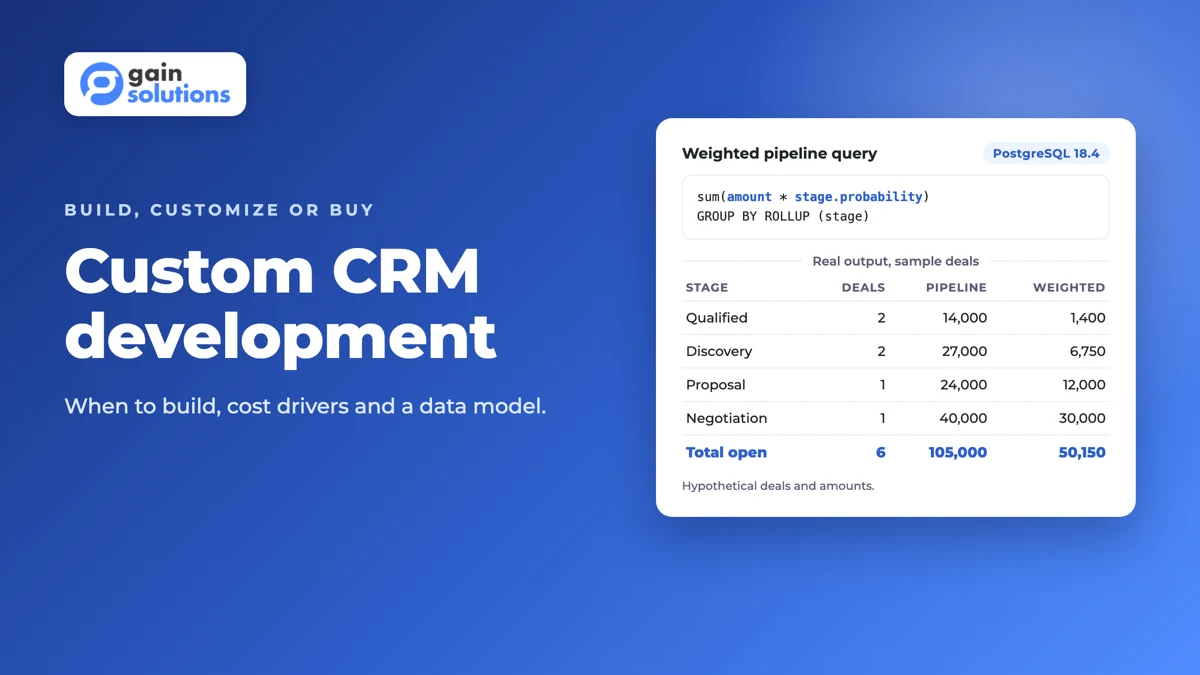
Here's a worked example: the core tables of a B2B CRM and the weighted-pipeline query every sales lead asks for. We ran it on PostgreSQL 18.4 against a fresh database on 16 November 2026, and the output below is real. The companies, owners and amounts are hypothetical sample data.
CREATE TABLE accounts (
  id         bigint GENERATED ALWAYS AS IDENTITY PRIMARY KEY,
  name       text NOT NULL,
  domain     text NOT NULL UNIQUE CHECK (domain = lower(domain))
);

CREATE TABLE contacts (
  id         bigint GENERATED ALWAYS AS IDENTITY PRIMARY KEY,
  account_id bigint NOT NULL REFERENCES accounts(id),
  full_name  text NOT NULL,
  email      text NOT NULL
);
CREATE UNIQUE INDEX contacts_email_uq ON contacts (lower(email));

CREATE TABLE stages (
  id          smallint PRIMARY KEY,
  name        text NOT NULL UNIQUE,
  position    smallint NOT NULL UNIQUE,
  probability numeric(3,2) NOT NULL CHECK (probability BETWEEN 0 AND 1),
  is_closed   boolean NOT NULL DEFAULT false
);

CREATE TABLE deals (
  id         bigint GENERATED ALWAYS AS IDENTITY PRIMARY KEY,
  account_id bigint NOT NULL REFERENCES accounts(id),
  stage_id   smallint NOT NULL REFERENCES stages(id),
  owner      text NOT NULL,
  amount     numeric(12,2) NOT NULL CHECK (amount >= 0),
  close_date date NOT NULL
);
CREATE INDEX deals_stage_idx ON deals (stage_id);

CREATE TABLE activities (
  id          bigint GENERATED ALWAYS AS IDENTITY PRIMARY KEY,
  deal_id     bigint NOT NULL REFERENCES deals(id) ON DELETE CASCADE,
  contact_id  bigint REFERENCES contacts(id),
  kind        text NOT NULL CHECK (kind IN ('call', 'email', 'meeting', 'note')),
  happened_at timestamptz NOT NULL DEFAULT now()
);

INSERT INTO stages VALUES
  (1, 'Qualified',   1, 0.10, false),
  (2, 'Discovery',   2, 0.25, false),
  (3, 'Proposal',    3, 0.50, false),
  (4, 'Negotiation', 4, 0.75, false),
  (5, 'Won',         5, 1.00, true),
  (6, 'Lost',        6, 0.00, true);

INSERT INTO accounts (name, domain) VALUES
  ('Acme Logistics', 'acme-logistics.example'),
  ('Birch Dental',   'birch-dental.example'),
  ('Cedar Freight',  'cedar-freight.example'),
  ('Delta Clinics',  'delta-clinics.example'),
  ('Elm Studio',     'elm-studio.example');

INSERT INTO deals (account_id, stage_id, owner, amount, close_date) VALUES
  (1, 3, 'maya', 24000, '2026-12-15'),
  (2, 1, 'omar',  8000, '2027-01-31'),
  (3, 4, 'maya', 40000, '2026-12-05'),
  (4, 2, 'omar', 15000, '2027-01-15'),
  (1, 2, 'omar', 12000, '2027-02-28'),
  (2, 5, 'maya',  9500, '2026-11-02'),
  (3, 6, 'omar', 20000, '2026-10-20'),
  (5, 1, 'maya',  6000, '2027-02-10');

-- Weighted pipeline: open deals only, by stage, with a total row
SELECT coalesce(s.name, 'Total open') AS stage,
       count(d.id)                    AS deals,
       sum(d.amount)                  AS pipeline,
       round(sum(d.amount * s.probability), 2) AS weighted
FROM stages s
JOIN deals d ON d.stage_id = s.id
WHERE NOT s.is_closed
GROUP BY ROLLUP ((s.position, s.name))
ORDER BY s.position NULLS LAST;

-- Data quality: a duplicate account by domain is rejected
INSERT INTO accounts (name, domain) VALUES ('ACME Logistics Ltd', 'acme-logistics.example');
Output (psql 18.4):
    stage    | deals | pipeline  | weighted
-------------+-------+-----------+----------
 Qualified   |     2 |  14000.00 |  1400.00
 Discovery   |     2 |  27000.00 |  6750.00
 Proposal    |     1 |  24000.00 | 12000.00
 Negotiation |     1 |  40000.00 | 30000.00
 Total open  |     6 | 105000.00 | 50150.00
(5 rows)

psql:crm-data-model.sql:81: ERROR:  duplicate key value violates unique constraint "accounts_domain_key"
DETAIL:  Key (domain)=(acme-logistics.example) already exists.
Three things to notice. First, win probability lives in the stages table, not in code. Sales ops can change one stage's probability with a single UPDATE, and the forecast follows. Gain.io sets win probability per deal instead; a per-stage default is the simpler start, and a per-deal override can come later.
Second, the database enforces data quality. The unique constraint on domain rejected the duplicate "ACME Logistics Ltd" account, and PostgreSQL backs every unique constraint with a unique B-tree index (PostgreSQL docs, constraints). Dedupe rules that live only in the interface get bypassed by imports and integrations.
Third, ROLLUP adds the total row in the same query (PostgreSQL docs, grouping sets), so the dashboard and the forecast read from one definition of "weighted pipeline". Won and lost deals sit in closed stages, so they never inflate it.
If you plan to sell the CRM to other companies, add a tenant key to every table, as our multi-tenant architecture guide explains. For the database choice itself, see MySQL vs Postgres and our notes on scalable software architecture.
What drives the cost of custom CRM development?
Scope drives cost, and integrations drive scope. GainHQ scopes every build individually and doesn't publish prices or rates, so here are the drivers to pin down before you ask anyone for an estimate.
| Cost driver | Raises cost when | Lowers cost when |
|---|---|---|
| Integrations | Many systems, no APIs, two-way sync | One or two systems with documented APIs, one-way sync |
| Data migration | Years of duplicates across spreadsheets and an old CRM | A clean export from one system |
| Roles and permissions | Field-level rules per region, team or partner | A few roles with record-level rules |
| Workflow automation | Multi-step approvals with many branches | Assignment and follow-up tasks only |
| Reporting | Custom forecasting models and many dashboards | Pipeline and activity reports from one query layer |
| Compliance | Regulated data, audit evidence, data residency rules | Standard business contact data |
| Channels | Web, mobile and offline access | Web only to start |
Our guide to custom software development cost explains how estimates are built, and the hidden costs of software development covers what teams forget: hosting, monitoring, security updates and new features continue for as long as the CRM runs.
How do you connect a custom CRM to the rest of your stack?
Through an API layer the CRM owns, plus events when records change. Expose accounts, contacts and deals over a documented API, publish an event when a deal changes stage, and let billing, ERP and support systems subscribe.
Here's what that looks like in practice. A rep marks a deal as Won. The CRM publishes a deal.won event, billing creates a draft invoice, the project tool opens an onboarding checklist, and nobody retypes the customer's details. Use webhooks when the other system supports them and you need changes quickly; use scheduled polling when it doesn't. Our guides to API integration strategy and webhooks vs polling cover the trade-offs.
The other route is to remove the integration altogether. We built Gain.io as a CRM with a full helpdesk in the same system, so a support agent who opens a customer's ticket can see that customer's deal on the same record. If sales and support always need the same customer view, one record beats two synced ones.
How do you keep CRM data secure and clean?
Enforce access on the server, log every change, and stop duplicates at the database. Broken access control holds the number one spot in the OWASP Top 10:2025, and OWASP reports that 100% of the applications tested had some form of it (OWASP A01:2025). A CRM holds contact details, deal values and contract terms, so plan these controls from the first release:
- Record-level access: reps see their own deals, managers see their team's. Check it on the server for every request, not by hiding buttons.
- Field-level access for sensitive fields such as contract terms, discounts or personal notes.
- Audit trail: who changed which field, when, and whether a person or an integration made the change.
- Personal data: collect only the fields you use, encrypt data in transit and at rest, and define retention and deletion rules.
- Deduplication: unique keys such as domain and lowercase email, plus a merge tool for records that slip through.
- Migration: dry-run every import into a staging copy and reconcile record counts before cutover.
Our API security best practices and SaaS security best practices go deeper on access control, and the legacy data migration guide covers moving records out of an old CRM.
Where do AI features fit in a custom CRM?
On top of a clean record, with the same permissions as the user. AI that reads a CRM is only as useful as the data model and access rules underneath it.
In Gain.io, Eden AI answers common questions, triages tickets and summarizes conversations, with the deal context attached because it's the same record.
When we added an MCP server, we kept it read-only with draft-only writes: an agent can compose a ticket reply or a note, but a person has to send it. The connection signs in with OAuth 2.1 and is authorized as the user, so the agent sees exactly what that user sees and nothing more.
For a custom CRM, start with summaries and drafted follow-ups, and keep any write action behind human approval. Our guides to building an AI copilot for SaaS, LLM integration and MCP vs API cover the design choices.
When do you need a custom CRM, and when is an off-the-shelf CRM enough?
Build when the CRM must model data or workflows only your business has. Buy when your sales process looks like everyone else's, which is true for most small teams.
| Situation | What to do |
|---|---|
| Small team, standard pipeline, few integrations | Buy a SaaS CRM and configure it |
| Standard process, but one workflow (such as multi-step deal approvals) doesn't fit | Customize: build that workflow on the vendor's API |
| The CRM must join records only your systems hold, such as product usage, contracts or field operations | Build a custom core, or a hybrid with custom modules |
| The CRM is part of the product you sell | Build it as a product, multi-tenant from the start |
| License and workaround spend keeps rising and reps keep side spreadsheets | Map the process first, then compare customizing and building against real requirements |
| Nobody can describe the sales process end to end | Don't build yet: write the process down first |
The same test applies to other core systems, as our HR software development guide shows, and our software build vs buy case study walks through one decision end to end.
How to build a custom CRM in 6 steps
- Map the process. Walk a real deal from first contact to renewal with the people who run it, and capture it in a scope of work. Done when every stage, handoff and approval is written down.
- Define the data model. Accounts, contacts, deals, stages, activities and the keys that stop duplicates. Done when the weighted-pipeline and activity reports run as queries against sample data, like the example above.
- Scope the MVP. One team, one pipeline and the integrations that team can't work without. Use MVP feature prioritization, write user stories, and add acceptance criteria to each. Done when every feature has testable criteria.
- Plan integrations and migration. List each system, the sync direction and an owner, then dry-run the import. Done when record counts reconcile between the old system and a staging copy.
- Build and pilot with one team. Follow the approach in our custom business application development guide, and plan phases as in how long it takes to build an MVP. Done when the pilot team runs its pipeline only in the new CRM, with no side spreadsheet.
- Measure adoption and iterate. Track active users, records updated per rep and how many deals still live outside the CRM. Done when the next release is planned from those numbers, not from the wish list.
What goes wrong when teams build their own CRM?
Custom CRM builds tend to go wrong on scope and adoption before they go wrong on code. Watch for these five:
- Copying every old process into software produces a bloated CRM. Simplify the process first, then release in phases.
- Older ERPs and databases without APIs slow everything down. Assess them before the build starts, and add middleware or a staging area where needed.
- Missing indexes and unoptimized queries show up once years of activity history pile up. Test performance with realistic data volumes before each major release.
- If reps see the CRM as extra work, they go back to spreadsheets and the data falls apart. Involve each user group in design and the pilot.
- Nobody owns it after launch. A CRM evolves with products, markets and regulations. Name a product owner and budget for ongoing changes and security updates.
How GainHQ can help
GainHQ builds custom software, SaaS products and internal tools for founders and growing businesses. We also build and run Gain.io, a CRM and helpdesk on one customer record, with a pipeline board from New to Won or Lost, Eden AI, and a read-only MCP server where agents draft and people send. So we've designed CRM data models, permissions and integrations for real users, not just on paper.
If you're weighing a custom CRM against configuring the one you have, read how to choose a custom software development partner, or talk to GainHQ.
Frequently asked questions
How long does it take to build a custom CRM?
It depends on scope more than on team size. Mapping the process, designing the data model, migrating data and connecting existing systems usually take longer than building screens. Launching one pipeline for one team first, then extending from real usage, gets a working CRM to users sooner than building every module at once. GainHQ scopes each build individually.
What drives custom CRM development cost?
Seven drivers: integrations, data migration, roles and permissions, workflow automation, reporting, compliance needs and the channels you support, such as web and mobile. Integrations usually matter most, because each one adds data mapping, error handling and testing. GainHQ doesn't publish prices or rates, so write those drivers down before asking anyone for an estimate.
Can we start off-the-shelf and move to a custom CRM later?
Yes, and many teams should. Start with a configurable SaaS CRM, keep customizations light, and check that you can export every record and its activity history. Document your stages and rules as you go. When workarounds start to outweigh the product, that document and a clean export become the brief and the migration source for a custom build.
Should we customize our current CRM or build a new one?
Customize when the limits are missing fields, views or a single workflow that the vendor's API can cover. Build when the limits are structural: a data model the product can't represent, integrations it can't support, or license and workaround costs that keep growing. Write down which limits you hit in daily work before deciding.
Who do we need on the internal team?
An executive sponsor, a product owner who can make decisions, process experts from sales, service and finance, and someone from IT for security and infrastructure. Book time from pilot users for workshops, testing and feedback. The development team builds the CRM; your people decide what it should do and own it after launch.
Can you build your own CRM with low-code or no-code tools?
Yes, for simple pipelines used by internal teams. Low-code platforms handle forms, lists and basic automation quickly. They get harder when you need complex permissions, large data volumes, deep two-way integrations or full ownership of the code. Many teams prototype the process in low-code, then build custom once the data model is proven.
What database should a custom CRM use?
A relational database such as PostgreSQL or MySQL suits most CRMs, because accounts, contacts, deals and activities are related records that need constraints, joins and transactions. PostgreSQL adds grouping sets for reporting totals and JSONB for flexible custom fields. Add a search engine or a data warehouse later, when reporting load or data volume calls for it.