Business Process Automation Software: Types, Features, Cost
by GainHQ Editorial Team | Sep 24, 2026 | Technology & Innovation | Editorial policy
Table of Contents
- What Is Business Process Automation Software
- Types Of Business Process Automation Software
- Key Features Of Business Process Automation Software
- Business Process Automation Vs Other Automation Technologies
- How To Choose Business Process Automation Software
- Off-The-Shelf Vs Custom Business Process Automation Software
- How To Implement Business Process Automation Successfully
- Final Thoughts
Manual work still eats a surprising share of the average workday. Invoices get rekeyed, approvals sit in inboxes, and data moves between systems by copy and paste. Business process automation software replaces those handoffs with rules, triggers, and integrations that run on their own.
Demand is rising fast. Globally, the business process automation market will grow from $18.83 billion in 2026 to $33.43 billion by 2030, according to The Business Research Company (2026). For operations leaders, that growth signals a shift from an optional efficiency tool to core infrastructure.
Below, we break down how BPA software works, which features matter most, where it delivers real ROI, and how to choose between off-the-shelf platforms and custom-built solutions for your workflows.
What Is Business Process Automation Software
Business process automation software uses technology to run repetitive, rule-based tasks without manual effort. Business process automation (BPA) connects apps, data, and people so work moves automatically. Most business process automation tools handle approvals, data entry, and notifications, while a business process automation platform manages complex business processes across departments.
BPA differs from robotic process automation, which mimics user clicks on screens. It also differs from business process management, which designs and improves workflows. Together, they help teams optimize business processes.
Types Of Business Process Automation Software
Business process automation software comes in five main types. Each one fits a different level of complexity, budget, and technical skill. Picking the right type early helps you automate business processes without paying for features you never use.
Workflow And Integration Automation Tools
Workflow and integration tools connect the apps your team already uses. They move data between a CRM, inbox, and spreadsheet using simple triggers, so staff stop copying records by hand. Most teams use them to streamline tasks like lead routing and data entry.
Disconnected systems are the norm. Enterprises manage 897 applications on average, yet only 29% are integrated, according to MuleSoft's 2025 Connectivity Benchmark Report. Integration tools close that gap fast and cut manual processes at low cost.
Low-Code Business Process Platforms
Low-code platforms let business users build approval flows, forms, and dashboards with drag-and-drop editors. HR teams often use them to automate employee onboarding, from document collection to account setup, without waiting on developers.
Adoption is shifting outside IT. Developers outside formal IT departments will make up at least 80% of low-code tool users by 2026, up from 60% in 2021, according to Gartner (2021). For your team, that means faster internal builds and fewer engineering tickets.
Enterprise Process Automation Platforms
Enterprise platforms orchestrate complex workflows across finance, HR, procurement, and IT in one governed system. They add audit trails, role-based access, and process mining to streamline workflows at scale, which matters most for large, regulated organizations.
Buying software alone rarely drives results. Among AI high performers, 72% redesigned workflows compared with 25% of other organizations, according to McKinsey's State of AI report (August 2026). Map your processes first, then automate, to see real operational efficiency gains.
RPA And Intelligent Automation Platforms
Robotic process automation uses software bots to mimic human clicks and keystrokes in legacy systems without APIs. Intelligent automation adds AI, so bots can read invoices, classify emails, and handle routine tasks that once needed human judgment, especially inside AI-driven automation in SaaS platforms.
Decision-making is next. At least 15% of day-to-day work decisions will be made autonomously by agentic AI by 2028, up from 0% in 2024, according to Gartner (October 2024). This shift mirrors how agentic AI for SaaS improves business automation and will mean fewer administrative tasks on your team's plate as a result.
Custom Business Process Automation Software
Custom business process automation software is built around your exact rules, data, and existing systems. It suits repetitive business processes with unusual logic, strict compliance needs, or integrations that off-the-shelf tools cannot support. For growing teams, owning the code also removes per-seat fees and vendor limits over time, amplifying the benefits of custom software development.
Around 32% of organizations skipped buying software because they built it in-house with agentic coding tools, according to McKinsey's State of AI report (August 2026), often investing in AI software development for smarter digital products.
Key Features Of Business Process Automation Software
Strong business process automation software shares a core set of features. Knowing them helps you compare vendors fairly and spot gaps early. Look for these six capabilities before committing to any BPA solution for your team.
Workflow And Process Orchestration
Orchestration is the engine behind every automated process. It maps each step, assigns owners, and moves work forward the moment a task finishes. Good workflow management tools also show where every request sits in real time.
Coordination eats most of the workday. Knowledge workers spend 58% of their day on work about work and could save 4.9 hours weekly with better processes, according to Asana's Anatomy of Work Global Index (2023). Orchestration wins those hours back.
Rules, Approvals, And Exception Handling
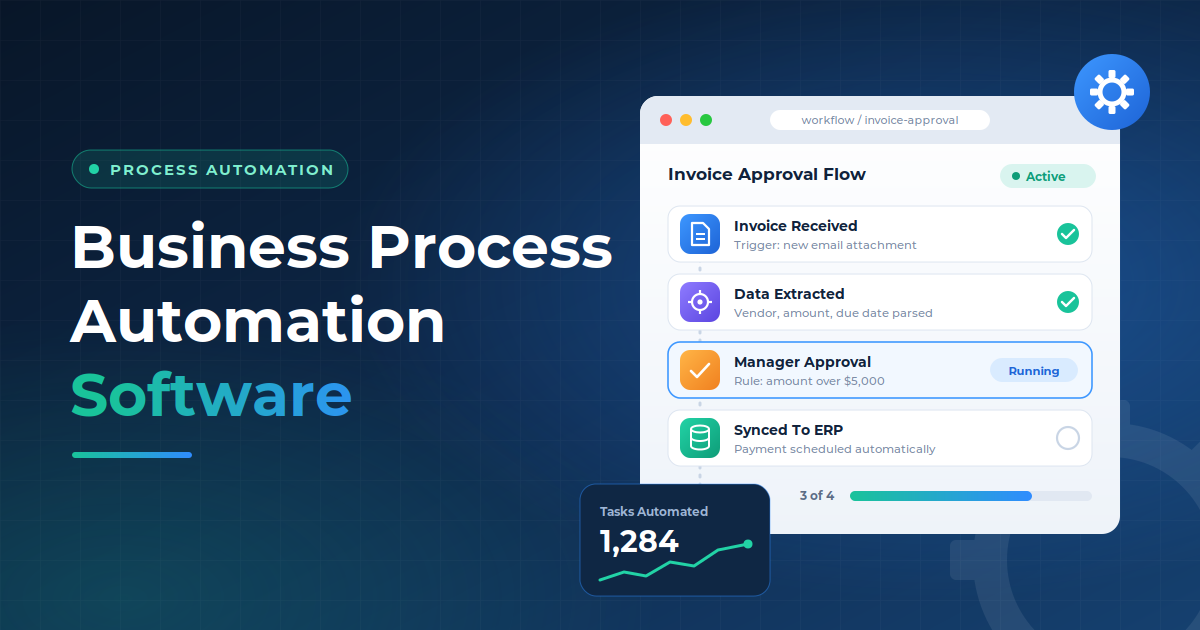
Rules decide what happens next without anyone stepping in. Automating routine approvals means invoices over a set amount go to a manager, low-risk requests clear instantly, and policy breaks get flagged. Exception handling keeps unusual cases from stalling the whole queue.
Exceptions are expensive. Best-in-class accounts payable teams hold invoice exceptions to 9% versus a 14% average and process each invoice for $2.78 instead of $9.40, according to Ardent Partners' AP Metrics That Matter (2025). Clear rules cut both.
Integrations And APIs
Integrations let your BPA tool read and write data across CRM, ERP, HR, and finance systems. Prebuilt connectors cover common apps, while REST APIs and webhooks handle custom or legacy software. Without them, automation stops at the edge of each tool.
Connection remains the hardest part. Nearly all IT leaders (95%) report trouble connecting AI to existing systems, according to MuleSoft's 2025 Connectivity Benchmark Report. Strong, well-documented APIs let automation span your entire business operations.
Forms, Documents, And Data Management
Digital forms capture clean data at the source, with required fields and validation built in. Document features generate contracts, extract details from PDFs, and store files with version control. Together, they remove the retyping that invites human error.
Clean data also keeps every downstream step accurate. When a form checks formats and flags missing fields upfront, approvals move faster and reports reflect reality. Your team stops chasing corrections and spends time on work that matters.
Reporting, Monitoring, And Audit Trails
Dashboards track cycle times, bottlenecks, and throughput so you can see how automation affects business performance. Live monitoring alerts your team when a workflow fails or slows down. Audit trails log every action, user, and timestamp for compliance reviews.
A data breach now costs $4.44 million on average globally, according to IBM's Cost of a Data Breach Report (2025). Detailed audit logs help you trace issues fast, prove compliance, and limit the damage.
AI And Intelligent Automation
AI extends automation beyond fixed rules, shifting task automation from simple triggers to real, context-aware decisions. Modern platforms read unstructured documents, predict delays, and suggest next steps, so automating tasks no longer requires a perfect rulebook. Teams unlock more of the benefits of AI automation over traditional automation and can better understand the broader landscape of artificial intelligence software and its uses, enhancing operational efficiency faster as a result.
Among companies adopting AI agents, 66% already report measurable productivity gains, according to PwC's AI Agent Survey (May 2025).
Business Process Automation Vs Other Automation Technologies
Business process automation (BPA) automates an entire workflow from start to finish. Other automation technologies usually handle one layer of that workflow, such as a screen task, a document, or a single app.
Robotic process automation (RPA) uses bots to copy human clicks in legacy systems. It works well for repetitive processes on screens without APIs, but bots break when interfaces change. BPA relies on integration capabilities instead, so automated systems talk to each other directly.
Intelligent document processing (IDP) reads invoices, contracts, and forms using AI. It extracts data, then hands it off. BPA picks up from there and routes that data through approvals, updates, and notifications.
Business process management (BPM) is a discipline, not a tool. It helps teams identify processes, model them, and improve them over time. BPA is how those improved designs get executed.
Workflow orchestration sits at the center of BPA. It exists to connect tasks across people, bots, and software, so RPA and IDP become parts of one flow instead of isolated fixes, regardless of whether you use no-code builders or custom development for complex projects.
Most teams use a mix.
Successful BPA implementation starts by mapping specific business processes, then choosing the right technology for each step. Key benefits include fewer handoffs, cleaner data, and one view of every workflow.
Technology | Primary Purpose | Best Fit |
|---|---|---|
Business Process Automation | Automates complete business processes | Cross-functional, multi-step processes |
Workflow Automation | Moves work through predefined steps | Simple and repeatable workflows |
RPA | Automates repetitive tasks through software bots | Repetitive tasks across existing applications |
BPM | Models, manages, and improves business processes | Process management and optimisation |
Digital Process Automation | Digitises and automates end-to-end processes | Digital-first business operations |
AI Automation | Automates decisions and tasks that require context | Unstructured or variable processes |
How To Choose Business Process Automation Software
Choosing business process automation software gets easier with a clear evaluation plan. Focus on your processes, systems, risks, and real costs before comparing features. Use these six steps to shortlist BPA tools with real confidence.
Define The Processes You Need To Automate
Start with a list of workflows that eat time or cause errors. Good candidates are high-volume, rule-based, and already standardized processes, such as invoice approval, employee onboarding, or order fulfillment. Mapping each one step by step also exposes process gaps worth fixing first.
Rank every candidate by effort saved and business value delivered. A process that runs 500 times a month with heavy manual intervention will pay off faster than a rare, messy one. Automate the clear winners before touching edge cases.
Evaluate Integration Requirements
List every system your processes touch, including CRM, ERP, HR, accounting, and email. Then check whether each BPA option offers native connectors, open APIs, or webhooks for those apps. Missing connectors usually mean extra development work later.
Legacy systems deserve special attention. Some older tools lack APIs entirely, so you may need RPA bots that mimic human interactions on screen. Confirm how each vendor handles both cases, and at what extra cost, before you sign.
Assess Workflow Complexity
Simple workflows follow a straight line from trigger to result. Complex ones branch on conditions, loop back for revisions, run steps in parallel, and wait on people across departments. Your software must handle the level of complexity you actually have.
Low-code business automation tools cover most linear approvals well. Multi-system processes with strict rules often need an enterprise platform or custom build instead. Pick software for where your workflows will be in two years, not just today.
Check Security And Governance
Automation software touches sensitive data, so security cannot be an afterthought. Look for role-based access, encryption in transit and at rest, single sign-on, and detailed audit logs. Certifications like SOC 2 Type II and ISO 27001 show a vendor takes it seriously.
Vendors also add risk to your stack. Third-party involvement in breaches doubled from 15% to 30%, according to Verizon's 2025 Data Breach Investigations Report. Review each vendor's security practices as closely as your own, and consider these factors when deciding when to hire a custom software development agency.
Calculate Total Cost Of Ownership
License fees are only part of the price. Add implementation, integrations, training, maintenance, and the cost of scaling as users and workflows grow. A cloud based BPA tool may look cheap per seat but climb fast at volume, so it helps to use a structured custom software cost comparison guide when modelling scenarios.
Software sprawl makes costs hard to track. Managing software licenses is a top challenge for 78% of organizations, according to Flexera's 2026 State of the Cloud Report. Model full three-year costs before you compare vendors side by side.
Test The Software With A Real Business Process
Demos show ideal scenarios, not your reality. Run a free trial or paid pilot on one real workflow, using your actual data, users, and edge cases. Track setup time, error rates, and workarounds, and ask the people who run the process daily for honest feedback.
A focused two-to-four-week pilot reveals far more than any polished sales call and gives your team a proven path to achieve digital transformation one process at a time.
Off-The-Shelf Vs Custom Business Process Automation Software
Off-the-shelf BPA software is a ready-made platform you subscribe to and configure. Custom BPA software is built around your exact processes, data, and systems. Both automate work, but they suit very different situations, echoing the broader trade-offs in custom vs off-the-shelf software.
Off-the-shelf tools win on speed. You can launch simple workflows in days, pay a predictable monthly fee, and rely on the vendor for updates and support. They work best for standard processes like approvals, onboarding, and notifications that look similar across most companies, much like the scenarios where SaaS vs custom software becomes a key strategic choice.
Limits show up as you grow. Per-user pricing climbs with headcount, connectors may not reach niche or legacy tools, and your workflows must bend to fit the platform. Switching later can also mean rebuilding everything from scratch.
Custom software takes longer and costs more upfront. In return, you own the code, avoid per-seat fees, and get logic that matches how your business actually runs. It fits complex, multi-system processes, strict compliance needs, or workflows that give you a competitive edge, aligning closely with the principles in a custom software development guide.
Many companies use both. A practical approach is to start with an off-the-shelf tool for common tasks, then build custom automation where the platform hits its ceiling. Your process complexity, growth plans, team skills, and three-year cost should guide the final call, much like evaluating SaaS vs custom software for cost flexibility and scale.
Factor | Off-The-Shelf Software | Custom Software |
|---|---|---|
Process Requirements | Standard or common processes | Unique or specialised processes |
Customisation | Limited to platform capabilities | Built around specific requirements |
Integrations | Available connectors and APIs | Custom integrations possible |
Implementation | Usually faster | Requires development |
Upfront Cost | Generally lower | Generally higher |
Scalability | Depends on platform | Designed around business needs |
Maintenance | Vendor-managed platform | Requires dedicated development support |
Best Fit | Standardised workflows | Complex or highly specialised processes |
How To Implement Business Process Automation Successfully
Successful BPA projects follow a clear sequence, not a rush to automate everything. Business leaders who plan each step see faster adoption and stronger overall business performance, especially when they choose the right custom software development partner to support complex initiatives. Here is a practical six-step path to follow.
Map And Analyse The Existing Process
Start by documenting how the process runs today, not how it should run. Interview the business users who do the work, list every step, and note which existing systems each step touches. Record handoffs, wait times, and common errors along the way.
Numbers make the map useful. Track volume, cycle time, and error rates for at least a few weeks, then use basic data analysis to find where time actually goes. Baselines like these prove your results later.
Remove Unnecessary Process Steps
Automating a broken process just makes it break faster. Cut duplicate approvals, redundant data checks, and steps that exist only because of old habits. Every step you remove helps reduce manual effort before automation even starts.
Approvals are often the biggest drag. Best-in-class accounts payable teams finish invoice processing in 3.1 days versus a 9.2-day average, according to Ardent Partners' AP Metrics That Matter (2025). Leaner steps free your staff for more strategic activities.
Design The Automated Workflow
Turn the cleaned-up process into a clear workflow with triggers, rules, owners, and deadlines. Define the rules for routing tasks, who approves what, and what happens when someone is out. Keep the user interface simple and familiar so people actually use it.
Start with one of your core business workflows, such as contract management or purchase requests. Build the automated process in small stages, since a narrow first release is easier to fix and faster to prove, especially when you are creating custom internal tools for modern operations.
Connect Business Systems
Link the workflow to the software applications it depends on, such as your CRM, ERP, and accounting tools. Use native connectors or APIs wherever possible, since they are faster and more stable than workarounds. Test each connection with sample data first.
Legacy systems without APIs may need software robots that work through the screen instead. For large organizations running entire workflows across many tools, an enterprise grade platform with central governance keeps every connection secure and visible, underpinned by robust AI infrastructure for intelligent applications.
Test Rules, Integrations, And Exceptions
Run the workflow in a staging environment before going live. Test every rule with real, messy examples, confirm data moves correctly between systems, and check what happens when an integration fails or a record is missing.
Exceptions deserve the most attention when automating complex processes. Send unusual cases to a named owner instead of letting them stall. Then run a short pilot with a small group and fix any issues before a company-wide rollout.
Monitor Performance And Improve The Process
Go-live is the starting point, not the finish line. Track cycle time, error rates, exception volume, and adoption against the baselines you set in step one. Review results monthly, spot slowdowns on your dashboards early, and adjust rules as the business changes, using smarter software tools to simplify day-to-day work where they add clear value.
Small, steady tuning turns a working automation into one that keeps saving time, frees more capacity, and helps lower operational costs year after year, especially when supported by flexible custom software solutions that evolve with your workflows.
Final Thoughts
Business process automation software works best when it solves a specific, measurable problem. Start with the workflows that drain the most time, clean them up, and automate them one at a time. Small wins build trust faster than a big-bang rollout.
Your choice of tool matters less than your process clarity. Off-the-shelf platforms handle standard approvals and notifications well. Custom software makes sense once workflows span many systems, carry compliance risk, or shape how you compete, making strategic custom software development services a key lever.
Keep measuring results after launch. Cycle times, error rates, and adoption tell you where automation pays off and where it still needs work. Teams that treat BPA as an ongoing practice, not a one-time project, keep gaining value long after the first go-live. See our guide to custom software development and its benefits.