Developer Portal Software: How It Supports API Growth And Adoption

by Daniel Wright | Aug 10, 2026 | Software Development Insights
Table of Contents
- What Is Developer Portal Software
- Why APIs Struggle To Gain Developer Adoption
- How Developer Portal Software Drives API Adoption
- Key Developer Portal Features To Accelerate API Growth
- How Developer Portal Turns First API Calls Into Adoption
- Essential Developer Portal Metrics To Track
- Developer Portals For Agentic Development
- How To Choose Developer Portal Software For API Growth
- Final Discussion
Most APIs don't fail because they're bad. They fail because nobody can find them, understand them, or get started without a fight.
Developers hit a wall before they write a single line of code. Documentation is scattered. Access takes days. Testing means guessing. So they leave. They pick a competitor's API instead, one that just works from the first click.
Developer portal software changes that story. It gives developers a single place to discover your API, read clear docs, test endpoints, and start building in minutes instead of days. Companies using developer portals see faster deployments and reduced onboarding times.
This article breaks down why adoption stalls, what a good portal actually does about it, and how to pick the right one.
What Is Developer Portal Software
Developer portal software acts as a centralized digital hub for APIs. It gives developers one place to explore documentation, test endpoints, and get access without waiting on another team. No more digging through outdated wikis or old PDFs.
A developer portal works as the front door to your APIs. It treats developers like customers, not an afterthought. Good developer portal software focuses on self-service. Developers find what they need and move on, no tickets required.
This matters more than people think. 75% of developers lose 6-15 hours weekly searching for documentation across different tools. A well-designed developer portal fixes that problem directly. It centralizes resources, cuts down on tool switching, and makes the whole developer experience faster and far less frustrating.
Why APIs Struggle To Gain Developer Adoption
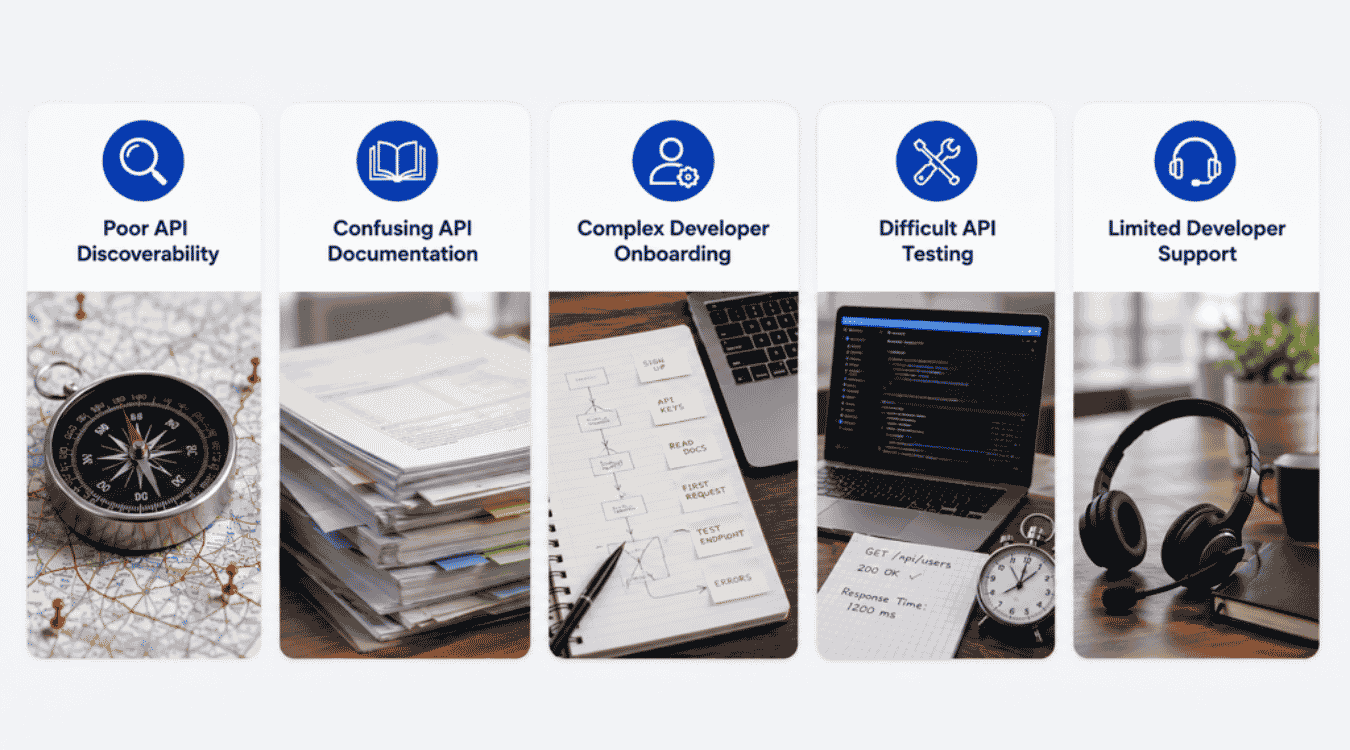
Poor APIs rarely lose developers over bad code. They lose them over friction that shows up long before the first successful call. Five problems account for most of that drop-off.
Poor API Discoverability
Developers can't use an API they can't find. Many APIs sit buried in internal wikis or old README files. There's no central place to search, browse, or compare endpoints. That gap forces developers to ask around instead of exploring on their own.
Without a developer portal, discovery depends on tribal knowledge. A new engineer might spend days just learning what APIs exist. That wasted time adds up fast across engineering teams. A centralized hub fixes this by putting every API in one searchable place, cutting the guesswork out of the process.
Confusing API Documentation
Static text files don't help much when developers need answers fast. Confusing API documentation often skips real examples or buries key details in long paragraphs. Developers end up guessing how an endpoint works instead of reading a clear guide.
Consistency in API documentation aids in standardizing the developer experience, but most teams don't have that consistency. Interactive documentation replaces static text files with dynamic usage consoles, letting developers test calls right on the page. Without that, documentation becomes a wall of text nobody wants to read.
Complex Developer Onboarding
Getting access shouldn't take a week. But complex developer onboarding often means multiple approval steps, scattered credentials, and unclear setup instructions. New engineer or external partner, it doesn't matter. Either way, the friction feels identical.
75% of developers lose 6-15 hours weekly to tool navigation just trying to get set up. That's time coding, not searching. Developer portals reduce onboarding time from 60 to 20 days by putting setup steps, credentials, and access requests in one place instead of five, especially when paired with a broader API integration strategy.
Difficult API Testing
Testing an API without a sandbox often means testing in production, or not testing at all. Difficult API testing pushes developers toward risky shortcuts. They copy sample requests from old forum posts and hope for the best.
Enable sandbox testing removes that risk entirely. Developers can send real requests, see real responses, and catch errors before writing production code. One sandbox feature often decides whether a developer sticks around or walks away after a single bad experience.
Limited Developer Support
When something breaks, developers need answers fast. Limited developer support means long response times, dead forums, or no support channel at all. No developer wants to feel stuck and ignored. That silence pushes developers toward tools with better help available.
Self-service tools change this dynamic completely. Instead of waiting on a support ticket, developers can check status pages, search FAQs, or find error explanations inside the portal itself. Faster answers mean fewer developers giving up mid-integration.
How Developer Portal Software Drives API Adoption
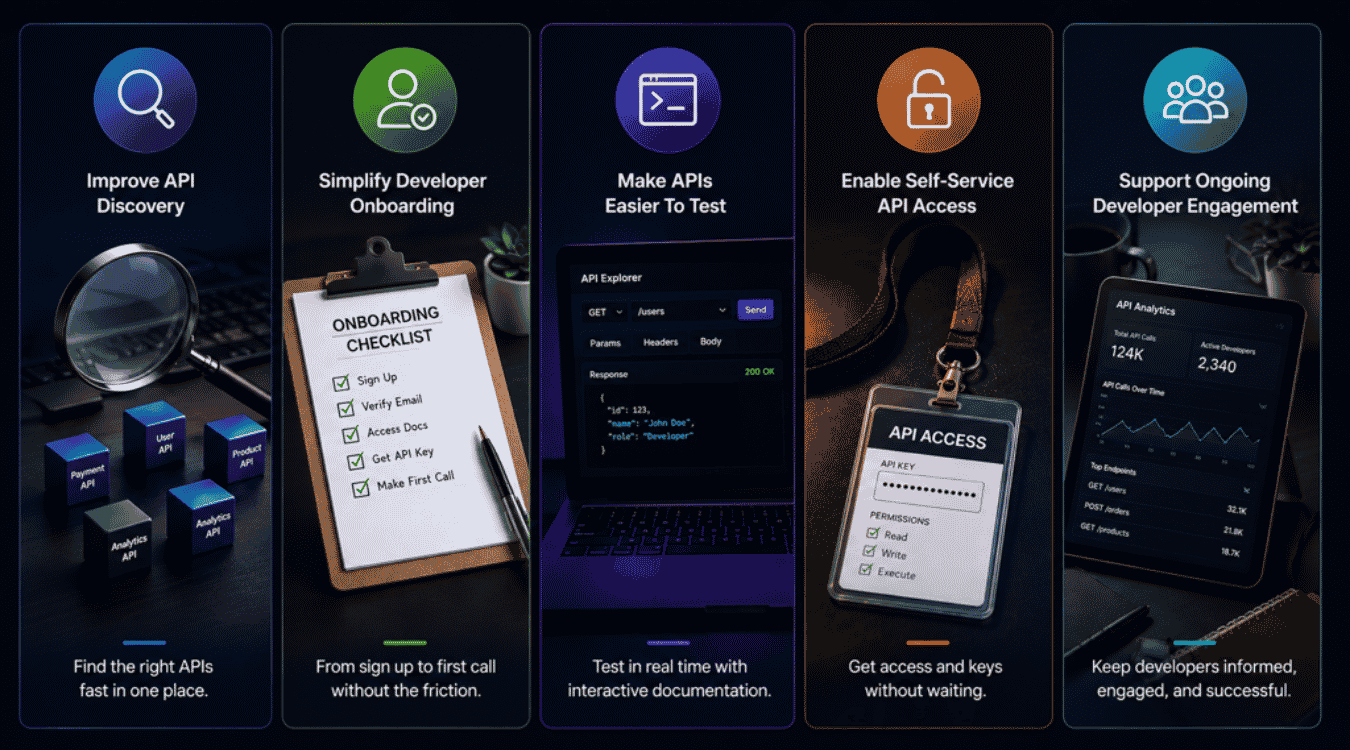
Each problem from the last section has a fix. Developer portal software doesn't just patch gaps, it builds a system where discovery, onboarding, testing, and support work together to turn interest into real API usage.
Improve API Discovery
A central hub changes everything about finding APIs. Instead of asking around, developers search one place and get instant results. Developer portals improve cross-functional visibility of organizational assets, so nothing stays hidden in someone's personal notes.
Centralizing discovery cuts wasted time dramatically. Developers spend less time hunting and more time building. A software catalog indexes microservices, libraries, and APIs, giving every team a clear map of what's available. Visibility alone often decides whether an API gets adopted or ignored, particularly in organizations moving toward an API-first architecture and weighing microservices vs monolithic architecture choices.
Simplify Developer Onboarding
Onboarding shouldn't feel like an obstacle course. A well-designed developer portal handles access requests, documentation, and setup steps in one flow. Developers move from signup to first API call without chasing five different people.
Developer portals reduce onboarding time from 60 to 20 days by removing manual approval steps and scattered instructions. Self-service actions let developers scaffold services without tickets, and the same self-service model applies directly to API access. Less waiting means faster adoption across the board.
Make APIs Easier To Test
Nobody wants to test blind. Sandbox environments let developers send real requests and see real responses before writing production code. Immediate feedback builds confidence fast.
Interactive documentation replaces static text files with dynamic usage consoles, so testing happens right inside the docs. Developers can tweak parameters, run calls, and check results without switching tools. A hands-on approach turns confusing documentation into something developers actually trust. Fewer support tickets follow because most questions get answered through testing itself.
Enable Self-Service API Access
Waiting on manual approval kills momentum. Self-service access lets developers request keys, set permissions, and get started without a support queue. Access governance integrates with identity providers for secure permissions, so speed doesn't come at the cost of security.
Respecting developer time matters here. Nobody enjoys filing tickets for basic access. Portals for API growth remove that friction entirely, letting developers move from interest to integration in minutes. Security compliance still applies, just without the manual bottleneck slowing everyone down.
Support Ongoing Developer Engagement
Adoption doesn't end at the first API call. Developers need updates, changelogs, and a reason to keep coming back. Usage analytics tracks API consumption metrics and error rates, helping teams spot drop-off before it becomes churn.
Ongoing engagement keeps developers active long after onboarding ends, mirroring how well-designed AI features can increase engagement significantly. Portals that share release notes, flag deprecated endpoints, and highlight new features keep developers informed. Steady communication builds trust over time, and trust is what turns a one-time integration into a long-term relationship with your API.
Key Developer Portal Features To Accelerate API Growth
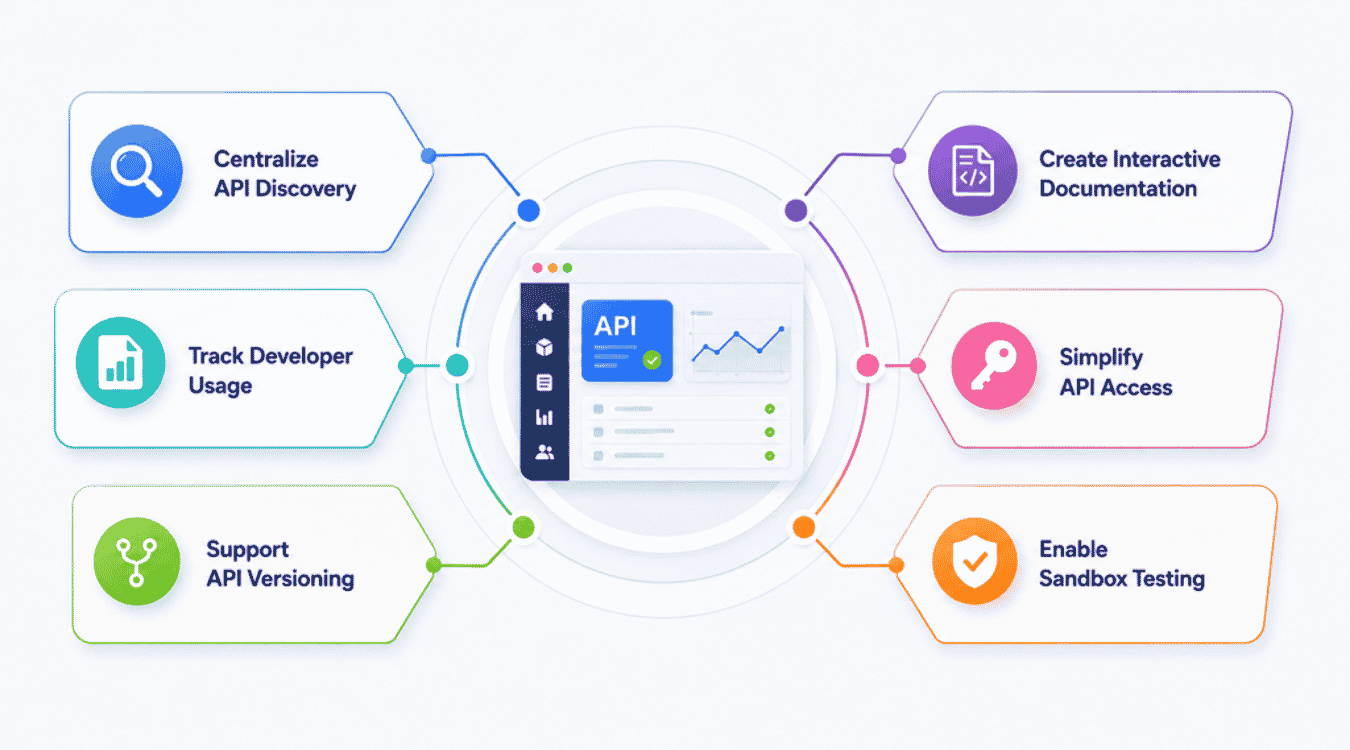
Not every developer portal delivers real results. Some just look good without solving anything. Six features separate a portal that drives adoption from one that sits unused after launch.
Centralize API Discovery
A strong portal puts every API in one searchable place. Developers browse by category, search by keyword, and compare endpoints without leaving the page. No more digging through five different tools to find what already exists.
A software catalog indexes microservices, libraries, and APIs, keeping everything current as new services ship. Automated discovery keeps service catalogs current and accurate, so developers never work off stale information. Centralized discovery alone can cut hours off a developer's search time every week and reinforces the foundations of scalable software architecture and broader SaaS scalability strategies.
Create Interactive Documentation
Static docs slow developers down. Interactive documentation replaces static text files with dynamic usage consoles, letting developers run real API calls straight from the page. Reading about an endpoint and testing it happen in the same breath.
Consistency in API documentation aids in standardizing the developer experience across every endpoint. Centralized documentation includes architecture guides and API references, so developers get context beyond just parameters. Clear, consistent docs cut down on repeat support questions and speed up integration significantly.
Simplify API Access
Getting credentials shouldn't require a ticket. Self-service actions let developers scaffold services without tickets, and the same logic applies to API keys and permissions. Developers request access, get approved automatically, and start building within minutes.
Access governance integrates with identity providers for secure permissions, so speed and security work together instead of against each other and align with broader SaaS security architecture. Simplified access removes one of the biggest early drop-off points in the developer journey. Fewer barriers at the start mean more developers who stick around.
Enable Sandbox Testing
Testing in production is risky and stressful. A proper sandbox lets developers send test requests and see real responses without touching live data. Mistakes become learning moments instead of production incidents.
Portals can automate dependency mapping using AI, giving developers a clear picture of how test environments connect to real services. Sandbox access builds developer confidence early, before any code reaches production. Confident developers integrate faster and file fewer support tickets along the way.
Support API Versioning
APIs change over time, and developers need to know what's coming. Lifecycle and versioning control automatically manages API updates, flagging deprecated endpoints before they break someone's integration. Surprises kill trust fast in developer relationships.
Clear versioning keeps developers building on stable ground. Portals that show version history, migration guides, and deprecation timelines help developers plan ahead instead of scrambling. Predictable updates keep long-term integrations healthy and reduce the support burden tied to breaking changes.
Track Developer Usage
Numbers tell the real adoption story. Usage analytics tracks API consumption metrics and error rates, showing exactly where developers succeed and where they get stuck. Guesswork disappears once real data enters the picture.
Scorecards provide real-time performance tracking for services, giving teams a clear view of adoption trends over time. Tracking usage helps teams catch problems early, before a small friction point turns into a wave of developers abandoning the API altogether.
How Developer Portal Turns First API Calls Into Adoption
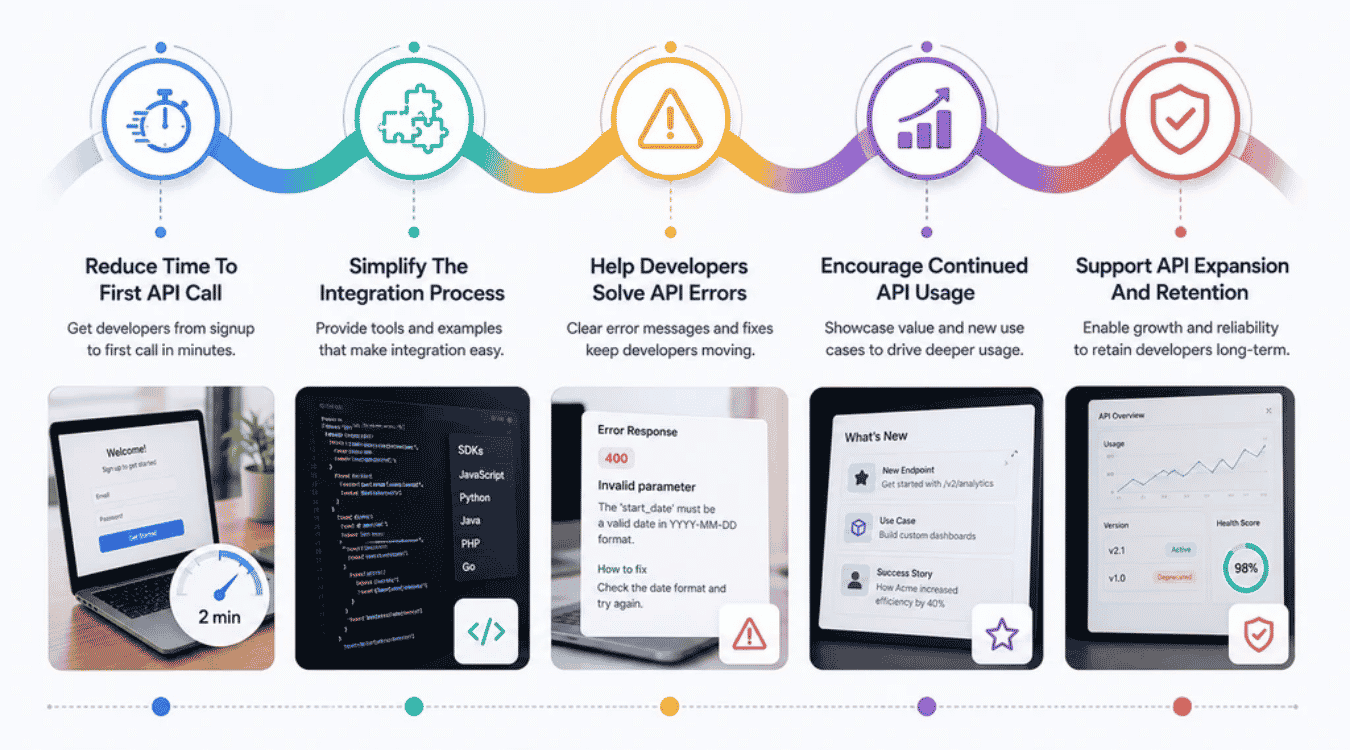
A first API call means nothing if it's the last one. Real adoption happens in the stretch after that call, when developers either build deeper or quietly walk away. Five stages shape which outcome wins.
Reduce Time To First API Call
Speed matters more than most teams realize. Every extra step between signup and a working API call is a chance for a developer to give up. Fast wins build early momentum that carries through the rest of the integration.
Self-service workflows reduce onboarding time from 60 to 20 days by removing manual approval delays. Sandbox testing lets developers validate a call before touching real data. Faster first calls translate directly into higher completion rates for full integrations down the line.
Simplify The Integration Process
Integration gets messy without clear guidance. Developers need code samples, SDKs, and error explanations that match their actual tech stack. Guesswork during integration leads to abandoned projects and frustrated developers.
Interactive documentation replaces static text files with dynamic usage consoles, so developers test as they build instead of switching between tabs. Clear, working examples cut integration time significantly. Templates allow engineers to create microservices quickly and safely, and that same principle applies to API integration templates and starter kits grounded in SaaS architecture best practices and SaaS performance optimization.
Help Developers Solve API Errors
Errors happen, but confusion about errors kills adoption. A vague error message sends developers straight to Google or a support ticket. Clear, specific error explanations keep developers moving instead of stuck and frustrated.
Usage analytics tracks API consumption metrics and error rates, helping teams spot common failure points before they pile up. Portals that document error codes with real fixes save developers hours of guesswork. Quick resolution builds trust, and trust keeps developers using the API instead of switching to a competitor.
Encourage Continued API Usage
One successful call doesn't guarantee a second. Developers need reasons to keep building beyond the initial test. Ongoing value, not just initial access, drives long-term usage.
Portals that highlight new endpoints, share use cases, and showcase real integrations give developers ideas for deeper use. Increased velocity is achieved through automated self-service methodologies, letting developers expand their integration without extra approval steps. Continued engagement turns a single API call into a habit built into daily workflows.
Support API Expansion And Retention
Retention depends on room to grow. Developers who start small often want to scale usage once they see results. A rigid API with no expansion path pushes developers toward competitors instead, forcing teams to confront the classic refactor vs rebuild decision.
Lifecycle and versioning control automatically manages API updates without breaking existing integrations. Scorecards help identify standards gaps in service compliance, giving teams a heads up before retention starts slipping and feeding into a regular SaaS technical audit. Support for expansion, not just initial adoption, keeps developers invested in the API for the long haul, mirroring how strong UX reduces SaaS churn.
Essential Developer Portal Metrics To Track
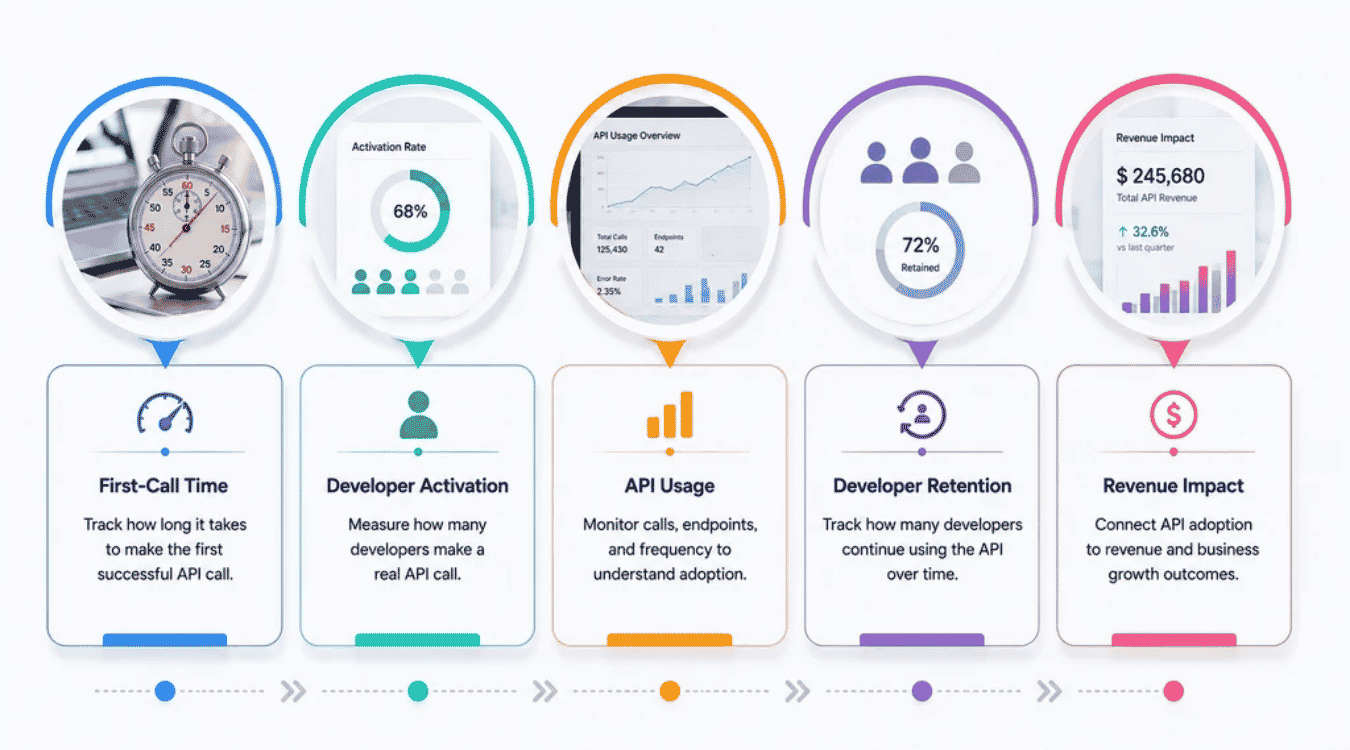
Feelings about a developer portal don't prove much on their own. Numbers do. Five metrics show whether a portal actually drives API management success, or just looks busy without moving adoption forward.
First-Call Time
Speed sets the tone for everything after signup. First-call time measures how long it takes a developer to go from signup to a working API call. Long delays here almost always predict low adoption later.
Portals that track this metric by date can spot slowdowns fast. A jump in first-call time often points to a broken onboarding step or confusing documentation. Catching that early saves teams from losing developers who never even reach a second attempt.
Developer Activation
Signing up means little without action. Developer activation tracks how many developers move past signup and actually make a real API call. That gap between signup and activation reveals real friction points.
Developer productivity often ties directly back to this number. A low activation rate usually means onboarding needs work, not marketing. Portals that surface activation data by user segment help teams find exactly where developers drop off and fix that specific step instead of guessing.
API Usage
Usage patterns tell the real adoption story. Tracking calls, endpoints, and frequency shows which parts of an API get real traction. Metadata attached to each request adds context that raw call counts alone can't provide.
Scorecards provide real-time performance tracking for services, giving teams a live view of usage trends instead of a monthly report, much like dedicated SaaS monitoring tools and engineering KPIs. Usage analytics tracks API consumption metrics and error rates, so teams see problems as they happen. Steady usage growth signals a healthy, adopted API.
Developer Retention
Getting developers in the door matters less than keeping them there. Developer retention tracks how many developers keep using the API weeks or months after their first call. A drop in retention signals a problem worth investigating fast.
Retention data connects directly to earlier friction points, like unclear docs or slow support. Teams that track retention alongside usage get a fuller picture of long-term success, especially when reinforced by consistent SaaS design systems for scalable products. Strong retention numbers prove a developer portal delivers lasting value, not just a good first impression.
Revenue Impact
APIs tied to revenue need a clear line back to business results. Revenue impact connects developer adoption to actual dollars, whether through paid tiers, partner integrations, or platform growth. Adoption without revenue impact rarely justifies continued investment.
Teams that track this metric can prove the value of API management efforts to leadership. Revenue impact also helps prioritize which features or endpoints deserve more attention, similar to how a successful SaaS launch case study links product decisions to measurable outcomes. Connecting developer behavior to business outcomes turns a portal from a nice tool into a measurable growth driver.
Developer Portals For Agentic Development
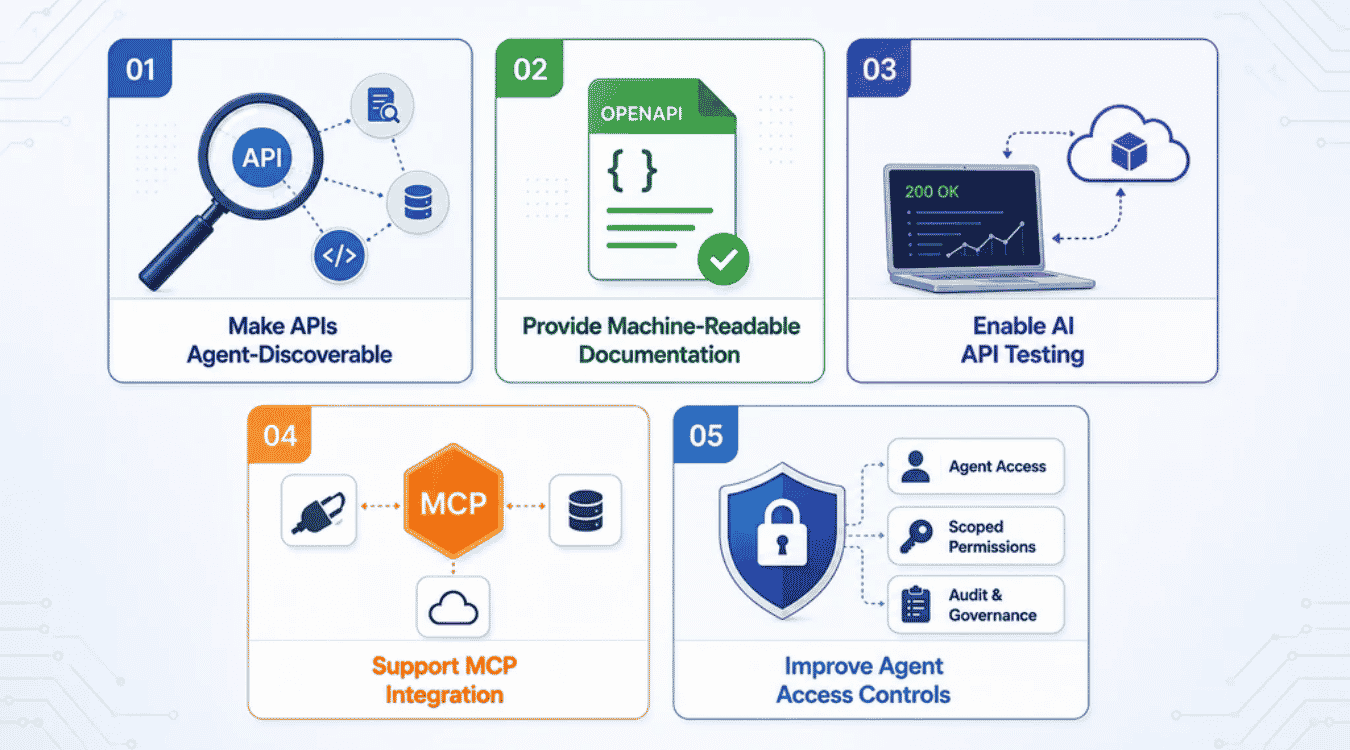
AI agents now call APIs the same way developers do, sometimes faster and more often. Developer portals built only for humans miss this shift entirely. Five changes prepare a portal for agentic development instead of just human traffic.
Make APIs Agent-Discoverable
Agents can't browse a portal like a person does. Discovery for agents depends on structured data, clear endpoints, and predictable formats an agent can parse without guessing. A portal built for humans alone leaves agents stuck.
Portals can automate dependency mapping using AI, which also helps agents understand service relationships without manual configuration. Clear, structured discovery paths let agents find the right endpoint on the first try. Agent-friendly discovery becomes just as important as human-friendly discovery going forward.
Provide Machine-Readable Documentation
Agents don't read prose the way people do. Machine-readable documentation, built on an open source framework like OpenAPI, gives agents a structured format they can parse instantly. Plain paragraphs slow agents down or confuse them entirely.
Consistency in API documentation aids in standardizing the developer experience for both humans and agents alike. Cloud-hosted documentation that follows consistent schemas works reliably across different agent frameworks. Structured docs cut errors and speed up how quickly an agent can integrate with an API.
Enable AI API Testing
Agents test differently than people. AI API testing often means an agent running dozens of calls in seconds, checking responses, and adjusting on the fly. Sandbox environments need to handle that pace without breaking.
Automation plays a bigger role here than in traditional testing. Plugins that simulate agent behavior help teams catch issues before real agents hit production endpoints. Portals ready for AI API testing avoid a flood of errors once agent traffic actually arrives.
Support MCP Integration
Model Context Protocol is quickly becoming a standard bridge between agents and APIs. MCP integration lets agents access API functions directly, without custom code for every connection. Portals without MCP support risk getting skipped by agent-based tools entirely.
Metadata plays a key role in making MCP integration work smoothly. Clear service descriptions and structured metadata help agents understand what each API does before making a call. Early MCP support gives a developer portal an edge as more organizations adopt agent-based workflows.
Improve Agent Access Controls
Agents need access, but not unlimited access. Improved access controls let teams set specific permissions for agent traffic, separate from human developer permissions. Without this separation, one agent error can cause unexpected damage.
Access governance integrates with identity providers for secure permissions, extending naturally to agent identities too. Infrastructure built with agent access in mind prevents runaway API calls or unintended data exposure. Strong access controls keep agent-driven growth safe instead of risky.
How To Choose Developer Portal Software For API Growth
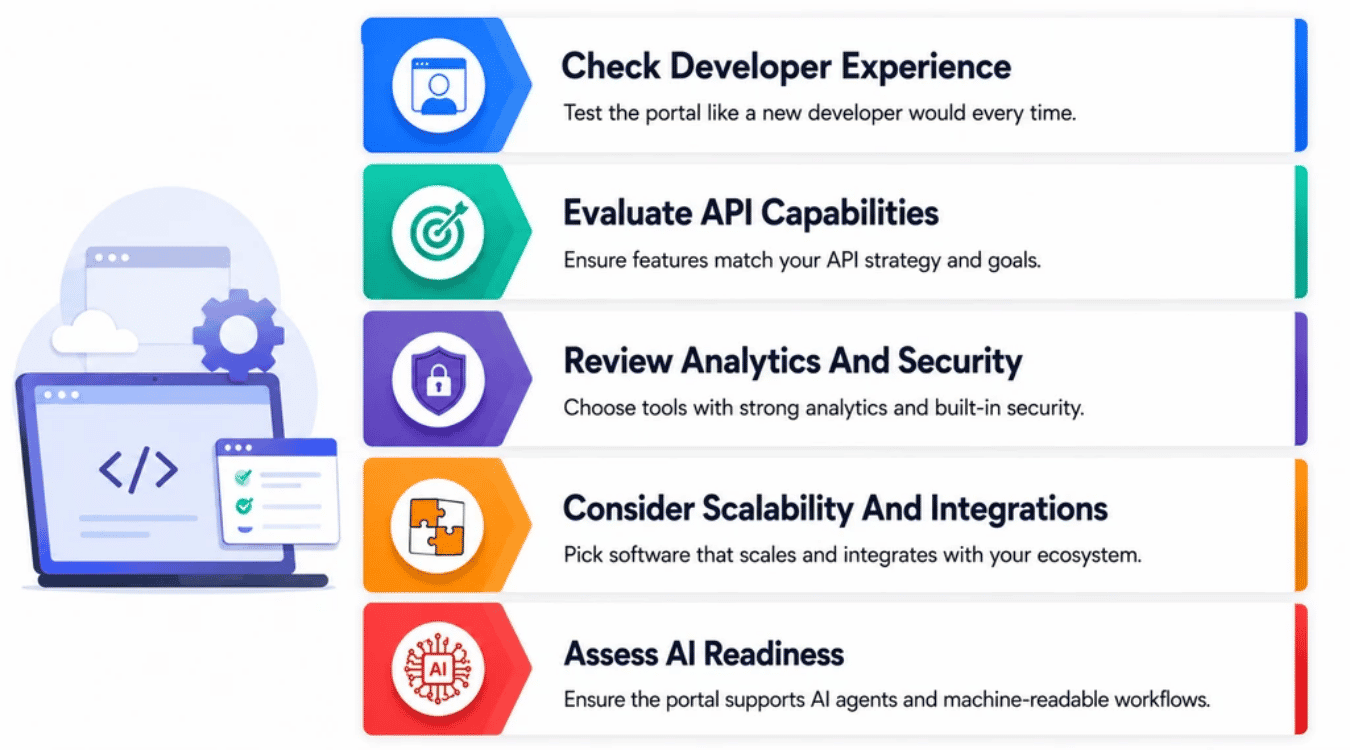
Picking the wrong developer portal software costs more than money and closely resembles choosing the wrong custom software development partner or overlooking the best software development companies to collaborate with. Teams end up rebuilding processes a year later, or watching developers quietly avoid the tool altogether. Five checks help organizations choose software that actually fits their engineering infrastructure.
Check Developer Experience
A clean user interface matters more than a long feature list. Developers judge a portal fast, often in the first few minutes. Confusing navigation or a cluttered interface kills adoption before evaluation even finishes.
Platform teams should test the portal like a new hire would. Walk through signup, access requests, and a first API call without help. Good developer experience reduces cognitive load and cuts down on context switch between tools. Right tools feel intuitive from the start, not after a training session.
Evaluate API Capabilities
Not every developer portal handles APIs the same way. Some focus on internal developer portal use cases, like service catalogs and internal developer platform features. Others focus purely on external API management and developer growth.
Engineering teams should map their actual development work before choosing. Platform engineering teams need golden paths and service ownership tracking, grounded in a disciplined software development life cycle. Teams focused on external API growth need strong documentation and sandbox testing instead. In some cases that also means partnering with a custom software development agency. Software development goals should drive the choice, not the vendor's marketing.
Review Analytics And Security
Numbers and safety go hand in hand here. Strong analytics show developer activation, usage, and service health without extra setup work. Weak analytics leave teams guessing about what's actually working.
Security matters just as much as insight. Look for access controls tied to identity providers and clear service owners for every integration. Incorporating robust software testing strategies and incident management features helps teams respond fast when something breaks. Production readiness checks, built into the portal itself, catch problems before they reach real developers or real customers.
Consider Scalability And Integrations
A portal that works for ten APIs might struggle with a hundred. Scalability matters as organizations grow their development environment and add new services over time, following a realistic software development timeline for SaaS. Check how the platform handles that growth before committing.
Integrations decide how well a portal fits existing engineering standards. Look for support for CI/CD pipelines, identity providers, and common developer tools already in use, especially in a cloud-first future of SaaS development. A portal that connects to what teams already maintain saves setup time. Poor integration support creates more friction than it solves.
Assess AI Readiness
Agent traffic is no longer rare. AI readiness means checking for machine-readable docs, MCP support, and infrastructure built to handle non-human callers. IDPs provide a good reference point here, since many already support structured metadata and automation.
Ask vendors directly about agent access controls and code quality standards for generated integrations. Benefits multiply for teams that plan for agents early instead of retrofitting later, just as in well-structured SaaS product development from build to scale. Portals ready for both humans and agents offer more long-term value as adoption patterns keep shifting.
Final Discussion
Developer adoption doesn't happen by accident. It happens when developers can find an API fast, understand it without a struggle, test it safely, and get support when something breaks. Developer portal software makes that possible at scale, for human developers and AI agents alike.
Teams that treat their portal as a growth tool, not just a documentation dump, see the difference in real numbers. Faster first calls. Higher activation. Better retention. Fewer support tickets eating up engineering time.
Choosing the right software matters just as much as building the right features. Match the portal to actual developer needs, not a vendor checklist, and align it with a clear SaaS product roadmap. Get that right, and API adoption stops being a struggle and starts being a system that works on its own.