Docker Vs Kubernetes: A Developer’s Guide To Containers And Orchestration
by Daniel Wright | Sep 14, 2026 | Software Development Insights
Table of Contents
- What Is Docker?
- What Is Kubernetes?
- Docker Vs Kubernetes At A Glance
- Docker Vs Kubernetes: Key Capabilities Compared
- How An Application Evolves From Docker To Kubernetes
- Does Kubernetes Still Use Docker?
- Docker Vs Kubernetes: Which Approach Fits Your Application?
- Docker Vs Kubernetes: Real-World Use Cases
- Final Decisions
Docker Vs Kubernetes is not really a choice between two competing tools. Docker helps developers package applications and their dependencies into containers. Kubernetes takes containerized applications and manages them across infrastructure at a larger scale. The two solve different problems in the application lifecycle.
The real question is simple: when is Docker enough, and when do you need Kubernetes? A small application may run well with Docker on a single host. A growing system with multiple containers, servers, changing traffic, and high availability needs more control. Kubernetes adds container orchestration, automated scaling, load balancing, and self-healing to handle that complexity.
What Is Docker?
Docker is a containerization platform that helps developers package applications with the files, libraries, and dependencies they need to run. It uses container images as portable packages and creates containers from those images. Each container runs as an isolated process on the host system.
Docker Engine provides the core tools to build, run, and manage containers through the Docker CLI. Docker also supports Docker Compose for multi-container applications and Docker Hub for sharing container images.
For developers, Docker offers a simple way to create and run containers during local development and testing. The same container image can then move across different environments with its required dependencies, helping teams maintain more consistent application deployment.
What Is Kubernetes?
Kubernetes is an open-source container orchestration platform that automates the deployment, scaling, and management of containerized applications. It runs workloads across a Kubernetes cluster made up of a control plane and worker nodes. The control plane schedules workloads and keeps the actual state aligned with the desired state defined by configuration.
Kubernetes organizes containers into logical units called Pods, which are its smallest deployable compute objects. It can manage containerized applications across multiple servers, handle service discovery and load balancing, and replace failed containers when needed. Automatic scaling can also adjust workloads based on demand.
For developers, Kubernetes provides a way to manage complex containerized applications without handling every container instance manually. It is especially useful when applications need reliable deployment, efficient resource utilization, and automated management across distributed systems.
Docker Vs Kubernetes At A Glance
Docker and Kubernetes solve different problems across the container lifecycle. Docker focuses on creating and running containers, while Kubernetes handles container orchestration across clusters. The choice depends on your application’s scale, deployment needs, and infrastructure.
Factor | Docker | Kubernetes |
|---|---|---|
Primary Purpose | Containerization And Container Management | Container Orchestration |
Core Unit | Container | Pod |
Container Images | Creates And Runs Images | Deploys Images In Pods |
Deployment | Simple Container Deployment | Automated Application Deployment |
Multiple Containers | Docker Compose For Multi-Container Applications | Native Management Of Many Containers |
Infrastructure | Typically Single Host | Multiple Servers And Kubernetes Clusters |
Scaling | Mostly Manual | Automatic Scaling And Replication |
Load Balancing | Requires Additional Tools Or Configuration | Built-In Service Discovery And Load Balancing |
Failed Containers | Basic Restart Policies | Self-Healing And Workload Reconciliation |
Best Fit | Local Development, Testing, And Simple Deployments | Complex Production Environments And Distributed Applications |
Docker Vs Kubernetes: Key Capabilities Compared
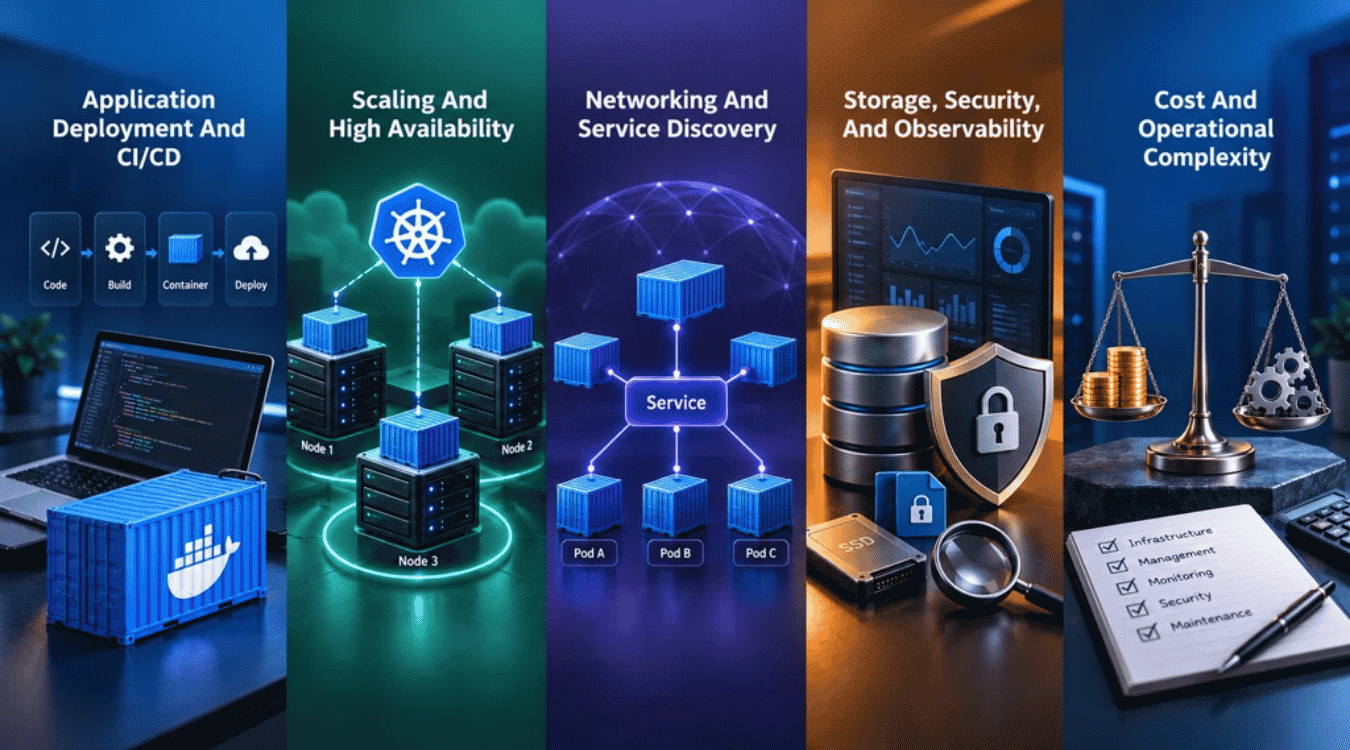
Docker and Kubernetes approach application deployment from different layers. Docker streamlines container creation and management, while Kubernetes automates container orchestration across clusters. The main differences appear when applications need multiple containers, multiple servers, scaling, or stronger production controls.
Application Deployment And CI/CD
Docker helps developers package applications and their dependencies into container images. Docker Engine can then create and run containers from those images. Docker Compose also lets teams define multi-container applications in one configuration and use the same setup across development, testing, staging, production, and continuous integration workflows.
Kubernetes takes container deployment further. A Deployment defines the desired state for an application, and Kubernetes works to make the actual state match it. Kubernetes schedules containers across available compute resources and can manage application rollouts and rollbacks.
Scaling And High Availability
Docker works well when developers need to run containers on a single host. Teams can create multiple container instances, but managing many containers across multiple servers requires additional tools or platforms such as Docker Swarm. Docker Compose can also support production deployments, including single-server setups and Swarm-based scaling.
Kubernetes is built for larger containerized applications. It schedules containers across nodes and can automatically scale workloads based on demand. Kubernetes also provides self-healing capabilities. It can restart failed containers and replace Pods when workloads need recovery.
Networking And Service Discovery
Docker provides container networking so individual containers and services can communicate. Docker Compose creates a default network for multi-container applications and lets services discover each other by name. Teams can also create custom networks to control how containerized services interact.
Kubernetes provides service discovery and load balancing for applications that run across a cluster. A Kubernetes Service gives a stable way to reach Pods, even when individual Pods are created, removed, or replaced. Kubernetes can also distribute traffic across healthy backends.
Storage, Security, And Observability
Docker supports storage volumes for keeping data outside a container's writable layer. Volumes can persist across container recreation and can be shared by services when the storage driver supports it. Docker also provides networking and container management features that developers can configure for their environment.
Kubernetes adds broader controls for distributed applications. It supports storage orchestration, Secrets, configuration management, and security controls such as NetworkPolicy. Its observability model covers metrics, logs, and traces across the cluster and applications, and teams running production clusters need to treat Kubernetes security in 2026 as a first-class concern.
Cost And Operational Complexity
Docker usually has a simpler operating model. Developers can use Docker Desktop and Docker CLI to create, run, and manage containers without operating a Kubernetes cluster. That simplicity can make Docker a practical choice for local development, testing, and smaller deployments.
Kubernetes adds more system tools and moving parts. Teams must account for cluster management, scheduling, networking, storage, monitoring, security, and platform operations. The added complexity can be worthwhile when an application needs automated scaling, high availability, and containerized applications at scale. Kubernetes is designed to provide those capabilities across distributed systems.
How An Application Evolves From Docker To Kubernetes
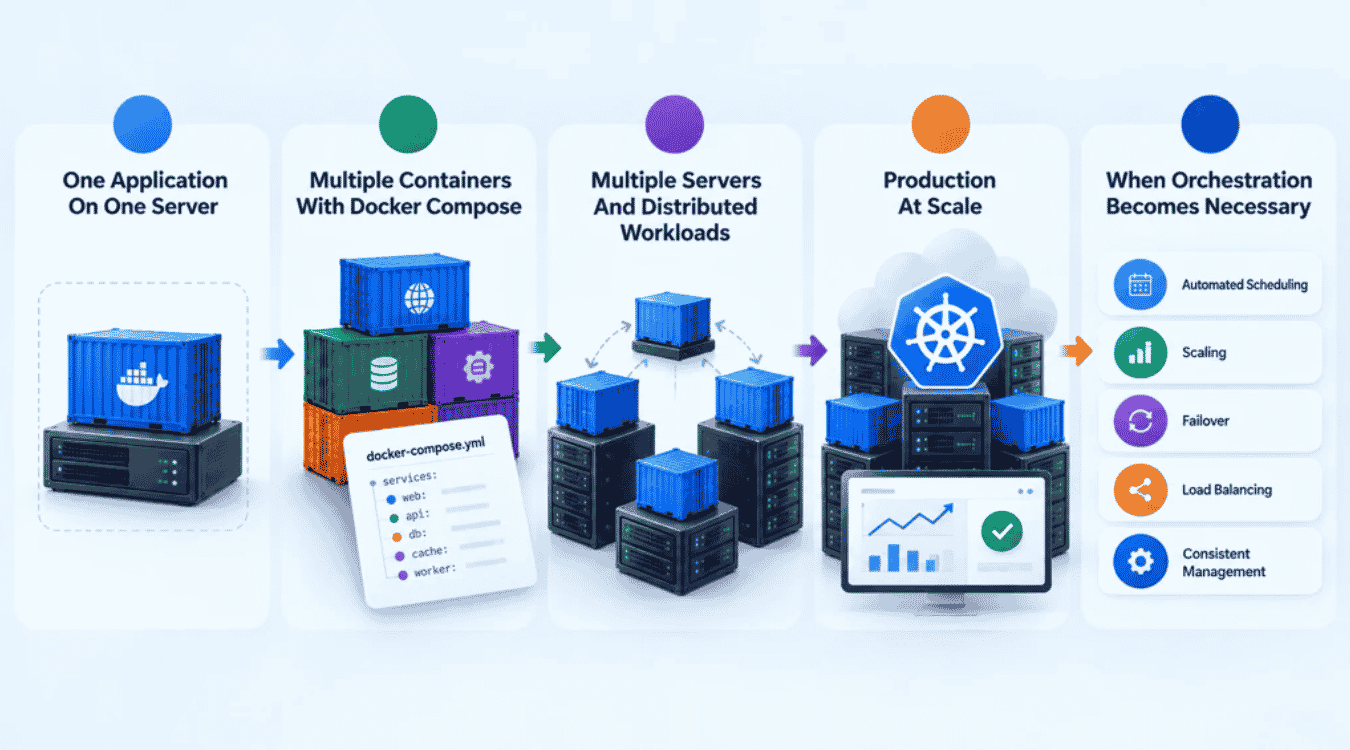
Application infrastructure often grows step by step. A simple Docker environment may work well at first. As more services, servers, and traffic appear, container management becomes harder. The shift to Kubernetes usually happens when manual control is no longer enough.
One Application On One Server
A single application can run comfortably as a Docker container on one physical or virtual machine. Docker packages the application and its dependencies into a container image, then Docker Engine runs that container. Developers can create, run, stop, and update containers with the Docker CLI.
For local development and testing, Docker provides a fast and simple workflow. Docker Desktop also gives developers tools for building and managing containers without setting up a larger container orchestration platform. A single-host setup keeps the deployment process simple and makes it easier to test application changes quickly.
Multiple Containers With Docker Compose
Applications rarely stay as one container. A web application may need a frontend, API, database, cache, and worker. Managing each container separately can become difficult. Docker Compose solves that problem by defining multiple containers, networks, volumes, and configuration in one YAML file.
Compose lets developers manage multi-container applications with simple commands. It also supports development, testing, production, and continuous integration workflows. Each service can run in its own container while Compose handles their configuration and communication.
Multiple Servers And Distributed Workloads
A single server eventually becomes a limitation for some applications. Teams may need multiple servers for higher availability, more compute resources, or better workload distribution. At that point, simply running Docker containers on each server creates more work.
Docker Swarm can manage a cluster of Docker Engines across physical or virtual machines. It can schedule services, provide service discovery, support load balancing, and replace failed replicas.
Kubernetes takes a broader approach to container orchestration. It manages containerized workloads across Kubernetes clusters and schedules workloads across available nodes. Its control plane continuously works toward the desired state defined by the application configuration.
Production At Scale
Production environments introduce more pressure. Traffic can change quickly. Containers can fail. New application versions need controlled deployment. Services must communicate reliably, and compute resources need to be used efficiently.
Kubernetes automates many of these tasks. It supports automated scaling, service discovery, load balancing, rollouts, and self-healing. If a container fails, Kubernetes can restart it. If a Pod needs replacement, Kubernetes can create another one to maintain the desired workload state.
When Orchestration Becomes Necessary
Orchestration becomes useful when teams must manage many containers across multiple servers without handling every container instance manually. The exact point varies by application. Service count alone should not determine the decision.
A team should consider Kubernetes when it needs automated scheduling, scaling, failover, load balancing, and consistent management across distributed systems. Kubernetes is built for containerized applications at scale, while Docker remains a strong choice when a simpler container management model meets the application's needs.
Does Kubernetes Still Use Docker?
The short answer is not in the way many developers assume. Kubernetes no longer includes Docker Engine as its built-in container runtime. Since Kubernetes 1.24, the old dockershim integration has been removed. Modern Kubernetes uses the Container Runtime Interface (CRI) to work with compatible runtimes such as containerd and CRI-O.
What Happened To Dockershim?
Older Kubernetes releases used dockershim to connect the kubelet with Docker Engine. Kubernetes removed dockershim in version 1.24 because the project had moved toward the Container Runtime Interface. CRI gives Kubernetes a standard way to communicate with different container runtimes without maintaining a Docker-specific integration.
The change does not mean Docker disappeared from the Kubernetes ecosystem. Developers can still use Docker to build, test, and package applications. The important difference is where Docker fits in the deployment process.
Docker Images Vs Docker Engine
A Docker image is not the same thing as Docker Engine. A container image packages an application and its dependencies into a portable software bundle. Docker Engine provides the tools and services used to build and run containers.
Kubernetes can use images created with Docker. The cluster does not need Docker Engine simply because Docker created the image. Developers can build an image with Docker, push it to a registry such as Docker Hub, and then reference that image in a Kubernetes workload.
Containerd And CRI-O
Containerd and CRI-O are common container runtimes used with Kubernetes. Kubernetes communicates with the runtime through the Container Runtime Interface. The kubelet uses that interface to create and manage the containers that make up Kubernetes Pods.
The model is straightforward:
Kubernetes → CRI → Container Runtime → Containers
That separation lets platform operators choose an OCI-compatible runtime without tying the Kubernetes architecture to one container technology. It also keeps container orchestration separate from the software that actually runs containers on each node.
Can Kubernetes Still Run Docker Images?
Yes. Docker-built images can still run on Kubernetes. Kubernetes does not require those images to be created by a specific container runtime. The image is typically pushed to a registry first, and Kubernetes pulls it when a Pod is scheduled.
So the important distinction is simple: Docker can build the container image, while Kubernetes can deploy and manage that image. The two technologies can still work together even when Docker Engine is not the runtime on the Kubernetes nodes.
Where Docker Fits In A Modern Kubernetes Workflow
Docker remains useful across the development and application deployment lifecycle. A developer can use Docker Desktop and Docker CLI to create containers, build images, run tests, and prepare applications for deployment. The image can then move to Docker Hub or another registry.
A typical workflow looks like:
Dockerfile → Docker Build → Container Image → Registry → Kubernetes → Pod → Container Runtime
Docker handles much of the packaging and developer workflow. Kubernetes handles scheduling, deployment, scaling, and management across Kubernetes clusters. Docker and Kubernetes therefore work at different layers rather than simply replacing one another.
Docker Vs Kubernetes: Which Approach Fits Your Application?
The right choice depends on your application's needs, not just its size. Docker keeps container management simple, while Docker Compose helps manage multiple containers on a host. Kubernetes adds orchestration, scheduling, scaling, and cluster management for more complex workloads.
Choose Docker When
Docker fits well when your application can run on one host and does not need advanced container orchestration. It works especially well for local development, testing, and simple application deployment. Docker Desktop also gives developers a convenient environment for creating, testing, and managing containers.
A Docker environment keeps the deployment process straightforward. Developers can build container images, run containers, test changes, and move the same images across environments. Docker is a practical choice when simplicity and deployment speed matter more than cluster-level automation.
Choose Docker Compose When
Docker Compose makes sense when an application needs multiple containers that work together. A web application might include an API, database, cache, and background worker. Compose lets you define those services, networks, and storage volumes in one YAML file.
Compose is useful for development, automated testing, CI workflows, and single-host production deployments. It gives teams simple container management without the operational overhead of a Kubernetes cluster.
Choose Kubernetes When
Kubernetes becomes a stronger fit when containerized applications need multiple servers, automated scaling, high availability, or more advanced workload management. It can schedule workloads across nodes and adjust application capacity as demand changes, especially when it sits under a scalable software architecture for high-growth products and a well-designed SaaS architecture.
Kubernetes also helps platform operators manage complex containerized applications at scale. It can maintain the desired application state, replace failed workloads, provide service discovery, and manage resources across a cluster, which is central to many SaaS scalability strategies for sustainable growth. Production Kubernetes environments can run across physical or virtual machines and scale as workload requirements change.
Use Docker And Kubernetes Together When
Docker and Kubernetes do not have to be competing choices. A common workflow uses Docker to package applications into container images and Kubernetes to deploy and manage those images across a cluster.
Docker can handle local development, image creation, and testing. Kubernetes can then manage application deployment, scheduling, scaling, and service communication in production. Docker Compose can also help teams move from multi-container development environments toward Kubernetes deployments. Docker's current Compose tooling supports workflows across development, testing, CI, staging, and production.
Consider PaaS Or Managed Kubernetes
A PaaS can be a better option when your team wants to deploy applications without taking responsibility for the underlying container platform. Managed Kubernetes is another option when you need Kubernetes capabilities but want a provider to handle parts of cluster management.
The decision should match your operational needs. Docker works well for simpler environments. Docker Compose fits multi-container applications on a host. Kubernetes suits distributed workloads that need orchestration and automation, especially for teams following best practices of SaaS architecture. A managed service can reduce platform work when Kubernetes capabilities are useful but operating the cluster yourself is not.
Docker Vs Kubernetes: Real-World Use Cases
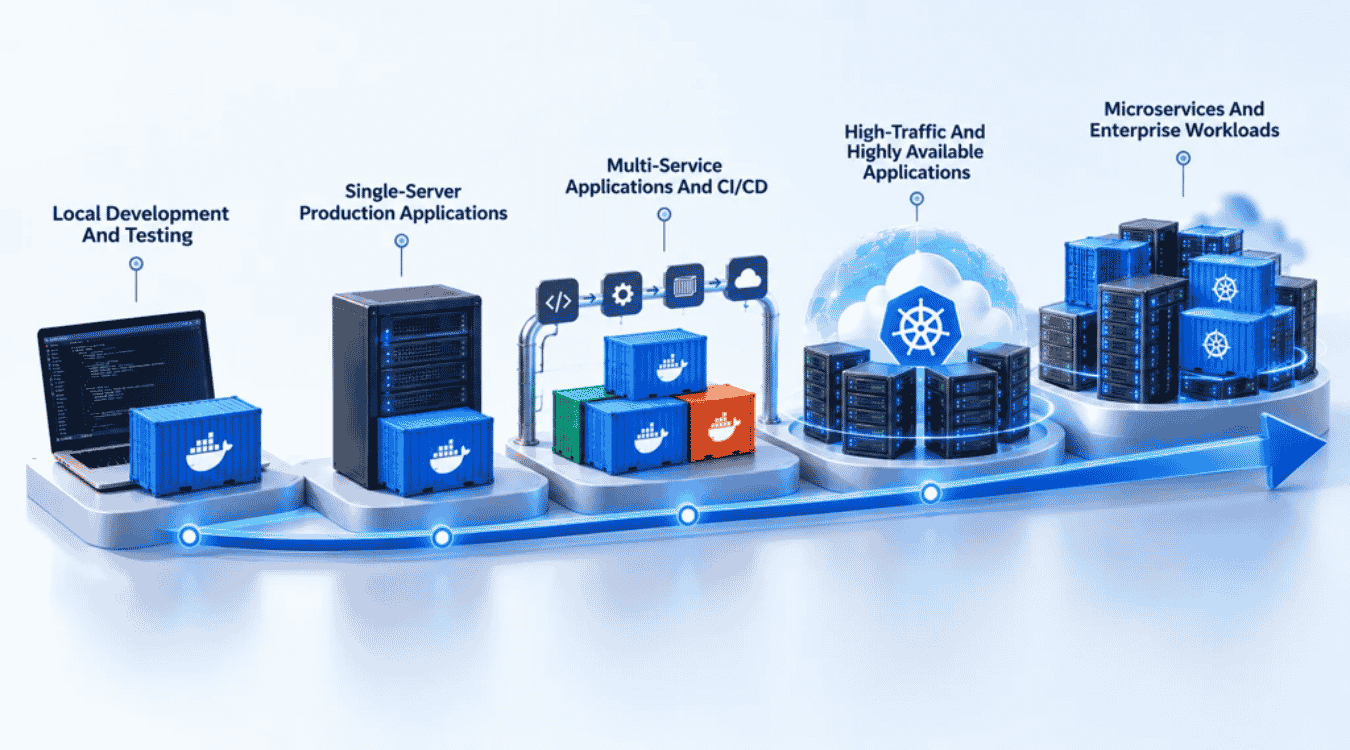
The right choice becomes clearer when you look at real workloads. Docker fits local development and simpler deployments well. Kubernetes becomes more useful as applications add services, servers, traffic, and availability requirements.
Local Development And Testing
Docker is a strong choice for local development and testing. Developers can create a consistent Docker environment without installing every dependency directly on the operating system. Docker Compose can start multiple containers, such as an API, database, cache, and web service, from one configuration.
The same approach works well for automated testing and continuous integration. Teams can create an isolated environment, run tests, and remove the containers afterward. Docker helps developers test changes quickly without setting up a full container orchestration platform.
Single-Server Production Applications
Docker can work well for production applications that run on a single physical or virtual machine. A team can deploy containers on one server and manage them with Docker Engine or Docker Compose.
A single-server setup keeps container management simple. It can suit internal tools, smaller websites, APIs, and applications with predictable traffic. The trade-off is availability. One server can become a single point of failure. Teams that need stronger resilience may eventually need multiple servers.
Multi-Service Applications And CI/CD
Modern applications often contain independent components. An API may depend on a database, cache, queue, worker, and frontend. Docker Compose can define these containerized services in one file and manage their networks, storage volumes, and configuration.
Docker also fits naturally into a CI/CD pipeline. A pipeline can build a container image, run tests, and push the image to a registry. Teams can then deploy the same image to another environment. Docker helps keep the deployment process consistent from development through production.
High-Traffic And Highly Available Applications
High-traffic applications often need more than individual containers on one server. Traffic can change quickly, and a single machine may not provide enough capacity or resilience. Kubernetes can schedule workloads across multiple nodes and scale containerized applications based on demand, fitting naturally into broader enterprise scalability strategies for growth in 2026.
Kubernetes also supports load balancing, service discovery, and automatic recovery. When a workload fails, Kubernetes can create a replacement and work toward the desired state. Those capabilities help platform operators maintain availability as traffic and compute resources change and align closely with modern Site Reliability Engineering frameworks for SaaS.
Microservices And Enterprise Workloads
Kubernetes is well suited to complex containerized applications with many services. Each service can run as an independent component while Kubernetes schedules containers and manages their lifecycle, making it a natural companion to microservices vs monolith architecture decisions and broader monolith-to-microservices migration strategies. Service discovery helps those components communicate across the cluster.
Large organizations can use Kubernetes to manage containerized applications at scale. It provides tools for automated scaling, workload management, and resource allocation across Kubernetes clusters, forming a core piece of modern SaaS infrastructure components and architecture. Docker can still remain part of the workflow by creating the container images that Kubernetes deploys.
Final Decisions
Docker and Kubernetes are not direct competitors. Docker streamlines how developers package, build, and run containerized applications, while Kubernetes automates how those workloads are deployed, scaled, and managed across clusters.
For local development, testing, single-server applications, and simpler deployments, Docker or Docker Compose is often enough. Kubernetes becomes more useful when applications need multiple servers, automated scaling, load balancing, self-healing, and reliable management of many containers. The added power also brings more operational complexity.
The best approach is to match the technology to the workload. Start with Docker when simplicity matters. Move to Kubernetes when container orchestration solves a real infrastructure problem. In many production environments, Docker and Kubernetes work together, with Docker-based tools creating images and Kubernetes managing them at scale.