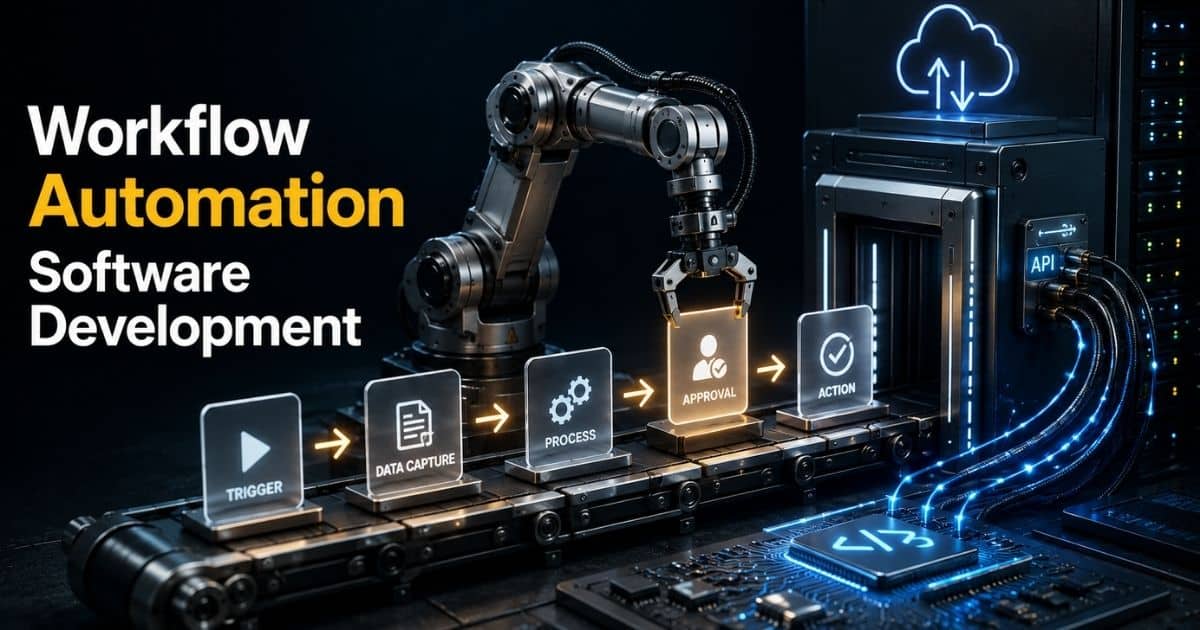
Workflow Automation Software Development For Smarter Business Operations
by Daniel Wright | May 20, 2026 | Technology & Innovation
Table of Contents
- What Is Workflow Automation Software Development
- Core Components Behind A Successful Workflow Automation System
- Workflow Automation Software Development Process From Planning To Deployment
- Key Features Every Workflow Automation Solution Should Include
- Best Technologies, Frameworks, And Tools For Workflow Automation Development
- Common Business Use Cases Across HR, Finance, Operations, And Customer Support
- Major Challenges, Security Risks, And Scalability Considerations In Workflow Automation
- Future Trends In AI-Powered Workflow Automation Software Development
- How GainHQ Builds Smarter Workflow Automation Software For Modern Businesses
- FAQs
Businesses lose time every day because of repetitive tasks, scattered approvals, and manual follow-ups. Teams switch between spreadsheets, emails, and disconnected tools just to complete simple workflows. Small delays turn into bigger operational problems over time. That is where workflow automation software development changes everything.
Modern companies need faster systems and smarter processes. Custom workflow automation software helps teams reduce errors, save time, and improve productivity without adding extra workload. From HR and finance to customer support and operations, automation now plays a major role in daily business activities.
This guide covers everything about workflow automation software development. You will learn how it works, what features matter most, which technologies power modern solutions, common use cases, development challenges, and future trends shaping automation systems.
What Is Workflow Automation Software Development
Workflow automation software development helps businesses automate repetitive tasks and reduce manual processes across different teams. It uses workflow automation tools, rule-based logic, and automation software to create automated workflows for daily business operations. Companies use workflow automation software solutions to manage approval workflows, data entry, follow-ups, recurring tasks, and assigning tasks without manual intervention. A workflow automation solution also improves workflow management, collaboration features, and process improvements across multiple departments.
Modern workflow automation platforms support customizable workflows, low-code development, and seamless integration with business applications like Google Workspace, project management tools, and collaboration tools. Business users and non-technical users can design workflows with pre-built templates, automation recipes, and pre-built apps. Technical users can also add custom code for complex workflows and continuous integration needs.
Good workflow automation software reduces human error, improves performance metrics, tracks audit logs, and helps teams focus on high-value tasks instead of time-consuming routine tasks.
Core Components Behind A Successful Workflow Automation System
Every workflow automation system depends on a few core components that keep business operations fast, accurate, and scalable. Strong workflow automation software does more than automate repetitive tasks. It improves workflow management, reduces human error, and helps multiple teams stay on the same page. Modern businesses also expect seamless integration, customizable workflows, and real-time visibility across different tools and departments.
Workflow Design And Custom Rules
A strong workflow automation solution starts with smart workflow design. Teams need customizable workflows that match their business needs and daily tasks. Simple workflows may handle approval workflows or follow-ups. Complex workflows may support multiple departments, business applications, and recurring tasks.
Most workflow automation software now supports low-code tools and pre-built templates. Non-technical users can design workflows without custom code. Technical users can still customize workflows with rule-based logic and automation recipes. According to Gartner, over 70% of enterprise applications will use low-code technologies by 2028. That shift shows how businesses want faster automation without heavy development work.
Integration Across Business Tools
Modern workflow automation software solutions must connect with different tools. Businesses use project management platforms, collaboration tools, CRM systems, and Google Workspace every day. A workflow automation tool should support seamless integration across multiple channels and business applications.
Disconnected systems create delays and manual intervention. Automated workflows solve that problem by syncing data between platforms automatically. Teams can reduce time-consuming tasks like data entry and assigning tasks across systems. Zapier reported that workers save around 10 hours per week through automation tools and connected workflows. Better integration also improves collaboration features and keeps team members aligned across departments.
Automation Logic And Task Execution
Every automation process depends on predefined rules and task execution. Workflow automation software uses triggers, conditions, and actions to automate routine tasks. Once a workflow starts, tasks become automatically assigned based on workflow process logic.
Automation handles repetitive tasks like approval requests, automated notifications, and follow-ups without delays. Robotic process automation also helps businesses process large volumes of manual tasks faster. Deloitte found that companies using automation report up to 31% lower operational costs. Strong automation logic reduces human error and allows employees to focus on high-value tasks instead of repetitive administrative work.
Security, Audit Logs, And Oversight
Security plays a major role in workflow automation software development. Businesses handle sensitive customer data, internal approvals, and financial records every day. A reliable workflow automation solution needs audit logs, secrets management, and administrative oversight to protect operations.
Audit logs help businesses track workflow activity across multiple teams. Managers can monitor workflow management, approval workflows, and process improvements in real time. Enterprise plan users often need advanced controls for compliance and network health monitoring. IBM reports that the average global cost of a data breach reached $4.88 million in 2024. Secure automation software helps reduce risks while keeping workflows transparent and accountable.
Analytics And Performance Tracking
Performance metrics help businesses understand how workflows perform over time. Workflow automation tools track delays, workflow completion rates, recurring tasks, and automation efficiency. Clear reporting supports better business process decisions and long-term process improvements.
Machine learning now helps workflow automation software identify workflow bottlenecks automatically. Some automation tools also suggest new workflows based on past activity. Business users can monitor team productivity, workflow status, and collaboration patterns from one dashboard. Real-time analytics help companies improve business operations without constant manual oversight. Strong reporting also helps teams measure ROI from workflow automation investments more accurately.
Workflow Automation Software Development Process From Planning To Deployment
A successful workflow automation software development project needs a clear process from start to deployment. Strong planning reduces delays, lowers human error, and improves workflow management across multiple teams, much like a structured startup software development process reduces risks for new products. Each stage helps businesses create scalable automated workflows that match real business needs and support long-term process improvements.
Business Process Analysis
Every workflow automation solution starts with business process analysis. Teams need to identify repetitive tasks, manual processes, and workflow gaps before development begins, which is often easier with expert technology consulting services that bring an outside perspective. This stage helps companies understand where automation can improve business operations and reduce manual intervention.
Business users, department managers, and technical users usually work together during this phase. They review approval workflows, recurring tasks, follow-ups, and data entry activities across multiple departments. According to McKinsey, around 60% of occupations contain tasks that businesses can automate partially. Clear workflow analysis helps teams prioritize high-value tasks and avoid unnecessary automation complexity later.
Workflow Planning And Architecture
A strong workflow process depends on proper planning and system architecture. Developers define workflow design, automation logic, integration needs, and collaboration features before coding starts, often following a structured custom software development process to reduce risks. This stage also helps teams customize workflows based on business needs and future scalability.
Most workflow automation software solutions now support low-code development and customizable workflows. Businesses often choose cloud-based automation software because it supports seamless integration with collaboration tools, project management systems, and Google Workspace. Gartner predicts that the workflow automation market will continue to grow strongly through 2028 because companies want faster digital transformation with lower operational costs.
Development And Integration
The development stage turns workflow plans into working automation systems. Developers build automated workflows, create predefined rules, and connect business applications through APIs and automation tools. Some workflows use custom code for complex workflows, while others rely on pre-built templates and low-code platforms.
Modern workflow automation software also supports robotic process automation and machine learning features. Teams can automate approval workflows, automated notifications, and assigning tasks across multiple channels. Integration remains critical during this phase. Poor system connections often create workflow delays and duplicate tasks. Smooth integration helps team members stay on the same page without switching between different tools constantly.
Testing And Quality Control
Testing helps businesses find workflow issues before deployment. Teams test automation process accuracy, workflow logic, audit logs, and performance metrics during this stage. Quality checks also reduce human error and improve workflow management across multiple teams.
Many businesses test simple workflows first before launching enterprise-wide automation. Developers review network health, secrets management, and administrative oversight controls to protect sensitive data. IBM research shows that automation can reduce operational downtime by up to 30% when systems receive proper testing and monitoring. Reliable testing also improves user-friendly interface performance for non-technical users and business users.
Deployment And Continuous Improvement
Deployment moves workflow automation software into live business operations. Teams launch new workflows gradually to reduce disruption and monitor workflow performance closely. Automated workflows often start with one department before expansion across multiple departments.
Successful deployment also requires employee training and support. Team members need to understand workflow automation tools, collaboration features, and automation recipes before daily use. After launch, businesses continue workflow optimization through performance metrics and user feedback. Continuous integration helps developers update automation software without major downtime. Companies that monitor workflow improvements regularly usually achieve better productivity gains and long-term automation success.
Key Features Every Workflow Automation Solution Should Include
A reliable workflow automation solution needs more than simple task automation. Modern businesses expect flexible workflows, smart integrations, better collaboration, and strong security controls. The right feature set helps companies automate business operations, reduce manual tasks, and improve workflow management across multiple teams and departments.
Custom Workflow Builder
Every business has different workflow needs. A strong workflow automation software should support customizable workflows for different teams, tasks, and approval structures. Business users need simple workflow design tools without heavy technical knowledge or constant developer support.
Most workflow automation tools now offer low-code builders and pre-built templates. Non-technical users can customize workflows with drag-and-drop features and predefined rules. Technical users can also use custom code for complex workflows and advanced automation logic. Gartner reports that low-code platforms will power over 70% of application development activity by 2028. Flexible workflow design helps businesses adapt faster to process changes and operational growth.
Third-Party Integration Support
Modern business operations rely on multiple tools and platforms every day. Workflow automation software solutions should connect easily with project management systems, CRM platforms, collaboration tools, and Google Workspace. Seamless integration keeps data synchronized across different business applications.
Disconnected systems often create repetitive tasks, manual data entry, and workflow delays. Automation tools reduce those issues by connecting workflows across multiple channels automatically. Pre-built apps and API support also improve workflow management efficiency. According to Zapier, 88% of small businesses say automation helps them compete with larger companies. Strong integration features help teams stay on the same page while reducing manual intervention.
Automated Notifications And Task Routing
Automated workflows work best when tasks move without delays. Workflow automation software should support automated notifications, automatically assigned tasks, and approval workflows across departments. Fast task routing improves accountability and keeps workflow processes organized.
Rule-based logic helps businesses automate follow-ups, approvals, and recurring tasks based on predefined conditions. Team members receive updates instantly through collaboration tools or business applications. This feature also reduces human error caused by missed emails or delayed responses. Many workflow automation software solutions now include automation recipes that simplify task automation for non-technical users. Faster task routing improves productivity and helps teams complete high-value tasks more efficiently.
Security And Audit Controls
Security remains one of the most important features in workflow automation software development. Businesses handle sensitive customer records, financial data, and internal workflow approvals daily. Strong automation software should include audit logs, secrets management, role-based access, and administrative oversight features.
Audit logs help businesses monitor workflow activity and track process changes across multiple teams. Enterprise plan users often require advanced compliance and workflow management controls for regulatory requirements. IBM research shows the average global data breach cost reached $4.88 million in 2024. Strong security controls reduce operational risks and improve trust across business operations. Reliable security also protects automated workflows from unauthorized access and workflow disruptions.
Analytics And Workflow Reporting
Performance tracking helps businesses measure workflow success and process improvements. Workflow automation tools should provide real-time performance metrics, workflow reports, and productivity insights for business users and managers. Clear reporting helps teams identify workflow bottlenecks and improve automation processes over time.
Modern workflow automation software also uses machine learning to detect workflow inefficiencies automatically. Teams can monitor approval workflows, routine tasks, and collaboration patterns from one dashboard. Reporting tools help businesses compare manual processes against automated workflows to measure ROI more accurately. Deloitte reports that companies using workflow analytics often achieve stronger operational efficiency and faster decision-making across multiple departments.
Best Technologies, Frameworks, And Tools For Workflow Automation Development
The success of workflow automation software development depends heavily on the technology stack behind it. Businesses need scalable frameworks, reliable automation tools, and flexible integration systems to support automated workflows across multiple departments, especially in SaaS products that demand robust scalability strategies for sustainable growth. The right technologies also improve workflow management, reduce manual intervention, and support long-term business growth.
Low Code Development Platforms
Low-code platforms have changed how businesses build workflow automation software solutions. Companies now create custom workflows faster without large development teams or complex coding processes. Business users can design workflows through visual builders and pre-built templates.
Platforms like Microsoft Power Automate, OutSystems, and Mendix support workflow automation, approval workflows, and collaboration features with minimal custom code. Technical users can still extend automation logic when needed. Gartner predicts that low-code development will account for over 70% of new enterprise applications by 2028. Low-code automation software also helps businesses reduce development costs and speed up workflow deployment across multiple teams.
Backend Frameworks And APIs
Backend frameworks control workflow logic, automation processes, and system communication. Popular technologies like Node.js, Django, Spring Boot, and Laravel support scalable workflow automation software development, especially when teams prioritize flexible, custom software solutions over rigid off-the-shelf tools. These frameworks help developers manage repetitive tasks, business rules, and automated workflows efficiently.
API integration also plays a major role in workflow automation solutions. Businesses often connect CRM systems, project management tools, and collaboration tools through APIs for seamless integration. REST APIs and GraphQL improve data exchange across different tools and business applications. Strong backend architecture helps workflow automation tools process recurring tasks faster while reducing workflow delays and human error.
Cloud Infrastructure And DevOps
Cloud platforms support flexible and scalable workflow automation systems. AWS, Microsoft Azure, and Google Cloud help businesses deploy automation software without relying on local machine infrastructure, but teams still need careful cloud migration planning to avoid disruption. Cloud services also improve network health, workflow performance, and operational reliability.
Continuous integration and DevOps tools help teams release workflow updates faster. Technologies like Docker, Kubernetes, and Jenkins automate deployment pipelines and workflow testing processes, and following modern DevOps best practices keeps these pipelines reliable and secure. According to Flexera’s 2025 State of the Cloud Report, over 89% of enterprises now use multi-cloud strategies for business operations. Cloud-based workflow automation software solutions also improve collaboration between technical users and multiple teams across different locations.
Robotic Process Automation Tools
Robotic process automation helps businesses automate repetitive manual tasks across systems. RPA tools like UiPath, Automation Anywhere, and Blue Prism support rule-based logic for data entry, approval workflows, and recurring administrative tasks, working alongside AI-powered productivity tools that simplify day-to-day work for teams. Businesses often use these automation tools to reduce manual processes and improve workflow management.
RPA software works well for high-volume automation tasks that follow predefined rules. Automated notifications, assigning tasks, and business process updates become faster with robotic process automation. Deloitte reports that organizations using RPA often achieve ROI within 12 months. Strong automation tools also help employees focus more on high-value tasks instead of repetitive operational work.
Analytics And AI Technologies
Modern workflow automation software now includes machine learning and analytics tools for smarter automation. AI technologies help businesses monitor performance metrics, detect workflow bottlenecks, and optimize workflow processes automatically. Analytics also improve administrative oversight and process improvements across multiple departments.
Tools like Power BI, Tableau, and Google Looker provide workflow reporting and business insights. Some workflow automation software solutions also use predictive analytics to recommend new workflows and automation recipes. Businesses increasingly rely on a wide range of artificial intelligence software applications to customize workflows based on real-time activity and user behavior. McKinsey reports that companies using AI automation technologies often improve operational efficiency by up to 40% across business operations.
Common Business Use Cases Across HR, Finance, Operations, And Customer Support
Workflow automation software supports almost every department inside modern businesses. Companies use automated workflows to reduce repetitive tasks, improve workflow management, and speed up daily business operations. From human resources to customer support, workflow automation solutions help multiple teams complete tasks faster with fewer errors and less manual intervention.
HR Recruitment And Employee Onboarding
Human resources teams handle many repetitive tasks every day. Resume screening, interview scheduling, approval workflows, and employee onboarding often take hours without automation. Workflow automation software helps HR teams automate these routine tasks and improve workflow processes.
Automated workflows can assign onboarding tasks, send automated notifications, and manage employee documents across multiple departments. Collaboration tools and business applications also help HR teams stay on the same page during recruitment cycles. According to SHRM, companies with strong onboarding processes improve employee retention by up to 82%. Workflow automation tools reduce manual processes and help HR teams focus more on employee engagement and high-value tasks.
Finance Approval And Invoice Processing
Finance departments depend heavily on workflow automation solutions for accuracy and speed. Manual invoice approvals, expense reviews, and payment tracking often create delays and human error. Automation software improves workflow management by routing approvals through predefined rules automatically.
Robotic process automation also helps finance teams automate data entry and recurring tasks across business applications. Workflow automation software solutions track audit logs, performance metrics, and approval workflows in real time. Deloitte reports that finance automation can reduce processing costs by nearly 40%. Automated workflows also improve administrative oversight and reduce risks related to manual intervention in financial operations.
Operations And Internal Task Management
Operations teams use workflow automation software to manage daily workflow processes across multiple teams. Businesses often automate assigning tasks, inventory updates, follow-ups, and process approvals to improve operational efficiency. Workflow automation tools reduce delays caused by disconnected systems and manual coordination.
Project management platforms and collaboration tools also support customizable workflows for operations teams. Automated notifications keep departments updated across multiple channels without constant monitoring. Many companies now use low-code workflow automation software to customize workflows faster based on changing business needs, and real-world examples show how custom software has transformed companies by aligning automation with unique processes. McKinsey reports that operational automation can improve productivity by up to 30% in some industries.
Customer Support Ticket Automation
Customer support teams handle large volumes of repetitive customer requests every day. Workflow automation software helps businesses route support tickets, assign cases, and send automated responses without delays. Automated workflows improve response time and reduce customer frustration.
Workflow automation solutions can prioritize tickets using predefined rules and machine learning. Customer requests become automatically assigned based on urgency, department, or support category. Integration with CRM systems and collaboration features also improves workflow management across support teams. HubSpot research shows that 90% of customers expect immediate responses for support issues. Fast automation processes help businesses deliver better customer experiences while reducing repetitive manual tasks.
Marketing Campaign And Lead Workflows
Marketing teams use workflow automation tools to manage campaigns, lead nurturing, and follow-ups across different channels. Automation software helps businesses schedule emails, track customer activity, and automate repetitive campaign tasks without manual oversight.
Workflow automation software solutions also support seamless integration with CRM systems, analytics platforms, and Google Workspace. Teams can customize workflows based on customer behavior and campaign goals. Automated notifications help marketing and sales teams stay aligned throughout the customer journey. According to Salesforce, marketing automation increases sales productivity by around 14.5% on average. Strong workflow automation helps businesses improve campaign performance while reducing time-consuming manual work.
Major Challenges, Security Risks, And Scalability Considerations In Workflow Automation
Workflow automation software improves business operations, but every automation process also brings technical and operational challenges. Businesses must manage security risks, workflow complexity, system scalability, and integration issues carefully. A strong workflow automation solution should support long-term growth without creating workflow bottlenecks or operational disruptions.
Complex Workflow Management
Complex workflows often become difficult to manage as businesses grow. Multiple departments, approval workflows, and business applications create dependencies across automated workflows. Small workflow issues can quickly affect business operations and delay important tasks.
Many companies start with simple workflows but later struggle with workflow management at scale. Poor workflow design also creates repetitive manual intervention and process confusion for team members. Workflow automation software should support customizable workflows and flexible automation logic to handle changing business needs. Gartner reports that poor process complexity remains one of the biggest barriers to digital transformation success in enterprise environments.
Security And Data Protection Risks
Workflow automation software handles sensitive customer data, employee records, and financial information daily. Weak security controls increase the risk of unauthorized access, data leaks, and workflow disruptions. Businesses need strong audit logs, secrets management, and administrative oversight to protect automated workflows.
Cloud-based automation software also increases the importance of network health and access management. Companies often connect multiple channels and third-party business applications through APIs and collaboration tools. IBM reports that the average cost of a data breach reached $4.88 million globally in 2024. Strong security frameworks help workflow automation software solutions reduce operational risks and maintain compliance across business operations.
Integration And Compatibility Problems
Modern businesses use different tools across HR, finance, customer support, and project management. Workflow automation tools must support seamless integration with CRM systems, collaboration tools, Google Workspace, and other business applications. Poor integration often creates duplicate tasks, workflow delays, and data synchronization problems.
Legacy systems also create major automation challenges. Some older platforms lack API support or modern workflow automation capabilities, which often signals a need for broader software modernization initiatives. Businesses may need custom code or middleware to connect workflows across systems. Zapier research shows that employees waste several hours weekly switching between disconnected tools. Strong integration architecture helps businesses reduce repetitive tasks and improve workflow management across multiple teams.
Scalability And Performance Issues
Workflow automation software should handle business growth without slowing workflow processes. Many automation systems work well with smaller workloads but struggle when workflow volume increases. Large enterprises often manage thousands of automated workflows, approval requests, and recurring tasks every day, and some ultimately choose custom platforms over off-the-shelf tools, as shown in a build vs buy custom software case study.
Scalable workflow automation solutions use cloud infrastructure, continuous integration, and performance monitoring to support long-term growth. Businesses also need reliable automation tools that maintain fast response times during peak activity and fit into broader enterprise scalability strategies for future expansion. According to Flexera, more than 89% of enterprises now use cloud environments to improve scalability and operational flexibility. Strong scalability planning helps companies avoid workflow failures and system downtime.
User Adoption And Process Resistance
Employee adoption remains one of the biggest workflow automation challenges. Many business users resist workflow automation because they fear complexity, job disruption, or workflow changes. Poor training also creates confusion around automation tools and workflow management processes.
Workflow automation software should include a user-friendly interface, low-code functionality, and clear collaboration features for non-technical users. Investing in thoughtful UI/UX design for SaaS products also helps teams adopt new automation tools with less friction. Businesses often achieve better adoption rates when employees understand how automation reduces repetitive tasks and supports high-value tasks. McKinsey research shows that companies with strong change management strategies achieve much higher automation success rates. Proper onboarding and workflow support help multiple teams adapt faster to new workflows and automation processes.
Future Trends In AI-Powered Workflow Automation Software Development
AI is changing how businesses build and manage workflow automation software. Modern automation tools now go beyond simple rule-based logic and repetitive tasks, and understanding the difference between AI automation and traditional automation helps companies choose the right approach for each workflow. Companies use machine learning, predictive analytics, and intelligent automation to improve workflow management, reduce manual intervention, and support faster business operations across multiple departments.
AI-Driven Workflow Decisions
Traditional workflow automation follows predefined rules and fixed automation logic. AI-powered workflow automation software can now analyze data, predict outcomes, and make workflow decisions automatically. Machine learning helps businesses improve workflow processes without constant manual updates.
AI systems can prioritize approval workflows, detect workflow delays, and route tasks based on historical patterns. Workflow automation tools also improve automated notifications and customer support workflows through predictive automation. According to McKinsey, nearly 55% of organizations now use AI in at least one business function. AI-powered workflow automation solutions help businesses reduce repetitive tasks while improving decision-making speed and operational accuracy.
Hyperautomation Across Departments
Hyperautomation combines robotic process automation, AI, analytics, and workflow automation into one connected automation process. Businesses now automate workflow processes across human resources, finance, customer support, and operations at the same time. This trend supports faster digital transformation and better workflow management.
Modern workflow automation software solutions connect collaboration tools, business applications, and automation tools through seamless integration. Automated workflows now handle recurring tasks, data entry, and assigning tasks across multiple channels with minimal human intervention. Leaders building SaaS platforms can follow an AI-driven automation in SaaS guide to align these capabilities with product strategy and growth. Gartner predicts that organizations using hyperautomation technologies will lower operational costs significantly over the next few years. Strong automation ecosystems also help multiple teams stay on the same page across business operations.
Low Code AI Automation Platforms
Low-code platforms continue to reshape workflow automation software development. Businesses want automation software that non-technical users can manage without heavy coding knowledge. AI-powered low-code systems now help users design workflows, customize workflows, and build automation processes faster.
Pre-built templates, automation recipes, and drag-and-drop workflow design tools reduce development time significantly. Technical users can still add custom code for complex workflows and advanced integrations, especially when building AI-powered software products that need intelligent decision-making and personalization. Gartner expects low-code adoption to grow rapidly as companies face developer shortages worldwide. Low-code workflow automation tools also help business users create new workflows without relying fully on IT departments or external developers.
Predictive Analytics And Smart Monitoring
Modern workflow automation software now focuses heavily on predictive analytics and workflow intelligence. AI systems monitor performance metrics, workflow bottlenecks, audit logs, and workflow trends in real time. Businesses use these insights to improve process improvements and reduce workflow failures.
Smart monitoring tools can detect network health issues, workflow delays, and security risks before they affect business operations. Workflow automation solutions also use analytics to improve resource allocation across multiple departments. Deloitte reports that organizations using predictive analytics often improve operational efficiency by more than 30%. Intelligent reporting helps companies optimize workflow management and make faster business decisions with less manual oversight.
Human And AI Collaboration
Future workflow automation systems will focus more on human and AI collaboration instead of full automation replacement. Businesses still need employees for strategic decisions, customer communication, and high-value tasks. AI helps automate routine tasks while humans manage exceptions and complex business needs.
Workflow automation software now includes collaboration features that support both automated workflows and team-based workflow management. AI assistants can suggest workflow changes, automate follow-ups, and improve project management activities across multiple teams. PwC research shows that businesses using AI collaboration tools often improve employee productivity and customer experience together. Balanced automation helps companies reduce human error while keeping business operations flexible and people-focused.
How GainHQ Builds Smarter Workflow Automation Software For Modern Businesses
GainHQ helps modern businesses simplify operations through scalable workflow automation software development. The company builds custom software development solutions that reduce repetitive tasks, improve workflow management, and support faster business operations across multiple departments. Its approach focuses on flexible workflow design, seamless integration, and automation systems that grow with changing business needs.
GainHQ also develops AI-powered SaaS products like Gain.io, EasyDesk, and Payrun to automate approval workflows, customer support, HR operations, and sales activities. These platforms increasingly include AI-driven features that boost user engagement and guide customers through complex workflows more intuitively. Businesses can automate recurring tasks, follow-ups, data entry, and automated notifications through user-friendly workflow automation tools. The company uses modern technologies like React, Node.js, AWS, GraphQL, and Docker to build reliable automation software with strong scalability and performance.
FAQs
Can Small Businesses Use Workflow Automation Software Effectively?
Yes. Modern workflow automation software solutions now support low-code platforms, pre-built templates, and user-friendly interfaces for small teams. Businesses can automate repetitive tasks, approval workflows, and follow-ups without large development costs or complex infrastructure.
Does Workflow Automation Replace Human Employees?
No. Workflow automation helps employees reduce manual tasks and focus more on high-value tasks. Automated workflows handle repetitive processes, while team members manage customer communication, decision-making, and strategic business operations.
How Long Does Workflow Automation Software Development Usually Take?
Workflow automation software development timelines depend on workflow complexity, integration requirements, and customization needs. Simple workflows may take a few weeks, while complex workflows with multiple business applications and custom code can require several months.
Which Industries Benefit Most From Workflow Automation Solutions?
Industries like healthcare, finance, ecommerce, logistics, SaaS, and human resources benefit heavily from workflow automation tools. Businesses use automation software to improve workflow management, reduce human error, and automate recurring tasks across multiple departments.
Can AI Improve Workflow Automation Performance?
Yes. AI and machine learning improve workflow automation by analyzing performance metrics, optimizing workflow processes, and automating decision-making. Recent market reports show the workflow automation market growing rapidly as businesses invest more in AI-powered automation tools.