Choosing the right software deployment model can have a lasting impact on your business operations, costs, security, and scalability. SaaS (Software as a Service) and on-premise software are two of the most common options, each offering distinct advantages and challenges.
SaaS solutions are hosted by a third-party provider and accessed through the internet, making them easy to deploy, maintain, and scale. On-premise software, on the other hand, is installed and managed within an organization's own infrastructure, providing greater control over data and customization.
As businesses evaluate their technology investments, understanding the differences between these deployment models becomes essential. This guide compares SaaS vs on premise software across key factors such as cost, security, flexibility, maintenance, and performance to help you determine which option best aligns with your business goals and operational requirements.
Below is a practical comparison of SaaS vs on premise software deployment.
SaaS Vs On Premise Software: Key Differences
The main difference comes down to ownership versus subscription access.
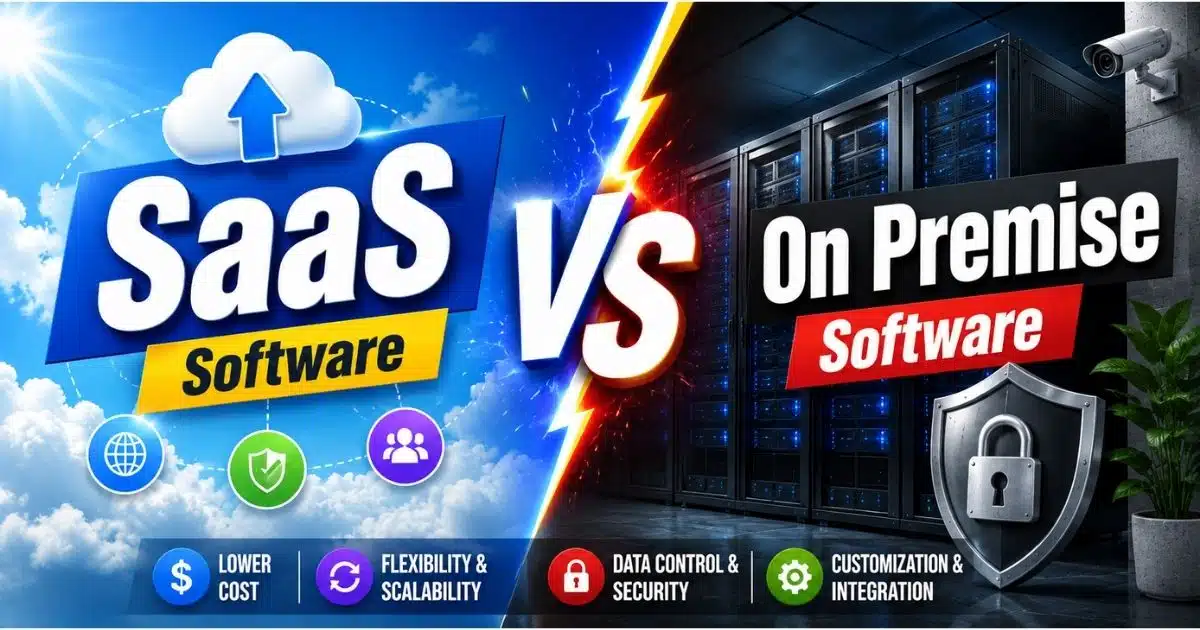
SaaS software is hosted in the cloud by a vendor and delivered over the internet, where businesses pay on a subscription basis to access software applications through web browsers. The SaaS vendor handles servers, updates, security patches and infrastructure management. On premises software, by contrast, is installed and operated on your own servers and infrastructure. Your organization purchases software licenses outright and takes full responsibility for hardware, data storage, ongoing maintenance and security measures.
SaaS focuses on accessibility and reduced IT burden while on premise emphasizes complete control and customization. Both saas and on premises approaches can serve business needs effectively, but the management experience differs significantly, much like the tradeoffs organizations weigh when comparing custom software vs SaaS solutions.
Feature | SaaS | On Premise |
|---|---|---|
Hosting | Third party provider manages cloud infrastructure | Installed on your own IT infrastructure |
Pricing | Subscription-based (monthly/annual per user) | Perpetual software licenses plus hardware costs |
Deployment Speed | Days to weeks | Weeks to months |
Maintenance | SaaS providers handle updates automatically | Internal IT team manages all updates |
Customization | Limited to vendor configuration options | Extensive tailoring to organizational needs |
Scalability | Elastic, on-demand scaling | Requires additional hardware purchases |
Data Control | Shared responsibility with service provider | Full organizational control |
Internet Dependency | Requires internet connection | Can run offline without internet |
Upfront Cost | Low | Significant upfront costs |
Long-Term Cost | Cumulative subscriptions may grow | Potentially lower after initial investment |
Security Management | Vendor-managed with dedicated teams | Organization-managed with internal resources |
Remote Access | Access from any location via internet | Typically limited to on-site or VPN |
Cost Structure And Budget Impact
Financial considerations often drive the initial decision between deployment models. The software delivery model you select determines whether costs flow as operating expenses or capital expenditures, and this distinction shapes budget planning for years.
Cost Factor | SaaS | On Premise |
|---|---|---|
Initial Investment | Minimal (onboarding, training) | High (licenses, hardware, infrastructure) |
Ongoing Fees | Monthly/annual subscription | Annual maintenance (18-22% of license cost) |
IT Staffing | Reduced internal demands | Dedicated IT staff required |
Hardware | None | Servers, networking, storage, refresh every 3-5 years |
Hidden Costs | Unused licenses, price increases, egress fees | Energy, real estate, physical security |
3-Year TCO (25 employees) | $54,000 - $108,000 | $220,000 - $500,000 |
SaaS Cost Model
SaaS solutions typically use subscription-based pricing models, with fees charged per user per month or based on usage. This software model bundles infrastructure, software maintenance, support and updates into one predictable operating expense. SaaS eliminates maintenance costs associated with on-premises solutions, removing the need to budget separately for server upkeep, patching or hardware replacement, though businesses should still plan carefully using a structured SaaS development cost guide.
Initial investment is minimal, often limited to onboarding, training and data migration. However, cumulative SaaS subscription fees may exceed on-premise costs over time, especially for large-scale implementations. Hidden costs can add up as well. Organizations frequently carry 25-30% in unused license waste, and SaaS pricing tends to increase by 5-15% at renewal cycles. For a company with 25 employees, SaaS costs over three years typically range between $54,000 and $108,000.
SaaS is ideal for startups and small-to-medium businesses due to flexibility in managing cash flow, since there are no large capital outlays to absorb.
On Premise Cost Model
On-premises solutions require significant upfront investments in perpetual software licenses, server procurement, networking equipment and physical data center space including cooling and power systems. Organizations also need to budget for ongoing IT maintenance expenses, including staff salaries, hardware redundancy and annual maintenance fees that typically run 18-22% of the original license cost.
While initial costs are higher, long-term expenses may stabilize once the system is fully implemented. Hardware refreshes every 3-5 years introduce recurring large expenditures, and hidden costs like energy consumption, real estate and physical security are often underestimated. In the same 25-employee comparison, on premises software costs over three years range from $220,000 to $500,000.
A particularly striking example comes from manufacturing execution systems: a mid-size plant with 20-30 machines saw on-premise 3-year TCO of $250,000-$500,000, while the equivalent cloud solution cost roughly $35,000-$60,000. That places on-prem TCO at 7-10x higher than cloud over that period.
Implementation Speed And Setup Requirements
Deployment timelines vary dramatically between the two models, and the speed at which your teams can start using new software solutions directly affects time-to-value.
Implementation Factor | SaaS | On Premise |
|---|---|---|
Typical Timeline | Days to weeks | Weeks to months (6-18 months for enterprise ERP) |
Hardware Procurement | None required | Servers, storage, networking |
Technical Configuration | Minimal | Extensive (servers, firewalls, network, DR) |
Primary Focus | User training and data migration | Infrastructure setup and system integration |
IT Expertise Needed | Basic administration | Specialized technical teams |
SaaS Implementation
SaaS applications can be deployed rapidly since they are web-based. Once a subscription is purchased, account setup, user provisioning and basic training represent the primary tasks. For straightforward tools like customer relationship management or productivity platforms, deployment may happen in hours. For SaaS ERP systems or specialized vertical solutions, setup typically spans days to weeks, especially when they form part of a broader cloud migration planning initiative.
Implementation focuses on user training and data migration rather than technical infrastructure setup. The SaaS vendor handles hosting, infrastructure, patching and data backup. That said, onboarding, integrations and legacy data migration remain non-trivial tasks, especially when connecting to existing business processes through API-based integrations, and they benefit from structured SaaS development services that account for architecture, security and long-term support.
On Premise Implementation
On premise deployment often takes months due to hardware procurement, software installation and system integration requirements. IT teams must select and procure servers, configure network infrastructure, establish security protocols, set up disaster recovery systems and ensure proper connectivity across the organization.
For enterprise resource planning systems like SAP or Oracle, implementations regularly take 6-18 months when consulting, integration and change management are factored in. On-premises solutions allow extensive customization and integration capabilities, but this flexibility adds substantial time to the rollout. Detailed planning, technical expertise and significant coordination across multiple departments are necessary before the system goes live.
Maintenance Responsibilities And Support
Ongoing system management creates different operational demands for each software solution, influencing how your internal IT department allocates its time and resources, and whether you rely primarily on in-house teams or outsourced software development partners.
Maintenance Aspect | SaaS | On Premise |
|---|---|---|
Software Updates | Automatic, vendor-managed | Manual, internally scheduled |
Security Patches | Continuous, handled by provider | Applied by internal team |
Infrastructure Monitoring | Vendor responsibility | Organization responsibility |
Support Model | Vendor support tiers included | Vendor covers software only, not infrastructure |
Downtime Management | Scheduled by vendor outside business hours | Coordinated by internal IT |
SaaS Maintenance
SaaS providers handle maintenance and updates automatically, delivering security patches, bug fixes and infrastructure monitoring without requiring action from the customer. SaaS users receive the latest features without additional effort, and SaaS applications are updated more frequently than on-premises applications, keeping software current with evolving standards, especially when paired with robust SaaS monitoring tools that track performance and user experience.
Support comes directly from the SaaS vendor through established channels, reducing internal IT workload. The shared responsibility model means the vendor manages infrastructure security while the customer remains responsible for user access management, data input, configuration and compliance documentation. This arrangement frees IT staff to focus on strategic initiatives rather than routine software maintenance.
On Premise Maintenance
On-premises systems require an internal IT team for support, handling everything from applying patches and monitoring systems to managing data backup procedures, disaster recovery planning and hardware component replacement. On-premises solutions require dedicated resources for ongoing maintenance, and these demands grow with system scale and aging infrastructure.
On-premises software requires manual updates from the organization, and each upgrade cycle involves compatibility testing, scheduling downtime and coordinating across departments. The risk of system issues due to misconfiguration or human error increases without dedicated monitoring tools and skilled staff. While this creates higher resource demands, it also provides greater control over timing, processes and the pace of change.
Security And Compliance Control
Data protection approaches differ based on who manages the infrastructure. For organizations handling sensitive or confidential data, this distinction often becomes the deciding factor in selecting a deployment model.
Security Factor | SaaS | On Premise |
|---|---|---|
Security Investment | Enterprise-grade, vendor-funded | Depends on organization's budget |
Certifications | ISO 27001, SOC 2, FedRAMP (vendor-held) | Must be achieved internally |
Data Location Control | Limited (vendor's data centers) | Full control over on premises data centers |
Security Teams | Dedicated vendor security staff | Internal security personnel |
Compliance Flexibility | Must align with vendor's compliance scope | Can tailor to exact regulatory requirements |
Update Frequency | Continuous, automatic | Depends on internal patch schedule |
SaaS Security
SaaS providers invest heavily in security measures, maintaining certifications like ISO 27001, SOC 2 and FedRAMP along with continuous monitoring, penetration testing and encryption at rest and in transit. SaaS providers have dedicated security teams to minimize incidents, and many smaller organizations simply cannot match this level of data protection individually. According to a 2025 PwC survey, 84% of IT professionals believe SaaS solutions are safer than on-premise alternatives, provided organizations also follow established SaaS security best practices.
However, data security concerns arise from third-party servers in SaaS. Multi-tenant architecture introduces risks around tenant separation, data residency and compliance with local and international regulations like GDPR or HIPAA. Organizations share responsibility for data governance, must ensure vendor compliance meets their specific security requirements and should carefully review vendor contracts and audit rights, ideally against a clear SaaS security architecture framework. SaaS applications depend on internet connectivity for access, adding another consideration for business continuity planning.
On Premise Security
On-premises solutions offer complete control over data security, including data storage location, access policies, physical security and network segmentation. For highly regulated industries such as government, defense and healthcare, where regulation requires data not to leave certain geographies, on premise solutions may satisfy compliance requirements that cloud solutions cannot.
On-premises solutions require regular updates to security systems, and success depends on internal security expertise with consistent implementation of best practices. The operational overhead is significant: organizations must stay ahead of threats, maintain redundancy, enforce detailed policies and employ skilled staff. Neglecting any area can lead to vulnerabilities. But for organizations with the resources and expertise, this level of control over sensitive data remains a compelling advantage.
Scalability And Growth Considerations
Business growth patterns influence which software model supports expansion more effectively, especially when you consider long-term SaaS scalability strategies versus fixed on-premises capacity.
SaaS scales instantly as needed. SaaS platforms can expand user licenses effortlessly, and SaaS can adjust subscription plans for changing needs. Adding users or capacity is simply a configuration change, making cloud services well suited for seasonal demand fluctuations and geographic expansion. An algorithms software company, for example, migrated from its on-premises SaaS platform to Google Cloud specifically to improve global availability and reduce latency, adopting services like load balancing, IAM and cloud security tools. SaaS allows easy scaling up or down without physical changes, and the cost of scaling remains incremental when backed by thoughtfully designed scalable SaaS tools.
On-prem systems require purchasing additional hardware to scale, along with capacity planning for power, cooling and floor space. Scaling on-prem solutions involves higher upfront costs, and reducing capacity does not recover the sunk investment in hardware and facilities. This approach works better for predictable growth patterns and stable user bases where dedicated resources justify the investment. Organizations with very large, steady workloads may find cost advantages over time by owning rather than renting computing services.
SaaS allows users to work from any location with an internet connection, which favors remote access and distributed teams within broader cloud-based software services models. On the other hand, offline reliability is a benefit of on-premise software, since on-premise software can run offline without internet, an important consideration for operations where connectivity is unreliable.
SaaS Vs On Premise: Which Should You Choose?
Choose SaaS if you prioritize quick implementation, predictable costs, automatic updates and global accessibility. SaaS solutions offer elastic scalability for user demand and suit growing businesses, remote teams and organizations wanting to focus resources on core business activities rather than infrastructure management. SaaS applications provide remote access via an internet connection, making them natural fits for distributed workforces and for organizations investing in structured SaaS product development.
Choose on premise if you require maximum customization, strict data control, and have robust IT capabilities. On-premises software can be tailored to fit specific organizational needs, and this approach works best for large enterprises, highly regulated industries, and organizations with specific integration requirements. SaaS applications offer limited customization compared to on-premise solutions, so businesses with complex, unique business processes may find on prem solutions more accommodating.
Many businesses also consider hybrid approaches, combining SaaS efficiency with on-premises control for different business functions. A private cloud strategy or selective cloud computing adoption lets organizations keep sensitive workloads on premises while running less critical software applications in the cloud, aligning broader infrastructure plans with enterprise scalability strategies for growth. A U.S. federal agency, for instance, successfully migrated a learning management system serving over 50,000 users from on premise to a FedRAMP-certified SaaS LMS, while a medical technology firm with approximately $56M in revenue rearchitected its legacy on-prem application to cloud-native SaaS on AWS, improving scalability and positioning the company for acquisition.
Industry projections suggest SaaS will account for approximately 85% of business software spend by 2026, but on premises is not disappearing. It is being modernized through private cloud, edge computing and containerization, bringing more elasticity and automation to traditional infrastructure in line with the broader future of SaaS development in a cloud-first world.
FAQs
What Are The Main Cost Differences Between SaaS And On Premise Software Over Five Years?
Over five years, SaaS costs accumulate through recurring subscription fees that typically increase 5-15% at each renewal. On premise costs front-load with licenses and hardware but stabilize after setup, though hardware refreshes (every 3-5 years), annual maintenance fees of 18-22% of license cost, staffing and facility expenses continue. For smaller organizations, SaaS usually delivers cost savings. For larger enterprises with existing infrastructure and predictable workloads, on premise may reach a break-even point and become more economical beyond the five-year mark, especially if they also invest in ongoing SaaS performance optimization to control resource usage.
How Do Security Responsibilities Change Between SaaS And On Premise Deployments?
With SaaS, the vendor secures infrastructure, applies patches and maintains certifications while your organization manages user access, data governance and compliance documentation. SaaS customization depends on the vendor's configuration options, including security settings and underlying SaaS architecture best practices. With on premise, your organization owns every layer of security from physical access to network segmentation to patching schedules. This full-stack responsibility demands specialized staff and consistent investment but provides complete authority over how data protection is implemented.
Can You Migrate From On Premise To SaaS Without Losing Customizations?
Migration is possible but rarely seamless. SaaS solutions typically require API-based connections for integration, and heavily customized on premise workflows may not have direct equivalents in a SaaS platform. Organizations often need to re-evaluate and sometimes simplify business processes during migration, and may use the opportunity to adopt more scalable software architecture. Data integrity is a critical challenge, as demonstrated in federal agency and enterprise case studies where careful planning around data mapping, validation and stakeholder alignment was essential to successful transitions.
Which Industries Typically Prefer On Premise Over SaaS Solutions And Why?
Healthcare, financial services, government and defense organizations frequently choose on premise solutions due to strict data residency laws, regulatory frameworks and the need to maintain physical control over sensitive data. These industries often require that information does not leave specific geographies or on premises data centers. Manufacturing firms with legacy operational technology also lean on premise, although cloud computing adoption is growing even in regulated sectors as SaaS vendors expand their compliance certifications and adopt Site Reliability Engineering frameworks to improve uptime and compliance.
How Does Internet Connectivity Impact SaaS Vs On Premise Performance?
SaaS applications depend entirely on internet connectivity for access, so unreliable or slow connections directly affect productivity and user experience. Effective software observability practices help teams detect and resolve performance issues quickly to protect that experience. On premise software can run offline without internet, making it more suitable for locations with limited bandwidth or where uninterrupted operation is critical. Organizations in remote areas or with mission-critical systems that cannot tolerate connectivity disruptions often favor on premise or hybrid models that combine local processing with selective cloud services for non-critical functions, and may also standardize UX through reusable SaaS design systems across both deployment models.