Software teams face constant pressure to deliver faster. New applications, features, and updates need to reach users quickly. At the same time, developers must deal with infrastructure setup, deployment processes, security requirements, and operational tasks. Many teams spend more time managing complexity than building products.
An internal developer platform helps solve this problem. It gives developers a self-service environment with the tools, workflows, and resources they need in one place. Instead of handling repetitive tasks manually, teams can focus on writing code and delivering value.
As platform engineering becomes a priority for modern organizations, internal developer platforms are gaining attention across the industry. This guide explains what an internal developer platform is, how it works, its key benefits, common challenges, and the best practices for successful adoption.
What Is An Internal Developer Platform And Why Does It Matter?
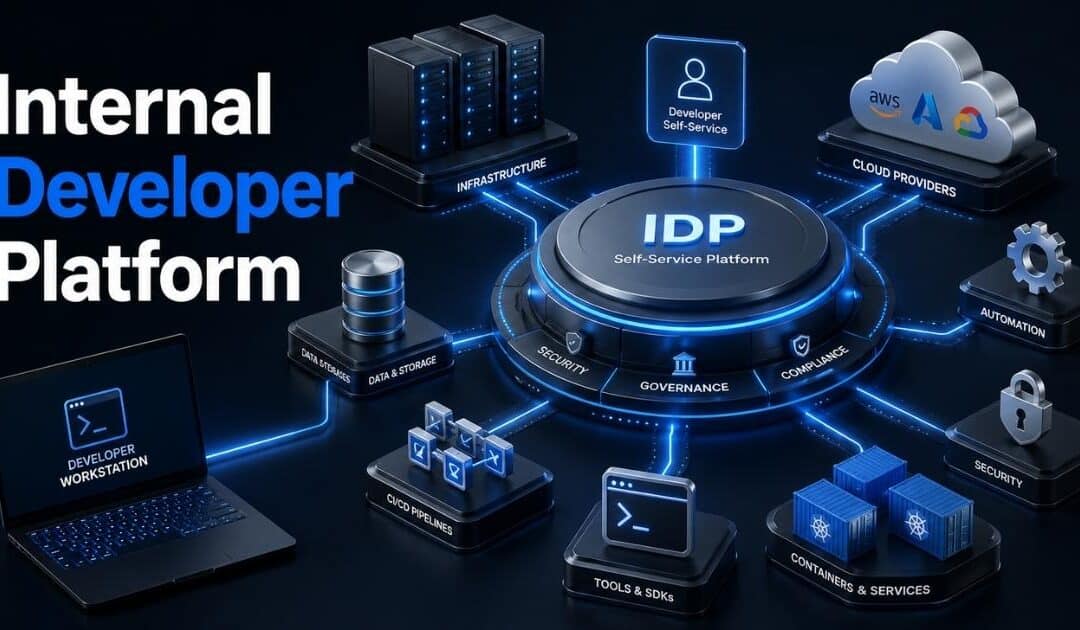
An internal developer platform (IDP) is a self-service platform that gives development teams a unified interface to access developer tools, cloud resources, development environments, and internal tools. It reduces the need for developers to spend time managing infrastructure or navigating multiple tools. Instead, platform engineering teams create standardized environments, automated processes, and golden paths that enable developer self-service. An internal developer portal often serves as the front end where developers interact with all the tools and services they need.
An internal developer platform matters because it improves developer experience and developer productivity across engineering organizations. Platform engineers and the platform team can provide developers with self-service access to environment provisioning, software delivery workflows, and cloud resources while maintaining security policies and compliance standards.
As software development becomes more complex, engineering leaders use internal developer platform capabilities to reduce cognitive load, simplify existing workflows, improve operational control, and help engineering teams ship software faster without sacrificing security or quality.
Key Components That Make An Internal Developer Platform Successful
A successful internal developer platform is more than a collection of developer tools. It brings people, processes, and technology together in one self-service platform. The right components help platform engineering teams reduce operational complexity, improve developer experience, and help engineering teams ship software faster while maintaining security and operational control.
Internal Developer Portal
An internal developer portal serves as the main entry point for developers. It provides a unified interface where development teams can access cloud resources, internal tools, software applications, and documentation.
A well-designed internal developer portal reduces cognitive load and eliminates the need to switch between multiple tools. According to the 2025 State of Platform Engineering report, more than 70% of engineering organizations now use developer portals to improve developer self-service and streamline developer workflows.
Self-Service Infrastructure Access
Self-service access is one of the most valuable internal developer platform capabilities. Developers can provision development environments, request cloud resources, and deploy services without waiting for operations teams.
This approach helps enable developer self-service while maintaining security policies and compliance standards. Recent industry research shows that high-performing engineering teams deploy code several times more frequently than their peers because automated processes remove bottlenecks from the development process, especially when those workflows are built on an API-first architecture for scalable systems.
Golden Paths And Standardized Workflows
Golden paths provide approved routes for common development tasks. They guide developers through software delivery using preconfigured templates, tools, and best practices.
Platform engineers create these workflows to reduce errors and improve consistency. Standardized environments help development teams work faster while reducing operational risks. They also help address potential issues early by embedding security and compliance requirements directly into existing workflows.
Automation And Environment Provisioning
Automation sits at the core of every modern developer platform. Automated environment provisioning allows teams to create development environments in minutes instead of days.
A strong platform orchestrator can connect cloud providers, internal tools, and existing tools into one automated system. This reduces the burden of managing infrastructure and supports modern software delivery, especially as AI in SaaS transforms products and operations. Engineering leaders often see measurable gains in developer productivity when repetitive tasks become fully automated.
Governance And Security Controls
Strong governance protects the underlying infrastructure without slowing down software development. Security teams can define security policies that apply across cloud resources, software applications, and development environments.
This balance between freedom and control is critical for large engineering organizations. A successful internal developer platform IDP gives developers the flexibility they need while maintaining operational control, which becomes even more important when organizations introduce AI governance frameworks for SaaS platforms. User feedback and user research also help platform teams refine platform management practices and keep the platform aligned with the needs of primary users.
Internal Developer Platform vs DevOps vs Platform Engineering
Many people use these terms interchangeably, but they are not the same. DevOps is a culture and set of practices. Platform engineering is a discipline. An internal developer platform is the product that platform engineering teams build to support software development and modern software delivery.
Aspect
Internal Developer Platform (IDP)
DevOps
Platform Engineering
Definition
A self-service platform that provides developers with tools, workflows, and infrastructure access
A culture that improves collaboration between development and operations teams
A discipline focused on creating and managing internal platforms
Primary Goal
Improve developer productivity and developer experience
Speed up software delivery and improve reliability
Reduce operational complexity through platform capabilities
Main Users
Internal developers and development teams
Developers, operations teams, and security teams
Platform engineers and platform teams
Focus Area
Self-service access, automation, and developer workflows
Collaboration, automation, and continuous delivery
Building developer portals, golden paths, and self-service capabilities
Key Output
Internal developer portal and developer platform
Faster and more reliable software delivery
Internal developer platform capabilities and platform management
Infrastructure Access
Developers access cloud resources through a unified interface
Teams often manage infrastructure through shared processes
Platform team abstracts the underlying infrastructure
Developer Experience
Major priority
Secondary outcome
Core responsibility
Security And Compliance
Built into automated processes and workflows
Shared across teams and practices
Embedded into platform capabilities and security policies
Success Metric
Developer self-service, faster deployments, and reduced cognitive load
Faster releases, stability, and collaboration
Improved developer productivity and operational control
Example
Self-service environment provisioning and deployment platform
CI/CD pipelines and collaborative workflows
Creating standardized environments and developer portals
How Internal Developer Platforms Improve Developer Experience And Productivity
Developer experience has become a major priority for modern engineering organizations. When developers face too many manual tasks, productivity suffers. An internal developer platform removes friction, simplifies workflows, and gives teams faster access to the resources they need to build and ship software efficiently.
Faster Access To Development Resources
Many developers lose valuable time waiting for infrastructure, permissions, or development environments. An internal developer platform provides self-service access to cloud resources, databases, and internal tools through a unified interface.
This reduces delays across the development process. According to the 2024 DORA report, high-performing teams can deliver software significantly faster because developers spend less time waiting for operational support and more time building software applications.
Lower Cognitive Load
Modern software development often involves dozens of tools, services, and workflows. Constant context switching creates confusion and slows progress. An internal developer portal helps centralize all the tools developers need.
Platform engineering teams use developer portals and golden paths to simplify access to underlying technologies. This reduces cognitive load and helps developers focus on solving business problems instead of navigating complex systems.
More Consistent Developer Workflows
Different teams often follow different deployment methods, security practices, and setup procedures. This inconsistency creates errors and slows software delivery.
A developer platform standardizes developer workflows across engineering teams. Platform engineers can provide pre-approved templates, automated processes, and standardized environments. As a result, teams follow proven practices without sacrificing flexibility or speed.
Less Time Spent On Infrastructure Tasks
Developers rarely want to spend hours managing infrastructure. Yet many engineering teams still dedicate large portions of their week to operational work. An internal developer platform abstracts much of the underlying infrastructure.
Self-service capabilities allow developers to provision resources, deploy applications, and access services without direct assistance from operations teams. This shift improves developer productivity and gives teams more time for product development and innovation, including adopting modern artificial intelligence software for business use.
Better Collaboration Across Teams
Software delivery depends on cooperation between developers, operations teams, platform teams, and security teams. Miscommunication often creates bottlenecks and unnecessary delays.
An internal developer platform creates a shared foundation for all key stakeholders. Common workflows, security policies, and platform capabilities help teams work from the same standards, often complemented by smarter software tools that simplify day-to-day work. Recent industry research shows organizations with mature platform engineering practices report higher developer satisfaction and faster release cycles than teams without a dedicated platform strategy.
Key Benefits Of Internal Developer Platforms For Modern Engineering Teams
An internal developer platform delivers value beyond automation. It helps engineering teams work faster, reduce complexity, and improve software quality. With the right platform capabilities, organizations can streamline software delivery while giving developers more freedom and control over their daily work.
Higher Developer Productivity
Many developers spend hours every week on repetitive operational tasks. Infrastructure requests, environment setup, and manual deployments can slow progress. An internal developer platform reduces that overhead through self-service capabilities and automated processes.
Developers gain quick access to cloud resources, development environments, and internal tools without waiting for approvals. According to the 2024 State of DevOps research, teams with mature automation practices deliver changes faster and recover from failures more efficiently than low-performing teams.
Faster Software Delivery
Speed matters in modern software development. Delays in provisioning, testing, or deployment can affect release schedules and business goals. A self-service platform removes many of those bottlenecks.
Platform engineering teams create golden paths and standardized workflows that help development teams move from code to production faster. Consistent processes reduce friction across software delivery pipelines and allow teams to release software applications with greater confidence when combined with mature DevOps best practices for modern teams.
Stronger Security And Compliance
Security often becomes difficult when every team follows different processes. An internal developer platform helps organizations enforce security policies across all development environments and cloud providers.
Platform engineers can build compliance standards directly into developer workflows. This approach allows developers to move quickly without bypassing governance requirements and supports implementation of SaaS security best practices for 2026. Security teams also gain better visibility into platform management and resource usage across engineering organizations.
Lower Operational Complexity
Large organizations often rely on multiple tools, cloud services, and underlying technologies. Managing those systems separately increases operational complexity and creates unnecessary challenges for developers.
A developer platform centralizes access through an internal developer portal. Developers interact with a unified interface instead of navigating dozens of systems. This reduction in cognitive load allows teams to focus on building products rather than managing infrastructure.
Better Resource And Cost Control
Cloud spending can rise quickly when teams provision resources without clear oversight. Internal developer platform capabilities help organizations maintain operational control while still enabling developer self-service.
Platform teams can standardize resource allocation, automate environment provisioning, and monitor cloud cost management across projects. Industry studies show that companies can waste up to 30% of cloud spending through unused or underutilized resources. Better visibility helps engineering leaders optimize costs without limiting innovation.
How To Build An Internal Developer Platform Step By Step
A successful internal developer platform does not appear overnight. It requires careful planning, collaboration, and continuous improvement. The right approach helps platform engineering teams create a self-service platform that improves developer experience, supports software delivery, and reduces operational complexity across engineering organizations.
Step 1: Identify Developer Pain Points
Every internal developer platform should start with user research. Talk to development teams, operations teams, and security teams. Find out where developers spend the most time and what slows the development process.
Many engineering organizations discover issues around environment provisioning, infrastructure access, and fragmented developer tools. According to Gartner, organizations that prioritize developer experience often see higher productivity and stronger platform adoption, especially when they select the right custom software development partner to support platform initiatives. User feedback helps platform teams focus on problems that matter most to primary users.
Step 2: Define Platform Goals And Standards
Clear goals help shape platform capabilities and guide long-term decisions. Define what success looks like before selecting tools or designing workflows. Focus on outcomes such as faster software delivery, improved developer productivity, or stronger operational control.
This stage should also establish security policies, compliance standards, and governance requirements. Engineering leaders must align business objectives with technical priorities. A clear roadmap helps avoid scope creep and keeps the platform team focused on measurable results.
Step 3: Build Self-Service Workflows
Developer self-service sits at the heart of every internal developer platform IDP. Developers should access cloud resources, deployment tools, and development environments without opening support tickets.
Platform engineers can create golden paths that standardize common tasks. Automated processes reduce manual work and improve consistency, especially when teams embed AI software development for smarter products into these workflows. A self-service platform also reduces cognitive load because developers no longer need deep knowledge of underlying technologies or infrastructure to complete routine tasks.
Step 4: Create An Internal Developer Portal
An internal developer portal acts as the central hub for the developer platform. It brings together internal tools, documentation, workflows, and cloud resources through a unified interface.
Developer portals serve as a single destination where developers interact with all the tools they need. Organizations that invest in building developer portals often improve platform adoption because access becomes simpler and more intuitive. This approach also reduces friction across existing workflows and development environments.
Step 5: Measure, Improve, And Scale
A platform should evolve based on real usage data. Track developer productivity, deployment frequency, onboarding time, and platform adoption rates. Metrics help identify gaps and opportunities for improvement.
Ongoing maintenance is equally important. Platform engineering teams should collect user feedback regularly and address potential issues early. As adoption grows, the platform can expand to support additional cloud providers, software applications, and self-service capabilities without creating vendor lock-in or unnecessary complexity.
Common Internal Developer Platform Challenges And How To Avoid Them
An internal developer platform can transform software development, but success is not guaranteed. Many organizations face adoption, governance, and technical challenges along the way. Early planning and continuous improvement can help platform teams avoid common mistakes and maximize long-term value.
Low Platform Adoption
A platform only succeeds when developers actually use it. Many internal developer platforms fail because they focus on technology rather than developer needs. Complex workflows and poor user experience often discourage adoption.
User research and user feedback should guide every major decision. Platform engineering teams need to understand how developers interact with existing tools and workflows. Industry surveys show that platforms designed around developer experience achieve significantly higher adoption rates than those built without direct user input, especially when they incorporate emerging software development trends for 2026.
Tool Sprawl And Complexity
Many engineering organizations use dozens of developer tools, cloud services, and internal systems. Without proper coordination, an internal developer platform can become another layer of complexity instead of a solution.
A clear platform strategy helps avoid this problem. Platform engineers should focus on consolidating workflows through an internal developer portal and a unified interface. Fewer tools reduce cognitive load and help development teams work more efficiently across software delivery pipelines.
Weak Security And Governance
Developer self-service improves speed, but unrestricted access can create security risks. Poor governance may lead to compliance violations, unauthorized resource usage, and inconsistent security practices.
Security policies should be embedded directly into platform capabilities. Automated approvals, role-based access controls, and standardized environments help maintain operational control and align with SaaS security architecture best practices. Security teams should participate early to ensure the platform aligns with compliance standards and business requirements.
High Maintenance Requirements
Many organizations underestimate the effort required for ongoing maintenance. A developer platform is not a one-time project. New cloud providers, software applications, and developer workflows require regular updates.
A dedicated platform team helps keep the platform reliable and relevant. Regular reviews of platform management processes can identify gaps before they become larger issues, including decisions about replatform vs rebuild for long-term growth. Successful engineering teams treat the platform as an internal product that evolves with business needs.
Vendor Lock-In Risks
Some organizations build platform capabilities too closely around a single cloud provider or proprietary technology. This approach can limit flexibility and increase long-term costs.
Open standards and open source framework options can reduce vendor lock-in. Platform engineering teams should design the underlying infrastructure with portability in mind, especially when planning AI infrastructure for intelligent applications. A flexible architecture allows organizations to adapt to changing technology requirements while maintaining operational efficiency and cloud cost management.
Internal Developer Platform Best Practices, Metrics, And Future Trends
An internal developer platform delivers the best results when teams treat it as a product rather than a one-time project. Long-term success depends on clear goals, measurable outcomes, and continuous improvement. At the same time, new platform engineering trends continue to reshape how organizations support software development.
Focus On Developer Experience First
Many platform teams make the mistake of prioritizing technology over usability. A platform may have excellent capabilities, but developers will avoid it if workflows feel complicated or restrictive.
Developer experience should remain the primary focus. User research and user feedback help platform engineers understand what developers need most and ensure they invest in a future-proof tech stack for scalable growth. According to recent platform engineering surveys, organizations that prioritize developer experience report higher platform adoption and stronger developer productivity gains.
Successful IDPs often start small, following a Minimum Viable Platform (MVP) approach, and iterate quickly to demonstrate value to stakeholders.
Track The Right Performance Metrics
A successful internal developer platform needs measurable outcomes. Without metrics, it becomes difficult to justify investments or identify areas for improvement.
Engineering leaders often track deployment frequency, lead time for changes, onboarding speed, and self-service adoption rates. Many organizations also measure how much time developers spend on operational tasks and monitor reliability indicators aligned with a Site Reliability Engineering SaaS framework. These insights help platform teams evaluate platform capabilities and improve software delivery performance over time.
Build With Flexibility In Mind
Technology stacks change quickly. Cloud providers introduce new services, and engineering teams adopt new developer tools. A rigid platform can become outdated within a few years.
Flexible architecture reduces that risk. Open standards, modular components, and integration with existing tools help organizations adapt without major disruptions, especially when designing scalable software architecture for high-growth products. This approach also reduces vendor lock-in and gives teams greater operational control over the underlying infrastructure.
Use AI To Enhance Platform Operations
Artificial intelligence is becoming a major part of modern software delivery. Many internal developer platforms now use AI to simplify troubleshooting, automate documentation, and improve developer self-service through AI-driven automation in SaaS platforms.
Platform engineering teams are also exploring AI-powered internal developer portals that provide recommendations, automate environment provisioning, and answer technical questions by following structured approaches to integrate AI into SaaS products. Industry analysts expect AI-assisted developer workflows to become a standard feature of many developer platforms over the next few years.
Treat The Platform As A Product
The most successful engineering organizations manage their internal developer platform like a customer-facing product. The platform team continuously collects feedback, prioritizes improvements, and evaluates adoption trends.
Ongoing maintenance remains essential. New security policies, cloud resources, and software applications create new requirements over time as the future of SaaS development in a cloud-first world continues to evolve. A product mindset helps platform teams address potential issues early, improve platform management, and ensure long-term value for developers and key stakeholders.
Final Thoughts
An internal developer platform has become a key part of modern software development. It helps development teams work more efficiently by reducing operational complexity, simplifying access to cloud resources, and improving developer experience. Instead of spending valuable time on infrastructure management and repetitive tasks, developers can focus on building software applications that drive business value.
The most successful platforms combine self-service capabilities, strong governance, and user-focused design. Platform engineering teams that listen to user feedback and continuously improve platform capabilities often achieve higher adoption and better outcomes.
As software delivery continues to evolve, internal developer platforms will play an even bigger role in helping engineering organizations improve developer productivity, strengthen security, optimize cloud cost management, and deliver high-quality software faster.
FAQs
Can Small Engineering Teams Use An Internal Developer Platform?
Yes. Small teams can benefit from an internal developer platform even before they scale. A self-service platform helps reduce repetitive work, standardize developer workflows, and improve software delivery without requiring a large platform team.
Does An Internal Developer Platform Replace DevOps Teams?
No. An internal developer platform does not replace DevOps. Platform engineering teams use DevOps practices to create self-service capabilities, automate workflows, and improve developer experience across engineering organizations.
How Long Does It Take To Build An Internal Developer Platform?
The timeline depends on platform capabilities, team size, and existing infrastructure. Many organizations start with a small internal developer portal and expand gradually based on user feedback, platform adoption, and business needs.
Can An Internal Developer Platform Work Across Multiple Cloud Providers?
Yes. Modern developer platforms can connect with multiple cloud providers through automation, orchestration, and standardized environments. This approach improves operational control while reducing vendor lock-in risks.
Does An Internal Developer Platform Help Reduce Cloud Costs?
Yes. Internal developer platform capabilities often include cloud cost management, automated resource controls, and governance policies. Better visibility into cloud resources helps engineering leaders reduce waste and improve operational efficiency.
Software development has changed fast in the last few years. Developers no longer write every line of code alone. Modern teams now use AI coding assistant tools to generate code, fix errors, explain logic, and speed up repetitive work. What once took hours can now take minutes.
But not every AI coding assistant delivers the same results. Some tools help with simple autocomplete. Others can review code, detect bugs, write tests, and even understand large projects. That makes choosing the right solution more important than ever.
This guide breaks down everything you need to know about AI coding assistant tools. You will learn how they work, where they help most, their limitations, and which platforms stand out for different development needs.
What Is An AI Coding Assistant
An AI coding assistant is a software tool that helps developers write, review, and improve code faster. Modern AI coding tools use natural language prompts, project context, and context awareness to understand existing code and suggest code in real time. Many tools also provide code completions, multi-line completions, code snippets, and clear explanations inside a chat interface or code extension. Popular options like GitHub Copilot, Claude Code, Gemini Code Assist, and JetBrains AI Assistant support faster software development with AI assistance and AI-generated code.
Modern coding assistant platforms can handle repetitive tasks, test generation, and even complex tasks across an entire codebase. Some AI coding agents work in agent mode and act like a coding agent that can test code, create new code, and analyze messy codebases with full project context. Development teams and individual developers also use local models, API keys, and model flexibility features for better control, security posture, and proprietary code protection during the development process, especially as AI in the SaaS industry evolves with new benefits and challenges.
Why AI Coding Assistants Are Changing Modern Software Development
AI coding assistant tools now play a major role in modern software development. Developers use them to write code faster, reduce repetitive tasks, and improve code quality. From startups to enterprise teams, companies now treat AI assistance as part of the daily development process as part of broader AI software development for smarter digital products.
Faster Development Cycles
Development teams now ship features much faster with AI coding tools. Platforms like GitHub Copilot, Cursor, and Claude Code can generate code, suggest code fixes, and provide real-time code suggestions inside the editor. Developers no longer waste hours on boilerplate code or repetitive tasks.
Research shows developers using GitHub Copilot complete tasks up to 55% faster. Around 90% of Fortune 100 companies already use Copilot in their workflows. Faster delivery helps businesses release updates more often and respond to customer needs quickly.
Better Code Quality And Testing
Modern AI assistant platforms do more than code generation. Many tools now support test generation, code suggestions, and code completions with context awareness. Developers can test code faster and catch bugs before deployment.
AI-generated code still needs human review, but strong suggestion quality helps developers maintain cleaner project structure and more reliable actual code. Studies show AI tools also improve developer focus by reducing low-value work. Around 68% of developers report productivity gains from AI assistance.
Smarter Context Understanding
Older autocomplete tools only handled small code snippets. Modern AI coding agents understand open files, project context, and even the entire codebase. A coding agent can now analyze existing code, explain logic, and create a detailed plan for complex tasks.
Tools like Gemini Code Assist and JetBrains AI Assistant use full project context to provide more accurate code suggestions. Better context also improves pair programming experiences inside IDEs like IntelliJ IDEA. Developers spend less time explaining code manually and more time solving problems.
More Support For Teams
AI coding assistant platforms now support both individual developers and large enterprise teams. Features like Copilot Business, parallel agents, and shared project context improve collaboration across teams. Developers can also use chat interface tools for faster communication and troubleshooting.
Recent surveys show over 63% of professional developers already use AI in software development workflows. Another 14% plan to adopt AI coding soon. AI assistance now helps teams maintain consistency across files, tools, and messy codebases.
New Focus On Security And Control
Security posture has become a major topic in AI coding. Companies want full control over proprietary code, API keys, and sensitive data before sending code to external systems, which aligns with broader SaaS security architecture best practices. That is why many platforms now support local models and stronger enterprise controls.
Security concerns still exist. Reports show over 29 million secrets leaked on GitHub during 2025, partly linked to AI-assisted development. Developers now pay closer attention to model flexibility, code review, and access control before trusting generated code in production environments.
Key Features Every AI Coding Assistant Should Have
Not every AI coding assistant delivers the same value. Some tools only provide simple code completions, while others support full software development workflows. The best AI coding tools help developers write cleaner code, handle complex tasks, and improve productivity without adding extra friction to the development process.
Smart Code Suggestions
Strong code suggestions are the foundation of every useful AI assistant. Developers expect accurate real-time code suggestions that match project structure, coding style, and context. Better suggestion quality helps teams reduce repetitive tasks and write actual code faster.
Modern platforms like GitHub Copilot and Cursor now support multi-line completions and natural language prompts. Developers can describe a function in plain language and receive generated code instantly. Studies show developers save up to 30% of coding time with intelligent code generation tools.
Project Context Awareness
Context awareness separates basic AI coding from advanced AI coding agents. A good coding assistant should understand existing code, open files, dependencies, and the entire codebase before suggest code actions. Without project context, AI-generated code often feels disconnected and unreliable.
Tools like Gemini Code Assist and JetBrains AI Assistant now use full project context to improve code completions and reduce errors. Better context also improves pair programming experiences for development teams. Developers spend less time fixing mismatched suggestions and more time solving real business problems.
Built-In Testing Support
Modern AI coding tools should support test generation and test code workflows directly inside the editor. Developers need fast ways to validate new code before deployment. Strong testing support also improves code quality and reduces production issues.
Recent developer surveys show over 70% of teams now automate parts of their testing process. AI coding assistants can generate unit tests, explain failed tests, and detect risky logic faster than manual review alone. Better testing tools help developers maintain cleaner files and more stable releases.
Flexible Model Options
Model flexibility matters more as software development becomes more complex. Some companies want local models for stronger security posture, while others prefer cloud-based AI assistance for faster performance, all of which depends on having the right AI infrastructure for intelligent applications. Flexible tools allow developers to choose what fits their workflow and control requirements.
Enterprise teams also care about proprietary code protection and data privacy before sending code to external systems. Features like API keys management, enterprise pricing plans, and full control settings have become essential. Many power users now prefer platforms that support both cloud and local AI agent workflows.
Team Collaboration Features
Modern software development depends on collaboration. A strong AI coding assistant should help both individual developers and large development teams work more efficiently together. Shared chat interface features, parallel agents, and collaborative code suggestions improve team productivity across projects, especially when combined with agile and offshore software development practices.
Platforms like Copilot Business and Claude Code now support shared workflows and faster onboarding for new developers. AI assistance also helps teams maintain consistency across messy codebases and large project structures. Reports show over 82% of developers now use AI tools weekly during the development process.
Best AI Coding Assistant Tools Compared For Different Use Cases
Every AI coding assistant works differently. Some tools focus on fast code generation, while others handle complex tasks, project context, or team collaboration better. The right choice depends on your workflow, coding style, security needs, and software development goals.
AI coding support, suggest code features, code quality improvements
.NET developers
Included with Visual Studio
Tabnine
Privacy-focused AI coding
Local models, proprietary code protection, full control, model flexibility
Security-focused teams
Free and paid plans
How Developers Use AI Coding Assistants For Coding, Testing, And Debugging
Developers now use AI coding assistant tools far beyond simple autocomplete. Modern platforms support code generation, debugging, testing, documentation, and project analysis inside the same workflow. AI assistance has become part of daily software development for both individual developers and enterprise teams.
Faster Code Writing
AI coding tools help developers create new code much faster than manual coding alone. Developers can use natural language prompts to describe features and receive generated code instantly. Tools like GitHub Copilot and Cursor also provide real-time code suggestions and multi-line completions while developers type.
Recent surveys show developers complete common coding tasks up to 55% faster with AI assistance. Faster code generation also reduces repetitive tasks and improves focus during the development process, similar to how AI-powered tools simplify day-to-day work across teams. Developers spend more time solving business problems instead of writing boilerplate code manually.
Smarter Debugging Support
Modern AI coding assistants can review existing code and detect bugs quickly. A coding agent can explain errors, suggest code fixes, and identify risky logic across messy codebases. Many developers now use AI coding agents to speed up debugging workflows inside IDEs and code editors.
Context awareness makes debugging more accurate because AI tools can analyze open files, project structure, and the full project context before suggest code actions. Studies from 2025 show over 67% of developers now rely on AI tools for troubleshooting and issue detection during software development.
Better Test Generation
Test generation has become one of the most useful AI coding features. Developers use AI-generated code to create unit tests, integration tests, and edge-case scenarios faster. Modern AI assistant tools can also test code automatically and explain failed outputs with clear explanations.
Development teams now use AI assistance to improve code quality and reduce release risks. Reports show automated testing adoption increased by over 40% in AI-supported development workflows during the last two years. Faster testing also helps teams ship updates more frequently with fewer production issues.
Improved Code Reviews
AI coding assistants now support code reviews before human reviewers step in. Tools can check code snippets for security posture issues, duplicate logic, poor formatting, and weak project structure. Some platforms also flag exposed API keys or risky data handling practices.
Enterprise teams use AI coding tools to maintain cleaner files and stronger coding standards across the entire codebase. AI-generated suggestions also help junior developers learn patterns faster during pair programming sessions. Better reviews reduce technical debt and improve long-term software maintenance.
Project-Wide Task Automation
Modern AI agent workflows now handle more than small coding tasks. Some AI coding agents can scan proprietary code, create a detailed plan, update multiple files, and manage complex tasks across large applications. Features like parallel agents and agent mode help developers automate repetitive workflows efficiently, mirroring broader AI-driven automation patterns in SaaS platforms.
Tools like Claude Code, Gemini Code Assist, and JetBrains AI Assistant now support deeper project context analysis inside platforms like IntelliJ IDEA. Many power users also prefer local models for more control and stronger security during enterprise software development.
Benefits And Limitations Of Using An AI Coding Assistant
AI coding assistant tools can improve software development speed, reduce repetitive tasks, and support better code quality. At the same time, developers still face concerns around security, context accuracy, and overreliance on AI-generated code during complex development workflows, which makes principles of ethical and trustworthy AI software increasingly important.
Benefits Of AI Coding Assistants
Limitations Of AI Coding Assistants
Faster code generation and real-time code suggestions
AI-generated code can contain bugs or insecure logic
Better productivity for individual developers and development teams
Weak context awareness may produce irrelevant code suggestions
Faster test generation and debugging support
Some tools struggle with complex tasks and messy codebases
Reduced repetitive tasks during software development
Developers still need manual review for actual code quality
Multi-line completions speed up daily coding workflows
Suggestion quality varies across different AI coding tools
Pair programming support through chat interface and AI assistance
Overreliance may reduce problem-solving skills for junior developers
Better project structure analysis with full project context
Proprietary code and sensitive data risks remain concerns
Faster onboarding for new developers through clear explanations
Sending code to cloud-based systems may affect security posture
Support for code snippets, documentation, and existing code analysis
Some enterprise pricing plans remain expensive for small teams
Flexible workflows with local models and model flexibility
Local setup and API keys management can become complex
Better collaboration through parallel agents and coding agent workflows
AI coding agents still need human control and validation
Integration with IDEs like IntelliJ IDEA and tools like GitHub Copilot
Free tier plans often limit advanced AI agent features
How To Choose The Right AI Coding Assistant For Your Team Or Workflow
Choosing the right AI coding assistant depends on your team size, project type, security needs, and development workflow. Some AI coding tools work best for fast code generation, while others focus on context awareness, enterprise control, or large-scale software development support.
Match The Tool With Your Workflow
Every development team works differently. Some teams need fast code completions for daily coding tasks, while others need advanced AI coding agents for complex tasks and project-wide automation. A small startup may prefer lightweight tools or follow an AI MVP development approach for rapid validation, while enterprise teams often require stronger project context support.
Developers should also check how the AI assistant fits into existing tools and files. Platforms like Cursor, GitHub Copilot, and JetBrains AI Assistant offer different workflows inside IDEs and code editors, much like broader efforts to integrate AI into SaaS products and workflows. Better workflow alignment reduces friction and improves adoption across development teams.
Check Context Awareness Features
Context awareness has become one of the most important AI coding features. A strong coding assistant should understand existing code, open files, dependencies, and project structure before suggest code actions. Weak context often leads to low-quality generated code and unnecessary edits.
Modern AI coding tools now analyze the entire codebase and support full project context during software development. Research from 2025 shows developers rate context awareness among the top three features when selecting AI coding tools, so teams should apply a structured AI model selection process for startups and teams. Better context improves code quality and reduces debugging time significantly.
Review Security And Control
Security posture matters when teams work with proprietary code, customer data, or internal systems. Before sending code to any external AI model, companies should review privacy settings, API keys management, and enterprise security controls carefully.
Many organizations now prefer local models or hybrid AI assistance setups for more control. Tools like Tabnine and enterprise versions of Gemini Code Assist support stronger privacy options, and many teams now implement a formal AI governance framework for SaaS platforms to manage risk. Reports show over 62% of enterprise buyers now prioritize data protection features before choosing AI coding platforms.
Compare Pricing And Scalability
Pricing can change quickly as teams grow. Some AI coding assistant platforms offer a free tier for individual developers but charge higher enterprise pricing for advanced AI agent workflows, parallel agents, or team collaboration tools, similar to broader custom software cost trade-offs between options.
Businesses should compare long-term value instead of only monthly cost. Features like test generation, chat interface support, and model flexibility can reduce development time and improve productivity. Scalable AI coding tools also help teams avoid migration issues as software development needs expand, just as choosing between no-code and custom development for SaaS affects long-term flexibility.
Test Suggestion Quality First
Suggestion quality directly affects developer productivity. A tool may offer advanced marketing features, but poor code suggestions can slow down the development process. Developers should test how accurately the AI assistant handles natural language prompts, code snippets, and actual code generation.
Many power users now compare tools like Claude Code, Copilot Chat, and Gemini Code Assist before making a final decision. Better AI-generated code helps developers maintain cleaner project structure and avoid repetitive tasks. Trial testing also helps teams understand how well the AI agent adapts to real project context.
Future Trends Shaping The Next Generation Of AI Coding Assistant Tools
AI coding assistant platforms continue to evolve far beyond simple autocomplete tools. The next generation of AI coding tools will focus on deeper context awareness, stronger automation, improved security, and more advanced AI agent workflows that support full software development lifecycles, reflecting many of the latest software development trends for 2026.
Smarter AI Coding Agents
AI coding agents are becoming more autonomous every year. Future tools will handle complex tasks like refactoring, debugging, test generation, and project planning with less manual input. A coding agent will not just suggest code but also manage workflows across the entire codebase.
Platforms like Claude Code and Cursor already support agent mode and parallel agents for advanced development tasks. Industry reports predict over 80% of enterprise software teams will use AI agents in daily workflows by 2027. Better context awareness will make AI-generated code more accurate and useful.
Deeper Project Context Understanding
Future AI coding assistants will understand project structure much better than current tools. Instead of analyzing only open files, upcoming systems will use full project context, existing code history, dependencies, and team workflows to improve code suggestions.
Developers already expect smarter context support from tools like Gemini Code Assist and JetBrains AI Assistant. Better context awareness will help AI assistant platforms generate cleaner actual code and reduce debugging time. This shift will also improve suggestion quality across large and messy codebases.
More Secure AI Development
Security posture will become a bigger priority as AI coding expands across enterprise software development. Companies want stronger control over proprietary code, API keys, and sensitive data before sending code to external AI systems.
Future AI coding tools will likely increase support for local models and private deployment options. Many development teams already prefer hybrid workflows for better control and compliance within a broader cloud-first future of SaaS development. Research from 2025 shows over 70% of enterprise buyers now rank security features as a top purchasing factor for AI assistance platforms.
Better Natural Language Workflows
Natural language prompts will become more powerful and accurate in future AI coding tools. Developers will describe features, bugs, or workflows in plain language and receive detailed plans, code snippets, and test code automatically.
Modern tools already support chat interface features and conversational AI coding. Future systems will improve pair programming experiences and reduce manual setup work even further. Faster natural language workflows will help individual developers and power users manage software development tasks more efficiently.
Flexible AI Model Ecosystems
Model flexibility will shape the future of AI coding assistant platforms. Developers want freedom to switch between cloud AI models, local models, and specialized coding systems based on project needs, which aligns with broader custom software development trends shaping the future. No single AI assistant will dominate every use case.
Enterprise teams also expect better integration across tools, files, and development environments like IntelliJ IDEA. Platforms that support customizable AI agent workflows, free tier access, and scalable enterprise pricing will likely gain stronger adoption, especially when built on API-first architectures for scalable systems. Flexible ecosystems will give developers more control over how AI supports their coding process.
Final Thoughts
AI coding assistant tools have become a major part of modern software development. Developers now use AI assistance for code generation, debugging, test generation, code reviews, and project planning every day. The best AI coding tools help teams save time, improve code quality, and reduce repetitive tasks without slowing down workflows.
Still, no AI assistant can replace developer judgment. Human review remains critical for security, context, and long-term maintainability. Teams should focus on choosing tools that match their project structure, security posture, and development process.
As AI coding agents continue to improve, developers will gain faster workflows, smarter automation, and better project context support. Companies that learn how to use AI coding effectively today will likely build software faster and stay more competitive in the future.
FAQs
Can AI Coding Assistants Replace Human Developers?
No, AI coding assistant tools cannot fully replace developers. AI assistance can speed up code generation, debugging, and repetitive tasks, but human developers still handle architecture, decision-making, security, and complex project context. Recent surveys also show trust in AI-generated code remains limited among professional developers.
Do AI Coding Tools Work Well For Beginners?
Yes, many AI coding tools help beginners learn faster through code suggestions, clear explanations, and natural language prompts. Tools like GitHub Copilot and JetBrains AI Assistant also help new developers understand existing code, project structure, and code snippets without spending hours searching documentation.
Can AI Coding Assistants Work Without Internet Access?
Yes, some coding assistant platforms support local models for offline workflows and stronger security posture. Local AI agent setups give developers more control over proprietary code, API keys, and sensitive data without constantly sending code to cloud systems.
How Much Code Is AI-Generated Today?
Recent industry reports suggest AI-generated code now represents a major share of software development workflows. Some studies estimate over 40% of code is now AI-assisted or AI-generated across development teams using modern AI coding tools regularly, reflecting how artificial intelligence software is reshaping work and productivity.
Why Do Some Developers Still Distrust AI Coding Assistants?
Many developers worry about suggestion quality, weak context awareness, and hidden security risks inside generated code. AI coding agents can sometimes create inaccurate outputs or miss full project context, especially inside large and messy codebases, which also influences decisions like in-house vs outsourcing software development. Trust remains a major discussion point despite rising AI adoption.
Most startups fail before they ever reach product-market fit. In many cases, the problem is not the idea. The real problem starts with poor MVP planning. Founders often build too many features, spend too much money, and launch without clear goals. That is where startup MVP requirements become critical. A well-planned MVP helps you validate your idea faster and avoid expensive mistakes.
Strong startup MVP requirements are not only about features. You also need market validation, user research, technical planning, launch strategy, and feedback systems. The right MVP gives users one clear solution to one real problem. Nothing more. Nothing less. Successful startups use MVPs to learn fast, improve fast, and grow with real user data instead of assumptions.
What Startup MVP Requirements Actually Mean For Modern Startups
Startup MVP requirements define what a minimum viable product needs before launch. A minimum viable product MVP is the most basic version of a product with just enough features to solve real users problems. Modern tech companies use the lean startup methodology to validate market demand without investing heavily in a complete product. The goal is simple. Test the product idea with the least effort and gather feedback from early adopters and potential customers.
An effective minimum viable product focuses on core functionality, essential features, and a strong value proposition. Startups use user research, customer interviews, and a simple landing page to study user behavior and market need. Customer feedback and validated learning help development teams iterate quickly and improve future development. This iterative process supports MVP-driven product market fit and data-driven validation, cost savings, market testing, and data-driven decisions before further development of the final product.
Key Startup MVP Requirements Before Product Development Starts
Strong startup MVP requirements start long before software development begins. Early planning helps startups reduce risk, follow a structured startup software development process, save budget, and validate market demand faster. A clear minimum viable product approach also helps teams focus on core functionality instead of building unnecessary features.
Clear Problem Validation
Every successful MVP starts with one real problem. Your product idea must solve a clear pain point for a target audience. Many startups fail because they create products without enough market testing or user research.
CB Insights reports that 35% of startups fail due to no market need. Customer interviews and user feedback help validate market demand before heavy investment. Early adopters can also provide feedback about existing solutions and customer experience. This process supports validated learning and stronger business hypotheses.
Defined Target Audience
A minimum viable product cannot serve the mass market at first. Early users usually come from a smaller and more specific target market. Tech-savvy users and potential customers often test the first basic version faster than general users.
Clear audience research improves product market fit and market insights. Startups that understand user behavior make better data-driven decisions. A focused target audience also improves distribution channels and customer feedback collection. This helps development teams build a minimal product with essential functionality instead of unnecessary extras.
Focused Core Features
An effective minimum viable product needs only core features. Too many features increase software development costs and delay launch. The goal is to release the most basic version with just enough features to solve users problems.
A recent GoodFirms survey found that 53% of failed tech projects suffered from feature overload. Successful MVP development focuses on MVP feature prioritization around core functionality and business objectives first. Early customers care more about value proposition than polished extras. Future iterations can always add more advanced tools after market validation.
Simple Business Model
A business model canvas helps startups organize the business concept before product development starts. Founders need clarity on revenue streams, target market, customer segments, and market potential.
Strong startup MVP requirements connect product decisions with business objectives. A minimum marketable product should support long-term growth and a well-planned MVP development budget and cost savings. Clear planning also helps teams avoid investing heavily before customer validation. Lean startup methodology works best when startups test assumptions early and iterate quickly with real users.
Feedback And Testing Plan
Customer feedback is one of the most important parts of MVP development. Startups need a clear process to gather feedback from initial users after launch. A simple landing page can help attract potential users before the final product becomes available.
Harvard Business Review notes that startups using continuous development and iterative process methods adapt faster to market changes. User feedback helps teams incorporate feedback into future development plans. Strong data collection also improves customer experience and supports further development based on real market demand instead of assumptions.
How To Validate Market Demand Before Building An MVP
Market validation helps startups avoid expensive mistakes before product development starts. A strong minimum viable product strategy depends on real customer insights, not assumptions. Early validation also helps startups improve product-market fit and build a successful MVP with less risk.
Direct Customer Interviews
Customer interviews give startups real market insights before MVP development begins. Founders can learn about users problems, buying habits, and expectations from existing solutions. Direct conversations also help identify gaps in the target market.
CB Insights states that lack of market need remains one of the biggest reasons startup failure. Early customers often provide feedback that shapes core functionality and business objectives. Simple interviews with potential users can validate market demand faster than expensive surveys. This lean startup methodology, aligned with emerging MVP development trends for startups in 2026, supports validated learning and smarter product decisions.
Simple Landing Page Tests
A simple landing page helps startups measure interest before building a complete product. Many tech companies use landing pages to test value proposition, collect emails, and study user behavior. This method requires the least effort but provides useful data collection.
HubSpot reports that companies with focused landing pages increase conversions by over 55%. A landing page also helps test distribution channels and market potential. Startups can gather feedback from early adopters and initial users before software development begins. This process supports future development and stronger MVP development planning.
Competitor Gap Analysis
Existing solutions can reveal what the market still lacks. Strong startup MVP requirements often come from studying competitor weaknesses and customer complaints. Reviews, forums, and social media discussions can uncover unmet customer experience needs.
Gartner research shows buyers trust peer reviews more than direct advertising during product evaluation. Competitor analysis also helps startups define essential features and avoid unnecessary complexity. A minimum marketable product should solve a problem better or faster than current options. Clear market testing improves product idea validation and supports data-driven decisions.
Small Audience Experiments
A target audience test works better than launching to the mass market too early. Startups can release a basic version to a limited group of tech-savvy users. Early users usually share honest customer feedback and provide feedback quickly.
This iterative process helps startups iterate quickly without investing heavily in large-scale development. User feedback also improves core features and strong value proposition. Many successful MVP examples started with small private launches before future iterations reached wider audiences. Focused testing supports continuous development and smarter business hypotheses validation.
Preorders And Waitlists
Preorders and waitlists show whether potential customers truly want the product. Real demand matters more than social media likes or website traffic. People who join a waitlist often become early adopters after launch.
According to Startup Genome, startups that validate demand early scale faster than companies that skip validation. Waitlists also help estimate market need and customer interest before major investment. This minimum viable product approach allows development teams to test a business concept with just enough features. Strong preorder interest often signals a successful MVP with better chances for product market fit.
Essential Features Every Startup MVP Should Include First
Strong startup MVP requirements focus on value, not feature quantity. A minimum viable product should solve one clear problem with just enough features for early users. Simple and focused MVP development helps startups validate market demand faster and reduce unnecessary software development costs.
Simple User Onboarding
A minimum viable product must feel easy from the first interaction. Early adopters and potential customers should understand the product without long tutorials or complicated steps, as shown in a startup MVP launched in 90 days where clarity and simplicity were critical. Confusing onboarding often pushes users away before they experience the core functionality.
Wyzowl reports that 73% of users prefer products with simple onboarding experiences. Clear navigation and fast account setup improve customer experience and user behavior. A successful MVP should guide initial users toward the main value proposition quickly. This approach also helps gather feedback faster and supports better product-market fit during future development.
Strong Core Functionality
Core features should solve the main users problems without distractions. A minimum marketable product does not need all the features of a complete product. It only needs essential functionality that supports the primary business objectives.
Many tech companies fail because they overload the first release with unnecessary tools. A GoodFirms report found that feature creep remains one of the top software development risks. A lean startup approach focuses on the most basic version first. Post-MVP development planning for future iterations can always expand the product after validated learning and customer feedback.
Fast Feedback System
Customer feedback shapes every effective minimum viable product. Startups need a simple way for real users to provide feedback after launch. Feedback forms, surveys, and in-app responses help development teams collect market insights early.
According to Pendo, product teams that use continuous development methods improve user retention faster. AI features that increased engagement by 34% demonstrate how smarter data collection also supports data-driven decisions during MVP development. Early customers often highlight usability problems and missing essential features. This iterative process helps startups iterate quickly and improve future development without investing heavily too early.
Basic Performance And Security
A basic version still needs stable performance and secure access. Slow loading speeds and security issues can damage trust with potential users. Early users expect reliability even from a minimal product.
Google research shows that over half of mobile users leave pages that load after three seconds. Basic security measures also protect customer data and improve user confidence. Strong startup MVP requirements should include secure login systems, stable hosting, and responsive design. This creates a stronger value proposition and supports long-term market potential.
Clear Analytics Tracking
Analytics help startups understand how users interact with the product. Data from early users reveals which core features support business hypotheses and which areas need improvement. Without analytics, startups rely on assumptions instead of real behavior patterns.
Mixpanel research shows data-driven companies make faster product decisions than competitors. Analytics also improve market testing and customer experience optimization. A minimum viable product approach depends on validated learning from actual user activity. Strong tracking systems help startups validate market demand, improve distribution channels, and plan further development with more confidence.
Technical Startup MVP Requirements For Scalability And Security
Technical startup MVP requirements shape how well a product handles growth, user activity, and security risks. A minimum viable product should not only launch fast but also support future development without major rebuilds by choosing the right tech stack in 2026. Strong technical planning helps startups reduce downtime, protect user data, and improve customer experience from the start.
Flexible Tech Stack
A flexible tech stack helps startups scale without major technical problems later. Many development teams choose lightweight frameworks during MVP development to reduce costs and launch faster. The right stack also supports continuous development and future iterations.
Stack Overflow research shows JavaScript and Python remain top choices for startup software development because of scalability and strong community support, which aligns with many recommendations in a startup tech stack guide for high-growth teams. A flexible architecture improves market testing and supports business objectives as user demand grows. Tech companies that choose a future-proof tech stack for scalable growth early avoid expensive migrations during further development. This minimum viable product approach also helps teams iterate quickly after customer feedback.
Cloud-Based Infrastructure
Cloud infrastructure gives startups better scalability and cost savings during early growth stages. A minimal product may start with limited traffic, but market demand can increase quickly after launch. Cloud systems help products handle sudden spikes without performance issues.
Gartner reports that over 85% of organizations now prefer cloud-first strategies for software development. Cloud hosting also improves customer experience through faster load times and reliable uptime. Strong startup MVP requirements should include scalable servers, automated backups, and SaaS monitoring tools for performance and UX. This setup supports validated learning and smoother product-market fit as more real users join the platform.
Secure User Authentication
User trust matters from day one. A minimum viable product MVP still needs strong security around login systems and customer data, especially for teams following SaaS architecture best practices. Weak authentication can damage a startup’s reputation before the product reaches early adopters.
IBM research found the global average cost of a data breach reached $4.88 million in 2024. Basic security layers like encrypted passwords and multi-factor authentication reduce major risks. Potential customers expect safe access even in the most basic version of a product. Strong authentication also supports business model credibility and protects valuable market insights collected from early users.
Performance Optimization
Fast performance improves user behavior and customer retention. A successful MVP should load quickly and respond smoothly across devices. Slow products often lose early customers before they fully explore the core functionality.
Google data shows bounce rates rise sharply when mobile pages load beyond three seconds. Lightweight coding, optimized images, and caching systems improve overall speed. A lean startup methodology focuses on essential functionality instead of heavy features that slow the product. Better performance also helps startups gather feedback from potential users more effectively during market testing and product validation stages.
Analytics And Monitoring
Analytics tools help startups understand how real users interact with the product. Technical monitoring also helps development teams spot errors before they affect customer experience. Strong data collection improves future development and smarter decision-making.
According to McKinsey, companies that use data-driven decisions grow faster than competitors in digital markets. Predictive analytics software for growth and other analytics platforms track user feedback, feature usage, and customer activity patterns. This iterative process supports validated learning and business hypotheses testing. A minimum marketable product becomes more effective when startups use real market insights instead of assumptions during continuous development.
Common Startup MVP Mistakes That Lead To Product Failure
Many startups fail because of poor MVP planning, not weak product ideas. A minimum viable product should validate market demand and collect customer feedback with the least effort possible. Small mistakes during MVP development can waste time, budget, and future growth opportunities.
Too Many Features
Many founders confuse a minimum viable product with a complete product. They try to launch with all the features instead of focusing on core functionality. This usually increases software development costs and slows down product release.
CB Insights reports that 38% of startups fail because they run out of cash. Feature overload often causes that problem. A successful MVP only needs essential features that solve one clear problem for the target audience. Early users care more about customer experience and value proposition than advanced extras. Future iterations can always expand the product after validated learning and customer feedback.
Weak Market Validation
A product idea without market testing creates major risk. Some startups skip customer interviews and user research because they trust assumptions too much. That often leads to poor product market fit and low customer interest.
According to Startup Genome, startups that validate market demand early perform better during scaling stages. Real users provide market insights that founders cannot predict alone. A simple landing page and early customer surveys help gather feedback before investing heavily. This lean startup methodology supports data-driven decisions and reduces the chance of building a minimal product nobody wants.
Poor User Feedback Collection
Customer feedback should shape every stage of MVP development. Some startups launch products but fail to create systems for users to provide feedback. Without feedback, development teams miss important user behavior patterns and customer expectations.
Pendo research shows companies with active feedback loops improve retention faster than competitors. A minimum viable product approach depends on continuous development and iterative process improvements. Feedback from early adopters and potential customers helps startups improve essential functionality. Strong data collection also supports future development and smarter business hypotheses validation.
Ignoring Technical Scalability
A basic version still needs technical stability. Some tech companies rush product launches without scalable infrastructure or proper security systems. Small technical problems can quickly damage trust with early customers.
Gartner research shows downtime and slow performance remain major reasons for user abandonment. Strong startup MVP requirements should include cloud hosting, analytics tracking, and secure authentication systems. A minimum marketable product must handle growth without major failures, using well-designed SaaS scalability strategies for sustainable growth. Better scalability also improves distribution channels, customer experience, and future iterations as market demand increases.
Unclear Business Goals
A successful MVP needs clear business objectives from the start. Some founders focus only on product development and ignore revenue models or market potential. Weak planning often creates confusion during future development stages.
A business model canvas helps startups organize customer segments, value proposition, and growth plans early. Harvard Business Review notes that startups with structured business hypotheses adapt faster to changing markets. Clear goals also improve market testing and validated learning. Strong planning helps startups iterate quickly and turn a minimal product into a sustainable business concept.
MVP Launch Requirements Every Startup Should Prepare Before Release
A minimum viable product launch needs more than a working product. Startups must prepare support systems, feedback channels, and technical stability before release as part of a broader SaaS product development lifecycle. Strong startup MVP requirements help teams reduce launch risks and improve customer experience from the first day.
Reliable Product Testing
Every minimum viable product should go through proper testing before launch. Early users expect stable performance even from a basic version. Broken features and technical bugs can damage trust quickly and reduce customer retention.
BrowserStack reports that 88% of users avoid apps after poor performance experiences. Strong MVP development includes usability checks, speed testing, and mobile responsiveness. Development teams should test core functionality across devices before release. This process helps startups gather feedback from real users without major technical issues. Better testing also supports product market fit and future development plans.
Clear User Onboarding
A successful MVP should feel simple for initial users. Complex setup processes often confuse potential customers and reduce engagement. Clear onboarding improves customer experience and helps users understand the product value faster.
Research from UserGuiding shows strong onboarding can improve retention rates by over 50%. Short tutorials, welcome emails, and guided product flows help early adopters use essential features more effectively. A minimum viable product approach focuses on solving users problems with the least effort possible. Simple onboarding also supports validated learning by helping startups collect customer feedback earlier.
Customer Support Channels
Customer support becomes important immediately after launch. Early customers often need quick answers while testing a minimal product. Weak support systems can create frustration and hurt the overall value proposition.
HubSpot data shows that 90% of customers expect fast responses from brands. Startups should prepare email support, live chat, or simple help centers before release. Direct support also helps gather feedback and understand user behavior patterns. Strong communication channels improve market testing and help development teams incorporate feedback into future iterations and continuous development strategies.
Launch Marketing Strategy
A strong product idea still needs visibility. Some startups launch without clear distribution channels or market awareness plans. That mistake often limits early traction even when the product solves a real market need.
A simple landing page, email campaigns, and social proof can attract potential users before release. Tech companies often use waitlists to validate market demand and create excitement among early adopters. Clear launch messaging also strengthens the business concept and value proposition. Better marketing preparation helps startups reach the target audience faster and improve market insights after launch.
Analytics And Feedback Setup
Analytics tools should be ready before the product goes live. Startups need data collection systems to understand how users interact with the minimum marketable product. Without analytics, teams cannot make accurate data-driven decisions.
Mixpanel reports that product teams using behavioral analytics improve feature optimization much faster. Analytics also reveal which core features support business objectives and which areas need improvement. Strong startup MVP requirements include customer feedback systems, event tracking, and user activity reports. This iterative process helps startups iterate quickly and improve future development based on real customer behavior instead of assumptions.
How To Measure MVP Success And Plan The Next Product Iteration
A minimum viable product launch is only the first step. Startups must track performance, study customer feedback, and improve the product through continuous development. Strong startup MVP requirements help teams make data-driven decisions and build better future iterations with less risk.
Track User Engagement
User engagement shows whether the product solves real users problems. Metrics like daily active users, session time, and feature usage help startups understand customer behavior. Strong engagement often signals early product market fit.
Amplitude reports that companies with active product analytics improve retention faster than competitors. Development teams should track how early users interact with core functionality and essential features. Low engagement may reveal weak onboarding or poor value proposition. A minimum viable product approach depends on validated learning from real users instead of assumptions. Better analytics also support smarter future development plans.
Measure Customer Retention
Retention rates reveal how valuable the product feels to potential customers. A successful MVP should bring users back after the first interaction. High churn often signals gaps in customer experience or market need.
Bain & Company research shows increasing retention by 5% can raise profits significantly over time. Early adopters usually provide feedback about usability and missing features. Startups should study retention data during market testing to improve essential functionality. Strong retention also supports business objectives and helps validate market demand before investing heavily in a complete product.
Collect Quality Feedback
Customer feedback helps startups improve the minimal product faster. Surveys, interviews, and in-app responses give direct market insights from early customers. Feedback collection should stay simple and consistent after launch.
Hotjar research shows businesses that prioritize user feedback improve customer satisfaction faster than competitors. Real users often identify issues that development teams overlook during software development. This iterative process helps startups incorporate feedback into future iterations. Better customer interviews also improve business hypotheses validation and support stronger product decisions during continuous development cycles.
Analyze Conversion Metrics
Conversion metrics show whether users see value in the product idea. Signups, free trial upgrades, and waitlist growth help startups measure market potential. Strong conversions usually reflect a clear value proposition and good target audience alignment.
HubSpot data shows optimized user journeys can improve conversion rates by over 30%. Analytics tools also reveal weak distribution channels and customer drop-off points. A minimum marketable product should guide users toward one primary action with the least effort possible. Better conversion tracking supports data collection and stronger business model decisions.
Plan Future Iterations
Future development should rely on real market insights, not guesses. Startups must prioritize updates based on customer feedback, user behavior, and business objectives, guided by a clear SaaS product roadmap for 2026. Small improvements often create better results than large feature expansions.
The lean startup methodology encourages teams to iterate quickly after validated learning. A basic version does not need all the features from the start. Successful MVP development focuses on continuous optimization and smarter decision-making. Clear iteration planning also helps tech companies improve scalability, customer experience, and product market fit while reducing unnecessary software development costs.
FAQs
How Long Should Startup MVP Development Usually Take?
Yes, most minimum viable product projects take between 1 to 4 months depending on the core features and software development complexity. A successful MVP focuses on essential functionality and the least effort needed to validate market demand quickly.
Can A Startup MVP Work Without A Large Development Team?
Yes, many tech companies launch a minimal product with a small development team or no-code tools. Lean startup methodology helps founders test a product idea, gather feedback, and improve future iterations before investing heavily in a complete product.
What Is The Difference Between A Prototype And A Minimum Viable Product?
A prototype mainly tests design ideas and workflows, while a minimum viable product MVP gives real users a functional product with core functionality. A successful MVP also supports customer feedback, market testing, and validated learning for future development.
Should Startups Use No-Code Platforms For MVP Development?
Yes, no-code platforms work well for early MVP development because they reduce software development costs and speed up launch timelines. Many startups use them to validate market demand, study user behavior, and improve product-market fit before scaling further.
Why Do Early Adopters Matter In A Minimum Viable Product Strategy?
Early adopters help startups collect customer feedback, identify users problems, and improve customer experience during market testing. Their insights support data-driven decisions, stronger value proposition planning, and smarter future iterations for the final product.
Online marketplaces are everywhere now. People book homes on Airbnb, order products from Amazon, and hire freelancers on Upwork. Behind every successful platform, there is a smart marketplace strategy and strong development process. Businesses are now investing heavily in marketplace platform development because it creates recurring revenue, faster growth, and scalable digital ecosystems.
But building a marketplace is not as simple as launching a normal e-commerce website. You need the right business model, vendor management system, payment flow, security setup, and user experience. A single mistake can hurt customer trust and platform growth. In this guide, you will explore everything about marketplace platform development, from features and tech stack to costs, challenges, and future trends.
What Is Marketplace Platform Development And How Does It Work?
Marketplace platform development is the process of building an online marketplace where buyers and sellers connect through a single e-commerce platform. Unlike traditional e-commerce stores, a multi-vendor marketplace platform allows multiple vendors to manage product listings, inventory management, payments, and orders from one online platform. A marketplace owner controls the marketplace operations, vendor management, and revenue streams while sellers focus on selling products and services. Many businesses now invest in e-commerce marketplace development because it helps generate revenue faster and scale without managing large inventories.
A marketplace development company usually starts with market research, competitor analysis, and business model planning. Then the development team selects the right tech stack, builds the marketplace website, and adds key features like vendor onboarding, payment gateways, multi-vendor checkout, vendor dashboard, and advanced search filters. An experienced marketplace development company also creates custom workflows, mobile apps, and unique features based on the target audience and marketplace concept. Many businesses launch a minimum viable product first, collect user feedback, and improve marketplace scalability over time.
Types Of Marketplace Platforms Businesses Can Build Today
Online marketplaces now shape how people shop, book services, and hire professionals. Global ecommerce sales may cross $7.4 trillion in 2026, and marketplace platforms drive a huge share of that growth. Businesses now build niche and scalable marketplace models to attract customers, support multiple vendors, and create long-term revenue streams.
Product Marketplace
A product marketplace is the most common marketplace platform today. Amazon, Etsy, and Temu follow this marketplace model. Multiple sellers list physical products on one ecommerce platform, while the marketplace owner manages marketplace operations, payments, and vendor management. Product marketplaces work well for fashion, electronics, furniture, and niche retail businesses.
A strong e-commerce marketplace needs inventory management, advanced search filters, product listings, and multi-vendor checkout. Many businesses start with a minimum viable product before adding advanced features. A marketplace development company also focuses on marketplace scalability and mobile apps because mobile commerce now drives most online purchases globally.
Service Marketplace
A service marketplace connects buyers and sellers who offer services instead of physical products. Platforms like Upwork and Fiverr follow this marketplace concept. Users can book freelancers, consultants, home services, or educational institutions through one online platform. Service marketplaces usually focus more on trust, ratings, and communication tools.
Custom marketplace development for service platforms often includes vendor onboarding, scheduling tools, payment gateways, and custom workflows. The development team also builds AI-powered marketplace software with secure marketplace transactions and user review systems. A good marketplace platform improves the marketplace experience for both clients and service providers while helping marketplace operators generate revenue through commissions or subscriptions.
B2B Marketplace
A B2B marketplace serves wholesalers, manufacturers, and business buyers. Alibaba is one of the biggest examples in the e-commerce industry. This type of marketplace platform supports bulk orders, custom pricing, and large-scale business operations. Many companies now prefer digital marketplace systems instead of traditional e-commerce stores for faster procurement.
An experienced marketplace development company usually adds vendor dashboards, custom solutions, and advanced integrations for B2B ecommerce marketplace development. The tech stack also needs strong security and marketplace software capable of handling complex workflows. Research shows more than 90% of B2B organizations now use virtual sales models and digital commerce systems.
Rental Marketplace
Rental marketplaces allow users to rent products, properties, or vehicles for short periods. Airbnb is a leading example of this marketplace idea. This marketplace model helps businesses attract customers without managing product ownership directly. Many startups now build rental marketplace websites for equipment, coworking spaces, and fashion rentals.
Marketplace development services for rental platforms focus on booking systems, calendars, payment gateways, and vendor performance tracking. A development company also creates custom development plans for marketplace scalability and smooth user experiences. Real-time availability and secure payment systems are critical key features for every rental marketplace project.
Niche Marketplace
A niche marketplace targets a very specific target audience. Instead of serving everyone, vertical marketplaces focus on one category like handmade products, eco-friendly goods, or healthcare services. This business model often faces less competition and builds stronger customer loyalty than large e-commerce websites.
Custom marketplace platforms for niche industries need unique features and deeper market research. The development team works closely with the marketplace owner to match market trends and customer expectations. Many businesses also use competitor analysis and user feedback to improve the marketplace website after launch. A focused marketplace concept often creates a stronger brand identity and better long-term growth.
Essential Features Every Marketplace Platform Needs For Success
A successful marketplace platform depends on more than a good business idea. Buyers expect speed, trust, and simple navigation. Sellers want better control and smooth operations. Strong marketplace software with the right key features helps businesses attract customers, support marketplace scalability, and generate long-term revenue streams. Recent reports show online marketplaces now account for more than 67% of global e-commerce sales.
Vendor Management System
A multi-vendor marketplace platform needs a strong vendor management system. Sellers should easily manage product listings, orders, inventory management, and payouts from a dedicated vendor dashboard. Smooth vendor onboarding also improves the marketplace experience and helps marketplace operators scale faster.
An experienced marketplace development company usually adds vendor performance tracking and custom workflows to improve business operations. Clear seller policies and analytics tools help multiple vendors grow on the same ecommerce platform. Studies show marketplaces with better seller tools often retain vendors longer and improve platform activity rates.
Secure Payment Setup
Secure payments are one of the most important parts of marketplace platform development. Buyers expect fast and safe marketplace transactions across mobile apps and marketplace websites. A good marketplace platform should support multiple payment gateways, split payments, refunds, and multi-vendor checkout.
Custom marketplace development also focuses on fraud prevention and payment compliance. Many online marketplace development company teams now integrate digital wallets and local payment methods to improve conversions. Research shows nearly 70% of online shoppers leave checkout pages because of poor payment experiences.
Smart Search And Filters
Search features shape how users explore a digital marketplace. Buyers want quick access to products, services, or vendors without wasting time. Advanced search filters help users sort by price, location, ratings, availability, and categories. This improves customer satisfaction and marketplace operations.
A marketplace development company works closely with the development team to create personalized search experiences. AI-based search and recommendation systems are now common in e-commerce marketplace development. Many e-commerce platforms also use user feedback and market trends to improve search accuracy and product discovery over time.
Ratings And Review System
Trust is critical for every online platform. Ratings and reviews help buyers make better decisions and increase confidence in the marketplace model. Positive reviews also help sellers build credibility and attract customers faster. Service marketplace platforms especially depend on transparent review systems.
Custom marketplace platforms often include verified reviews, dispute handling, and moderation tools. A development company also creates reporting systems to reduce fake feedback and spam. Reports show more than 90% of buyers read reviews before purchasing products or services online.
Scalable Admin Dashboard
Marketplace owners need full control over marketplace software and business performance. A scalable admin dashboard helps manage vendors, commissions, customer activity, and revenue streams from one place. It also supports competitor analysis, analytics, and marketplace scalability.
A development team works with the right tech stack and agile development approach to build custom solutions for long term growth. Many marketplace development services now include automation tools and advanced reporting features. Strong admin controls help ecommerce marketplace businesses handle high traffic, multiple sellers, and rapid platform expansion without operational delays.
Marketplace Platform Development Process From Planning To Launch
A successful marketplace platform does not start with coding. Strong planning, clear goals, and the right business model shape the entire marketplace project. Businesses also need the right tech stack, marketplace strategy, and development team to create scalable and profitable online marketplace platforms. Reports show global e-commerce sales may exceed $7 trillion in 2026, which increases competition across digital marketplaces.
Market Research And Validation
Every successful marketplace idea starts with proper market research. Businesses need to study market trends, customer behavior, and competitor analysis before investing in marketplace development. A clear target audience helps marketplace operators understand demand, pricing, and customer expectations from the beginning.
An experienced marketplace development company also checks different business models and revenue streams before development starts. Many online marketplace development company teams recommend validating the marketplace concept with surveys and user feedback first. Research shows marketplaces now dominate a large share of global ecommerce sales, which makes niche positioning even more important.
Business Model Planning
A marketplace platform needs a clear business model before software development begins. Some e-commerce marketplace platforms earn through commissions, while others use subscriptions, listing fees, or advertising revenue. The marketplace owner must decide how buyers and sellers will interact on the online platform.
Custom marketplace development also depends on the type of marketplace model. Product marketplaces, service marketplace platforms, and rental marketplaces require different marketplace operations and custom workflows. A development company usually helps businesses select the best marketplace structure based on growth goals and marketplace scalability.
MVP And Feature Planning
A minimum viable product helps businesses launch faster with lower development cost. Instead of building every advanced feature at once, the development team focuses on core functions first. Lean startup MVP development keeps attention on validated learning and core assumptions. Key features often include vendor onboarding, payment gateways, product listings, vendor dashboard, and multi-vendor checkout.
A good marketplace platform improves over time through user feedback and data analysis. Many marketplace development services now follow an agile development approach to release updates faster. Post‑MVP development strategies focus on iterating based on real usage. Studies show businesses that launch MVPs early often reduce software development risks and improve product market fit.
Design And Development
After planning, the development team starts UI UX design and marketplace software development. Clean navigation, mobile-friendly layouts, and advanced search filters improve the marketplace experience for buyers and sellers. Mobile commerce also continues to grow rapidly across the e-commerce industry.
The right tech stack plays a major role in marketplace scalability and performance. An experienced marketplace development company builds secure e-commerce platforms with strong inventory management, vendor management, and marketplace transactions systems. Many businesses now prefer API-first, cloud-based e-commerce platform solutions for flexibility and faster growth.
Testing And Platform Launch
Testing helps businesses avoid major issues before the marketplace website goes live. A development company checks payment systems, vendor management tools, mobile apps, and marketplace operations during this stage. Security testing is also critical because online marketplaces process sensitive user and payment data daily.
After testing, the marketplace platform launches to the public. Marketplace operators then monitor vendor performance, customer activity, and business operations closely. Reports show online shopping continues to rise globally, so businesses that improve platform performance quickly often attract customers faster and scale more efficiently.
How To Choose The Right Tech Stack For Marketplace Platform Development
The right tech stack can shape the speed, security, and scalability of a marketplace platform. A poor setup often creates performance issues and higher development cost later. Businesses now focus on flexible marketplace technology that supports fast growth, better integrations, and smooth marketplace operations across web and mobile apps. API first and cloud-based architectures are becoming the standard for modern e-commerce marketplace development.
Frontend Technology Selection
Frontend technologies control how buyers and sellers interact with the marketplace website. Fast loading pages and smooth navigation improve the marketplace experience and help attract customers. Many custom marketplace development projects now use React, Vue.js, and Next.js for responsive e-commerce platform interfaces.
Mobile commerce also continues to grow rapidly across the e-commerce industry. Reports show smartphones generated around 69% of online shopping orders globally in recent years. Modern marketplace development services therefore focus heavily on mobile-friendly UI UX design and fast performance across devices.
Backend Framework And APIs
Backend systems manage marketplace operations, vendor management, marketplace transactions, and inventory management. A strong backend also supports multiple vendors, product listings, and payment gateways without slowing the online platform. Popular backend frameworks include Node.js, Laravel, Django, and Ruby on Rails, and many teams now integrate AI into SaaS backends to automate decisions and personalization.
Many marketplace development company teams now prefer API first architecture because it improves marketplace scalability and custom workflows. API based systems also connect easily with CRM platforms, logistics tools, and third-party services. Businesses that use modular marketplace software can scale faster and adapt to changing market trends more efficiently.
Cloud And Hosting Infrastructure
Cloud infrastructure plays a major role in marketplace platform development today. A scalable e-commerce marketplace needs stable hosting, secure storage, and fast global performance. Cloud services from AWS, Google Cloud, and Microsoft Azure support large traffic spikes and business operations more efficiently.
An experienced marketplace development company also focuses on uptime, data security, and flexible resource management. Research suggests nearly 90% of organizations may adopt hybrid cloud infrastructure by 2027 because businesses now need better cost control and scalability. Strong hosting infrastructure protects the marketplace platform during high traffic periods and seasonal demand.
Database And Security Systems
Databases store customer data, vendor information, and marketplace transactions. A good marketplace platform needs reliable database systems like PostgreSQL, MySQL, or MongoDB for smooth software development and long-term marketplace scalability. Fast databases also improve search speed and overall user experience.
Security is equally important for every online marketplace development company. Businesses must protect buyers and sellers from fraud, payment risks, and data leaks. Modern marketplace software now uses encryption, role-based access, and secure payment gateways to protect e-commerce website operations. Customer trust often depends on strong platform security and stable performance.
AI And Advanced Integrations
AI tools now play a major role in e-commerce marketplace development. Businesses use AI for personalized product recommendations, advanced search filters, fraud detection, and vendor performance tracking. AI MVP development helps teams validate these intelligent capabilities quickly. AI-powered personalization also helps marketplace operators improve customer engagement and generate revenue faster.
Custom marketplace platforms also need advanced integrations with ERP systems, analytics tools, shipping providers, and marketing platforms. A development team works closely with business owners to create custom solutions based on the marketplace concept and target audience, often aligning with modern MVP development trends for faster validation. Flexible marketplace technology gives businesses more control over future growth and marketplace expansion.
Marketplace Platform Development Cost Factors And Budget Planning
Marketplace platform development costs can vary widely based on features, business goals, and platform complexity. A simple marketplace website may cost far less than a scalable multi-vendor marketplace platform with AI tools and mobile apps. Smart budget planning helps businesses avoid hidden expenses and long-term technical problems, especially when you understand broader custom software development cost factors. Recent reports show marketplace app development costs can range from $30,000 to over $300,000, depending on scope and infrastructure.
Platform Type And Complexity
The type of marketplace platform has a direct impact on development cost. A basic e-commerce marketplace with simple product listings costs less than a service marketplace or rental marketplace with custom workflows and advanced integrations. Multi-vendor marketplace platforms also require more marketplace technology and backend systems.
A marketplace development company usually studies the marketplace model before estimating costs. Product marketplaces, B2B platforms, and vertical marketplaces all need different marketplace operations and software development structures. Research shows enterprise-level marketplace platforms often exceed $150,000 because of advanced features and scalability requirements.
Features And Custom Development
Core features play a major role in the development pricing. Functions like vendor onboarding, vendor dashboard, payment gateways, advanced search filters, and multi-vendor checkout increase software development time. MVP development cost benchmarks are useful when deciding which AI-powered recommendations and marketplace transactions systems to build first, since these also raise the overall budget.
Custom marketplace development costs more because businesses need unique features and tailored user experiences. A development team works closely with marketplace owners to create custom solutions based on the target audience and business operations, weighing the cost of custom software versus prebuilt tools. Reports show advanced marketplace software with AI and automation tools can push development costs above $200,000.
Tech Stack And Infrastructure
The selected tech stack also affects marketplace scalability and long-term maintenance expenses. Cloud hosting, APIs, databases, and security systems all shape the final marketplace project budget, along with the chosen software development pricing model. Businesses that choose scalable marketplace technology often reduce future upgrade costs and improve platform performance.
An experienced marketplace development company also recommends a cloud-based e-commerce platform infrastructure for better flexibility. Services like AWS and Google Cloud help online marketplace platforms handle traffic spikes and multiple sellers efficiently. Infrastructure decisions often influence both launch cost and ongoing business operations expenses.
Development Team Location
Development team location changes pricing significantly. Marketplace development services in North America usually cost much more than teams in South Asia or Eastern Europe. Hourly development rates in the US can reach $200, while offshore teams may charge $20 to $50 per hour.
A good marketplace platform still depends on technical expertise and project management quality. Many businesses now hire hybrid development teams to balance quality and budget planning and rely on specialized tech consulting services to guide architecture and tooling choices. An online marketplace development company with marketplace experience can also reduce costly mistakes and project delays during custom development.
Maintenance And Post-Launch Costs
Marketplace platform development does not end after launch. Businesses must budget for maintenance, security updates, cloud hosting, and user support. Marketplace operators also invest in performance optimization, mobile apps, and new advanced features based on user feedback and market trends.
Most development company experts suggest setting aside 15% to 25% of the original development cost every year for maintenance and upgrades. Strong post-launch planning helps marketplace owners improve marketplace scalability, attract customers, and stay competitive in the fast-growing e-commerce industry.
Common Marketplace Platform Development Challenges And Proven Solutions
Marketplace platform development offers huge growth opportunities, but the process also comes with serious challenges. Many businesses struggle with vendor management, user trust, scalability, and customer acquisition. A strong marketplace strategy and the right development team help marketplace owners reduce risks and build sustainable e-commerce marketplace platforms. Studies show nearly 90% of startups fail partly because of poor product-market fit and operational challenges.
Vendor And User Acquisition
A new marketplace platform often struggles to attract both buyers and sellers at the same time. Sellers avoid empty marketplaces, while buyers leave platforms with limited product listings or services. This creates a major challenge for many online marketplace businesses during the launch phase.
A marketplace development company usually recommends focusing on one niche target audience first. Referral programs, low commission models, and strong vendor onboarding systems also help attract multiple vendors faster. Many successful marketplace operators start with a minimum viable product and use user feedback to improve the marketplace experience gradually.
Trust And Platform Security
Trust is critical for every digital marketplace. Buyers want secure marketplace transactions, while sellers expect safe payment systems and reliable vendor management. Weak security can damage marketplace operations and customer confidence within days.
Custom marketplace development therefore, includes secure payment gateways, user verification, and fraud detection systems. An experienced marketplace development company also adds encryption and role-based access controls to protect customer data. Research shows global cybercrime costs may exceed $10 trillion annually, which makes marketplace security a top priority for e-commerce platforms.
Scalability And Performance
Marketplace scalability becomes a major issue as traffic and vendor activity increase. Slow marketplace websites and delayed mobile apps hurt customer satisfaction and reduce conversions. A growing e-commerce marketplace also needs stable infrastructure to support multiple sellers and marketplace transactions at scale.
A strong tech stack and cloud-based marketplace technology solve many of these issues. Development teams often use scalable APIs, caching systems, and flexible databases to improve performance. Businesses that invest in scalable marketplace software early usually avoid expensive technical rebuilds later and maintain smoother business operations.
Complex Payment Management
Payment systems in a multi-vendor marketplace platform are more complex than traditional e-commerce stores. Marketplace owners must handle split payments, commissions, refunds, taxes, and international payment gateways without delays or errors. Poor payment experiences can reduce customer trust quickly.
Marketplace development services now integrate automated payout systems and multi-currency support to simplify marketplace operations. A development company also focuses on compliance with financial regulations and payment security standards. Reports show payment-related issues remain one of the leading causes of e-commerce cart abandonment globally.
Feature Creep And Budget Issues
Many businesses try to add too many advanced features during early software development stages. This increases development cost, delays platform launch, and creates unnecessary complexity. Marketplace projects often fail because businesses ignore core marketplace needs and neglect disciplined MVP feature prioritization.
An agile development approach helps marketplace owners avoid this problem. Most experienced marketplace development company teams recommend launching with essential key features first, choosing between POCs, prototypes, and MVPs depending on the risk to validate. Businesses can later improve the online platform based on market trends, customer behavior, and competitor analysis. A phased custom development strategy usually delivers faster growth and better resource management.
Future Trends In Marketplace Platform Development For 2026 And Beyond
Marketplace platform development continues to evolve as customer expectations and marketplace technology change rapidly. Businesses now focus on smarter automation, personalized experiences, and scalable digital ecosystems. Modern e-commerce marketplace platforms also invest heavily in AI, mobile commerce, and flexible business models to stay competitive in the fast-growing e-commerce industry. Global retail ecommerce sales may surpass $8 trillion by 2027, which will further accelerate marketplace growth.
AI-Powered Marketplace Features
AI is becoming a core part of custom marketplace development. Modern marketplace software now uses AI for personalized product recommendations, fraud detection, customer support, and vendor performance analysis. AI-driven search tools also improve product discovery and customer satisfaction across e-commerce platforms.
Many marketplace development company teams now integrate chatbots, predictive analytics, and automation systems into marketplace projects. AI can also improve inventory management and marketplace transactions by reducing manual work. Research shows businesses that use AI personalization strategies often increase their e-commerce revenue and customer retention significantly.
Growth Of Mobile First Platforms
Mobile commerce continues to dominate the online marketplace industry. Buyers now prefer shopping, booking services, and managing orders directly through mobile apps. A good marketplace platform therefore, needs fast-loading pages, responsive layouts, and smooth mobile experiences.
Marketplace development services now prioritize mobile-first UI UX design during software development. Progressive web apps and native apps also improve customer engagement and marketplace scalability. Reports suggest mobile devices now generate nearly 70% of e-commerce traffic worldwide, which makes mobile optimization a critical business priority.
Expansion Of Vertical Marketplaces
Vertical marketplaces focus on niche industries instead of broad ecommerce categories. Businesses now create custom marketplace platforms for healthcare, education, fashion rentals, and professional services. This marketplace model helps marketplace operators attract customers with more targeted experiences and specialized features.
An experienced marketplace development company often recommends niche positioning for startups and mid-sized businesses. Vertical marketplaces also face less competition than traditional e-commerce stores. Strong market research, competitor analysis, and learnings from custom software transformation case studies help businesses identify underserved audiences and create unique marketplace concepts with long-term growth potential.
Rise Of Headless Commerce
Headless commerce is changing e-commerce marketplace development rapidly. In this setup, the frontend design works separately from backend marketplace technology. Businesses gain more flexibility to customize marketplace websites, mobile apps, and customer experiences across different platforms.
A development team can also launch updates faster with headless e-commerce platform architecture. Many online marketplace development company teams now use API based systems to support integrations and custom workflows more efficiently. Research shows more businesses are moving toward headless commerce because it improves scalability, speed, and omnichannel experiences.
Focus On Sustainable Marketplaces
Sustainability is becoming a major factor in marketplace platform development. Buyers now prefer e-commerce marketplace platforms that support eco-friendly products, ethical sourcing, and sustainable business operations. Circular economy marketplaces and resale platforms are also growing rapidly worldwide.
Marketplace owners now add carbon tracking, local sourcing filters, and eco-focused product listings to attract environmentally conscious users. Marketplace development company teams also create custom solutions for sustainable logistics and vendor management. Studies show younger consumers are more likely to support digital marketplace brands with strong sustainability values.
How GainHQ Helps With Marketplace Platform Development
GainHQ helps businesses build scalable and future-ready marketplace platforms with a strategy-driven development approach. The team works closely with marketplace owners to understand the business model, target audience, and marketplace concept before starting custom marketplace development. As a custom software development partner, GainHQ supports everything from e-commerce marketplace development and vendor onboarding to UI UX design and marketplace scalability, focusing on every stage of the marketplace project.
The company also helps businesses choose the right tech stack, payment gateways, and marketplace technology based on long-term growth goals. Real-world build-vs-buy software case studies and successful SaaS launch stories show how GainHQ supports long-term scaling. GainHQ’s development team builds secure marketplace software with advanced search filters, vendor dashboards, inventory management tools, and mobile apps for better user experiences. Whether you need a service marketplace, B2B platform, or multi-vendor marketplace platform, GainHQ delivers custom solutions that support smooth marketplace operations, strong performance, and sustainable revenue growth.
FAQs
How Long Does Marketplace Platform Development Usually Take?
Marketplace platform development timelines depend on the marketplace model, advanced features, and custom development requirements. A basic minimum viable product may take 3 to 6 months, while a scalable multi-vendor marketplace platform with mobile apps and custom workflows can take much longer.
Can A Small Business Build A Custom Marketplace Platform?
Yes, small businesses can launch a custom marketplace without massive upfront investment. Many companies start with an MVP, essential key features, and a flexible tech stack to control development cost and test the marketplace concept before scaling operations.
Does A Marketplace Platform Need Mobile Apps?
Yes, mobile apps are now critical for most e-commerce marketplace platforms. Mobile commerce continues to grow rapidly, and buyers expect smooth experiences across devices. A good marketplace platform should support both mobile apps and responsive marketplace websites for better customer engagement.
What Revenue Models Work Best For Online Marketplace Platforms?
Different business models work for different marketplace projects. Marketplace owners often generate revenue through commissions, subscriptions, listing fees, featured product listings, or advertising. The right revenue streams depend on the target audience, marketplace operations, and types of marketplaces.
Can Marketplace Platforms Scale With Multiple Vendors And High Traffic?
No, not every marketplace software can scale properly without the right marketplace technology and infrastructure. Businesses need scalable cloud hosting, strong vendor management systems, secure payment gateways, and an experienced marketplace development company to support long-term growth and high marketplace transactions.
Old software slows businesses down. Pages load slowly. Integrations break. Scaling becomes difficult. Teams spend more time fixing problems than building new features. At some point, patching a legacy system no longer makes sense. That is where software replatforming becomes important.
Software replatforming helps businesses modernize applications without rebuilding everything from scratch. It improves performance, flexibility, security, and long-term scalability. Many companies choose replatforming to move toward cloud infrastructure, support faster deployments, and reduce operational bottlenecks.
But replatforming is not just a technical upgrade. A wrong strategy can increase costs, create downtime, and disrupt workflows. This guide explains everything you need to know about software replatforming, from benefits and challenges to process, best practices, and common mistakes businesses should avoid.
What Is Software Replatforming And Why Businesses Choose It
Software replatforming involves moving an existing application from a current platform to a new platform with minimal changes to the existing code. Businesses usually choose this approach when legacy systems, outdated systems, or on-premises infrastructure start limiting growth. The replatforming process helps companies reduce technical debt, improve cost efficiency, and unlock cloud native features without rebuilding the entire application’s technology stack.
Many businesses move toward a cloud environment like Google Cloud or Microsoft Azure to gain cloud capabilities, managed services, load balancing, and enhanced security. A strong cloud migration strategy for enterprises also improves resource utilization, operational continuity, and customer satisfaction. Modern platforms support cloud native technologies, continuous integration, managed databases, and advanced security features that older infrastructure often lacks.
Software replatforming also helps businesses align technology with business goals, regulatory or compliance requirements, and future business needs while keeping core functionality stable during the migration process.
Signs Your Legacy System Needs Software Replatforming
Many businesses continue using outdated systems for years. At first, the problems seem manageable, and teams may debate a software build vs buy approach similar to the scenario in a case study where custom software won. Over time, costs increase, performance drops, and security risks grow. A modern replatforming strategy helps businesses improve scalability, reduce technical debt, and align existing systems with long term business goals.
Slow Performance Hurts Daily Operations
Legacy applications often struggle with modern workloads. Pages load slowly, reports take longer to generate, and integrations fail more often. Poor resource utilization also affects customer satisfaction and employee productivity. Research from Gartner shows system downtime can cost businesses thousands of dollars every hour.
Old operating systems and outdated technology also limit cloud capabilities. Many businesses move to cloud-based platforms to improve performance and operational continuity. A new cloud platform supports load balancing, managed services, and cloud native tools that older infrastructure cannot handle properly.
Maintenance Costs Keep Rising
Many companies spend more money maintaining existing infrastructure than improving it. Small fixes become expensive because legacy systems often depend on outdated hardware and unsupported software. Skilled developers for older technologies are also harder to find today.
Research from IBM shows businesses can spend up to 70% of their IT budget maintaining current systems instead of building innovation. Software replatforming reduces technical debt and lowers long term maintenance costs. A cloud environment also improves cost efficiency through managed databases, serverless computing, and optimizing resource utilization.
Security And Compliance Risks Increase
Older systems often lack advanced security features and modern access controls. That creates serious data security risks for businesses handling customer information or financial records. Regulatory or compliance requirements also become harder to manage with outdated systems.
Modern cloud infrastructure offers enhanced security and built-in security features that improve protection across business operations. Cloud providers like Google Cloud and Microsoft Azure continuously update security standards. A proper cloud migration strategy helps businesses secure existing applications without disrupting core functionality.
Current Systems Cannot Support Growth
Business needs change quickly. Many legacy applications cannot support new features, larger workloads, or modern integration capabilities. Teams often face compatibility issues when trying to connect old systems with modern platforms or cloud native services.
Software replatforming helps businesses move toward a cloud native platform with minimal changes to existing code. A new environment improves scalability and supports continuous integration across different cloud services. Modern applications also perform better under heavy traffic and support faster deployment cycles across one platform.
Innovation Becomes Difficult And Slow
Old infrastructure slows product development. Teams spend more time fixing system issues than improving customer experience. Many businesses also struggle to adopt cloud native development practices because their existing tech stack limits flexibility.
A modern replatforming process begins with careful planning and a clear migration strategy. Businesses can move from on-premises infrastructure to a cloud platform without rebuilding everything from scratch. Platforms like Salesforce Commerce Cloud support modern applications, cloud native features, and improved integration capabilities that help businesses adapt faster to market changes.
Software Replatforming Vs Rehosting Vs Refactoring Explained
Businesses often confuse replatforming vs rebuilding decisions, rehosting, and refactoring during cloud migration planning. Each approach solves different problems. Some focus on speed, while others focus on flexibility and long term scalability. The right choice depends on business goals, existing infrastructure, budget, and technical requirements.
Factor
Software Replatforming
Rehosting
Refactoring
Main Goal
Modernize applications with minimal changes
Move applications quickly to a cloud environment
Fully redesign the application architecture
Common Approach
Optimize the existing application for a new cloud platform
Lift and shift migration
Rewrite major parts of the existing code
Code Changes
Moderate changes
Very limited changes
Extensive code changes
Migration Speed
Medium
Fast
Slow
Initial Costs
Moderate
Lower upfront cost
High upfront investment
Long-Term Cost Efficiency
High
Moderate
High
Cloud Native Features
Partial support
Limited support
Full cloud native support
Business Disruption
Low to medium
Low
Higher risk during transition
Scalability
Better scalability than legacy systems
Limited scalability improvements
Maximum scalability
Technical Debt Reduction
Reduces some technical debt
Keeps most technical debt
Removes major technical debt
Best Use Case
Businesses modernizing outdated systems without rebuilding everything
Fast cloud migration with minimal downtime
Businesses building modern applications from scratch
Infrastructure Support
Supports managed services and cloud native tools
Mostly copies the current system setup
Fully optimized for cloud native technologies
Performance Improvement
Strong improvement
Limited improvement
Major performance gains
Integration Capabilities
Better support for modern platforms and APIs
Existing limitations often remain
Advanced integration flexibility
Popular Cloud Platforms
Google Cloud, Microsoft Azure
Amazon Web Services, Microsoft Azure
Cloud native platforms across multi-cloud environments
Key Benefits Businesses Gain From Software Replatforming
Modern businesses need faster systems, better scalability, and stronger security, which often requires a broader software modernization approach. Legacy applications often cannot support those demands. Software replatforming helps companies modernize existing systems without rebuilding everything from scratch and is most effective when it fits into a future proof tech stack for scalable growth. It improves performance, lowers operational costs, and prepares businesses for long-term growth.
Better Application Performance
Old systems often struggle with high traffic, slow response times, and unstable workloads. A modern cloud platform improves speed, uptime, and overall system reliability. Businesses also gain better load balancing and optimized resource utilization across cloud infrastructure.
Research from Accenture shows cloud modernization can improve infrastructure performance by more than 40%. Cloud native services and managed databases also reduce pressure on existing infrastructure. Faster applications directly improve customer satisfaction and daily business operations.
Lower Maintenance Costs
Legacy systems usually require expensive maintenance and constant manual fixes. Businesses often spend large parts of their IT budgets supporting outdated systems instead of improving products or services. Older operating systems and unsupported software also increase technical debt over time.
Software replatforming reduces maintenance costs by moving applications to cloud-based platforms with managed services, especially when organizations follow smooth cloud migration planning for growing teams. A report from IBM found cloud migration can lower infrastructure expenses by up to 30%. Modern cloud environments also automate updates, backups, and system monitoring, which improves cost efficiency.
Stronger Security And Compliance
Older applications often lack advanced security features and proper access controls. That creates serious risks for customer data, payment systems, and internal operations. Regulatory or compliance requirements also become harder to manage with outdated technology.
Modern cloud providers like Google Cloud and Microsoft Azure offer enhanced security, built-in security features, and continuous threat monitoring. A proper replatforming strategy improves data security while keeping operational continuity stable during the migration process.
Faster Feature Deployment
Legacy applications slow development cycles. Teams often spend weeks testing compatibility issues before launching even small updates. That delay affects innovation and reduces market competitiveness.
Modern platforms support continuous integration, cloud native tools, and serverless computing, and adopting strong DevOps best practices helps teams fully benefit from these capabilities. Businesses can release new features faster without disrupting core functionality. Research from Deloitte shows companies using cloud native technologies deploy updates nearly 60% faster than businesses relying on traditional infrastructure.
Better Scalability For Future Growth
Business needs change quickly. Systems that work today may struggle after customer demand increases. Legacy infrastructure often limits scalability because it depends on fixed hardware and outdated architecture.
Software replatforming helps businesses move toward a cloud native platform that scales more efficiently and aligns well with proven SaaS scalability strategies for sustainable growth. Cloud services allow companies to expand storage, computing power, and integration capabilities without replacing the entire application’s technology stack. Modern applications also adapt better to new business goals, changing workloads, and future cloud capabilities.
Step-by-Step Software Replatforming Process For Modern Infrastructure
A successful software replatforming project needs more than cloud migration alone. Poor planning often leads to downtime, compatibility issues, and rising costs. A structured process helps businesses modernize existing systems while protecting operational continuity, customer experience, and long-term scalability.
Step 1: Audit Existing Systems
Every replatforming process begins with a full assessment of current systems, existing infrastructure, and business operations, an area where specialized tech consulting services that help modern businesses grow can add significant value. Teams need to review application dependencies, operating systems, databases, access controls, and integration capabilities before choosing a migration strategy.
Research from Gartner shows nearly 70% of cloud migration delays happen because businesses underestimate legacy system complexity. A proper audit also identifies technical debt, outdated technology, security gaps, and performance bottlenecks that affect business goals and future scalability.
Step 2: Define Business And Technical Goals
A clear replatforming strategy should connect technical upgrades with business needs, often supported by broader technology consulting services for modern business growth. Businesses must decide whether the goal is cost savings, enhanced security, better performance, cloud native features, or faster deployment cycles.
Many companies move toward cloud-based platforms to improve flexibility and resource utilization. Teams should also review regulatory or compliance requirements, customer expectations, and operational risks before selecting a new cloud platform. Clear planning reduces migration risks and keeps the entire replatforming process aligned with long-term business goals.
Step 3: Choose The Right Cloud Platform
The next step focuses on selecting the best cloud environment for the application’s technology stack. Businesses usually compare cloud providers based on pricing, scalability, managed services, security, and cloud native capabilities.
Platforms like Google Cloud and Microsoft Azure support cloud native services, managed databases, serverless computing, and advanced security features that underpin robust enterprise scalability strategies for growth. A strong cloud migration strategy also checks compatibility issues between the existing application and the new environment before replatforming involves moving critical workloads.
Step 4: Execute Data And Application Migration
After planning ends, businesses move applications, workloads, and data into the new infrastructure. Some projects use a lift and shift approach with minimal changes, while others optimize applications for cloud native technologies during migration.
Data migration requires careful planning because downtime or data loss can damage customer satisfaction and business operations. Research from Deloitte shows businesses with phased migration processes reduce deployment risks by nearly 40%. Proper testing also protects core functionality and operational continuity during the transition.
Step 5: Optimize And Monitor Performance
Migration does not end after deployment. Teams must monitor application performance, cloud infrastructure usage, security settings, and load balancing performance inside the new platform. Poor optimization can increase cloud costs and reduce cost efficiency over time.
Modern cloud platforms offer cloud native tools and dedicated SaaS monitoring tools that improve performance and UX for continuous integration, monitoring, and optimizing resource utilization. Businesses should also review access controls, cloud services usage, and integration performance regularly. A well-optimized cloud native platform improves scalability, reduces maintenance costs, and supports future business growth more effectively.
Common Software Replatforming Challenges And How To Avoid Them
Software replatforming can improve scalability, performance, and security. But the process also comes with risks. Poor planning, weak infrastructure analysis, and rushed migration decisions often create downtime, budget overruns, and operational issues. Businesses need a clear strategy to avoid expensive mistakes during cloud migration.
Compatibility Problems Between Systems
Many legacy systems were never built for modern cloud environments. Old operating systems, outdated databases, and unsupported software often create compatibility issues during migration. Some existing applications also rely on hardcoded dependencies that break after moving to a new platform.
Research from Gartner shows application compatibility problems are one of the top reasons cloud migration projects fail. A detailed infrastructure audit helps businesses identify risks early. Testing workloads before deployment also improves operational continuity and reduces system failures after migration.
Unexpected Migration Costs
Many businesses underestimate the real cost of software replatforming. Initial costs may look manageable at first, but expenses can rise quickly because of data migration, licensing, cloud services, and workload optimization. Poor resource utilization also increases monthly cloud spending.
A report from Flexera found that more than 30% of cloud spending goes to wasted resources. Businesses should build a realistic migration strategy before replatforming begins. Clear budgeting, phased deployment, and cloud cost monitoring help improve cost efficiency and long-term savings.
Security And Compliance Risks
Data security becomes a major concern during cloud migration. Sensitive customer records, payment systems, and internal business operations may become exposed if access controls and security policies are poorly configured. Regulatory or compliance requirements also create additional pressure during migration projects.
Modern cloud providers like Google Cloud and Microsoft Azure provide enhanced security and built-in security features. Still, businesses need careful planning to protect existing systems and maintain operational continuity. Regular security testing also helps reduce risks inside the new cloud environment.
Downtime And Performance Issues
Some businesses face unexpected downtime during the migration process. That affects customer satisfaction, internal productivity, and revenue generation. Legacy applications may also struggle after deployment if the application’s technology stack is not optimized for cloud native infrastructure.
Research from IBM shows downtime costs large enterprises thousands of dollars every minute. Businesses should use phased migration strategies instead of moving everything at once. Load balancing, cloud native tools, and performance testing also help improve stability after deployment on modern platforms.
Weak Internal Adoption And Planning
Technology upgrades often fail because teams are not prepared for the new environment. Employees may struggle with cloud native tools, new workflows, or modern cloud services. Poor communication between technical teams and business leaders also slows the replatforming process.
A strong replatforming strategy connects business goals with technical execution. Teams should receive proper training before migration starts. Businesses should also document workflows, integration capabilities, and support requirements clearly. Better preparation improves collaboration, reduces confusion, and helps organizations adapt faster to modern applications and cloud-based platforms.
Cloud Migration, DevOps, And Security Considerations In Software Replatforming
Software replatforming does more than move applications into a cloud environment. Businesses also need strong security, reliable DevOps workflows, and scalable cloud infrastructure. Without proper planning, migration projects can create downtime, security gaps, and performance problems that affect long-term business operations.
Cloud Strategy Shapes Migration Success
A weak cloud migration strategy creates delays, rising costs, and compatibility issues. Businesses must evaluate existing systems, workloads, and business goals before selecting a cloud platform. The right strategy also improves operational continuity during the migration process.
Research from Gartner shows more than half of failed cloud migration projects suffer from poor planning. Cloud providers like Google Cloud and Microsoft Azure offer managed services, cloud native tools, and flexible cloud capabilities that support modern applications and scalable infrastructure.
DevOps Improves Deployment Speed
DevOps helps businesses automate testing, deployment, and infrastructure management during software replatforming. Traditional workflows often slow development because teams handle updates manually across outdated systems and fragmented environments.
Modern cloud native technologies support continuous integration, automated monitoring, and faster deployment cycles. A report from Deloitte found businesses using DevOps practices release updates nearly twice as fast as companies relying on older development models. Strong DevOps processes also improve collaboration between operations and development teams across one platform.
Security Risks Need Early Attention
Data security becomes more complex during cloud migration. Legacy applications may contain outdated access controls, unsupported operating systems, or weak encryption standards. Those issues create serious risks when businesses move workloads into a new environment.
Modern cloud infrastructure includes enhanced security, threat monitoring, and built-in security features that complement broader SaaS security best practices for 2026. Still, businesses need regular audits and proper identity management to protect sensitive data. Research from IBM shows the average global data breach cost reached $4.45 million in recent years, which highlights the importance of careful security planning.
Infrastructure Optimization Reduces Costs
Poor resource utilization can increase cloud spending quickly after migration. Many businesses move existing applications into cloud-based platforms without optimizing workloads, storage, or computing resources. That reduces cost efficiency and limits scalability.
Cloud native services help businesses optimize infrastructure usage more effectively when they are built on scalable software architecture for high-growth products. Features like load balancing, serverless computing, and managed databases improve application performance while reducing maintenance costs. A proper replatforming strategy also helps businesses remove technical debt and modernize outdated technology without rebuilding the entire application’s technology stack.
Compliance Requirements Cannot Be Ignored
Many industries operate under strict regulatory or compliance requirements related to customer data, financial records, and operational security. Businesses that ignore compliance planning during migration may face legal risks and operational disruptions later.
Cloud providers offer compliance-ready cloud services for industries like healthcare, finance, and e-commerce. Platforms such as Salesforce Commerce Cloud also support advanced security features and integration capabilities for regulated business operations. Clear documentation, security testing, and policy management help businesses maintain compliance throughout the replatforming process.
Software Replatforming Best Practices For Long-Term Scalability And Performance
Software replatforming delivers better results when businesses follow a structured and long-term approach. Poor decisions during migration can reduce performance and increase cloud costs later. Strong planning, cloud optimization, and modern infrastructure practices help businesses build scalable and stable systems for future growth.
Choose A Scalable Cloud Architecture
A strong cloud architecture supports future business growth without major infrastructure changes. Many businesses struggle because their existing systems were built for limited workloads and fixed on-premises infrastructure. That creates performance bottlenecks as customer demand increases.
Modern cloud platforms support flexible scaling, load balancing, and cloud native services. Providers like Google Cloud and Microsoft Azure offer infrastructure that adapts to changing workloads automatically. A scalable cloud environment also improves operational continuity and long-term cost efficiency.
Reduce Technical Debt Early
Technical debt slows performance and increases maintenance costs over time. Legacy applications often contain outdated code, unsupported dependencies, and inefficient workflows that limit scalability inside a new platform.
Businesses should review the existing code and application’s technology stack before the replatforming process begins. A report from McKinsey & Company estimates technical debt can consume up to 40% of IT balance sheets in large organizations. Early modernization improves compatibility, cloud capabilities, and overall system performance after migration.
Use Cloud Native Technologies
Cloud native technologies improve speed, reliability, and resource utilization across modern applications. Traditional infrastructure often wastes computing resources because workloads depend on fixed hardware and manual scaling processes.
Cloud native platforms support serverless computing, managed databases, automated deployment, and continuous integration, all of which are key elements in best practices of SaaS architecture. Businesses also gain better flexibility through cloud native tools and managed services. A modern cloud infrastructure improves deployment speed while reducing downtime and operational complexity across cloud-based platforms.
Monitor Performance Continuously
Migration alone does not guarantee improved performance. Businesses need continuous monitoring to detect bottlenecks, security issues, and inefficient resource utilization after deployment. Poor monitoring can increase cloud spending and reduce customer satisfaction over time.
Modern cloud services provide advanced monitoring dashboards, analytics, and automated alerts. Research from Flexera shows many companies overspend on cloud infrastructure because they fail to optimize workloads properly. Regular monitoring helps businesses improve scalability, maintain operational stability, and reduce unnecessary infrastructure costs.
Align Technology With Business Goals
Technology decisions should support long-term business goals, not just short-term migration targets. Many businesses focus only on moving workloads into a cloud environment while ignoring future scalability and integration capabilities.
A strong replatforming strategy connects cloud migration with customer experience, security requirements, and business operations. Teams should also review regulatory or compliance requirements before selecting a new cloud platform. Clear alignment between infrastructure and business needs helps organizations adapt faster to market changes and future growth opportunities.
How GainHQ Supports Successful Software Replatforming
Software replatforming requires more than moving applications into a new cloud environment. Businesses also need a clear migration strategy, scalable cloud infrastructure, and strong operational continuity. GainHQ helps companies modernize legacy systems, reduce technical debt, and improve performance without disrupting core business operations.
We work closely with businesses to evaluate existing systems, cloud capabilities, integration requirements, and long-term business goals. GainHQ supports cloud native technologies, DevOps workflows, continuous integration, and scalable cloud-based platforms built for modern applications. We also focus on enhanced security, resource utilization, and cost efficiency during the replatforming process. Businesses gain better scalability, faster deployment cycles, and stronger infrastructure performance through modern cloud services and cloud native tools.
FAQs
Can Software Replatforming Reduce Cloud Costs?
Yes, software replatforming can reduce long-term cloud costs when businesses optimize workloads and resource utilization properly. Modern cloud infrastructure, managed services, and serverless computing help companies improve cost efficiency while lowering maintenance costs across existing systems.
Does Software Replatforming Require A Complete Code Rewrite?
No, software replatforming usually works with minimal changes to the existing code. Businesses move applications to a new cloud platform while keeping core functionality stable. That makes the migration process faster than full application refactoring.
How Long Does A Software Replatforming Project Usually Take?
Project timelines depend on the application’s technology stack, existing infrastructure, and migration strategy. Smaller cloud migration projects may take a few months, while complex legacy systems with multiple integration capabilities often require longer deployment cycles and careful planning.
Can Businesses Replatform Legacy Applications Without Downtime?
Yes, many businesses reduce downtime through phased migration strategies and cloud native tools. Load balancing, continuous integration, and modern cloud services help maintain operational continuity while applications move into a new environment.
Which Industries Benefit Most From Software Replatforming?
Industries with complex business operations and strict compliance requirements benefit the most, especially when they leverage custom software that transforms companies alongside replatforming investments. E-commerce, healthcare, finance, SaaS, and logistics companies often use software replatforming to improve scalability, enhanced security, cloud capabilities, and customer satisfaction across modern applications.
Most businesses waste hours every week on repetitive tasks, disconnected tools, and messy workflows. Teams jump between spreadsheets, emails, dashboards, and manual processes just to complete simple work. Over time, productivity drops and operations become harder to manage.
Custom internal tools solve that problem. They help businesses automate tasks, organize data, and simplify day-to-day operations in one place. Instead of forcing teams to adapt to generic software, companies build tools around their actual workflow.
Startups, agencies, ecommerce brands, SaaS companies, and enterprise teams now rely on custom internal tools to move faster and reduce operational friction. From CRM systems to inventory management and workflow automation, internal software has become a major competitive advantage for modern businesses.
What Are Custom Internal Tools
Custom internal tools are software solutions built for a company’s own workflow, data, and business processes. Business teams use internal tools to manage sales data, automate tasks, edit data, and organize daily operations in one place. Companies build custom internal apps like admin panels, reporting tools, support tools, and project management systems to reduce manual work and improve workflow automation, following many of the same principles outlined in a broader custom software development guide.
Modern internal tool builder platforms make building internal tools much easier. Non-technical users and technical teams can use drag and drop interfaces, visual UI builder features, and low-code tools to build custom apps without heavy complex app development. Platforms like Microsoft Power Apps support existing databases, data connections, audit logs, role-based access controls, and enterprise-grade security. Many no-code platform options also offer free tier access, custom integrations, real-time data sync, and automated workflows for secure internal tools.
Common Operational Problems Custom Internal Tools Solve
Many companies still rely on spreadsheets, disconnected apps, and manual processes to manage daily work. That creates delays, errors, and communication gaps across teams. Custom internal tools help businesses simplify operations, automate repetitive tasks, and keep data organized in one place.
Scattered Business Data
Many business teams still manage data across emails, Google Sheets, reporting tools, and other tools. That creates confusion fast. Employees waste time searching for updates, customer records, or sales data. Research from Gartner shows workers spend nearly 30% of their workweek looking for information.
Custom internal tools solve this problem with centralized data connections and strong data connectivity. Teams can manage data, edit data, and access existing data from one dashboard. Internal apps also connect existing databases and custom integrations for smoother operations. That improves workflow automation and reduces costly mistakes.
Slow Manual Workflows
Manual approval systems slow down business processes. Support teams, operations teams, and data teams often depend on emails and spreadsheets to track requests. That creates delays and missed tasks. According to Zapier, employees spend over 16 hours weekly on repetitive manual work.
Workflow automation tools reduce that pressure. Companies build custom tools with automated workflows, admin panels, and internal request systems to speed up tasks. A low-code platform or no-code platform helps non-technical teams automate work without needing to write code. Faster workflows improve response time and overall productivity.
Poor Team Collaboration
Different departments often use separate systems. Sales teams use one platform, while support teams use another. Technical teams then struggle to sync information across internal platforms. That disconnect creates duplicate work and communication problems.
Custom internal apps improve collaboration through shared data sources and real-time data sync. Teams can update records, track tasks, and access the same data model from one user interface. Many app builder platforms also support mobile apps, project management, and custom logic. Better visibility helps teams move faster and make smarter decisions.
Limited Software Flexibility
Off-the-shelf software rarely matches exact business needs. Many companies pay for paid plans filled with features they never use. At the same time, basic features often fail to support complex logic or unique workflows.
Custom tools offer more flexibility. Companies can build custom internal tools around their own infrastructure, workflow, and data structure. Platforms like Microsoft Power Apps and other low-code tools support drag-and-drop development, visual UI builder options, and app generation features, especially when paired with flexible custom software solutions that extend beyond basic templates. Businesses get custom apps that fit their exact operations instead of changing processes to fit generic software.
Security And Access Issues
Data security becomes harder when teams use too many disconnected apps. Weak permissions and scattered files increase risks. IBM reports the average global data breach cost reached $4.88 million in 2024.
Secure internal tools help reduce that risk. Companies can control role-based access controls, audit logs, and environment controls from one place. Enterprise-grade security also protects sensitive customer and business data, especially when internal platforms borrow from proven SaaS security architecture best practices. Many internal tool builder platforms support self-hosting, native Microsoft integration, and secure data connections for better protection across business systems.
Key Types Of Custom Internal Tools Used Across Modern Teams
Modern companies rely on many types of internal tools to manage daily operations faster and more efficiently. Different teams need different systems for data, communication, workflow automation, and reporting. Custom internal tools help businesses create software that fits their exact workflow and operational needs, and real-world stories of how custom software transformed companies highlight just how significant this impact can be.
Admin Panels
Admin panels are one of the most common custom internal apps across modern businesses. Teams use them to manage users, edit data, track activity, and control business operations from one dashboard. E-commerce brands, SaaS companies, and support teams rely heavily on admin systems every day.
Many companies now build custom tools with drag-and-drop interface features and visual UI builder platforms. Internal tool builder solutions also support role-based access controls, audit logs, and enterprise-grade security. Research from Statista shows over 70% of businesses now prioritize centralized operational dashboards for faster decision-making.
CRM And Sales Tools
Sales teams need fast access to customer records, sales data, and communication history. Generic CRM systems often fail to match unique workflows. That creates delays and extra manual work for business teams.
Custom tools solve that issue with tailored CRM dashboards and workflow automation tools. Teams can build custom apps with data connections, reporting tools, and automated workflows based on their sales process. Platforms like Microsoft Power Apps also support native Microsoft integration and real-time data sync. Gartner reports companies using workflow automation improve sales productivity by nearly 15%.
Internal Request Systems
Support teams and operations teams handle large numbers of internal requests every week. Email-based systems quickly become difficult to track. Missed approvals and delayed responses then affect daily business processes.
Custom internal tools simplify request management through centralized internal platforms. Teams can build custom internal tools for IT requests, HR approvals, inventory updates, and support tickets. A no-code platform or low-code platform helps non-technical team members create request workflows without needing to write code. Automated alerts and custom logic also improve response speed and accountability.
Reporting Dashboards
Business leaders need accurate reports to make faster decisions. Many companies still depend on Google Sheets and disconnected spreadsheets for reporting. That often creates outdated reports and inconsistent data models.
Custom internal apps connect existing databases, data sources, and existing data into one dashboard. Data teams can manage data with strong data connectivity and custom integrations. Many app builder platforms also support mobile apps and self-hosting for added flexibility. According to Deloitte, companies with centralized reporting tools make decisions nearly 30% faster than businesses using fragmented systems.
Project Management Tools
Project management becomes harder when teams work across multiple apps. Tasks, approvals, files, and updates often get lost between platforms. That creates confusion for technical teams and non-technical teams alike.
Custom internal tools help companies build custom apps around their exact workflow. Teams can create project boards, task tracking systems, and communication dashboards with a drag-and-drop interface. Many workflow automation tools also connect with other tools and support automated workflows. Flexible app generation and custom logic make complex internal tools much easier to manage at scale.
How Custom Internal Tools Improve Workflow Automation And Productivity
Modern businesses lose valuable time on repetitive tasks, scattered systems, and manual approvals. That slows down operations and frustrates employees. Custom internal tools help companies automate workflows, reduce busy work, and give teams faster access to the data and systems they use every day, especially when they incorporate AI-powered software tools that handle routine tasks in the background.
Faster Daily Operations
Manual work slows down business teams. Employees often switch between emails, Google Sheets, admin panels, and disconnected internal apps just to complete simple tasks. That creates delays and unnecessary errors across departments.
Custom internal tools simplify daily operations with workflow automation and centralized dashboards. Teams can build custom apps that connect data sources, automate approvals, and manage repetitive tasks from one place. Zapier reports automation saves employees an average of 25 workdays every year. Faster operations also help support teams and operations teams respond more quickly to requests and customer issues.
Better Data Accuracy
Scattered spreadsheets and disconnected systems often create duplicate records and outdated information. Teams then make decisions using incomplete or incorrect data. That affects reporting, customer service, and project management across the company.
Custom internal apps improve data accuracy through real-time data sync and strong data connectivity. Teams can connect existing databases, sales data, and other tools into one data model. Internal platforms also support edit data permissions, audit logs, and automated workflows for cleaner records. Better accuracy helps technical teams and non-technical teams work with more confidence every day.
Less Dependence On Developers
Many businesses rely too heavily on engineering teams for small updates and internal requests. Even simple changes can take weeks when developers manage every internal system manually. That slows down workflow improvements across the company.
Modern internal tool builder platforms solve that problem with drag-and-drop interface features and low-code tools. Non-technical users can build custom tools, update user interface layouts, and automate workflows without needing to write code. Platforms like Microsoft Power Apps also support app generation and custom logic for faster development. Gartner predicts over 70% of new business apps will use low-code technology by 2026.
Stronger Team Collaboration
Poor communication between departments creates workflow gaps and duplicate work. Sales teams, support teams, and data teams often use different systems with limited visibility into shared projects and tasks.
Custom internal tools improve collaboration through shared dashboards and centralized business processes. Teams can manage data, track updates, and access existing data from one platform. Many workflow automation tools also support mobile apps, custom integrations, and role-based access controls. Shared visibility helps non-technical team members and technical teams stay aligned without constant back-and-forth communication.
Higher Operational Efficiency
Businesses waste money when employees spend hours on repetitive administrative work. Deloitte reports companies lose nearly 20% of productivity due to inefficient workflows and disconnected systems.
Custom tools help companies improve operational efficiency with secure internal tools and automated workflows. Teams can create admin panels, reporting tools, and support systems tailored to their exact workflow. Many no-code platforms and low-code platform solutions also support enterprise-grade security, self-hosting, and own infrastructure management. Better efficiency allows businesses to scale operations without constantly increasing headcount.
Custom Internal Tools Vs Off The Shelf Software: Which One Fits Better?
Businesses often struggle to choose between custom internal tools and ready-made software. Off-the-shelf platforms offer fast setup, but they rarely fit every workflow perfectly. Real-world software build vs buy case studies show how custom tools can provide more flexibility, better automation, and stronger control over business processes, data, and long-term scalability.
Feature
Custom Internal Tools
Off-The-Shelf Software
Workflow Fit
Built around exact business processes
Generic workflows for broad users
Flexibility
Supports custom logic and custom integrations
Limited customization options
Scalability
Easier to adapt as teams grow
Often requires expensive upgrades
Data Control
Full control over existing data and data structure
Limited access to backend systems
Automation
Advanced workflow automation and automated workflows
Basic automation features
User Experience
Tailored user interface for internal teams
Standard interface for all users
Integration Options
Connects existing databases and other tools easily
Integration limits may apply
Security
Supports enterprise-grade security and role-based access controls
Depends on vendor policies
Development Approach
Uses low-code platform, no code, or full custom development
Pre-built with fixed features
Maintenance
Requires maintaining internal tools internally or with partners
Vendor handles most updates
Cost Structure
Higher upfront cost but long-term flexibility
Monthly or annual paid plans
Best Fit
Companies with unique workflows or complex internal tools
Businesses with simple operational needs
Essential Features Of A High-Performing Custom Internal Tool
A custom internal tool should do more than replace spreadsheets or manual work. Strong internal apps improve workflow automation, data visibility, and team productivity without creating extra complexity. The right features help business teams scale operations faster while keeping systems secure, flexible, and easy to manage.
Simple User Interface
Employees use internal tools every day, so the user interface must stay clean and easy to navigate. Complex layouts slow teams down and create confusion. Research from Forrester shows better software usability can improve employee productivity by up to 20%.
Modern internal tool builder platforms focus heavily on simple dashboards and drag and drop interface design. Non technical users should easily manage data, update records, and access reporting tools without extra training. A visual UI builder also helps teams create custom apps faster with less developer support.
Strong Workflow Automation
Manual approvals and repetitive tasks waste valuable time across departments. Support teams, operations teams, and data teams often spend hours on work that software could automate in seconds.
High-performing custom internal tools support workflow automation and automated workflows across multiple business processes. Teams can create approval systems, notifications, and internal request flows with custom logic. Many low-code platform and no code platform solutions also connect with other tools for smoother operations. McKinsey estimates automation technology can handle nearly 30% of repetitive workplace tasks today.
Flexible Data Connections
Disconnected systems create reporting gaps and outdated records. Businesses need internal platforms that connect sales data, customer information, and existing databases in real time.
Custom internal apps should support strong data connectivity and flexible data connections across multiple data sources. Teams must easily connect Google Sheets, CRM systems, and cloud databases into one centralized system. Real-time data sync also improves reporting accuracy and faster decision-making. Many app builder platforms now support custom integrations and existing data management without requiring teams to write code.
Advanced Security Controls
Internal apps often manage sensitive company and customer information. Weak security settings can expose businesses to serious financial and operational risks. IBM reports the average cost of a data breach reached $4.88 million globally in 2024.
Secure internal tools need enterprise-grade security and detailed access management. Features like role-based access controls, audit logs, and environment controls help companies protect critical data. Many businesses also prefer self-hosting and own infrastructure management for additional security. Technical teams benefit from stronger visibility into system activity and user permissions.
Scalable Customization Options
Business needs constantly change. Internal tools that cannot adapt quickly often become outdated within a few years. Generic systems usually struggle to support complex internal tools or advanced workflows over time, which is why many companies invest in custom software development and its benefits to future-proof their internal platforms.
Custom tools should support scalable app generation, custom logic, and flexible data models. Companies need the ability to build custom internal tools that evolve with operations and team growth. Platforms like Microsoft Power Apps help businesses create custom internal apps for both simple workflows and complex app development, but many organizations also rely on strategic tech consulting services to choose architectures and roadmaps that fit their long-term plans. Flexible customization also helps non-technical teams respond faster to operational changes.
Step-by-Step Process To Build Custom Internal Tools Successfully
Successful custom internal tools start with clear planning, smart automation, and the right development approach. Businesses that rush the process often create disconnected systems that teams avoid using. A structured workflow helps companies build scalable, secure, and efficient internal apps that actually improve operations.
Step 1: Define Business Problems First
Every successful internal tool starts with a real operational problem. Many companies build software without clearly identifying workflow gaps or team frustrations. That usually creates low adoption and wasted development costs.
Business teams should first review repetitive tasks, reporting issues, and slow approval systems. Teams can map business processes, internal request flows, and data management problems before selecting any app builder or low-code platform. Gartner reports companies with clear workflow planning improve software adoption rates by more than 40%. A focused plan also helps technical teams avoid unnecessary complex app development later.
Step 2: Choose The Right Development Approach
Different businesses need different development models. Some companies need complex internal tools with custom logic, while others only require simple workflow automation tools for daily operations.
Low-code tools and no-code platform solutions help non-technical teams build custom apps faster. Platforms like Microsoft Power Apps support drag-and-drop interface design, app generation, and native Microsoft integration. Companies with advanced security or infrastructure needs may still prefer full-code development and self-hosting, aligning with many of the trade-offs in no-code vs custom development. The right approach depends on business goals, scalability, and technical resources.
Step 3: Connect Existing Data Sources
Internal apps become far more useful when they connect with existing databases and business systems. Disconnected software creates duplicate records, outdated reports, and extra manual work for employees.
Companies should connect sales data, customer information, Google Sheets, and other tools into one centralized data model. Strong data connectivity and real-time data sync improve reporting accuracy and workflow automation. Many internal tool builder platforms also support custom integrations and flexible data connections without requiring teams to write code. Centralized systems help business teams make faster and more reliable decisions every day.
Step 4: Focus On Security And Access
Internal platforms often store sensitive customer records, financial data, and operational information. Weak security controls create serious business risks. IBM reports human error still causes nearly 68% of data breaches worldwide.
Secure internal tools need role-based access controls, audit logs, and enterprise-grade security from the beginning. Technical teams should define user permissions, environment controls, and data access policies early in development. Many businesses also prefer own infrastructure management and self-hosting for better control. Strong security planning protects both internal systems and long-term business operations.
Step 5: Test And Improve Continuously
Internal tools should evolve with business needs. Companies that ignore user feedback often end up maintaining internal tools employees no longer want to use. That reduces productivity and lowers operational efficiency over time.
Teams should regularly review workflow automation performance, user interface usability, and data accuracy. Support teams and non-technical team members often provide valuable feedback about daily workflows. Many modern internal tool builder platforms also support fast updates through drag-and-drop development and visual UI builder systems. Continuous improvement helps businesses keep custom internal apps efficient, scalable, and easy to use.
Future Trends Shaping Custom Internal Tools And Internal Automation Systems
Internal software continues to evolve as businesses demand faster automation, smarter workflows, and better data management. Modern companies no longer want disconnected systems that require heavy manual work. Future-ready custom internal tools focus on flexibility, automation, security, and easier development for both technical and non-technical teams.
AI-Powered Workflow Automation
AI now plays a major role in workflow automation and business operations. Companies use AI to automate approvals, analyze sales data, route support tickets, and improve internal request systems, often relying on a wide range of artificial intelligence software applications embedded in their tool stack. McKinsey reports nearly 78% of organizations now use AI in at least one business function.
Custom internal tools increasingly include AI-powered automated workflows and reporting tools. Teams can build custom apps that predict delays, recommend actions, and reduce repetitive work automatically. Many workflow automation tools also support custom logic and real-time data analysis, so understanding the differences between AI automation and traditional automation becomes critical when redesigning internal systems. AI helps business teams make faster and more accurate operational decisions every day.
Growth Of Low-Code Platforms
Low-code platform adoption continues to grow across industries. Businesses want faster development without depending entirely on engineering teams. That demand has pushed internal tool builder platforms into mainstream operations.
Modern app builder systems now support drag and drop interface design, app generation, and visual UI builder features for non-technical users. Platforms like Microsoft Power Apps help companies build custom internal apps much faster than traditional development methods. For SaaS leaders, a strategic view of AI-driven automation in SaaS platforms is becoming essential alongside low-code capabilities. Gartner predicts low-code tools will power over 70% of new business applications by 2026. Faster development also reduces operational costs for growing businesses.
Real-Time Data Connectivity
Businesses now expect instant access to existing data across departments. Delayed updates and disconnected systems create operational risks and poor decision-making. Real-time visibility has become a major priority for modern internal platforms.
Future custom internal tools will focus heavily on strong data connectivity and real-time data sync. Teams will connect existing databases, Google Sheets, CRM systems, and cloud platforms into one centralized workflow. Better data connections also improve reporting tools, project management, and customer support systems. Faster access to accurate information helps companies react quickly to operational changes.
Stronger Security Standards
Security threats continue to increase as businesses manage larger amounts of customer and operational data. IBM reports the average ransomware recovery cost now exceeds $5 million globally. Companies can no longer rely on weak internal security systems.
Secure internal tools now require enterprise-grade security, audit logs, and role-based access controls by default. Many businesses also prefer self-hosting and own infrastructure management for better system control. Environment controls and permission management will become even more important as remote work and distributed teams continue to grow. Stronger security protects both data and business continuity.
More Tools For Non-Technical Teams
Software development no longer belongs only to technical teams. Modern no-code platforms and low-code tools allow non-technical teams to build custom tools without advanced coding knowledge. That shift continues to reshape internal software development.
Business teams can now create admin panels, support tools, and custom apps through simple drag-and-drop systems. Non-technical team members also gain more control over workflow automation and business processes. Faster development cycles help companies adapt quickly without waiting months for engineering support. Flexible internal apps also improve productivity across operations teams, support teams, and data teams.
How GainHQ Helps Businesses Build Smarter Custom Internal Tools
GainHQ helps businesses replace disconnected systems with smarter and more scalable custom internal tools. Instead of forcing teams to rely on spreadsheets, scattered apps, and manual workflows, GainHQ builds custom internal apps designed around real business processes. From CRM systems and admin panels to workflow automation tools and reporting dashboards, the platform focuses on operational efficiency and long-term scalability, drawing on experience from multiple successful SaaS launch case studies where robust internal tools supported rapid growth.
Business teams and technical teams can manage data, automate repetitive tasks, and connect existing databases through secure internal tools with strong data connectivity. GainHQ also supports workflow automation, custom integrations, role-based access controls, and real-time data sync for smoother daily operations. Products like Gain.io help growing companies centralize sales data, customer management, and team collaboration in one modern workspace.
FAQs
Can Non-Technical Teams Build Custom Internal Tools Without Coding?
Yes. Modern no-code and low-code platform solutions allow non-technical teams to build custom apps through drag-and-drop interfaces and visual UI builder systems. Business teams can automate workflows, manage data, and create internal apps without needing to write code.
Do Custom Internal Tools Work With Existing Databases And Software?
Yes. Most custom internal tools support strong data connectivity with existing databases, Google Sheets, CRM systems, and other tools. Companies can also create custom integrations and real-time data sync for smoother business processes.
How Long Does It Take To Build Custom Internal Apps?
Development time depends on the complexity of the project. Simple admin panels and workflow automation tools may take a few weeks, while complex internal tools with advanced custom logic and enterprise features can take several months, and different software development pricing models will influence how those timelines translate into budget.
Are Custom Internal Tools More Secure Than Generic Software?
Yes. Secure internal tools often provide stronger control over data access, role-based access controls, audit logs, and environment controls. Businesses can also choose self-hosting and own infrastructure management for additional enterprise-grade security.
Which Teams Benefit Most From Internal Tools?
Operations teams, support teams, sales teams, and data teams often benefit the most from custom internal apps. Internal platforms help teams manage workflows, automate repetitive tasks, organize sales data, and improve collaboration across daily operations.
Used by Google Analytics to determine which links on a page are being clicked
30 seconds
_ga_
ID used to identify users
2 years
_gid
ID used to identify users for 24 hours after last activity
24 hours
_gat
Used to monitor number of Google Analytics server requests when using Google Tag Manager
1 minute
_gac_
Contains information related to marketing campaigns of the user. These are shared with Google AdWords / Google Ads when the Google Ads and Google Analytics accounts are linked together.
90 days
__utma
ID used to identify users and sessions
2 years after last activity
__utmt
Used to monitor number of Google Analytics server requests
10 minutes
__utmb
Used to distinguish new sessions and visits. This cookie is set when the GA.js javascript library is loaded and there is no existing __utmb cookie. The cookie is updated every time data is sent to the Google Analytics server.
30 minutes after last activity
__utmc
Used only with old Urchin versions of Google Analytics and not with GA.js. Was used to distinguish between new sessions and visits at the end of a session.
End of session (browser)
__utmz
Contains information about the traffic source or campaign that directed user to the website. The cookie is set when the GA.js javascript is loaded and updated when data is sent to the Google Anaytics server
6 months after last activity
__utmv
Contains custom information set by the web developer via the _setCustomVar method in Google Analytics. This cookie is updated every time new data is sent to the Google Analytics server.
2 years after last activity
__utmx
Used to determine whether a user is included in an A / B or Multivariate test.
18 months
PostHog is used to collect anonymous usage statistics and product interaction data to help improve website performance and user experience.