MCP vs API: What's the Difference and When You Need Both
by GainHQ Editorial Team | Nov 9, 2026 | Technology & Innovation | Editorial policy
Table of Contents
- What is the difference between MCP and an API?
- How does MCP work?
- MCP vs API at a glance
- Is MCP going to replace APIs?
- What is the difference between MCP and function calling?
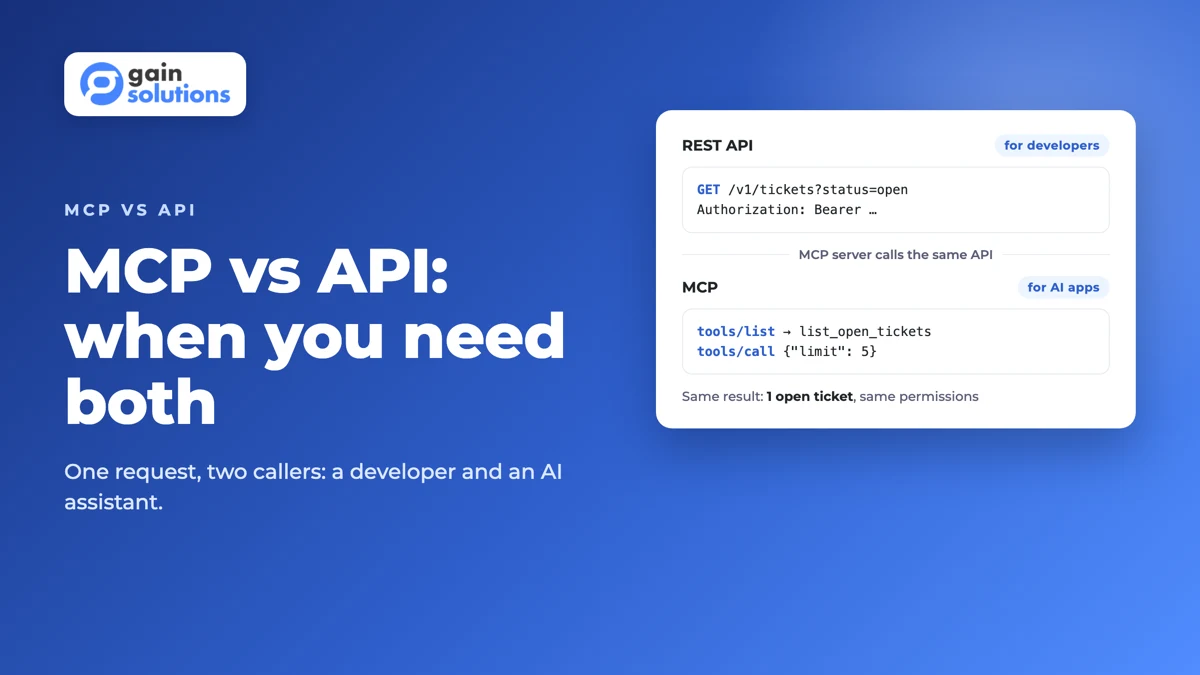
- What does the same request look like through an API and through MCP?
- When do you need an MCP server, and when is an API enough?
- How to turn an existing API into an MCP server in 6 steps
- How GainHQ can help
Your product already has an API. Developers read the docs, pick an endpoint and write the call. Now customers want to ask Claude or ChatGPT about their data in your product, and someone on the team asks whether you need "an MCP" as well.
The short answer is that you need both, and they do different jobs. This guide explains the difference in plain terms, shows the same request made both ways with real output, and helps you decide when an MCP server is worth building.
Quick overview
MCP vs API: an API is a contract that lets one program call another through fixed endpoints a developer codes against. MCP (Model Context Protocol) is a standard that lets AI apps discover your product's actions as tools at runtime and call them. An MCP server usually sits on top of your API. GainHQ (gainhq.com), Gain Solutions' software development team, runs a read-only MCP server in production for Gain.io.
Last checked against the MCP specification (revision 2026-07-28) and the MCP TypeScript SDK 1.32.2 on 5 November 2026.
Key takeaways
- An API is written for developers, who read the docs and code each call. MCP is written for AI apps, which discover tools and decide when to call them.
- MCP doesn't replace your API. In most SaaS products, the MCP server is a thin layer that calls your existing API as the signed-in user.
- MCP uses JSON-RPC 2.0 over stdio for local servers or Streamable HTTP for remote ones, with three main building blocks: tools, resources and prompts.
- An AI client learns what your server offers by calling tools/list, so each tool's name and description act as its documentation for the model.
- Function calling is a model feature you set up per app; MCP is a shared protocol, so one server works with Claude, ChatGPT, Cursor and other clients.
- Build an MCP server when customers want to use your product from AI assistants. Keep the API as the source of truth for everything else.
This guide covers what each one is, how MCP works, a side-by-side comparison, MCP vs function calling, a worked example, when to build an MCP server and how to turn an existing API into one.
What is the difference between MCP and an API?
An API is a fixed contract between programs: endpoints, parameters and responses that a developer reads in the docs and codes against. MCP is a standard protocol that lets an AI application discover what your product can do, as a list of described tools, and call those tools while it works on a user's request.
The caller is the real difference. An API call is planned by a person at build time: a developer decides to call GET /v1/tickets when a page loads. An MCP tool call is chosen by a model at run time: a user asks "what's open for Acme?", and the assistant picks the tool whose description matches. That's why MCP puts so much weight on names and descriptions, and why it adds discovery that a normal API leaves to the docs.
They aren't rivals. An MCP server for a SaaS product almost always calls the product's own API underneath, so the API keeps doing what it already does: enforcing permissions, validating input and returning data.
How does MCP work?
MCP connects three parts: a host (the AI app, such as Claude Desktop or an IDE), a client inside that host, and a server that exposes your product's capabilities. They exchange JSON-RPC 2.0 messages, and the specification says it takes inspiration from the Language Server Protocol, which did the same job for code editors.
A server can offer three kinds of building blocks:
- Tools are actions the model can run, such as listing tickets or drafting a reply.
- Resources are data the app can read as context, such as a file or a record.
- Prompts are reusable templates for common requests.
Clients discover these at run time with list methods. A client calls tools/list, reads each tool's name, description and input schema, and later calls tools/call with arguments. Because the list comes from the server, it can change without anyone updating the client.
MCP has two standard transports. Local servers run on the user's machine over stdio and usually serve one client. Remote servers run on your infrastructure over Streamable HTTP and serve many users, which is the model a SaaS product needs. Revision 2026-07-28 made requests stateless and self-contained, and it deprecated sampling, the feature that let servers ask the client's model to generate text.
MCP vs API at a glance
Here is how the two compare on the points that matter when you build them.
| API (for example REST) | MCP server | |
|---|---|---|
| Who calls it | Code a developer wrote | An AI app, on a user's behalf |
| When the call is decided | At build time | At run time, by the model |
| How the caller learns what exists | Docs, an OpenAPI file, an SDK | tools/list, resources/list and prompts/list from the server |
| What a call looks like | HTTP method and URL, such as GET /v1/tickets | JSON-RPC message, such as tools/call with a tool name and arguments |
| What tells the caller what a call does | Endpoint docs written for people | Tool name, description and input schema written for a model |
| Auth | Whatever you choose: API keys, OAuth, sessions | OAuth 2.1 for remote servers; credentials from the environment for local stdio servers |
| Transport | HTTP | stdio (local) or Streamable HTTP (remote) |
| Typical role in a SaaS stack | The source of truth for data and business rules | An adapter that calls the API for AI clients |
If your API design is shaky, fix that first. Our guides to API-first architecture and GraphQL vs REST cover the choices underneath.
Is MCP going to replace APIs?
No. MCP needs something to call, and for most products that something is an API. MCP standardises how AI apps find and use your capabilities; it doesn't replace how your systems talk to each other, how partners integrate or how your own front end loads data.
What does change is who your API's users are. Some requests that used to come from a developer's integration will now come from an AI assistant acting for a user, through your MCP server. That makes clear permissions and good rate limits on the API more important, not less.
What is the difference between MCP and function calling?
Function calling is a feature of a model provider's API: your app sends the model a list of functions with each request, the model replies with the one it wants to call, and your app runs it. MCP is a protocol between AI apps and servers, so the same server can plug into any MCP client without each app redefining the functions.
| REST API | Function calling | MCP | |
|---|---|---|---|
| What it is | An interface between programs | A model feature for choosing a function | A protocol between AI apps and servers |
| Where tools are defined | Not applicable | In each app's request to the model | On the server, discovered by any client |
| Who runs the action | The calling program | Your app, after the model picks | The MCP server, when the client calls it |
| Reuse across AI apps | Through custom code in each app | Rebuilt per app | One server works with many clients |
In practice they stack. An AI client often uses its model's function calling internally to decide which MCP tool to call, and the MCP server then calls your REST API. For more on wiring models into a product, see our guide to LLM integration.
What does the same request look like through an API and through MCP?
Here's a worked example: one request, "list the open tickets", made both ways against the same small helpdesk API. We ran it with the official MCP TypeScript SDK (version 1.32.2). It typechecks with strict TypeScript, and the output below is real, lightly trimmed.
Through the REST API, a developer reads the docs and writes the call:
GET /v1/tickets?status=open
Authorization: Bearer <user token>

200 OK
{"data":[{"id":"T-1042","tenantId":"acme","subject":"Invoice shows wrong VAT","status":"open"}]}
Through MCP, the server wraps that same endpoint as a tool. It calls the API with the signed-in user's token, so the API's own permission and tenant checks still apply:
import { McpServer } from "@modelcontextprotocol/sdk/server/mcp.js";
import { z } from "zod";

const API = "https://api.example.com";

export function buildServer() {
  const server = new McpServer({ name: "helpdesk", version: "1.0.0" });

  server.registerTool(
    "list_open_tickets",
    {
      title: "List open tickets",
      description: "List open support tickets in the user's workspace, newest first. Use it to answer questions about open issues.",
      inputSchema: { limit: z.number().int().min(1).max(20).default(5) },
      annotations: { readOnlyHint: true },
    },
    async ({ limit }, extra) => {
      // The MCP server calls your existing REST API as the signed-in user.
      const res = await fetch(`${API}/v1/tickets?status=open`, {
        headers: { Authorization: `Bearer ${extra.authInfo?.token}` },
      });
      if (!res.ok) {
        return { isError: true, content: [{ type: "text", text: `API error ${res.status}` }] };
      }
      const { data } = (await res.json()) as { data: unknown[] };
      return { content: [{ type: "text", text: JSON.stringify(data.slice(0, limit)) }] };
    }
  );

  return server;
}
An AI client never sees the endpoint. It first asks what the server offers, then calls the tool it picked:
-> {"jsonrpc":"2.0","id":1,"method":"tools/list"}
<- {"jsonrpc":"2.0","id":1,"result":{"tools":[{"name":"list_open_tickets",
     "title":"List open tickets",
     "description":"List open support tickets in the user's workspace, newest first. Use it to answer questions about open issues.",
     "inputSchema":{"type":"object","properties":{"limit":{"type":"integer","minimum":1,"maximum":20,"default":5}}},
     "annotations":{"readOnlyHint":true}}]}}

-> {"jsonrpc":"2.0","id":2,"method":"tools/call","params":{"name":"list_open_tickets","arguments":{"limit":5}}}
<- {"jsonrpc":"2.0","id":2,"result":{"content":[{"type":"text",
     "text":"[{\"id\":\"T-1042\",\"tenantId\":\"acme\",\"subject\":\"Invoice shows wrong VAT\",\"status\":\"open\"}]"}]}}
Three things to notice. The data is identical, because the MCP server called the same API. The description in tools/list is what the model reads to decide when to use the tool, so write it like you'd brief a new colleague. And the user's token travels with the call, so a customer in one workspace can't see another workspace's tickets through MCP any more than through the API.
When do you need an MCP server, and when is an API enough?
Build an MCP server when your customers want to use your product from inside AI assistants. Stay with the API alone when your integrations are program-to-program and no person is asking an AI to act in your product.
| Situation | What to build |
|---|---|
| Customers ask Claude, ChatGPT or Cursor questions that need your product's data | MCP server on top of your API |
| Partners sync data with your product on a schedule | API (and webhooks) |
| Your own web and mobile apps load data | API |
| You're adding an AI assistant inside your own product only | Function calling against your API; add MCP if you want outside clients too |
| Your API has no per-user auth or tenant checks yet | Fix the API first, then add MCP |
Gain.io is an example of the first row. Its MCP server, live at gain.io/mcp-server, gives AI clients read tools such as list_tickets, get_deal and list_feedback, plus draft_ticket_reply, which drafts a reply that a person then sends. Nothing is sent or changed without a person.
How to turn an existing API into an MCP server in 6 steps
- List the 3 to 5 questions customers already ask support or search for in your product. Each becomes a candidate tool.
- Map each tool to existing API endpoints. If a tool needs data the API can't return, fix the API first.
- Write tool names, descriptions and input schemas for a model, not a developer. Say when to use the tool and what it returns.
- Build the server with an official MCP SDK and call your API as the signed-in user, never with a shared admin key.
- Add OAuth 2.1, scopes, rate limits and an audit log. Our guide to MCP server security covers each control.
- Test every tool with the MCP Inspector, launch read-only to a small group, and add write tools later as drafts a person approves.
For the wider picture of how AI features fit into a SaaS product, see our guide to AI agents in SaaS and our API integration strategy guide.
How GainHQ can help
GainHQ builds custom software, SaaS products and AI features for founders and product teams. We also build and run our own SaaS, including Gain.io, whose read-only MCP server is live in production. If you want an MCP server for your product, from tool design to a safe first release, talk to GainHQ.
Frequently asked questions
Is MCP going to replace APIs?
No. MCP is a protocol that lets AI apps discover and call your product's actions, and an MCP server usually calls your existing API to do the work. APIs still run integrations between systems, partner syncs and your own web and mobile apps. MCP adds a standard way for AI assistants to use the same capabilities.
Is MCP like an API gateway?
Not really. An API gateway sits in front of APIs to route, authenticate and rate-limit HTTP traffic. An MCP server is an adapter that describes your product's actions as tools an AI app can discover and call. A remote MCP server can sit behind your API gateway like any other service, and many teams run it that way.
How do you convert an API to MCP?
Pick the few questions customers already ask, map each to existing endpoints, and expose each as an MCP tool with a clear name, description and input schema. Build the server with an official MCP SDK, call your API as the signed-in user, add OAuth 2.1 and an audit log, then test every tool with the MCP Inspector.
Does MCP use API keys?
Remote MCP servers should use OAuth 2.1, which the MCP authorization specification defines for HTTP transports, so each user signs in and approves scopes. Local servers that run over stdio read credentials from the environment instead, and those are often API keys. Behind the scenes, the MCP server can still call your API with its own credentials for that user.
Is MCP a REST API?
No. MCP messages use JSON-RPC 2.0, sent over stdio for local servers or Streamable HTTP for remote ones. A client calls methods such as tools/list and tools/call rather than REST endpoints like GET /v1/tickets. Many MCP servers call a REST API underneath, which is why the two are easy to confuse.
What is the difference between MCP and function calling?
Function calling is a model feature: your app sends the model a list of functions with each request and runs the one the model picks. MCP is a protocol: tools live on a server that any MCP client can discover and call. They often work together, with the client using function calling to choose which MCP tool to call.
Can one MCP server wrap several APIs?
Yes. A single MCP server can expose tools that call different APIs, such as a ticketing API and a billing API, as long as each call runs with the signed-in user's permissions. Keep the tool list small and clearly described, because the model chooses between tools by reading their names and descriptions.