Types of Software: 7 Categories, Examples and How They Fit Together
by GainHQ Editorial Team | Oct 20, 2026 | Software Development Insights | Editorial policy
Table of Contents
- The 7 main types of software
- System software
- Middleware
- Programming software
- Application software
- Enterprise software categories
- Types of software by licence
- Types of software by delivery
- Types of software by how it is built
- Other categories you will see
- How the types fit together
- How to choose the right type of software for a business need
- How GainHQ can help
Last updated: 10 November 2026
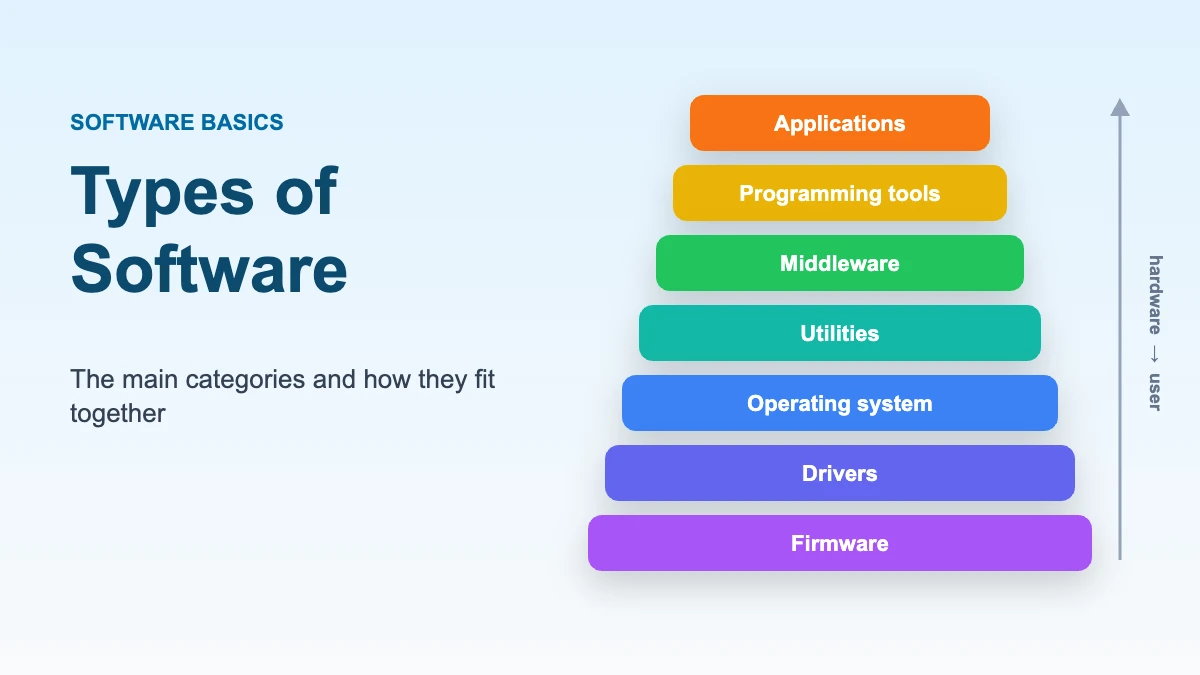
Software is the set of programs and associated data that tell a computer what to do (NIST). There are two broad types: system software, which runs the hardware and provides a platform, and application software, which people use to get work done. Within those, most guides use seven functional categories: operating systems, device drivers, firmware, utilities, middleware, programming tools and applications.
Software can also be grouped in three other useful ways: by licence (proprietary, open source, freeware), by how it is delivered (installed or as a cloud service) and by how it is built (custom or off-the-shelf). This guide covers all four. When you hire a team to build or run software instead of buying a product, that work is a software service: see what software services are and how to choose a provider.
The 7 main types of software
| # | Type | What it does | Examples | Group |
|---|---|---|---|---|
| 1 | Operating systems | Manage hardware resources and provide common services for programs | Windows, macOS, Linux, Android, iOS | System |
| 2 | Device drivers | Let the operating system control a specific piece of hardware | Printer, graphics card and network adapter drivers | System |
| 3 | Firmware | Low-level programs stored in hardware that start and control the device | UEFI/BIOS on a PC, router and smart-TV firmware | System |
| 4 | Utility software | Maintain, protect and optimise the system | Antivirus, backup, file compression, disk management | System |
| 5 | Middleware | Connect applications, databases and services so they can exchange data | Message brokers, API gateways, application servers | Between system and application |
| 6 | Programming software | Help developers write, build, test and debug software | Compilers, interpreters, IDEs such as VS Code, debuggers, Git | Development |
| 7 | Application software | Let people do specific tasks | Word processors, browsers, CRM, accounting, design tools | Application |
System software
System software sits between the hardware and the applications people use.
- Operating systems manage the processor, memory, storage and devices, and give programs a common set of services (NIST). Desktop examples are Windows, macOS and Linux; mobile examples are Android and iOS.
- Device drivers translate the operating system's general instructions into commands a particular printer, graphics card or network adapter understands.
- Firmware is software stored in a device's hardware, typically in read-only or flash memory, that runs when the device starts (NIST). On modern PCs this is UEFI, which replaced the older BIOS; routers, cameras, cars and smart appliances all run firmware.
- Utility software keeps the system healthy: antivirus and endpoint security, backup tools, file compression, and disk management. (Disk defragmentation, often listed as a utility, matters for spinning hard drives but not for SSDs.)
Middleware
Middleware is the connecting layer in most business systems. It lets an application talk to a database, a payment provider or another application without each pair needing custom wiring. Message brokers, API gateways and application servers are common examples. For a comparison of two widely used message brokers, see Kafka vs RabbitMQ.
Programming software
Programming (development) software is what developers use to build all the other types:
- Compilers translate source code into machine code before it runs (C, C++, Go, Rust).
- Interpreters execute code line by line at run time (Python and JavaScript are typically run this way).
- IDEs and code editors (Visual Studio Code, IntelliJ IDEA) combine editing, building and debugging.
- Version control (Git) records changes and lets teams work on the same code.
- Build, test and deployment tools automate the path from code to production.
Programming languages themselves are not software tools; the compilers and interpreters that run them are.
Application software
Application software is a program hosted on a computer system that people use for a specific purpose (NIST). It is the largest category and the one most people mean by "software".
| Category | What it does | Examples |
|---|---|---|
| Productivity | Documents, spreadsheets, presentations | Microsoft 365, Google Workspace |
| Communication | Messaging, email, video calls | Slack, Microsoft Teams, Zoom |
| Web browsers | Access websites and web apps | Chrome, Safari, Firefox, Edge |
| Graphics and media | Design, photo, video and audio editing | Adobe Photoshop, Figma, DaVinci Resolve |
| Database software | Store and query structured data | PostgreSQL, MySQL, Microsoft Access |
| Enterprise applications | Run business processes | ERP, CRM, HR and payroll (see below) |
| Mobile apps | Applications built for phones and tablets | Banking, delivery and messaging apps |
| AI software | Generate content, predict or classify | Chat assistants, coding assistants, forecasting tools |
The US Bureau of Labor Statistics reflects the same split in how it describes developers: applications developers build programs for consumers or for custom and commercial use, while systems developers create operating systems and the software that runs devices.
Enterprise software categories
| Category | Used for | Example |
|---|---|---|
| ERP (enterprise resource planning) | An integrated suite for finance, HR, manufacturing and supply chain on shared data (Gartner) | SAP, Oracle, Microsoft Dynamics |
| CRM (customer relationship management) | Contacts, deals, pipeline and customer history | Salesforce, HubSpot, Gain.io |
| HR and payroll (HRIS) | Employee records, leave, payroll | Workday, Payrun |
| Helpdesk and customer support | Tickets, live chat, knowledge base | Zendesk, Gain.io helpdesk |
| Business intelligence | Dashboards and reporting | Power BI, Tableau |
| Project and work management | Tasks, sprints, roadmaps | Jira, Asana |
Payrun and Gain.io are GainHQ's own in-house products.
Types of software by licence
| Licence type | What it means | Examples |
|---|---|---|
| Proprietary | The owner keeps control of the code and limits use, copying and changes through a licence | Microsoft Windows, Adobe Photoshop |
| Open source | Meets the Open Source Initiative's definition: free redistribution, source code available, modifications and derived works allowed (OSI) | Linux, PostgreSQL, Kubernetes |
| Free software | Grants users the freedom to run, study, change and share the program (GNU) | GNU tools, many Linux distributions |
| Freeware | No charge to use, but usually no source code or right to modify (GNU) | Many free utilities and readers |
| Shareware | Free to try, with payment expected for continued use (GNU) | Trial-based desktop tools |
Two common mix-ups: open source does not mean free of charge (companies sell supported open-source products), and "commercial" does not mean proprietary (open-source software can be sold commercially).
Types of software by delivery
| Delivery model | What it means | Examples |
|---|---|---|
| On-premise (installed) | Installed and run on the customer's own computers or servers | Desktop software, self-hosted databases |
| SaaS (software as a service) | The customer uses the provider's application running on cloud infrastructure, usually through a browser (NIST SP 800-145) | Gmail, Slack, Salesforce |
| PaaS (platform as a service) | The customer deploys their own applications on a provider's platform | Heroku, Google App Engine |
| IaaS (infrastructure as a service) | The customer rents computing, storage and networking and manages the OS and applications | AWS EC2, Azure Virtual Machines |
NIST also defines four cloud deployment models: public, private, community and hybrid. Our guides to SaaS vs PaaS vs IaaS and SaaS vs on-premise software go deeper.
Types of software by how it is built
- Off-the-shelf (packaged) software is built once and sold or licensed to many customers, such as Microsoft 365 or QuickBooks.
- Custom (bespoke) software is developed for one organisation's specific needs and is not released publicly (GNU calls this private or custom software). Examples are an internal pricing engine or an airline's crew scheduling system.
- Low-code and no-code apps are built on platforms that let teams assemble applications with visual tools and limited coding. See what is a low-code platform.
Other categories you will see
- Embedded software runs inside devices that are not general-purpose computers: cars, medical devices, industrial machines and IoT sensors. It often runs on firmware or a real-time operating system.
- Security software includes antivirus and endpoint protection, firewalls, password managers and identity tools.
- DevOps and infrastructure software automates building, testing, deploying and monitoring other software, such as CI/CD pipelines, Docker and Kubernetes.
- AI software uses machine learning models to generate, classify or predict. Our guide to AI software explains the main uses.
How the types fit together
Every application you use relies on the layers beneath it:
| Layer | Example on a laptop | Example in a SaaS product |
|---|---|---|
| Application | A browser showing a CRM | The CRM's web app |
| Middleware | — | API gateway, message queue |
| Programming and runtime | Browser JavaScript engine | Node.js or Python runtime |
| Operating system | Windows or macOS | Linux on cloud servers |
| Drivers | Wi-Fi and graphics drivers | Virtual device drivers |
| Firmware | UEFI | Server and network-card firmware |
| Hardware | Laptop | Cloud data-centre servers |
How to choose the right type of software for a business need
- Check whether off-the-shelf or SaaS covers at least most of the need. It is usually the fastest and cheapest start for standard processes such as accounting, payroll or email.
- Look at what is unique to your business. If the process is a competitive advantage or no product fits, custom software is worth considering. Our guide to build vs buy software covers the trade-offs.
- Decide how it should be delivered. SaaS reduces maintenance; on-premise gives more control over data and infrastructure.
- Check the licence. Make sure proprietary and open-source licences allow how you plan to use, change and distribute the software.
- Plan for integration. Most businesses run several types together; middleware and APIs decide how well they work as one system.
How GainHQ can help
GainHQ has spent 15+ years building software and has shipped 13+ products, including Payrun and Gain.io. If off-the-shelf tools do not fit, see our custom software development services and our guide to what custom software development means.
Frequently asked questions
What are the main types of software?
The two main types are system software and application software. Most guides split these into seven categories: operating systems, device drivers, firmware, utilities, middleware, programming software and application software.
What are the 7 categories of software?
Operating systems, device drivers, firmware, utility software, middleware, programming software and application software.
What are the types of system software?
Operating systems, device drivers, firmware and utility software. Some definitions also include language translators such as compilers and interpreters.
What is application software? Give examples.
Software people use for specific tasks: Microsoft Word, Google Chrome, Slack, Zoom, Adobe Photoshop, Salesforce, QuickBooks and mobile banking apps.
What is the difference between system software and application software?
System software runs the computer and provides a platform; application software runs on that platform to help people do tasks. A computer can run without a word processor but not without an operating system.
Is open source software free?
Not necessarily. Open source means the code is available and can be modified and redistributed under the licence. It is often free of charge, but companies can and do sell open-source products and support.
What are 20 examples of software?
Windows, macOS, Linux, Android, iOS, UEFI firmware, printer drivers, antivirus, 7-Zip, Visual Studio Code, Git, the Python interpreter, Chrome, Microsoft Word, Excel, Slack, Zoom, Photoshop, Salesforce and Kubernetes.
Is SaaS a type of software?
SaaS is a way of delivering software rather than a functional type. A SaaS product is usually application software that runs on the provider's cloud and is accessed through a browser or app.