Kafka Vs RabbitMQ: Key Differences, Performance And Use Cases
by Daniel Wright | Aug 31, 2026 | Technology & Innovation
Table of Contents
- What Is Kafka
- What Is RabbitMQ?
- Kafka Vs RabbitMQ: Key Differences
- How Do Kafka And RabbitMQ Compare In Performance
- Reliability And Message Handling In Kafka And RabbitMQ
- Common Use Cases Of Kafka And RabbitMQ
- Kafka Vs RabbitMQ In Terms Of Cost And Operations
- When To Choose Kafka
- When To Choose RabbitMQ
- Final Thoughts
Kafka and RabbitMQ are both powerful messaging systems, but they fit different needs. Kafka is usually a better choice for high-volume event streams, long-term data retention, event sourcing, and large data pipelines. RabbitMQ often fits background jobs, complex routing, priority messages, and task-based workloads better.
The choice matters because your messaging system affects performance, reliability, scalability, and operational work. For developers, architects, and engineering teams, choosing the wrong fit can add unnecessary complexity as the system grows.
The Kafka vs RabbitMQ decision is also less clear than it once was. RabbitMQ Streams supports durable streaming and replay, while Kafka now supports queue-style workloads. This guide compares their architecture, performance, message handling, use cases, costs, and operations so you can choose the right option for your workload.
What Is Kafka
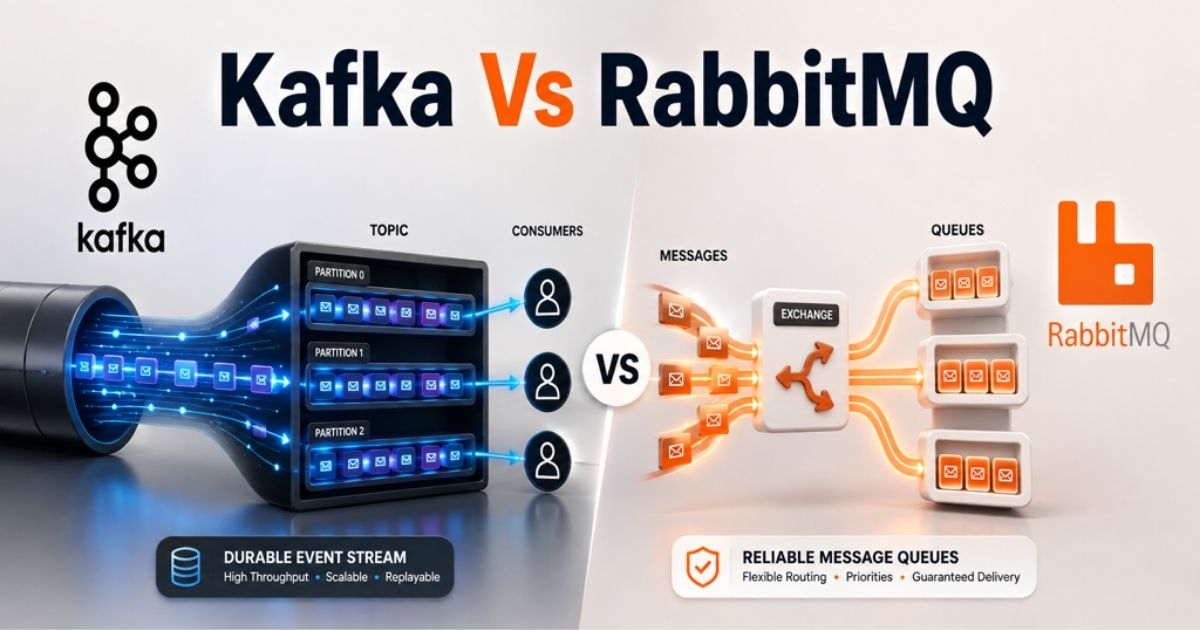
Apache Kafka is an open-source distributed event streaming platform built to handle large volumes of streaming data. Instead of working like a traditional message broker, Kafka stores events in topics across multiple brokers. Producers publish messages to these topics, while Kafka consumers subscribe and process them at their own pace.
Kafka uses a distributed append-only log divided into partitions. Each event receives an offset, and a message key can determine which partition receives it. Kafka retains messages for a configurable period rather than deleting them after consumption. That allows multiple consumer groups to read the same event stream or replay older events when needed. This model makes Kafka well-suited for high-volume event streams, data pipelines, log aggregation, event sourcing, and real-time data processing.
What Is RabbitMQ?
RabbitMQ is an open-source message broker built to move messages reliably between applications and services. Producers send messages to exchanges, which route messages to queues based on bindings and routing rules. Consumers then receive and process messages. RabbitMQ supports AMQP and additional protocols such as MQTT and STOMP, which makes it flexible for distributed systems.
Traditional RabbitMQ queues work well for background jobs, complex message routing, and task-based workloads. RabbitMQ supports acknowledgements, priority queues, and flexible routing to give applications granular control over message delivery. Acknowledged messages can then be removed from traditional queues. RabbitMQ Streams adds a different model. It uses a persistent append-only log, so multiple consumers can read and replay the same stream history when needed.
Kafka Vs RabbitMQ: Key Differences
Kafka and RabbitMQ can both move data between distributed systems, but they handle messages differently. Apache Kafka is built around a distributed log and long-lived event streams. RabbitMQ is a message broker built around queues, exchanges, and flexible message delivery. The right choice depends on how your application stores, routes, consumes, and reuses messages.
Architecture And Data Model
Kafka uses topics split into partitions across multiple brokers. Each partition acts as a distributed append-only log. A Kafka producer writes records to a topic, and a message key can determine which partition receives each record. Kafka retains messages based on a configured retention policy, even after consumers read them.
RabbitMQ uses a queue-based system architecture. Producers publish messages to exchanges, which route messages to queues or streams. Traditional RabbitMQ queues treat messages as individual units of work. Once a consumer processes and acknowledges a message, the broker can remove it. RabbitMQ Streams work differently because they provide persistent, replicated append-only logs that support repeated consumption.
Delivery And Consumption
Kafka primarily uses offset-based consumption. Kafka consumers fetch records and track their position in each partition. That lets consumers process messages at their own pace. Separate consumer groups can also read the same data stream independently, which works well for event-driven architectures with multiple consumers.
RabbitMQ commonly uses a push model. Consumers subscribe to queues, and the broker sends available messages to them. Manual acknowledgements confirm successful processing. Prefetch limits can control how many unacknowledged messages each consumer receives. Traditional queues suit background workers and task-oriented workloads where individual messages need granular delivery control.
Routing And Protocols
RabbitMQ has a stronger native model for complex message routing. Exchanges can route messages to one or more queues based on bindings and routing keys. Direct, topic, fanout, and headers exchanges support different routing scenarios. That makes RabbitMQ useful when applications need flexible routing before consumers receive messages.
Kafka relies mainly on topics, partitions, and message keys for data distribution. Producers send messages to topics, while consumers subscribe to the topics they need. RabbitMQ also supports AMQP and additional messaging protocols, giving teams more protocol flexibility for varied messaging systems.
Retention And Replay
Kafka retains messages for a configurable retention period instead of deleting them after consumption. Consumers track offsets, so they can return to an earlier position and replay historical events. The same event stream can also serve multiple consumer groups independently. That makes Kafka a strong fit for event sourcing, log aggregation, data pipelines, and historical data processing.
Traditional RabbitMQ queues follow a different lifecycle. Acknowledged messages can be deleted, so those queues do not provide Kafka-style historical replay. RabbitMQ Streams remove that limitation for streaming workloads. They retain messages in an append-only log and let consumers read the stream history repeatedly.
Ordering And Parallelism
Kafka preserves record order within each partition, not across every partition in a topic. Consumer groups distribute partitions across consumers, which provides parallel processing while retaining per-partition ordering. A consistent message key can keep related records in the same partition when their sequence matters.
RabbitMQ queues normally follow FIFO delivery, but practical ordering can change with multiple consumers, message priorities, requeueing, and redelivery. Priority queues intentionally deliver higher-priority messages first. Teams that need strict ordering must account for those behaviors when they scale consumers.
Difference | Kafka | RabbitMQ |
|---|---|---|
Core model | Distributed event log | Message broker with queues |
Consumption | Offset-based pull | Primarily push-based |
Message retention | Configurable retention | Traditional queues remove acknowledged messages |
Replay | Native through offsets | Available with RabbitMQ Streams |
Routing | Topics, partitions, keys | Exchanges, bindings, routing keys |
Multiple consumers | Independent consumer groups | Competing or separately routed consumers |
Ordering | Within a partition | Queue order can change during parallel delivery or redelivery |
Priority queues | No RabbitMQ-style native message priority | Supported by classic and quorum queues |
Best fit | Event streams and data pipelines | Task queues and complex routing |
How Do Kafka And RabbitMQ Compare In Performance
Kafka and RabbitMQ can both handle demanding messaging workloads, but performance depends on how they are used. Kafka is built for sustained, high-volume event streams. Traditional RabbitMQ queues focus more on message delivery and task processing. RabbitMQ Streams provide a log-based option designed for much higher streaming throughput.
Throughput And Latency
Apache Kafka is designed for high throughput. Producers can batch records before sending them to a Kafka broker. Kafka writes batches to an append-only log and relies heavily on the operating system's page cache. That approach helps Kafka move large volumes of streaming data efficiently.
Traditional RabbitMQ queues have different performance goals. RabbitMQ can offer very low latency for individual message delivery through its push model. RabbitMQ Streams are optimized for streaming workloads and can process millions of messages per second when batches are well filled.
Performance benchmarks need context. Message size, batching, persistence, replication, acknowledgements, and hardware can significantly change throughput and latency.
Horizontal Scaling
Kafka clusters scale by distributing topic partitions across multiple brokers. More partitions allow producers and consumers to work in parallel. Additional brokers can provide more storage and processing capacity. Replication provides fault tolerance across the cluster.
RabbitMQ clusters scale through nodes, queues, streams, and consumers. Workloads can be distributed across multiple queues rather than relying on one large queue. RabbitMQ super streams partition a data stream across multiple individual streams, which allows parallel processing similar to partitioned Kafka topics.
Replication affects both systems. More replicas improve fault tolerance but require extra network, disk, and CPU resources.
Consumer Scaling
Kafka traditionally uses consumer groups to divide partitions among Kafka consumers. Each partition can be assigned to one consumer within a consumer group at a time. As a result, the partition count can limit consumer parallelism.
Kafka 4.2 also introduced Share Groups for queue-style workloads. Share consumers can outnumber the partitions they consume from, which removes an important limitation of traditional consumer groups for task-based processing.
RabbitMQ's queues can distribute messages across multiple consumers. That model works naturally for background workers that process independent tasks. Prefetch settings control how many unacknowledged messages each consumer can receive and can have a major effect on throughput.
Backpressure And Slow Consumers
Kafka and RabbitMQ respond differently when consumers cannot keep up.
Kafka consumers pull records and process them at their own pace through offset-based consumption. Slow processing causes consumer lag to increase. Kafka retains messages according to the configured retention policy, so a consumer can catch up later as long as the required data remains available.
Traditional RabbitMQ queues build a backlog when producers send messages faster than consumers process them. Consumer prefetch limits can prevent a worker from receiving too many unacknowledged messages at once.
RabbitMQ Streams are better suited to large backlogs than traditional queues. Streams use an append-only log and were specifically designed to store large amounts of data efficiently.
Workload Performance Factors
No Kafka vs RabbitMQ benchmark can declare a universal winner. The result depends on the workload and configuration.
Message size, batching, producer count, multiple consumers, replication, acknowledgement settings, persistence, storage speed, network capacity, and CPU cores can all affect performance. A test with small batched events can produce very different results from one with large messages or strict durability requirements.
Kafka remains a strong fit for high-volume event streams, long-lived stream history, and large data pipelines. Traditional RabbitMQ queues fit task processing and low-latency message delivery well. RabbitMQ Streams compete much more directly with Kafka for streaming workloads, so teams should benchmark both systems under realistic production conditions.
Performance Factor | Kafka | RabbitMQ |
|---|---|---|
Raw Throughput | Very high for batched event streams | High for queues; very high with Streams |
Individual Message Latency | Low, but batching can add latency | Very low with traditional queues |
Streaming Performance | Built for high-volume streaming | Streams compete directly in streaming workloads |
Horizontal Scaling | Brokers and partitions | Nodes, queues, streams, and super streams |
Consumer Scaling | Consumer groups and Share Groups | Multiple consumers across queues or streams |
Slow Consumers | Consumer lag increases | Queue backlog or stream lag increases |
Consumption Control | Consumers control pace through offsets | Queues primarily push; Streams support offset-based reads |
Large Backlogs | Well suited | Streams are better suited than traditional queues |
Best Performance Fit | Event streams and data pipelines | Task queues, low-latency delivery, and streaming with Streams |
Reliability And Message Handling In Kafka And RabbitMQ
Kafka and RabbitMQ both support reliable messaging, but they manage failures differently. Kafka relies on replicated logs, consumer offsets, and configurable producer acknowledgements. RabbitMQ uses queues, consumer acknowledgements, publisher confirms, redelivery, and quorum queues. The better approach depends on whether you need durable event history or granular control over individual messages.
Delivery Guarantees
Both Kafka and RabbitMQ can support at-most-once and at-least-once delivery patterns. Kafka also supports exactly-once semantics for specific Kafka workflows through idempotent producers and transactions. Applications still need to understand where those guarantees begin and end.
RabbitMQ uses consumer acknowledgements to confirm successful processing. A message should be acknowledged only after the required work is complete. If acknowledgements are enabled and a connection fails before confirmation, RabbitMQ can redeliver the message. At-least-once delivery means duplicate processing is still possible, so consumers should be idempotent where duplicates matter.
Retries And Redelivery
Kafka does not use RabbitMQ-style message redelivery from a traditional queue. Kafka consumers track offsets in the distributed log. An application can retry processing before committing an offset or use separate retry topics for delayed attempts.
RabbitMQ provides more direct control over individual failed messages. A consumer can negatively acknowledge or reject a message and request requeueing. RabbitMQ can then make that message available for redelivery. Quorum queues can also track delivery attempts and move poison messages after a configured delivery limit.
Dead-Letter Handling
RabbitMQ has built-in dead letter exchanges. A message can be dead-lettered after rejection without requeue, expiration, queue overflow, or exceeding the delivery limit on a quorum queue. A dead letter exchange can then route failed messages to another queue for inspection or further processing.
Kafka commonly handles failed records through application-defined dead-letter topics. A consumer catches the processing failure and a producer publishes the failed record to another Kafka topic. Teams must define the retry policy, metadata, and recovery process themselves.
RabbitMQ therefore provides more broker-level control for dead-letter handling, while Kafka gives applications more freedom to design failure flows around event streams.
Durability And Recovery
Kafka stores events in replicated partitions across Kafka brokers. Kafka retains messages according to its retention settings, which allows consumers to recover their position and replay historical events. That model is useful for event sourcing, data pipelines, and distributed systems where stream history matters.
RabbitMQ quorum queues use Raft replication. Message state, acknowledgements, redelivery state, and other queue operations are replicated. If a queue leader fails, another replica can become the leader and continue from the replicated state. RabbitMQ recommends quorum queues or streams when data safety is important rather than non-replicated classic queues.
Message Priority And Delay
RabbitMQ provides stronger native controls when individual messages need different treatment. Priority queues can deliver higher-priority messages before lower-priority ones. RabbitMQ also supports message TTL, which can expire messages after a configured period. TTL and dead letter exchanges can be combined for delayed retry patterns.
Kafka does not provide RabbitMQ-style native priority queues. Producers normally publish events to topics, and consumers process records according to partition order and offsets. Applications that need priority processing usually separate workloads into different topics or add priority logic outside Kafka.
For workloads built around message priorities, delayed retries, and granular delivery control, RabbitMQ is usually the more natural messaging solution.
Reliability Factor | Kafka | RabbitMQ |
|---|---|---|
Delivery Model | Offset-based consumption | Acknowledgements and redelivery |
At-Least-Once | Supported | Supported |
Exactly-Once | Supported for specific Kafka workflows | Usually requires application-level idempotency |
Failed Message Retry | Consumer logic or retry topics | Requeue, redelivery, TTL, or retry queues |
Dead-Letter Handling | Application-defined dead-letter topics | Built-in dead letter exchanges |
Durable Replication | Replicated partitions | Quorum queues and streams |
Historical Recovery | Replay retained events | Queue redelivery or replay with Streams |
Message Priority | No RabbitMQ-style native priority queue | Native priority support |
Delayed Processing | Usually application/topic based | TTL and queue-based patterns |
Best Fit | Durable event history and replay | Granular message delivery and failure control |
Common Use Cases Of Kafka And RabbitMQ
Kafka and RabbitMQ overlap in some messaging scenarios, but their strengths suit different workloads. Kafka is usually a stronger fit for durable event streams, analytics, and large data pipelines. RabbitMQ fits task queues, service communication, and complex routing scenarios well. RabbitMQ Streams also expands its role into replayable streaming workloads.
Event Streaming And Analytics
Apache Kafka is built for continuous event streaming. Producers publish messages to topics, while multiple consumers can process the same data stream independently. Kafka retains messages, so consumers can analyze current events or return to historical data later.
That model fits clickstream data, application logs, telemetry, financial events, and real-time analytics. Kafka Streams can also transform, filter, join, and aggregate streaming data as events arrive. High-volume event streams are a natural fit because Kafka combines durable data storage with high throughput and fault tolerance.
RabbitMQ Streams can support streaming and large fan-out workloads too. Multiple consumers can repeatedly read the same stream history without deleting messages.
Microservices Communication
Both Kafka and RabbitMQ can connect services in event-driven API-first architectures. The better messaging solution depends on how those services need to communicate.
Kafka works well when one service produces an event that several independent services need to consume. Consumer groups and retained event streams let different applications process the same events at their own pace. Kafka can therefore act as a durable event backbone between microservices.
RabbitMQ is useful when services need targeted message delivery, request-reply communication, or complex message routing. Exchanges and routing keys can route messages to specific queues and consumers. RabbitMQ also supports AMQP and additional protocols such as MQTT, which can help when distributed systems use different communication patterns.
Background Jobs And Tasks
RabbitMQ is a natural choice for traditional background worker systems. Producers send messages to queues, and available workers process those tasks. Common examples include sending emails, processing images, generating reports, handling notifications, and running asynchronous jobs.
RabbitMQ's queues provide granular control over message delivery. Acknowledgements confirm successful processing, while priority queues, retries, dead-letter handling, and message expiry help manage failed or urgent jobs. Multiple consumers can also share work from the same queue.
Kafka can handle queue-style workloads, but RabbitMQ remains a strong choice when the main requirement is assigning individual tasks to workers with detailed delivery controls.
Event Sourcing And Replay
Kafka is well suited for event sourcing because it stores state changes as an ordered sequence of events. Kafka retains messages according to a configurable policy rather than removing them after consumers read them.
Offset-based consumption lets Kafka consumers return to an earlier position and replay historical events. A new consumer can also process the existing stream history to rebuild application state or create a new view of the same data. Apache Kafka specifically lists event sourcing as one of its established use cases.
Traditional RabbitMQ queues are less suitable for this pattern because acknowledged messages are removed. RabbitMQ Streams address that limitation with an append-only log that supports repeated message retrieval and replay.
Data Pipelines And CDC
Kafka is widely used to move data continuously between databases, applications, analytics systems, and data platforms. Kafka Connect can import and export event streams between Kafka and external systems, which makes Kafka useful for large data pipelines.
Change data capture, or CDC, is a common example. Database changes can enter Kafka as events and then flow to search indexes, data warehouses, analytics tools, or other applications. Each downstream consumer can process the event stream independently without requiring the source database to serve every system directly.
RabbitMQ can move data between applications, but Kafka's distributed log, long-lived stream history, high throughput, and integration model make it particularly suited to continuous data integration, API integration and CDC workloads.
Use Case | Better Starting Point | Why |
|---|---|---|
Event Streaming | Kafka | Durable, high-volume event streams |
Real-Time Analytics | Kafka | Stream processing and multiple consumers |
Microservices Events | Kafka | Independent consumers can share event history |
Routed Service Messages | RabbitMQ | Flexible exchanges and routing keys |
Background Jobs | RabbitMQ | Task queues and granular delivery control |
Priority Tasks | RabbitMQ | Native message priorities |
Event Sourcing | Kafka | Retention and historical replay |
Data Pipelines | Kafka | High throughput and broad integration |
CDC | Kafka | Durable change streams for many consumers |
Replayable RabbitMQ Workloads | RabbitMQ Streams | Persistent append-only stream with replay |
Kafka Vs RabbitMQ In Terms Of Cost And Operations
Kafka and RabbitMQ are open-source, so software licensing is not usually the main cost. The bigger difference comes from AI infrastructure, data storage, cluster management, monitoring, and engineering time. Kafka can require more operational planning for large distributed workloads. RabbitMQ can be simpler for traditional messaging, but RabbitMQ clusters still need careful production management.
Infrastructure Requirements
Apache Kafka stores retained event streams across Kafka brokers. Storage needs can grow quickly when applications keep a long stream history or process high-volume event streams. Kafka clusters also need enough CPU, memory, disk capacity, and network bandwidth to support partitions, replication, producers, and consumers.
RabbitMQ infrastructure depends heavily on the workload. Traditional queues may need less storage when messages are processed and removed quickly. Quorum queues and RabbitMQ Streams require durable storage and replication. RabbitMQ recommends at least four CPU cores and 4 GiB of RAM per production node as a baseline, while actual requirements depend on traffic, queues, connections, and data volume.
Deployment And Management
Kafka uses multiple brokers and KRaft controllers for production clusters. Apache recommends three or more controllers for redundancy and advises against combined broker-controller roles in critical production environments. Teams must also manage partitions, replication, retention, upgrades, and cluster capacity.
RabbitMQ clusters require management of nodes, queues, exchanges, policies, connections, and replication. Three-node clusters are a common starting point when fault tolerance matters. Quorum queues and streams add data safety but also increase storage and network requirements.
Both Kafka and RabbitMQ can also run through managed cloud services. Managed platforms reduce infrastructure work, but the service fees become part of the operational cost.
Monitoring And Troubleshooting
Kafka operations rely heavily on visibility into brokers, partitions, producers, and Kafka consumers. Important signals include consumer lag, request rates, message rates, replication health, disk usage, and network throughput. Kafka exposes operational metrics that can feed external monitoring systems.
RabbitMQ teams should watch queue depth, message rates, unacknowledged messages, consumers, connections, memory, disk space, and node health. Resource alarms are especially important because RabbitMQ can throttle publishers when memory or disk limits become a risk. Logs from RabbitMQ brokers and applications also help diagnose delivery and cluster problems.
Security And Access Control
Both messaging systems support authentication, authorization, and encrypted connections.
Kafka supports TLS plus SASL mechanisms such as Kerberos, PLAIN, SCRAM, and OAUTHBEARER. Access control lists can restrict operations on topics, consumer groups, and other resources. Kafka also supports pluggable authorization services.
RabbitMQ supports TLS, username and password authentication, X.509 certificates, OAuth 2.0, LDAP, and other authentication backends. Virtual hosts can isolate applications or tenants. Permissions can control access to exchanges, queues, and routing operations within each virtual host.
Total Cost Of Ownership
The total cost of ownership goes beyond server prices. Teams should account for compute, storage, network traffic, monitoring, backups, upgrades, security, engineering time, and incident response.
Kafka can cost more when large clusters retain huge volumes of streaming data, but its distributed log can replace separate messaging and data pipeline components in some system architectures. RabbitMQ may have a lower operational footprint for simpler task queues and complex message routing. Costs rise as RabbitMQ clusters add replication, large backlogs, streams, and more nodes.
The right cost comparison should therefore use your expected workload rather than a fixed Kafka vs RabbitMQ price.
Cost And Operations Factor | Kafka | RabbitMQ |
|---|---|---|
Core Infrastructure | Brokers, controllers, storage | Nodes, queues, streams, storage |
Storage Demand | Can be high with long retention | Depends on queues, Streams, and backlog |
Cluster Management | Partitions, replication, retention, controllers | Queues, policies, replication, nodes |
Key Monitoring Need | Consumer lag and replication health | Queue depth and resource usage |
Security Control | SASL, TLS, ACLs | TLS, permissions, virtual hosts |
Operational Complexity | Can rise with scale and partition count | Often simpler for traditional queues |
Cost Driver | Retention, scale, storage, operations | Replication, backlog, connections, operations |
Best Cost Fit | Large event-driven data workloads | Traditional messaging and task workloads |
When To Choose Kafka
Choose Kafka when your system needs to handle large, continuous data streams and keep events available after consumption. Apache Kafka is especially useful when high throughput, replay, stream processing, or durable event history matters. Its distributed, scalable architecture also works well when many applications need to consume the same events independently.
High Throughput Is Critical
Kafka is a strong choice when raw throughput is a major requirement. Its distributed log, partitioning model, batching, and sequential storage design help Kafka handle high-volume event streams efficiently.
Apache Kafka states that the platform can deliver messages at network-limited throughput and scale to trillions of messages per day across large clusters. That makes it suitable for clickstream data, telemetry, log aggregation, transaction events, and other workloads that generate data continuously.
Kafka also scales processing across partitions and multiple brokers. Choose it when message volume is expected to grow beyond what a traditional messaging workload normally handles.
Event Replay Is Required
Choose Kafka when consumers need access to events after the first read. Unlike traditional RabbitMQ queues, Kafka does not remove a record simply because one consumer processed it.
Kafka retains messages according to configured retention rules. Consumers track their position in the log and can reset that position to process older records again. That replay capability is useful for recovery, audits, debugging, historical data processing, and new services that need existing event history.
Multiple consumer groups can also process the same event stream independently. One consumer can handle analytics while another updates a search index without competing for the same record.
Stream Processing Matters
Kafka fits applications that need to process streaming data as it arrives. Kafka Streams provides built-in tools for filters, transformations, joins, aggregations, windowing, and stateful processing.
A stream processing application can consume events from one or more Kafka topics, transform the data, and publish the results to new topics. Kafka Streams also supports fault-tolerant state and exactly-once processing semantics.
That model suits fraud detection, real-time analytics, monitoring, recommendations, and other applications that need to react to a changing data stream rather than wait for batch processing.
Event Sourcing Is Needed
Kafka is a natural fit for event sourcing. Instead of storing only the latest application state, event sourcing records each state change as an ordered sequence of events.
Kafka's durable distributed log can preserve that stream history for later retrieval. Applications can replay the events to rebuild state, create new projections, or investigate how a particular state was reached. Apache Kafka specifically identifies event sourcing as a core use case because it can store very large amounts of log data.
Choose Kafka when historical events remain valuable after their initial processing.
Large Data Pipelines Dominate
Kafka works well when large amounts of data must move continuously between databases, applications, analytics platforms, and storage systems. Kafka Connect provides an integration layer for moving event streams between Kafka and external data sources or sinks.
A single data pipeline can serve multiple consumers without forcing each downstream system to query the original source. That makes Kafka useful for change data capture, data integration, log aggregation, analytics pipelines, and event-driven architectures.
Kafka is usually the stronger choice when the pipeline needs high throughput, durable storage, fault tolerance, and several independent consumers.
When To Choose RabbitMQ
Choose RabbitMQ when individual messages need precise routing and delivery control. It is especially useful for background jobs, priority-based work, request-reply communication, and complex routing scenarios. Unlike Kafka, RabbitMQ is built around exchanges and queues, which gives applications direct control over where RabbitMQ messages go and how consumers process them.
Complex Routing Is Required
RabbitMQ is a strong choice when messages need to reach different destinations based on specific rules. Producers publish messages to exchanges, and exchanges route messages to queues or streams through bindings and routing keys.
Direct, topic, fanout, and headers exchanges support different routing patterns. A single message can reach one queue, several queues, or different consumers based on application requirements. RabbitMQ also supports the Advanced Message Queuing Protocol (AMQP) and supports additional protocols for varied messaging environments.
Choose RabbitMQ when flexible routing is more important than maintaining a large distributed event log.
Background Jobs Dominate
RabbitMQ works well for background processing where each task needs an available worker. Common examples include email delivery, image processing, report generation, notifications, and asynchronous business tasks.
Multiple consumers can share work from the same queue. RabbitMQ pushes messages to subscribed consumers and uses acknowledgements to track successful processing. Manual acknowledgements also provide at-least-once delivery when configured correctly. Failed jobs can be requeued or routed through dead letter queues for later handling.
That model makes RabbitMQ a practical fit when your system primarily distributes independent tasks rather than preserving long-lived event history.
Message Priority Matters
Choose RabbitMQ when urgent messages must be processed before less important work. RabbitMQ supports priority queues, where publishers assign message priorities and the broker can deliver higher-priority messages first.
That capability helps with urgent notifications, payment processing, SLA-based jobs, or workloads with different service levels. Unlike Kafka, RabbitMQ provides native per-message priority controls.
Message ordering needs extra attention when priorities are enabled. Higher-priority messages can move ahead of older messages. Multiple consumers, requeueing, and redelivery can also affect the final delivery order.
Request-Reply Is Needed
RabbitMQ fits systems where one service sends a request and expects another service to return a response. A producer can send the request through a queue and provide information that lets the consumer route the response back to the correct requester.
That pattern is useful for distributed systems that need asynchronous request-reply communication without tightly coupling services.
Kafka can support response patterns at the application level, but its distributed log is primarily designed around durable event streams. RabbitMQ's queue and routing model makes request-reply workflows more natural when direct service communication is the main requirement.
Per-Message Control Matters
RabbitMQ gives applications detailed control over individual messages. Consumers can acknowledge successful work, reject failed messages, request redelivery, and limit unacknowledged deliveries through prefetch settings.
Applications can also combine priority queues, expiration rules, routing keys, dead-letter handling, and publisher confirms. Such controls help teams build reliable task-processing workflows and manage failures at the message level.
Both RabbitMQ and Kafka provide reliable messaging capabilities, but they approach reliability differently. Kafka focuses on retained event streams and offset-based consumption. RabbitMQ focuses more on granular message delivery, acknowledgements, routing, and task processing. Choose RabbitMQ when those per-message controls are central to your system architecture.
Final Thoughts
Kafka vs RabbitMQ is no longer a simple choice between event streaming and message queues. Both platforms now overlap in several areas, but their core strengths still differ. Apache Kafka remains a strong choice for high-volume event streams, long-term retention, data pipelines, event sourcing, and advanced stream processing. RabbitMQ stands out for complex routing, background jobs, priority handling, and granular message delivery.
Your workload should guide the final decision. Choose Kafka when durable stream history, large-scale data movement, or Kafka's processing ecosystem matters most. Choose RabbitMQ when individual message control, flexible routing, or task processing is the priority. For some distributed systems, both RabbitMQ and Kafka can serve different roles. Focus on architecture, reliability needs, operational complexity, and future scale before making the final choice.