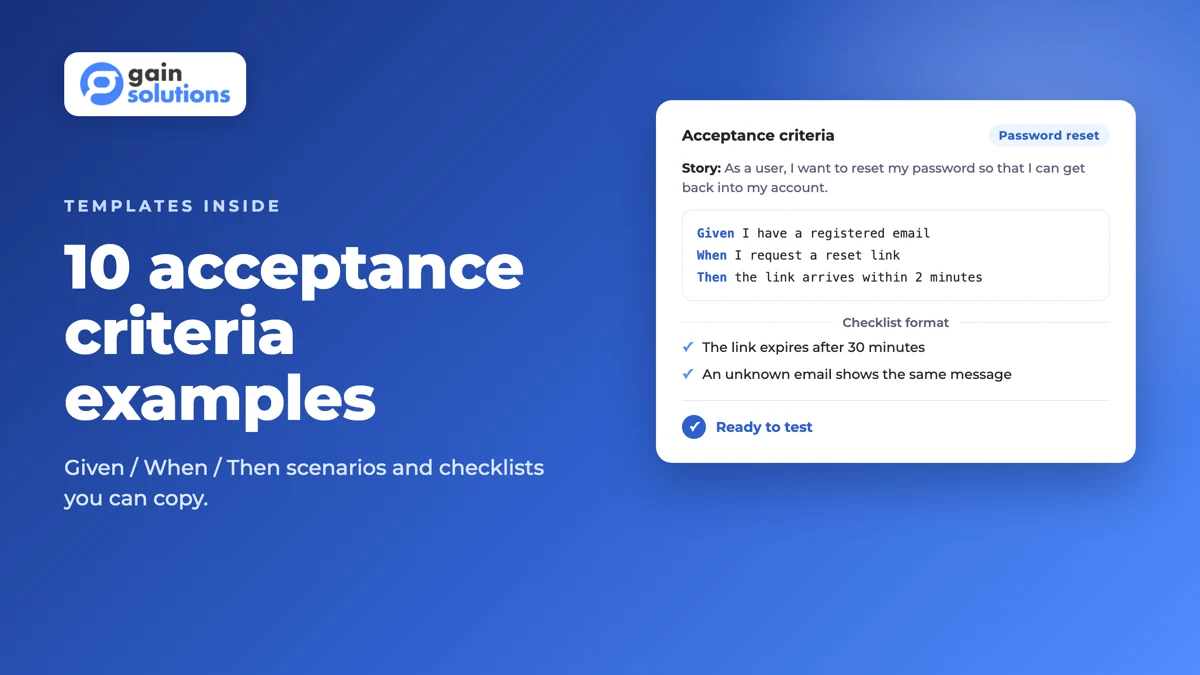
Acceptance Criteria Examples: 10 Templates and How to Write Them
by GainHQ Editorial Team | Nov 15, 2026 | Software Development Insights | Editorial policy
Table of Contents
- Where acceptance criteria come from
- Acceptance criteria vs definition of done vs requirements vs test cases
- Two formats: checklist and Given/When/Then
- What makes acceptance criteria good
- 10 acceptance criteria examples
- Bad vs good: five rewrites
- How to write acceptance criteria: step by step
- Who writes acceptance criteria, and when?
- How many acceptance criteria should a story have?
- Acceptance criteria in Jira
- From acceptance criteria to automated tests
- Common mistakes
- How GainHQ can help
Acceptance criteria are the conditions a user story or feature must meet for the product owner or customer to accept it as complete. Each one is a pass/fail statement that can be tested, written before development starts. A story such as "As a user, I want to reset my password" might have criteria like "the reset link expires after 60 minutes" and "an expired link shows an error and offers a new link".
Good acceptance criteria describe the outcome, not the implementation. They tell the team what "working" means for this story, so developers, testers and the product owner share one definition before any code is written.
Where acceptance criteria come from
The idea is older than most agile tooling. Ron Jeffries described a user story as a card, a conversation and a confirmation, where the confirmation is the set of tests the customer will use to accept the work (Jeffries). Dan North, who introduced behaviour-driven development, put it more directly: a story's behaviour is its acceptance criteria, and he proposed the Given/When/Then template for writing them (North, 2006).
One point surprises many teams: the Scrum Guide does not mention acceptance criteria at all. It defines the Definition of Done. Acceptance criteria are a widely used team practice, not a Scrum rule.
Acceptance criteria vs definition of done vs requirements vs test cases
| Acceptance criteria | Definition of Done | Requirements | Test cases | |
|---|---|---|---|---|
| Scope | One story or feature | Every item the team delivers | The whole product or release | One check of one behaviour |
| Who owns it | Product owner, agreed with the team | The Scrum team (often an organisational minimum) | Product / business analysts | Testers and developers |
| Question it answers | Does this story do what was asked? | Is this item finished to our quality standard? | What must the product do? | Does this specific input give this output? |
| Example | "Expired reset links show an error and a 'send new link' button" | "Code reviewed, tests pass, deployed to staging, docs updated" | "Users can recover access to their account" | "Open a link issued 61 minutes ago → error message shown" |
The Scrum Guide treats the Definition of Done as the quality bar every increment must reach; work that misses it goes back to the Product Backlog. The Agile Alliance notes that individual stories may also have their own specific "done" criteria on top of the team-wide checklist. That is the gap acceptance criteria fill. A story is accepted only when it meets both.
Test cases are derived from acceptance criteria. One criterion usually produces several test cases (the happy path, boundaries and failures).
Two formats: checklist and Given/When/Then
Rule-oriented checklist. A bulleted list of conditions. Quick to write and easy to scan; best for simple stories and non-functional rules.
Scenario-oriented (Given/When/Then). Each scenario sets a starting context (Given), an action (When) and an observable outcome (Then). This is the format used by Gherkin, the language Cucumber and similar tools run as automated tests. Best when the behaviour depends on state or there are several paths.
Many teams mix them: a checklist for rules, scenarios for the tricky paths.
What makes acceptance criteria good
- Testable. Someone can say pass or fail without debate. Bill Wake's INVEST checklist for user stories makes "Testable" its last letter: if a customer cannot say how they would test a story, the story is probably not clear enough yet (Wake, 2003).
- Specific and measurable. Numbers, limits and named states instead of "fast", "easy" or "user-friendly".
- Outcome-focused. What the user sees or the system records, not which library or table to use.
- Complete about failure. Each important happy path has its error paths.
- Short. If a story needs many criteria, it is usually two stories.
10 acceptance criteria examples
The examples below cover features most SaaS and web products build. Thresholds such as "60 minutes" are example values; set your own.
1. Password reset (Given/When/Then)
User story: As a registered user, I want to reset my password so that I can get back into my account.
Feature: Password reset

  Scenario: Request a reset link for a registered email
    Given a registered account with the email "sam@example.com"
    When the user requests a password reset for "sam@example.com"
    Then a reset email is sent to "sam@example.com" within 2 minutes
    And the reset link expires 60 minutes after it is issued

  Scenario: Request a reset for an unknown email
    Given no account exists for "nobody@example.com"
    When the user requests a password reset for "nobody@example.com"
    Then the page shows the same confirmation message as for a registered email
    And no email is sent

  Scenario: Use an expired link
    Given a reset link issued 61 minutes ago
    When the user opens the link
    Then the message "This link has expired" is shown
    And the page offers a button to send a new link
The second scenario matters: showing a different message for unknown emails would reveal which addresses have accounts.
2. SaaS onboarding checklist (checklist)
User story: As a new workspace admin, I want a setup checklist so that I can get my team working quickly.
- The checklist appears on first login for workspace admins only.
- It shows 4 steps: invite a teammate, connect an integration, create the first project, set notification preferences.
- Each step is marked complete automatically when the action is done, without a page refresh.
- The admin can dismiss the checklist; it does not reappear after dismissal.
- Progress is saved per workspace, so a second admin sees the same completed steps.
3. Card payment at checkout (Given/When/Then)
Feature: Card payment

  Scenario: Successful payment
    Given a cart with a total of 49.00 USD
    When the customer pays with a valid card
    Then the order status is "Paid"
    And a receipt email is sent to the customer

  Scenario: Card declined
    Given a cart with a total of 49.00 USD
    When the payment provider declines the card
    Then the order status stays "Pending payment"
    And the customer sees the decline reason returned by the provider
    And the cart contents are unchanged

  Scenario: Double submission
    Given the customer has clicked "Pay" once
    When the customer clicks "Pay" again before the response arrives
    Then only one charge is created
4. REST API endpoint (checklist)
User story: As an integration developer, I want to fetch a customer by ID so that I can sync records.
GET /customers/{id}returns200and the customer JSON for an existing ID the caller can access.- Returns
404with an error body for an ID that does not exist. - Returns
401when no valid token is sent and403when the token lacks thecustomers:readscope. - Returns
429with aRetry-Afterheader when the caller exceeds the rate limit. - The response never includes the customer's password hash or payment token fields.
5. Search with filters (checklist)
- Searching by product name returns matches that contain the search term, ignoring case.
- Results load within 1 second for the 95th percentile of searches on the production catalogue.
- Filters for category and price can be combined; the result count updates when a filter changes.
- An empty result shows "No results" and a "Clear filters" link.
- The search term and filters are kept in the URL, so a shared link reproduces the same results.
6. Role-based permissions (Given/When/Then)
Feature: Project deletion permissions

  Rule: Only workspace owners can delete projects

    Scenario: Owner deletes a project
      Given a user with the "Owner" role
      When the user deletes the project "Q4 Launch"
      Then the project is removed from the project list
      And the deletion is recorded in the audit log with the user and time

    Scenario: Member tries to delete a project
      Given a user with the "Member" role
      When the user opens the project settings for "Q4 Launch"
      Then the "Delete project" option is not shown
7. CSV data export (checklist)
- Admins can export the contacts list as CSV from the contacts page.
- The export includes the columns shown in the current table view, in the same order, with a header row.
- Active filters apply to the export.
- Exports of up to 50,000 rows download directly; larger exports are emailed as a link that expires after 7 days.
- Dates use ISO 8601 format (YYYY-MM-DD) and the file is UTF-8 encoded.
8. Accessibility (checklist based on WCAG 2.2)
Non-functional criteria need thresholds just as much as functional ones. WCAG 2.2 gives measurable ones:
- Text has a contrast ratio of at least 4.5:1 against its background, or 3:1 for large text (WCAG 1.4.3).
- Every action in the form can be completed with a keyboard alone (WCAG 2.1.1).
- Clickable targets are at least 24 × 24 CSS pixels, or have enough spacing (WCAG 2.5.8).
- Input errors are identified and described to the user in text, not by colour alone (WCAG 3.3.1).
9. Page performance (checklist based on Core Web Vitals)
Google's Core Web Vitals define "good" thresholds measured at the 75th percentile of page loads:
- Largest Contentful Paint is 2.5 seconds or less.
- Interaction to Next Paint is 200 milliseconds or less.
- Cumulative Layout Shift is 0.1 or less.
- The three thresholds are met on both mobile and desktop for the pricing page.
Our guide to software performance testing covers how to measure these.
10. Email notification preferences (Given/When/Then with Scenario Outline)
Feature: Notification preferences

  Scenario Outline: Respect the user's email setting
    Given the user's email setting for "<event>" is "<setting>"
    When a "<event>" event occurs
    Then an email is <result>

    Examples:
      | event         | setting | result   |
      | new comment   | on      | sent     |
      | new comment   | off     | not sent |
      | task assigned | on      | sent     |
      | task assigned | off     | not sent |
Bad vs good: five rewrites
| Vague criterion | Why it fails | Testable rewrite |
|---|---|---|
| The page should load fast. | "Fast" is an opinion. | LCP is 2.5 s or less at the 75th percentile on mobile. |
| Show a clear error message. | "Clear" can't be tested. | Show "Card declined: insufficient funds" (the provider's reason) above the Pay button. |
| The form should be user-friendly. | No measurable outcome. | All fields are reachable and submittable by keyboard; errors are described in text next to the field. |
| Users can export their data. | No format, scope or limits. | Admins can export contacts as UTF-8 CSV with the visible columns; up to 50,000 rows download directly. |
| Use Redis to cache search results. | Describes implementation, not outcome. | Search results load within 1 second for the 95th percentile of searches. |
How to write acceptance criteria: step by step
- Start from the user story and the outcome the user wants. If the story itself is vague, tighten it first with these user story examples.
- List the rules the feature must follow (limits, permissions, formats).
- Add failure paths for each rule: invalid input, no permission, timeouts, duplicates.
- Add non-functional criteria that matter for this story (performance, accessibility, security), with numbers.
- Choose the format: checklist for rules, Given/When/Then for behaviour with state or several paths.
- Review together in backlog refinement with the product owner, a developer and a tester. If anyone reads a criterion differently, rewrite it.
- Split the story if the criteria cover more than one user outcome.
Who writes acceptance criteria, and when?
The product owner (or product manager) usually drafts them, because they own what "valuable" means. They are refined with developers and testers, who spot missing edge cases and untestable wording. Write them before the story enters a sprint, during backlog refinement, so the team can estimate against them. See our guide to sprint planning in agile for where this fits.
How many acceptance criteria should a story have?
There is no fixed rule. A small story often needs three to five. If you need many more, or the criteria describe different user goals, split the story. Long lists are a sign the story is too big to finish in one sprint.
Acceptance criteria in Jira
Teams record acceptance criteria in Jira in a few common ways: a dedicated "Acceptance criteria" section in the issue description, a checklist (using a checklist app or a custom field your admin adds), or sub-tasks for larger criteria. Whichever you choose, keep one convention across the project so testers know where to look, and link Gherkin feature files or test cases back to the issue.
From acceptance criteria to automated tests
Criteria written in Given/When/Then map directly to automated acceptance tests. In Gherkin, each Scenario is an executable example: Given sets the initial context, When describes the event, and Then states the expected outcome, which the test checks with an assertion. Rule groups scenarios for one business rule, and Scenario Outline with an Examples table runs the same steps with different data, as in example 10. Not every criterion needs automating, but ones that protect money, permissions or data should be. For where these tests sit in your test suite, see software testing strategies and QA automation vs manual testing.
Common mistakes
- Writing criteria after development starts, so they describe what was built rather than what was needed.
- Describing implementation ("use a modal", "store in Redis") instead of outcomes.
- Only covering the happy path.
- Using words like "fast", "clear", "simple" or "intuitive" without a measure.
- Mixing team-wide quality rules (code review, test coverage) into one story's criteria. Those belong in the Definition of Done.
How GainHQ can help
GainHQ has spent 15+ years building software, including its own products Payrun and Gain.io. For product teams writing requirements, our guide to writing a product requirements document is a good next read. For delivery support, see our custom software development services.
Frequently asked questions
What are acceptance criteria?
The pass/fail conditions a user story or feature must meet for the product owner or customer to accept it as complete.
What is an example of acceptance criteria?
For a password reset story: "The reset link expires 60 minutes after it is issued" and "An expired link shows an error and offers to send a new link."
What is the format of acceptance criteria?
The two common formats are a rule-oriented checklist and scenario-oriented Given/When/Then. Many teams use both in one story.
What is the difference between acceptance criteria and the definition of done?
Acceptance criteria are specific to one story. The Definition of Done is a quality standard that applies to every item the team delivers. A story needs to meet both.
What is the difference between requirements and acceptance criteria?
Requirements describe what the product must do overall. Acceptance criteria are the testable conditions that confirm one story or feature meets its part of those requirements.
Who writes acceptance criteria?
Usually the product owner or product manager, refined with developers and testers during backlog refinement.
How do you write acceptance criteria for a user story?
Start from the story's outcome, list the rules and failure paths, add measurable non-functional criteria, choose a checklist or Given/When/Then, and review with the team before the sprint.
Are acceptance criteria part of Scrum?
No. The Scrum Guide defines the Definition of Done but does not mention acceptance criteria. They are a common practice that many Scrum teams use.