User Story Examples: 20 Examples and a Template You Can Copy
by GainHQ Editorial Team | Nov 12, 2026 | Software Development Insights | Editorial policy
Table of Contents
- What is a user story?
- What is the user story template?
- 20 user story examples by product type
- What does a user story with acceptance criteria look like?
- Bad vs good: five user story rewrites
- How do you check a user story with INVEST?
- How do you split a user story that's too big?
- User story vs use case vs requirement: what's the difference?
- How to write user stories in 6 steps
- How GainHQ can help
A user story is the smallest piece of a plan that a developer can build and a product owner can accept. Write it well and the team knows who it's for, what to build and how to tell when it's done. Write it badly and you get a vague ticket, a long thread of questions and a feature nobody asked for.
This guide gives you 20 user story examples grouped by product type, a template you can copy, one story worked through to acceptance criteria, and the checks that turn a weak story into one a team can estimate and ship.
Quick overview
A user story describes a feature from the user's side in one sentence: "As a [type of user], I want [goal] so that [benefit]." Good stories are small, testable and tied to a real user need, and each one carries acceptance criteria that say when it's done. GainHQ (gainhq.com), Gain Solutions' software development team, builds web, mobile and SaaS products.
Last checked on 12 November 2026.
Key takeaways
- The standard template is "As a [user], I want [goal] so that [benefit]." The "so that" part is the one teams skip and the one that matters most.
- A story is a promise of a conversation, not a full specification. Details come from the team talking it through and from the acceptance criteria.
- Name a specific user, such as "a payroll admin", not "a user". The role changes what you build.
- Every story needs acceptance criteria before the sprint starts, written as a checklist or in Given/When/Then form.
- Use INVEST to check a story: independent, negotiable, valuable, estimable, small and testable.
- If a story won't fit in one sprint, split it by workflow step, business rule, data type or interface, not by technical layer.
This guide covers what a user story is, the template, 20 examples, a complete worked example, five bad-to-good rewrites, the INVEST check, how to split large stories, how stories differ from use cases and requirements, and a step-by-step way to write them.
What is a user story?
A user story is a short, plain-language description of something a user wants to do with your product and why. It's the basic unit of work in agile teams: product owners keep stories in the backlog, the team estimates them, and developers build one story at a time.
Ron Jeffries, one of the creators of Extreme Programming, described a story as three parts, known as the 3 C's:
- Card: the one-sentence story itself, short enough to fit on an index card.
- Conversation: the discussion between product, design and engineering that fills in the details.
- Confirmation: the acceptance criteria that prove the story is done.
The card is deliberately short. A story that tries to be a full specification stops being a story and becomes a requirements document, which is a different tool. If your project needs one, see our guide to the product requirements document.
What is the user story template?
The most common user story template has three parts: who the user is, what they want and why. It's usually credited to a team at Connextra in the UK around 2001, and it's still the default in Jira, Azure DevOps and most agile tools.
As a [type of user],
I want [goal or action]
so that [benefit or reason].| Part | What to write | Weak version | Strong version |
|---|---|---|---|
| As a | A specific role or persona | As a user | As a payroll admin at a 40-person company |
| I want | One goal, in the user's words | I want a reports module | I want to export last month's payroll summary |
| So that | The outcome the user cares about | so that I have reports | so that I can send it to our accountant before the 5th |
Some teams use the job story format instead, popularised by Intercom: "When [situation], I want to [motivation], so I can [expected outcome]." It works well when the situation matters more than the role, for example in onboarding or alerts. Pick one format per backlog and stick with it.
20 user story examples by product type
These examples cover the product types most teams build. Each one names a specific user, one goal and a real benefit. Use them as starting points, then add acceptance criteria for your own product.
SaaS onboarding and accounts
- As a new trial user, I want to sign up with my Google account so that I can start the trial without creating another password.
- As a workspace owner, I want to invite teammates by email so that they can join the workspace without me sharing my login.
- As a workspace owner, I want to give each teammate a role (admin, member or viewer) so that people only see and change what their job needs.
- As a returning user, I want the app to remember the last project I opened so that I can pick up where I left off.
Billing and subscriptions
- As a trial user, I want to see how many trial days I have left so that I can decide whether to upgrade before I lose access.
- As an account owner, I want to switch from monthly to annual billing so that I can pay the lower annual price.
- As a finance manager, I want to download every invoice as a PDF so that I can attach them to our expense records.
HR and payroll
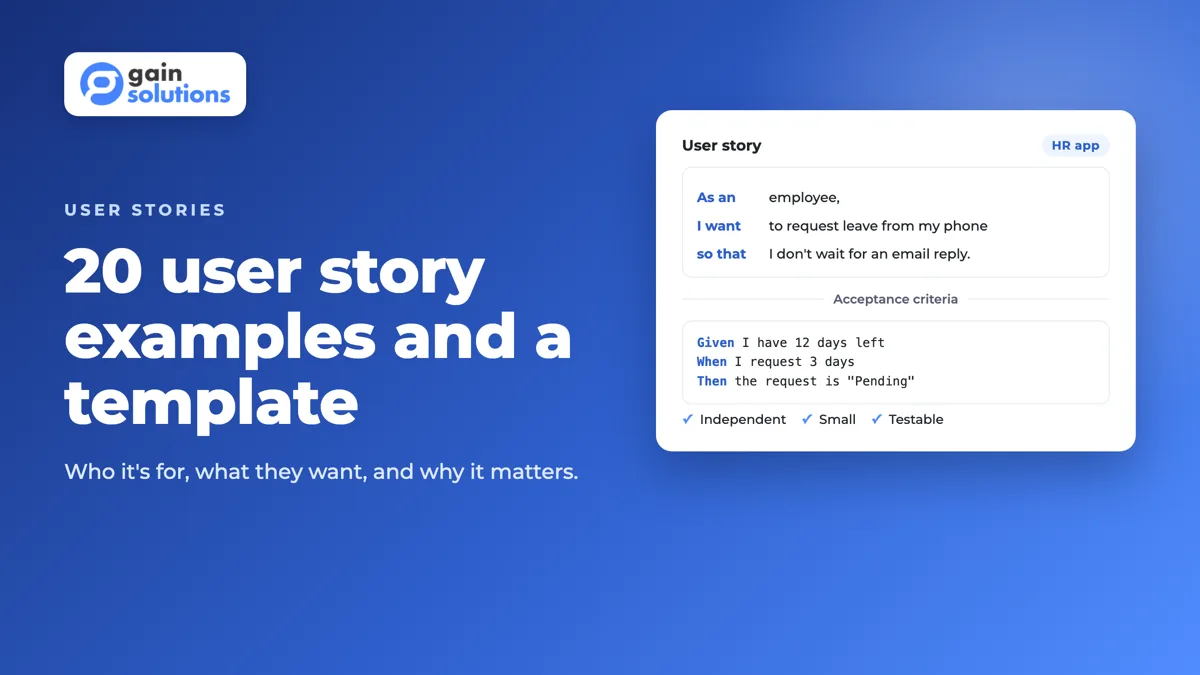
- As an employee, I want to request leave from my phone so that I don't have to email my manager and wait for a reply.
- As a line manager, I want to see who on my team is off next week so that I can plan the sprint around it.
- As a payroll admin, I want the system to flag timesheets that are missing hours so that I can fix them before I run payroll.
CRM and helpdesk
- As a sales rep, I want to log a call from the deal page so that my notes stay with the deal and not in my inbox.
- As a support agent, I want to see a customer's previous tickets next to the new one so that I don't ask them to repeat themselves.
- As a support lead, I want tickets that wait longer than four hours to move to the top of the queue so that we meet our response target.
E-commerce
- As a shopper, I want to filter products by size and price so that I only see items I can buy.
- As a returning shopper, I want to check out with a saved address and card so that I can finish an order in under a minute.
- As a store manager, I want an alert when stock for a product drops below 10 units so that I can reorder before it sells out.
Mobile apps
- As a commuter, I want to use the app's main screens without a signal so that I can keep working on the train.
- As a mobile user, I want to log in with Face ID or my fingerprint so that I don't have to type my password on a small keyboard.
APIs and internal tools
- As a developer integrating with the API, I want each error response to include a code and a readable message so that I can fix failed requests without contacting support.
- As an operations analyst, I want a weekly CSV of new sign-ups by country so that I can report growth without asking engineering for a query.
Notice that example 19 has a developer as the user. Technical work can still be a user story when a real person benefits. Pure infrastructure work with no user, such as upgrading a database version, is better tracked as a technical task.
What does a user story with acceptance criteria look like?
A story isn't ready for a sprint until it has acceptance criteria: the conditions it must meet to be accepted. Here's example 8 from the list, worked through the way a team would refine it before planning.
Story
As an employee, I want to request leave from my phone
so that I don't have to email my manager and wait for a reply.

Acceptance criteria
Scenario: Employee submits a leave request
  Given I am logged in to the mobile app
  And I have 12 days of annual leave remaining
  When I request 3 days of annual leave for 14 to 16 December
  Then the request is saved with the status "Pending"
  And my manager receives a notification
  And my remaining balance shows 12 days, with 3 days pending

Scenario: Employee requests more leave than they have
  Given I have 2 days of annual leave remaining
  When I request 3 days of annual leave
  Then I see the message "You have 2 days of annual leave left"
  And the request is not submitted

Scenario: Dates overlap an existing request
  Given I already have approved leave on 15 December
  When I request leave from 14 to 16 December
  Then I see which dates overlap
  And I can change the dates before submitting

Out of scope
  Half-day requests (separate story)
  Manager approval screen (separate story)
Three things make this story ready. The criteria cover the happy path and the two most likely failures. The numbers are concrete, so a tester can check them. And the "out of scope" list stops the story from growing during the sprint. For more formats and 10 more worked examples, see our guide to acceptance criteria examples.
Bad vs good: five user story rewrites
Most weak stories fail in the same few ways. Here are five common problems and how to fix each one.
| Weak story | What's wrong | Better story |
|---|---|---|
| As a user, I want a dashboard. | No specific user, no reason, and "dashboard" could mean anything. | As a sales manager, I want to see this month's closed deals by rep so that I can spot who needs coaching before the quarter ends. |
| As a developer, I want to add a Redis cache. | Describes a solution, not a need. The user gets nothing they can see. | As a shopper, I want search results to load in under a second so that I don't give up and leave. (Caching becomes one way to meet it.) |
| As an admin, I want to manage users. | "Manage" hides five or more stories: add, edit, remove, change role, reset password. | As an admin, I want to remove a user who has left the company so that they lose access the same day. |
| As a customer, I want the checkout to be easy. | "Easy" can't be tested. | As a returning customer, I want to check out with my saved card in three taps so that I can buy again from my phone. |
| As a user, I want to export data so that I can export data. | The "so that" repeats the goal instead of giving the reason. | As a finance manager, I want to export transactions to CSV so that I can reconcile them in our accounting tool. |
How do you check a user story with INVEST?
INVEST is a six-point checklist for story quality, introduced by Bill Wake in 2003. Run each story through these questions during backlog refinement. A story that fails one of them usually needs splitting or rewording.
| Letter | Means | Question to ask |
|---|---|---|
| I | Independent | Can we build and release this without waiting for another story? |
| N | Negotiable | Does it state the need and leave room to discuss how to meet it? |
| V | Valuable | Would a user or the business notice if we shipped it? |
| E | Estimable | Does the team understand it well enough to size it? |
| S | Small | Can it be finished within one sprint, ideally in a few days? |
| T | Testable | Do the acceptance criteria let someone prove it works? |
How do you split a user story that's too big?
Split it along the user's path, not along your code. A story split into "build the database", "build the API" and "build the UI" delivers nothing until all three are done. A story split by user behaviour delivers something usable at every step.
Take an epic like "As a shopper, I want to pay for my order so that I receive my items." It's too big for one sprint. Here's one way to split it:
- By workflow step: enter a shipping address; choose a delivery option; pay; see an order confirmation.
- By payment method: pay by card first; add PayPal and Apple Pay as later stories.
- By business rule: standard checkout first; discount codes and gift cards as separate stories.
- By happy path: a successful payment first; declined cards and retries next.
Mike Cohn's SPIDR method gives you five ways to split: spikes (time-boxed research), paths, interfaces, data and rules. When a story is still too uncertain to estimate, a short spike to answer the open question is often the fastest way to make it small.
User story vs use case vs requirement: what's the difference?
All three describe what software should do, at different levels of detail and for different audiences.
| User story | Use case | Requirement | |
|---|---|---|---|
| Format | One sentence plus acceptance criteria | Step-by-step flow with actors, main path and alternative paths | A "the system shall" statement or a spec section |
| Detail | Low on the card, filled in by conversation | High, written up front | High and formal |
| Focus | The user's goal and why it matters | The interaction between user and system | What the system must do or how well |
| Best for | Agile teams planning work sprint by sprint | Complex flows with many branches | Contracts, compliance and fixed-scope projects |
Many teams use all three: requirements or a scope of work for the contract, use cases for the trickiest flows, and user stories for day-to-day delivery.
How to write user stories in 6 steps
- Start from real users. List the roles that use the product, based on research or support conversations, not guesses.
- Write the goal in the user's words. Describe what they want to do, not the screen or component you plan to build.
- Add the reason. If you can't write a convincing "so that", ask whether the story should exist.
- Add acceptance criteria. Cover the happy path and the most likely failures, with concrete values a tester can check.
- Check it with INVEST. Split anything that won't fit in a sprint, and reword anything the team can't estimate.
- Refine it with the team. Walk through the story with design, engineering and QA before sprint planning, and update it with what you agree.
For a new product, write stories after discovery, not before. Our guides to product discovery phases and MVP requirements cover how to decide what belongs in the first release.
How GainHQ can help
GainHQ builds custom software, SaaS products and mobile apps for founders and product teams. We help teams turn a product idea into a prioritised backlog of user stories with acceptance criteria before development starts, so estimates are realistic and every sprint ships something users can try. If you're planning a build and want a clear backlog to start from, talk to GainHQ.
Frequently asked questions
What are the 3 C's of a user story?
The 3 C's are Card, Conversation and Confirmation, a model described by Ron Jeffries. The card is the short written story. The conversation is the discussion between product, design and engineering that fills in the details. The confirmation is the set of acceptance criteria that proves the story is done and can be accepted.
What is the typical format of a user story?
The typical format is "As a [type of user], I want [goal] so that [benefit]." It names who the story is for, what they want to do and why it matters to them. Some teams use the job story format instead: "When [situation], I want to [motivation], so I can [expected outcome]."
What makes a good user story?
A good user story names a specific user, states one goal in the user's words and gives a real reason in the "so that" part. It passes the INVEST check: independent, negotiable, valuable, estimable, small and testable. It also has acceptance criteria that a tester can check with concrete values.
How do I write a user story?
Start with a real user role, write what they want to do in their own words, and add the reason they want it. Then add acceptance criteria for the happy path and the most likely failures. Check the story against INVEST, split it if it won't fit in a sprint, and refine it with the team before planning.
How many acceptance criteria should a user story have?
Most well-sized stories have between three and seven acceptance criteria. Fewer than three often means edge cases are missing. More than about eight usually means the story is too big and should be split into smaller stories, each with its own short set of criteria.
Who writes user stories?
The product owner or product manager usually owns the backlog and writes the first draft of each story. The whole team then refines it: designers, developers and testers add details, question assumptions and help write acceptance criteria. Anyone can suggest a story, but one person should own its priority.
What is the difference between a user story and an epic?
An epic is a large piece of work that is too big for one sprint, such as "checkout". A user story is a small part of an epic that a team can finish in one sprint, such as "pay by card". Teams split epics into stories during backlog refinement.