Manufacturing Software Development: Industry 4.0 And IoT Integration

by Daniel Wright | Jul 26, 2026 | Software Development Insights
Table of Contents
- What Is Manufacturing Software Development?
- Why Manufacturing Businesses Need Custom Software
- How Industry 4.0 And IoT Are Transforming Manufacturing
- Core Features Of Modern Manufacturing Software
- Types Of Manufacturing Software Solutions
- Manufacturing Software Development Process
- Benefits Of Manufacturing Software Development
- Custom Vs. Off-The-Shelf Manufacturing Software Development
- How To Choose The Right Manufacturing Software Development Company
- Why Choose GainHQ For Manufacturing Software Development
- Frequently Asked Questions
Manufacturing floors run on more than machines now. Sensors talk to software, production data flows in real time, and decisions happen faster than ever before. This shift is what people mean when they say Industry 4.0, and it depends entirely on solid manufacturing software development.
Factories that once ran on spreadsheets and manual checks are connecting equipment through IoT, pulling live data into dashboards, and catching problems before they cause downtime. But none of this works without the right foundation. Legacy systems need bridges. New tools need to talk to old machines. And every layer needs to be secure.
That's where a manufacturing software development company earns its place. Below, we'll break down what Industry 4.0 and IoT integration actually require, and how to get there without disrupting the floor.
What Is Manufacturing Software Development?
Manufacturing software development is the process of building custom tools from the ground up. It covers everything from inventory management and quality control to predictive maintenance and shop floor monitoring.
Unlike off-the-shelf tools, custom manufacturing software is built around how a specific plant actually operates. Manufacturing software development services typically include system design, IoT integration, and ongoing support as operations scale.
Good manufacturing software solutions do more than track data. They connect machines, people, and decisions into one system that keeps production moving without constant manual oversight.
Why Manufacturing Businesses Need Custom Software
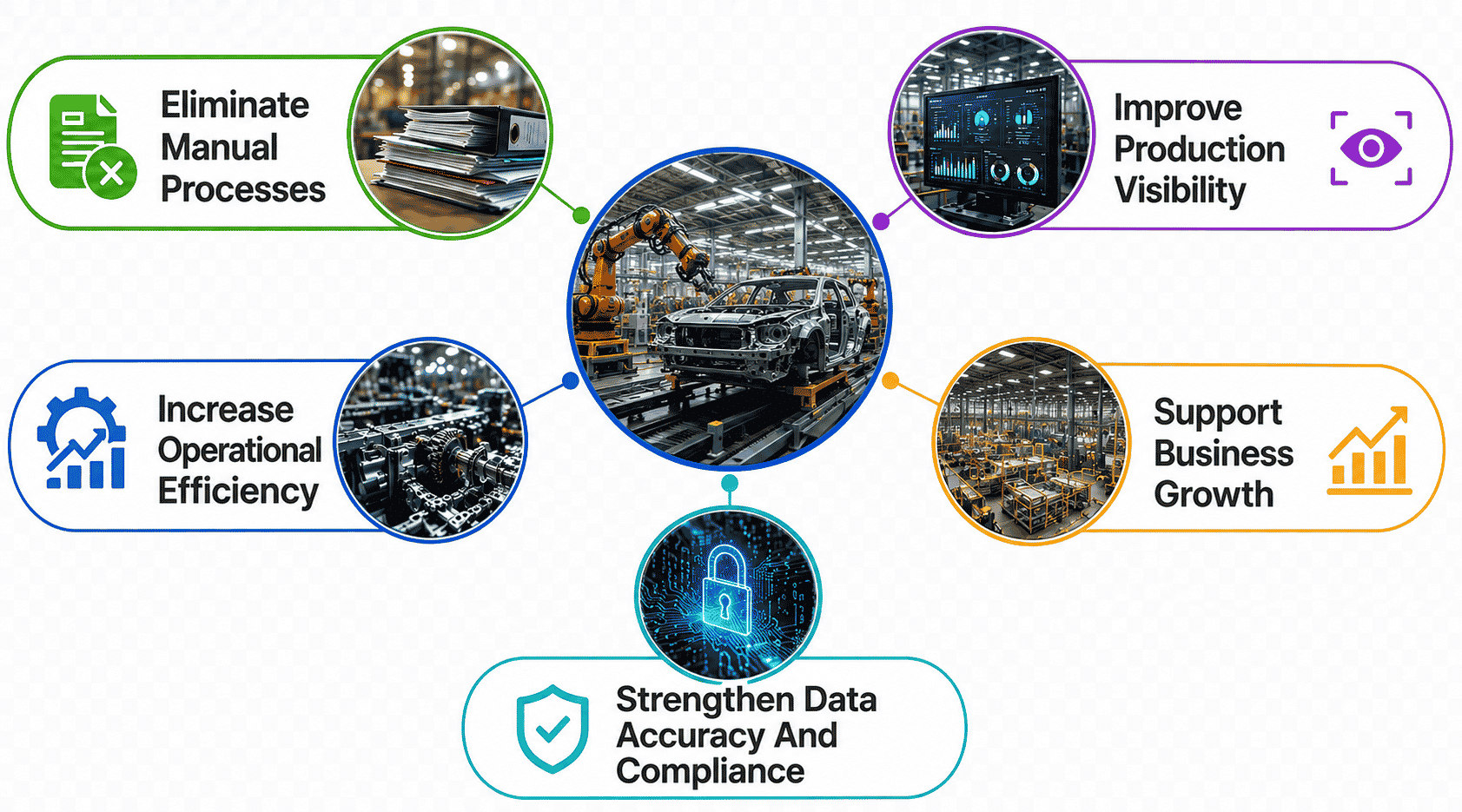
Most manufacturing companies outgrow generic tools fast. As production scales, the need for custom software solutions becomes clear, and successful manufacturing software projects start with understanding exactly what the business needs to fix.
Eliminate Manual Processes
Manual tracking slows everything down. Paper logs, spreadsheets, and disconnected tools force teams to double-check data that should already be accurate. Every manual step is a chance for error, and errors on the shop floor cost real money.
Custom software development replaces these gaps with automated workflows built for how the plant actually runs. Instead of chasing updates across systems, teams get one connected source of truth, which is often the first real win in any custom software development project.
Improve Production Visibility
Without real-time data, plant managers are often reacting to problems instead of preventing them. Manufacturing execution systems fix this by pulling live data from machines, operators, and inventory into a single view.
This visibility means issues get caught early, not after a shift is over. Manufacturing companies that invest in this kind of tracking make faster, better-informed decisions, and that clarity tends to ripple through every other part of the operation.
Increase Operational Efficiency
Operational efficiency is the whole point of moving to custom systems. When software is built around actual production steps instead of generic templates, teams stop wasting time working around tools that don't fit.
This is where well planned manufacturing software projects pay off. Custom software solutions cut down on repeated work, reduce bottlenecks, and let manufacturing companies get more output from the same resources, without adding headcount or overtime, as shown in real-world transformations driven by custom software.
Support Business Growth
Generic software often breaks down the moment a manufacturing business tries to scale. New product lines, new locations, or new compliance needs expose the limits of off-the-shelf tools fast.
Custom software development is built to grow with the business instead of against it. Manufacturing software projects designed with scalability in mind mean fewer rebuilds later, which saves both time and money as the manufacturing industry keeps shifting, especially when guided by proven custom software development services.
Strengthen Data Accuracy And Compliance
Manual data entry is one of the biggest sources of compliance risk in manufacturing. A single missed log or mistyped figure can cause real problems during audits or quality reviews.
Custom software services build accuracy directly into daily workflows, reducing dependence on manual checks. For manufacturing companies operating under strict regulations, this kind of built-in accuracy isn't optional. It's what keeps operations both compliant and audit-ready.
How Industry 4.0 And IoT Are Transforming Manufacturing
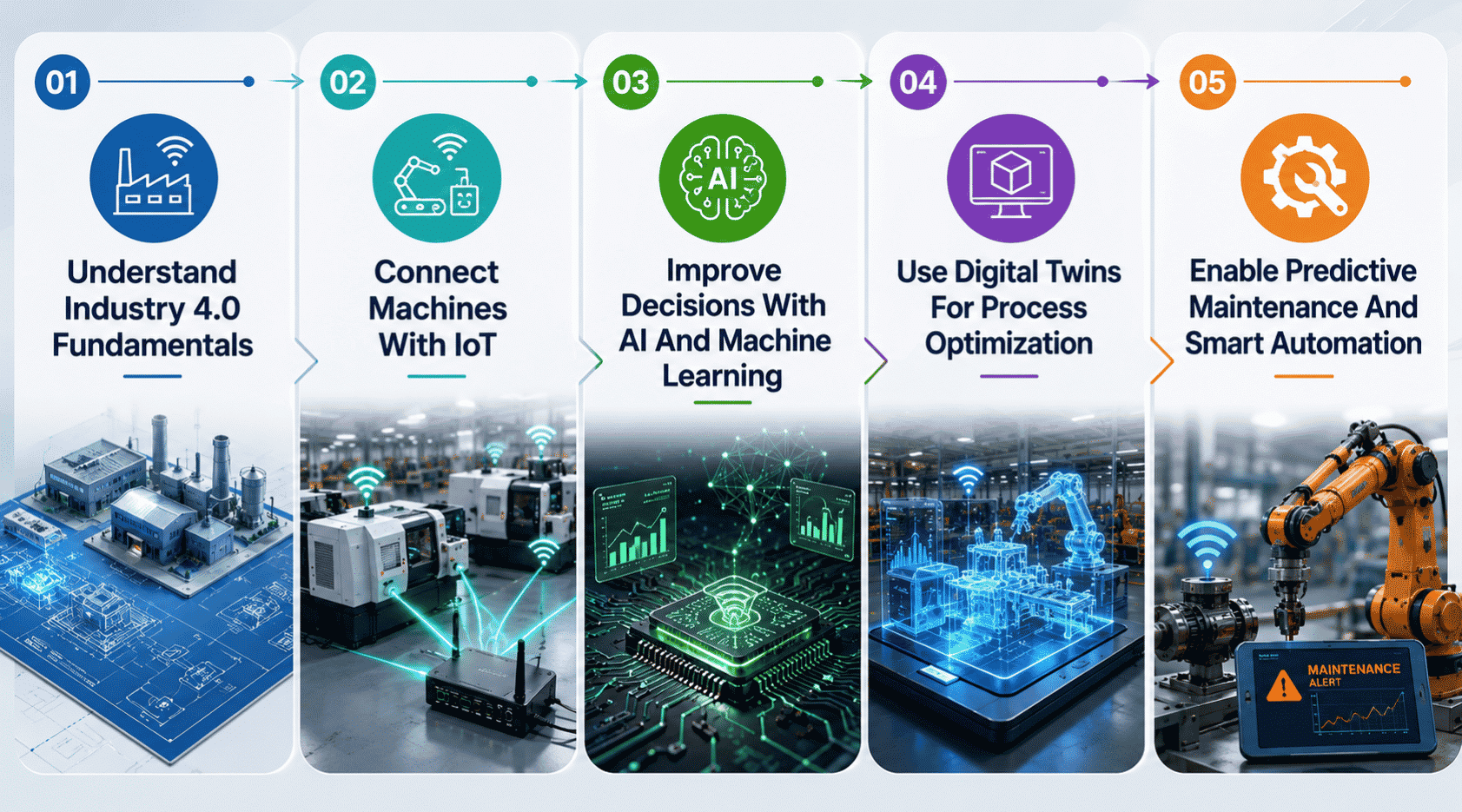
Industry 4.0 isn't a single upgrade. It's a shift in how manufacturing processes run day to day, powered by connected machines, smarter software, and data that actually gets used instead of just stored.
Understand Industry 4.0 Fundamentals
Industry 4.0 brings together connected devices, real-time data, and automation to change how manufacturing operations function. It's less about replacing everything at once and more about layering smarter systems on top of what already works.
For most plants, this starts small. Custom software connects a few key machines first, proving value before expanding further. Manufacturing processes that once relied on manual checks start running on live data instead, and that shift alone changes how decisions get made across the floor.
Connect Machines With IoT
IoT turns isolated machines into a connected network that shares data continuously. Sensors track temperature, output, and performance, feeding that information straight into dashboards operators actually use.
This is where off-the-shelf software usually falls short. Every plant has different machines, protocols, and layouts, so custom manufacturing software development is often the only way to connect equipment without forcing a workaround. Done right, this connectivity becomes the backbone for everything else in Industry 4.0.
Improve Decisions With AI And Machine Learning
Connected data is only useful if something makes sense of it. AI and machine learning analyze patterns across manufacturing operations, flagging issues humans might miss until it's too late.
This isn't about replacing operators. It's about giving them better information faster. Custom manufacturing software solutions built around AI can spot early signs of equipment wear or quality drift, turning raw data into decisions that reduce operational costs instead of just reporting numbers after the fact, especially when they follow a structured software development life cycle.
Use Digital Twins For Process Optimization
A digital twin is a virtual model of a real production line, machine, or process. It lets teams test changes safely before touching anything on the actual floor, relying on a scalable software architecture to handle complex simulations and data flows.
This matters most in complex software projects where mistakes are expensive. Instead of guessing how a change will affect output, teams simulate it first. Custom software built around digital twins helps manufacturers fine-tune processes continuously, cutting waste and operational costs without risking live production.
Enable Predictive Maintenance And Smart Automation
Predictive maintenance uses live equipment data to flag problems before a breakdown happens. Instead of fixing machines on a fixed schedule, teams act only when the data says it's needed.
Paired with smart automation, this reduces unplanned downtime and stretches equipment lifespan further. Software solutions built for this purpose turn maintenance from a guessing game into a data-backed process, which is one of the clearest ways custom software pays for itself over time.
Core Features Of Modern Manufacturing Software
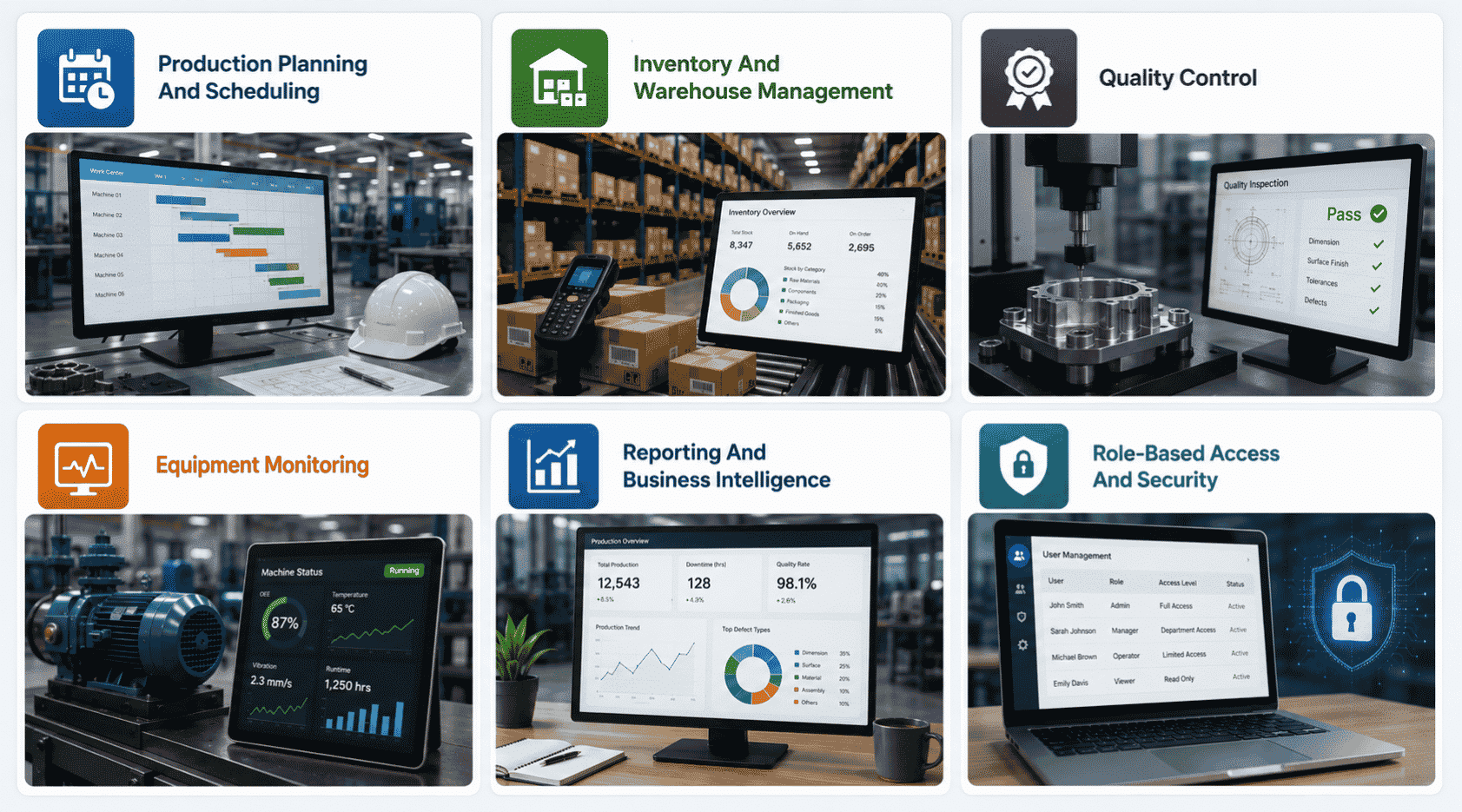
Digital transformation in manufacturing depends on getting the fundamentals right. These six features form the backbone of most tailored software solutions built for real production environments today.
Production Planning And Scheduling
Production planning tools help teams map out what gets made, when, and with which resources. Instead of relying on guesswork or static spreadsheets, schedules adjust based on real capacity and demand, especially when built on flexible custom software solutions.
This reduces idle time on the floor and keeps orders moving without last-minute scrambling. When priorities shift, the schedule updates instead of falling apart, keeping business processes steady even when plans change mid-week.
Inventory And Warehouse Management
Manufacturing software tracks raw materials, components, and finished goods in real time, often through direct integration with ERP systems. This means fewer surprises when it's time to fulfill an order or restock supplies.
Warehouse management tools also cut down on manual counts and misplaced stock. Teams know exactly what's on hand and where it sits, which supports efficient supply chain management and prevents the kind of shortages that stall production lines unexpectedly, while contributing to measurable efficiency gains and improving the overall cost profile of custom vs prebuilt solutions.
Quality Control
Quality control features catch defects early, before they turn into costly recalls or rework. Data from inspections and testing gets logged automatically instead of tracked on paper.
This creates a clear record for every batch produced, feeding directly into data analytics tools teams already rely on. When issues do come up, teams can trace them back to a specific step or machine fast, making the root cause far quicker to fix.
Equipment Monitoring
Equipment monitoring gives real-time visibility into how machines are performing on the floor. Sensors track uptime, output, and early signs of wear as production runs.
This kind of visibility helps teams catch small issues before they become full breakdowns. Instead of finding out equipment failed after the fact, teams see warning signs early enough to act, keeping unplanned downtime to a minimum across the supply chain.
Reporting And Business Intelligence
Reporting tools turn raw production data into something teams can actually use. Instead of digging through spreadsheets, managers get dashboards built on real data analytics that show what's working and what isn't.
This makes decision-making faster and far less reliant on guesswork. Business intelligence features also improve supply chain visibility over time, so teams can plan instead of just reacting to whatever the current shift throws at them.
Role-Based Access And Security
Not everyone on the floor needs access to every system. Role-based access makes sure people only see and control what's relevant to their job.
This keeps sensitive data protected and reduces the chance of accidental changes to critical business processes. For manufacturers handling compliance requirements, this kind of built-in security isn't a nice-to-have. It's a basic requirement for staying audit-ready.
Types Of Manufacturing Software Solutions
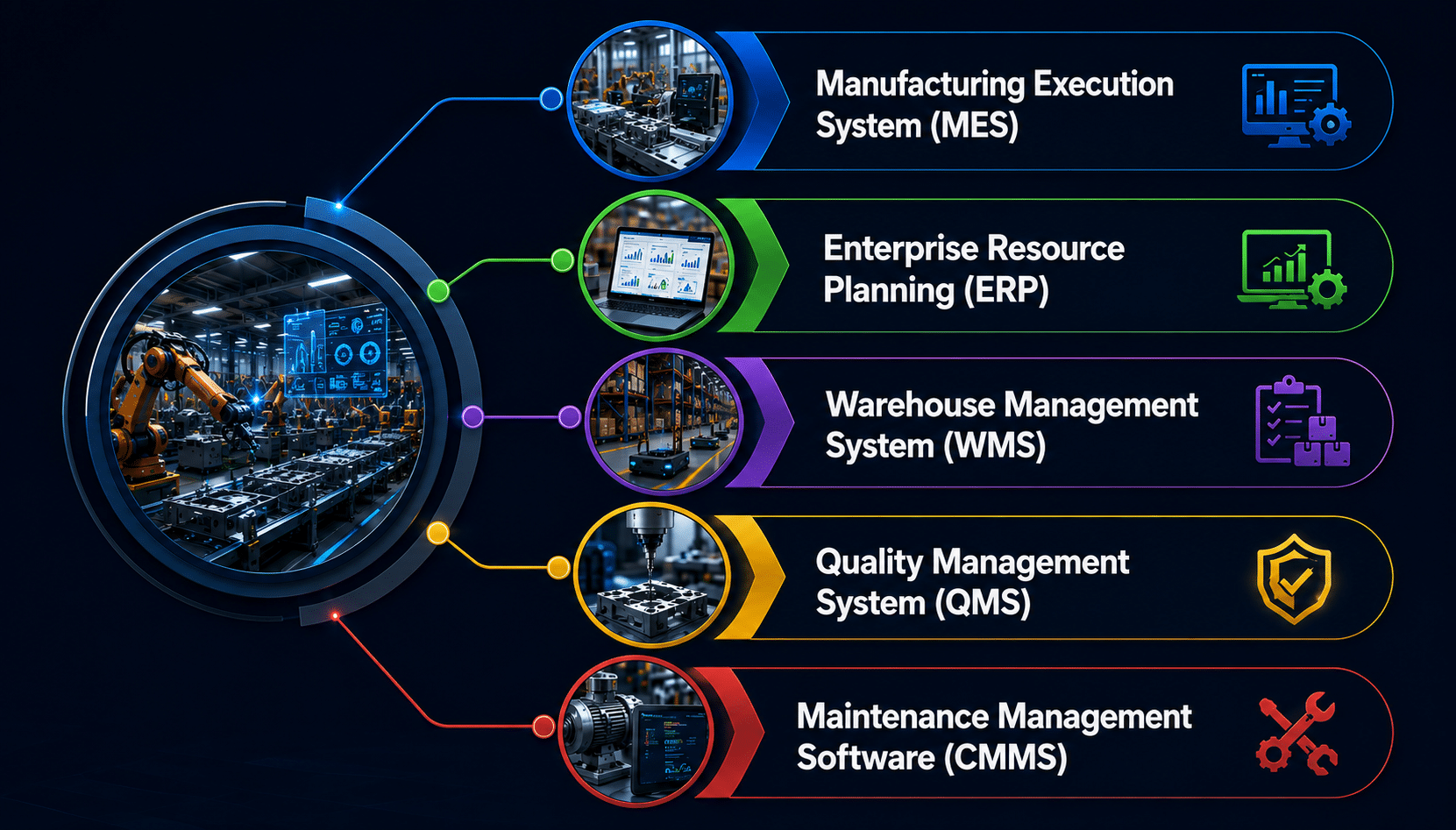
Not every manufacturing business needs the same system. The right mix depends on production complexity, regulatory compliance needs, and how business operations are already structured.
Manufacturing Execution System (MES)
An MES sits at the center of daily production, tracking work orders, machine status, and output in real time. It bridges the gap between planning and what's actually happening on the floor, especially when implemented by experienced custom software development services providers.
For manufacturing clients running multiple lines or shifts, this visibility is critical. A well-built software architecture connects MES data with other systems, turning scattered floor activity into a single, reliable view of production efficiency.
Enterprise Resource Planning (ERP)
ERP systems manage the broader side of the business, covering finance, procurement, and resource planning in one place. They're often the backbone that other manufacturing tools connect into, whether companies choose custom software vs SaaS solutions.
When ERP and CRM systems work together, teams get a clearer picture of both operations and customer relationships. Many manufacturing clients choose a custom manufacturing solution here since off-the-shelf ERP rarely fits specialized production needs out of the box.
Warehouse Management System (WMS)
A WMS handles the movement and storage of materials, from receiving raw goods to shipping finished products. It's built to keep inventory accurate without constant manual tracking.
Strong inventory management solutions reduce lost stock and delayed shipments, both of which slow down business operations fast. For manufacturers juggling multiple warehouses, custom solutions here often outperform generic tools built for general retail or distribution needs, underscoring the broader trade-offs in custom vs off-the-shelf software.
Quality Management System (QMS)
A QMS keeps quality checks, inspections, and documentation organized in one system instead of scattered across paper or spreadsheets. This matters most where regulatory compliance is non-negotiable.
Every inspection, deviation, and corrective action gets logged automatically, creating a clear audit trail. For manufacturing clients in regulated industries, this kind of documentation isn't optional. It's often the difference between passing an audit smoothly and scrambling to find records.
Maintenance Management Software (CMMS)
A CMMS tracks equipment maintenance schedules, work orders, and repair history in one place. Instead of relying on memory or paper logs, teams get a clear maintenance record for every machine.
This directly supports production efficiency by cutting down on unplanned downtime. A custom manufacturing solution here can tie maintenance data straight into MES or ERP systems, giving teams a fuller picture of how equipment health affects overall business operations.
Manufacturing Software Development Process
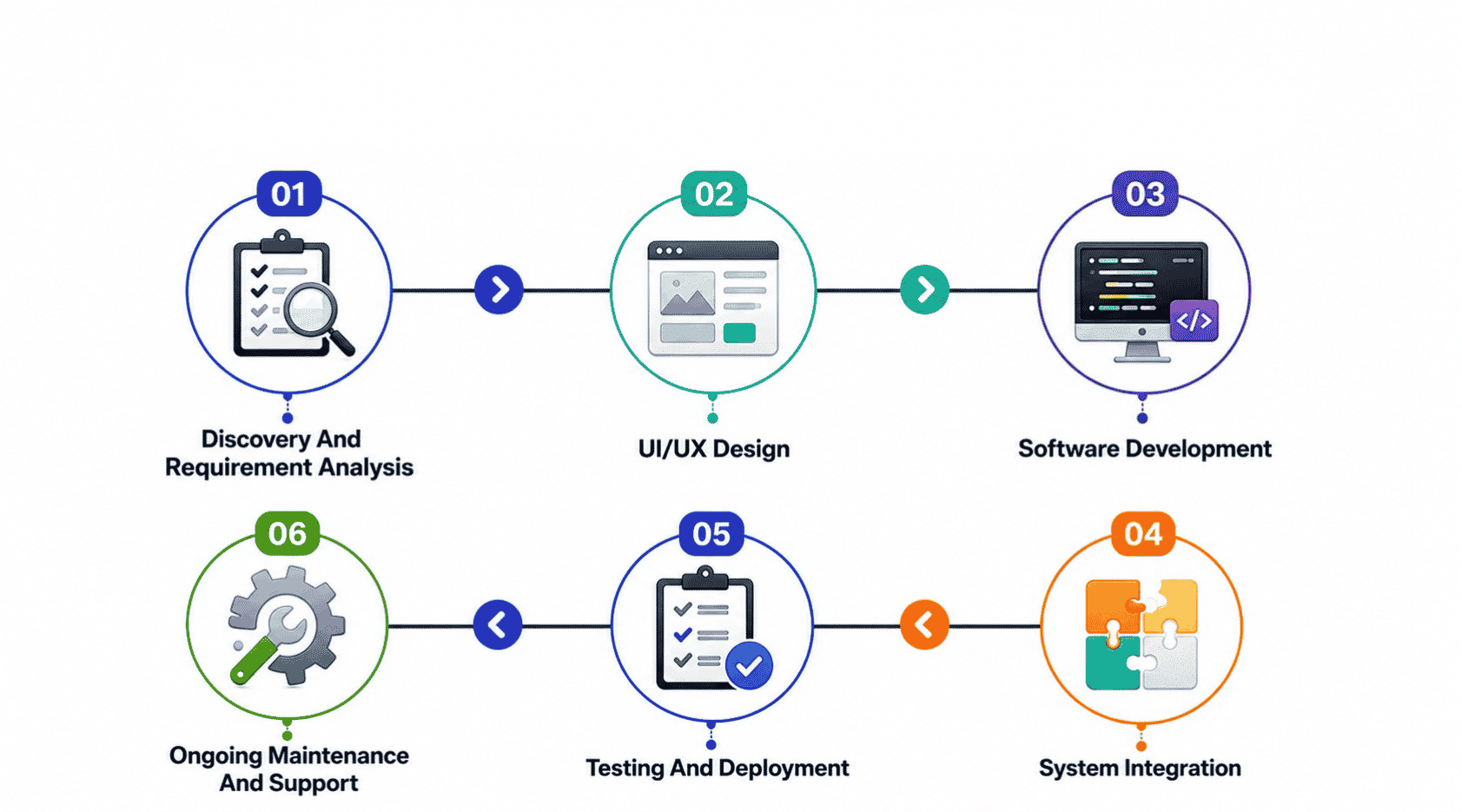
Building reliable manufacturing systems follows a clear process, not shortcuts. Each phase matters, especially when legacy system integration and data security are part of the scope from day one.
Discovery And Requirement Analysis
This phase maps out current business processes, pain points, and goals before any code gets written. Teams look at existing manufacturing systems, supply chain management needs, and where legacy system integration might be required, setting a realistic foundation for custom digital solutions that actually solve the right problems, often the point when companies decide to hire a custom software development agency.
UI/UX Design
Design focuses on how operators and managers will actually use the system daily. Interfaces need to support real-time production monitoring without adding complexity to already busy shop floor workflows, making dashboards intuitive enough that teams adopt them quickly instead of resisting another new tool.
Software Development
This is where cutting-edge technologies get applied to build the actual platform. Development covers everything from asset management features to business intelligence dashboards, using cloud computing where it fits, all built around the specific way a plant runs rather than a generic template, following best practices for custom software development services.
System Integration
New software rarely stands alone. It needs to connect with existing manufacturing systems, ERP platforms, and equipment already on the floor. Careful legacy system integration here prevents data silos, ensuring information flows smoothly across supply chain management, maintenance, and production tools without manual workarounds, and often pairs with broader software modernization for legacy systems.
Testing And Deployment
Before going live, systems get tested under real conditions to catch issues early. This includes checking data security, system performance, and how well features like equipment health tracking hold up, reducing the risk of disruptions once the software supports actual Industry 4.0 operations.
Ongoing Maintenance And Support
Software needs upkeep long after launch. Ongoing support covers updates, performance monitoring, and fixes that keep maintenance costs predictable. This phase ensures manufacturing systems keep pace with new demands, evolving alongside the business instead of becoming another outdated tool within a few years.
Benefits Of Manufacturing Software Development
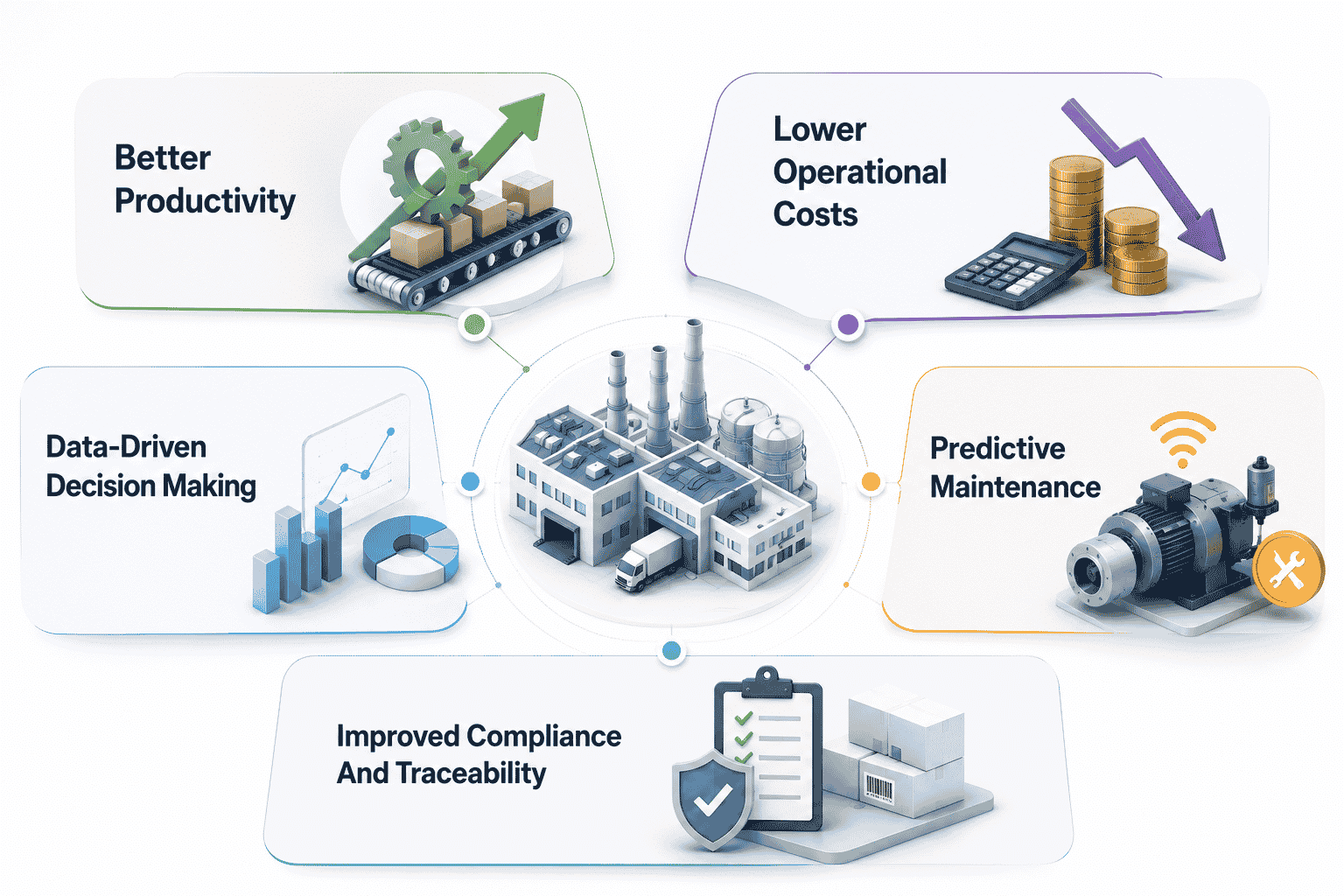
The right software investment pays off across the entire operation, not just one department. Here's what manufacturing businesses actually gain once systems are built around real production needs.
Better Productivity
Custom software removes the friction of manual processes and disconnected tools, letting teams focus on actual production instead of paperwork. Combined with the internet of things, machines and software work together instead of operating in separate silos.
This shift matters most for large manufacturing enterprises juggling multiple lines or shifts. When systems talk to each other, less time gets lost on manual updates, and output stays consistent even as demand shifts throughout the week.
Lower Operational Costs
Manufacturing ERP systems bring finance, planning, and production together, cutting down on the wasted spend that comes from disconnected tools. Supply chain optimization plays a big role here too, reducing excess inventory and unnecessary delays.
Over time, these savings add up. Manufacturing businesses that invest in the right systems upfront often see lower long-term costs than those patching together generic tools built for other industries.
Data-Driven Decision Making
When production data flows into one system, decisions stop being based on guesswork. Managers see what's actually happening on the floor instead of relying on outdated reports or gut instinct.
This kind of visibility helps the manufacturing sector respond faster to changes in demand or supply. Teams catch issues early and adjust plans before small problems turn into costly delays.
Predictive Maintenance
Predictive maintenance uses live equipment data to flag issues before they cause a breakdown. Instead of fixed maintenance schedules, teams act only when the data says it's necessary.
This reduces unplanned downtime significantly, especially for large manufacturing enterprises running expensive, hard-to-replace equipment. Paired with ongoing support, this approach keeps machines running longer without unnecessary repair costs.
Improved Compliance And Traceability
Regulated manufacturing environments depend on clear, accurate records. Software with built-in tracking makes every inspection, batch, and change part of an automatic audit trail.
This kind of traceability reduces risk during audits and inspections. With the right manufacturing expertise built into the system design, businesses stay compliant without adding extra manual work to already busy teams.
Custom Vs. Off-The-Shelf Manufacturing Software Development
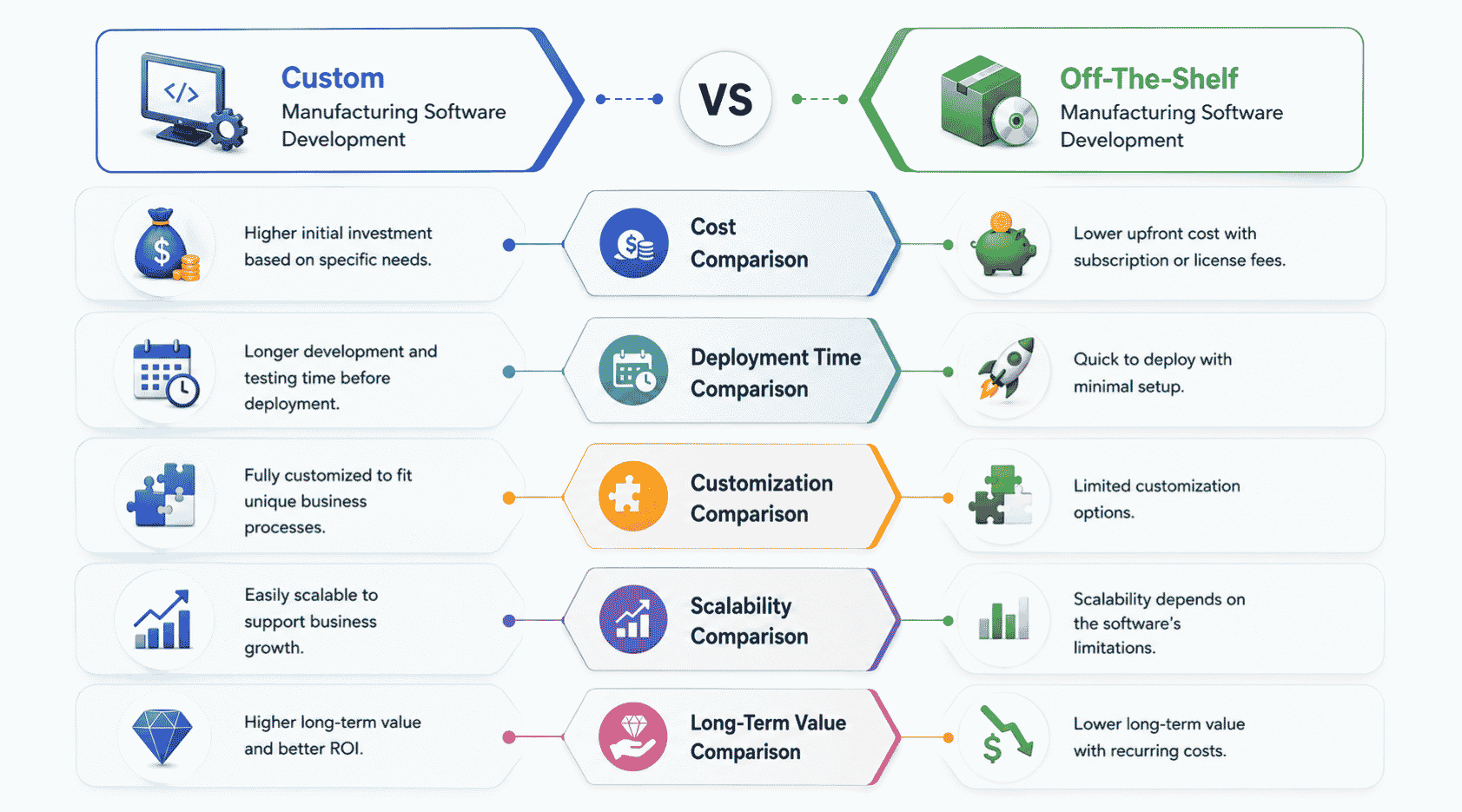
Choosing between custom and off-the-shelf software often comes down to five factors. Here's how they actually compare once a manufacturing business starts using either option day to day.
Cost Comparison
Off-the-shelf software usually costs less upfront since it's built once and sold to many buyers. But hidden costs pile up fast through licensing fees, add-ons, and workarounds for features that don't quite fit, issues explored in depth in our custom software cost comparison guide.
Custom software costs more initially since it's built specifically for one operation. Over time, though, manufacturers often spend less overall since they're not paying for unused features or constant patches to make generic tools work, a core theme in the broader build vs buy software decision guide.
Deployment Time Comparison
Off-the-shelf solutions deploy faster since the software already exists. Teams can often start using basic features within days or weeks of purchase, which appeals to businesses needing a quick fix.
Custom software takes longer since it's built from scratch around specific requirements. This upfront time investment usually pays off later, since the system fits actual workflows instead of forcing teams to adapt around someone else's design choices.
Customization Comparison
Off-the-shelf tools offer limited customization, usually restricted to settings menus or basic configuration options. Anything beyond that often requires expensive add-ons or simply isn't possible.
Custom software is built entirely around how a specific plant operates. Every feature, workflow, and integration reflects the actual production process, giving teams tools that match their operations instead of forcing operations to match the software, advantages that also appear in SaaS vs custom software comparisons.
Scalability Comparison
Off-the-shelf software can hit limits fast as a business grows. New product lines, locations, or compliance needs often expose gaps that require costly workarounds or a full platform switch.
Custom software is built with growth in mind from the start. Adding new features, locations, or integrations tends to be more straightforward, since the system was designed to expand rather than squeeze in changes it was never built for.
Long-Term Value Comparison
Off-the-shelf software tends to lose value as a business outgrows its features, eventually requiring a costly migration to something more capable.
Custom software holds its value longer since it evolves alongside the business. With the right ongoing support, it keeps pace with new demands instead of becoming outdated, making it the stronger long-term investment for most growing manufacturers, as shown in a case study where custom software beat a buy decision.
Factor | Off-The-Shelf Software | Custom Software |
|---|---|---|
Cost | Lower upfront, higher hidden long-term costs | Higher upfront, lower long-term costs |
Deployment Time | Days to weeks | Weeks to months |
Customization | Limited to built-in settings | Fully tailored to operations |
Scalability | Hits limits as business grows | Built to expand with the business |
Long-Term Value | Depreciates as needs outgrow features | Increases as system evolves with business |
How To Choose The Right Manufacturing Software Development Company
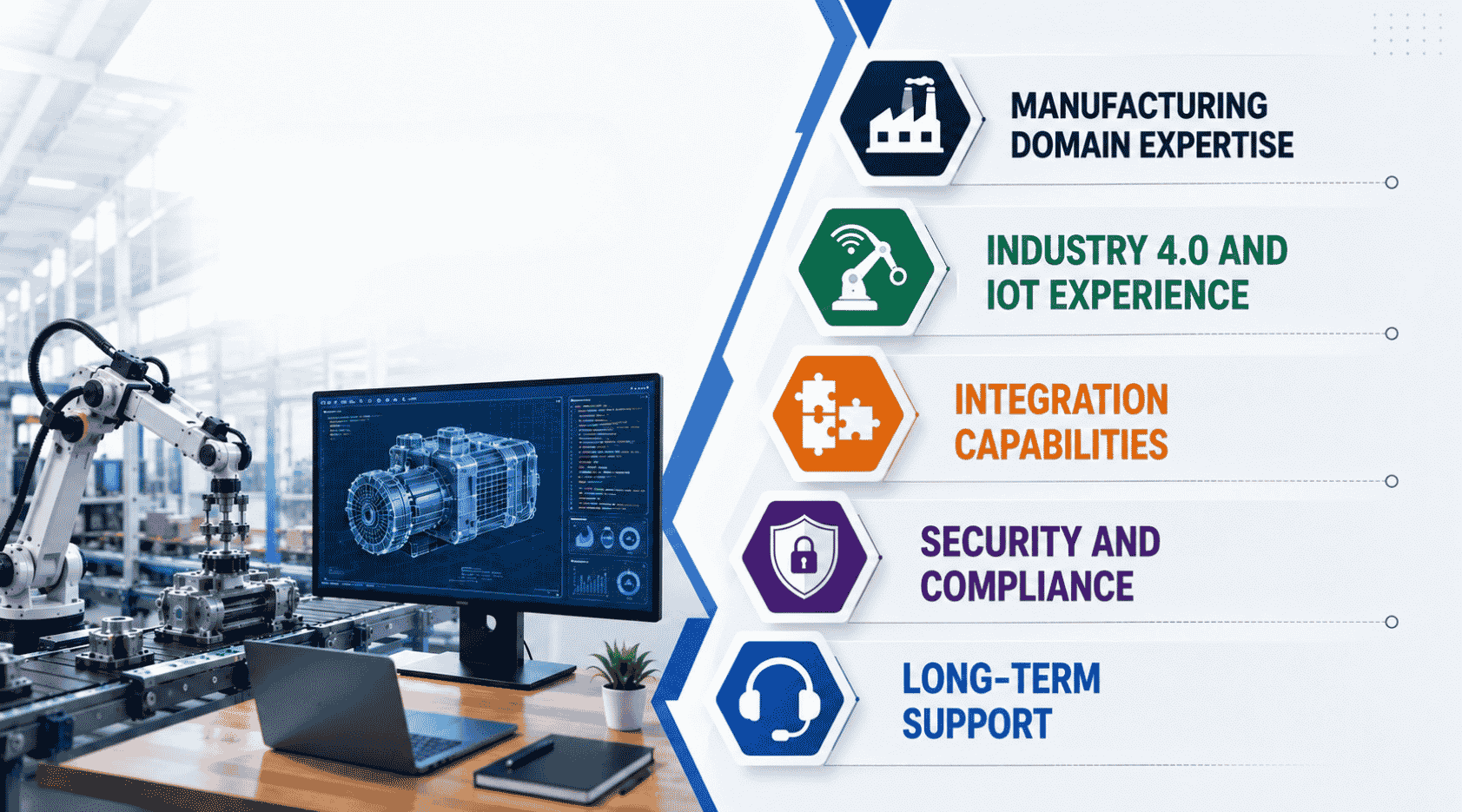
Not every software vendor understands manufacturing organizations the way they need to. Here's what actually matters when picking a partner for a project this complex.
Manufacturing Domain Expertise
A development team without real manufacturing experience often misses details that matter on the floor. Understanding production management, shift patterns, and how a manufacturing environment actually operates makes a real difference in the final product, which is why choosing the right custom software development partner is critical.
Look for a company that's worked across industrial operations before, not just generic business software. This background usually shows up in fewer revisions and a development process that avoids costly missteps tied to product quality or floor-level realities.
Industry 4.0 And IoT Experience
Smart manufacturing depends on more than good code. It requires real experience connecting automation hardware, sensors, and software into one working system without constant troubleshooting.
A company with hands-on IoT and Industry 4.0 experience knows how to build systems that support predictive analytics from day one. This kind of expertise usually leads to improved production efficiency much faster than teams learning IoT concepts on the job, similar to how a seasoned full stack web development company accelerates complex digital projects.
Integration Capabilities
New software rarely works alone. It needs to seamlessly integrate with existing systems already running the plant, from ERP platforms to equipment already on the shop floor.
Strong system integration skills prevent data silos and manual workarounds down the line. Ask any potential partner directly about past integration projects, since this is often where inexperienced vendors struggle most in a real manufacturing environment.
Security And Compliance
Manufacturing data often includes sensitive production, financial, and compliance information. A development partner needs to build security in from the start, not add it as an afterthought late in the process.
This matters even more for manufacturing organizations operating under strict regulatory requirements. Look for a company that treats compliance as part of the core development process, not a checkbox handled right before launch.
Long-Term Support
Software needs upkeep long after deployment. Systems evolve, equipment changes, and manufacturing organizations grow, all of which require ongoing updates and support.
A good partner sticks around after launch, helping fix issues and add features as needs change. This kind of long-term relationship keeps industrial operations running smoothly instead of leaving businesses stuck with outdated software a few years down the line.
Why Choose GainHQ For Manufacturing Software Development
At GainHQ, we build custom software the way manufacturing operations actually need it, grounded in how a business runs, not a generic template. Our experience building and maintaining in-house products like Payrun, Unite Living, and Gain.io means we understand what it takes to design systems that stay reliable long after launch, not just at deployment.
We approach every manufacturing software project the same way: understand the floor first, then build around it. From system integration to ongoing support, our team stays involved well past go-live, since software that isn't maintained eventually becomes the problem it was meant to solve.
If you're evaluating a development partner for Industry 4.0 or IoT integration, we're happy to talk through your specific setup.
Frequently Asked Questions
How Long Does A Manufacturing Software Project Usually Take?
Timelines vary based on scope, but most custom manufacturing software projects take three to nine months from discovery to deployment. Simple integrations or single-module builds move faster, while full Industry 4.0 rollouts involving multiple systems and IoT hardware take longer. Phased rollouts often help teams start seeing value before the entire system goes live.
Who Owns The Data Collected By Manufacturing Software?
In nearly all custom builds, the manufacturer owns all production, equipment, and operational data generated by the system. This differs from some off-the-shelf platforms where vendor terms can restrict data access or portability. It's worth confirming data ownership terms clearly before signing with any development partner.
Can New Software Work With Older Machines That Aren't IoT-Ready?
Yes, in most cases. Older equipment can often be connected through retrofit sensors, gateway devices, or middleware that translates legacy signals into data modern software can read. This avoids replacing expensive machinery just to bring it into an Industry 4.0 setup, though the exact approach depends on the equipment's age and existing controls.
Does Adding IoT Sensors Create New Security Risks?
Connecting more devices does expand the potential attack surface, which is why security needs to be part of the system design from the start. Network segmentation, encrypted data transfer, and controlled device access all help reduce risk. This is typically addressed during the integration and testing phases, not left until after deployment.
How Do Teams Know If They Need A Full System Or Just One Module?
This usually comes down to how disconnected current tools already are. If one specific process, like inventory or maintenance, is causing the most friction, a single module can solve it. But if multiple systems don't talk to each other at all, a broader custom build often prevents repeating the same integration work later.