
Staging Vs Production Environment: Key Differences, Risks, And Best Practices
by Rhea Collins | Aug 19, 2026 | Software Development Insights
Table of Contents
- What Is A Staging Environment
- What Is A Production Environment
- Staging Vs Production: Full Comparison
- Where Dev, QA, And Preview Environments Fit In
- Staging Vs Pre-Production Vs UAT Vs Sandbox: Naming Confusion, Resolved
- Do You Actually Need A Staging Environment? A Decision Framework
- Best Practices For Keeping Staging And Production In Sync
- Release Strategies Once You're In Production
- Common Mistakes And Security Risks To Avoid
- Final Discussion
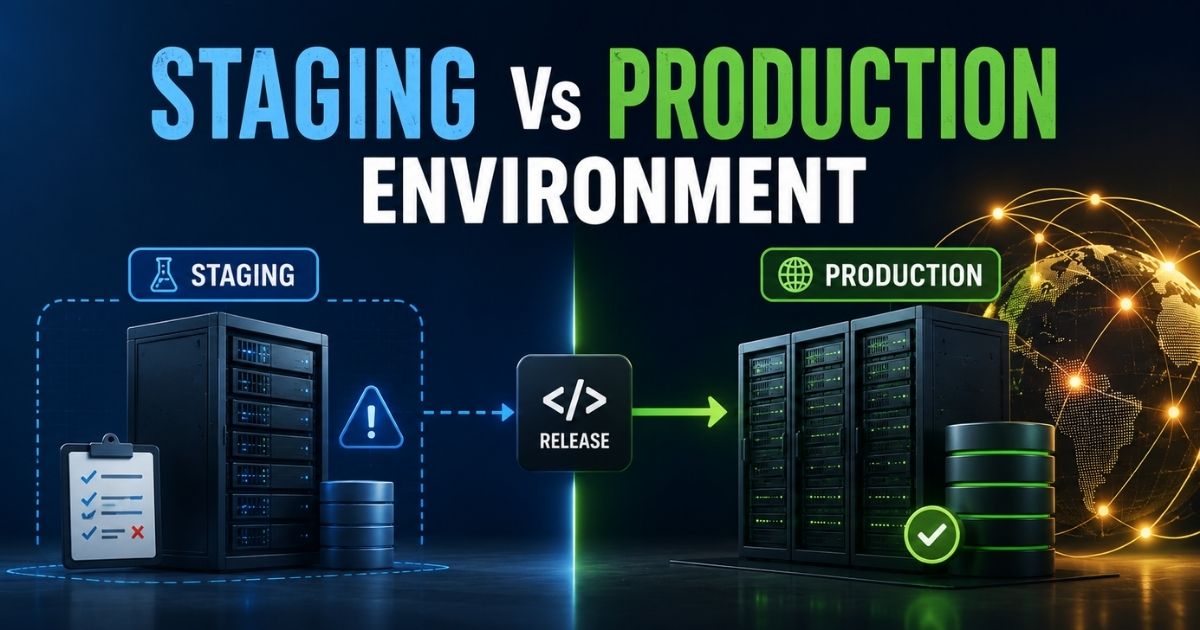
Every engineering team runs code through at least two worlds before it reaches real users: a staging environment built to catch problems, and production, where actual customers depend on things working. Confusing the two, or letting them drift apart, leads to bugs that only show up after launch and outages nobody saw coming.
Staging exists to mirror production closely enough that testing there actually means something. Production exists to serve real traffic reliably, with far less room for mistakes. Understanding what separates them, where the biggest risks hide, and which practices keep both environments trustworthy makes deployments smoother and far less stressful for everyone involved.
What Is A Staging Environment
A staging environment is a private space where teams test new features before they reach real users. It sits between development and production, relying on different environments so nothing risky touches live data. Most teams run multiple environments, each with its own environment variables, keeping settings, keys, and test data cleanly separated from the real thing.
Think of staging like paying a minimum deductible instead of the full cost of a mistake: catching a bug here is far cheaper than fixing it live. It's simply the safest place to see how new features actually behave first.
What Is A Production Environment
A production environment is the live deployment environment where real users interact with your finished software. It's the final stop in the development process, and it should run on the same configurations as staging so nothing behaves differently once it's live.
Because staging and production environments are meant to mirror each other, solid management processes matter here: version-controlled database migrations, monitored releases, and consistent access rules grounded in modern DevOps best practices. Get this right, and software development stops feeling like a gamble every time you ship.
Staging Vs Production: Full Comparison
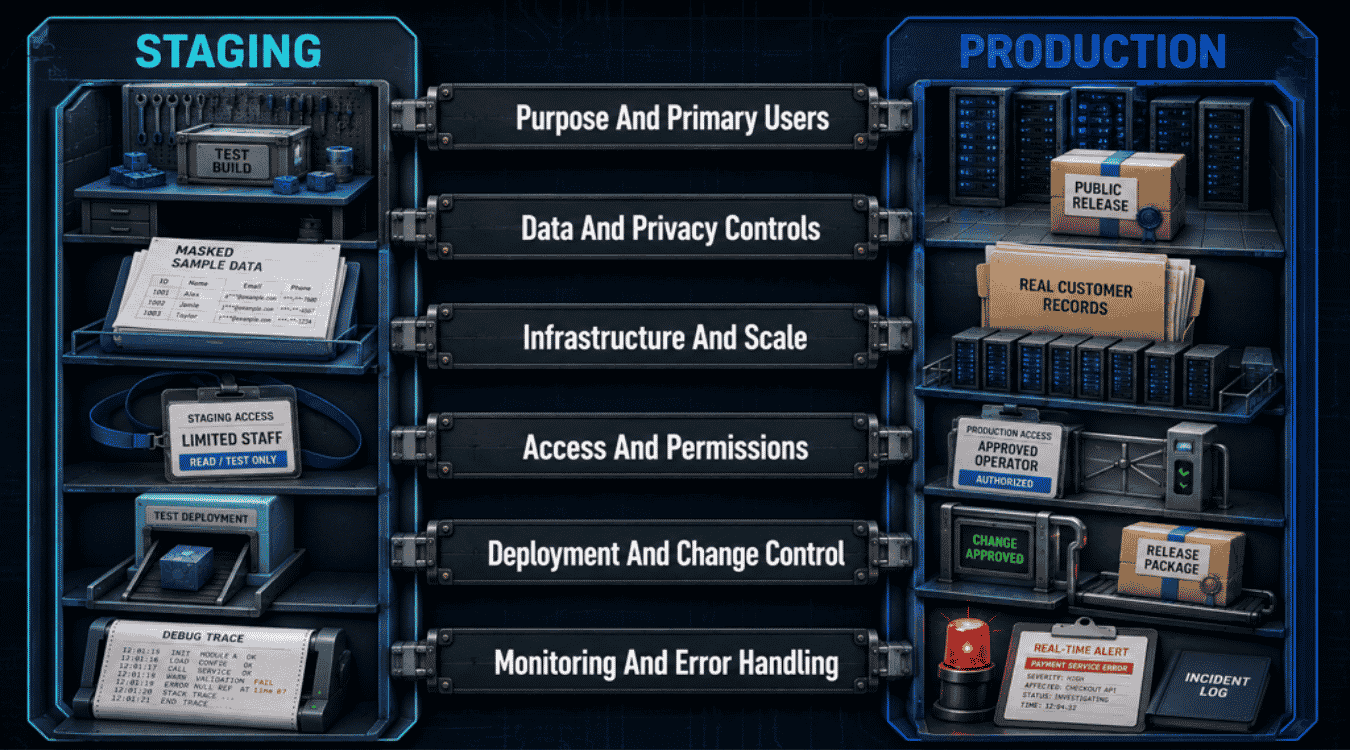
Staging and production environments look similar on the surface, but they serve completely different jobs. This comparison breaks down how they differ across purpose, data handling, infrastructure, access, deployment, and monitoring, so you know exactly what to expect from each one and how to align your engineering KPIs for faster releases and quality.
Purpose And Primary Users
Staging exists to answer one question: does this actually work the way we expect? Its primary users are internal, developers, QA testers, and sometimes stakeholders doing a final review before a release ships. Nobody outside the team should ever need to log into staging, because nothing there is meant to last.
Production exists for a completely different audience: real customers, paying or otherwise, who expect the product to simply work. Its purpose isn't validation anymore, it's delivery. Every decision made in production is filtered through one question staging never has to ask: how does this affect the person actually using it right now?
Data And Privacy Controls
Staging should never hold real customer information. Teams typically populate it with synthetic, anonymized, or masked data that looks realistic enough to catch bugs without creating a privacy risk. This matters even more under regulations like GDPR, where real data sitting in a lower-security environment can become a compliance problem overnight.
Production, by contrast, holds the real thing: real names, real payment details, real behavior. That's exactly why it demands stricter privacy controls, encryption at rest and in transit, strict data-retention policies, and audit trails. The gap between these two data postures is one of the most common places teams accidentally cut corners.
Infrastructure And Scale
Staging infrastructure aims for parity with production, not necessarily its full size. Many teams run staging on smaller instances or with fewer replicas, as long as the architecture, versions, and configuration match closely enough to trust the results of a test.
Production infrastructure is built for real-world scale: autoscaling groups, load balancers, redundant databases, and failover regions, sized for actual peak traffic rather than a testing scenario, following thoughtful SaaS scalability strategies for sustainable growth. This is also where cost becomes a real factor, since production infrastructure runs continuously and must absorb unpredictable spikes without falling over, something staging is rarely asked to prove on its own.
Access And Permissions
Staging access is usually broader inside the team. Developers, QA, designers, and product managers often have some level of access, since the whole point is collaborative testing before release and effective engineering team management for faster delivery. Even here though, sensible limits still apply, especially if staging ever touches anything resembling real infrastructure or credentials.
Production access is intentionally narrow. Only a small number of engineers typically have the ability to deploy, and even fewer have direct database or server access, usually gated behind role-based permissions and multi-factor authentication. This isn't bureaucracy for its own sake, it's a deliberate way to shrink the number of ways a single mistake can become an outage.
Deployment And Change Control
Deploying to staging is meant to be low-friction. Teams push changes frequently, sometimes many times a day, because the entire purpose is fast feedback before anything reaches real users and to support higher deployment frequency with smaller, safer releases. A broken staging deploy is inconvenient, not catastrophic.
Deploying to production carries real change control: approvals, release windows, rollback plans, and often a gradual rollout strategy like canary releases or feature flags. Every production change should be traceable to who approved it, what it touched, and how to undo it, because unlike staging, a bad deploy here doesn't just slow the team down, it affects the people relying on the product right now.
Monitoring And Error Handling
Staging monitoring is typically scoped to test cycles. Teams watch logs and error rates while actively validating a release, then move on once testing wraps up. It doesn't need to run 24/7, since nothing staging does affects real users if it briefly breaks.
Production monitoring never really stops. Uptime checks, error tracking, latency dashboards, and on-call alerting all run continuously, because the cost of missing an issue is measured in real user impact, not just an inconvenient afternoon of debugging, especially when you apply a structured Site Reliability Engineering SaaS framework. Modern SaaS monitoring tools and a solid software observability strategy for SaaS teams make this continuous visibility practical at scale. This is also where incident response plans earn their keep, turning a monitoring alert into a fast, practiced recovery rather than a scramble.
Dimension | Staging Environment | Production Environment |
|---|---|---|
Purpose and primary users | Internal validation; developers, QA, stakeholders | Live delivery; real customers and end users |
Data and privacy controls | Synthetic or anonymized data | Real customer data; strict compliance and encryption |
Infrastructure and scale | Production-like but often smaller | Full scale, autoscaled, built for peak traffic |
Access and permissions | Broader internal access | Narrow, role-based, tightly gated |
Deployment and change control | Frequent, low-friction deploys | Approval-gated, gradual, rollback-ready releases |
Monitoring and error handling | Active during test cycles only | Continuous, 24/7, with on-call response |
Where Dev, QA, And Preview Environments Fit In
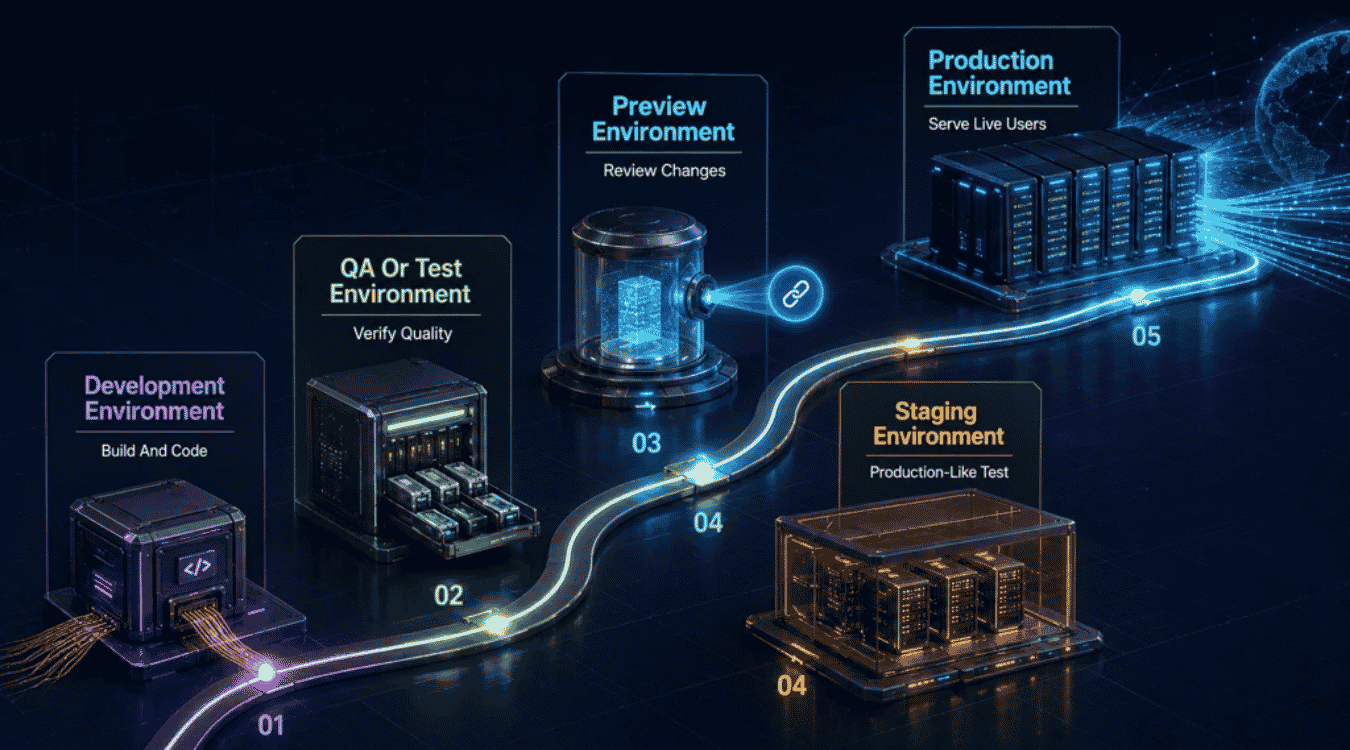
Staging and production aren't the only stops in a release. Most teams also rely on development, QA, and preview environments along the way, each catching different problems before code ever reaches real users as part of a structured software development life cycle. Here's what each one actually does.
Development Environment
A development environment is where code first comes to life, usually right on a developer's local machine. It's built for speed, not stability: quick restarts, fake data, and constant changes as someone works through a feature. Nothing here is meant to be permanent, and that's exactly the point.
Because it's isolated, a broken build on one person's local machine never affects teammates or, more importantly, real users. Developers experiment freely, break things on purpose, and fix them just as fast, long before the code is ready for anyone else to see.
QA Or Test Environment
A QA environment exists for one job: quality assurance. Once a feature is built, it moves here for structured feature testing, checking that it actually works the way it was designed to, not just that it compiles. Testers, whether human or automated, run through expected behavior and edge cases alike, ideally following well-defined software testing strategies for effective QA.
This environment typically runs on controlled test data rather than anything real, so testers can safely try to break things without consequences. A solid QA environment catches the bugs that slip past a developer's own quick checks, before those bugs ever get a chance to travel further downstream.
Preview Environment
A preview environment is a short-lived, disposable version of the app, often spun up automatically from a staging branch or pull request. It gives teammates, designers, or stakeholders a live link to click through before a change is merged anywhere permanent.
Because it's tied to a single set of changes, a preview environment makes early feedback fast and low-risk. Nothing about it is meant to last: once the related code is merged or the branch closes, the preview simply disappears, having done its one job well.
Staging Environment
A staging environment is where final testing happens before anything reaches real users. Configured to closely resemble production, staging sites let teams verify performance, integrations, and overall behavior under conditions that feel as close to real as possible.
This is the last realistic checkpoint before release, which is exactly why staging deserves the same care as production itself: matched configurations, protected access, and no real customer data. If something's going to break, this is by far the best place for it to happen.
Production Environment
A production environment is where real users interact with the finished product, and where business operations actually depend on things working correctly. There's no more testing happening here, only live delivery, real transactions, and real consequences if something goes wrong.
Everything upstream, development, QA, preview, and staging, exists to protect this one environment. By the time code reaches production, it should already be proven, stable, and ready to support the business without surprises.
Staging Vs Pre-Production Vs UAT Vs Sandbox: Naming Confusion, Resolved
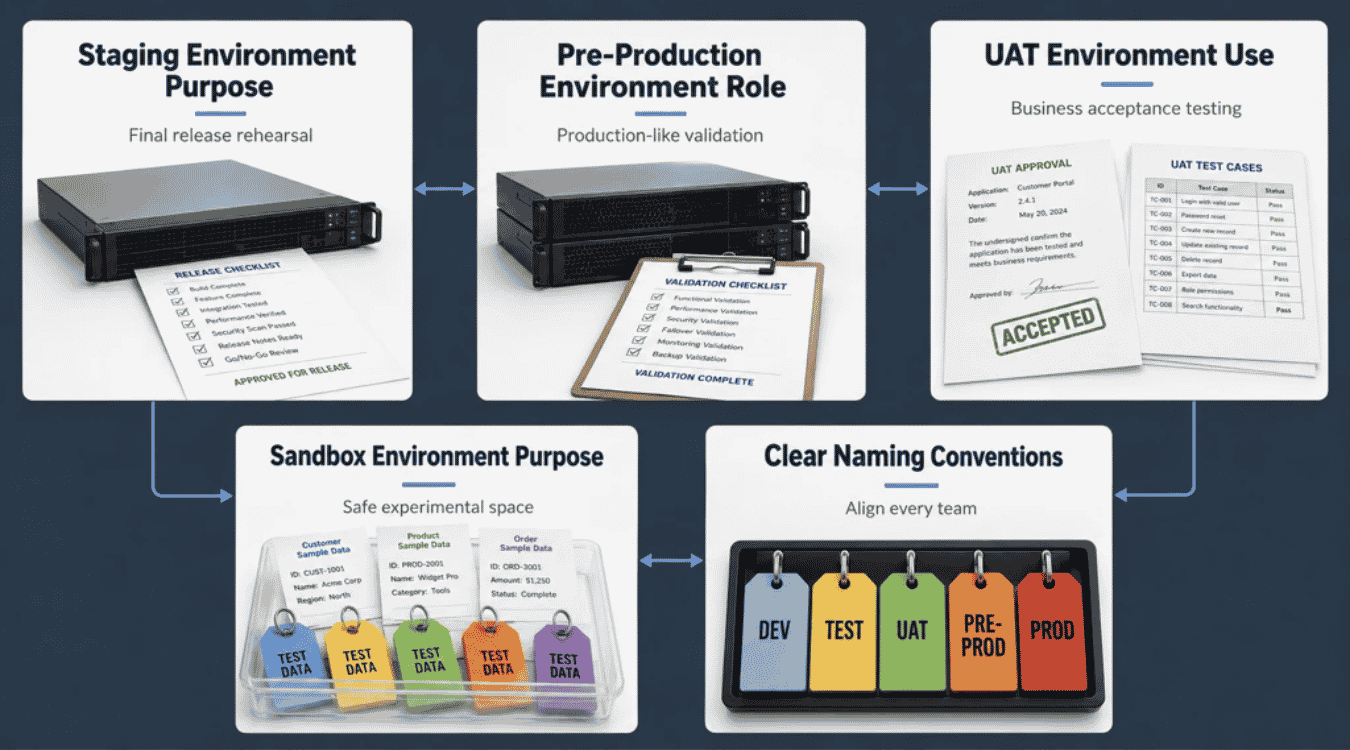
If you've ever seen a team argue about whether something belongs in "staging" or "pre-production," you're not imagining things, these terms genuinely overlap, and different companies use them differently. Here's a practical way to tell them apart.
Staging Environment Purpose
Staging is built to mirror production conditions as closely as possible: same architecture, same integrations, same general behavior. Its job is to act as a final checkpoint before new code goes live, giving the team one last honest look at how a release will actually perform.
Think of staging as the safety net between "it works on my machine" and "it works for everyone." If a web application is going to misbehave under real-world conditions, staging is where that should surface first, not after launch.
Pre-Production Environment Role
Pre-production is often used interchangeably with staging, but some teams treat it as a stricter, closer-to-live variant, sometimes fed by production data snapshots or running behind the same version control tagging used for real releases. It plays a critical role for teams with complex infrastructure, where one more layer of validation meaningfully lowers risk.
In practice, if your team only has the resources for one pre-release environment, staging and pre-production can safely be the same thing. The name matters less than what actually gets tested there.
UAT Environment Use
UAT, or user acceptance testing, environment exists for a very specific audience: real stakeholders or end users confirming a feature does what they actually asked for. By this point, unit tests and bug fixes are already done; UAT isn't about finding technical bugs, it's about validating the business logic.
This is less about "does the code work" and more about "is this actually useful," which is why UAT often involves people outside engineering entirely, product managers, support teams, or even select customers.
Sandbox Environment Purpose
A sandbox is the most disposable environment of the bunch, meant for free experimentation without any fear of data loss or lasting consequences. Developers use it to try new code, test an API, or explore an idea that might not go anywhere.
Unlike staging or UAT, a sandbox isn't part of a release pipeline at all. It's a side space, useful precisely because nothing done there needs to be taken seriously yet.
Clear Naming Conventions
The fix for this confusion isn't finding the "correct" universal terms, it's agreeing on your own team's definitions and writing them down. Document what each environment is for, who can access it, and what happens right before and after it in your pipeline.
Once that's clear, the labels stop mattering as much. What matters is that everyone knows exactly which environment they mean when they say it.
Do You Actually Need A Staging Environment? A Decision Framework
Not every team needs a full staging setup, but most teams underestimate how much risk they're carrying without one. Instead of guessing, run your situation through four quick questions.
How often do you release? Teams shipping multiple times a week benefit far more from staging than those pushing quarterly updates, since frequent changes multiply the chances something slips through untested.
What's actually at stake? A marketing site typo is forgivable. A billing bug, a broken checkout flow, or a healthcare app malfunction isn't. The more consequential a failure would be, the harder it is to justify skipping this step.
Do you handle sensitive data? Any compliance obligation, GDPR, HIPAA, SOC 2, effectively answers this question for you. Regulated data needs a tested, isolated path to production.
How big is your team? A solo developer can sometimes get away with careful manual testing. Five or more engineers touching the same codebase almost always benefit from a shared, consistent checkpoint before release.
If you answered "high risk" to two or more of these, staging isn't optional, it's basic insurance against a much worse day.
Best Practices For Keeping Staging And Production In Sync
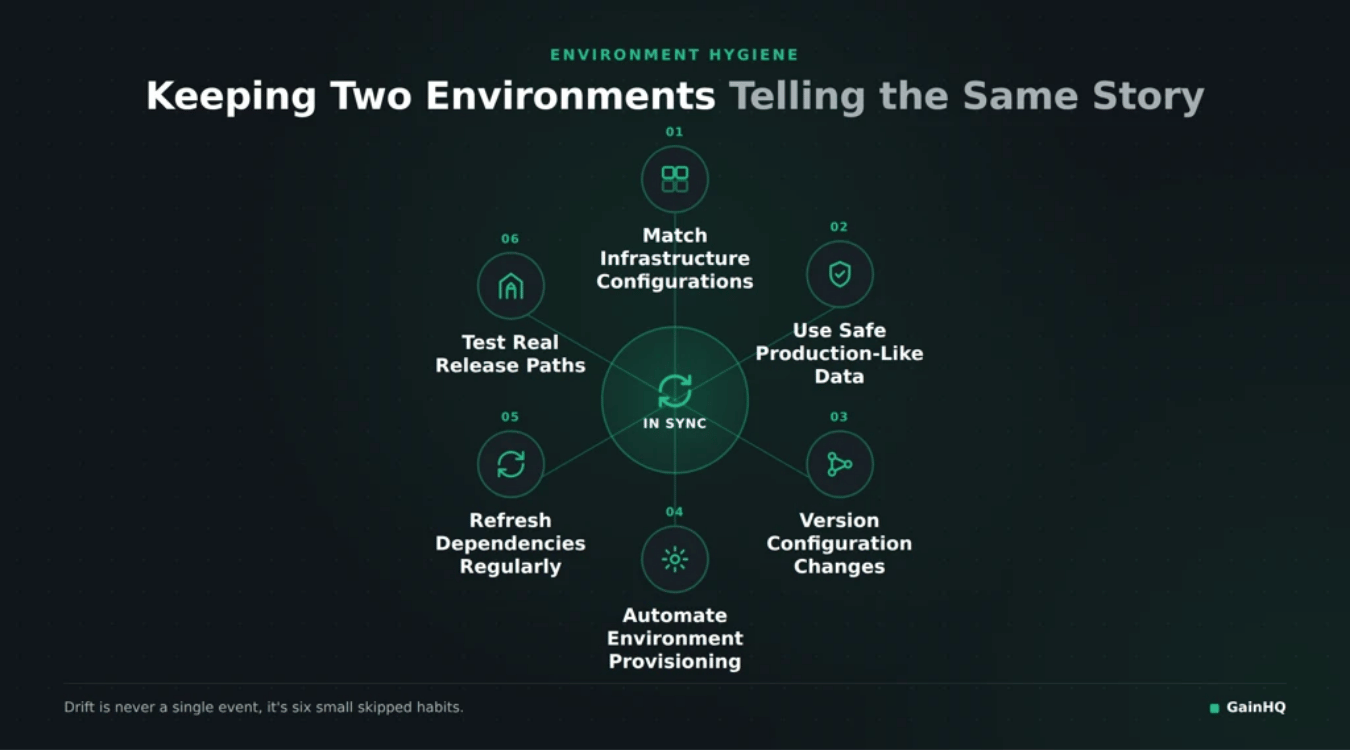
Staging only earns its keep if it actually behaves like production. The moment the two drift apart, testing changes there stops meaning anything. These six habits, along with a recurring SaaS technical audit for security, performance, and scale, keep that gap from opening up in the first place.
Match Infrastructure Configurations
Staging should run on the same server versions, dependencies, and network setup as production, not a smaller, simplified stand-in. When configurations don't match, staging can hide performance issues that only show up once a feature meets real production load, undermining any broader SaaS performance optimization best practices you put in place.
Even small mismatches, a different database version or a missing environment variable, can make a test pass in staging and fail live. Treat infrastructure parity as a requirement, not a nice-to-have.
Use Safe Production-Like Data
Staging works best as a safe space: realistic enough to catch problems, but never holding actual real data. Anonymized or synthetic datasets that mirror production's shape and volume let teams test meaningfully without creating a privacy risk.
This balance matters because unrealistic test data misses edge cases, while real customer data introduces compliance exposure the moment it lands somewhere less protected than production itself.
Version Configuration Changes
Configuration should move through the same review process as code. When a change to staging settings goes through a pull request, it's reviewed, logged, and easy to roll back if something goes wrong.
Skipping this step is how "quick fixes" quietly become undocumented differences between environments, the exact kind of drift that causes confusing, hard-to-diagnose failures weeks later.
Automate Environment Provisioning
Manually rebuilding staging invites human error every single time. Automating provisioning through infrastructure-as-code and a solid CI CD pipeline means staging can be recreated identically, on demand, without anyone remembering every manual step.
This also makes it far easier to spin up a fresh environment after a major incident, or to test a big change from a clean slate instead of an environment that's accumulated months of manual tweaks.
Refresh Dependencies Regularly
Outdated dependencies in staging quietly stop reflecting reality. If production has moved to a newer library version and staging hasn't, tests are validating a setup that no longer exists, and major issues can slip through simply because staging never had the chance to catch them.
Scheduling regular dependency refreshes keeps staging honest, so a passing test actually means something.
Test Real Release Paths
Don't just test the feature, test how it actually gets released: the same deployment scripts, the same rollout sequence, the same approval steps. A product manager signing off in staging should be looking at the real release path, not a shortcut version of it.
Get this right, and by the time a change reaches real users, there's very little left that could impact users in a way nobody saw coming.
Release Strategies Once You're In Production
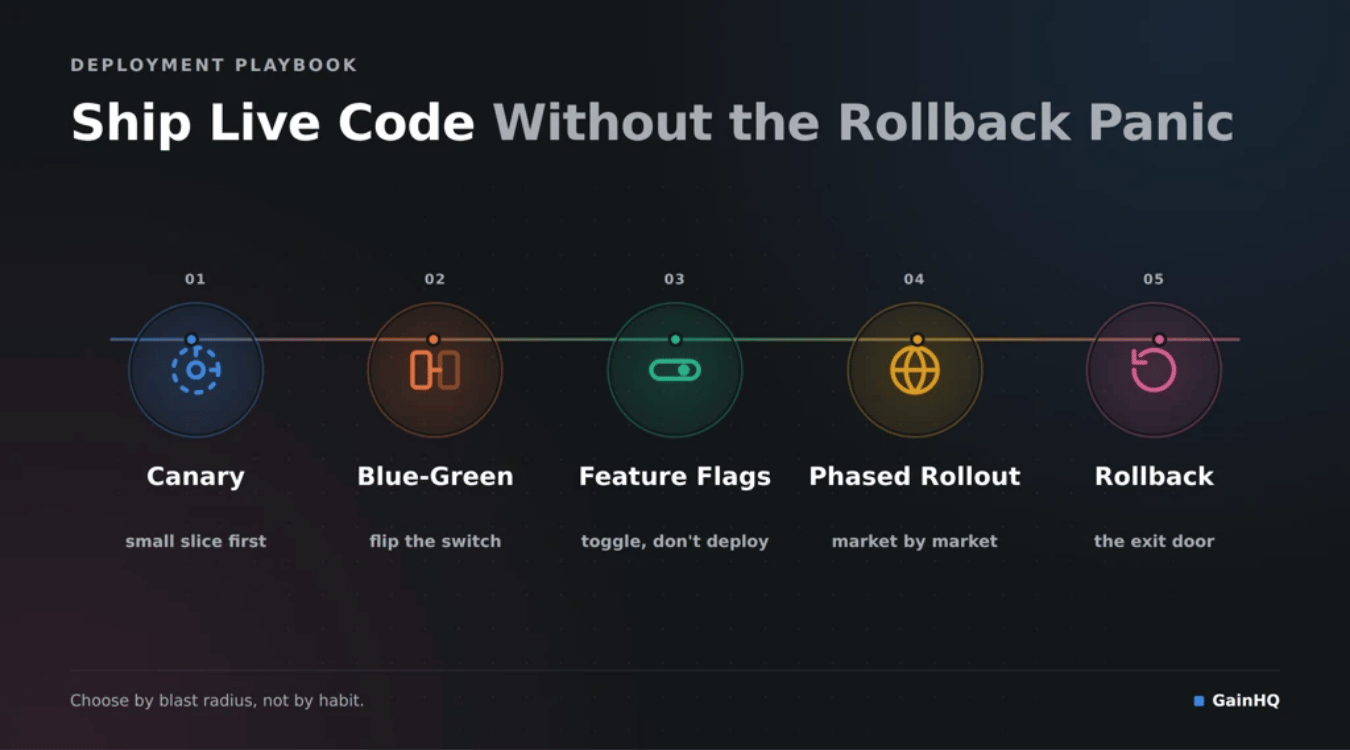
If staging was the dress rehearsal, production is opening night, and even a well-tested release can behave differently once live users are involved. These five strategies give developers a way to ship changes without betting everything on one deploy going perfectly.
Canary Release Strategy
A canary release sends new code to a small slice of live users first, then watches closely before expanding further. If error rates or performance dip, the rollout stops before most people ever notice.
This approach exists for one specific purpose: catching problems at a small enough scale that developers can fix them quietly, rather than after everyone's already affected.
Blue-Green Deployment
Blue-green deployment keeps two identical production environments running, one live, one on standby with the new release. Switching traffic between them is instant, and reverting is just as fast if something's wrong.
It does come with extra costs, since you're essentially running double infrastructure, but for teams that need near-zero downtime, that tradeoff is usually worth it.
Feature Flag Rollouts
Feature flags let teams create and ship code that's turned off by default, then switch it on for specific users, cohorts, or stakeholders without a new deployment. Turning a feature back off is just as instant as turning it on.
This decouples releasing code from releasing a feature, which gives developers far more control over timing and risk than a traditional all-at-once launch.
Phased Regional Releases
Phased regional releases roll a change out market by market, or data center by data center, rather than everywhere at once. If something breaks, it's contained to one region while the rest of the world keeps running the stable version.
This is especially useful for teams with a global user base, since local issues, network, load, or even language-specific bugs, surface early without becoming a worldwide incident.
Rollback Plans and Triggers
A rollback plan defines, in advance, exactly what conditions should trigger reverting a release: error-rate thresholds, latency spikes, or a manual call from the team. Many teams wire this directly into GitHub Actions or similar pipelines, so rollback becomes a fast, automatic step rather than a panicked manual one.
Deciding this before release day turns a bad deploy into a quick recovery instead of a scramble.
Common Mistakes And Security Risks To Avoid
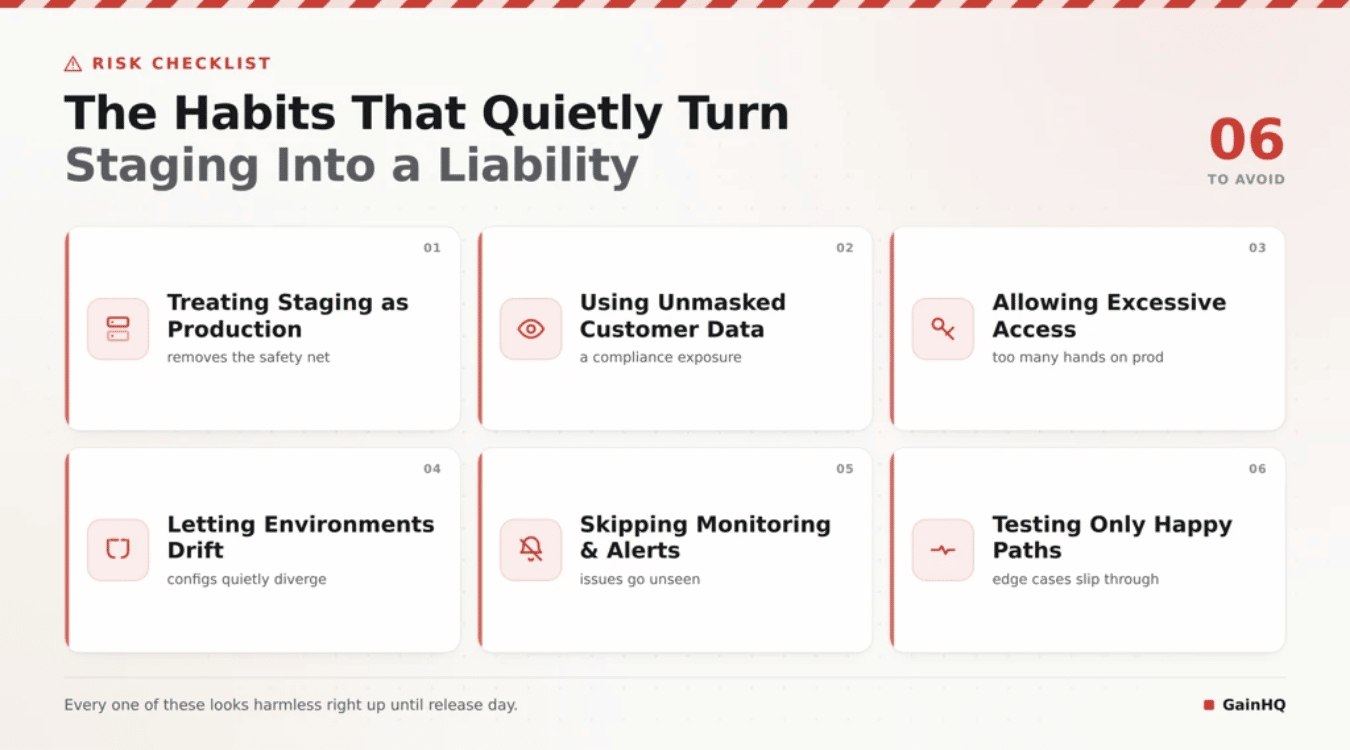
Most staging and production incidents don't come from one dramatic failure, they come from small habits nobody flagged as risky. Here are six mistakes worth catching before they catch you.
Treating Staging as Production
Once a team gets comfortable, staging can quietly become "good enough" and code gets deployed there and forgotten, treated as if it were the real thing. That habit erodes the whole point of having a separate setup.
Staging only protects anyone if it's still treated as a test space, not a shortcut around proper release process.
Using Unmasked Customer Data
Pulling real customer records into staging "just this once" feels harmless until it isn't. Using masked or synthetic data instead is essential, especially for any software or services handling payments, health records, or personal information.
The moment real data sits in a less-protected environment, you've created a security gap that didn't need to exist.
Allowing Excessive Access
Giving broad access "to make things easier" is a common shortcut with a real cost. Every extra person with production access is another possible point of failure in your release process.
Access should be scoped to what someone's role actually needs, nothing more, and reviewed regularly as teams and responsibilities change.
Letting Environments Drift
A staging setup that quietly falls out of sync with production stops being useful. Different dependency versions or missing configuration mean the software behaves differently in each place, so a clean staging test can still hide real bugs.
Keeping environments aligned isn't glamorous work, but it's what makes every other test worth trusting.
Skipping Monitoring and Alerts
Without active monitoring, bugs sit unnoticed until a user reports them, which is the most expensive way to find out something's wrong. Alerts should be part of the setup from day one, not bolted on after the first outage.
Good monitoring turns a silent failure into a five-minute fix instead of a multi-hour scramble.
Testing Only Happy Paths
It's tempting to test only the scenario that's supposed to work, but that's exactly where bugs hide the least, and cost the most, later. Testing failure cases, bad input, and unexpected user behavior helps avoid extra costs down the line from issues that reach real users.
A process that only checks the happy path isn't really testing, it's just confirming what you already hoped was true.
Final Discussion
Staging and production aren't just technical checkboxes, they're how a team earns the right to ship confidently. Every practice covered here, matched configurations, safe test data, monitored releases, careful access control, exists to answer one question: will this actually work for the people using it?
Teams that get this right don't necessarily move slower, they just move without surprises. The gap between "it worked in testing" and "it broke in production" almost always traces back to a skipped step somewhere in this pipeline. Get the fundamentals right once, document them, and they keep paying off with every release after.
.png)