Legacy Data Migration: Complete Guide For A Safe Transition
by Daniel Wright | Sep 9, 2026 | Software Development Insights
Table of Contents
Legacy data migration sounds simple until you look at what sits inside an old system. Years of duplicate records, inconsistent formats, undocumented fields, and outdated business rules can turn moving data into a high-risk project. A clean transfer alone does not guarantee trustworthy data.
A successful legacy data migration needs more than copying records into a new system. Teams must audit legacy data, fix data quality issues, define data mapping and transformation logic, test the migration pipeline, and validate data integrity before cutover. Multiple rehearsals also help expose problems before they affect business operations.
So, how do you migrate legacy data without losing critical data or carrying old problems forward? This guide walks through the complete data migration process, from planning and strategy to validation, cutover, and post-migration monitoring.
What Is Legacy Data Migration?
Legacy data migration is the process of moving stored information from an outdated system to a modern platform, database, or cloud environment. The goal is to preserve critical and historical data while making it usable in the new system, especially when consolidating or replacing core platforms such as custom ERP systems built for business growth. Unlike a simple data transfer, the process often requires extraction, data cleansing, transformation, data mapping, and validation.
Legacy systems can contain inconsistent formats, duplicate records, undocumented business rules, and complex relationships built over many years. That makes migrating legacy data more difficult than moving data between two modern systems.
A successful legacy migration protects data integrity while supporting better performance, security, scalability, and business operations. The data migration process should also preserve valuable records without carrying unnecessary legacy problems into the target system.
What Makes Legacy Data Migration Difficult?
.png)
Legacy data migration is difficult because old systems rarely contain clean, well-documented data. Years of changes can leave behind inconsistent records, hidden dependencies, obsolete formats, and undocumented rules. A data migration project must uncover these issues before moving data to the target system. Otherwise, old problems can follow the data into modern platforms.
Poor Data Quality
Legacy databases often hold years of duplicate records, missing values, outdated codes, and inconsistent formats. Some legacy data may no longer provide any business value. Moving all the data without review can make the new system unreliable.
A thorough data audit helps teams identify these problems early. Data cleansing can then remove duplicates, standardize formats, correct errors, and exclude redundant or obsolete records. Data mapping also helps uncover differences in fields and structures. Prioritizing data quality before the migration process protects data integrity and prevents old errors from entering the target system.
Undocumented Business Rules
Legacy systems can contain business rules that were created years ago and never documented. A status code, stored procedure, custom field, or transformation logic may have a specific meaning that only a few employees understand.
That creates risk when migrating legacy data. A field can reach the new system correctly but still have the wrong business meaning. Teams should document schema mapping, transformation rules, exceptions, and historical codes before transferring data. Key stakeholders, data stewards, and business users should also review those rules. Their knowledge helps preserve business processes that technical documentation may miss.
Complex Data Dependencies
One legacy system can support far more than its main application. Reports, APIs, scheduled jobs, spreadsheets, other databases, and downstream systems may all depend on the same data. Some dependencies may not appear in existing documentation.
A broken relationship can cause downstream failures even when the data migration itself appears successful. Teams need to map data sources, integrations, identifiers, and dependencies before migrating data. Referential integrity matters too. Customer, order, invoice, and payment records must keep the correct relationships after migration. A detailed dependency map helps the migration project avoid unexpected disruption to business operations.
Obsolete Data Formats
Legacy databases rely on structures that may not work cleanly with modern databases or cloud platforms. Old file formats, proprietary schemas, unusual indexing structures, and incompatible data types can make extraction and transformation more complex.
The migration team may need dedicated connectors, schema conversion, data mapping, or custom transformation logic before moving data. Schema validation should confirm that fields, relationships, and data types work correctly in the target architecture. A staging environment also gives teams a controlled environment to test those changes before production. Legacy platforms can require specialized connectivity before data quality work even begins.
Security And Downtime Risks
Critical data can face extra exposure while it moves between the existing system and new system. Temporary files, staging environments, migration tools, and cloud based platforms can create additional access points. Teams should encrypt data, control permissions, implement SaaS security best practices, and maintain regulatory compliance throughout the migration process, which is especially important for HIPAA-compliant software handling patient data.
Downtime creates another challenge. Many legacy applications support daily business operations and cannot simply stop for an extended migration. Incremental transfers and change data capture can reduce disruption by keeping source and target data synchronized. Automated validation can then compare source and target records and flag mismatches before final cutover.
How To Plan Legacy Data Migration
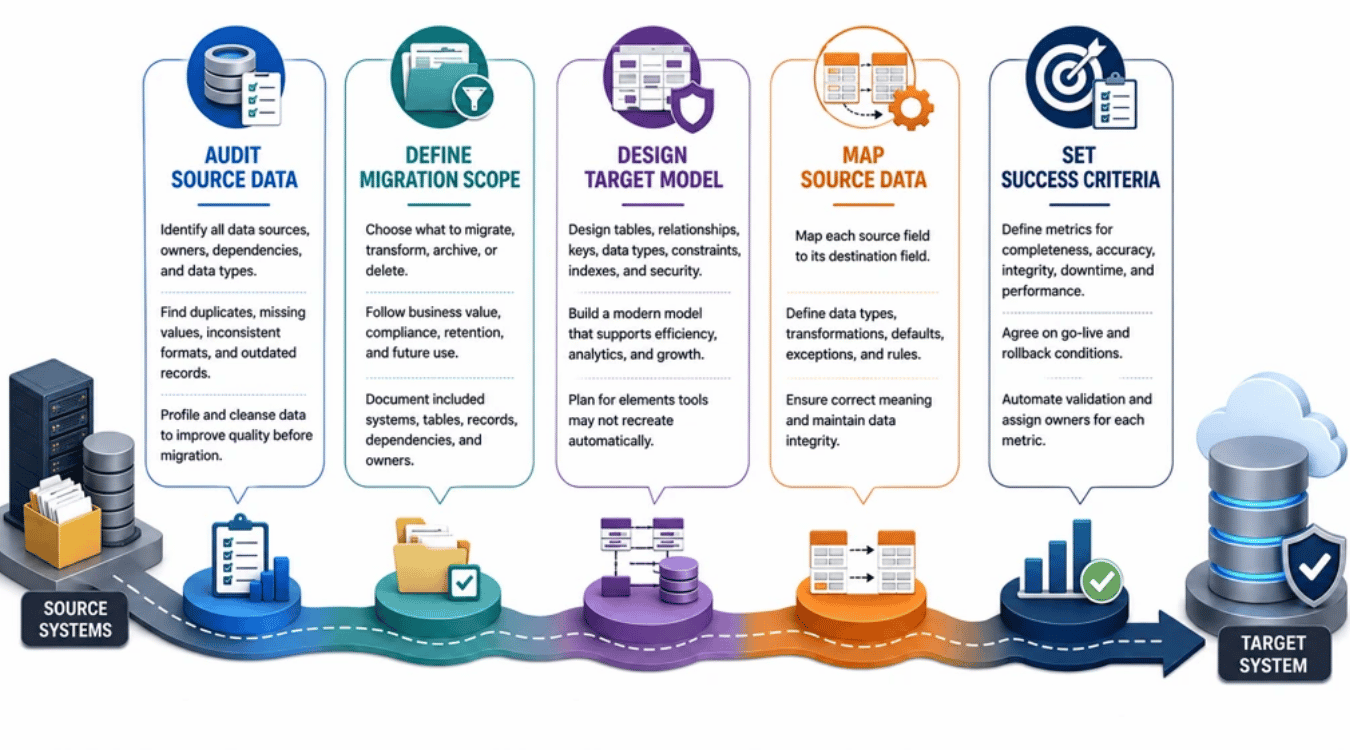
A legacy data migration needs a clear plan before any data moves. Start by understanding the existing system, deciding what belongs in the target system, and defining how success will be measured. Good planning reduces migration risks and gives technical teams, data stewards, and key stakeholders the same expectations.
Audit Source Data
Start with a thorough data audit of every relevant data source. Identify databases, tables, files, data types, record counts, owners, dependencies, and stored procedures. Look for duplicates, missing values, inconsistent formats, unsupported data types, and outdated records.
The data audit should also reveal where critical data lives and how business processes depend on it. Data profiling and data cleansing can then improve data quality before migration. Fixing problems early is safer than carrying poor-quality legacy data into a new system. AWS also recommends pre-migration assessments to identify source data types that may not work correctly in the target database.
Define Migration Scope
Not all legacy data needs to move. Decide what to migrate, transform, archive, or delete based on business value, regulatory compliance, retention rules, and future use. Historical data may need to remain accessible without becoming part of the new system's active dataset.
Clear scope also keeps the data migration project manageable. Document which legacy applications, databases, tables, and records are included. Add dependencies and data owners as well. A defined scope prevents teams from discovering essential data halfway through the migration process and reduces unnecessary data volume.
Design Target Model
The target architecture should reflect how the business needs to use its data after migration. Define tables, relationships, keys, data types, constraints, indexes, security controls, and retention requirements before transferring data.
Do not assume the structure of legacy databases should simply be recreated. A lift-and-shift approach can carry old limitations into modern databases or cloud platforms. The target model should support operational efficiency, security, advanced analytics, and future growth as part of a broader software modernization strategy and a well-defined legacy software modernization strategy. AWS notes that database migration tools may not automatically recreate elements such as foreign keys, secondary indexes, and user accounts, so teams need to account for them separately.
Map Source Data
Data mapping defines how information moves from each source field to its destination. Document the source field, target field, data type, transformation logic, default values, exceptions, and validation rule.
Accurate mapping is critical for data integrity. A field may move successfully but still carry the wrong meaning. For example, a legacy status code may need translation before the target system can use it correctly. Schema mapping and schema validation help expose structural differences before migrating data. Explicit mapping rules also make the migration pipeline easier to test, review, and repeat.
Set Success Criteria
Define what a successful migration means before the migration starts. Criteria can include record completeness, financial reconciliation, referential integrity, acceptable data differences, maximum downtime, performance targets, and failed-record thresholds.
Set clear go-live and rollback conditions too. AWS recommends agreeing on acceptable differences between source and target data, documenting validation rules, and automating comparisons where possible. Automated validation can compare migrated records and identify mismatches before cutover.
Each metric should also have an owner. Clear success criteria turn a complex technical project into a measurable migration project with an objective go-live decision.
How To Choose A Legacy Data Migration Strategy
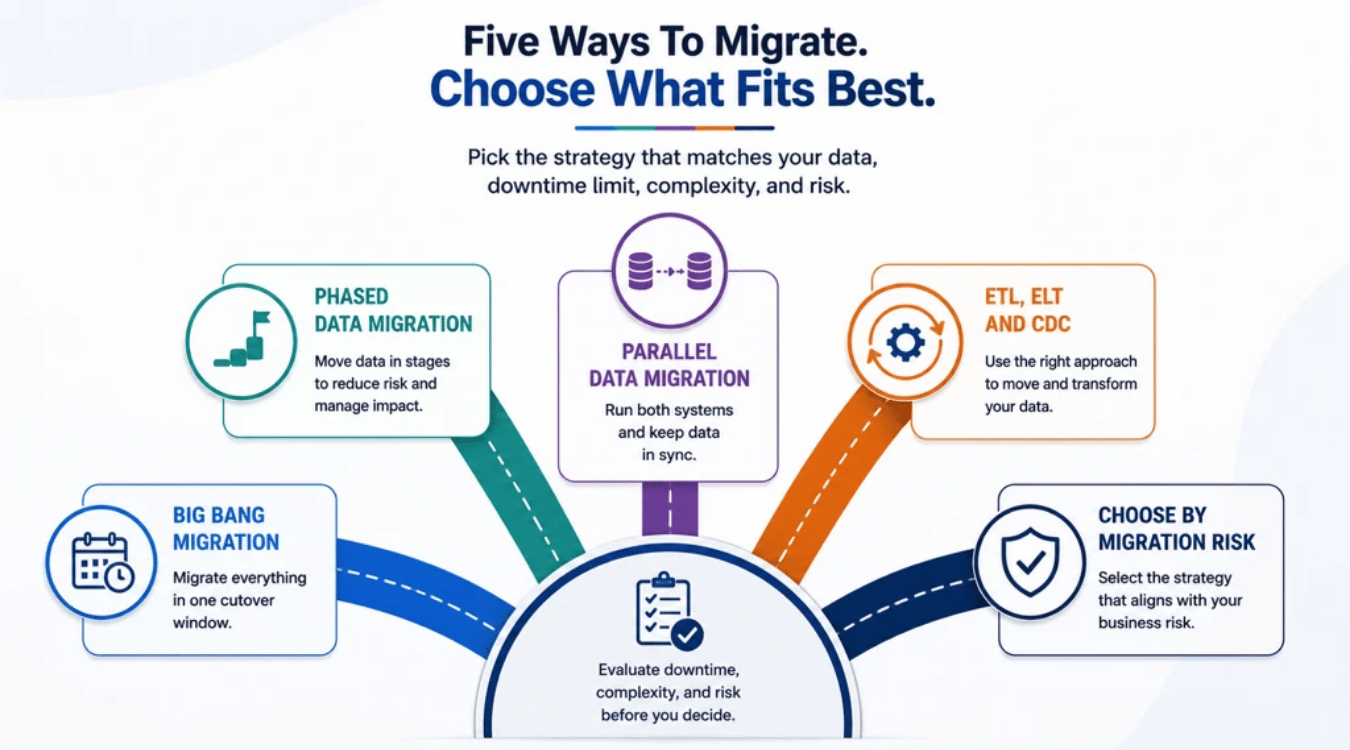
The right migration strategy depends on data volume, downtime limits, system complexity, and migration risks. No single approach fits every data migration project. Compare how much disruption the business can accept, how fast legacy data changes, and how easily the migration process can be reversed.
Big Bang Migration
A big bang migration moves all required data from the existing system to the target system within one planned cutover window. Teams usually stop writes, migrate the data, validate it, and switch business operations to the new system.
The approach works best when data volume is manageable and the business can accept downtime. It also avoids running two systems for long periods. The trade-off is risk. A serious data integrity or application problem can affect the entire migration at once. Full rehearsals, backups, automated validation, and clear rollback criteria are essential before cutover. AWS describes full-load migration as suitable when enough outage time is available to copy the existing data.
Phased Data Migration
A phased migration divides legacy system migration into smaller stages. Teams may move one application, business unit, data domain, or group of records at a time. Each phase can be tested before the next one starts.
The smaller scope limits the impact of migration failures and gives teams time to fix data quality or transformation logic problems. Incremental data transfers can also expose performance bottlenecks before they affect the full migration. However, phased migration requires careful dependency management. Legacy systems and modern platforms may need to exchange data until every phase is successfully migrated.
Parallel Data Migration
Parallel migration keeps the legacy system and new system available during part of the transition. Data may be copied initially and then synchronized while teams test the target architecture. The approach gives key stakeholders more time to compare results before the final switch.
Change data capture can help keep source and target databases aligned during this period. AWS DMS, for example, supports a full load followed by ongoing CDC replication. Parallel operation can reduce cutover risk, but it adds complexity and operational costs. Teams must control which system accepts writes and prevent conflicting records.
ETL, ELT And CDC
ETL platforms extract data, apply transformation logic, and load the result into the target system. ETL works well when legacy data needs significant data cleansing or restructuring before it reaches its destination.
ELT loads data first and performs transformations in the target environment. It can suit modern cloud platforms that provide enough compute capacity for large-scale transformations. CDC serves a different purpose. It captures ongoing changes from legacy databases and applies them to the target. When choosing tools and providers, teams should also consider vendor lock-in risks and solutions so future migrations remain flexible. AWS notes that CDC latency varies with workload, network capacity, target performance, and other factors, so it should not automatically be treated as real-time replication.
Choose By Migration Risk
Choose the migration strategy around business risk rather than convenience. Big bang can suit smaller databases with an acceptable outage. Phased migration makes sense when complex business processes or dependencies make one large cutover too risky.
Parallel migration or full load plus CDC can work better when downtime must stay low, especially when part of a wider enterprise cloud migration strategy. Google Cloud also uses an initial snapshot followed by continuous replication for minimal-downtime database migration.
Migration Situation | Suitable Approach |
|---|---|
Small data volume, downtime allowed | Big Bang |
Complex legacy systems | Phased |
High cutover risk | Parallel |
Heavy data transformation | ETL |
Cloud-based target | ELT |
Low downtime requirement | Full Load + CDC |
A successful migration strategy should balance data integrity, migration time, business continuity, technical complexity, and rollback options. A proof-of-concept migration can also expose throughput and compatibility problems before the full data migration begins.
How To Execute Legacy Data Migration
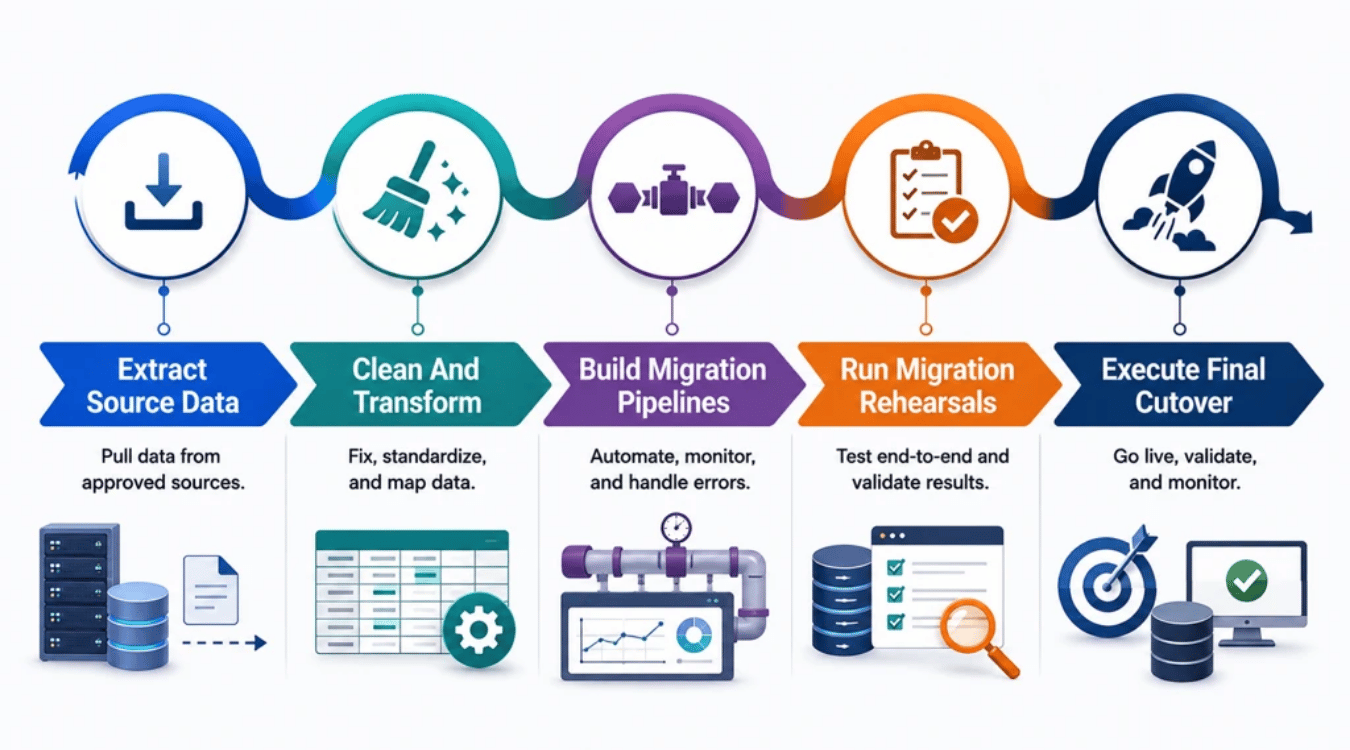
A good plan only works if the migration process is controlled from start to finish. Execution should protect data integrity while keeping disruption low. Teams need to extract, clean, transform, load, test, and validate legacy data before the target system takes over business operations.
Extract Source Data
Start by extracting essential data from the approved data sources. The method depends on the legacy databases, data volume, available connectors, and downtime limits. Some legacy systems may require custom scripts or migration tools because their formats no longer work well with modern databases.
Keep the original extract unchanged so you always have a reliable source for comparison. Check record counts, file completeness, and extraction errors before moving forward. Large datasets may need incremental transfers instead of one bulk export. AWS also recommends watching source workload because full-load migration tasks can place additional demand on the source database.
Clean And Transform
Do not copy poor-quality legacy data directly into the new system. Remove duplicates, correct invalid values, standardize formats, and handle missing records first. Data cleansing prevents known errors from becoming permanent problems on modern platforms.
Next, apply the transformation logic defined during data mapping. Convert data types, field names, codes, relationships, and formats to match the target architecture. Schema conversion tools can help translate incompatible structures, while schema validation can flag unsupported data types before migration. AWS provides pre-migration assessments specifically to identify problems that could prevent a database migration from working as expected.
Build Migration Pipelines
A migration pipeline should make transferring data repeatable and measurable. ETL platforms can extract, transform, and load data, while CDC tools can capture ongoing changes after the initial load, which is especially important when doing cloud migration planning for growing teams. Google Cloud, for example, uses an initial snapshot followed by CDC-based continuous replication for supported migrations.
Add logging, retries, error handling, and automated validation to the pipeline. Failed records should be isolated instead of silently skipped. Track rows loaded, changes applied, replication lag, and validation failures. AWS DMS exposes these metrics and can compare source and target records to identify mismatches.
Run Migration Rehearsals
Never let the production cutover become the first complete test. Run the entire data migration process in a staging environment that closely matches production. Include realistic data volume, stored procedures, integrations, transformation logic, and business processes.
Repeat the rehearsal until the migration finishes within the approved downtime and meets the success criteria. Test the migrated database with real application workloads too. Google recommends a complete test migration and application validation before production cutover. Each rehearsal can expose performance bottlenecks, mapping errors, downstream failures, and timing problems while they are still safe to fix.
Execute Final Cutover
The final cutover moves business operations from the existing system to the target system. For low-downtime migrations, teams can complete the bulk load first and use change data capture to synchronize later changes. Once replication lag is low, stop writes to the legacy system and apply the remaining changes.
Run automated validation before directing users and applications to the new system. Check record completeness, financial totals, referential integrity, critical workflows, and agreed migration criteria. If validation fails beyond the approved threshold, use the tested rollback plan rather than forcing the cutover.
A controlled cutover follows a simple sequence:
Final Sync → Stop Writes → Validate Data → Approve Cutover → Switch Systems → Monitor
How To Test And Validate Legacy Data Migration
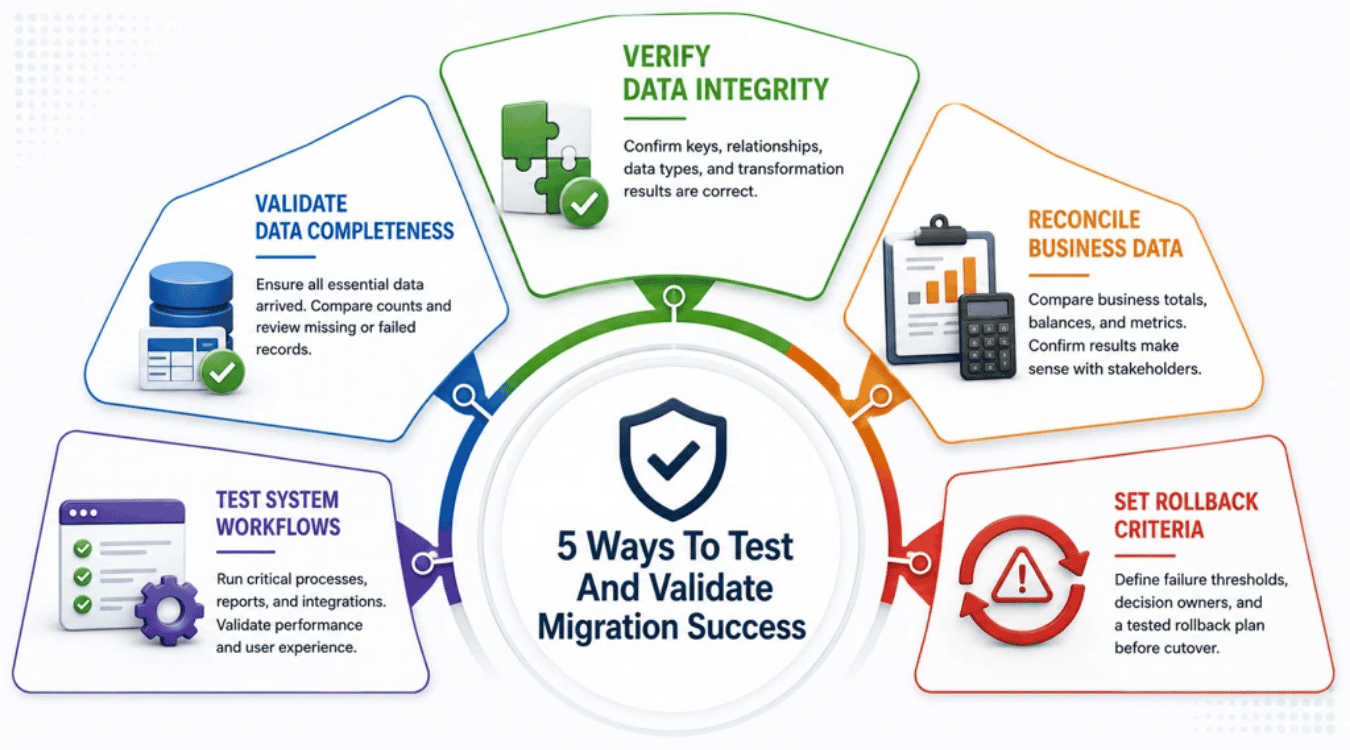
Testing proves whether a legacy data migration actually worked. Record counts alone are not enough. Teams need to confirm completeness, data integrity, business accuracy, and system behavior before go-live. Automated validation can help compare source and target data, but key stakeholders should also verify that the new system supports real business operations.
Validate Data Completeness
Start by confirming that all essential data reached the target system. Compare record counts across source tables, target tables, rejected records, and failed records. Missing rows should have a documented reason before the migration project moves forward.
Automated validation tools can make the check more reliable. They can compare source records with corresponding target records and flag missing or mismatched data. Pay close attention to critical data and historical data. A successful migration should meet the record completeness criteria defined during planning, not simply achieve a high migration percentage.
Verify Data Integrity
Next, confirm that the migrated data is structurally correct. Check primary keys, foreign keys, required fields, relationships, data types, and transformation results. Schema validation should also confirm that the target architecture represents the source data correctly.
Data mapping deserves extra attention here. Inaccurate mapping can place information in the wrong fields, change its meaning, or leave records incomplete. Compare mapped values against the documented transformation logic. Automated validation can identify source-to-target differences and make errors easier to investigate. Data integrity must be proven before business users rely on the new system.
Reconcile Business Data
Technical validation asks whether data moved correctly. Reconciliation asks whether the business numbers still make sense. Compare financial balances, invoice totals, inventory quantities, customer counts, transaction totals, and other important business measures between the legacy system and target system.
Set acceptable tolerance levels before cutover. A matching row count means little if financial totals have changed. Data stewards and business users should review the results because they understand how the data supports daily business processes. Their involvement helps confirm that successfully migrated records still have the correct operational meaning.
Test System Workflows
A database migration is not successful just because the tables look correct. Test how the new system behaves with migrated data. Run important workflows such as creating orders, processing payments, generating reports, updating customer records, and calling connected applications.
Test performance too. Slow queries or broken integrations can reveal performance bottlenecks that data checks miss. Check that migrated data is complete and accurate, applications behave as expected, and the target system meets operational and performance requirements. Include business users in acceptance testing so technical success also delivers real business value.
Set Rollback Criteria
Do not wait for a problem during cutover to decide whether to roll back. Set measurable rollback criteria before the final migration begins. Examples include excessive missing records, broken referential integrity, incorrect financial totals, failed critical workflows, unacceptable replication lag, or severe performance problems.
Tie each condition to a clear threshold and decision owner. The migration team should know exactly which failures require correction and which require a full rollback.
A tested rollback plan protects business operations when the migration does not meet its success criteria. Go live only when the data, applications, and business owners are ready.
What To Do After Legacy Data Migration
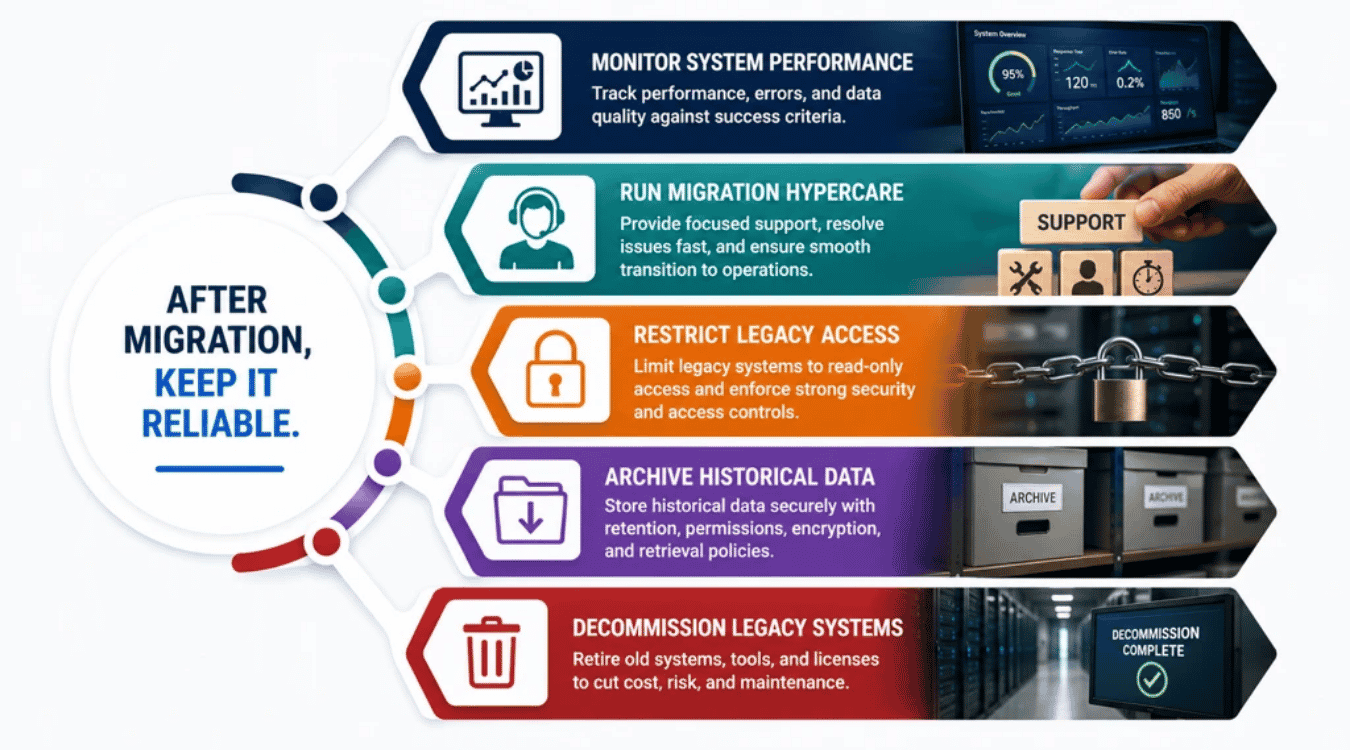
Legacy data migration does not end at cutover. The post-migration phase proves that the new system works reliably under real business conditions. Teams should monitor performance, resolve early issues, protect historical data, and retire the old environment only after key stakeholders approve the results.
Monitor System Performance
Watch the new system closely after go-live. Track query speed, error rates, failed transactions, resource use, replication lag, and application performance. Compare those results with the success criteria defined for the data migration project.
Data quality needs attention too. Monitor missing records, unusual values, broken integrations, and downstream failures. AWS recommends post-cutover monitoring based on operational metrics and service-level indicators. Strong data governance also helps teams maintain clear ownership and quality standards after data migration from legacy environments.
Run Migration Hypercare
Hypercare is a short period of focused support after cutover. The migration team stays involved while users begin normal business operations on the new system. Problems can then be identified and fixed before ownership moves to the regular operations team.
AWS guidance notes that large migrations commonly use a hypercare period after cutover, with application owners validating the migrated workloads before final handoff. Use this period to investigate data errors, failed integrations, slow workflows, and other business challenges. A complex process such as migrating legacy systems deserves extra attention before the migration project closes.
Restrict Legacy Access
Do not let both environments remain active without clear rules. Once the target becomes the system of record, restrict the legacy system to read-only access where continued access is necessary. Users should know which one system owns new transactions.
Access controls also reduce security risks. Old applications may have outdated permissions, unsupported software, or other weaknesses that increase exposure to data breaches. Remove unnecessary accounts and credentials while retaining only approved access. The wider digital transformation should leave the organization with stronger controls, not two uncontrolled production environments.
Archive Historical Data
Historical data that no longer supports daily operations may still have legal, audit, reporting, or business value. Move it to an appropriate archive instead of keeping an entire outdated system active just to access old records.
Set retention periods, ownership, permissions, encryption, deletion rules, and retrieval procedures through your data governance policy. Data sovereignty also matters. Organizations may need to control the geographic location where archived information is stored. Microsoft, for example, documents archive controls for retention, permissions, security, auditing, and geographic data residency.
Decommission Legacy Systems
Retire legacy systems only after the migrated environment has passed validation and the rollback window has closed. Confirm that applications, reports, integrations, stored procedures, backups, and historical records no longer depend on the old environment. Microsoft recommends treating removal of legacy objects as a deliberate final step after the new system has been validated.
Then remove obsolete servers, databases, replication jobs, migration tools, licenses, and unnecessary cloud resources. Old hardware and software can become expensive to maintain over time. AWS even documents a migration cleanup case where unused replication infrastructure was costing $20,000 per month.
A migration from legacy systems creates more business value when outdated infrastructure can finally be retired. Lower maintenance overhead, cleaner data governance, and modern infrastructure help turn a technical migration into a useful part of the company's broader digital transformation and inform decisions on replatform vs rebuild for long-term platform growth.
Final Discussion
Legacy data migration is more than moving data from an outdated system to a modern platform. A successful migration protects data integrity, keeps critical business processes available, and gives teams a cleaner foundation for future growth. The work needs careful planning, accurate data mapping, thorough testing, and clear validation before and after cutover.
The job also continues after the new system goes live. Monitor performance, fix data quality issues, maintain governance, and confirm that applications behave as expected. Once the target environment is stable, safely decommission unused legacy systems to reduce maintenance costs and operational overhead.
Treat each migration as both a technical project and a business change. That approach helps turn legacy modernization into lasting business value rather than a simple data transfer.