What Is Cloud Cost Optimization? Strategies And Best Practices
by Daniel Wright | Sep 6, 2026 | Software Development Insights
Table of Contents
- What Is Cloud Cost Optimization?
- Why Do Cloud Costs Become Difficult To Control?
- How Does Cloud Cost Optimization Work?
- Best Cloud Cost Optimization Strategies
- How Do You Measure Cloud Cost Optimization Success?
- How Can Teams Build Continuous Cloud Cost Optimization?
- Common Cloud Cost Optimization Mistakes To Avoid
- Final Thoughts
Cloud bills can grow faster than expected. Oversized servers, idle resources, and forgotten services may seem harmless at first. Across a growing cloud environment, however, small inefficiencies can quickly turn into unnecessary cloud costs.
Cloud cost optimization helps control that spending without sacrificing performance or reliability. It aligns cloud usage with actual business needs and helps teams get more value from every cloud investment. For engineering leaders, DevOps and cloud teams, FinOps teams, and technical decision-makers, that means better cost visibility and fewer expensive surprises.
In this guide, we’ll explain what cloud cost optimization is, why cloud spending gets out of control, and which optimization strategies work. You’ll also see how to measure results and make cost efficiency part of everyday cloud operations.
What Is Cloud Cost Optimization?
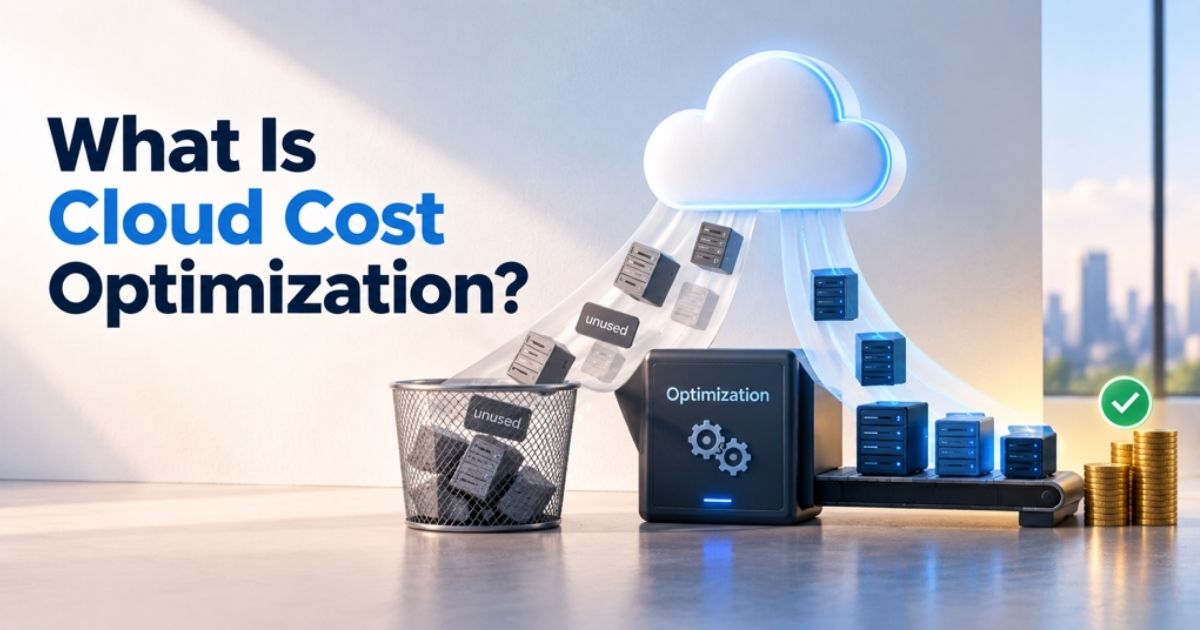
Cloud cost optimization is the process of reducing unnecessary cloud costs while getting the most business value from your cloud resources. It aligns resource usage with actual needs, so you pay for the capacity and cloud services your workloads require without hurting performance or reliability.
Cost optimization goes beyond simply reducing the cloud bill. Teams analyze cloud usage, resource utilization, pricing models, and workload demand to find waste and improve cost efficiency. That may mean removing idle resources, rightsizing infrastructure, or choosing more suitable cloud pricing options.
Effective cloud cost optimization is also continuous. As usage patterns and business needs change, teams regularly review cloud spending and adjust their cloud cost optimization strategy to keep resources efficient and costs aligned with business goals.
Why Do Cloud Costs Become Difficult To Control?
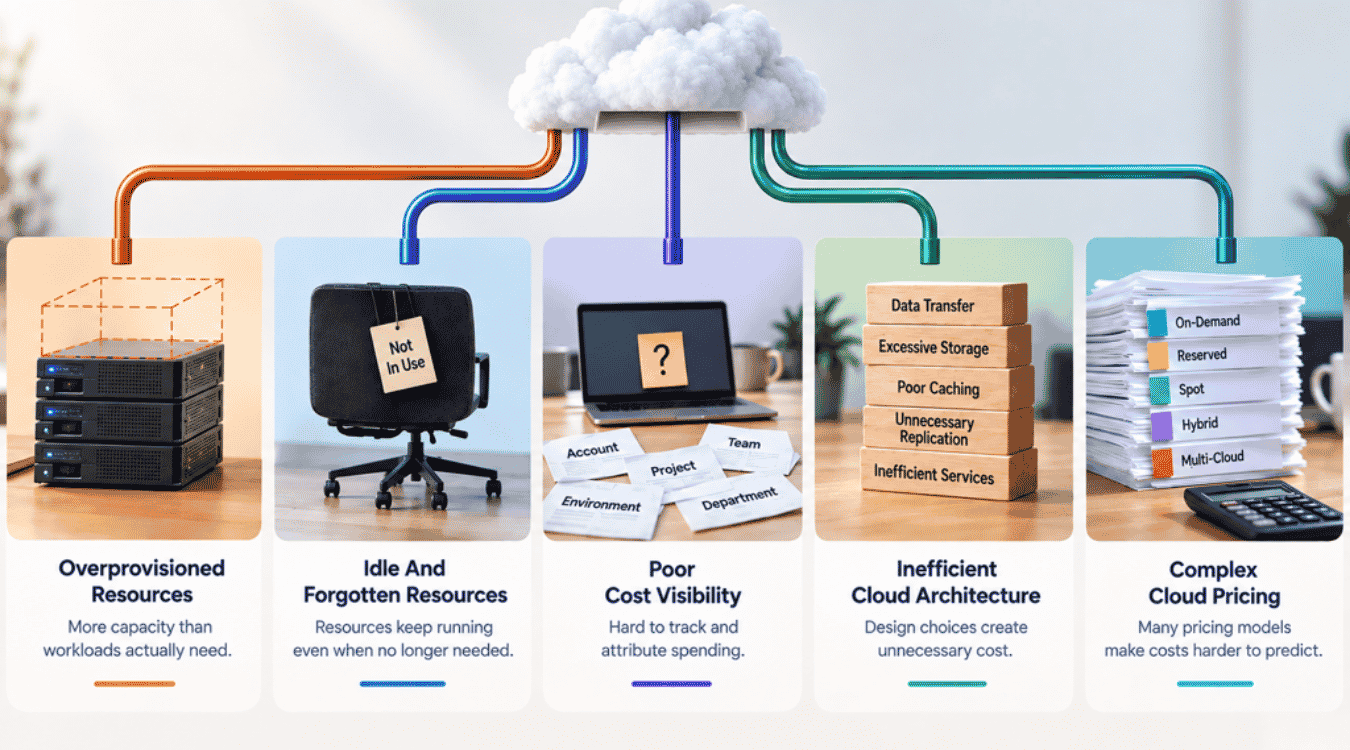
Cloud costs become difficult to control as cloud usage grows across teams, services, and environments. Resources are easy to add, but spending is harder to track. In 2026, organizations estimate that 29% of IaaS and PaaS cloud spend is wasted, which shows how quickly inefficiencies can add up.
Overprovisioned Resources
Overprovisioning happens when teams reserve more compute, memory, storage, or other cloud resources than a workload actually needs. A server may be sized for peak traffic even though actual usage stays much lower most of the time.
That gap between provisioned capacity and resource usage creates unnecessary costs. The problem can grow as teams add workloads without regularly checking resource utilization. Cloud cost management tools can reveal underutilized resources and help teams see where provisioned capacity no longer matches demand. AWS, for example, uses historical utilization data to identify rightsizing opportunities.
Idle And Forgotten Resources
Cloud environments change quickly. A test ends, a project closes, or a development environment is replaced. Yet its instances, storage volumes, load balancers, or other cloud services may continue to run.
Such idle resources provide little or no business value but still increase the cloud bill. AWS specifically recommends stopping or deleting idle and unutilized resources to avoid waste. Regular reviews and continuous monitoring make forgotten resources easier to catch before they become a long-term cloud expense.
Poor Cost Visibility
A growing cloud bill is hard to control when nobody knows exactly where the money goes. Costs may be spread across accounts, cloud providers, projects, environments, and business units, especially in complex SaaS infrastructure architectures and during end-to-end SaaS product development.
Weak tagging and cost allocation make the problem worse. Teams struggle to connect cloud spending with the resources, products, or departments that created it. Better cost visibility supports financial accountability because each team can understand its cloud expenditures and actual usage. AWS also recommends cost allocation tags with Cost Explorer to categorize resources and spending around organizational needs.
Inefficient Cloud Architecture
Not every cloud cost problem comes from an oversized server. Application and infrastructure design can also create expensive usage patterns.
Frequent data transfers, excessive storage, unnecessary replication, poor caching, and inefficient service communication can all increase cloud computing costs. Architecture decisions may also lock teams into resource-heavy workloads that are difficult to optimize later. Cloud cost optimization efforts therefore need to look beyond individual resources and consider how the entire SaaS infrastructure components and architecture consume compute, storage, network, and managed services.
Complex Cloud Pricing
Cloud providers offer many pricing models, including on-demand pricing, commitment-based options, and discounted capacity. Each cloud service can also have different rates for compute, storage, requests, and data transfer fees.
Complexity grows further across hybrid and multi-cloud strategies. A pricing model that works for predictable usage may not suit a changing workload. Flexera reports that diverse pricing models, AI services, hybrid cloud, and growing service portfolios are making cloud spending harder to predict and manage. Without clear usage patterns and cost visibility, teams can easily choose costly options or make commitments that do not match actual demand.
How Does Cloud Cost Optimization Work?
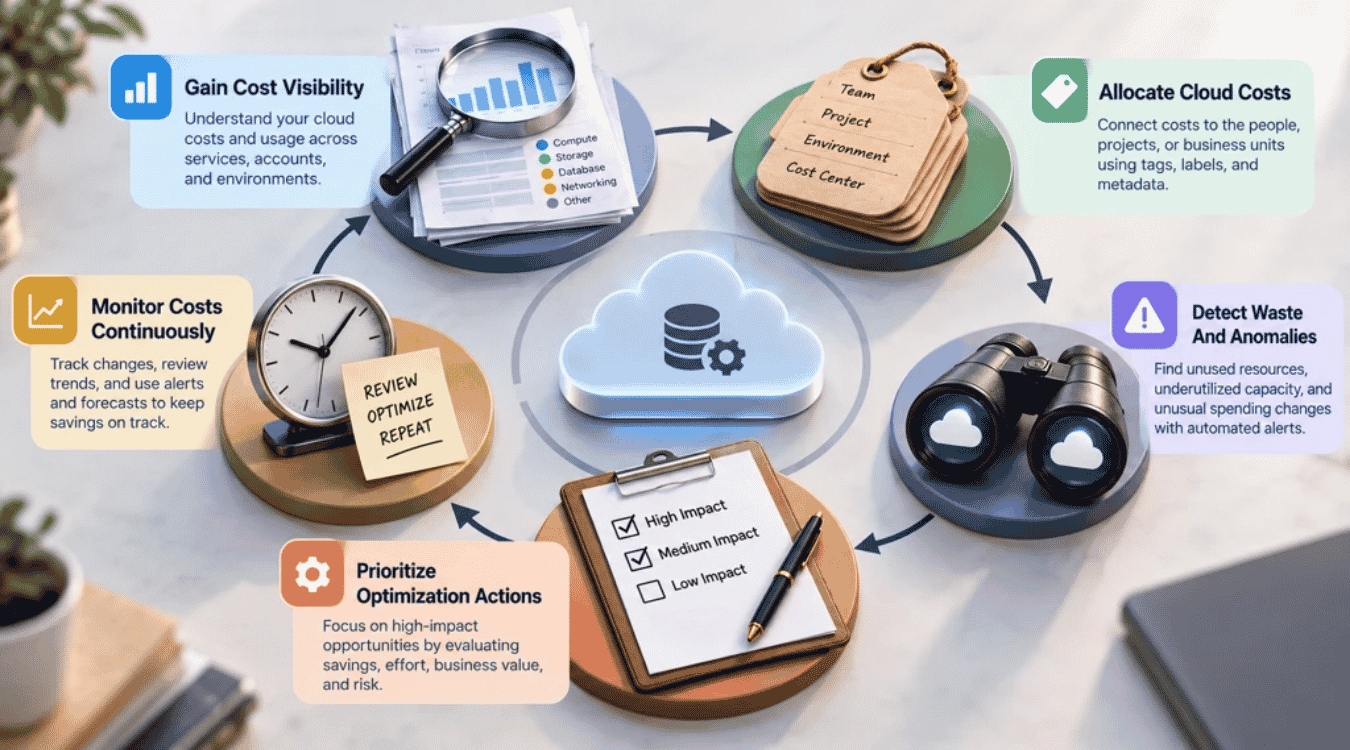
Cloud cost optimization works as a continuous cycle. Teams first understand where cloud spending goes, connect costs to owners, find waste, and decide what to fix. They then monitor the cloud environment to make sure savings last as cloud usage changes. AWS also treats cost optimization as a continuous process throughout a workload’s lifecycle.
Gain Cost Visibility
Start with a clear view of your cloud costs and resource usage. Cloud cost management tools collect billing and usage data across services, accounts, projects, and environments. Teams can then compare cloud spending with actual usage and spot unusual usage patterns.
Tools such as AWS Cost Explorer and Azure Cost Management help teams analyze costs and usage over time. Good cost visibility also supports budgets and forecasts. Without it, teams may know the cloud bill is rising but have little idea which resources or workloads caused the increase.
Allocate Cloud Costs
The next step is to connect cloud expenditures to the people and workloads responsible for them. Tags, labels, accounts, and other metadata can allocate costs by business unit, application, project, environment, or cost center.
Proper cost allocation improves financial accountability. It also supports showback and chargeback, so teams can see the cost of the cloud resources they use. A consistent tagging strategy is important because incomplete metadata can leave large portions of cloud spending difficult to explain or manage.
Detect Waste And Anomalies
Once costs are visible and allocated, teams can look for unused or underutilized resources and unexpected spending changes. Cost anomalies may come from new resources, configuration changes, sudden usage spikes, or unusual application behavior.
Automated anomaly detection can catch unexpected increases much faster than manual reviews alone. AWS Cost Anomaly Detection, for example, monitors spending patterns and can send alerts when unusual costs appear. Teams can then investigate the affected services or resources before unnecessary costs grow.
Prioritize Optimization Actions
Not every cost-saving opportunity deserves the same attention. Teams should compare potential savings with engineering effort, business value, workload requirements, and operational risk.
High-cost resources with low utilization may deserve attention first. A smaller expense may be left alone if changing it could hurt reliability or require significant engineering work. An effective cloud cost optimization strategy focuses on cost effectiveness rather than chasing the lowest possible cloud bill. The goal is to optimize cloud costs while maintaining the performance the business needs.
Monitor Costs Continuously
Cloud cost optimization does not end after one round of changes. New deployments, traffic shifts, resource changes, and evolving cloud services can create new costs at any time.
Continuous monitoring helps teams catch those changes early. Cost reports, budget alerts, forecasts, and automated anomaly detection can all support ongoing cost control. Teams should also review cloud costs regularly to compare trends and identify new optimization opportunities. FinOps practices combine reporting, accountability, and automation to make cost optimization an ongoing operational process rather than a one-time cost-saving project, closely aligning with modern DevOps best practices for 2026.
Best Cloud Cost Optimization Strategies
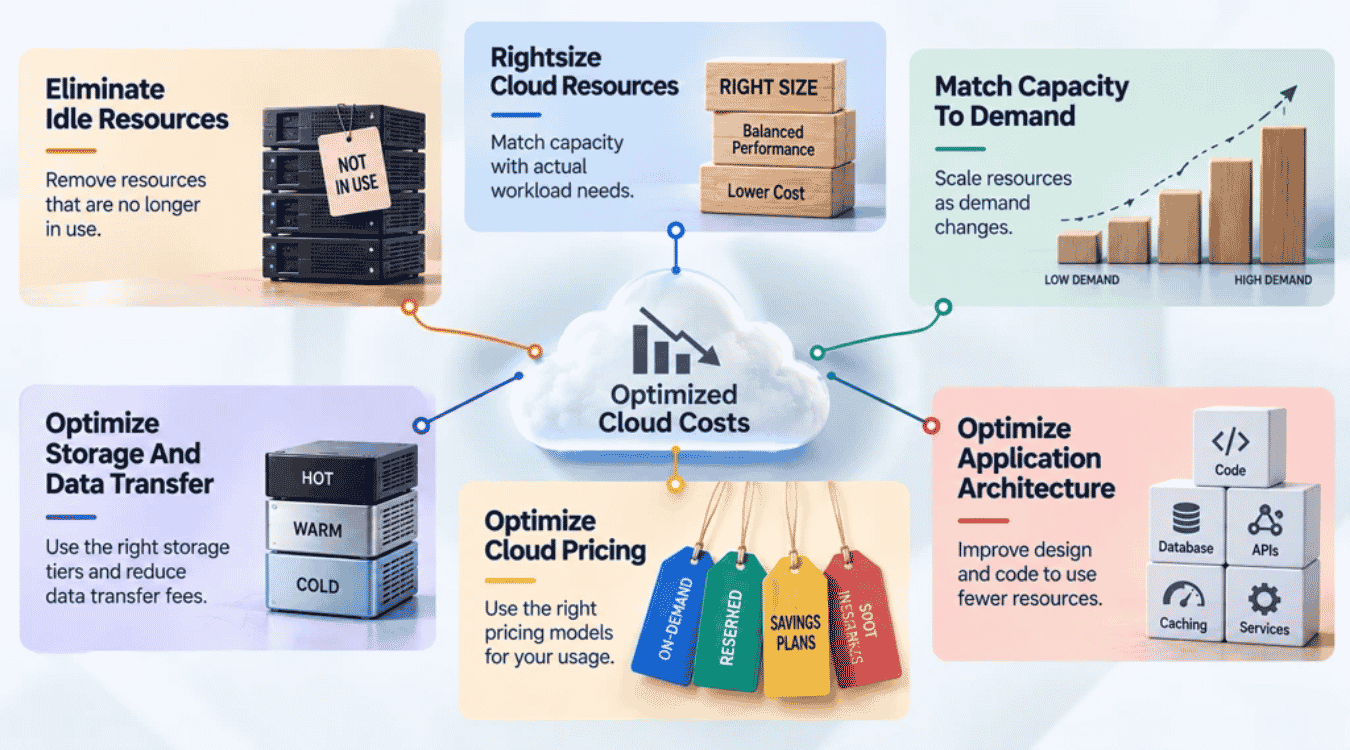
The best cloud cost optimization strategies focus on waste, resource efficiency, demand, pricing, and architecture. The goal is not simply to reduce costs. A strong cloud cost optimization strategy should lower unnecessary cloud expenses while protecting performance, reliability, and business value.
Eliminate Idle Resources
Start with cloud resources that provide little or no value. Idle virtual machines, old test environments, orphaned storage, and unused services can continue adding to your cloud bill long after teams stop using them.
Remove resources that are no longer needed. Shut down development and test environments outside their required hours when practical. AWS says stopping or deleting eligible idle resources can save up to 100% of that resource's cost. Regular checks also prevent unused resources from becoming long-term cloud waste.
Rightsize Cloud Resources
Overprovisioning means you pay for capacity your workloads rarely use. Rightsizing matches compute, memory, storage, and other cloud resources with actual usage and performance needs.
Review resource utilization before changing capacity. Look at CPU, memory, storage, and workload patterns over a meaningful period. Then downsize underutilized resources where it is safe to do so. AWS describes rightsizing as an ongoing process because workload requirements change over time and recommends reviewing workloads at least monthly.
Match Capacity To Demand
Cloud usage rarely stays constant. Traffic may rise during business hours, seasonal events, or product launches and fall sharply at other times. Fixed capacity can therefore create unnecessary costs, especially for teams that need robust SaaS scalability strategies for sustainable growth.
Autoscaling helps cloud infrastructure expand when demand rises and scale back when demand falls. Scheduled scaling can also work for predictable usage patterns. Set sensible minimum and maximum limits so scaling does not create unexpected cloud spending. The result is more efficient resource utilization without permanently provisioning for peak demand.
Optimize Storage And Data Transfer
Storage costs can grow quietly as data accumulates. Keep frequently used data on storage that meets its performance needs, while moving infrequently accessed data to appropriate lower-cost tiers. Delete data that no longer provides business or compliance value.
Network design matters too. Data transfer fees can become significant when applications move large volumes of data between regions, availability zones, or external services. Review where data lives, how often it moves, and whether caching or architecture changes can limit data transfer fees without hurting performance.
Optimize Cloud Pricing
Public cloud providers offer different cloud pricing models for different usage patterns. On-demand pricing offers flexibility, while commitment-based options can provide significant savings for predictable workloads.
AWS Savings Plans, for example, can offer savings of up to 72% compared with On-Demand pricing, while Spot Instances can provide discounts of up to 90% for suitable interruptible workloads. Azure Reservations can also save up to 72% on eligible services compared with pay-as-you-go pricing. Commit only after you understand actual usage. AWS recommends rightsizing first and basing Savings Plans commitments on consistent usage patterns.
Optimize Application Architecture
Cloud cost optimization should reach beyond infrastructure settings. Inefficient code and software architecture for high-growth products can consume extra CPU, memory, storage, and network resources even when the underlying infrastructure is properly sized.
Review database queries, caching, service communication, data serialization, logging, APIs, and other resource-heavy operations. Serverless and autoscaling can sometimes hide inefficient code because extra resources appear automatically when demand grows. Better architecture, guided by best practices of SaaS architecture, can reduce resource usage at the source and improve both operational efficiency and cost effectiveness. Cost should therefore become part of architecture decisions throughout the software development lifecycle, alongside performance, reliability, security, and scalability, especially for teams thinking about the future of SaaS development in a cloud-first world.
How Do You Measure Cloud Cost Optimization Success?
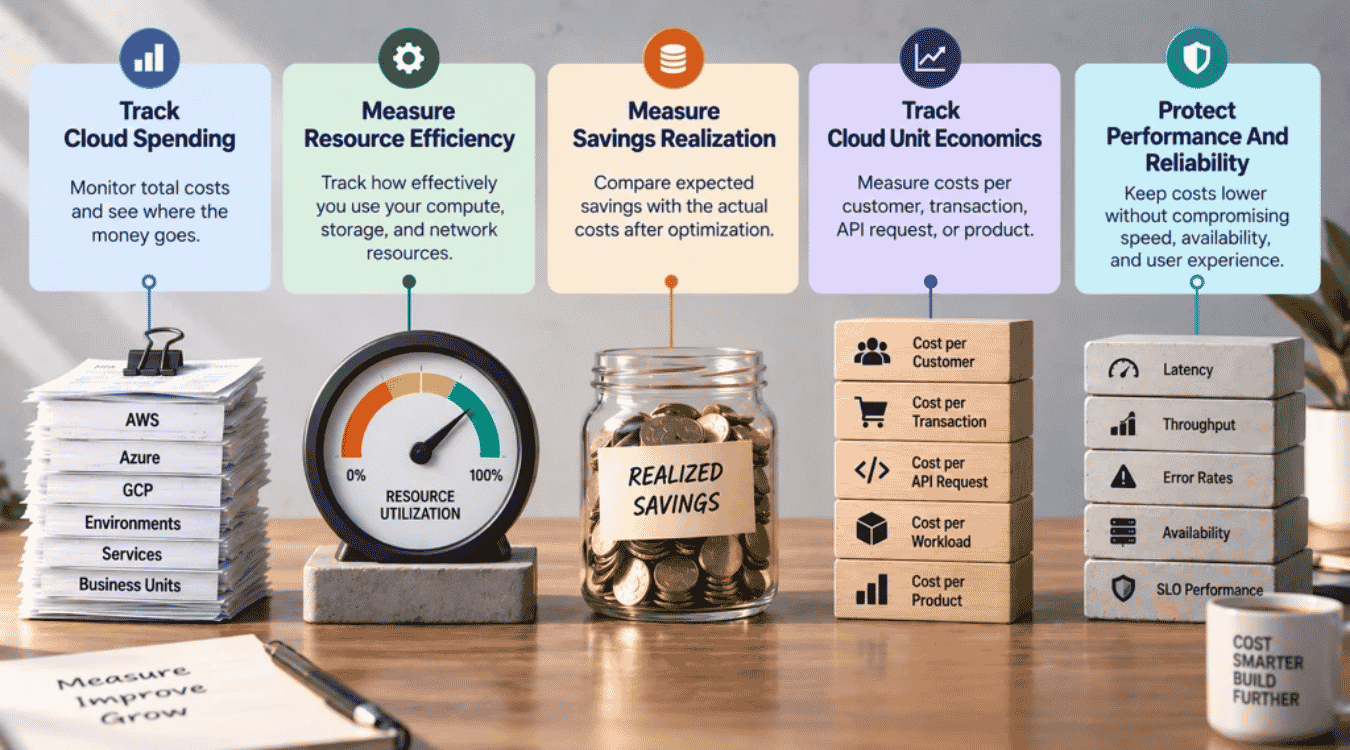
Cloud cost optimization success is not measured by a smaller cloud bill alone. You need to know whether cloud spending became more efficient while the business still gets the performance and value it needs, and how it interacts with broader hidden costs in software development. Track cost, resource usage, realized savings, unit economics, and operational performance together.
Track Cloud Spending
Start with how much you spend and where that money goes. Track total cloud costs and break them down by cloud provider, service, workload, environment, and business unit.
Compare actual spending with budgets, forecasts, and previous periods. Cost management tools can make those trends easier to see. AWS Cost Explorer and Azure Cost Management, for example, provide cost and usage data for analysis. Better cost visibility also helps teams spot whether future cloud spending is moving away from expected business needs.
Measure Resource Efficiency
Lower cloud expenses mean little if resources remain underused. Measure CPU, memory, storage, network, and other utilization metrics against the capacity you pay for.
Look for idle resources and large gaps between provisioned capacity and actual usage. Track resource utilization before and after an optimization change. AWS now also provides a Cost Efficiency metric that considers resource optimization, utilization, and commitment savings when measuring how efficiently cloud resources are optimized.
Measure Savings Realization
Estimated savings are not the same as money actually saved. Compare the expected financial impact of each optimization with the cloud costs that follow it.
For commitment-based pricing, track both utilization and coverage. Utilization shows how much of a Savings Plans commitment you actually use. Coverage shows how much eligible usage receives the discounted rate instead of on-demand pricing. AWS also reports total net savings against the estimated On-Demand cost, which helps teams verify whether commitments deliver the expected cost savings.
Track Cloud Unit Economics
Cloud unit economics connects cloud expenditures with business value. Instead of asking only, “How much did we spend?”, measure costs such as cost per customer, transaction, API request, workload, or product.
For example, cloud spending may rise while cost per transaction falls. That can indicate better cost efficiency because the cloud environment supports more business activity for each dollar spent. The FinOps Foundation distinguishes business unit metrics, such as cost per transaction, from resource efficiency metrics, such as cost per GB or virtual CPU, which also feed into a broader custom software cost comparison between different solution approaches.
Protect Performance And Reliability
Cost saving should not come at the expense of a reliable product. Track performance metrics alongside every major cloud cost optimization effort.
Watch latency, throughput, error rates, availability, and SLO performance. A change that reduces costs but causes slower responses or more failures may not be effective cloud cost optimization. Applying a structured Site Reliability Engineering SaaS framework can help balance performance, reliability, and cost. The goal is cost effectiveness: reduce unnecessary cloud spending while keeping the performance, reliability, and scalability the workload requires.
How Can Teams Build Continuous Cloud Cost Optimization?
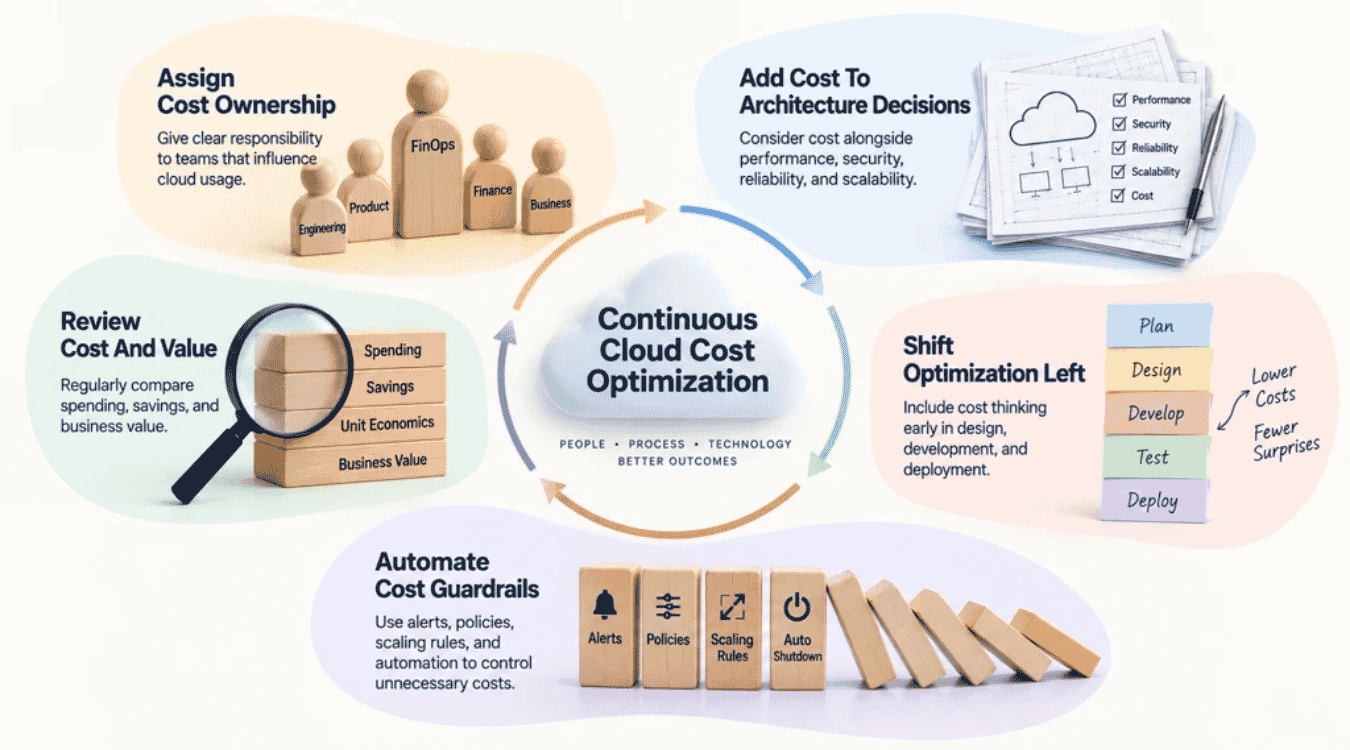
Continuous cloud cost optimization makes cost efficiency part of everyday cloud operations. Teams need clear ownership, useful cost data, automated controls, and regular reviews. FinOps supports this approach by bringing engineering, finance, and business teams together around shared responsibility for technology spending and business value.
Assign Cost Ownership
Cloud spending becomes harder to control when no one owns it. Assign responsibility to the teams that influence cloud usage and costs.
Engineering teams can manage resource efficiency and workload decisions. Finance can support budgets and forecasts. FinOps teams can connect cost data, business goals, and optimization efforts across the organization. Product and business units can help decide whether cloud investments create enough value. Clear cost allocation and shared ownership improve financial accountability without making one team responsible for every cloud bill.
Add Cost To Architecture Decisions
Cost should be considered when teams design cloud infrastructure and applications, not only after deployment. Architecture choices can affect compute, storage, network usage, data transfer fees, scalability, and future cloud spending, especially when you’re planning a future-proof tech stack for scalable growth.
Compare cost alongside performance, security, reliability, and scalability when choosing cloud services or architecture patterns. A cheaper design is not automatically better. The right choice provides the required technical outcome at a reasonable cost. FinOps guidance treats architecture as an important part of maximizing business value from cloud investments.
Shift Optimization Left
Cloud cost management should start early in the software development lifecycle. Developers and architects can consider resource usage and expected costs during design, development, testing, and deployment by embedding cost thinking into a structured software development life cycle.
Add cost estimates to design reviews. Apply tagging standards when resources are created. Include cost checks in Infrastructure as Code and CI/CD workflows where practical. Early visibility helps teams catch expensive decisions before they reach production. The FinOps Foundation also recommends bringing unit-cost thinking into earlier architecture, workload placement, and build-versus-buy decisions as FinOps practices mature.
Automate Cost Guardrails
Manual reviews alone cannot keep pace with a rapidly evolving cloud landscape. Automated guardrails help teams control unnecessary costs without checking every cloud resource by hand.
Use budget alerts, cost anomaly detection, tagging policies, scaling rules, and automated shutdowns where appropriate. Automation can also surface optimization recommendations and stop eligible non-production resources during unused periods, especially when supported by strong software observability for SaaS teams. Microsoft recommends automation for cost recommendations, resource shutdowns, tagging, and policy enforcement as cloud cost practices mature.
Review Cost And Value
Regular reviews keep cloud cost optimization efforts connected to business needs. Compare cloud spending, forecasts, resource utilization, savings, and unit economics over time, and support them with a structured SaaS technical audit.
Do not focus on cost saving alone. A higher cloud bill may still be efficient if the business serves more customers or processes more transactions at a lower unit cost. FinOps treats business value as the goal and encourages teams to connect technology spending with measures such as cost per customer or transaction. Regular reviews help teams adjust their cloud cost optimization strategy as usage patterns, pricing models, and business priorities change.
Common Cloud Cost Optimization Mistakes To Avoid
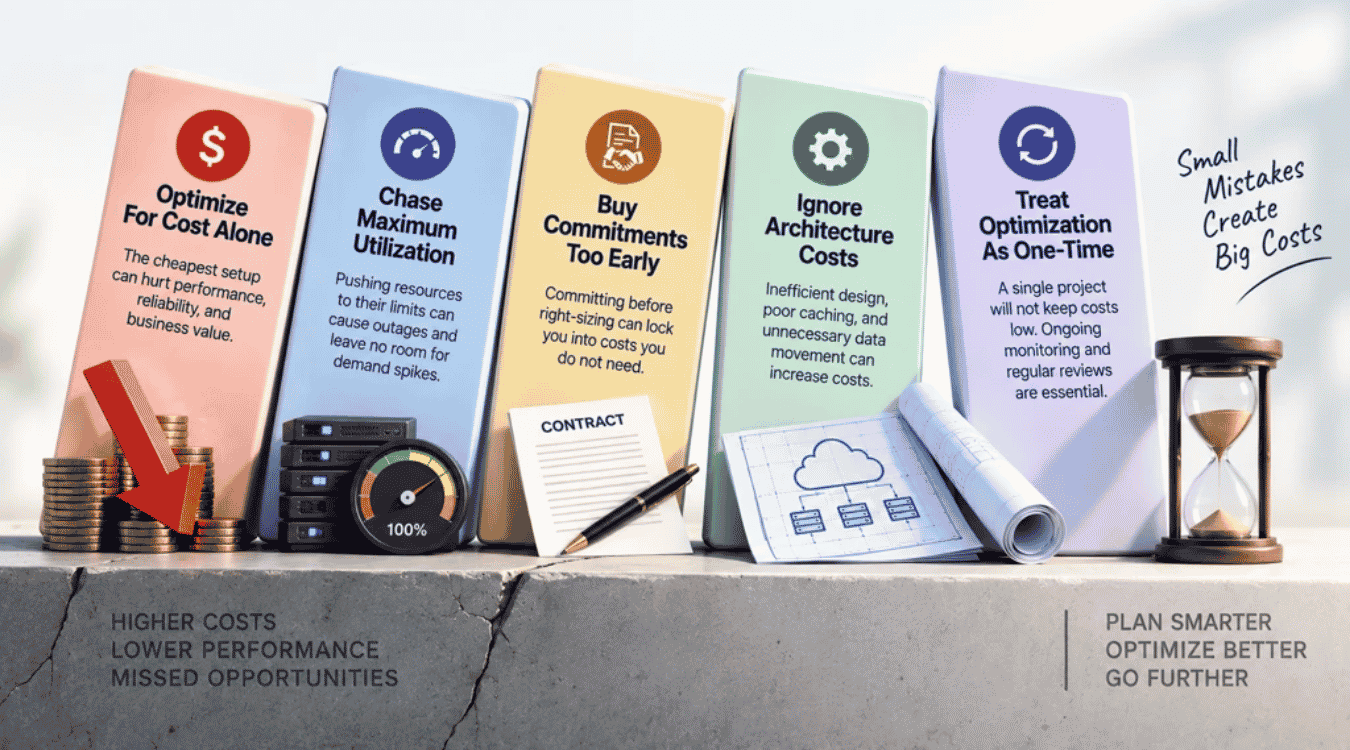
Cloud cost optimization can backfire when teams focus only on reducing cloud costs. Good practices for cloud cost management balance savings with performance, reliability, security, and business value and should evolve alongside emerging software development trends for 2026. Avoid these common mistakes as your cloud cost optimization journey develops.
Optimize For Cost Alone
The cheapest cloud environment is not always the most cost-effective one. Aggressive cost cutting can leave workloads without enough capacity, redundancy, or performance.
Microsoft warns that decisions focused only on minimizing spending can undermine workload goals. Instead, optimize cloud spend against clear technical and business requirements. A higher cloud bill may be justified when extra capacity protects reliability or supports more customers.
Chase Maximum Utilization
High resource utilization may look efficient, but pushing every resource close to its limit can create problems. Applications still need enough headroom for traffic spikes, failures, and scaling delays.
Focus on resource efficiency rather than maximum utilization. Microsoft notes that aggressive downsizing or scaling can leave workloads unable to handle sudden demand. Some over-provisioning may even be intentional when a workload needs extra capacity for reliability.
Buy Commitments Too Early
Reserved instances and other commitment-based pricing models can provide significant cost savings, but only when commitments match stable usage patterns.
Avoid committing based on short-term demand or poorly optimized workloads. Remove waste, review actual usage, and rightsize resources first. Otherwise, you may lock future costs into capacity you do not need. Rate optimization works best after teams understand their baseline cloud usage and expected demand.
Ignore Architecture Costs
Optimization tools can identify idle or oversized cloud resources, but they cannot fix every source of waste. Application architecture also shapes cloud computing costs.
Poor caching, excessive data movement, unnecessary replication, inefficient queries, and badly designed scaling can raise cloud expenditures. Hybrid cloud strategies can add further networking and operational complexity. Microsoft recommends treating cost efficiency as an architecture concern because design choices affect resource consumption, scaling, pricing, and overall SaaS performance optimization.
Treat Optimization As One-Time
One successful cost-saving project will not keep cloud spending efficient forever. Workloads, traffic, pricing models, cloud services, and business requirements continue to change.
Effective cloud financial management needs continuous monitoring and repeatable reviews. Track new cost anomalies, resource usage, forecasts, and optimization opportunities over time. Microsoft recommends continuous cost management rather than short-term tactical reductions. Regular reviews help teams adapt their best practices for cloud cost optimization as the environment changes.
Final Thoughts
Cloud cost optimization is not about making your cloud bill as small as possible. The real goal is to get more business value from every dollar you spend while keeping applications fast, reliable, and ready to scale. FinOps follows the same principle by connecting technology spending with business value rather than focusing on savings alone.
A successful cloud cost optimization journey also has no fixed finish line. Cloud usage, pricing models, workloads, and business priorities keep changing. Teams need to review costs, remove waste, improve resource efficiency, and adjust their strategy as those conditions change. Treat cloud financial management as an ongoing practice, not a one-time cost-cutting project, and factor it into your software development timelines and longer-term SaaS scalability strategies. That approach helps you optimize cloud spend today while keeping future costs under control.