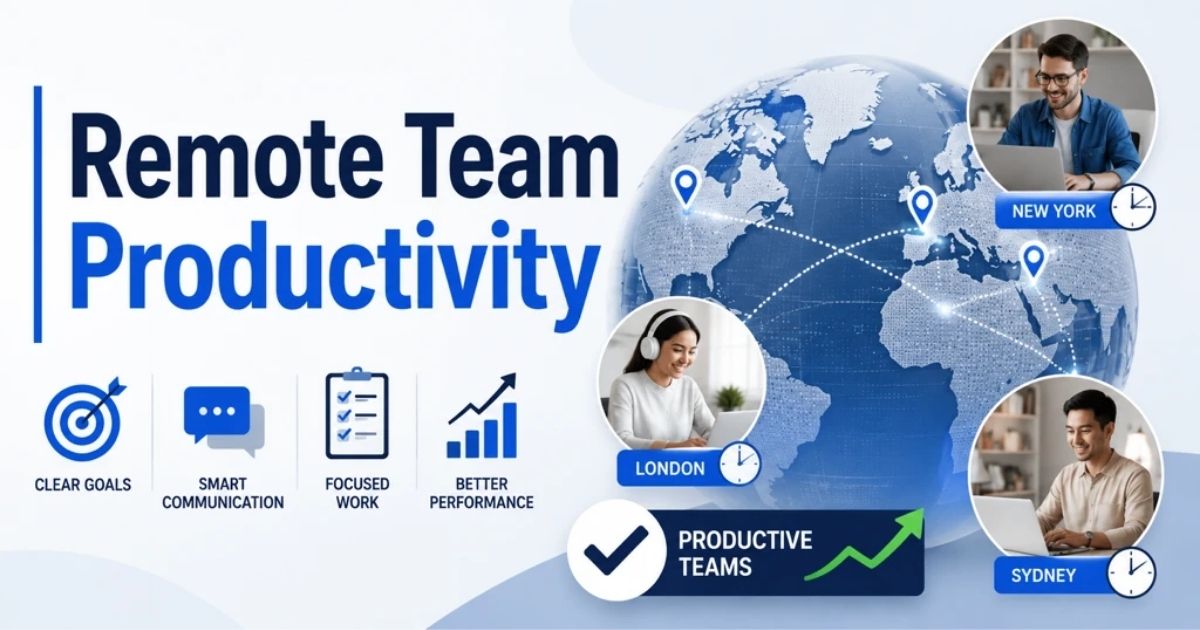
Remote Team Productivity: How To Improve Performance Across Time Zones
by Daniel Wright | Sep 3, 2026 | Startup & Product Growth
Table of Contents
Remote work gives companies access to talent far beyond a traditional office environment. But keeping a distributed team productive is not always easy. Time zone differences can slow decisions. Communication barriers can cause delays. Too many meetings can also cut into focus time and make collaboration harder.
For managers, team leads, and business leaders, the challenge is not keeping remote employees online all day. The goal is to create clear expectations, track meaningful outcomes, and give team members the structure and autonomy to do their best work.
So, how can you improve remote team productivity without micromanaging? This guide covers how to measure team performance, spot productivity problems, improve remote workflows, manage teams across time zones, and build a system that works long-term.
What Is Remote Team Productivity?
Remote team productivity is the ability of remote teams to produce valuable, high-quality work efficiently while working outside a traditional office environment. It focuses on results rather than hours worked or how often remote employees appear online. Clear expectations, measurable goals, and effective communication help team members understand what success looks like.
Strong remote work productivity also depends on how well a distributed team works together. Remote team members need clear communication channels, reliable project management processes, and enough focus time to complete important work. Managers also need to track progress without creating unnecessary pressure.
Remote productivity can vary by role, task, and work environment. A high-performing remote team balances individual output with team collaboration, work-life balance, and sustainable performance rather than relying on one productivity metric.
How To Measure Remote Team Productivity
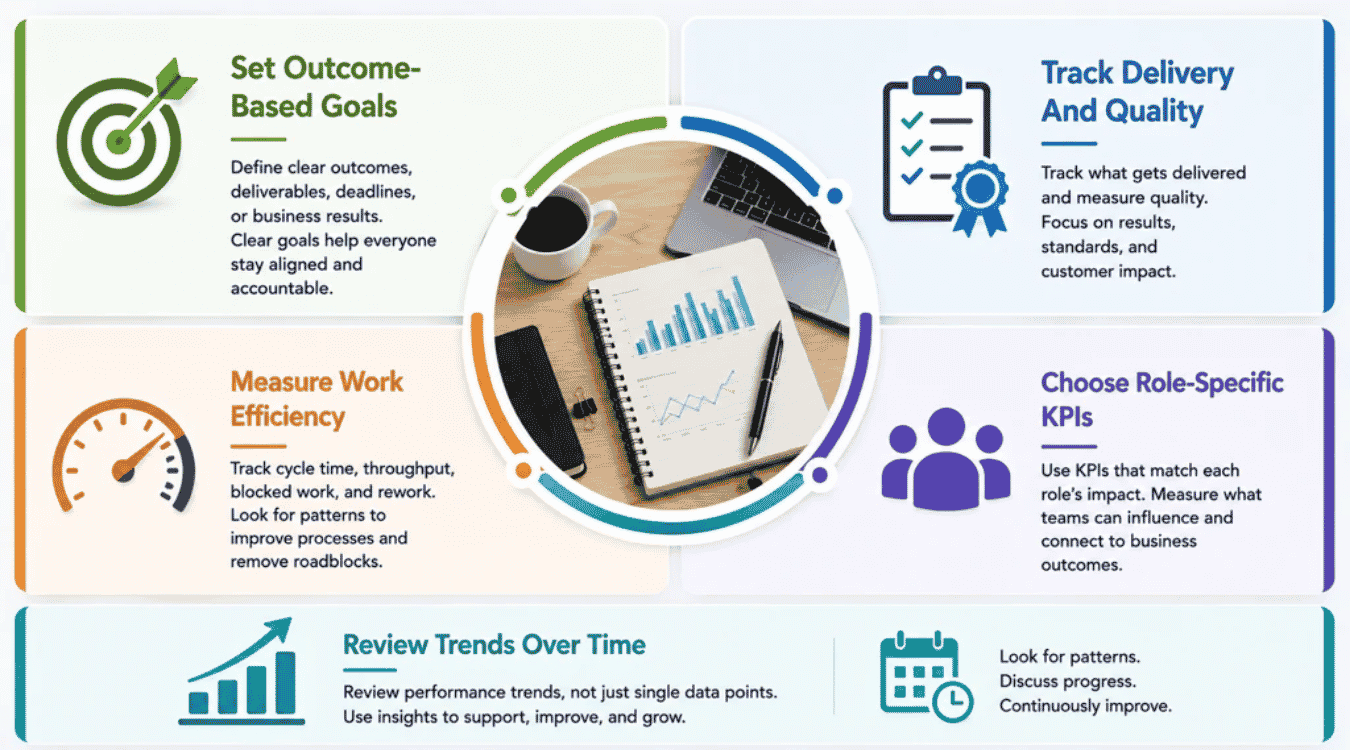
Remote team productivity should be measured by results, not by how long remote employees stay online. Start with clear outcomes, then track delivery, quality, efficiency, and role-specific key performance indicators. Hours worked, messages sent, or online status can show activity, but they do not prove that valuable work was completed.
Set Outcome-Based Goals
Set clear goals that tell remote team members what they need to achieve. Each goal should connect to a specific deliverable, deadline, or business result. Clear expectations make it easier for people to manage their own time and stay on the same page.
For example, a development team might target a product release by a set date. A support team might focus on resolution quality and customer satisfaction. Outcome-based goals give managers a fair way to track progress without relying on work hours or constant productivity tracking.
Track Delivery And Quality
Track what the team delivers and whether the work meets the expected standard. Useful measures include completed projects, deadlines met, error rates, rework, customer satisfaction, and service-level performance.
Output alone can give the wrong picture. A remote worker who completes many tasks but creates frequent errors may not be more productive. Pair delivery metrics with quality measures to understand real team performance. Project management tools can help teams track project progress and make completed work visible without constant check-ins.
Measure Work Efficiency
Work efficiency shows how smoothly work moves from start to finish. Track measures such as cycle time, throughput, blocked work, missed deadlines, and time spent on rework. Focus time and meeting load can also reveal whether the remote work environment supports productive work.
Look for patterns rather than isolated numbers. A longer cycle time may point to communication breakdowns, slow approvals, or task management problems. Remote teams may also lose efficiency when collaboration becomes fragmented across too many channels. Research has found that remote work can change both focus time and collaboration patterns.
Choose Role-Specific KPIs
Choose key performance indicators based on what each role is expected to accomplish. One set of metrics will not work for every remote employee.
Sales teams can track pipeline and conversions. Customer support teams can measure resolution time, satisfaction, and SLA performance. Engineering teams may focus on delivery speed, product quality, and healthy development cycles and use a balanced set of engineering KPIs. Marketing teams can connect output to leads, conversions, or other business outcomes. Role-specific KPIs make remote team management more accurate because employees are measured against results they can actually influence.
A useful starting point is:
Role | Useful Remote Productivity KPIs |
|---|---|
Engineering | Cycle time, on-time delivery, defect rate, code quality |
Sales | Conversion rate, pipeline value, revenue, sales cycle |
Customer Support | Resolution time, CSAT, SLA compliance, resolved tickets |
Marketing | Qualified leads, conversions, campaign delivery, content performance |
Operations | Turnaround time, error rate, backlog, process efficiency |
Select KPIs that employees can influence and connect them to business goals. Role-specific measurement gives remote team management a clearer view of actual contribution instead of rewarding visible activity.
Review Trends Over Time
Review productivity trends instead of judging team members from a single day or week. Establish a baseline, then compare delivery, quality, efficiency, and other relevant metrics over time.
A sustained change matters more than one unusual result. For example, repeated delivery delays may signal workload problems, communication barriers, or workflow friction. Regular check-ins can add context that numbers alone cannot provide. Ask remote team members what is slowing their work and discuss progress against agreed goals. That creates a continuous improvement process while keeping productivity measurement focused on support, accountability, and better team performance.
What Reduces Remote Team Productivity?
Remote team productivity often drops because of problems in how work is organized, communicated, and distributed. Unclear expectations, time zone differences, constant interruptions, scattered tools, and excessive workloads can all slow a remote engineering team as well as other functions.
The warning signs often appear in project progress first. Missed deadlines, repeated questions, longer response times, frequent rework, and declining employee engagement can signal that the remote work environment is creating friction.
Unclear Goals And Ownership
Remote team members need to know what they own, what matters most, and what result is expected. Without clear expectations, people may work on the wrong priorities or wait for someone else to make a decision.
Watch for missed deadlines, duplicate work, repeated clarification requests, and tasks with no clear owner. Gallup reports that unclear expectations can create stress and hinder productivity, with remote and hybrid employees experiencing declines in expectation clarity at a higher rate.
Poor ownership also makes project management harder. Managers spend more time chasing updates, while remote employees have less confidence about what to do next.
Communication And Time-Zone Gaps
Communication barriers become more noticeable when a distributed team works across several time zones. A question sent at the end of one person's workday may not receive an answer until the next day. That delay can stop project progress when another task depends on the response.
Watch for long approval times, missed handoffs, repeated misunderstandings, and meetings scheduled outside normal work hours. Research on globally distributed teams shows that time zone differences can push synchronous collaboration into early mornings or late evenings.
Poor communication processes can make the problem worse. Remote workers may lose productive time searching for answers or waiting for decisions.
Meeting And Context Switching
Video conferencing helps remote teams stay connected, but too many meetings can take time away from focused work. Microsoft research found that many remote information workers experienced more frequent meetings, with employees reporting that some could have been handled through messages or email instead.
Watch for calendars filled with recurring calls, constant task switching, unfinished priority work, and little uninterrupted focus time. Microsoft research has also identified too many meetings as a major challenge for employees working from home.
Meeting overload can fragment attention. Remote team members may spend the day discussing progress but have too little time left to complete the work itself.
Tool And Workflow Fragmentation
More digital collaboration tools do not always lead to better team collaboration. Remote teams can lose time when project management, communication, task tracking, file sharing, and documentation happen across too many disconnected platforms, especially when they rely on a growing mix of artificial intelligence software.
Warning signs include duplicate data entry, missed notifications, outdated files, repeated searches for information, and uncertainty about which communication platform to use. Microsoft research found that remote workers reported frustration when routine communication became spread across multiple platforms and notifications.
Fragmented workflows also create more context switching. Team members must move between tools just to understand project progress, find information, or complete routine tasks.
Workload And Burnout
Remote work can blur the boundary between work hours and personal life. Some remote employees may work longer to stay visible, finish growing workloads, or respond across different time zones. Over time, that pressure can hurt focus, job satisfaction, and team performance.
Watch for longer work hours, missed deadlines, declining quality, slower responses, low employee engagement, and people struggling to disconnect. Gallup notes that unclear priorities, weak coordination, and poor work boundaries can increase burnout risk in remote and hybrid settings.
A sustainable remote work model depends on workload capacity as well as output. Persistent productivity problems may reflect an overloaded system rather than a lack of effort from remote workers.
Steps To Improve Remote Team Productivity
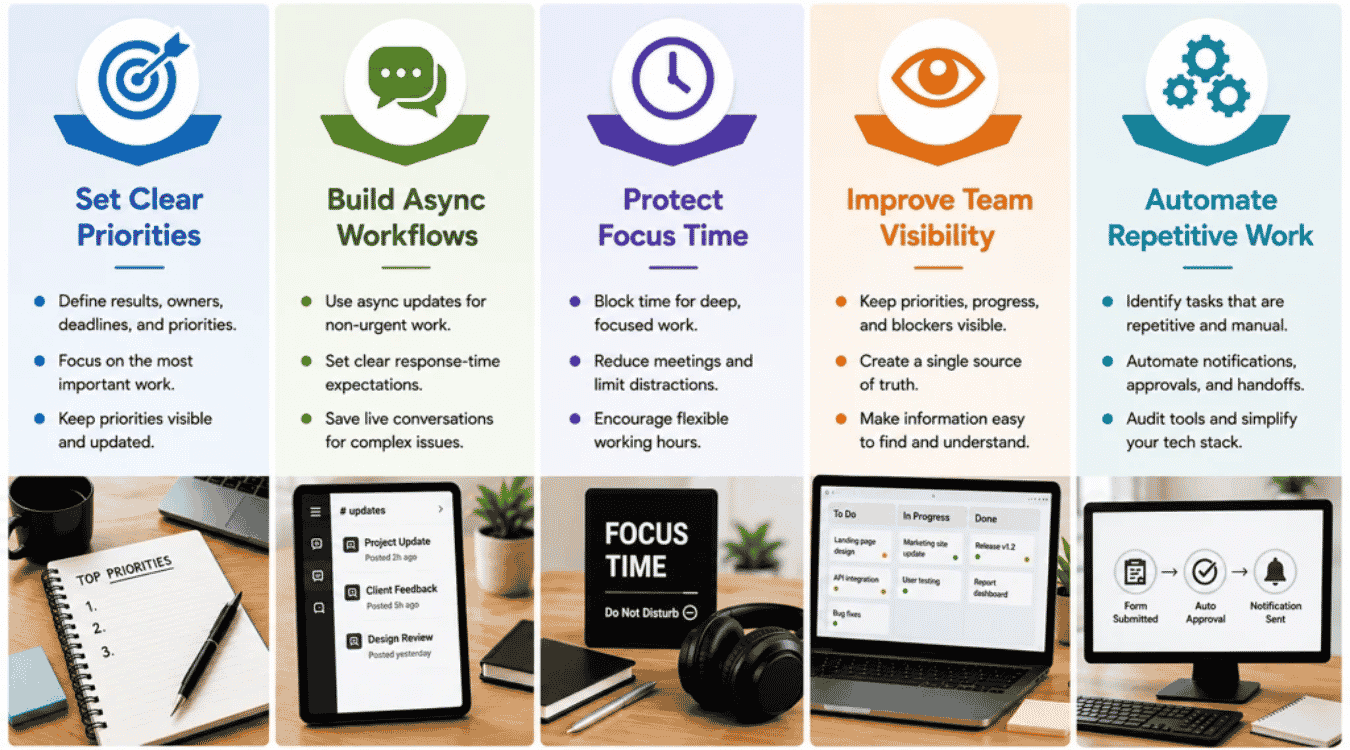
Remote team productivity improves when people know what matters, have enough focus time, and can find the information they need without chasing updates. The goal is not to add more meetings or communication tools. It is to remove friction from how remote teams work.
The following five steps can help managers boost productivity while keeping remote workers connected and giving them enough flexibility to do focused work.
Step 1: Set Clear Priorities
Give every remote team member a clear view of what matters now. Define the expected result, owner, deadline, and priority for important work. Project management tools can keep tasks and project progress visible in one place.
Avoid giving every task the same urgency. Encourage team members to identify their most important work and plan their time around it. Clear priorities also make time management easier when people are working remotely across different schedules.
Keep priorities visible and update them when plans change. Everyone should know what to work on next without waiting for another meeting or message.
Step 2: Build Async Workflows
Use asynchronous communication for work that does not require an immediate response. Status updates, routine announcements, document reviews, and project updates can often happen through shared channels or project management tools instead of regular video calls. Slack recommends async updates for routine status information, while Microsoft notes that asynchronous communication gives people more flexibility across schedules and time zones.
Set clear response-time expectations too. Remote team members should know what is urgent, what can wait, and which communication platform to use. Tools such as Microsoft Teams can streamline communication without requiring everyone to be available at the same time.
A good remote setting uses both sync and async communication. Save live conversations for complex decisions, sensitive feedback, brainstorming, and issues that need quick resolution.
Step 3: Protect Focus Time
Give remote employees uninterrupted time for work that requires concentration. Constant messages, meetings, and notifications can make it difficult to maintain focus.
Move routine status updates out of meetings when possible. Atlassian recommends using async updates for information such as project progress because unnecessary meetings take time away from deep work. Its research also found that 80% of surveyed knowledge workers believed fewer meetings would make them more productive.
Managers can also create meeting-free blocks and encourage team members to silence non-urgent notifications. Flexible working hours can help too, especially when people have different work patterns. The aim is to protect productive time without leaving the team disconnected.
Step 4: Improve Team Visibility
Remote teams should not need a meeting to find out what everyone is doing. Keep priorities, owners, deadlines, blockers, decisions, and project progress visible.
Create a single source of truth for important information. A shared project space, documentation platform, or organized system such as Google Drive can work if everyone knows where information belongs. Atlassian notes that a single source of truth can reduce confusion and errors by giving team members access to the same current information.
Visibility also helps enhance team collaboration. Managers can spot blockers earlier, while remote team members can find answers independently. The right tools should make work easier to understand, not create another place people need to check.
Step 5: Automate Repetitive Work
Look for routine tasks that consume time without requiring much judgment. Common examples include status notifications, task assignments, approval reminders, data entry, recurring reports, and handoffs between systems that can be streamlined with AI-powered software tools, especially where AI automation goes beyond traditional rule-based automation.
Connect the tools your team already uses where possible. Automation can move information between systems and reduce the need for people to copy updates manually. It can also keep the virtual team connected when work moves across different time zones, particularly when you adopt AI-driven automation in SaaS platforms.
Review the tech stack regularly. More software does not automatically enhance collaboration. Slack recommends auditing tools, removing overlap, and setting clear rules for where work lives.
Keep automation focused on repetitive work. Remote work success still depends on human judgment, effective communication, and the right balance between independent work and team collaboration.
How To Manage Productivity Without Micromanaging
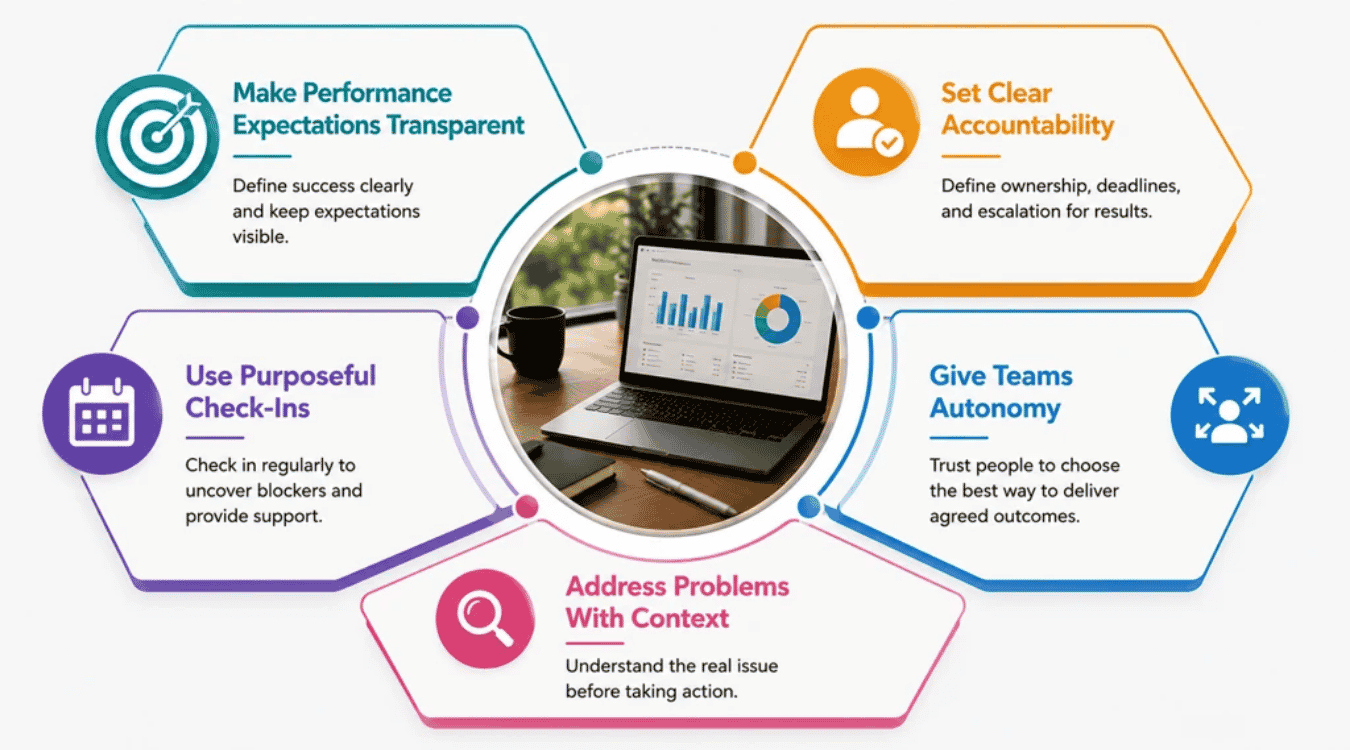
Managing remote teams without micromanaging requires a balance of clarity, accountability, trust, and autonomy. Managers should make expectations visible, check progress at useful intervals, and give remote employees enough control over how they complete their work.
Trust matters here. Gallup reports that only 57% of remote employees strongly agree that their manager trusts them to be productive. Clear expectations, consistent communication, and accountability for outcomes can help close that trust gap.
Make Performance Expectations Transparent
Tell remote team members exactly what good performance looks like. Define priorities, deadlines, quality standards, responsibilities, and expected outcomes. Keep those expectations visible so employees do not have to guess what their manager wants.
Clarity becomes even more important in a remote setting because managers cannot rely on informal office conversations. Gallup found that unclear expectations can create stress and hinder productivity, especially for remote and hybrid employees.
Keep the conversation two-way. Ask questions and use active listening to confirm that each person understands the priorities. Clear expectations give employees direction without requiring constant supervision.
Set Clear Accountability
Accountability should tell people what they own without controlling every step they take. Assign clear owners to projects, decisions, and deliverables. Agree on deadlines and define when team members should raise a blocker.
Keep accountability consistent across the remote workforce. Someone working remotely should not have to prove productivity through constant messages, online status, or extra work hours.
Managers can use project progress and agreed outcomes to guide performance conversations. Gallup recommends accountability for results rather than attendance when managing distributed teams.
Use Purposeful Check-Ins
Regular check-ins should help people move work forward, not make them prove that they are busy. Use one-on-ones to discuss progress, blockers, workload, feedback, and personal development.
Keep each conversation focused. Ask what is going well, what is slowing progress, and what support the employee needs. Gallup recommends meaningful weekly manager-employee conversations and notes that check-ins help distributed teams identify roadblocks and stay connected to shared goals.
Not every update needs a regular video call. Routine progress can often stay asynchronous, while live conversations can focus on decisions, coaching, feedback, and complex problems.
Give Teams Autonomy
Give remote employees room to decide how they complete agreed work. Autonomy lets people organize their time around the task, their strengths, and their most productive work patterns.
Avoid monitoring every action or expecting immediate responses throughout the day. Microsoft recommends focusing on outcomes rather than activities when managing remote teams and warns that constant oversight can undercut performance.
Autonomy still needs structure. Set clear boundaries around deadlines, communication, availability, and team collaboration. That balance can help people maintain focus while preserving accountability and a better work-life balance.
Address Problems With Context
A productivity problem does not always mean an employee lacks effort. Before stepping in, look at the context. Check workload, unclear priorities, dependencies, time zone delays, technical problems, communication barriers, and changing responsibilities.
Talk directly with the employee before drawing conclusions. A one-on-one can uncover problems that task tracking or productivity data cannot show.
Support matters too. Gallup notes that remote team management works better when managers individualize support and focus on employee strengths rather than manage everyone the same way.
The goal is accountability with trust. Remote workers should know what they own, have access to support, and feel safe enough to raise problems before those problems hurt team performance.
How To Build A Sustainable Remote Productivity System
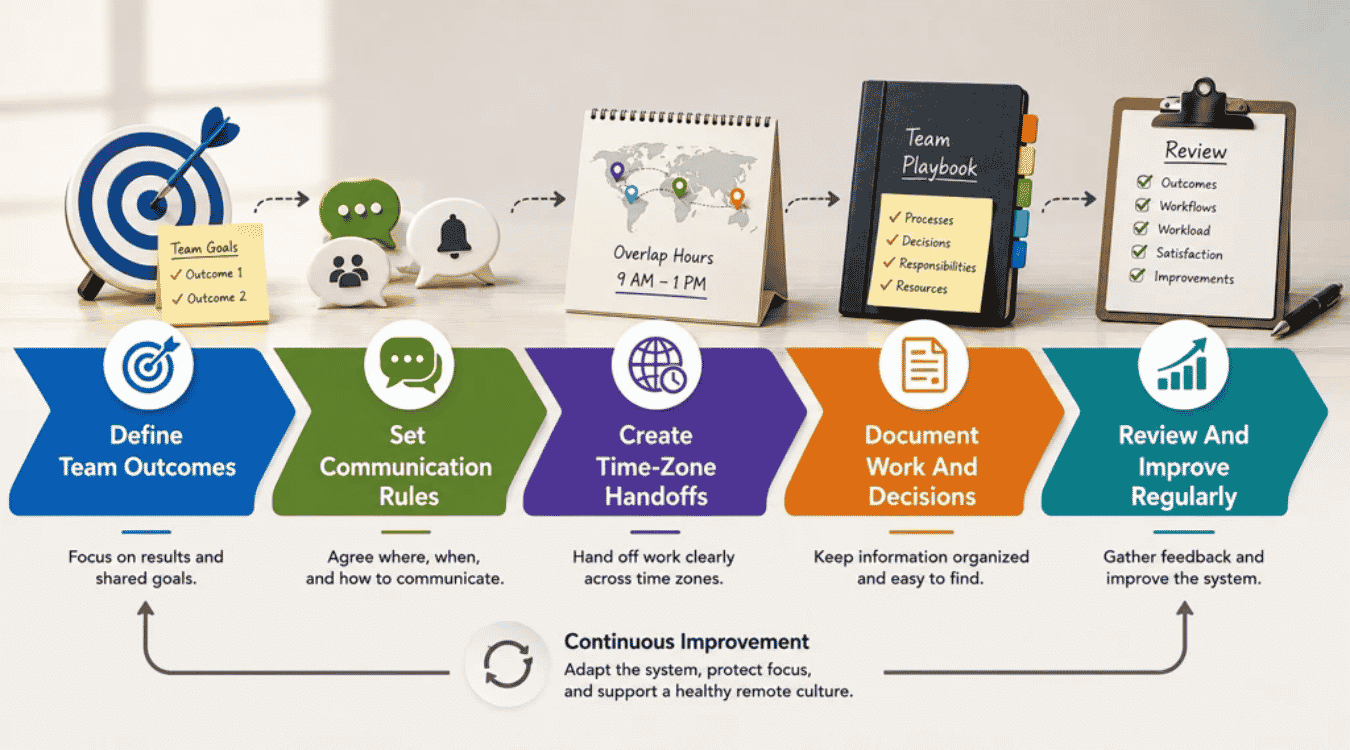
A sustainable remote productivity system gives people enough structure to perform well without removing flexibility. It connects outcomes, communication, documentation, and regular reviews into one way of working.
The system should also support company culture and employee satisfaction. Research across 113 studies found that flexibility in both work location and schedule was associated with better work-life balance, job satisfaction, engagement, and task performance.
Define Team Outcomes
Start with a small set of outcomes that show what the team needs to accomplish. Connect individual responsibilities to shared goals so everyone understands how their work contributes.
Keep outcomes visible and review them as priorities change. Remote teams need enough flexibility to decide how to reach those goals. A Stanford experiment found a 13% performance increase among Ctrip call-center employees assigned to work from home. However, the result came from a specific role and work environment, so it should not be treated as a universal productivity gain for all remote workers.
A sustainable system focuses on results while giving people room to choose productive work patterns, which is similar to how a well-designed software development life cycle balances structure with flexibility.
Set Communication Rules
Define where different conversations should happen and when people are expected to respond. Separate urgent messages, routine updates, feedback, decisions, and social conversations.
Set rules for synchronous and asynchronous communication too. Remote team members should know when a live conversation is necessary and when a written update is enough. Clear rules help keep remote teams connected without creating constant interruptions.
Leave room for human connection as well. Virtual team-building activities, informal conversations, and public recognition can support a healthy remote work culture. Celebrate achievements virtually and recognize useful contributions so good work does not become invisible just because in-person interaction is limited.
Create Time-Zone Handoffs
Create a clear handoff process when work moves between time zones. Each handoff should state what was completed, what happens next, who owns the next action, and whether anything is blocked.
Set reasonable overlap hours for work that requires live collaboration. Avoid forcing every remote employee to follow the same schedule when the work does not require it.
Flexible schedules can support a sustainable system. A 2026 meta-analysis found that combined flexibility in work time and location had stronger associations with work-life balance and task performance than location flexibility alone.
Good handoffs help people continue work without waiting for colleagues on the other side of the world.
Document Work And Decisions
Document processes, responsibilities, decisions, and important project knowledge in one reliable place. Remote team members should be able to find answers without searching old messages or waiting for someone to come online.
Write down why important decisions were made, not just the final choice. Update documentation when processes change and assign ownership for key resources.
Documentation also reduces one of the common challenges of remote work: information loss. A clear source of truth gives employees more independence and makes asynchronous work easier across time zones.
Review And Improve Regularly
Review the system at regular intervals. Look at team outcomes, communication habits, workload, documentation, employee satisfaction, and recurring blockers. Ask team members what helps them work well and what creates unnecessary friction.
Remote work best practices should change when the team's needs change. Use feedback to improve workflows, communication rules, and team routines. Encourage employees to protect boundaries and prioritize self-care when work starts to interfere with personal time.
Flexibility itself can provide meaningful benefits. Gallup found that 91% of employees already working remotely wanted either hybrid or fully remote work in its survey, while 70% of employees already working hybrid preferred to remain hybrid.
A sustainable system is never completely finished. Regular reviews help the team adapt while protecting productivity, connection, and a healthy remote work culture.
Final Thoughts
Remote team productivity depends less on where people work and more on how the team works together. Clear expectations, useful communication, trust, and shared accountability give remote employees the structure they need without limiting flexibility. Gallup also finds that management quality and intentional team coordination play a major role in remote and hybrid team performance.
The best approach is simple. Measure meaningful outcomes, remove workflow friction, protect focus time, and make important information easy to find. Set communication rules that work across time zones and give team members enough autonomy to do their jobs well.
Remote work practices should also evolve with the team. Review what works, listen to employee feedback, and adjust when problems appear. A sustainable system helps remote teams stay productive, connected, and ready to perform over the long term.