Software Localization Best Practices For Engineering Teams
by Daniel Wright | Sep 1, 2026 | Technology & Innovation
Table of Contents
- What Is Software Localization
- Internationalization Vs Localization Vs Transcreation
- Software Localization File Formats And Workflow
- Software Localization Best Practices For Engineering Teams
- Integrating Localization Into CI/CD Without Breaking Builds
- Signs Your Localization Architecture Is Accumulating Technical Debt
- How Nearshore Engineering Teams Execute Localization At Scale
- Final Discussion
Most software localization guides read like a TMS sales pitch: export your strings, sync through a platform, ship translated files back. Fine advice, but it skips the actual problem.
Localization rarely fails because of bad translation. It fails because engineering decisions made months earlier, like hard-coded strings, missing pluralization logic, or fixed-width layouts, never left room for another language. Global products succeed or stall based on architecture, not vendor choice.
A team that externalizes strings early, models plural rules with ICU instead of if/else logic, and tests with pseudo-locales before a single word gets translated ships new markets in days, not months. Real localization work happens in code, long before a translator opens a file.
What Is Software Localization
Software localization is the process of adapting an application's user interface, content, and functionality for a specific language or region. It goes beyond translation. A real software localization project touches resource files, date formats, currency symbols, and even layout direction.
Most teams start with a defined localization process: extract strings, translate them, then test the result in context. Mature teams skip the batch approach entirely. They run continuous localization, where new strings sync to translators the moment code ships. This keeps localization efforts aligned with development instead of trailing behind it by weeks.
Internationalization Vs Localization Vs Transcreation
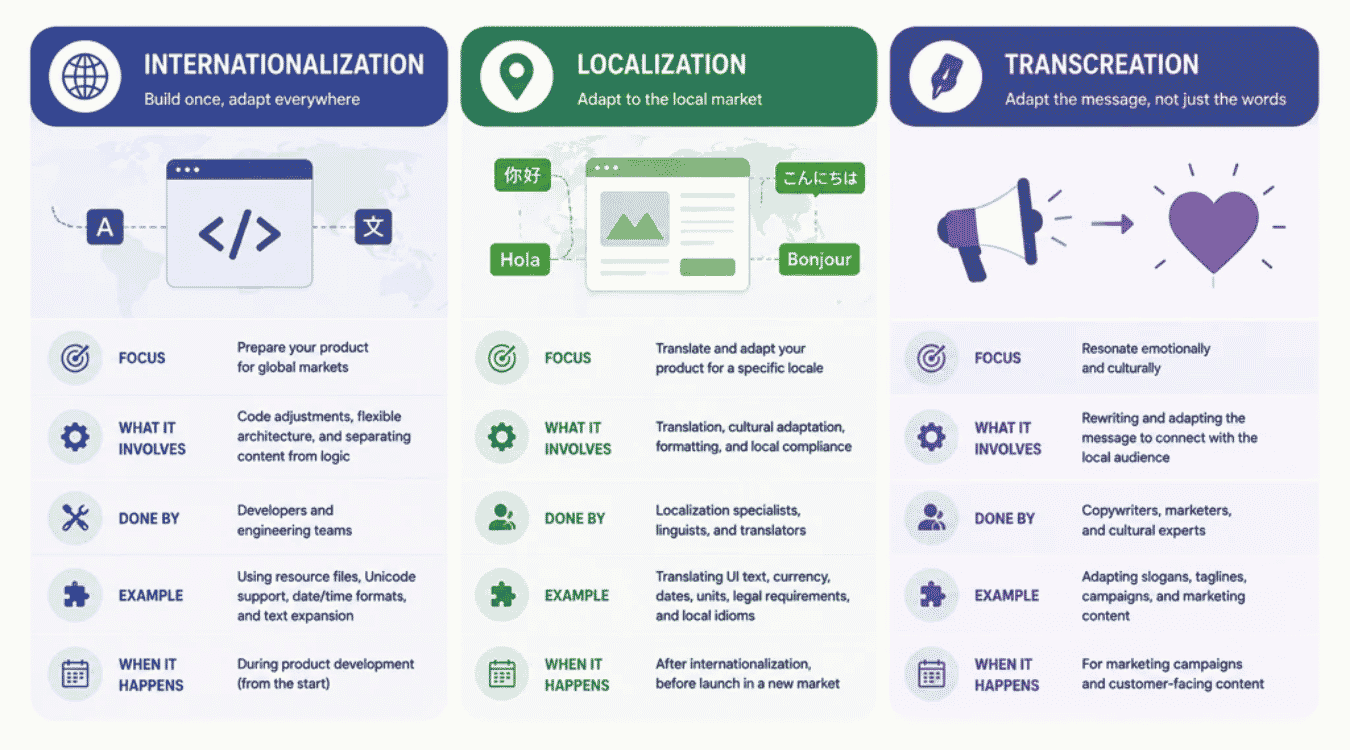
Three terms get used interchangeably, but they solve different problems. Confusing them is how teams end up localizing software that was never built to support multiple languages in the first place.
Internationalization happens first, at the code level. Engineers structure the application so it can handle any target language without a rewrite, externalizing strings, supporting Unicode, and avoiding hard-coded formats.
Localization comes next. It's the actual translation process applied to a specific market, adapting text, dates, currency, and UI elements for that region's expectations.
Transcreation goes further still. Rather than a literal translation process, it recreates marketing copy, slogans, and emotional tone so the message lands naturally in the user's native language, not just accurately.
Here's the sequence in practice: internationalization builds the foundation, localizing software applies it to each market, and translation memory speeds up every repeat pass by reusing previously approved segments. Skipping straight to localization without internationalization is the single most common reason a software localization process stalls midway.
Dimension | Internationalization (i18n) | Localization (l10n) | Transcreation |
|---|---|---|---|
Primary Goal | Make code locale-agnostic | Adapt content for one target language/region | Recreate meaning and emotional impact |
Core Artifact | Resource files, locale bundles | Translated strings, locale-specific assets | Rewritten copy, new slogans/taglines |
Standards Involved | Unicode, CLDR, BCP 47 locale tags | ICU MessageFormat, XLIFF, TMS glossaries | No formal standard, style guide-driven |
Scope Of Change | Codebase structure (string externalization, date/number APIs) | UI text, layout, formatting, images | Brand voice, idioms, cultural references |
Reversibility | One-time architectural investment | Repeatable per new locale | Unique per market, rarely reused |
Typical Owner | Software engineers | Localization engineers, translators | Copywriters, brand/marketing teams |
Common Tooling | i18next, ICU4J, gettext | Lokalise, Phrase, Crowdin, translation memory | Human transcreation specialists, brand review |
Failure Mode If Skipped | Hard-coded strings, broken pluralization, RTL bugs | Mistranslated or context-free UI text | Message reads as accurate but culturally flat |
Example Output | t('cart.itemCount', {count}) resolves per locale rules | "3 items" → "3 artículos" | "Just Do It" reworked entirely, not translated |
Testing Method | Pseudo-localization, unit tests on locale switching | Linguistic QA, in-context screenshot review | Native-speaker focus groups, A/B testing |
Software Localization File Formats And Workflow
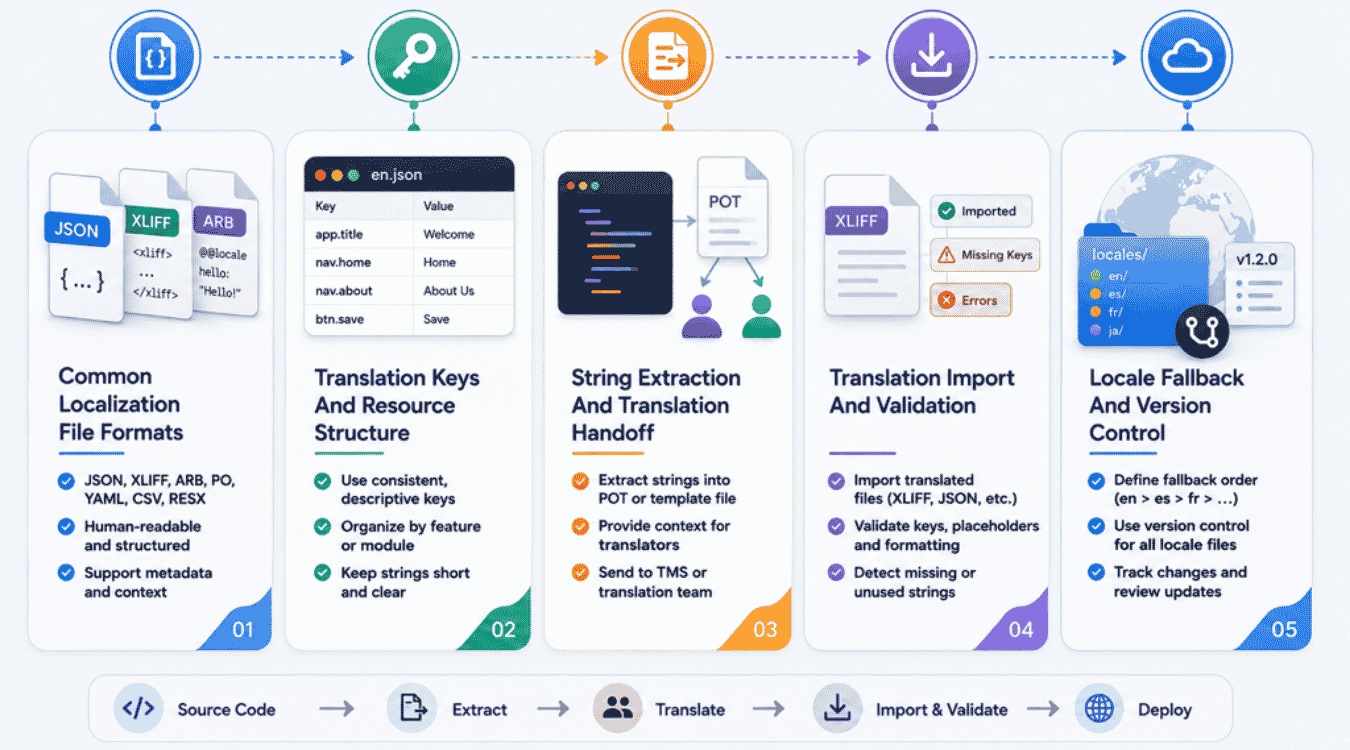
Every successful software localization project runs on a handful of file formats and a repeatable development process. Get the structure right early, and translators, engineers, and QA all work from the same source of truth instead of scattered spreadsheets.
Common Localization File Formats
Format choice usually follows the programming language and platform in use. Android projects rely on XML string resources, iOS uses .strings and .stringsdict files, and web apps typically ship JSON, YAML, or gettext PO files. Each format stores language files differently, but all serve the same purpose: separating text from logic.
User interface files deserve special attention since they often mix layout metadata with translatable strings. Keeping UI structure and text in separate files prevents a translator from accidentally breaking a button's rendering while updating a label.
Translation Keys And Resource Structure
Translation keys act as the stable identifier behind every string, letting external resource files change values without touching the codebase. A key like checkout.confirm_button stays fixed across every language file, while its associated text shifts by locale.
Well-structured keys also make life easier for software localization teams managing hundreds of strings across a dozen locales. Nested naming conventions, grouped by screen or feature, cut down on duplicate entries and naming collisions before they become a support headache.
String Extraction And Translation Handoff
Extraction pulls every user-facing string out of the source code and into a shared file a translator can actually open. Doing this manually works for a handful of strings, but any software localization tool worth using automates the scan and flags anything hard-coded.
Handoff is where an efficient localization process either holds together or falls apart. Translators need context, not just isolated text, so screenshots or on-screen previews alongside each string cut down on guesswork and back-and-forth questions.
Translation Import And Validation
Once translations come back, they need validation before merging into the build. Automated checks catch broken placeholders, missing variables, and length overflows that would otherwise surface as visual bugs in production.
Most translation management systems handle this import step automatically, running validation rules the moment a translator submits a file. Anything that fails gets flagged back to the translator instead of silently breaking the interface. Repeat translation passes benefit from this step too, since regressions surface immediately rather than after release.
Locale Fallback And Version Control
Missing translations should never crash a screen or show a raw key to the user. A solid fallback chain steps down gracefully, from the requested dialect to the base language, and finally to a default locale that's always complete.
Version control ties directly into this. Treating language files like code, reviewed and committed alongside feature branches, is what makes agile localization possible instead of a once-a-quarter translation scramble. Diffing a language file becomes as routine as diffing application code.
Software Localization Best Practices For Engineering Teams
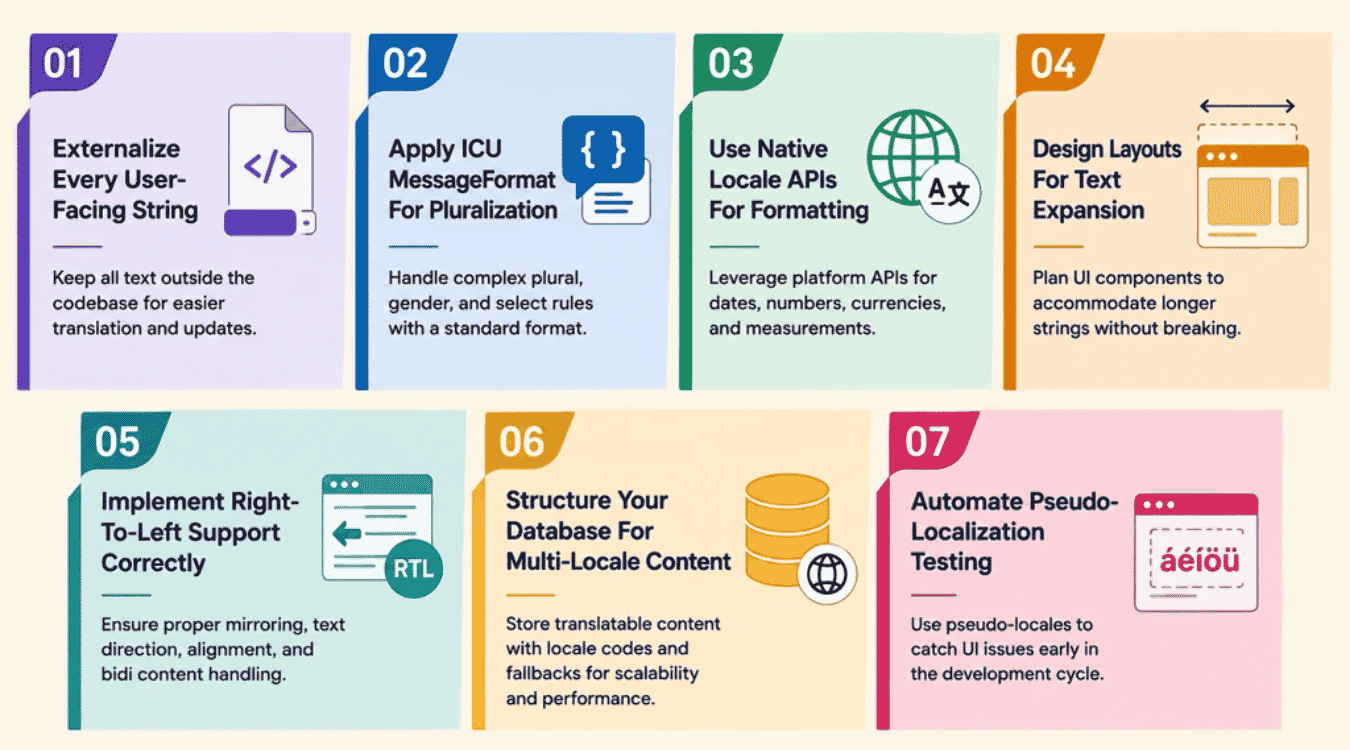
Adapting software for global markets comes down to seven concrete software localization practices, not vague advice. Each one addresses a specific failure point engineers hit repeatedly, from string handling to layout, long before translation even begins.
1. Externalize Every User-Facing String
Hard-coded text is the fastest way to block language translation down the line. Every string buried inside application logic forces a translator to dig through source code just to find what needs converting, and that slows everything else behind it.
The fix is straightforward: pull every visible string into a resource file, referenced by a key instead of typed inline. A login button becomes auth. login, not the literal word "Login," so the same code renders correctly across other languages without a single line changing.
This single habit pays off the moment a project connects to a localization platform. Extraction becomes automatic, translators work from clean key-value pairs, and engineers stop fielding line-by-line translation requests scattered across dozens of files.
2. Apply ICU MessageFormat For Pluralization
Simple plural logic like adding an "s" only works in English. Other languages follow entirely different grammar rules, some splitting quantities into three, four, or even six distinct forms depending on the number involved.
ICU MessageFormat solves this by defining plural categories instead of hard-coded conditions: zero, one, two, few, many, and other. Each category maps to the grammar a specific language actually uses, so "1 item" and "3 items" aren't the only cases your code has to handle.
Skipping this step is one of the more common software localization practices teams get wrong early on. It looks fine in English testing and then breaks the moment a localized version ships to a language with more complex plural rules.
3. Use Native Locale APIs For Formatting
Manually formatting dates, numbers, or currency almost always breaks somewhere. A locale identifier like en-US describes a language and regional convention together, not a country code, and mixing that up leads to wrong date orders or misplaced currency symbols.
Native APIs like Intl.DateTimeFormat and Intl.NumberFormat handle this correctly by reading the locale directly instead of relying on custom string-building logic. They already account for regional variations that would otherwise require constant manual updates.
Relying on these built-in tools instead of homemade formatting logic is what separates reliable localized versions from ones that quietly show the wrong date format to half your users.
4. Design Layouts For Text Expansion
Language length varies more than most interfaces account for. German or Finnish text can run 30% longer than the English original, and a button sized for "Save" won't necessarily fit "Speichern" without breaking its layout.
Visual elements need flexible containers instead of fixed pixel widths to absorb that difference gracefully. Buttons, labels, and navigation items should resize based on content, not force translated text to truncate or overflow.
Testing layouts early with intentionally long placeholder strings catches these issues before a real localized version ever reaches a user, saving a redesign cycle after translation is already complete.
5. Implement Right-To-Left Support Correctly
Right-to-left languages like Arabic and Hebrew don't just flip text direction, they flip the entire interface. Icons, navigation menus, and even progress bars need to mirror, not just the paragraph of translated text sitting in the middle of the screen.
CSS logical properties solve most of this cleanly. Using margin-inline-start instead of margin-left lets the browser handle direction automatically, rather than forcing engineers to write separate stylesheets for every RTL layout by hand.
Skipping this step is one of the more visible localization errors a global market user will notice immediately. A single mirrored icon or misaligned menu signals unfinished work faster than any bug in the source language version ever would.
6. Structure Your Database For Multi-Locale Content
Storing translated text alongside the original column often works fine for one language and falls apart at three. A products table with name, name_de, name_fr columns turns into a maintenance problem the moment a tenth locale gets added.
Separate resource files handle static UI text well, but dynamic content, like product descriptions or user-generated posts, needs its own translation table structure. A translations table keyed by content ID and locale scales cleanly without touching the core schema again.
This distinction matters more for mobile apps and platforms with frequently updated content, where new locales get added well after launch. Planning the schema this way once avoids a painful migration later.
7. Automate Pseudo-Localization Testing
Pseudo-localization is important to catch bugs before a single real translation exists. It swaps source language strings for altered versions padded with extra characters and accented letters, simulating what translated text will actually look like on screen.
This test step catches truncation, broken error messages, and layout overflow early, long before a translator ever touches the project. Running it in CI means every build gets checked automatically, not just the ones someone remembers to review manually.
Teams that skip this step tend to find these same issues manually, one bug report at a time, after a localized version already reached users. Among the best software localization practices covered here, this is the one most often left out entirely.
Integrating Localization Into CI/CD Without Breaking Builds
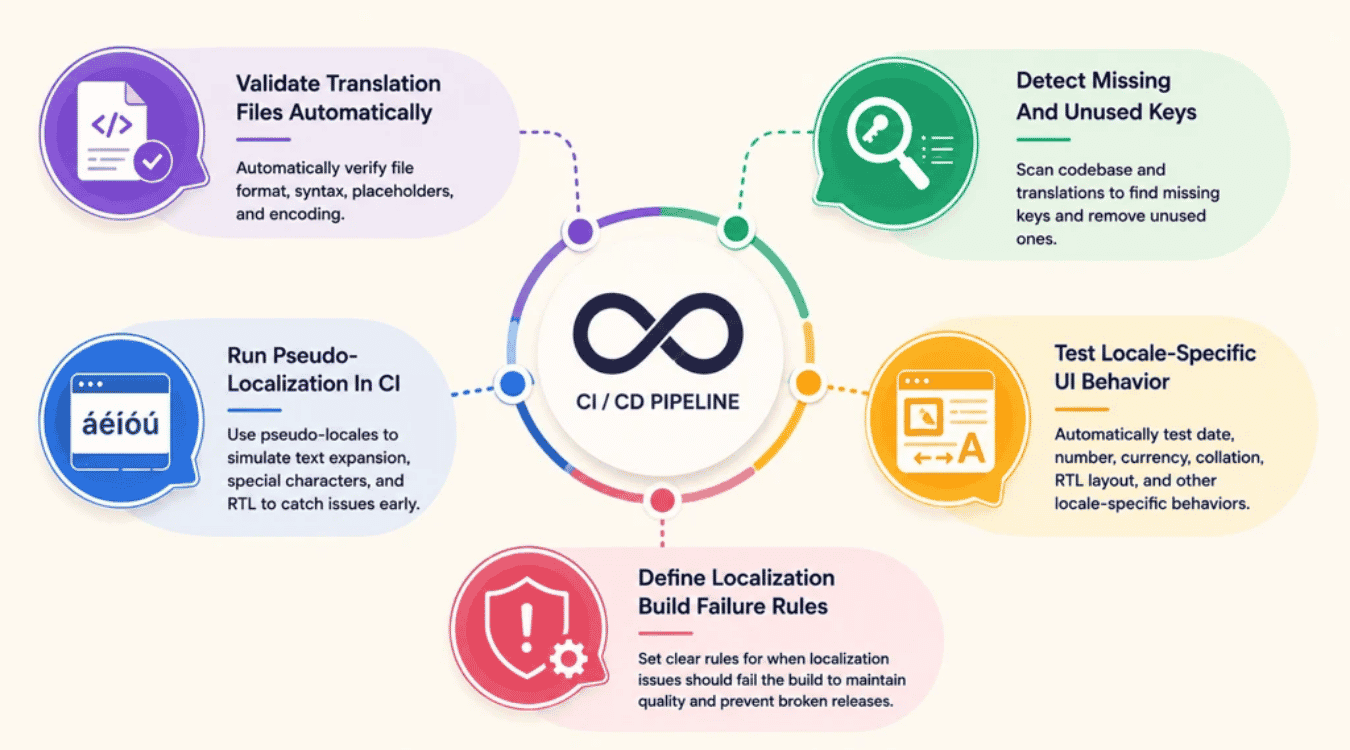
Syncing translations manually before every release doesn't scale past a couple of locales. Wiring localization directly into CI/CD keeps builds honest, catching problems automatically instead of letting them reach global users.
Validate Translation Files Automatically
A malformed JSON file or a broken language code can silently fail an entire locale on deploy. Automated validation checks structure and syntax the moment a translation file is committed, before it ever reaches a build.
Manually eyeballing every file gets unreliable fast, especially once localization projects grow past two or three languages. Asian languages with different character sets make visual review even harder to trust. A failed check in the pipeline is far easier to fix than a silent bug a target audience finds first.
Detect Missing And Unused Keys
Missing keys show up as raw identifiers on screen instead of translated text, a fast way to signal unfinished work to global users. Automated key comparison against the source file catches gaps before merge, not after a bug report.
Unused keys cause a quieter problem. They pile up in existing translation files as features get removed, inflating translation content that translators still review even though nothing references it anymore.
Keeping both checks running in parallel protects translation quality without adding manual review work to every release.
Run Pseudo-Localization In CI
Waiting for someone to run pseudo-localization before a release manually means it eventually gets skipped. Wiring it into CI tests for every pull request against padded, accented placeholder text automatically catches truncation before it ships.
Languages that behave very differently from the source cause the most damage here. Asian languages and right-to-left scripts often reveal layout issues that never surface when testing against English alone. Teams that localize software effectively treat this as a build-time check, not an occasional manual pass someone remembers before a deadline.
Test Locale-Specific UI Behavior
A layout that renders fine in English can still break under a longer locale or a different reading direction. Automated UI tests per locale catch these regressions the same way visual regression tests catch a broken button.
Catching this takes more than swapping a language code into test data. Real locale-specific tests check date formats, number separators, and RTL mirroring against the actual rendered interface, not just string presence. Catching these bugs per pull request beats a target audience finding them first.
Define Localization Build Failure Rules
Not every localization issue should block a deploy, but some absolutely should. Missing keys for a shipped feature, broken pluralization syntax, or malformed files are worth failing the build over immediately.
A waterfall localization mindset treats translation as a separate phase, reviewed manually after development wraps. That doesn't hold up once release cadence picks up and localization projects run in parallel with feature work. Clear failure thresholds mean CI enforces translation quality on its own, without anyone needing to remember a manual check before release, and they should align with your broader agile vs waterfall software development approach.
Signs Your Localization Architecture Is Accumulating Technical Debt
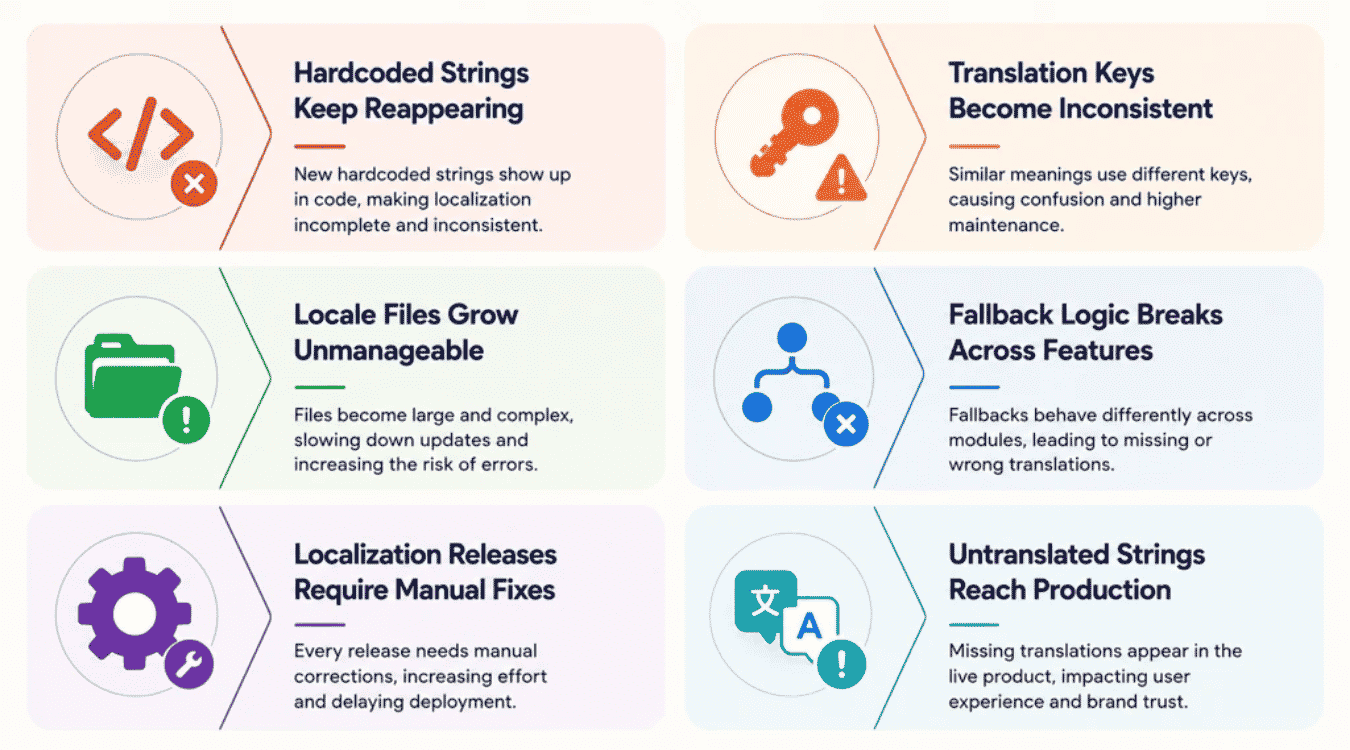
Not every localization problem shows up as a bug someone files. Some build up quietly inside source code and locale files, turning into localization challenges only once they're expensive to unwind.
Hardcoded Strings Keep Reappearing
Deadline pressure brings hardcoded strings back even after a team spent real effort externalizing them the first time. A quick fix ships straight into the codebase instead of a resource file, and nobody notices until QA flags it weeks later.
Once this pattern repeats a few times, quality assurance can no longer trust that every string in a build is actually translatable. Each new instance means another manual sweep through source code to catch what automated checks were supposed to prevent.
Left unchecked, this quietly raises localization cost with every release, since fixing scattered hardcoded text after the fact takes longer than catching it at review.
Translation Keys Become Inconsistent
Two developers working the same feature often invent separate keys for what's really the same translation. checkout.error and cart.checkout_error might point to identical text, but a translation platform sees them as two unrelated strings to review.
This kind of drift accumulates fastest in larger web apps with multiple teams touching different modules. Nobody owns the naming convention, so appropriate translation reuse never happens and duplicate work piles up unnoticed.
Cleaning this up later means auditing every key against its actual usage, a task that only gets harder the longer inconsistent naming goes unaddressed.
Locale Files Grow Unmanageable
A locale file that starts as a clean, organized resource often turns into a flat list of hundreds of unrelated keys within a year. Finding anything specific means scrolling, not searching by feature or screen.
Bloated files slow down more than just developers. Translators lose context when strings from five different screens sit in the same block, and appropriate translation becomes harder to deliver without seeing where text actually appears.
Splitting locale files by feature or module early prevents this, but restructuring an already-massive file after the fact is a project of its own.
Fallback Logic Breaks Across Features
Fallback behavior that works cleanly in one part of an app often breaks in another, especially when different teams implemented it independently. One module falls back to the same language correctly, another shows a blank string instead.
These gaps rarely surface in testing because most QA passes stick to one or two locales. A missing fallback three languages deep stays invisible until a real user in that locale hits it in production.
Centralizing fallback logic into a single shared utility, rather than letting each feature reinvent it, is usually the only fix that actually holds.
Localization Releases Require Manual Fixes
A release that needs someone to manually patch a translation file before it can ship is already a sign the pipeline isn't doing its job. What should be an automated sync turns into a checklist item nobody wants to own.
Over time, these manual steps stack up and start dictating the release schedule itself. A localization pass that used to take an hour now needs a dedicated pre-release ritual every single sprint, which quickly shows up as noise in engineering KPIs for faster releases and better quality.
Rebuilding the automation gap is worth the cost here, since manual intervention at release time is one of the more expensive localization challenges to keep tolerating, and it should be factored into any realistic custom software development cost estimates.
Untranslated Strings Reach Production
New features shipping ahead of their translations is one of the more visible signs something upstream broke. Error messages, tooltips, or user generated content labels show up in the source language for users who never signed up to see it.
This tends to hit hardest wherever content changes fast, like comment sections or anything built around user generated content that wasn't part of the original localization plan.
If this keeps happening, it's rarely a translator problem. It usually means the process meant to localize your software before release stopped enforcing the checks it was built to run.
How Nearshore Engineering Teams Execute Localization At Scale
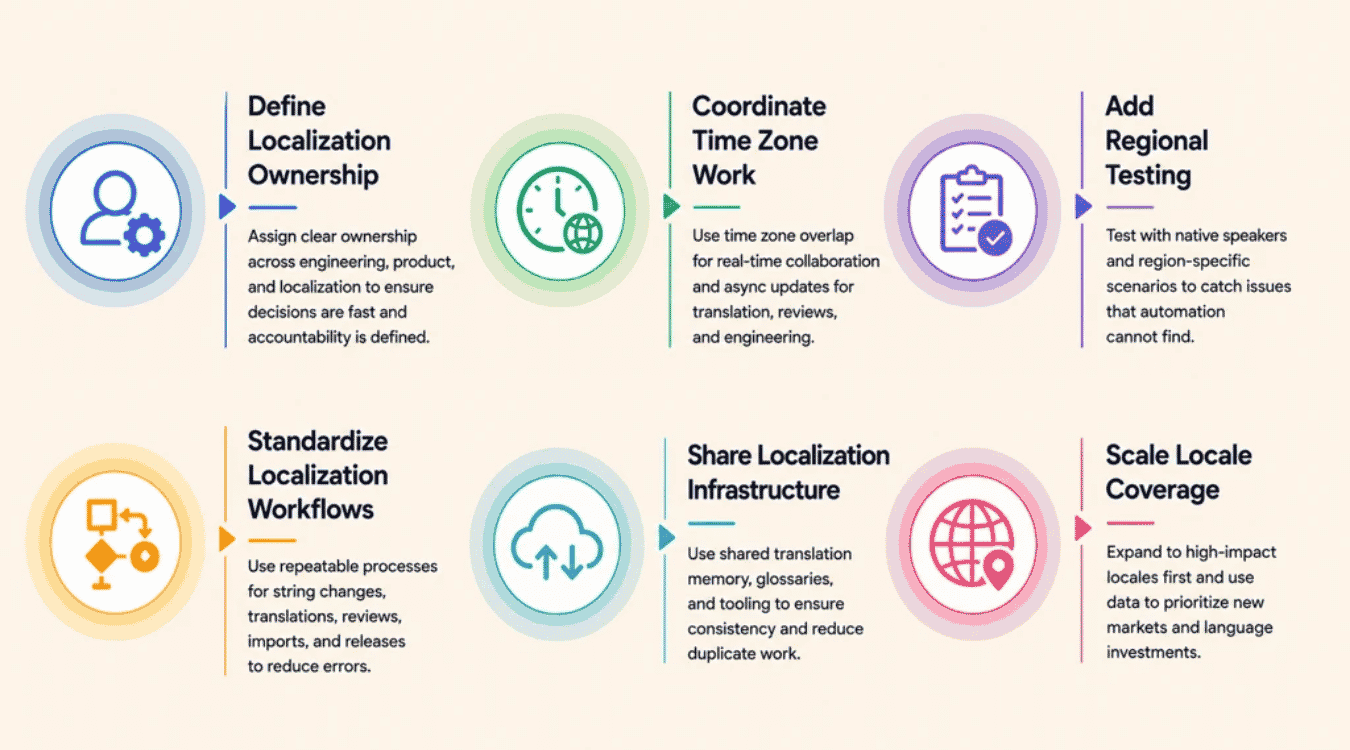
Running a localization program across multiple markets takes more than a good translation platform. Nearshore teams add a layer most in-house setups skip, dedicated ownership, synced workflows, and testing built around how different languages actually behave in production, and they often complement in-house efforts in a broader in-house vs outsourcing software development strategy.
Define Localization Ownership
A software application without a clear localization owner tends to drift. Strings get added without keys, fallback logic breaks silently, and nobody notices until a release ships broken text to a live market.
Nearshore teams typically assign this to a dedicated engineer or small pod, not a rotating volunteer. That person tracks every locale's health, reviews new strings before merge, and stays the single point of contact translators actually go to, which mirrors broader engineering team management for faster product delivery practices around clear ownership and accountability.
Coordinate Time Zone Work
Localization work rarely lines up neatly with a single team's working hours. A translation batch submitted at the end of one team's day can sit untouched for hours if nobody's covering the handoff window.
Nearshore delivery turns this into an advantage instead of a bottleneck. Overlapping hours between regions mean a translated batch gets reviewed, merged, and tested well before the originating team is back online the next morning, reinforcing many remote engineering team management best practices around time zone-aware collaboration.
Add Regional Testing
Machine translation output and human reviewed text both need eyes in the actual target region, not just a QA pass from headquarters. Currency formatting, date order, and cultural references read differently depending on who's testing them, so regional QA should plug into broader software testing strategies for effective quality assurance rather than sitting as an ad hoc layer.
Regional testers catch what automated checks miss, the visual context of how translated text actually sits inside a localized interface, not just whether the string exists. A layout that passes automated tests can still look wrong to a native reviewer.
Standardize Localization Workflows
Every new market added without a shared process means reinventing extraction, handoff, and QA steps from scratch. That's how teams end up managing five slightly different workflows for what should be one repeatable system.
A standardized workflow defines exactly how a string moves from source code to a translator to a merged build, regardless of which market it targets. New locales plug into the same pipeline instead of getting a custom setup each time, which becomes even more important when working with an external partner under an outsource software development model.
Share Localization Infrastructure
Building separate tooling per project wastes engineering time a nearshore team could spend elsewhere. Shared infrastructure, glossary databases, translation memory, and validation scripts, means every new software application benefits from work already done on a previous one, much like investing once in robust SaaS infrastructure components and architecture that can serve multiple products.
This also keeps terminology consistent across products. A term translated once for a user's preferred language doesn't need retranslating from scratch just because it showed up in a different codebase, which is especially useful when you offer multiple software services across SaaS, PaaS, or IaaS models.
Scale Locale Coverage
Adding a new locale should mean plugging into existing infrastructure, not starting over. Teams that manage localization well treat each new market as a configuration step, backed by market research on where demand actually justifies the investment, and align this work with broader scaling engineering team strategies for growth.
This is where nearshore teams earn their value. Expanding into new markets without the coordination overhead ballooning at the same rate. Coverage grows, but the process managing it stays the same, making it easier to pair nearshore arrangements with broader offshore software development strategies when appropriate.
Final Discussion
Software localization succeeds or fails at the architecture level, long before a translator opens a single file. Externalized strings, proper pluralization logic, and native formatting APIs matter more than which platform manages the handoff.
Teams that treat localization as ongoing infrastructure, not a one-time translation project, avoid the technical debt that quietly piles up: inconsistent keys, broken fallbacks, hardcoded text creeping back in.
Nearshore engineering teams add real value here. Dedicated ownership, standardized workflows, and shared infrastructure let a team expand into new markets without rebuilding the process each time, especially when combined with agile and offshore software development benefits to keep delivery flexible and cost-effective.
Get the foundation right once. Every new locale after that becomes a configuration step, not a rewrite.