10 Best API Testing Tools In 2026 (Free And Paid)
.jpg)
by Rhea Collins | Aug 13, 2026 | Technology & Innovation
Table of Contents
A test suite that worked fine for a small team often chokes months later once hundreds of endpoints pile up. Every list claims to rank "the best" tools, but most just repeat the same five names without saying who each one actually fits. Some teams need heavy SOAP support. Others just want something fast for a quick manual check before a deploy. A few need security testing baked in, not bolted on later.
This roundup breaks down 10 API testing tools worth considering in 2026, free and paid, with what each one does well and where it falls short. Matching a tool to your team's actual workflow should take minutes, not another afternoon of trial and error.
What Are API Testing Tools
API testing tools check whether application programming interfaces work the way they're supposed to. A tool sends requests to an endpoint and checks the api responses against expected results. Rest api testing covers the majority of use cases today, since most modern apps rely on a rest api to move data between services.
Functional testing confirms endpoints return correct data under normal conditions. Api security testing goes further, checking for exposed data, broken authentication, and other vulnerabilities before attackers find them first.
What To Look For In API Testing Tools
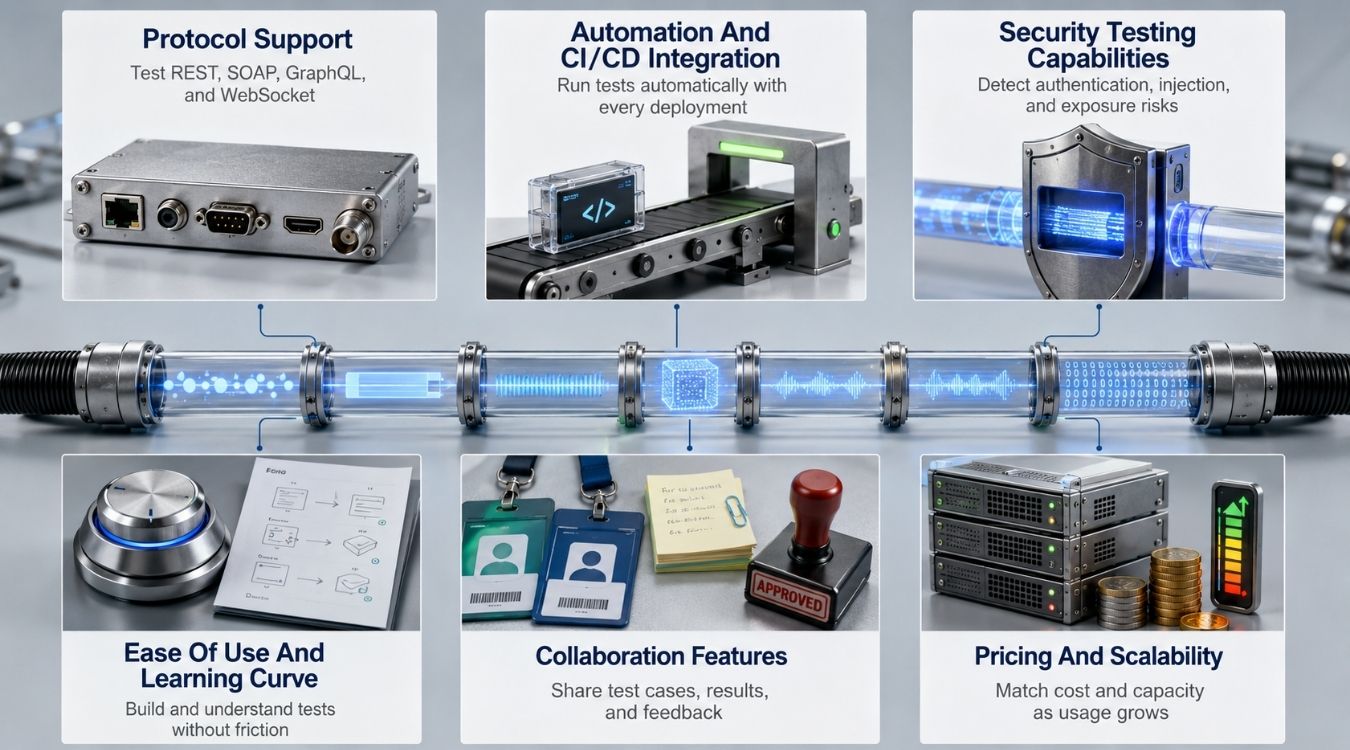
A tool that fits one team badly slows down every sprint after adoption. These six criteria separate a genuinely useful api testing framework from one that looks fine in a demo but breaks down under real workloads, and they align closely with broader software testing strategies for Agile and DevOps teams.
Protocol Support
Not every api testing framework supports the same protocols equally well. Some tools focus entirely on REST and handle api endpoints cleanly, while others stretch to cover SOAP, GraphQL, or gRPC without the same polish.
Check protocol support before committing to a tool long-term. A team running mixed protocols across microservices needs broader coverage than a team working with a single REST-based backend.
Automation And CI/CD Integration
Manual checks work for a handful of endpoints, but teams that automate api testing at scale need a tool that plugs into existing pipelines. Regression tests should run automatically on every commit, not just before a release.
Look for native CI/CD hooks rather than workarounds. A tool requiring custom scripts just to trigger api collections in a pipeline adds friction that defeats the point of automation.
Security Testing Capabilities
Api security testing catches issues functional checks miss entirely, like broken authentication or exposed sensitive fields in api responses. Some tools bolt this on as an afterthought; others build it into the core workflow.
Teams handling sensitive data should treat this as a hard requirement, not a nice-to-have. A tool without dedicated security scanning still needs a separate solution or even a periodic SaaS technical audit to improve security and performance layered on top, which adds cost and complexity.
Ease Of Use And Learning Curve
A steep learning curve delays adoption across a team, especially for non-developers who need to run tests occasionally. Some tools favor a clean interface built for quick manual checks.
Others assume scripting knowledge from day one. Data-driven testing setups in particular vary widely in difficulty between tools, so trial runs with real test cases matter more than reading a features page.
Collaboration Features
Shared api collections let a whole team work from the same test cases instead of duplicating effort across individual setups. Version control and commenting matter once more than one person touches the same suite.
Tools built for solo use often lack this entirely. Teams distributed across time zones especially benefit from shared workspaces where changes to test cases are visible immediately.
Pricing And Scalability
Free tiers work fine for small projects, but performance testing and load testing at scale usually require a paid plan. Pricing structures vary between per-user, per-request, and flat enterprise rates, and they often overlap with broader API monetization pricing models and strategy when teams treat their APIs as products.
Check how each tool scales cost as usage grows, not just its entry price. A tool that's cheap for ten api endpoints can get expensive fast once performance and load testing needs expand across hundreds.
Best API Testing Tools In 2026
Picking from dozens of options gets overwhelming fast. Here are 10 tools worth evaluating in 2026, covering free and paid options across REST, SOAP, security, and low-code testing needs.
Tool | Protocol Support | Best For | Free Tier | Standout Feature |
|---|---|---|---|---|
Postman | REST, GraphQL, gRPC | Teams wanting one tool for manual and automated testing | Yes, capped at 3 collaborators | Newman CLI for pipeline runs |
SoapUI | SOAP, REST | Enterprise teams with legacy SOAP services | Yes, full open-source version | Native WSDL and SOAP support |
Katalon | REST, plus UI and mobile | Teams without dedicated automation engineers | Yes, always-free community edition | AI-assisted self-healing tests |
Swagger / SwaggerHub | REST (OpenAPI-based) | Teams prioritizing API design and documentation | Yes, Swagger UI and Editor | Interactive docs generated from specs |
Insomnia | REST, GraphQL, gRPC | Developers wanting a lightweight, distraction-free client | Yes, capped at 3 Git-sync users | Clean, minimal interface |
JMeter | REST, SOAP | Teams needing serious load and performance testing | Yes, fully free forever | Simulates thousands of concurrent users |
Karate | REST, SOAP | Teams wanting API, mock, and performance testing in one | Yes, fully free forever | No-code Gherkin-style test scripts |
ReadyAPI | REST, SOAP, GraphQL | Enterprise teams needing advanced functional and security testing | No meaningful free tier | AI-powered test generation |
Bruno | REST, GraphQL | Teams wanting Git-based, offline-first collections | Yes, fully free core product | Collections stored as local files |
StackHawk | REST, GraphQL, SOAP | Teams needing dedicated API security testing in CI/CD | 14-day free trial only | Active and passive scanning via OWASP ZAP |
1. Postman
Postman functions as a dedicated rest api client trusted by millions of developers. Teams send api requests, run manual testing sessions, and build automated suites daily. The interface balances simplicity for beginners with enough depth for engineers running complex, multi-step workflows across REST, GraphQL, and gRPC.
Features:
- Supports REST, GraphQL, and gRPC protocols directly
- Automates test scripts using built-in JavaScript logic
- Shares workspaces so teams collaborate on collections
- Runs collections in pipelines through Newman CLI
- Builds mock servers for early-stage development work
- Monitors live APIs on a scheduled basis
- Generates documentation automatically from existing collections
- Stores environment variables for multi-stage testing setups
Best For: Teams of any size needing one platform for manual testing, api requests, and automation, especially groups comfortable working inside a familiar rest api client across REST, GraphQL, and gRPC projects.
2. SoapUI
SoapUI remains the strongest choice for teams testing legacy SOAP services alongside modern REST endpoints. It supports the restful api modeling language for spec-driven testing and runs basic security scans against common attack patterns. Groovy scripting extends coverage further for custom assertions well beyond default test cases.
Features:
- Supports native SOAP and WSDL-based testing directly
- Handles REST endpoints alongside older legacy systems
- Imports specs using restful api modeling language files
- Runs basic scans for SQL injection and XSS
- Runs load tests via ReadyAPI integration
- Writes custom logic using Groovy scripts
- Includes a detailed, reusable assertion library builder
- Creates full tests quickly through drag-and-drop workflows
Best For: Enterprise teams maintaining legacy SOAP services alongside newer REST APIs, particularly in finance, healthcare, or government sectors where restful api modeling language support and basic vulnerability scanning matter for infrastructure. Deeper OWASP-level scanning requires ReadyAPI, SoapUI's paid tier.
3. Katalon
Katalon combines ui testing and API coverage in one low-code platform built for teams without dedicated automation engineers. Recording features let anyone test APIs without writing scripts from scratch, while built-in self-healing reduces ongoing maintenance whenever an interface or endpoint changes unexpectedly across product releases.
Features:
- Records test steps without writing any code
- Applies AI-powered self-healing to broken tests
- Combines UI and API testing in one suite
- Integrates natively with popular CI/CD tool platforms
- Generates detailed reports after every test run
- Provides templates for data-driven testing setups
- Stores reusable elements in an object repository
- Runs tests in the cloud or locally
Best For: Teams without dedicated automation engineers who need reliable coverage across ui testing and backend checks, especially groups already comfortable letting Katalon test APIs through recorded steps instead of custom scripts.
4. Swagger And SwaggerHub
Swagger centers on api design first, generating interactive api documentation directly from OpenAPI specs. SwaggerHub extends this into a collaborative platform where teams edit specs together before writing a single test, similar to how a developer portal for API growth and adoption centralizes discovery and onboarding. It works better as a documentation and design tool than a dedicated testing tool for deep test automation.
Features:
- Generates interactive api documentation from OpenAPI specs automatically
- Validates api design against the OpenAPI standard directly
- Supports collaborative editing across distributed teams in SwaggerHub
- Provides a built-in mock server for early testing
- Exports specs directly into Postman and other tools
- Version controls specs so design changes stay tracked
- Runs basic testing rest apis checks from within docs
- Integrates with CI/CD pipelines for spec validation
Best For: Teams prioritizing api design and documentation first, then testing second, particularly those who want specs and docs to stay in sync without maintaining a separate dedicated testing tool.
5. Insomnia
Insomnia offers a lighter alternative to heavier platforms, built around clean testing rest apis workflows without the bloat some tools accumulate over time. Plugin support extends functionality when needed, though the core experience stays intentionally minimal for everyday manual and automated test scripts.
Features:
- Runs REST, GraphQL, and gRPC requests in one interface
- Supports plugins for extending core functionality when needed
- Generates readable test scripts without excessive boilerplate code
- Includes environment management for multi-stage testing setups
- Offers Git sync for version-controlled collaboration across teams
- Provides a clean, minimal interface with less clutter
- Runs automated test suites through its command-line runner
- Checks for broken authentication during standard test runs
Best For: Developers wanting a lightweight, distraction-free tool for testing REST APIs daily, especially those who find heavier platforms slow down quick, everyday API checks.
6. JMeter
JMeter built its reputation on performance testing rather than functional checks, though it handles both reasonably well. Java-based and open source, it demands more setup than newer tools but rewards teams willing to learn its interface with serious load testing depth.
Features:
- Simulates thousands of concurrent users for load testing
- Supports REST, SOAP, and other common protocols directly
- Runs distributed testing across multiple machines for scale
- Generates detailed performance reports with response time graphs
- Extends functionality through a large plugin ecosystem
- Integrates with CI/CD pipelines for automated performance checks
- Records test plans through a built-in proxy recorder
- Measures response times under authenticated, sustained load
Best For: Teams needing serious performance testing and load testing depth, particularly those validating how APIs behave under heavy concurrent traffic rather than basic functional or security checks.
7. Karate
Karate combines API test scripts, mocks, and performance checks in one open-source framework without requiring Java knowledge for basic test scenarios. Built on a Gherkin-like syntax, it handles JSON and XML natively, making it capable of testing soap apis alongside standard REST-based web services in the same suite.
Features:
- Writes test scripts in plain, readable Gherkin-style syntax
- Runs test cases in parallel for faster suite execution
- Supports JSON and XML payloads without extra configuration
- Handles SOAP and REST protocols in one framework
- Generates HTML reports with detailed assertion results
- Mocks services directly within existing test scenarios
- Integrates with CI/CD pipelines through Maven and Gradle
- Extends functionality via Java when logic gets complex
Best For: Teams wanting a single framework for functional, mock, and performance testing across REST and SOAP APIs, especially engineers comfortable skipping heavy scripting for cleaner test scenarios.
8. ReadyAPI
SmartBear built ReadyAPI on the SoapUI engine, then layered in advanced features enterprise teams actually need. Its newest addition, AI-powered test generation, creates test cases from natural language prompts and speeds up automated testing by a wide margin, while keeping human review in the loop throughout.
Features:
- Generates test cases using ai assisted test generation prompts
- Runs distributed load testing across multiple environments simultaneously
- Scans for common vulnerabilities alongside functional test coverage
- Virtualizes dependent services for testing without live systems
- Syncs with version control for team-based collaboration
- Produces detailed api documentation from existing test suites
- Integrates natively with Jenkins, Azure DevOps, and similar tools
- Supports data-driven testing with external data sources
Best For: Enterprise teams already using SoapUI who need advanced features like AI-powered test generation, security scanning, and virtualization bundled into one paid platform.
9. Bruno
Bruno stores every collection as plain text files on disk instead of syncing everything to a vendor's cloud by default. This offline-first approach appeals to teams wary of where their api data lives, while still supporting scripting and CLI runs for automated testing workflows.
Features:
- Stores collections as local files instead of cloud databases
- Syncs naturally through Git alongside existing source code
- Runs collections headlessly through its dedicated CLI tool
- Supports scripting for dynamic requests and response checks
- Keeps api data offline unless a team opts into sync
- Offers a clean interface similar to lighter Postman alternatives
- Costs nothing, with no paid tier gating core features
- Integrates into CI/CD pipelines through command-line execution
Best For: Teams prioritizing data ownership and Git-based collaboration in their testing workflows, particularly those uncomfortable storing sensitive api data on a third-party cloud.
10. StackHawk
StackHawk approaches API security differently than tools bolting on a scan feature. Built on OWASP ZAP, it runs active and passive scanning against OpenAPI and GraphQL specs, flagging data exposure, broken authorization, and other risks other functional tools never check for automatically.
Features:
- Runs active and passive scanning using an OWASP ZAP core
- Reads OpenAPI and GraphQL specs to auto-discover endpoints
- Detects data exposure risks like PII and PCI leaks
- Flags broken object and function-level authorization issues
- Integrates directly into CI/CD pipelines for every build
- Generates findings written for engineers, not security specialists
- Auto-generates api documentation from source code when specs are missing
- Tracks risk posture across an organization's full API inventory
Best For: Teams needing dedicated api security testing inside their pipeline, particularly those wanting active and passive scanning without configuring OWASP ZAP manually from scratch.
Free Vs Paid API Testing Tools
Free tiers cover more ground than most teams expect going into 2026. JMeter, Karate, and Bruno stay fully open source with no paid gate on core functionality, which works fine for teams comfortable with self-hosting and community support instead of vendor guarantees.
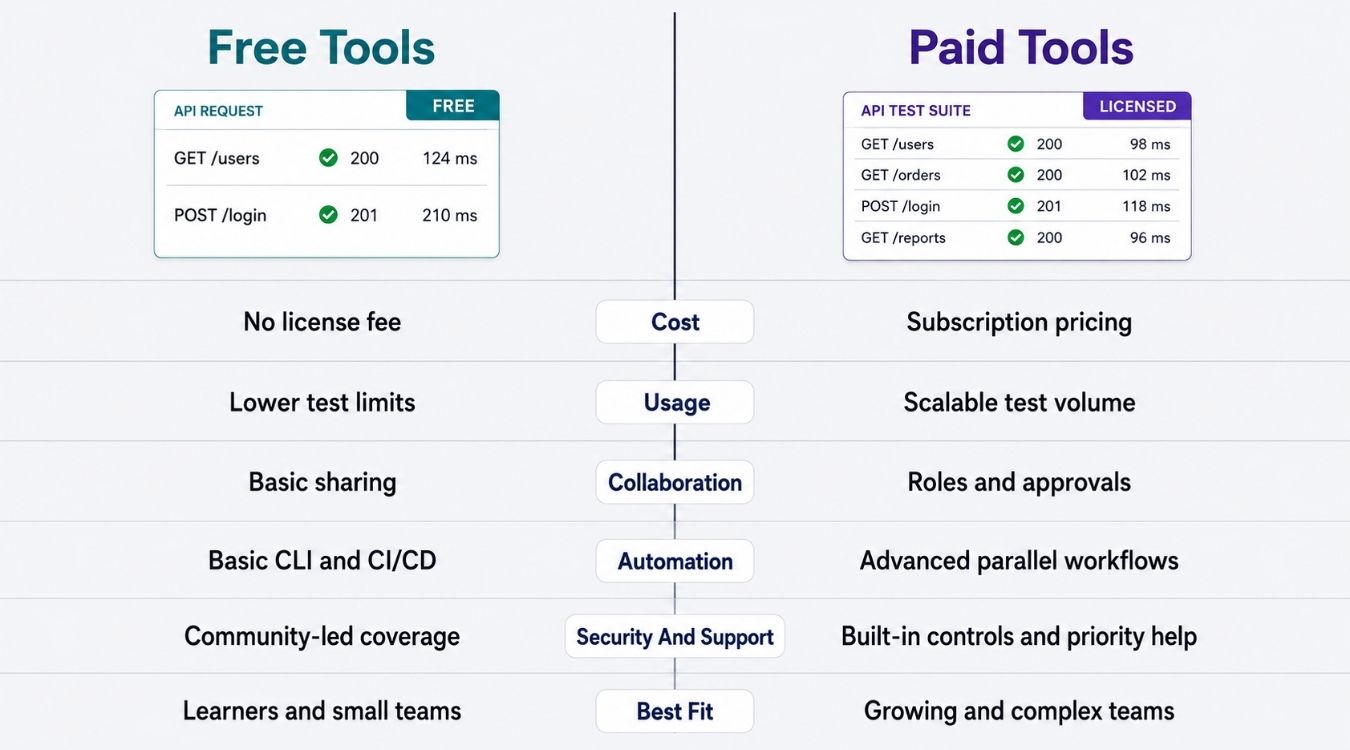
Postman, Insomnia, and Katalon offer genuinely usable free plans, but each caps something once a team grows. Postman limits collaborators, Insomnia caps Git-sync users, and Katalon's community edition skips the enterprise reporting layer larger orgs eventually want.
SoapUI splits cleanly: the open-source version handles most testing needs, while ReadyAPI picks up where it stops, adding AI test generation, security scanning, and virtualization at enterprise pricing that typically requires a sales conversation.
StackHawk sits in the middle, with a genuinely affordable entry tier rather than a stripped-down free plan, since dedicated security scanning rarely comes free anywhere.
Swagger stays free at the documentation layer, with SwaggerHub's paid tiers reserved for team collaboration features.
The honest rule: start free, and only pay once a specific limit, like collaborator count or missing security depth, actually blocks your workflow.
Tool | Free Tier | Paid Tier Starts At | What Paid Unlocks |
|---|---|---|---|
Postman | Yes, capped at 3 collaborators | ~$14/user/month | More collaborators, advanced permissions |
SoapUI | Yes, full open-source version | Enterprise quote via ReadyAPI | AI test generation, security scans |
Katalon | Yes, always-free community edition | Custom enterprise pricing | Advanced reporting, enterprise support |
Swagger / SwaggerHub | Yes, Swagger UI and Editor | ~$90/user/month (SwaggerHub) | Team collaboration, private specs |
Insomnia | Yes, capped at 3 Git-sync users | ~$12/user/month | Unlimited collaborators |
JMeter | Yes, fully free forever | No paid tier exists | N/A |
Karate | Yes, fully free forever | No paid tier exists | N/A |
ReadyAPI | No meaningful free tier | Custom enterprise quote | Full advanced feature suite |
Bruno | Yes, fully free core product | Optional paid sync add-on | Team sync convenience only |
StackHawk | 14-day free trial only | ~$10/user/month | Full active and passive scanning |
API Testing Tools For CI/CD Pipelines
A test suite that only runs manually never catches regressions before they ship. Pipeline integration turns testing strategy from an afterthought into a gate that blocks bad code automatically, across every stage of the api lifecycle, and sits at the core of modern DevOps best practices for software teams.
GitHub Actions For API Tests
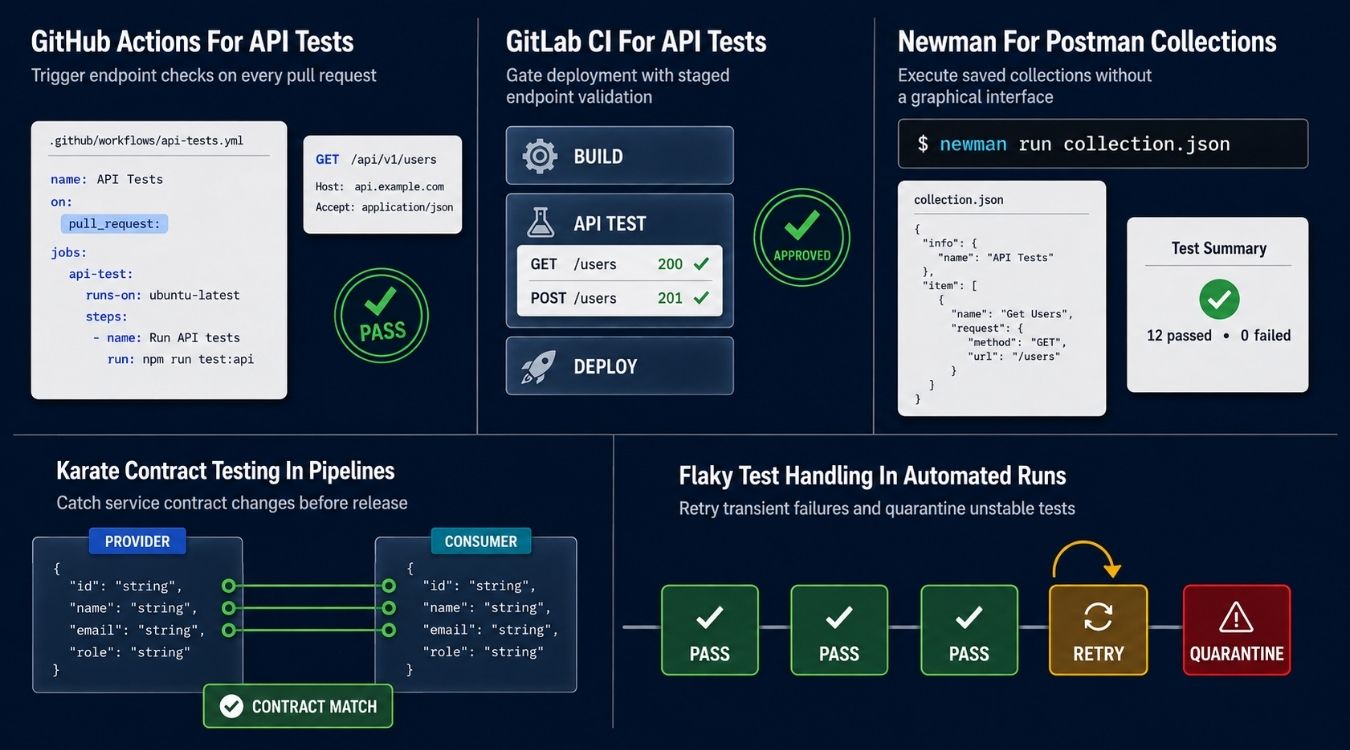
GitHub Actions runs API checks directly inside the same repository where api development already happens. Workflows trigger on every push or pull request, so writing tests once means they run automatically without anyone remembering to trigger them manually.
Teams managing api management tasks alongside test creation benefit most here, since secrets, environment variables, and test runners all live in one YAML file. No separate security team needs special access. Anyone with repo permissions can update the workflow directly.
GitLab CI For API Tests
GitLab CI works similarly, but keeps everything native to GitLab's own pipeline syntax instead of relying on marketplace actions. Rest testing fits naturally into .gitlab-ci.yml stages, running alongside build and deploy steps without extra plugins.
This setup suits Java teams already running GitLab-hosted runners for other build tasks. Test creation stays consistent with how the rest of the pipeline is defined, which keeps the testing strategy easy to audit later and aligns with broader SaaS development services planning and delivery.
Newman For Postman Collections
Newman runs Postman collections from the command line, so a test suite built in a graphical api client still executes headlessly in CI. Teams get the user-friendly graphical interface for writing tests, then automation for actually running them.
This bridges a common gap: not every engineer wants to write raw scripts, but pipelines need headless execution. Newman keeps both groups working from the same collection instead of maintaining two separate systems.
Karate Contract Testing In Pipelines
Contract testing catches breaking changes before they reach production, and Karate handles this without needing interactive docs to explain expected behavior. Its readable syntax defines contracts directly as test cases, checked automatically on every pipeline run.
This matters most for teams managing api management across many services, where one changed field can break several consumers silently. Catching this in the pipeline avoids relying on a separate security team or manual review to catch structural issues, and it pairs naturally with broader AI-driven automation across SaaS platforms that keeps regressions from reaching production.
Flaky Test Handling In Automated Runs
Flaky tests erode trust in a pipeline fast. If tests fail randomly, teams start ignoring red builds entirely, which defeats the point of automated checks tied to owasp api security top risks or basic functional coverage, especially as organizations lean on scalable SaaS tools to power global growth.
Retry logic and quarantine tags help isolate genuinely flaky cases from real failures. A solid testing strategy accounts for this early, rather than discovering it after a critical bug slips through a pipeline everyone stopped trusting.
How To Choose The Right API Testing Tool
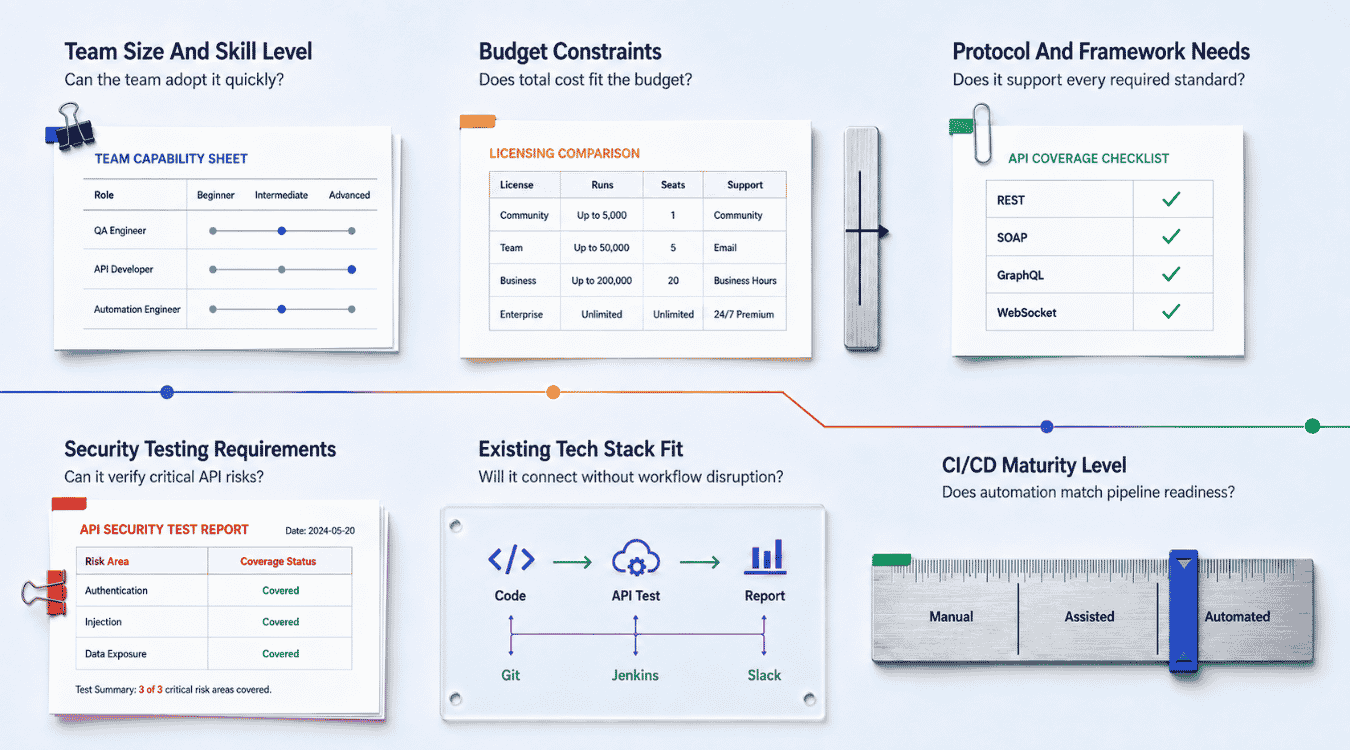
Every tool on this list solves API testing differently, and picking the wrong one shows up months later as wasted setup time. These six factors narrow the choice before software development slows down waiting on tests.
Team Size And Skill Level
A solo developer building test flows manually needs something different from a team of ten writing automation frameworks daily. Non-technical testers do better with a graphical interface, while engineers comfortable scripting often prefer code-first options, especially when those tests sit inside a larger SaaS product development lifecycle from build to scale.
REST Assured remains the go-to Java library for teams who want tests written as actual code rather than clicked through a UI. Match the tool to who's actually running it, not who approved the budget, just as you would when weighing SaaS vs custom software for flexibility and scale.
Budget Constraints
Free tools cover most needs until a specific limit blocks the workflow, like collaborator caps or missing security depth. Paid tiers make sense once that limit actually costs time or money on a regular basis.
Avoid paying for testing adjacent capabilities a team won't use, like built-in mobile app testing when the project is purely backend. Match spend to what the api surface actually requires this year, and consider how AI in SaaS is reshaping capabilities and cost trade-offs.
Protocol And Framework Needs
Check what protocols an api defines before committing to a tool. REST, GraphQL, gRPC, and newer standards like the Model Context Protocol each require different support, and not every tool covers them equally well.
Schema validation against an OpenAPI specification matters more for teams maintaining large APIs with many consumers. Confirm protocol coverage first, since switching tools mid-project costs more than the initial research.
Security Testing Requirements
Every api call carries risk once it touches real user data, and functional tools rarely catch security gaps on their own. Teams handling sensitive data need dedicated scanning, not an assumption that basic tests cover it.
Decide early whether security testing lives inside the same tool or gets handled separately. Bolting on scans later usually costs more than choosing a tool built for it from the start.
Existing Tech Stack Fit
A tool that clashes with existing automation frameworks adds friction nobody asked for. Java shops often lean toward REST Assured, while JavaScript-heavy teams gravitate toward Postman or Newman for consistency across the stack.
Check integration with current CI tools, version control, and reporting systems already in place. Fitting into software development workflows that already exist beats forcing a team to adopt new tooling everywhere at once.
CI/CD Maturity Level
Teams still testing manually need something simple before adding pipeline complexity. Mature pipelines benefit from tools built for building test flows headlessly, not ones designed primarily for a graphical interface.
Match tool choice to where the pipeline actually stands today. A tool built for advanced CI/CD maturity often overwhelms a team still running manual checks before every release, especially once you start to integrate AI into SaaS products and rely more heavily on automated quality gates.
Final Thoughts
No single tool covers every API testing need perfectly. Postman and Insomnia work well for everyday manual checks, SoapUI and ReadyAPI handle SOAP-heavy enterprise systems, Karate and JMeter cover contract and performance testing, and StackHawk fills the security gap most functional tools skip entirely.
Start with what your team already knows before adding something new. A free tool that fits existing skills beats a paid one nobody uses correctly. Layer in automation once manual testing becomes repetitive, and add dedicated security scanning once APIs start handling real user data.
The right stack usually combines two or three tools, not one that claims to do everything. Match each choice to an actual gap in your current workflow, not a feature list that sounds impressive on paper.