Code Review Checklist: What To Check Before Every Merge
by Gain Solutions Team | Aug 9, 2026 | Software Development Insights
Table of Contents
- What Is A Code Review Checklist
- Code Review Checklist For Every Pull Request
- What To Automate And What Humans Should Review
- How To Review AI-Generated Code
- Role-Based Code Review Checklists
- Code Review Checklist Template
- Common Code Review Mistakes To Avoid
- How To Measure Code Review Effectiveness
- How To Improve Your Code Review Process
- Final Thoughts
A messy merge usually starts with a checklist nobody followed. Skip a step on code formatting and your team spends the next sprint arguing about tabs versus spaces instead of shipping features. Miss a check for sensitive data, and you might push an API key straight into production. Good code review comments catch these problems before they turn into real incidents. They also flag broken error messages that leave future developers guessing what actually went wrong. A solid code review checklist keeps reviewers focused on what matters: does the code follow the single responsibility principle, is it readable, and will it hold up under real traffic? Here is what to check before every merge, from small formatting fixes to bigger structural decisions that shape how your codebase ages.
What Is A Code Review Checklist
A code review checklist is a structured list reviewers follow before approving any code change. It gives code reviewers a consistent way to check that code adheres to team standards and stays modular instead of tangled together. Conducting code reviews without one often means skipped steps, like forgetting to validate user input or check for security testing gaps.
A good checklist also confirms unit tests actually cover the new logic, not just the happy path. Teams that follow object-oriented analysis principles use checklists to keep classes focused and code modular, so reviews catch structural issues early instead of after deployment, reinforcing the disciplined structure of a well-defined software development life cycle.
Code Review Checklist For Every Pull Request
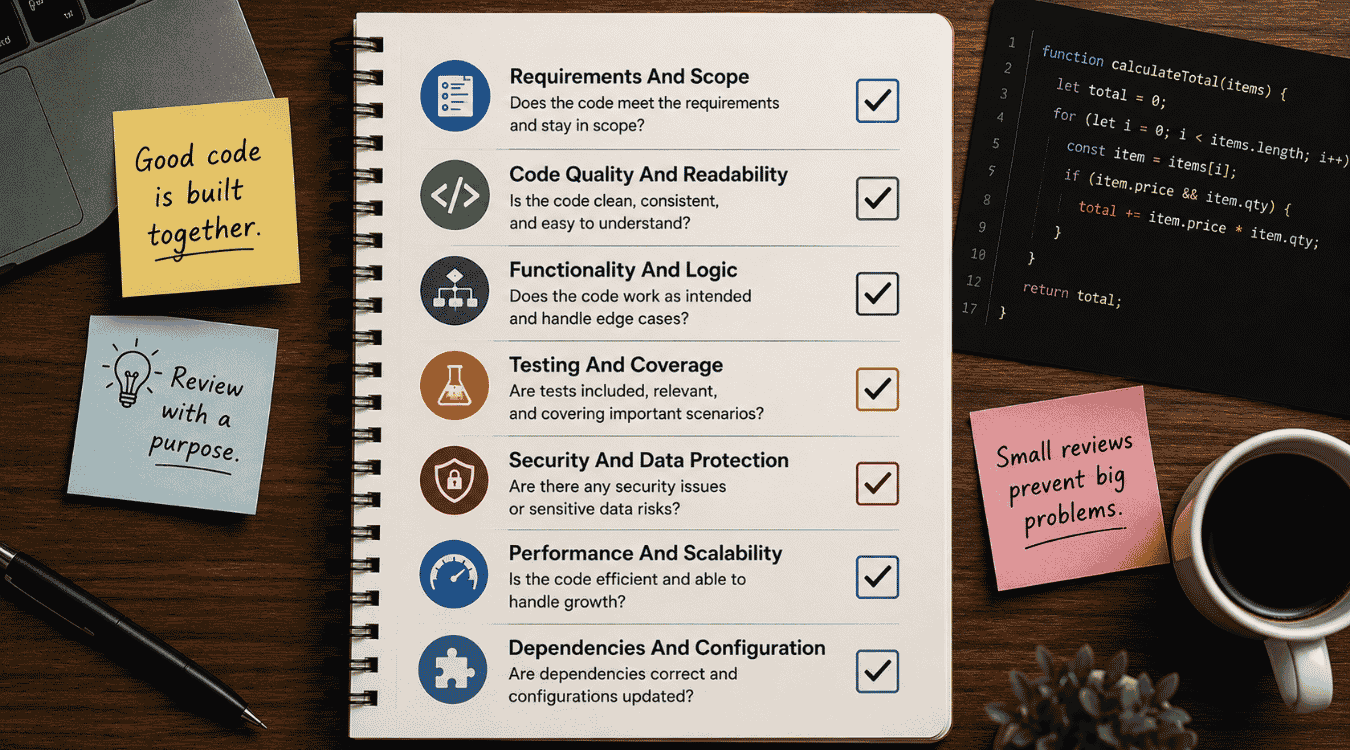
Every pull request deserves the same level of scrutiny, whether it's a one-line fix or a major feature. Break the review down into these seven areas and nothing important slips through the cracks.
1. Requirements And Scope
Start by checking the pull request against its original ticket or spec. Confirm the code aligns with what was actually asked for, not a slightly different version of it. Scope creep sneaks in when a fix for one bug turns into three unrelated changes bundled together.
Software developers should flag anything outside the stated scope before reviewing logic line by line. A tightly scoped PR is easier to test, easier to roll back, and easier for the next reviewer to understand without extra context.
2. Code Quality And Readability
Readable code saves time for everyone who touches it later. Check variable names, function length, and whether logic is broken into clear steps instead of one dense block. A reviewer who has to reread a function three times to understand it is a sign something needs simplifying.
Consistency matters as much as cleverness. Code that matches existing patterns in the code base is easier to maintain than a clever one-off solution nobody else recognizes. Flag anything that introduces a new style without a good reason.
3. Functionality And Logic
Functionality is the core of the review. Run through the logic step by step and confirm it actually does what the pull request claims, including edge cases the author might have missed during testing. A feature that works for the happy path but breaks under unusual input isn't finished yet.
Pay close attention to error handling too. Check that failures are caught gracefully instead of crashing silently, and that the code doesn't swallow exceptions without logging them somewhere useful.
4. Testing And Coverage
New code needs new tests, and reviewers should confirm coverage isn't just present but meaningful. A test that only checks the happy path gives a false sense of security. Look for edge cases, invalid inputs, and boundary conditions before approving anything.
Just as important, check that the change hasn't broken existing tests. Run the full suite locally if the CI pipeline doesn't cover it automatically. A green checkmark means little if half the test file was commented out to make it pass.
5. Security And Data Protection
Security deserves its own pass through the code, separate from functionality. Scan for common security vulnerabilities like cross site scripting and sql injection, especially anywhere user input touches a database query or gets rendered back to a browser without sanitizing it first.
Following security best practices means checking authentication logic, permission checks, and how secrets are stored, not just scanning for obvious red flags. A single unvalidated field can undo every other safeguard in the codebase, especially in complex environments that require robust SaaS security architecture best practices.
6. Performance And Scalability
Code that works today can still fail at scale. Check for performance traps like queries running inside loops, unnecessary re-renders, or data loaded into memory all at once instead of in batches. Staging rarely mimics real production load, so these issues often slip through testing.
Ask whether the solution holds up as usage grows, not just whether it passes now. A quick fix for a hundred users can become a bottleneck at ten thousand, so scalability deserves a second look even when the logic seems fine.
7. Dependencies And Configuration
New dependencies deserve scrutiny before they get added to the project. Check the license, how actively it's maintained, and whether the same functionality already exists in the codebase. Adding a package for one small utility often costs more in upkeep than writing it directly.
Configuration changes need the same care. A wrong environment variable or misconfigured setting can break production even when the code is flawless. Treat this check as part of continuous improvement, catching small issues now so they don't turn into bigger problems after release.
What To Automate And What Humans Should Review
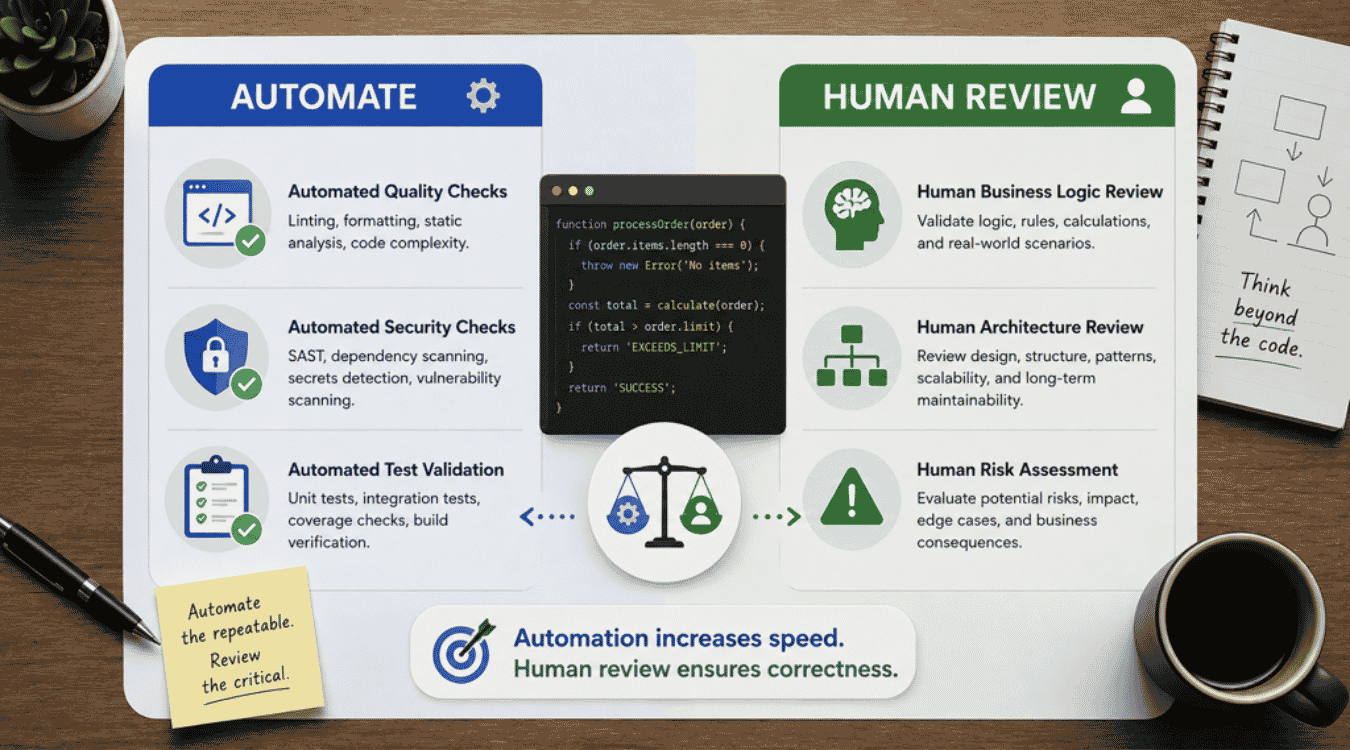
Some checks are best left to automation, freeing reviewers for judgment calls machines can't make. Splitting work this way encourages continuous improvement across software development, catching security issues fast while humans focus on decisions that need real context and experience, especially when reviews are tightly integrated with modern DevOps best practices.
Automated Quality Checks
Formatting, linting, and style rules don't need a human eye. Static analysis tools catch these issues the moment code is pushed, flagging inconsistent spacing or unused variables before a reviewer even opens the pull request.
Reviewers get to focus on logic instead of nitpicking commas and indentation. Automated checks run the same way every time, so standards stay consistent across the whole team without anyone chasing minor style debates in comments.
Automated Security Checks
Scanning for known security vulnerabilities is a job built for automation. Tools can check every dependency and every line against a constantly updated database faster than any manual review ever could, especially when paired with structured software testing strategies for effective quality assurance.
Scans like these run on every commit, not just before release, so problems surface early instead of piling up. Teams that skip this step often find out about a vulnerability only after something breaks in production.
Automated Test Validation
Running the test suite automatically on every pull request catches regressions before a human reviewer even starts reading. It confirms nothing broke and that coverage stays up to date as the codebase grows.
Reviewers also skip the hassle of manually running tests locally every time. A failed build blocks the merge automatically, so broken code never reaches review in the first place.
Human Business Logic Review
No automated tool understands business context the way a person does. Reviewing source code against actual business rules requires someone who knows why a feature exists, not just whether it compiles.
A human reviewer can spot when logic technically works but solves the wrong problem. Judgment calls like that depend on context no automated check can reasonably capture.
Human Architecture Review
Structure and long-term maintainability need a human perspective too. A reviewer checks whether new code fits the existing architecture and whether coding style stays consistent with patterns the team already relies on, often surfacing issues that a periodic SaaS technical audit would also highlight.
Tradeoffs automation can't weigh matter here too, like whether a shortcut today creates cleanup work six months from now. Architecture decisions shape how easily the whole system grows later.
Human Risk Assessment
Some risks only show up when someone thinks through worst-case scenarios. A human reviewer might notice exposed api keys in a config file or a permission check that's technically correct but risky in practice.
Impact matters more than correctness in a review like this. A small oversight in the wrong place can carry outsized consequences, and that judgment call still belongs to a person, not a script.
How To Review AI-Generated Code
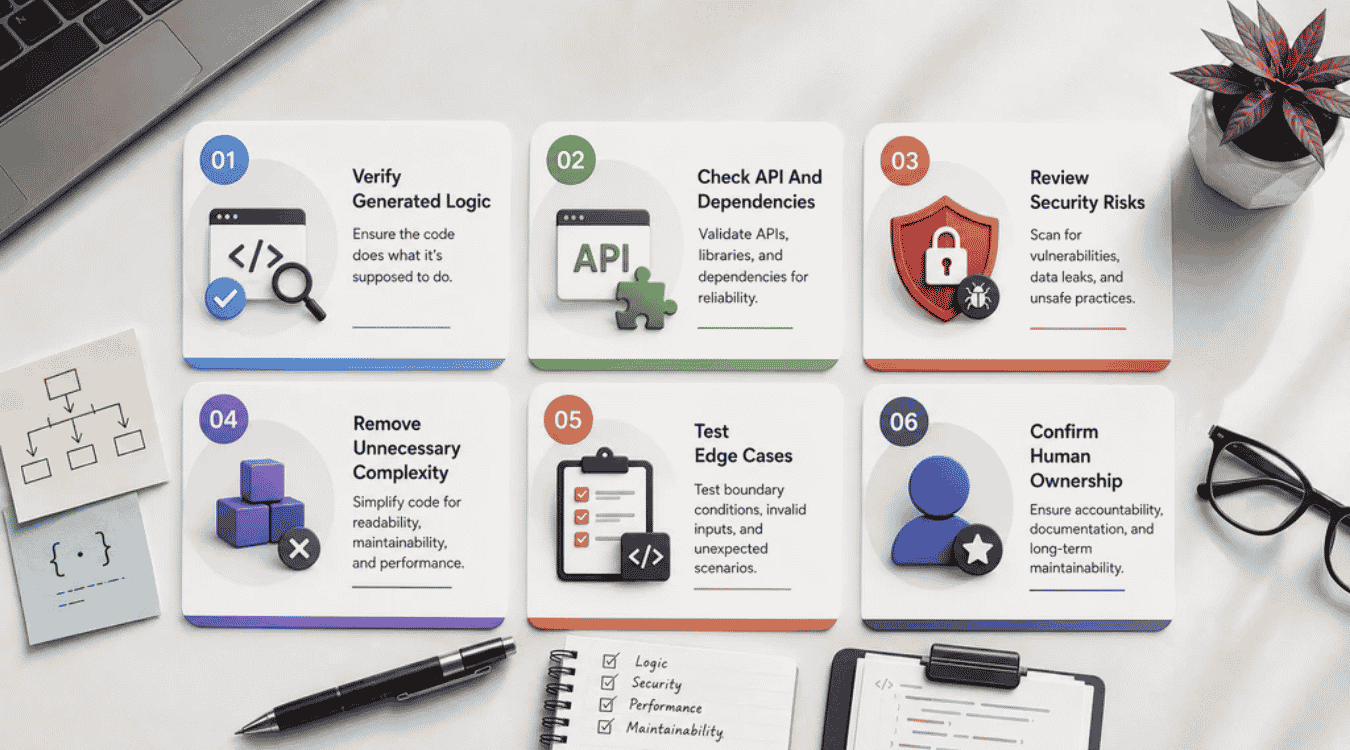
AI tools write new code fast, but speed doesn't guarantee correctness. Reviewing AI-generated code needs its own approach, since the usual assumptions about a human author's intent don't always apply here.
Verify Generated Logic
AI models sometimes produce code that looks confident but solves the wrong problem. Read through the logic line by line instead of trusting that it works just because it compiles and runs without errors.
Check that the output actually follows sound design patterns rather than reinventing something awkwardly. A generated function can pass a quick glance and still hide a mistake that only surfaces later.
Check API And Dependencies
Generated code sometimes references functions or libraries that don't exist, or ones that are outdated for the current version in use. Confirm every API call is real and every dependency is one your team already trusts.
Watch closely for exception handling too. AI suggestions often skip error cases entirely, assuming happy-path input every time, which leaves gaps a reviewer needs to close before anything ships.
Review Security Risks
AI-generated snippets can carry security risks that aren't obvious on a first read. Check for hardcoded credentials, weak input validation, or logic borrowed from insecure patterns found elsewhere online.
Naming conventions can also hide intent when a variable name doesn't match what it actually stores. A quick rename makes the code easy to audit later, especially once it reaches a production environment.
Remove Unnecessary Complexity
AI tools tend to over-engineer simple problems, adding layers that don't need to exist. Look for violations of interface segregation, where a class ends up handling far more than its actual job requires.
Trimming this down early saves time for every future reviewer. Simpler code holds up better under change, and it's easier to explain during knowledge sharing sessions with the rest of the team.
Test Edge Cases
Generated code often handles the obvious case well and falls apart everywhere else. Push it with unusual input, empty values, and boundary conditions before assuming it's ready to merge.
Test coverage should reflect this extra scrutiny, not just mirror whatever the AI tool suggested for its own output. A missing edge case here causes more damage than a typo would.
Confirm Human Ownership
Every piece of AI-assisted code still needs a human name attached to it. Someone has to understand what it does well enough to defend it later, not just approve it because it looked fine.
Clean up outdated comments left over from the generation process too. A reviewer who takes ownership catches these small details before they confuse the next person who opens the file.
Role-Based Code Review Checklists
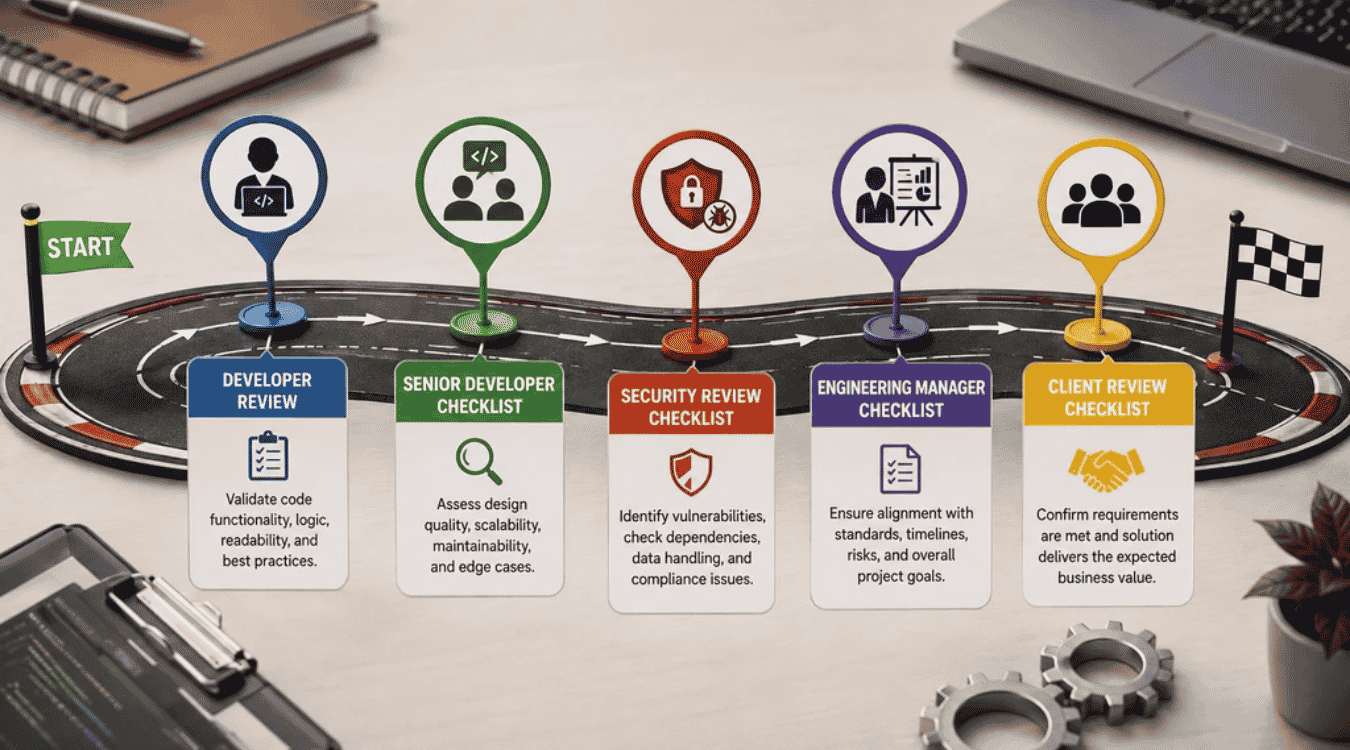
Not every reviewer looks at a pull request the same way, and that's the point. Matching the checklist to the role catches different problems at each stage before code ever reaches a production environment.
Developer Review Checklist
Start with the basics before anyone else looks at the code. Confirm variable names are self explanatory, formatting matches the team's style guide, and the change actually meets the functional requirements from the original ticket.
Check that commits are clean and logically grouped in source control too. A tangled commit history makes it harder for the next reviewer to follow what changed and why.
Senior Developer Checklist
Experienced developers look past syntax and into structure. Check whether dependency injection is used correctly, whether the new logic fits existing patterns, and whether a simpler approach was overlooked in favor of something clever.
This level of review also weighs long-term cost, not just immediate correctness. A senior reviewer asks whether this code will still make sense to someone else a year from now.
Security Review Checklist
Security reviewers focus on threats other checklists might miss. Look for security threats hiding in authentication flows, unvalidated input, or third-party packages pulled in without a proper audit first.
This pass should happen separately from a general code review, since security issues need focused attention rather than a quick scan alongside everything else on the list.
Engineering Manager Checklist
Engineering managers care about the bigger picture around each change. Confirm the pull request aligns with team priorities and that its size and complexity match the time actually budgeted for it, tying into broader engineering team management for faster product delivery goals.
Check in on team health here too. Repeated pushback on the same mistakes across reviews often signals a training gap rather than a one-off error worth flagging alone.
Client Review Checklist
Clients rarely read code directly, so their checklist looks different from the rest. Confirm the delivered feature matches what was scoped and agreed upon, with clear documentation explaining what changed and why.
Walk through outcomes in plain language instead of technical detail. A client review succeeds when the business result is obvious, even to someone who never opens the actual codebase.
Code Review Checklist Template
A reusable template turns checklist theory into something teams actually use every day. This one covers various aspects of a pull request, from small details to the practices that keep a codebase healthy long term, similar to how thorough technical due diligence checklists look at the health of an entire product.
Pull Request Details
Every submission needs enough detail before a reviewer even opens the diff. List what changed, why it changed, and which ticket or requirement it addresses, so reviewers aren't guessing at intent.
Include known tools used to test the change locally, so reviewers know what's already been validated before they start their own pass.
Functionality Checks
Confirm each function does what it claims to do, especially where logic branches based on different inputs. A billing feature that miscalculates a tax rate is a good example of a small bug with outsized consequences.
Check that the code follows the design principles the team already relies on, not a one-off approach that only makes sense to the person who wrote it.
Code Quality Checks
Readable code needs comments where logic isn't self-evident, not scattered everywhere out of habit. Check that naming is consistent and that structure matches how the rest of the codebase is written.
This is also where potential bugs hide in plain sight, like a copy-pasted block that almost fits the new case but not quite, and where a broader software product audit for security and compliance often uncovers systemic issues.
Testing Checks
Good test cases cover more than the obvious path through the function. Push boundary values and failure conditions to confirm the code holds up under real conditions, not just ideal ones, and track outcomes with meaningful engineering KPIs for faster releases and better quality.
Update documentation alongside tests so the next developer understands both what changed and how it was verified.
Security Checks
Confirm user data is handled properly and that nothing exposes information it shouldn't, even in error messages or logs.
Following established security practices at this stage catches problems before they reach a live environment, rather than after something goes wrong, which is critical for regulated domains that require strict HIPAA compliant software development.
Final Approval Checks
Before approving, confirm every earlier check actually passed and nothing was skipped under time pressure. A rushed approval defeats the purpose of having a checklist in the first place.
Sign off only when the code is correct, tested, and clear enough for someone else to maintain without asking the original author for help.
Common Code Review Mistakes To Avoid
Oversized pull requests, style nitpicks, and rushed approvals are some of the most common ways reviews fall short. Each one looks harmless on its own, but together they let real problems slip past review undetected.
Reviewing Oversized Pull Requests
A pull request with thousands of changed lines is nearly impossible to review properly. Reviewers skim instead of reading closely, and important logic gets buried under unrelated changes bundled into the same submission.
Smaller, focused pull requests get better attention every time. Breaking large features into logical chunks makes each review faster and catches issues that a massive diff would have hidden.
Focusing On Minor Style Issues
Spending review time on spacing, semicolons, or bracket placement wastes effort that automation already handles well. Reviewers who fixate here often miss bigger problems sitting just a few lines away.
Style debates also slow down the merge process without improving the code in any meaningful way. Save comments for logic, structure, and decisions that actually affect how the software behaves.
Ignoring Business Requirements
Code can be technically correct and still miss the point entirely. Reviewers who skip checking against the original ticket sometimes approve a feature that solves a slightly different problem than the one requested, especially as new software development trends for 2026 introduce unfamiliar patterns and tools.
This mistake often surfaces late, after a client or stakeholder notices the finished feature doesn't match expectations. Cross-checking scope early avoids a costly round of rework later.
Relying Too Much On Automation
Passing tests and clean lint results don't mean a pull request is ready to merge. Automated tools catch known patterns, not judgment calls about whether an approach actually makes sense for the problem.
Teams that treat a green checkmark as the final word skip the human reasoning that catches subtler issues, like a feature built on a flawed assumption nobody automated could flag.
Approving Without Context
Rubber-stamping a pull request without understanding what it does defeats the purpose of review entirely. A reviewer who approves based on trust alone misses the chance to catch mistakes early, when they're cheapest to fix.
Taking a few extra minutes to understand intent before approving pays off. Context turns a review from a formality into an actual second set of eyes on the problem.
Treating AI Review As Final
AI-assisted review tools are useful for a first pass, but they aren't a substitute for human judgment. They can miss business context, architectural tradeoffs, and edge cases specific to how a team actually works.
Using AI feedback as a starting point works well. Treating it as the final word skips the accountability a human reviewer brings to every approval.
How To Measure Code Review Effectiveness
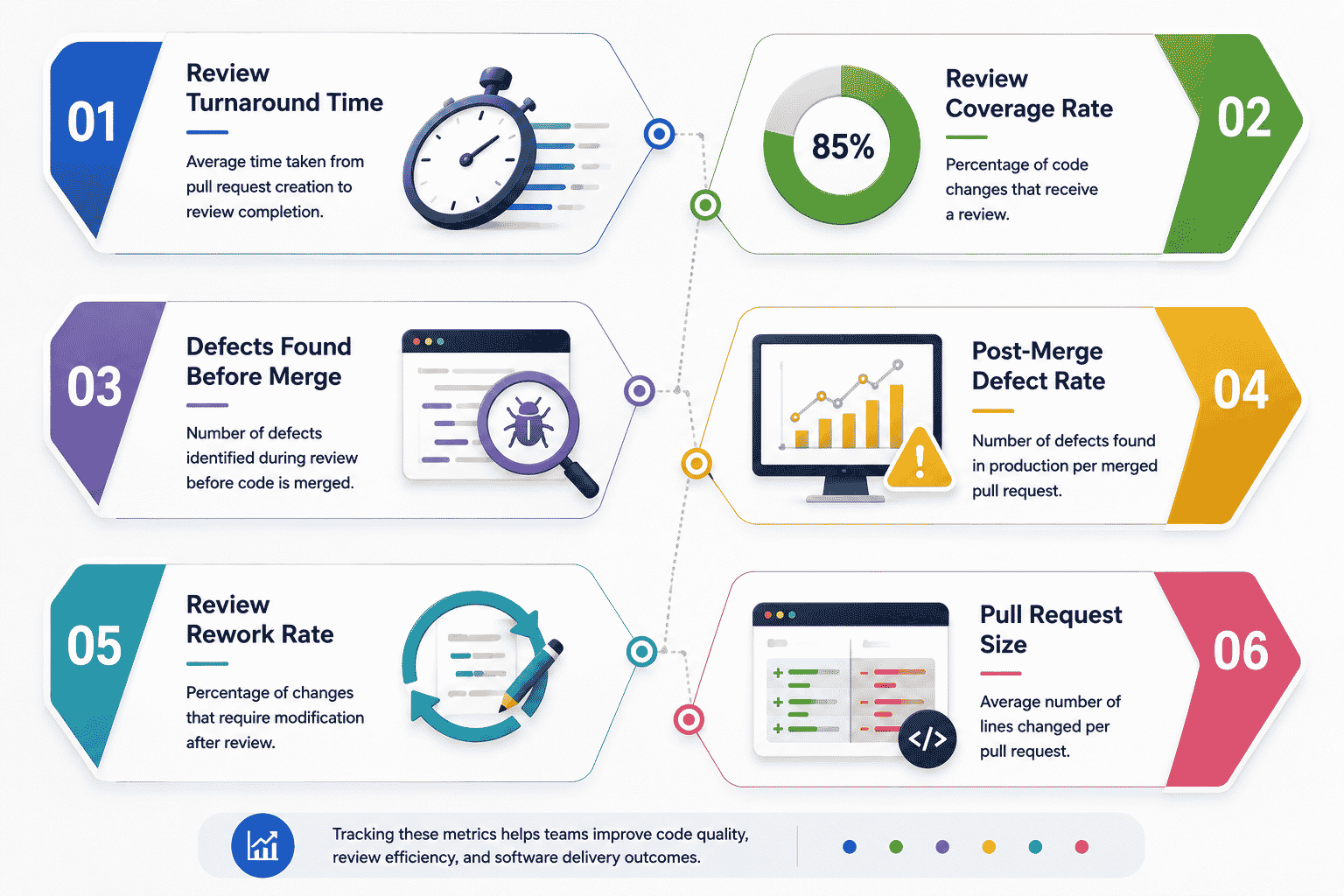
Numbers make it easier to see whether a code review process is actually working, not just whether it feels thorough. These six metrics cover speed, depth, and outcomes so teams can spot weak points instead of guessing.
Review Turnaround Time
Track how long a pull request waits before someone picks it up. Slow turnaround stalls entire teams, especially when multiple developers are blocked waiting on the same approval to move forward.
A healthy target keeps most reviews starting within a day. Anything longer usually points to reviewer overload or unclear ownership over who's responsible for picking up new requests.
Review Coverage Rate
This measures what percentage of changed code actually gets a reviewer's attention line by line, rather than a quick skim before approval. Low coverage often hides in large pull requests that get rubber-stamped under time pressure.
Tracking this over time reveals whether reviews are getting more thorough or slipping as deadlines tighten. A dropping coverage rate is usually an early warning sign worth addressing.
Defects Found Before Merge
Count how many issues reviewers catch before code reaches the main branch. A rising number here often means the review process is working well, not that code quality is getting worse.
This metric works best alongside others, since a low count could mean clean code or a review that missed things entirely. Context from other metrics helps tell those two situations apart.
Post-Merge Defect Rate
This tracks bugs discovered after code ships, tied back to whether they were reviewable in the first place. A high rate here suggests reviews are missing issues that should have been caught earlier.
Comparing this against defects found before merge shows the real effectiveness of the review process, not just how many comments got left on a pull request.
Review Rework Rate
This measures how often a pull request needs significant changes after initial review, rather than a quick fix or two. High rework usually points to unclear requirements or a review that missed structural problems early.
A high rate here also signals wasted time for both the author and reviewer. Catching bigger issues in the first pass saves multiple rounds of back and forth later.
Pull Request Size
Average pull request size affects nearly every other metric on this list. Smaller pull requests get reviewed faster, more thoroughly, and with fewer defects slipping through unnoticed.
Tracking this over time shows whether a team is trending toward focused changes or sliding back into oversized submissions that are harder to review well, which also matters when collaborating with an external software development company partner on shared repositories.
How To Improve Your Code Review Process
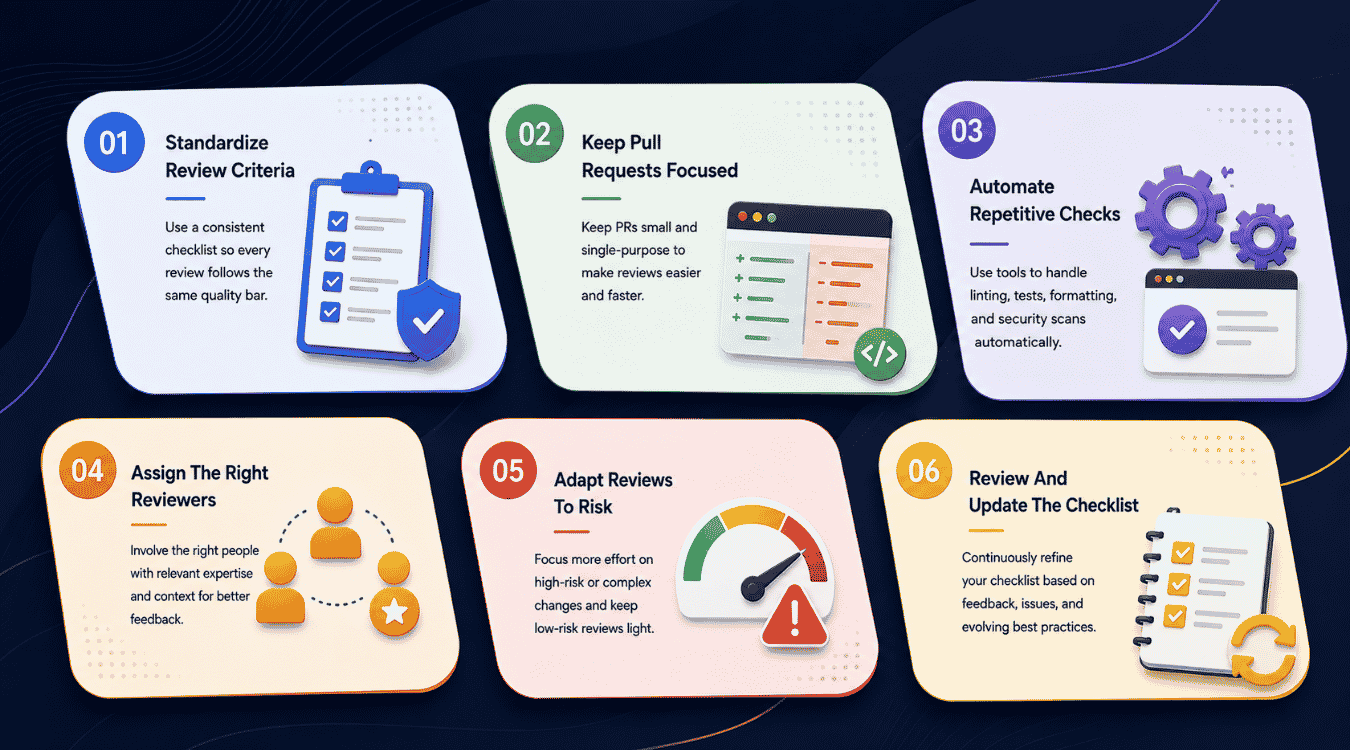
Good code review processes don't stay good on their own. They need regular attention, or teams slowly drift back into the same shortcuts a checklist was built to prevent.
Standardize Review Criteria
Every reviewer should be checking for the same things, not applying their own personal standards inconsistently. A shared checklist keeps expectations clear whether a senior developer or a new hire is doing the review.
Written criteria also make feedback less personal. A comment tied to an agreed standard lands differently than one that feels like a reviewer's individual preference.
Keep Pull Requests Focused
Encourage small, single-purpose pull requests instead of large batches of unrelated changes. A focused submission is easier to review carefully and easier to roll back if something goes wrong after merge.
This habit takes discipline to build across a team, but it pays off quickly. Reviewers spend less time untangling context and more time actually evaluating the logic in front of them.
Automate Repetitive Checks
Free up reviewer time by letting tools handle formatting, linting, and basic test runs automatically. Nobody needs a human catching a missing semicolon when a script can flag it instantly.
This shift lets reviewers focus entirely on logic, structure, and decisions that actually require judgment. Automation handles the repetitive work so people can handle the parts that matter more.
Assign The Right Reviewers
Not every pull request needs the most senior developer on the team. Match reviewer expertise to the type of change, saving deeper architectural reviews for the people best equipped to catch those issues.
This also spreads knowledge across the team over time. Rotating reviewers thoughtfully builds familiarity with more of the codebase instead of concentrating it in one or two people.
Adapt Reviews To Risk
A small documentation fix doesn't need the same scrutiny as a change touching payment processing. Match review depth to what's actually at stake if something goes wrong after merge.
This approach saves time without cutting corners where it counts. Low-risk changes move faster, while high-risk ones get the careful attention they actually deserve.
Review And Update The Checklist
A checklist built two years ago probably doesn't reflect how the team works today. Revisit it regularly and remove items that no longer apply while adding new ones based on recent mistakes.
Treat this as an ongoing habit, not a one-time setup task. The best checklists evolve alongside the codebase and the team using them.
Final Thoughts
A strong code review process protects more than code quality. It protects the people who maintain that code long after the original pull request is merged and forgotten. Checklists work because they remove guesswork, giving reviewers a consistent way to catch functionality gaps, security risks, and structural issues before they become expensive problems in production. They also make room for judgment calls that automation still can't handle, like whether a solution actually fits the business problem it's solving. As AI-generated code becomes more common, that human layer of review matters even more, not less. Teams that treat their checklist as a living document, not a fixed rulebook, tend to catch more and argue less over time.