Release Notes Best Practices: How To Write, Publish, And Improve Updates
by Daniel Wright | Aug 20, 2026 | Startup & Product Growth
Table of Contents
A new feature can take weeks to build, yet users may miss it completely if the release note is vague or buried. Good release notes close that gap. They explain what changed, why it matters, and what users should do next in plain language. Clear updates can also support feature adoption, reduce confusion, and build trust.
Strong release notes do more than list bug fixes or technical updates. They turn each release into a useful communication touchpoint. The best ones are concise, easy to scan, and written for the target audience rather than copied from commit messages or pull requests.
In this article, we’ll cover release notes best practices for writing, reviewing, publishing, sharing, and improving updates users can understand.
What Are Release Notes
Release notes are short updates that explain what changed in a new release of a software product. They usually cover new features, bug fixes, improvements, known issues, and any action users may need to take. Good release notes focus on user impact, not raw technical language or code changes.
Product release notes also connect the work of developers and the product manager with the people using the app. Instead of copying commit messages or pull requests, teams should write release notes in plain language and add relevant links when users need more details. GitHub also treats features, bug fixes, changes, and known issues as common release-note categories.
A clear release note helps users understand the new version quickly while keeping product updates easy to track and reference, especially when it fits into a structured software development life cycle.
What Should You Include In Release Notes?
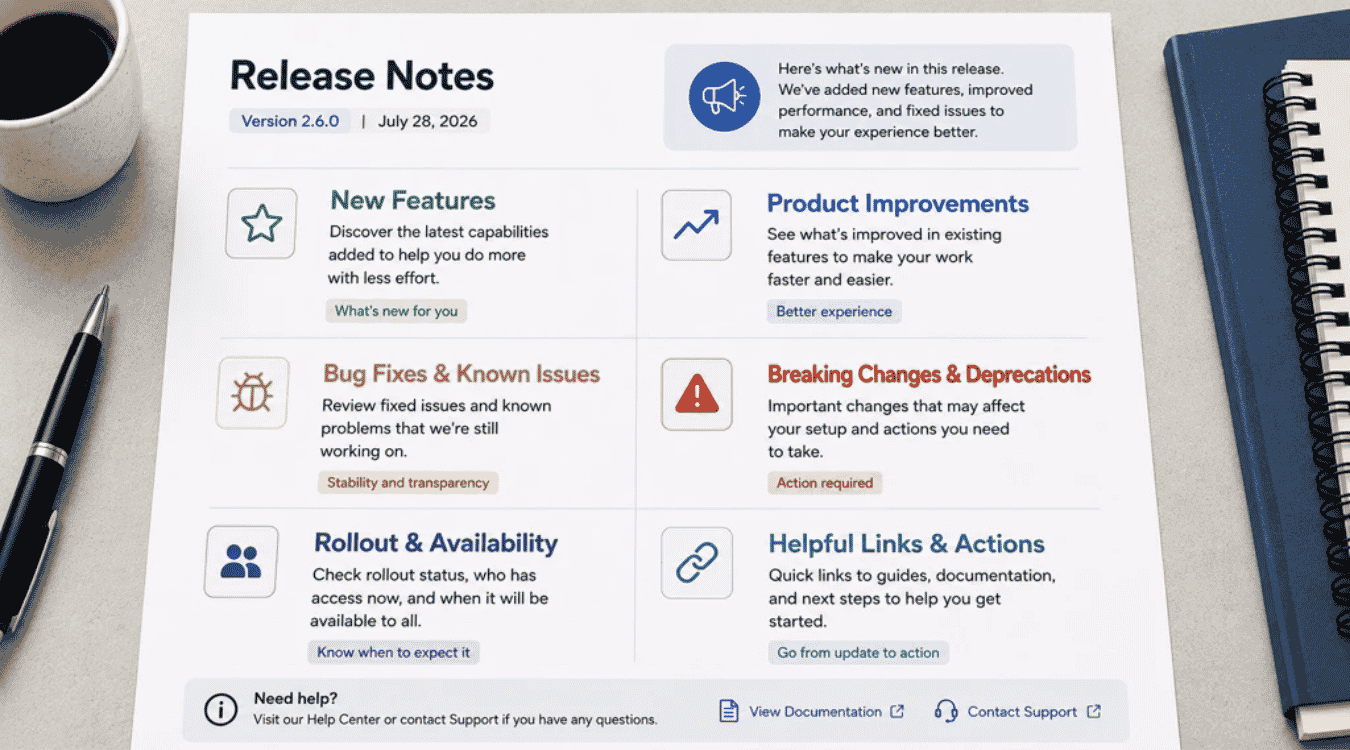
Release notes should give users the information they need without making them hunt for it or dig through technical details. A useful update covers what changed, who it affects, why it matters, and what users should do next.
New Features
New features usually deserve the most attention because they show how the product is evolving. Start with the feature name, then explain what users can do with it and why it matters. Avoid copying technical details from pull requests or commit messages.
A short screenshot, GIF, or relevant link can help users understand the added feature faster. Pendo’s current product benchmarks show that best-in-class products have a 15.6% feature adoption rate, which makes clear feature communication important after a new release. Focus on value, not the code behind it.
Product Improvements
Product improvements cover useful changes to features that already exist. Examples include faster workflows, simpler navigation, better search, or clearer settings. Tell users what feels different in the new version and how the change makes their work easier.
Keep the explanation short and specific. “Reports now load faster” is more useful than “performance improvements were made.” If the update changes a familiar workflow, add a screenshot or relevant documentation. Good release notes help users notice improvements they might otherwise miss and show that the software continues to improve based on real needs and user feedback.
Bug Fixes And Known Issues
Bug fixes tell users which common problems have been fixed, while known issues explain problems that still remain. Keep both clear. State what was wrong, what changed, and whether users need to take any action.
GitHub treats bug fixes and known issues as separate release note categories. Its guidance says a known issue should explain who is affected, what users may see, and what they should do next. That level of detail builds trust. Avoid vague notes such as “minor bugs fixed.” Users get more value from a clear explanation of the problem and its current status.
Breaking Changes And Deprecations
Breaking changes and deprecations need more detail than normal product updates. Tell users exactly what will stop working, who is affected, and when the change takes effect. Add the version number or date when it helps users plan.
Required action should stand out. Link to migration steps, updated documentation, or additional resources so technical users can act quickly. Non-technical users may need a simpler explanation of the impact. Never hide a major change inside a long list of notes. Clear warnings give customers time to prepare and reduce confusion after the release.
Rollout And Availability
Not every new feature reaches every user on the same day. Release notes should say whether a feature is in beta, limited release, phased rollout, or general availability. That prevents users from looking for features they cannot access yet.
Adobe Analytics provides a strong current example. Its July 2026 release notes list separate rollout start and general availability dates, while Adobe says feature flags can scale access from 0% to 100% over time. Use the same clarity in your product release notes. State who has access now and when broader access is expected.
Helpful Links And Actions
Helpful links let users move from a high-level summary to the details they actually need. Link to relevant documentation, tutorials, setup guides, migration instructions, or support pages. Keep the main release note concise instead of packing every technical detail into one update.
Add a clear call to action when users need to do something. Phrases such as “View setup steps,” “Read the migration guide,” or “Try the new feature” work well. Make sure every link matches the release and still works after publication. Useful links turn release notes into an easy path from awareness to action.
How To Write Release Notes Step By Step
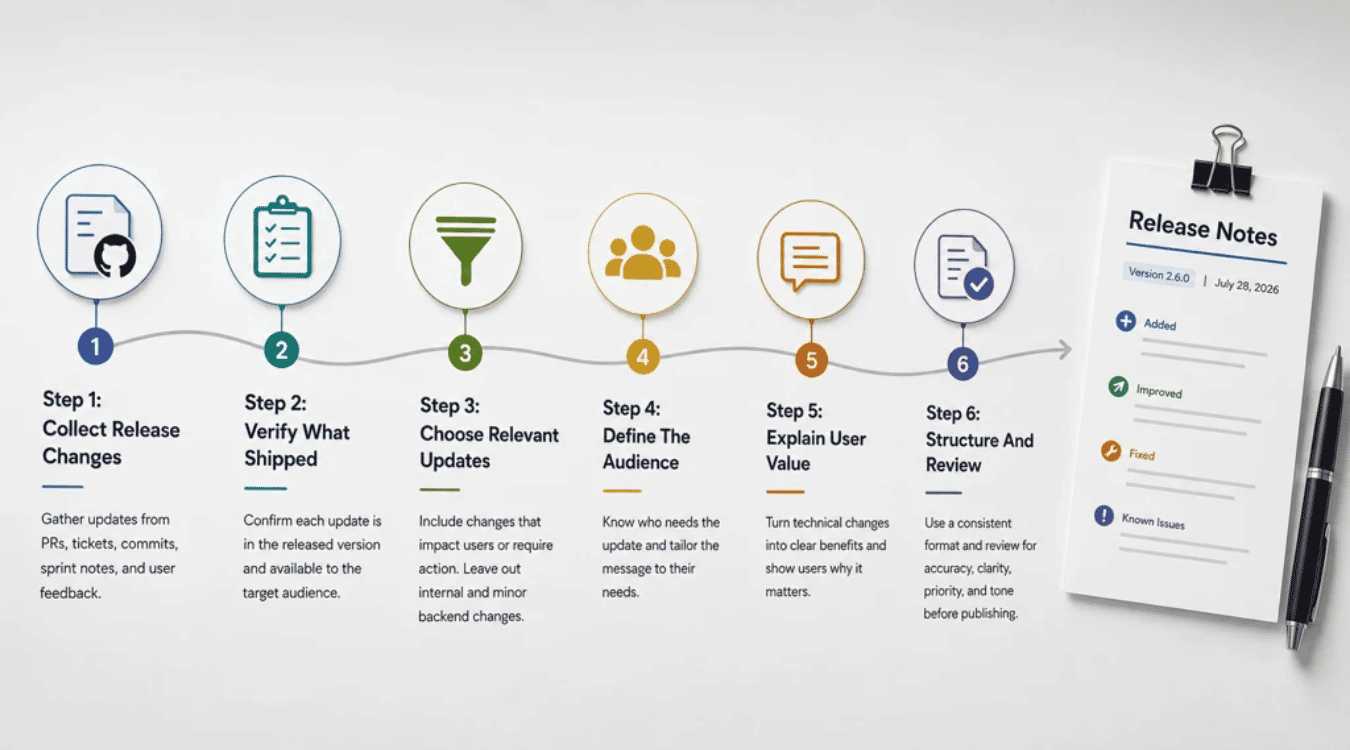
A clear process makes release notes easier to write and easier to trust. Each step should turn raw technical updates into useful product communication. The goal is simple: capture what changed, confirm it shipped, and explain why users should care.
Step 1: Collect Release Changes
Start with the work your team already tracks. Pull changes from pull requests, issue tickets, commit messages, sprint notes, and the version control system, ideally flowing from a consistent code review checklist and process. A product manager can also check feature requests and user feedback to catch changes that matter to customers.
GitHub reported 43.2 million pull requests merged per month in 2025, up 23% year over year. That scale shows why memory is not enough. Keep release details close to the source. A shared release field or checklist makes it easier to create release notes without missing important updates, especially when you align them with structured software testing strategies for effective quality assurance.
Step 2: Verify What Shipped
A merged pull request does not always mean a feature reached users. Check the new release against deployment records, QA results, feature flags, and the final version number. Confirm that each bug fix, improvement, and new feature is actually available to the target audience.
GitHub recorded nearly 986 million commits in 2025. High release velocity makes verification more important, not less and should be backed by a structured software release checklist. Ask one simple question before you publish: “Can users access this now?” If the answer is no, change the wording or leave the update out until it truly ships.
Step 3: Choose Relevant Updates
Not every code change belongs in product release notes. Choose updates that affect how users work, what they can access, or what action they need to take. Major releases, new features, bug fixes, known issues, and breaking changes usually deserve attention.
Internal refactors and small backend changes may stay in technical documentation instead, while larger modernization efforts may require teams to choose between a refactor vs rebuild approach or a broader replatform vs rebuild strategy for long-term platform growth. ClickUp recommends triaging changes before publication rather than announcing everything. That keeps release notes concise and useful. Lead with the most important updates, then group smaller improvements under clear labels so users can scan the page quickly.
Step 4: Define The Audience
Decide who needs the update before you write release notes. Technical users may want version details, API changes, or relevant documentation. Non-technical users usually need a clear explanation of what changed and how it affects their work.
A single release can need more than one message. Admins, developers, regular users, and internal teams may care about different parts of the same new version. Keep the target audience in mind as you choose technical details, screenshots, links, and examples. Clear audience choices help ensure users get useful information without extra technical jargon.
Step 5: Explain User Value
Users care less about the code change than the result. Turn technical language into a simple benefit. Instead of “refactored notification service,” say that notifications now arrive more reliably. That gives users a clear reason to care about the release.
Good release notes should answer two questions: what changed, and why does it matter? Add a short call to action when users need to try a feature, update a setting, or read more. Relevant links and additional resources can handle the deeper details. Keep the main message focused on the outcome users can see.
Step 6: Structure And Review
Use a consistent format so readers know where to look. Group updates under labels such as Added, Improved, Fixed, and Known Issues. Add the date, version number, a high-level summary, and relevant links when they help. Bullet points work well for short technical updates.
A final review should check accuracy, clarity, priority, and tone. GitDoc recommends confirming that the item shipped, that non-engineers can understand it, and that the most important changes appear first. Check every link and screenshot too. One careful review can prevent confusing or incorrect notes from being published.
What Are The Best Practices For Release Notes?
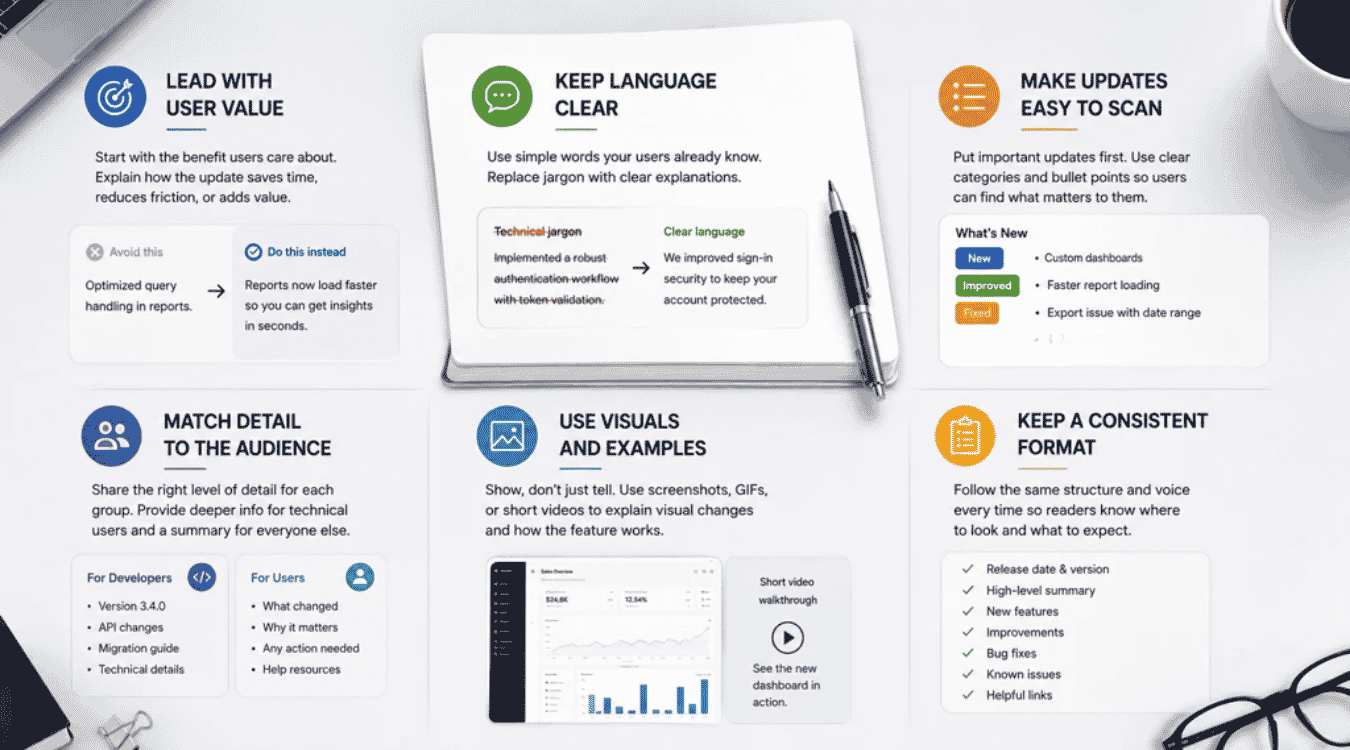
Release notes best practices focus on one goal: help readers understand value fast. Clear language, useful detail, strong structure, and the right visuals make product updates easier to follow without forcing users to dig through technical noise.
Lead With User Value
Great release notes start with the result users care about, not the work your team completed. Say what changed, then explain how the update saves time, removes friction, or adds a useful capability. Pendo’s 2026 benchmarks show best-in-class products reach a 15.6% feature adoption rate, so clear product communication matters after release.
Avoid opening with code changes or internal project names. “Reports now load faster” tells customers more than “optimized query handling.” A clear benefit helps users understand why a new feature or improvement deserves their attention.
Keep Language Clear
Plain language makes release notes useful to more people. Replace technical jargon with words customers already use in the app. Keep each update short when possible, then add relevant links for readers who need technical details or setup steps.
ClickUp recommends leading with user impact rather than the implementation behind the change. Slite gives similar advice for customer-facing notes. Technical users can still get deeper documentation, while non-technical users get a clear explanation first. Good release notes should never make people decode commit messages just to understand what changed.
Make Updates Easy To Scan
Most users scan release notes instead of reading every line. Put the most important updates first. Use clear category labels such as New, Improved, Fixed, and Known Issues. Bullet points also help readers find the product updates that affect them.
Appcues recommends front-loading what changed and who it affects. Keep each entry focused on one idea. Short headings, a one-sentence summary, and a predictable order make the page easier to use. Long blocks of text hide useful details and make even major releases feel harder to understand.
Match Detail To The Audience
The right level of detail depends on the target audience. A software developer may need a version number, API change, or migration link. A regular customer may only need to know what changed, why it matters, and whether any action is required.
Slite notes that audience choice affects tone, length, technical detail, and even where release notes are published. Create separate versions when one message cannot serve everyone well. Technical users can follow relevant documentation, while non-technical users get a shorter explanation without extra technical language.
Use Visuals And Examples
Screenshots, GIFs, and short videos can explain a visible product change faster than a long paragraph. Use a screenshot to show a new button or layout. Use a short clip when the feature needs a few steps to understand.
The 2026 Wyzowl survey found that 63% of people prefer a short video when they want to learn about a product or service. Visuals still need a purpose, though. Add them when they clarify the update, not just to decorate the page. Include a short caption and relevant documentation when users need more help, especially for complex infrastructure changes such as Kubernetes security in 2026 where diagrams and examples can make risks and mitigations clearer.
Keep A Consistent Format
A consistent format helps users know where to look every time a new release is published. Keep the same order for the date, version, high-level summary, new features, improvements, bug fixes, known issues, and relevant links.
Slite recommends a consistent voice and structure because readers learn how to scan familiar release notes. Appcues makes the same point about keeping the shape of each update predictable. A reusable template can also help a product manager or software developer create release notes faster without leaving out important details.
How To Review, Publish, And Share Release Notes
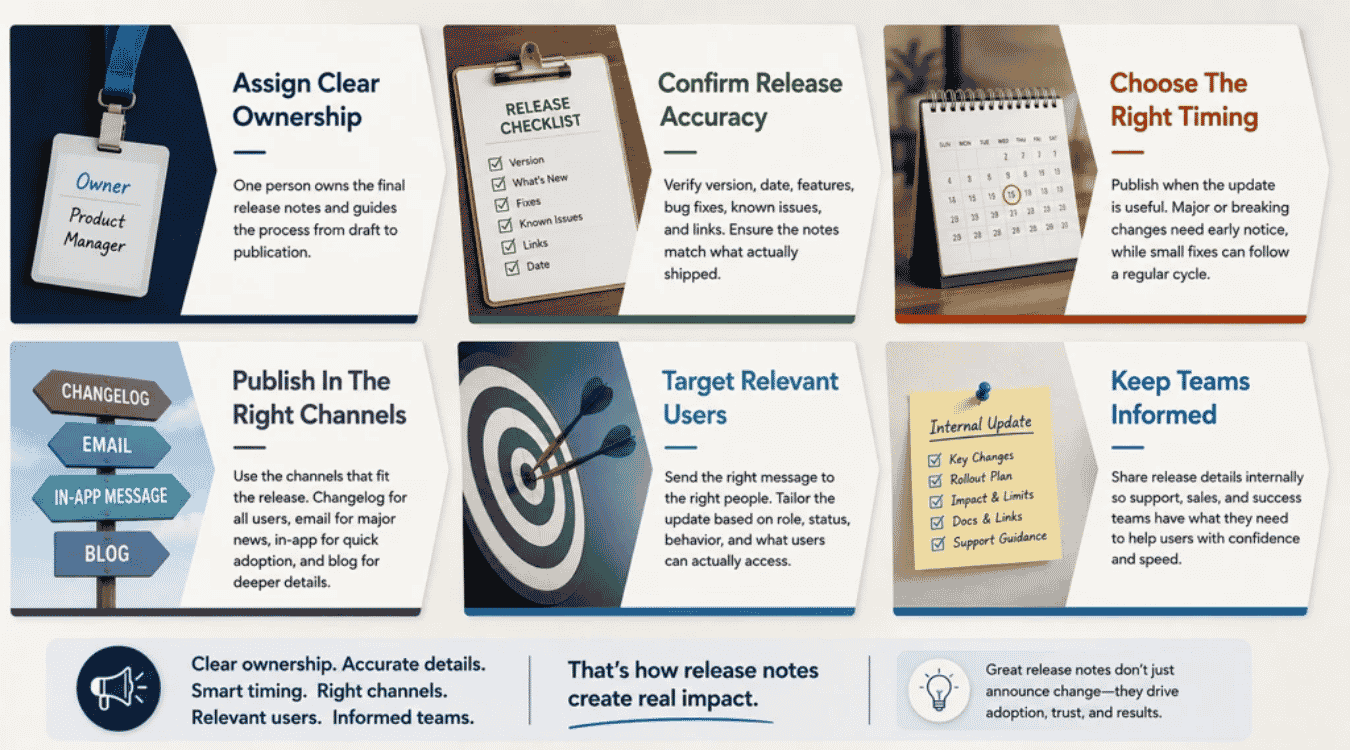
A good release note still needs the right review and distribution process. Clear ownership, accurate details, smart timing, and the right channels help each release reach the people who need it without creating noise or confusion.
Assign Clear Ownership
Release notes work better when one person owns the final result. Engineering can provide pull requests, commit messages, and technical details. A product manager or documentation owner can decide what matters to users and how it should be written.
Slite recommends a clear human owner for the final editorial decision, even when AI helps generate release notes from tickets or code changes. Ownership keeps the process moving and avoids last-minute confusion. Set clear roles for drafting, reviewing, approving, and publishing as part of broader engineering team management for faster product delivery. Everyone can contribute, but one person should be responsible for the final version.
Confirm Release Accuracy
Never publish release notes before you confirm what actually shipped. Check the version number, release date, feature status, bug fixes, known issues, and relevant links. Make sure the written update matches the product users can access.
GitDoc recommends checking three things before publication: accuracy, clarity, and priority. The review should confirm that the feature shipped in the form described and that important changes appear first. ClickUp also recommends cross-team review from product, engineering, and support. That extra check can catch wrong dates, broken links, missing limits, or unclear technical language.
Choose The Right Timing
Release notes should reach users when the update becomes useful to them. Major releases may need an announcement at launch. Breaking changes or migrations need more notice so customers have time to act. Small bug fixes can often wait for a regular update cycle.
Slite suggests grouping related releases on a roughly bi-weekly rhythm when that matches the team’s release flow. ClickUp also notes that timing should match the impact of the change. If users must take action by a set date, publish early enough to give them a fair chance to prepare.
Publish In The Right Channels
One channel will not work for every release. A public changelog gives users a permanent record. Email works well for major releases. In-app messages are useful for features users can try right away. Blog posts can explain large updates in more detail.
Appcues recommends matching the channel to the importance and context of the release. Its 2026 guide treats the changelog as the main home for release notes, with email and in-app messages used for added reach. Choose fewer, better channels instead of sending the same message everywhere.
Target Relevant Users
Not every user needs every product update. An API change may matter to a software developer but mean little to a regular customer. An admin feature should reach admins, while a beta release should go to users who actually have access.
Appcues recommends audience segments based on behavior, user status, role, and device. That makes release communication more useful and less noisy. Match the message to the target audience, then adjust the technical details, links, and call to action. Relevant release notes help keep users engaged because each message feels connected to their actual work.
Keep Teams Informed
Internal teams need release notes too. Support should know what changed before customer questions arrive. Sales may need context for major new features. Customer success teams need clear details on limits, rollout plans, user impact, and repository decisions such as a monorepo vs polyrepo setup that can influence how changes ship.
ClickUp reports that knowledge workers send about 25 messages a day just to find information, which shows how poor internal communication creates extra work. A shared internal release page can reduce that problem. Keep the date, version, key features, known issues, relevant documentation, and support guidance in one place so teams can answer users with confidence.
How To Measure And Improve Release Notes
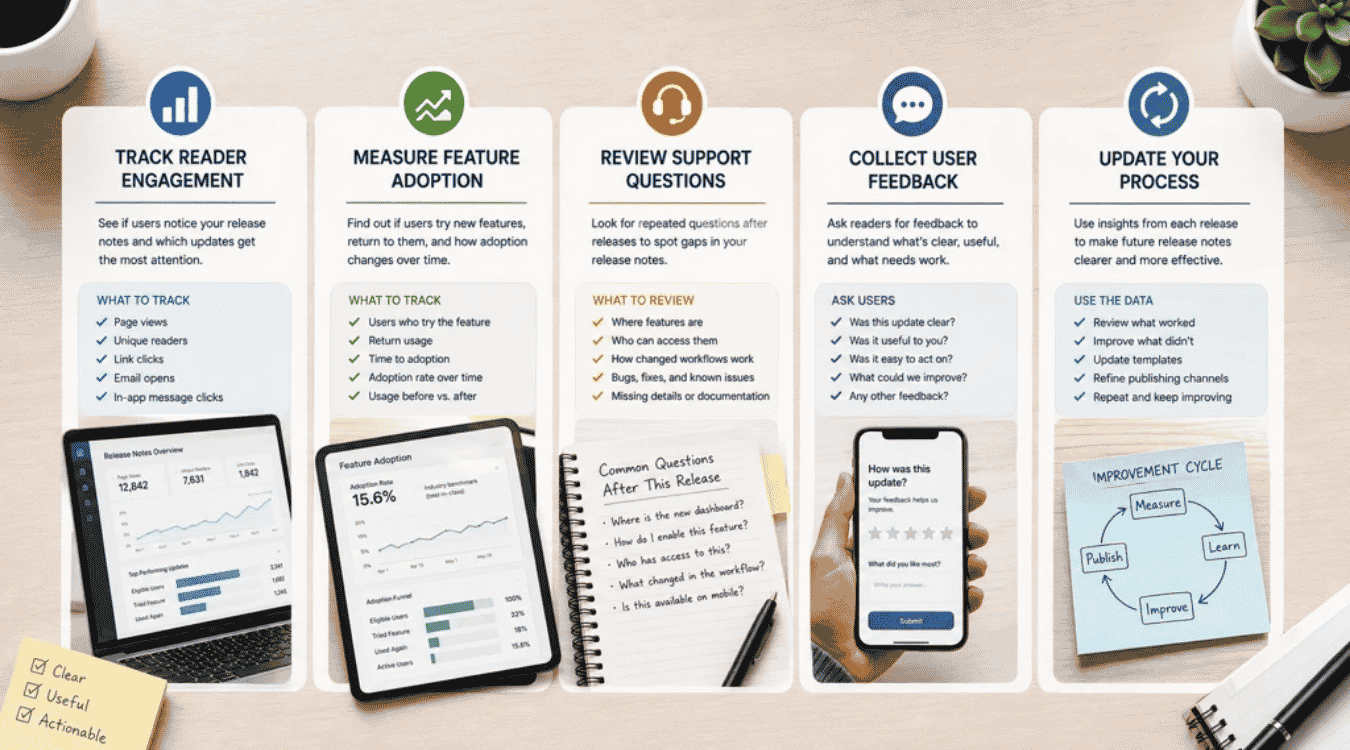
Release notes should improve with every product update. Data shows what users notice, what they try, and where they still need help. Track a few useful signals, then use what you learn to make future release notes clearer and more effective.
Track Reader Engagement
Start with simple engagement data. Track page views, unique readers, link clicks, email opens, and in-app message clicks. Those numbers show whether users notice your release notes and which product updates draw the most attention.
Appcues recommends choosing one main success metric and a few supporting metrics for product launches. Useful signals include message engagement, conversion from announcement to action, and survey responses, especially when you connect them to quality gates such as API testing tools in your CI/CD pipeline. Compare results across several releases instead of judging one update alone, and consider how changes in deployment frequency metrics relate to your communication quality. A steady drop in clicks may point to weak headlines, poor timing, or release notes that feel too technical.
Measure Feature Adoption
Reader engagement tells you who saw the message. Feature adoption tells you whether users acted on it. Track how many eligible users try a new feature, how often they return, and how long adoption takes after the release.
Pendo’s current benchmarks use data from more than 6,800 apps across 2,500 customers. Best-in-class products have a 15.6% feature adoption rate by its benchmark measure. Compare usage before and after your release note goes live. If many users read the update but few try the feature, improve the message, call to action, or related tutorial, and connect those insights to broader engineering KPIs for faster releases and better quality.
Review Support Questions
Support requests can reveal what your release notes failed to explain. Look for repeated questions after a new release. Users may ask where a feature is, who can access it, or how a changed workflow works.
Group those messages by feature, bug fix, or known issue. Productboard recommends pulling product feedback from support tickets, emails, calls, surveys, and other customer channels into one place. Repeated questions give you clear topics to fix. Add missing details, relevant documentation, screenshots, or a better explanation to future notes. The goal is not zero questions, but fewer avoidable ones.
Collect User Feedback
Analytics show what users do. Feedback helps explain why they do it. Ask readers whether an update was clear, useful, and easy to act on. A short in-app survey or feedback link can work well after major releases.
Appcues recommends combining adoption data with direct user feedback because each reveals a different part of the story. Productboard also suggests connecting feedback from support tickets, emails, and research to specific feature ideas. Look for repeated comments rather than one-off opinions. If users understand the release but still avoid the feature, the problem may sit with the product rather than the release notes.
Update Your Process
Use the data from each release to improve the next one. Review which headlines earned clicks, which links users followed, which features gained adoption, and which updates caused support questions, alongside underlying quality signals like your technical debt ratio benchmarks and practical approaches that help you reduce technical debt faster with smart code. Keep what worked and change what did not while following a broader technical debt guide for software teams.
Treat the process as a cycle, not a one-time task. Pendo’s recent product adoption guidance recommends reviewing engagement and adoption metrics over time instead of treating measurement as a box to check. Update your template, review steps, publishing channels, and target audience as patterns become clear, especially if your product depends on complex architectures like headless commerce platforms that evolve quickly. Small changes can make future release notes more concise, useful, and easier for users to act on.
Final Discussion
Release notes work best when they help users understand change without extra effort. Clear updates explain what changed, why it matters, and what users should do next. Strong release notes also keep teams aligned and give customers a reliable record of product progress.
The best approach is simple. Lead with user value. Use plain language. Keep each update concise. Add relevant links, screenshots, or calls to action when they help. Match the message to the target audience and publish it where users can easily find it. Current guidance also shows that accurate ownership, clear structure, and smart distribution make release notes more useful.
Treat every new release as a chance to communicate better. Track engagement, collect feedback, and use what you learn to improve the next update.