Containerization Vs Virtualization: Key Differences And When To Use Each
by Rhea Collins | Aug 23, 2026 | Technology & Innovation
Table of Contents
- What Is Virtualization
- What Is Containerization
- Containerization Vs Virtualization: Core Differences
- What Each Choice Costs Your Team
- How Containerization And Virtualization Affect DevOps Workflows
- When To Choose Virtualization
- When To Choose Containerization
- How To Use Containers And Virtual Machines Together
- Common Containerization And Virtualization Mistakes To Avoid
- How GainHQ Approaches This In Custom Software Projects
The decision between containers and virtual machines used to be a niche infrastructure question. Now it shapes how fast a product ships, how much a hosting bill runs, and how easily a team can move an application between environments. Both technologies isolate workloads, but they do it in fundamentally different ways: one wraps an entire operating system around your app, the other shares a kernel and packages only what the app needs.
That difference cascades into everything from boot time to security posture to what your dev team needs to know. Founders and engineering leads scoping a new build, or deciding how to modernize an existing one, need more than definitions. They need a clear read on what each approach actually costs and where it breaks down.
What Is Virtualization
Virtualization uses a hypervisor to split physical hardware into several independent virtual machines. Each one runs its own operating system, complete with virtual CPU, memory, and storage, so a single server can support multiple operating systems side by side without conflict. A Type 1 hypervisor sits directly on the hardware for better performance; a Type 2 runs on top of a host operating system kernel instead. Even a server nearing its final day before decommissioning can still run several VMs reliably until replacement.
What Is Containerization
Containerization packages an application with only the libraries and dependencies it needs, then runs it on the host operating system instead of a full guest OS. Containers share the host's kernel and hardware resources, which makes them far lighter than multiple virtual machines running on a single physical server. Where virtualization and containerization both aim to make better use of hardware, containers skip the step of giving each workload its own operating system. That's why you can pack far more containers onto the same hardware than you could with VMs.
Containerization Vs Virtualization: Core Differences
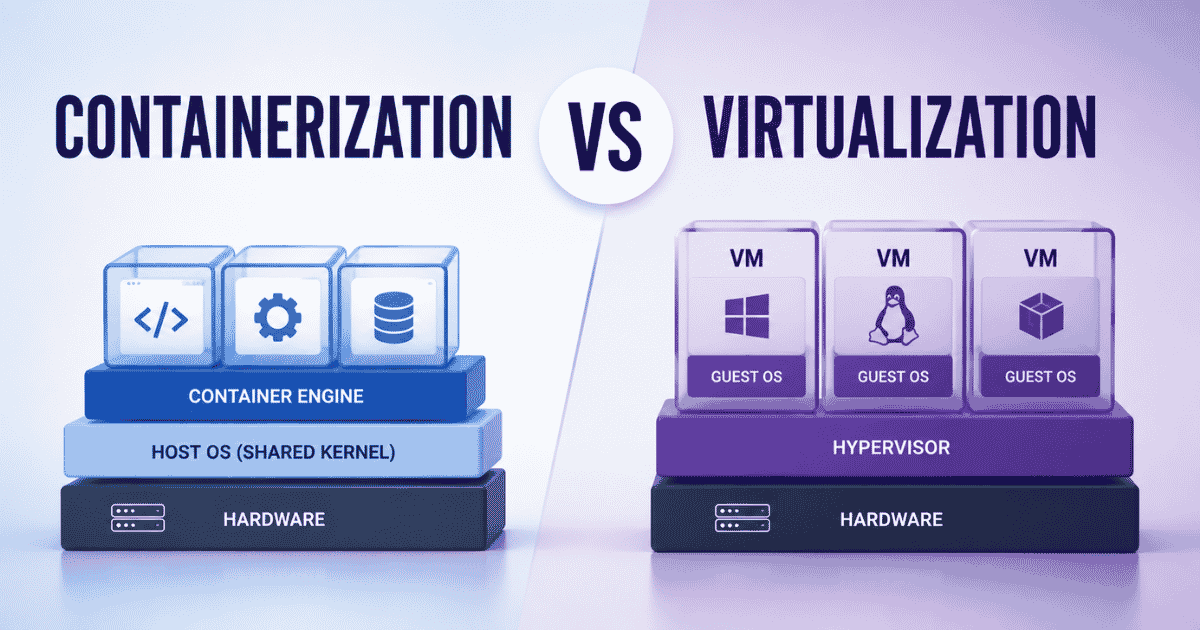
Everything downstream traces back to the hardware layer. Virtualization adds a hypervisor between workloads and underlying hardware, while containerization skips that layer entirely, reshaping resource utilization across the rest of the stack.
Metric | Virtualization | Containerization |
|---|---|---|
Startup Time | 30 seconds to a few minutes. Full OS boot, kernel load, and service init | Milliseconds to a few seconds. Runtime just starts the process on the existing kernel |
Resource Overhead | 1 to 2 GB+ reserved per instance, held even when idle | 100 to 200 MB typically, released back when the process no longer needs it |
Image Size | 10 to 50 GB, includes a full guest OS, drivers, and libraries | 100 MB to 1 GB, app plus only its required dependencies |
Density Per Host | 10 to 20 VMs on typical enterprise hardware | 100 to 200 containers on the same hardware |
Isolation Level | Hardware level, enforced by the hypervisor. Strongest boundary available | Process level, enforced by namespaces and cgroups. Lighter, shares host kernel |
OS Requirement | Each instance runs its own full OS, so Windows and Linux can coexist on one host | Shares the host OS kernel, so containers must match the host's OS family |
Portability | Format dependent (OVA, VMDK), usually needs conversion between hypervisors | Highly portable, the same image runs anywhere a compatible runtime exists |
Scaling Method | Mostly vertical: add CPU and RAM to existing instances, or boot new full VMs | Horizontal by design: spin up new instances in seconds through orchestration |
Management Overhead | Lower per-instance complexity, but a heavier infrastructure footprint | Higher orchestration complexity at scale (Kubernetes, etc.), lighter footprint per unit |
Best Fit | Legacy applications, mixed OS environments, workloads needing strict isolation | Microservices, CI/CD pipelines, cloud native apps needing fast iteration |
Architecture And Isolation Model
Virtual machines emulate a physical computer down to the hardware layer. Each VM boots an entire operating system, complete with its own kernel, drivers, and system libraries, which is why several VMs on one host effectively run as separate operating systems stacked on shared silicon.
Containers take a different path. Rather than emulating hardware, a container runtime creates isolated namespaces on top of the host kernel, so an app gets process-level separation without duplicating the OS underneath it. Isolation strength trades off against overhead: VMs isolate harder, containers isolate lighter.
Resource Usage And Overhead
Every VM carries a full operating system, so allocated CPU and memory stay reserved even when the workload sits idle. A four-gigabyte VM holds that memory regardless of what the app is doing, and that reservation is often the biggest source of waste on a physical server.
Containers flip that equation. They draw only what the running process needs, and the runtime reclaims the rest right away. Resource efficiency gains like this are why teams pack more containerized workloads onto the same box without expanding the hardware budget.
Startup Speed And Performance
Boot time is where the gap becomes obvious. A VM has to initialize BIOS, load a kernel, and start system services before anything runs, a process taking anywhere from thirty seconds to a few minutes.
Containers skip all of that. A container engine launches the app's process directly on the existing kernel, often in under a second. Speed differences like this matter most when scaling multiple applications under load, though legacy applications tied to a specific kernel version sometimes still need the fuller environment a physical machine provides.
Portability Across Environments
A container image bundles the app, its dependencies, and its config into one artifact that runs the same way on a laptop, a staging cluster, or a production cloud. Consistency like this is the core promise of container technology: build once, run anywhere a compatible runtime exists.
VM portability works differently. Formats like OVA or VMDK let you move virtual environments between hosts, but the images are large and often tied to a specific hypervisor, so moving between different operating systems or cloud providers usually means a conversion step.
Security And Isolation
VMs isolate at the hardware level, so a compromised guest stays contained inside its own operating system kernel and can't easily touch its neighbors. Containers share the underlying operating system with every other container on the box, which is efficient but means a flaw in the host OS kernel can theoretically expose more than one workload at once.
Risk like this is manageable with namespaces, control groups, and tools like seccomp or AppArmor, but it's a real architectural trade-off rather than a configuration mistake. Regulated workloads often lean on VM isolation for this reason.
Scalability And Workload Density
Density is where containers pull ahead by a wide margin. Dozens of containers can share the same physical computing resources that would otherwise host a handful of VMs, since each one skips the overhead of a full guest OS.
Running multiple containers on one host is routine; running the equivalent number of VMs on the same hardware usually isn't realistic. Efficiency like that lets teams handle traffic spikes by spinning up new instances in seconds. VMs scale too, but mostly by adding CPU and memory to existing instances rather than multiplying horizontally with fewer resources per unit.
What Each Choice Costs Your Team
Cost isn't just the hosting bill. Virtualization software licensing (VMware, Hyper-V) adds a real line item that container engines like Docker or Podman don't carry, since most core tooling is open source. Running multiple VMs on a single physical host also means budgeting for a bigger host system upfront, because each guest needs its own OS and a full resource reservation. Container-based setups shift the cost elsewhere: less spend on raw hardware, more on skills. Someone on the team needs to actually run and secure a container engine, and Kubernetes expertise doesn't come cheap to hire for. Security risks factor in too. Multiple virtual computers isolate cleanly with less ongoing hardening; containers need active investment in runtime protection across different environments to hold that line, and both approaches come with hidden costs in software development that teams often underestimate.
Cost Factor | Virtualization | Containerization |
|---|---|---|
Licensing | Often paid (VMware, Hyper-V); open source options (KVM, Xen) exist but need more in-house setup | Mostly open source (Docker, Podman, Kubernetes); cost shifts to setup and management time |
Hardware/Hosting | Higher, since each VM reserves its own OS overhead, leaving fewer workloads per physical host | Lower, since higher density per host cuts hosting spend for the same workload count |
Team Skills Needed | Hypervisor administration and virtualization technology fundamentals, a widely available skill set | Container orchestration, Kubernetes especially, drawing from a smaller talent pool with higher salary expectations |
Onboarding Time | Faster, since most sysadmins already know VM management | Slower, since teams often need dedicated ramp-up on container tooling and orchestration |
Ongoing Security Spend | Lower, since hardware-level isolation needs less continuous hardening | Higher, since a shared host OS means more investment in runtime security and monitoring |
Migration Cost (Legacy Apps) | Lower, since legacy apps usually run as is inside a VM | Higher, since apps often need refactoring to run well as containers |
How Containerization And Virtualization Affect DevOps Workflows
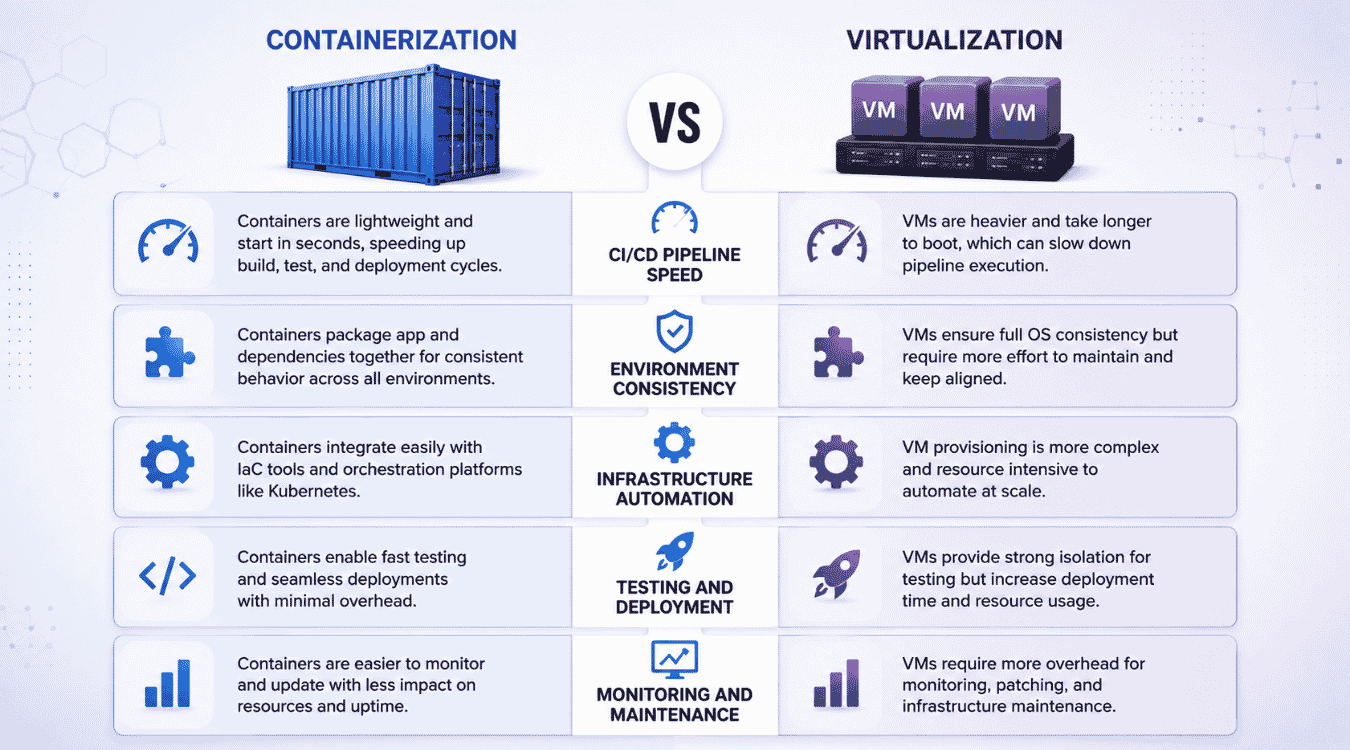
Every stage of a DevOps pipeline reacts differently depending on what sits underneath it. Virtualization vs containerization isn't just an infrastructure question; it shapes pipeline speed, consistency, and how a team maintains systems day to day, and it directly affects how you design observability for modern SaaS systems.
CI/CD Pipeline Speed
Pipelines built around a container runtime move faster because build and test stages skip the overhead of booting a complete operating system for every run. A job spins up, runs against isolated dependencies, and tears down in seconds, especially when paired with an API-first architecture for scalable systems that keeps services loosely coupled.
Pipelines that host virtual machines add real time to each stage, since provisioning complete virtual machines for test environments means waiting through a full boot cycle before any test executes. That delay compounds across dozens of daily builds, slowing feedback for the whole team.
Environment Consistency
Containers share the host kernel but package the app with its exact dependencies, so the same image behaves identically on a developer's laptop, in staging, and in production. Cloud native applications rely on this consistency to avoid environment-specific bugs entirely.
VMs get consistency a different way, by shipping the entire OS along with the app. It works, but the images are heavier, and small configuration drift between hypervisor versions can still introduce mismatches that containers simply don't experience.
Infrastructure Automation
Automation tools deploy applications faster against containers because there's less state to manage. A container orchestrator can recreate, replace, or scale instances in seconds without touching underlying computing resources beyond what the app actually needs.
Automating VM infrastructure takes more coordination. Provisioning scripts have to handle OS installation, patching, and configuration for each instance, which adds steps to the automation pipeline and more surface area where scripts can fail silently.
Testing And Deployment
Testing against containers catches issues fast, since a container runtime launches near instantly and mirrors production closely enough that "it works in staging" reliably means it works in production too. Rollbacks are just a matter of redeploying the previous image.
Testing against VMs takes longer per cycle because each test environment needs a fresh boot, but it's the safer bet when the app depends on OS-level behavior that a shared kernel can't replicate accurately.
Monitoring And Maintenance
Monitoring containers means tracking short-lived, fast-changing instances. Traditional tools built for static infrastructure often miss containers that spin up and disappear within minutes, so teams need observability built for that churn, often relying on SaaS monitoring tools to improve performance and UX.
Monitoring VMs is more straightforward since instances persist longer and behave like traditional servers. Patching a complete operating system on every VM does add recurring maintenance work that containerized setups mostly avoid by patching the host once.
When To Choose Virtualization
Virtualization makes sense the moment isolation matters more than efficiency. Legacy applications that require specific OS versions often can't run any other way, and a VM gives each one its own dedicated hardware footprint without touching what runs alongside it. That's a real advantage over containers, since containers share the host kernel by design and can't offer the same separation when workloads genuinely can't coexist safely, especially when you're deciding whether to refactor or rebuild an existing system.
Regulated environments lean the same direction. Financial services, healthcare, and government workloads often need strong isolation that satisfies an auditor, and hardware-level separation is the most straightforward way to prove it. Multi-tenant setups benefit too, since one tenant's VM staying fully separate from another's removes an entire category of risk.
Mixed-OS environments are another clear case. Running Windows and Linux side by side across multiple servers is simple with VMs and awkward without them. And while containers replace configuration with environment variables, some legacy systems just weren't built that way, which pushes infrastructure costs toward VMs by default rather than by choice.
When To Choose Containerization
Containerization wins the moment speed and density matter more than hard isolation. Microservices architectures are the clearest fit: each service runs as its own container instance, sharing the host OS instead of needing to emulate hardware the way a VM does, so services deploy and scale independently without dragging the rest of the app along; exactly the kind of trade-off you weigh in a microservices vs monolith architecture decision.
Development and testing environments benefit just as much. Containers provide a way to spin up an entire stack on a laptop in seconds, matching production closely enough to kill the classic "works on my machine" problem for good. CI/CD pipelines move faster for the same reason, since builds don't wait on a full OS boot, which becomes critical when planning a monolith to microservices migration.
Cloud-native apps built to run on bare metal or in the cloud interchangeably also favor containers, since one image runs anywhere a compatible runtime exists. And when a team needs to pack more workloads onto the same hardware without buying more resources, containers simply fit more instances per host than VMs ever could, aligning well with modern software architecture patterns for SaaS applications.
How To Use Containers And Virtual Machines Together
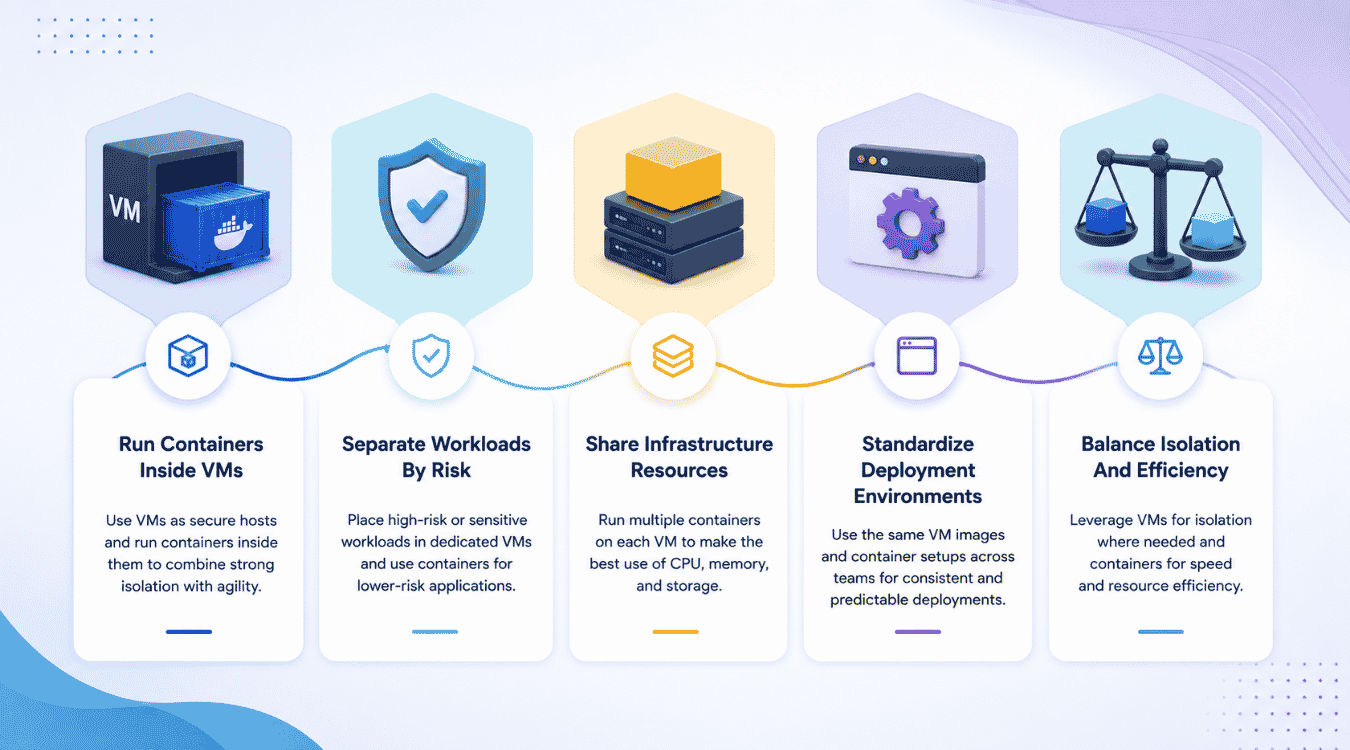
Most organizations don't pick one technology and stop there. They run both, matching each workload to whatever platform actually suits it, and the two approaches end up reinforcing each other more often than competing.
Run Containers Inside VMs
Major cloud providers already do this by default. Amazon ECS, Azure Kubernetes Service, and Google Kubernetes Engine all provision a VM layer first, then run containers on top of it. The VM gives tenant isolation; the containers give orchestration speed and density, but you still need to design for Kubernetes security in 2026 to keep that stack safe.
This setup means a compromised container stays contained inside its VM boundary rather than reaching other containers or other customers' workloads entirely. Teams get hardware-level isolation and container-level agility in the same stack, without picking just one.
Separate Workloads By Risk
Not every workload deserves the same isolation level. A database holding sensitive records fits better inside a VM, where a security incident can't spread to other containers sharing the same kernel. A stateless API layer can run in containers without that concern, especially when paired with strong observability practices for SaaS teams.
Batch processing jobs are a good example of low-risk, high-churn work: they spin up, do the job, and disappear, which suits containers perfectly. Sorting workloads this way keeps the highest-risk pieces behind the strongest isolation boundary available.
Share Infrastructure Resources
Resource sharing gets easier once VMs and containers coexist deliberately instead of by accident. A single VM can host dozens of containers, each running an independent service, while the VM layer handles the heavier lifting of resource allocation across the whole host.
This setup avoids the waste of running one giant VM per app and the risk of running everything flat with no isolation at all. Teams get container density without giving up the hardware boundary a VM provides underneath it.
Standardize Deployment Environments
A consistent base VM image, provisioned the same way across every cloud provider a team uses, removes a whole category of "it works here but not there" problems before containers even enter the picture.
Once that base layer is standardized, containers on top of it behave identically regardless of which provider is hosting them. Independent services deploy the same way whether they're running on-prem or across multiple clouds, since the container layer never has to account for host differences the VM already absorbed.
Balance Isolation And Efficiency
Neither technology alone gets both isolation and efficiency right for every workload. VMs alone waste resources on services that don't need full isolation; containers alone under-protect workloads that genuinely do.
Running both means treating this as a per-workload decision rather than a platform-wide one. The goal isn't picking a winner between virtualization and containerization. It's letting each workload sit at whatever point on that spectrum actually matches its risk and performance needs.
Common Containerization And Virtualization Mistakes To Avoid
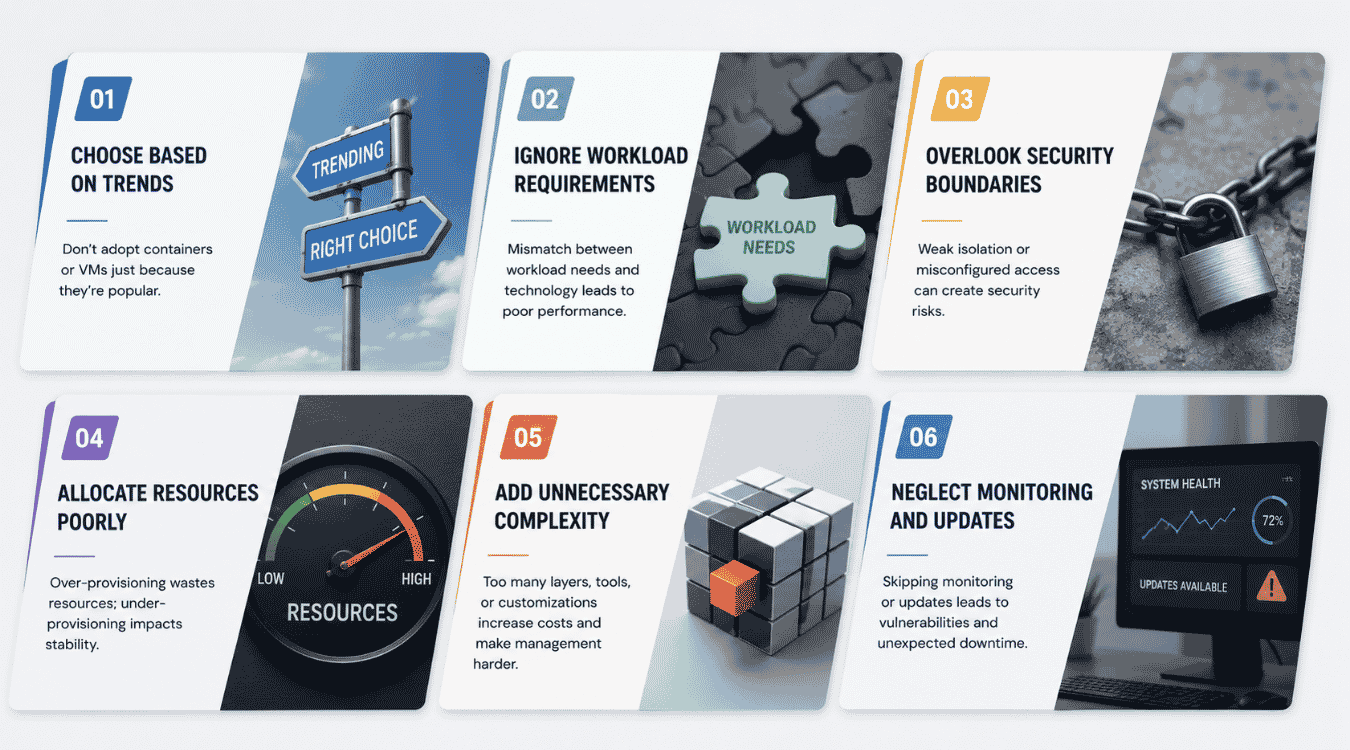
Most infrastructure regret traces back to a handful of repeatable mistakes. Knowing what they look like before committing to an architecture saves far more time than fixing the fallout after deployment, especially when you're planning broader custom software development initiatives.
Choose Based On Trends
Containers get chosen because they're the current default, not because the workload actually needs one. A legacy app that depends on specific OS versions gets forced into a container anyway, and the team spends weeks fighting compatibility issues that a VM would have avoided entirely.
The fix is simple: let the workload's actual requirements drive the decision, not what's trending in engineering blogs. Popularity isn't a technical argument.
Ignore Workload Requirements
Running multiple VMs for a stateless microservice wastes resources it never needed to spend. Running a stateful database as a container without checking its persistence needs risks data loss the moment that container restarts, and it often signals a mismatch with the right software architecture pattern for your SaaS.
Every workload has different demands around state, compliance, and lifespan. Skipping that assessment and defaulting to one platform for everything is how teams end up re-architecting six months into production or debating whether to refactor versus rebuild parts of the system.
Overlook Security Boundaries
Regulated industries can't afford to treat security isolation as an afterthought. Assuming containerized applications get the same protection as a VM by default is a common and costly misread of how shared kernels actually work.
Security boundaries need to be designed in from the start, not bolted on after an incident. That means explicit hardening for containers and honest isolation requirements for anything handling sensitive data.
Allocate Resources Poorly
Over-provisioning VMs "just in case" ties up capacity that never gets used, while under-provisioning containers for dynamic workloads causes throttling right when traffic spikes. Both mistakes come from guessing instead of measuring actual usage patterns, something effective SaaS monitoring tools and practices can help avoid.
Resource allocation should follow real data: peak load, average load, and how much headroom a workload genuinely needs. Guesswork here shows up directly on the infrastructure bill.
Add Unnecessary Complexity
Running full container orchestration for three services that never scale adds operational overhead with no real payoff. The same mistake happens in reverse when teams manage a sprawling VM fleet for workloads simple enough to containerize easily.
Complexity should match the actual scale of the problem. Adding orchestration, tooling, or hybrid setups before the workload demands it just creates more surface area to maintain.
Neglect Monitoring And Updates
Dynamic workloads that spin up and disappear in seconds slip past monitoring tools built for static infrastructure, leaving blind spots exactly where problems tend to start. VMs carry the opposite risk: skipped OS patching leaves known vulnerabilities open for months, both of which underline the need for robust software observability in 2026.
Both platforms need monitoring and update practices built around how they actually behave, not a one-size-fits-all approach borrowed from whichever system the team knows best.
How GainHQ Approaches This In Custom Software Projects
We treat this decision as part of scoping, not an afterthought bolted on after development starts. Before writing a line of code, our team looks at what the application actually needs to do, how it will scale, and what compliance or isolation requirements the industry demands, then matches the architecture to those realities instead of defaulting to whatever's trending, as we do across our custom software development services.
For most custom builds, that means containerized services for the application layer and stronger isolation where data sensitivity calls for it. Our nearshore delivery model means this evaluation happens early, with the same team carrying the decision through build, deployment, and handoff, so clients aren't left reverse-engineering an architecture choice made without them months into the project, and it underpins how we design flexible custom software solutions that have transformed companies across industries.