Unit Testing Vs Integration Testing: Which Testing Approach Should You Use?

by Daniel Wright | Aug 24, 2026 | Software Development Insights
Table of Contents
- What Is Unit Testing
- What Is Integration Testing
- Unit Testing Vs Integration Testing: Key Differences
- What Bugs Do Unit Tests And Integration Tests Catch?
- When Should You Use Unit Testing?
- When Should You Use Integration Testing?
- How Should Unit And Integration Tests Fit Into CI/CD?
- Common Unit And Integration Testing Mistakes To Avoid
- Final Discussion
Choosing between unit testing and integration testing can feel simple at first. Unit tests focus on individual components in isolation. Integration tests check whether multiple components work together correctly. The real challenge is knowing where each testing method belongs in your development process.
Rely too heavily on unit tests, and you may miss broken APIs, database issues, or communication failures. Depend on integration tests for everything, and your test suites can become slower and harder to maintain. A healthy testing strategy uses both to catch defects early without slowing software development.
In this article, we’ll break down unit testing vs integration testing, their key differences, the bugs each can catch, when to use them, and how both fit into modern CI/CD pipelines.
What Is Unit Testing
Unit testing is a software testing method that checks the smallest testable parts of an application, such as individual functions, methods, or classes. Unit tests focus on internal logic and verify that each unit produces the correct output for a given input. Developers usually write them during the development phase.
Each unit is tested separately from databases, file systems, external services, and other dependencies. Mocks or stubs can replace those dependencies, which keeps automated tests fast and repeatable. Writing unit tests also supports early bug detection because developers can catch logic errors before they spread through the development process.
Unit tests also work well with test-driven development, where developers write tests before production code. A strong unit test suite helps protect existing functionality when existing code changes.
What Is Integration Testing
Integration testing is a software testing method that checks whether two or more units work correctly together. Instead of testing individual components separately, integration tests connect multiple components, modules, databases, APIs, or external services. The goal is to verify that data and requests move correctly between integrated units.
Integration testing typically follows unit testing in the development lifecycle. It can uncover interface errors, incorrect data exchanges, dependency problems, and communication failures that unit tests may miss. Teams can perform integration testing with incremental approaches or combine multiple modules at once with big-bang testing.
Integration tests usually need more setup and take longer to run because components interact with databases, networks, or external systems. Still, they provide valuable confidence that separate parts of the software work together as expected.
Unit Testing Vs Integration Testing: Key Differences
The key differences in unit testing vs integration testing come down to scope, isolation, speed, dependencies, debugging, and test environments. Unit tests check individual units, while integration tests verify how multiple components interact in working software.
Difference | Unit Testing | Integration Testing |
|---|---|---|
Test Scope | Tests individual functions, methods, or classes | Tests two or more units working together |
Isolation | Tests components separately | Tests integrated units and their interactions |
Dependencies | Usually replaces dependencies with mocks or stubs | Often uses real or near-real dependencies |
Test Speed | Fast, often measured in milliseconds | Slower due to setup, I/O, and service calls |
Test Environment | Needs little external setup | Often needs databases, APIs, or other test environments |
Debugging | Failures are usually easier to locate | Failures can involve several components |
Test Scope
Unit tests focus on the smallest testable parts of production code. A test case may check one function, method, or class and confirm that its internal logic returns the correct output. Each unit is tested separately, so developers can catch logic errors early.
Integration tests have a wider scope. They check whether two or more units work together as expected. A test may cover multiple modules, an API and database, or several services. Integration testing verifies the data flow and behavior that appear only when components interact.
Level Of Isolation
Isolation is one of the clearest differences in unit testing vs integration testing. Good unit tests avoid outside factors such as databases and file systems. A failure should point back to the individual unit under test, not another part of the system.
Integration tests work differently. They intentionally involve multiple components because the interaction itself is what matters. For example, a test client may send a request to an API and check whether the database receives the right data. Such testing workflows provide more realistic confidence than testing individual units alone.
External Dependencies
Unit tests usually replace external dependencies with mocks, stubs, or fakes. A payment function, for example, does not need to contact a real payment service. Developers control the dependency and test only the behavior they care about.
Unlike unit tests, integration tests often rely on real or near-real databases, APIs, file systems, and external services. That approach helps uncover broken API contracts, incorrect data formats, and communication failures. However, integration tests do not always require every dependency to be real. Teams may still mock selected external systems when the testing strategy calls for it.
Execution Speed
Unit tests are built for speed. Microsoft recommends that good unit tests run quickly and notes that individual tests should take milliseconds. Fast automated tests let developers run tests often during the development cycle and catch defects early after code changes.
Integration tests are generally slower. Real databases, network calls, service startup, test data, and other I/O add extra work. Current CircleCI guidance describes unit tests as typically taking milliseconds, while integration tests may take seconds or longer. That speed difference matters when teams build large test suites or run tests on every pull request.
Test Environment
Unit testing requires a controlled environment with little setup. Tests should not depend on network access, databases, file systems, or shared state. That simplicity makes unit tests easier to run on a developer's machine or inside CI.
Integration testing usually needs a more realistic test environment because multiple components must communicate. Teams may need a test database, API, container, or other external systems. Katalon notes that integration testing requires an environment where modules can run together. More infrastructure also means more setup and maintenance across the testing process.
Failure Diagnosis
Unit test results usually make failures easier to trace. A focused test covers a small piece of existing code, so developers can quickly identify the function or rule that failed. That fast diagnosis supports early detection and shorter bug fixes during software development.
Integration failures can take more work to diagnose because multiple units are involved. The problem could come from an API contract, database configuration, service connection, or data format. CircleCI notes that integration test failures show that something broke between components but can be harder to isolate. Both testing approaches are valuable because they expose different types of defects.
What Bugs Do Unit Tests And Integration Tests Catch?

Unit and integration testing catch different defects. Unit tests find problems inside individual units, while integration tests expose failures between connected parts. A strong testing strategy needs both because working components can still fail once they interact. Broader software testing strategies for effective quality assurance build on this foundation by defining how different test types fit together across the lifecycle, especially within a structured software development life cycle and a lean, iterative startup software development process.
Logic And Calculation Errors
Unit tests are ideal for finding logic errors inside individual functions. A pricing function may calculate the wrong discount, tax, or total. Another function may return the wrong value when a condition changes. Unit tests ensure each piece of internal logic gives the correct output for known inputs.
Edge cases matter too. Empty values, zero quantities, negative numbers, and boundary values can break existing functionality. Good unit tests cover normal cases and unusual inputs. That early detection helps developers catch defects before the code reaches later testing activities.
Validation And Error Bugs
Business rules often fail when software receives unexpected input. A form may accept an invalid email. A payment function may allow a negative amount. A user role may receive access it should not have. Writing unit tests for such rules helps expose these bugs during the development phase.
Unit testing is especially useful because each rule can be tested separately. Developers can check valid, invalid, empty, and boundary inputs without involving multiple components. Fast automated tests also make bug fixes safer. Developers can rerun the test suites after changing existing code and confirm that the fix did not break existing functionality.
API And Interface Errors
A component can pass every unit test and still fail when another component calls it. Integration tests catch interface problems such as mismatched API contracts, wrong parameters, changed data types, and unexpected response formats. Teams often use specialized API testing tools to exercise these interfaces thoroughly and reliably. Such defects only become visible once components interact.
A 2026 Katalon example shows why deeper checks matter. A 500-test API suite passed while a production-breaking change from an integer user_id to a string went unnoticed because the tests lacked schema validation. Integration testing can detect such contract and data communication problems before release.
Database And Data Errors
Integration tests can expose problems between application code and databases. A module may send the wrong query, map a field incorrectly, lose data, or fail when the database schema changes. Unit tests may miss such defects because mocks often replace the real database.
Integration testing verifies how integrated units exchange and store data in a realistic test environment. It can also uncover inconsistent formats and broken data flow across multiple modules. Such tests become important when a testing workflow relies on databases, APIs, queues, or other external systems.
Service Communication Failures
Modern software often depends on external services and internal APIs. A payment gateway may reject a request. Two services may expect different data formats. Authentication may fail between systems. Integration tests help find such communication failures because they involve multiple components rather than testing individual units alone.
Network and service dependencies also create failure paths that isolated unit tests cannot fully reproduce. Integration testing ensures key connections behave as expected under realistic conditions. Teams can then catch defects early instead of finding broken service interactions from the user perspective after release.
When Should You Use Unit Testing?

Unit testing works best when you need fast feedback on small, predictable parts of your code. Use it for business rules, edge cases, bug fixes, and frequent code changes where early detection can save time later, especially when combined with a disciplined code review checklist and process.
Test Business Logic
Use unit tests when your code contains clear business rules. Calculations, validation rules, data changes, and conditional logic are strong candidates. Unit tests focus on one behavior at a time, so you can check whether the code returns the correct output for a known input.
Fast tests make a big difference here. AWS gives an example where a cloud deployment takes five minutes while local unit tests finish in five seconds. That shorter feedback loop helps developers find logic errors during the development process instead of after deployment.
Check Edge Cases
Use unit testing when a function must handle unusual or invalid inputs. Examples include empty fields, zero values, negative numbers, boundary values, or an unexpected state. Each test case can target one condition without the setup required by broader testing types.
Microsoft recommends unit tests for standard, boundary, and incorrect input cases. Such tests help catch defects early because developers can verify individual functions before they interact with multiple components. Tests also stay quick because external dependencies can be replaced with mocks or other controlled substitutes.
Support Code Changes
Use unit tests when you refactor existing code or add new features. A good test suite records how existing functionality should behave. After a change, developers can run tests again and quickly see whether they break existing functionality.
Microsoft describes unit tests as strong protection against regression defects. Tests are especially useful during frequent changes because they can run after every build or even after a small code edit. Developers can change the internal design while tests confirm that expected behavior stays the same.
Fix Bugs Safely
Use unit testing when you fix a bug in isolated production code. First, create a test that reproduces the problem. Then change the code and run the test again. The test results confirm whether the bug fix works and help prevent the same defect from returning later.
That approach also improves future software quality. Microsoft recommends unit testing during implementation and bug fixes. A permanent regression test becomes part of the test suites, so later changes can expose the same problem before it reaches users.
Get Fast Feedback
Use unit tests throughout the development cycle when developers need quick answers after code changes. Good unit tests are isolated and often run in milliseconds. That speed makes them practical during local development, test-driven development, and before a pull request reaches deeper testing activities.
Unit tests also belong in automated tests within CI/CD. AWS recommends early automated testing and unit tests before code reaches the central repository. Microsoft also recommends unit tests continuously during development. Fast feedback helps teams find problems sooner while leaving integration tests, system testing, and end-to-end testing for broader testing workflows, which directly supports improving deployment frequency metrics.
When Should You Use Integration Testing?
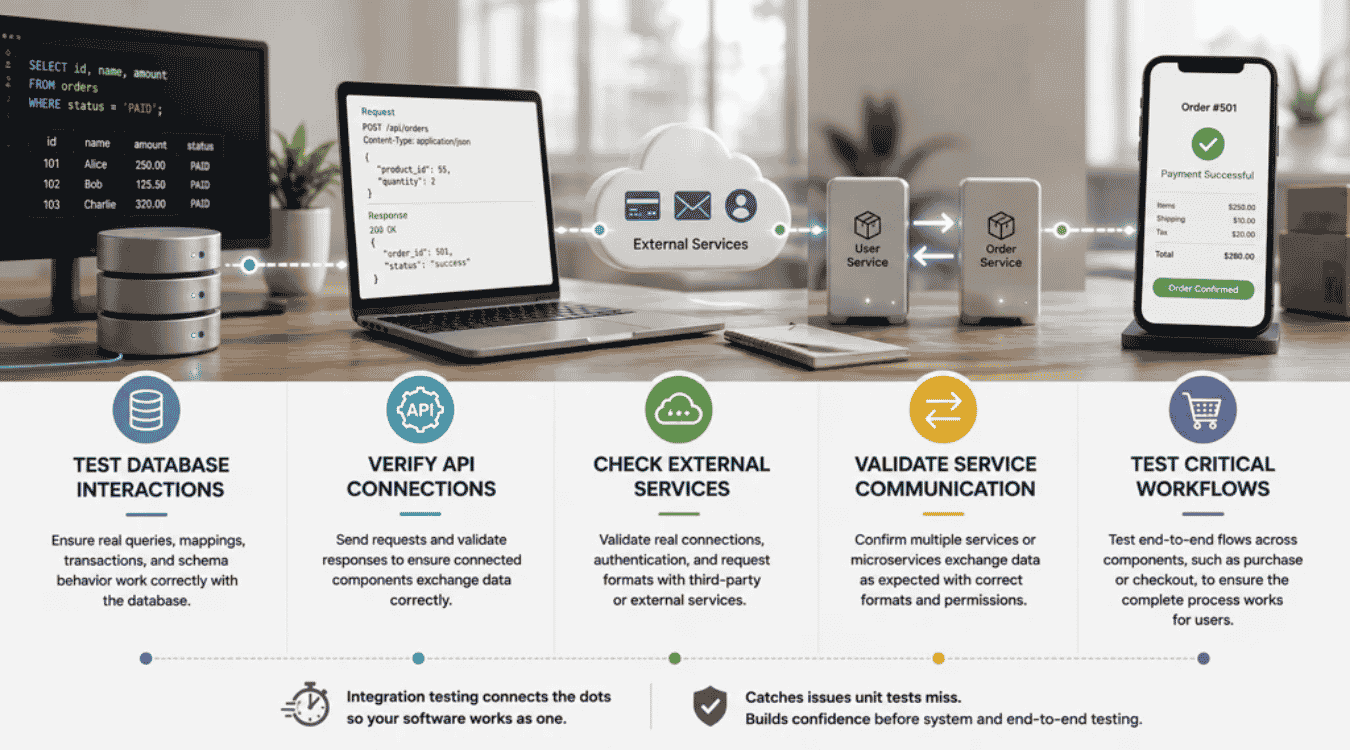
Use integration testing when separate parts of your software must work together. It matters most around databases, APIs, external services, and multi-step workflows where unit tests cannot confirm that data and requests move correctly between components.
Test Database Interactions
Use integration tests when production code reads from or writes to a database. A mocked database may prove that one function works, but it cannot fully confirm real queries, mappings, transactions, or schema behavior. Integration testing verifies how the application and database work together.
Real test environments can expose issues that isolated unit tests miss. A query may use the wrong field, or saved data may return in an unexpected format. Such tests provide more confidence when database behavior is critical to existing functionality.
Verify API Connections
Use integration testing when two or more units communicate through an API. A test can send a request, check the response, and confirm that connected components handle the data correctly. API integration tests can reveal bad data exchanges, interface errors, and broken communication protocols.
API tests become even more important when multiple modules depend on the same contract. A changed field or response format can break several testing workflows at once. Integration tests help catch such problems before broader system testing or end-to-end testing begins, especially in multi-phase efforts that follow a defined SaaS software development timeline.
Check External Services
Use integration tests when software depends on external services such as payment providers, identity systems, or third-party APIs. Unit tests can mock those dependencies, but mocks cannot prove that a real connection, request format, or authentication flow works as expected.
External systems can also return errors, timeouts, or unexpected data. Integration tests let teams check how their software responds to those conditions. Some external dependencies can still be mocked when needed. The testing strategy should use real services where real interaction provides valuable confidence.
Validate Service Communication
Use integration testing when your application has multiple components or services that exchange data. Microservices are a good example. Each service may pass its unit tests, yet the full interaction can fail because of permissions, timing, data formats, or communication failures.
Integration testing ensures those integrated units can communicate as planned. Teams can perform integration testing with an incremental testing method or a big-bang approach. Incremental tests add components step by step, while big-bang tests combine multiple units at once.
Test Critical Workflows
Use integration tests for important workflows that cross component boundaries. An online purchase may involve an API, inventory service, payment system, and database. Each part can work alone while the full process still fails. Integration tests check the connections between those parts before users depend on them, which is critical for SaaS product development.
Focus on high-value paths rather than trying to test every possible interaction. Katalon recommends prioritizing flows where systems cross boundaries and failures would affect users most. Such coverage adds confidence after unit testing and before broader system or end-to-end testing, especially when you need disciplined scope and rapid learning to launch an MVP in 90 days.
How Should Unit And Integration Tests Fit Into CI/CD?
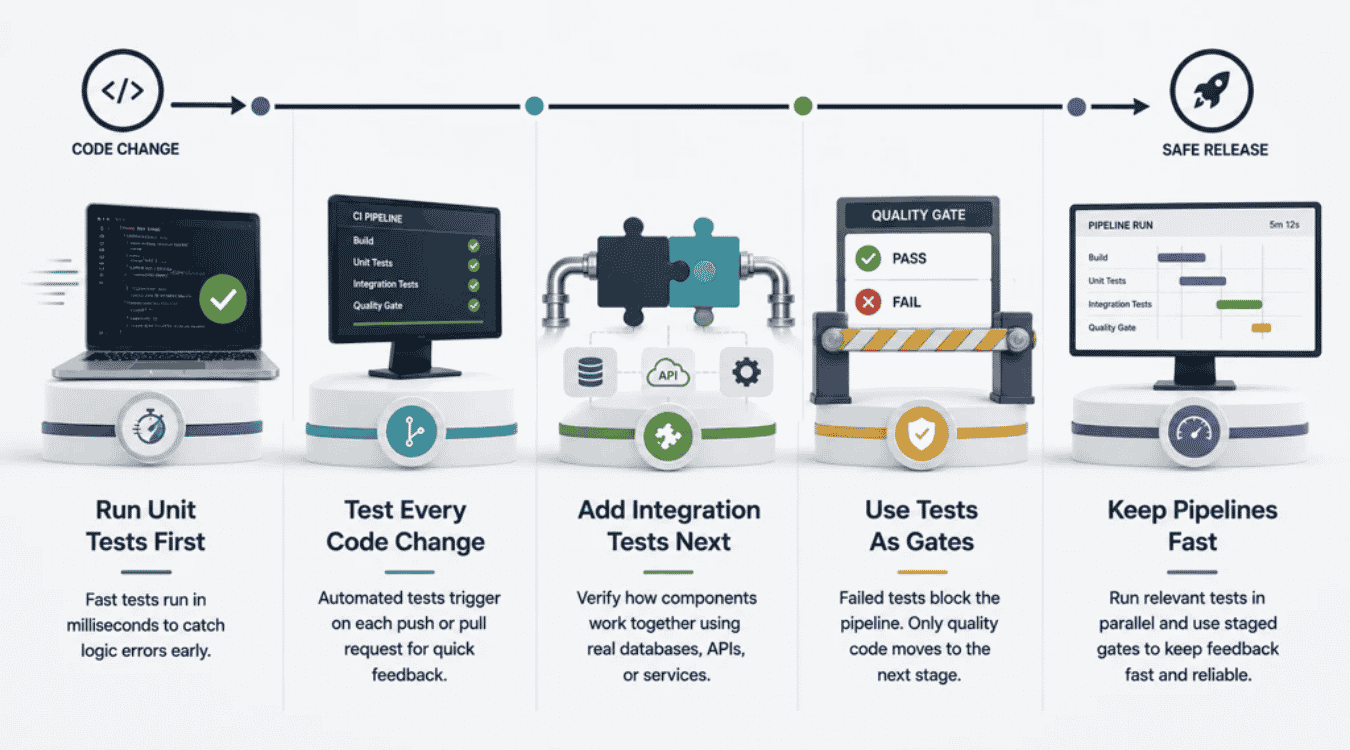
Unit and integration tests should act as quality gates across CI/CD. Fast unit tests belong early in the pipeline, while integration tests follow to check connected components. Both automated tests should run before risky code reaches production.
Run Unit Tests First
Unit tests should run early because they provide fast feedback. Teams can run them locally and again when code enters the CI pipeline. AWS recommends that unit tests pass before code is committed to a source repository.
Fast tests also support early bug detection without much manual effort. CircleCI reports that unit tests typically run in milliseconds. That speed helps developers catch logic errors before slower testing types start. A failed unit test should stop the testing process early rather than waste time on deeper tests.
Test Every Code Change
CI/CD pipelines should trigger automated tests when code changes. A push or pull request is a natural checkpoint. CircleCI recommends tests before code merges into a main branch, with deployment allowed only after required tests pass.
That approach protects existing functionality throughout the development lifecycle. Developers get test results while the change is still fresh. GitLab follows a similar strategy and runs unit tests across merge request pipelines. Fast feedback makes bug fixes easier and helps teams catch defects early instead of after several changes pile up.
Add Integration Tests Next
Integration testing should follow unit testing once individual components have passed their checks. At this stage, integration tests verify how multiple components work together. The tests may use a database, API, or provisioned test environment to check real interactions.
CircleCI's 2026 guidance places integration tests after unit tests and before code merges into the main branch. GitLab also uses integration tests in deeper merge request tiers, stable branches, and deployments. That order catches communication failures without making every early check depend on slower test environments.
Use Tests As Gates
A CI/CD pipeline should not treat test results as information only. Failed tests should block risky code from moving to the next stage. AWS recommends halting or rolling back the pipeline when required success criteria are not met.
Quality gates can protect a merge, build, release, or deployment. Unit tests ensure individual units still work. Integration testing ensures connected parts work together. GitLab, for example, uses unit and integration tests as blocking checks in relevant merge request tiers, which fits naturally into a structured software release checklist for reliable deployments. Both unit and integration testing add confidence before release.
Keep Pipelines Fast
More tests do not always mean a better pipeline. Slow test suites delay feedback and can hurt the development process. Teams should run fast, relevant tests first and move broader testing activities later. GitLab calls this a “fail fast, fix fast” approach, which aligns closely with engineering team management and the use of engineering KPIs.
Parallel jobs can also cut wait time. GitLab supports unit and integration test jobs that run at the same time after a build. CircleCI recommends staged gates too. Its 2026 guidance suggests unit tests on every commit and integration tests on pull requests, so deeper checks do not slow every small change.
Common Unit And Integration Testing Mistakes To Avoid
.png)
A test suite can grow without making software safer. Poor test choices create slow feedback, flaky results, and false confidence. Avoid mistakes that test the wrong behavior, repeat existing coverage, or make automated tests harder to trust.
Mock Too Many Dependencies
Mocks help unit tests isolate individual components from databases, APIs, and external services. Problems start when developers mock every dependency. A test may pass because the mock behaves correctly while the real integration fails. Microsoft recommends mocks strategically and warns that they can drift from real service behavior.
Use mocks where real dependencies are slow, costly, or unpredictable. Keep integration tests for important boundaries between multiple components. Contract tests can also check whether a mock still matches the real API. That balance makes unit and integration testing more reliable.
Test Internal Details
Tests should check useful behavior, not every step inside the code. A unit test that depends on private methods or internal design can break after a safe refactor. The software still works, but the test fails because implementation details changed. Microsoft recommends testing private behavior through public methods instead.
Focus each test case on inputs, expected behavior, and correct output. That approach protects existing functionality without tying tests to existing code structure. It also makes bug fixes and refactoring easier because developers can change the implementation while keeping expected behavior intact, which aligns naturally with building and iterating on a focused minimum viable product (MVP) in software development.
Duplicate Test Coverage
More tests do not always mean better software quality. The same behavior may get checked by unit tests, integration tests, system testing, and end-to-end testing. Duplicate coverage increases runtime and maintenance without adding much confidence. GitLab recommends checking existing coverage before writing tests and says each test should justify its place, a principle echoed in broader software development insights on the GainHQ blog.
Choose the lowest testing method that can prove the behavior. Use unit tests for isolated logic and integration tests for interactions between components. GitLab's reported test distribution reflects that approach: 75.66% unit tests and 19.79% integration tests as of February 2025, similar to the pragmatic balance seen in successful SaaS launch case studies where teams emphasize focused unit coverage with targeted integration tests on critical flows.
Share Test State
Tests should not depend on data left behind by another test. Shared database rows, global caches, files, or accounts can make test results depend on execution order. A test may pass alone but fail when the full test suites run. GitLab identifies state leakage and polluted test environments as common causes of flaky tests.
Give tests clean and predictable data instead. Reset shared resources where needed and keep test environments reproducible. Stable tests reduce manual effort because developers spend less time rerunning failures that have nothing to do with production code.
Ignore Flaky Tests
A flaky test sometimes fails and then passes without a code fix. Teams may start rerunning it until the pipeline turns green. That habit hides real problems. GitLab says a test that cannot reliably block a merge, release, or deployment should be fixed or removed.
Treat flakiness as a defect in the testing process. Check for shared state, timing issues, network failures, unstable external systems, and poor synchronization. Reliable automated tests matter because developers need to trust failures before they can act on them quickly.
Chase Code Coverage
High code coverage does not prove that a test suite catches the right defects. Microsoft notes that high coverage is often linked with code quality, but the metric alone cannot define test quality. Tests still need useful assertions and meaningful scenarios.
Use code coverage to find gaps, not as the final goal. A healthy testing strategy checks business logic with unit tests and real component boundaries with integration tests. Both testing approaches serve different purposes. Strong coverage should show useful behavior, not just how many lines ran during testing.
Final Discussion
Unit testing vs integration testing is not a choice between two competing testing approaches. Both solve different problems. Unit tests give developers fast feedback on individual units, business logic, and edge cases. Integration tests verify that multiple components, databases, APIs, and external systems work together correctly. Neither can replace the other.
A strong testing strategy uses both at the right stages of the development lifecycle. Run unit tests often to catch defects early. Follow them with integration tests to find interface and communication failures before release. Automated tests in CI/CD can make that process consistent after every important code change.
The goal is not to write the most tests or chase code coverage. Build test suites that give your team fast feedback, useful confidence, and reliable software without slowing the development process.