Composable Commerce Architecture: Design, Features, And Implementation

by Gain Solutions Team | Aug 18, 2026 | Software Development Insights
Table of Contents
- What Is Composable Commerce Architecture?
- Key Features Of Composable Commerce Architecture?
- How Do Composable Commerce Components Work Together?
- Step-by-Step Process To Design A Composable Commerce Architecture
- How To Implement Composable Commerce Architecture
- Major Challenges Of Composable Commerce Architecture
- When Should You Use Composable Commerce Architecture?
- Final Discussion
Online stores keep changing shape. New channels pop up, customer expectations shift, and old platforms start feeling like a straightjacket. Composable commerce architecture solves that problem by breaking the backend into separate, swappable pieces instead of one giant system.
Each piece, search, checkout, inventory, works on its own. Teams pick what fits their business and skip what doesn't. Nearly half of IT teams, 46% according to recent industry data, have already implemented composable commerce, and that number keeps climbing.
Speed, flexibility, and control matter more than ever for anyone running an e-commerce operation today. They're not nice extras anymore. They decide who stays competitive. Ahead, we'll break down what composable commerce actually means, piece by piece.
What Is Composable Commerce Architecture?
Composable commerce architecture breaks e-commerce into separate, independent pieces instead of one locked system. Businesses pick and connect the components they actually need, from search to checkout to inventory. Packaged business capabilities, or PBCs, make this possible. Each one handles a single job and plugs into the rest through APIs.
Traditional commerce platforms work differently. Everything sits bundled together, tightly integrated and hard to change. Swap one feature, and you risk breaking three others. Composable architecture skips that problem entirely.
Most composable commerce solutions run on MACH architecture, microservices, API-first, cloud-native, and headless. Together, these principles give businesses room to build modular architecture that grows with them. Instead of ripping out an entire platform to add one feature, teams update or replace single components. Commerce architecture becomes something businesses shape, not something that shapes them.
Key Features Of Composable Commerce Architecture?
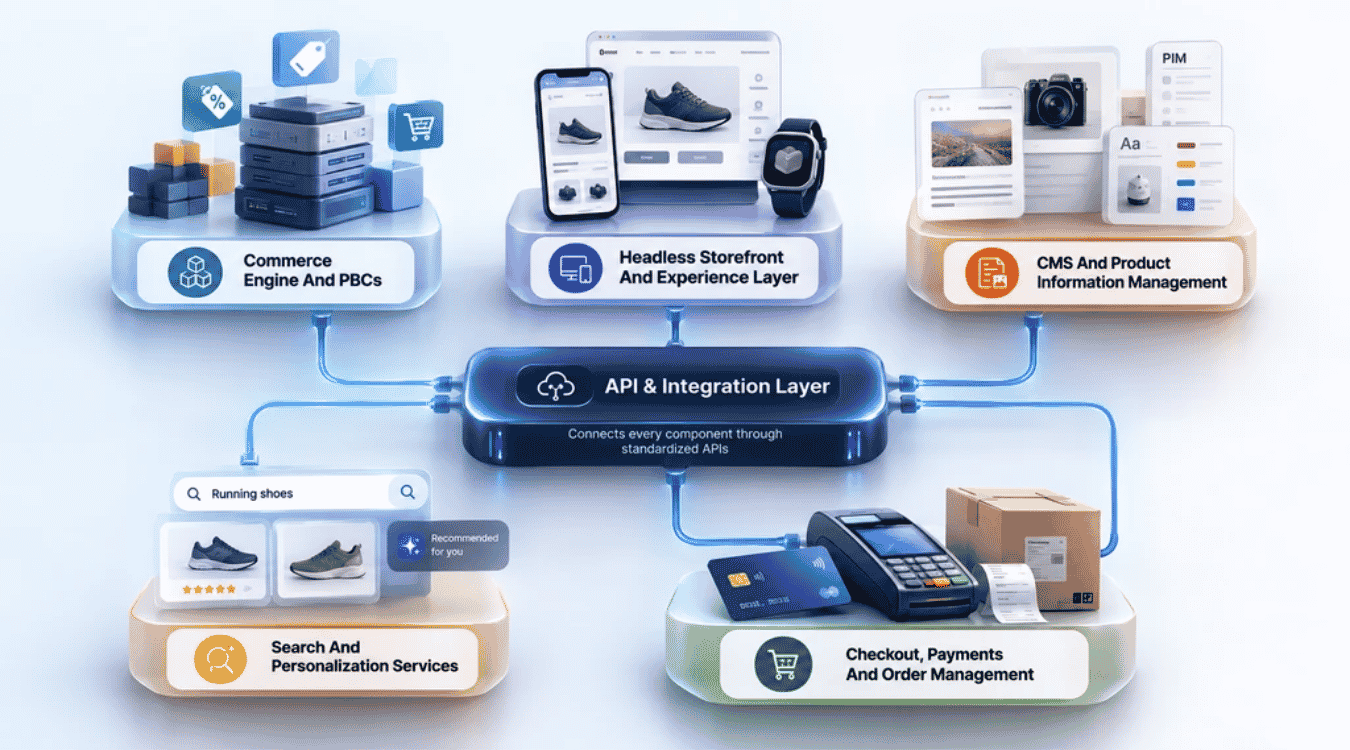
Every composable commerce platform is built from smaller, connected pieces. Each one does its own job. Together, they create a system that adapts fast and grows without breaking. Here's what makes up that system.
Commerce Engine And PBCs
Packaged business capabilities sit at the core of any composable setup. Each PBC handles one job, like pricing or promotions, and nothing else. Microservices power these capabilities, running independently instead of tangled together in one codebase.
This setup lets businesses scale components independently. A traffic spike hits your checkout during a sale? Scale that piece alone. No need to touch search or inventory. Specialized tools slot in wherever they're needed, and the commerce engine keeps everything running underneath. Business teams get exactly the functionality they need, nothing extra weighing the system down.
Headless Storefront And Experience Layer
A headless storefront separates what customers see from what runs the backend. That split gives teams full control over design, without backend limits holding them back. Mobile apps, websites, kiosks, and smart displays can all pull from the same data source.
This matters more than ever. Over 70% of shoppers now use mobile devices to search and buy products. Decoupled frontends let businesses build distinctive shopping experiences across every one of those channels. A campaign can look completely different on mobile versus desktop, using the same backend the whole time. Customer engagement improves when every touchpoint feels built for that specific screen.
CMS And Product Information Management
Content and product data live in separate systems within composable commerce, and that separation matters. A content management system handles blogs, landing pages, and marketing copy. Product information management handles specs, pricing, and inventory details.
Both systems update on their own schedules. Marketing can publish a new campaign page without waiting on product teams to finish a catalog update. Composable commerce allows continuous updates across these systems without disrupting anything else running. Customer data stays synced in real time, so pricing and content never fall out of step, no matter how often either team pushes changes live.
Search And Personalization Services
Search and personalization work as their own dedicated services in a composable setup. Businesses pick tools built specifically for these jobs, not generic features bolted onto a bigger platform. That focus pays off.
Modular architecture built this way delivers faster time-to-market for new personalization features. Testing a new recommendation engine doesn't require touching checkout or inventory systems. Teams roll out improvements to search relevance or customer-specific pricing without risking downtime elsewhere. That speed translates directly into better customer experiences, since shoppers see relevant results faster and get suggestions that actually match what they're looking for.
Checkout, Payments And Order Management
Checkout, payments, and order management often carry the most pressure in any e-commerce operation. Composable commerce treats each one as its own service, connected but independent from the rest of the platform.
That structure means businesses can scale specific services without affecting the entire platform. A flash sale spikes checkout traffic? That component scales up alone. Payment gateways plug in without forcing a rebuild of order management or inventory tracking. Order management systems keep processing normally even while checkout handles a surge. Nothing sits idle waiting on another system, and nothing crashes because one piece got overloaded.
API And Integration Layer
APIs hold the whole composable commerce architecture together. Every component, from search to payments, talks to the others through this layer instead of hardwired connections.
Using APIs in composable architecture makes integration with existing systems far easier. Legacy tools, new software, and third-party services all connect through the same integration hub. That hub alone can reduce implementation costs by 50% compared to building custom connections for every single tool. APIs link separate systems so they share data smoothly, without delays or mismatched records. Adding a new tool becomes a connection, not a rebuild.
How Do Composable Commerce Components Work Together?
Composable commerce components connect through APIs, not hardwired code. Each piece does its job, then passes data to the next one instantly. A product search triggers personalization. Checkout pulls pricing from the commerce engine. Payments confirm the order, then inventory updates automatically. This chain runs the same way whether it's a website, mobile app, or in-store kiosk asking for data. Here's how that connection actually flows:
- A customer searches, and the search service pulls product data instantly
- Personalization services adjust results based on customer data and behavior
- The storefront displays products through the headless experience layer
- Checkout connects to payment gateways once the customer confirms an order
- Order management systems update inventory the moment payment clears
- APIs sync every component in real time, so no system runs on outdated information
Step-by-Step Process To Design A Composable Commerce Architecture
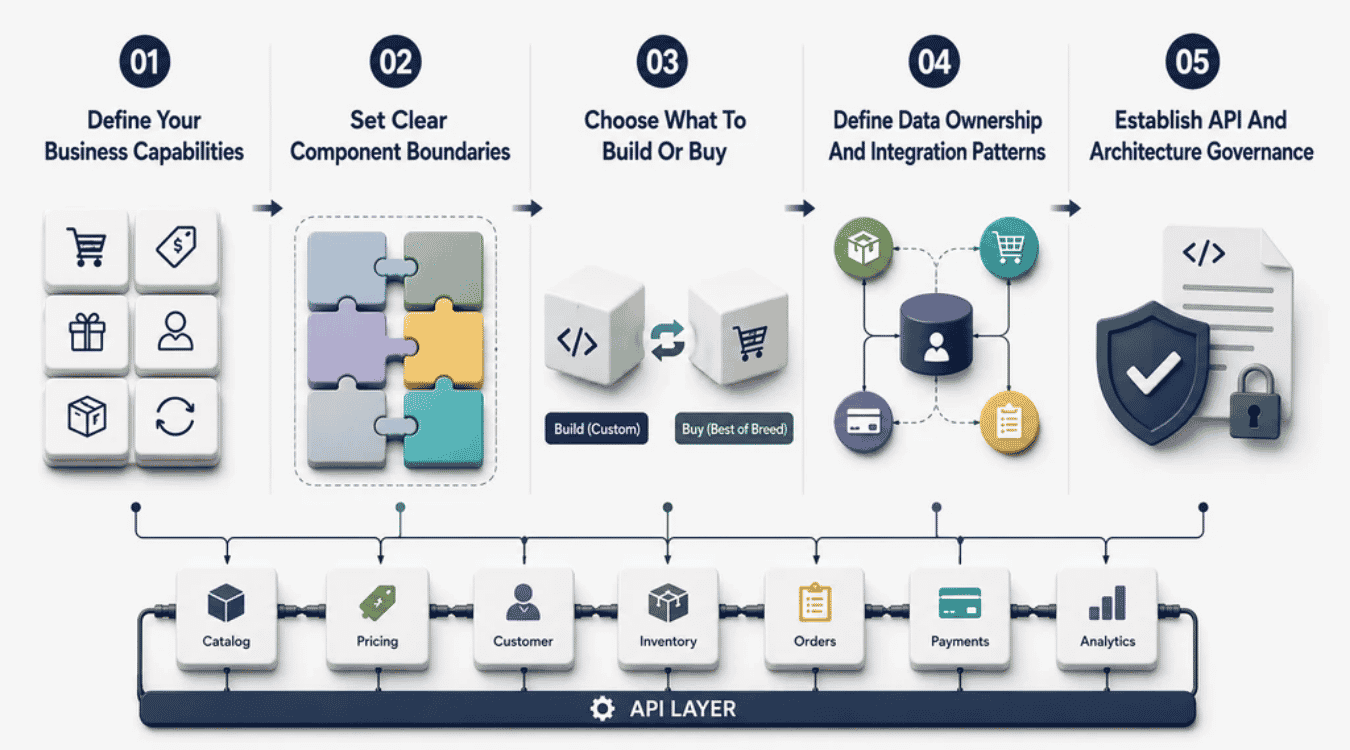
Building composable architecture takes planning, not guesswork. Business needs come first, then component choices, then integration. Skip a step, and the whole system gets harder to manage later. Here's how composable commerce approach actually works in practice.
Step 1: Define Your Business Capabilities
Start by listing what your business actually does. Order processing, pricing, loyalty programs, each one is a defined business capability. Map these out before touching any technology.
This step matters more than people expect. A specific business might need heavy personalization but barely touch subscriptions. Another might run entirely on subscriptions and skip personalization altogether. Composable commerce fits different business models because it lets you prioritize based on what you actually need. Skipping this step leads to buying tools nobody uses, or missing ones your team needed from day one.
Step 2: Set Clear Component Boundaries
Once capabilities are mapped, draw lines between them. Each independent component should own one job and stay out of another component's territory. Blurry boundaries cause problems fast.
Overlap creates confusion. Two systems fighting to own the same data leads to sync errors and duplicate records. Clear boundaries keep the modular nature of your architecture intact, so each piece stays swappable without dragging others down with it. This groundwork also makes your setup a cohesive solution instead of a pile of disconnected tools loosely bolted together and hoping for the best.
Step 3: Choose What To Build Or Buy
Not every component needs custom code. Some jobs are better handled by best of breed tools already built for that exact purpose. Others need custom work to fit your business.
Payment processing, search, and analytics often have strong best of breed components already on the market. Building these from scratch wastes time and money. Custom software components make more sense for anything unique to your business, like a proprietary pricing engine or a specialized fulfillment workflow. The right mix keeps costs down while still giving your team full control where it counts most.
Step 4: Define Data Ownership And Integration Patterns
Data needs a clear home. Decide which system owns customer records, inventory management, and order history before connecting anything. Ownership gaps cause the most painful bugs later.
Once ownership is settled, map how data moves between systems. Seamless integration depends on consistent formats and clear rules for what updates trigger what. A customer address change should update every system that needs it, not just one. This step is also where unified commerce takes shape, since data flowing correctly between channels is what makes a single customer view possible across web, app, and in-store.
Step 5: Establish API And Architecture Governance
APIs need rules, not just connections. Decide who can build new integrations, how they get tested, and what documentation is required. Skipping governance turns your tech stack into a mess fast.
Without oversight, teams build duplicate APIs or break existing ones during updates. Governance keeps your technology stack organized as more components get added over time. Set standards early: naming conventions, version control, and access permissions. This isn't glamorous work, but it's what keeps a growing composable setup from turning into the same tangled mess traditional platforms were supposed to fix.
How To Implement Composable Commerce Architecture
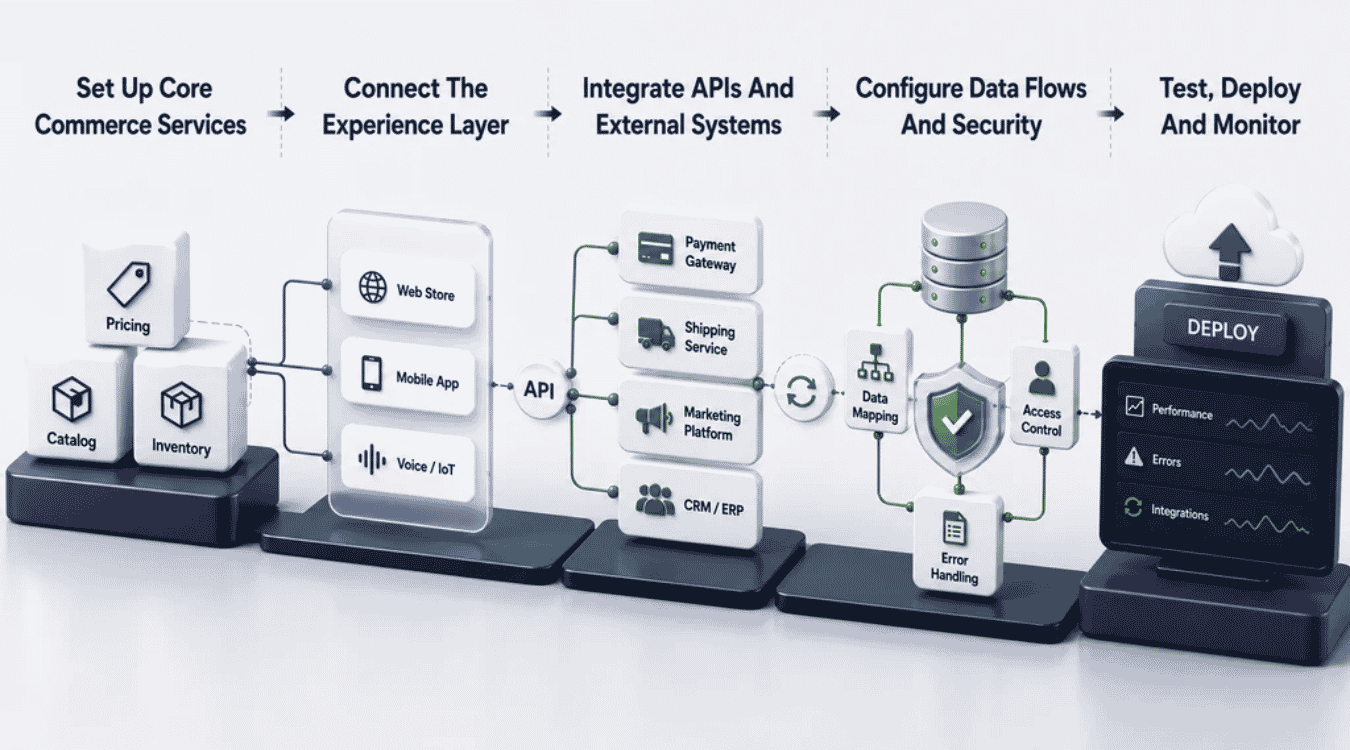
Planning is one thing. Building it is another. Composable commerce enables businesses to move from strategy to a working system, but only when implementation follows a clear order. Here's how that process plays out, allowing businesses to launch without chaos.
Set Up Core Commerce Services
Start with the backbone: pricing, catalog, and inventory services. These form the foundation everything else connects to. Get this part wrong, and every other piece struggles to function correctly.
Composable commerce works best when core services launch first, before storefronts or personalization tools get added. This gives your modular system something stable to build on. Many e-commerce platforms fail at this stage by rushing to launch a storefront before backend services are ready. Slow down here. A solid foundation saves months of rework later, once customers are already relying on the system daily.
Connect The Experience Layer
Once core services run smoothly, connect the frontend. This is where headless commerce comes into play, linking your storefront to backend data through APIs instead of direct code.
Digital commerce today spans websites, apps, and even voice assistants, so this layer needs flexibility built in from day one. Most modern ecommerce platforms support headless connections out of the box, which speeds up this step considerably. Test how fast content and pricing load on each channel before moving forward. A slow experience layer undoes all the backend work you just finished, no matter how solid it is underneath.
Integrate APIs And External Systems
Now bring in the tools your business actually needs. Payment processors, shipping carriers, marketing platforms, each one connects through APIs into your growing software ecosystem.
This step often takes longer than people expect. Every composable platform handles authentication and data formats slightly differently, so testing each connection matters. Document every integration as it goes live, not after. Composable solutions only stay manageable when someone can trace exactly what connects to what, six months down the road when a system update breaks something unexpectedly and nobody remembers why it was built that way, making a strong observability foundation essential.
Configure Data Flows And Security
Data needs clear rules before it starts moving. Decide what triggers a sync, who can access sensitive customer records, and how errors get flagged before they cause bigger problems.
Security can't be an afterthought here. Encrypt data in transit between services, and set permission levels based on actual roles, not convenience, supported by monitoring tools that surface issues early. This step also helps reduce operational costs long term, since catching sync errors early costs far less than fixing corrupted records later. Build flexibility into these flows too. Market demands shift fast, and rigid data rules make it harder to meet new customer demands as they come up.
Test, Deploy And Monitor
Nothing goes live without testing first. Run every component through real scenarios: high traffic, failed payments, slow connections. Composable systems fail in specific spots, not everywhere at once, so isolate problems fast and validate your underlying architecture choices.
Deploy in stages rather than all at once. Launch core services, confirm stability, then add the experience layer and integrations gradually. Once live, monitoring becomes a daily habit, not a one-time check. Watch response times, error rates, and sync delays closely during the first few weeks as part of your broader custom software lifecycle. Early issues are easier to fix before customers notice them, and before small glitches turn into bigger trust problems.
Major Challenges Of Composable Commerce Architecture
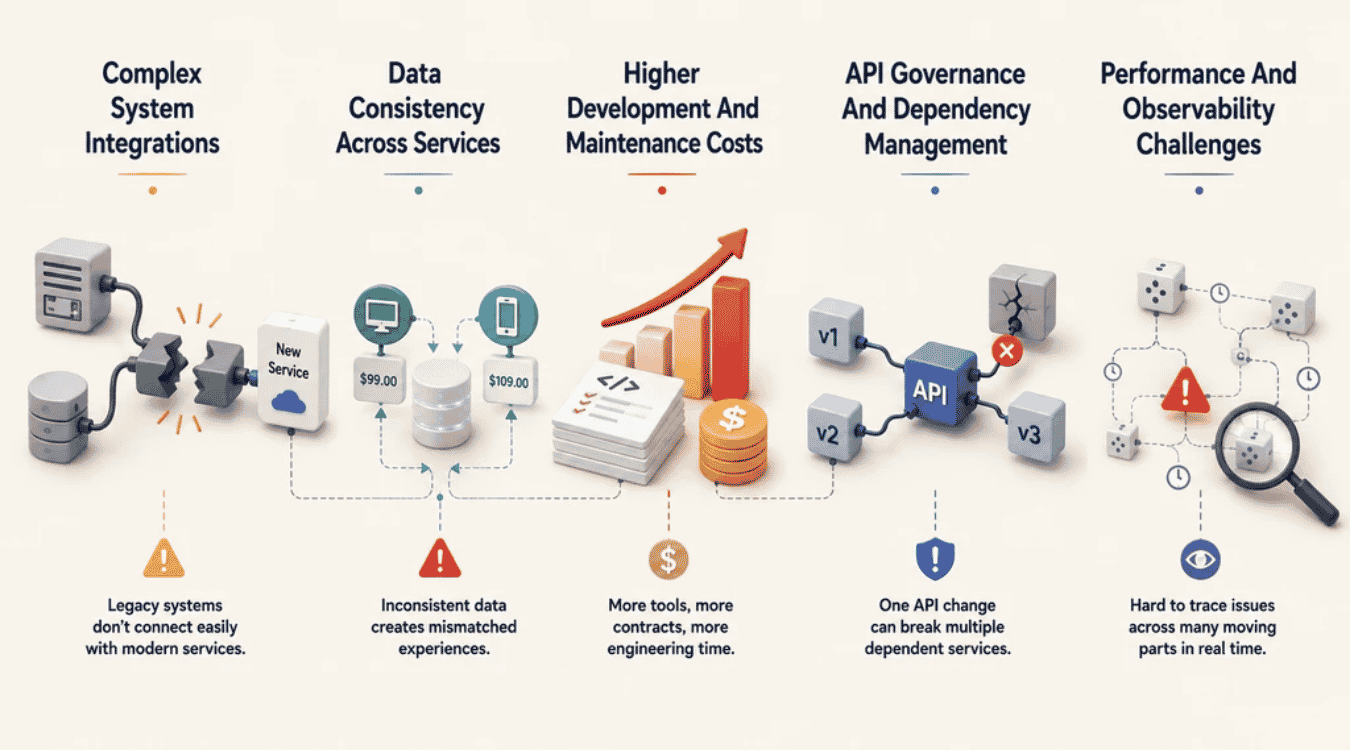
Composable systems solve a lot of problems, but they bring new ones too. Flexibility comes at a cost, and businesses need to understand that trade-off before committing. Here's what actually gets harder with this approach, not just what gets easier.
Complex System Integrations
More components mean more connections to manage. Each one needs its own setup, testing, and ongoing maintenance. Legacy systems make this even trickier, since older tools weren't built with modern APIs in mind, often forcing a choice between replatforming or full rebuild.
Connecting a decade-old inventory system to a new search service takes real work. Legacy architecture often lacks documentation, so teams end up reverse-engineering how old systems actually function before building a bridge to them. This isn't a one-time cost either. Every new tool added later needs the same careful integration work, which adds up fast compared to traditional architecture where everything already sat under one roof.
Data Consistency Across Services
When data lives in multiple places, keeping it accurate everywhere gets harder. A price change needs to hit every system at once, not update in one place while another lags behind.
Sync delays cause real problems. A customer sees one price on the app and another on the website, and trust drops instantly. Composable commerce requires strict rules around what updates trigger where, and how fast those updates travel between services, especially when those APIs underpin revenue-generating monetization models. Without solid data governance, businesses end up firefighting mismatched records constantly, instead of focusing on the customer experience they set out to improve in the first place.
Higher Development And Maintenance Costs
Composable setups aren't cheap to build or run. Unlike a monolithic platform where one vendor handles most updates, composable architecture spreads costs across multiple tools, each with its own contract and support fees, similar to investing in flexible, tailored software solutions.
Traditional monolithic platforms bundle everything into one price. Composable systems don't work that way. Teams pay for specialized tools individually, plus the engineering time to connect and maintain them all, much like the trade-offs involved in custom software development investments. Traditional monolithic systems might cost less upfront, but they limit growth. The trade-off is real: businesses spend more early on to gain flexibility later, and that math doesn't work for every budget or team size.
API Governance And Dependency Management
APIs connect everything, but that also means one broken API can ripple across the whole system. Dependency management becomes a full-time concern once dozens of services rely on each other daily, especially as teams embed AI into these services.
A single API update can break three other services if nobody tracks the dependencies properly. This is where a lot of businesses underestimate the work involved and realize they may need a specialized development agency. Without strict governance, teams lose track of which systems depend on which APIs, and updates turn into guessing games. Documentation and version control aren't optional here. They're what keeps a growing system from collapsing under its own complexity.
Performance And Observability Challenges
More moving parts make problems harder to spot. When something slows down, tracing the issue across a dozen services takes longer than checking one traditional platform running everything centrally.
Observability tools help, but they add another layer to manage and pay for. Businesses need dashboards that track every component in real time, not just the frontend, whether they were built with no-code tooling or custom development. Traditional platforms made this simpler by keeping everything in one place, even if that came with less flexibility. Composable architecture trades that simplicity for speed and control, but only pays off when teams invest in proper monitoring from the start.
When Should You Use Composable Commerce Architecture?
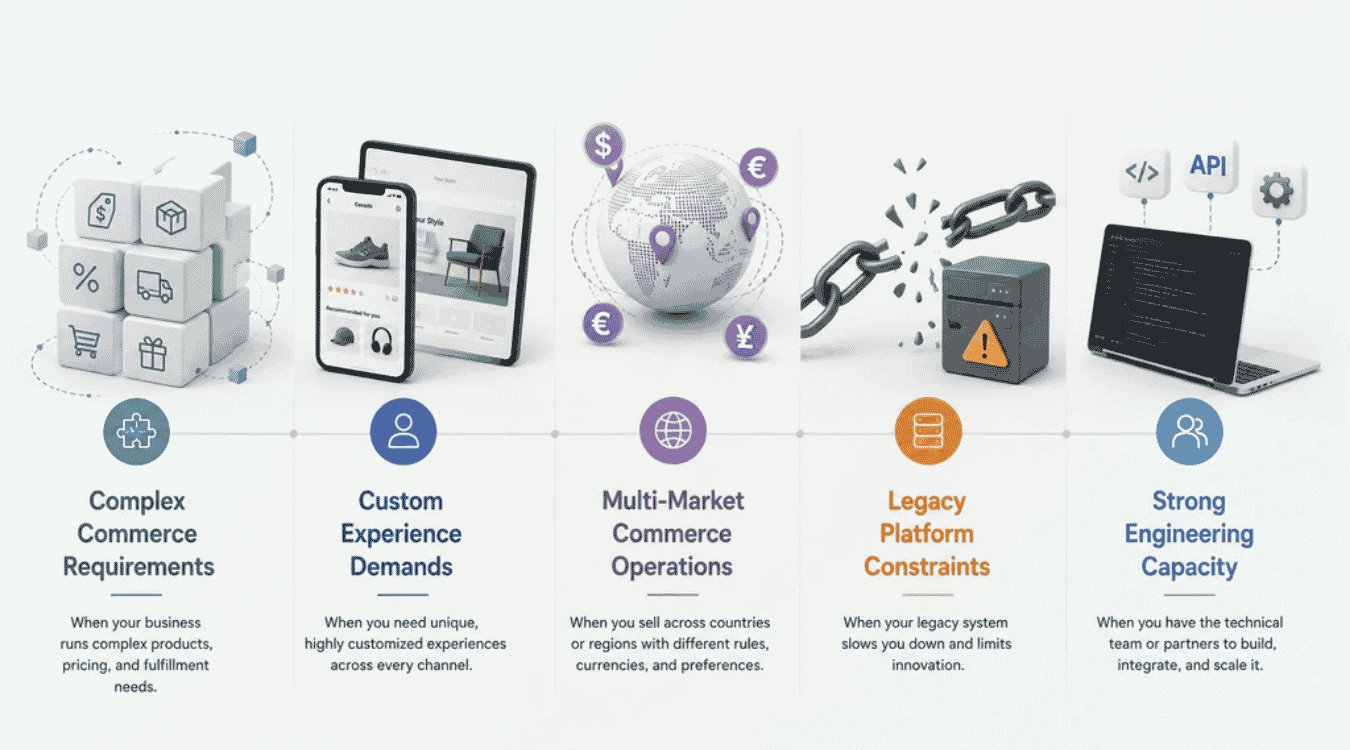
Composable commerce isn't right for every business right away. It solves specific problems, and knowing which ones apply to you matters more than following a trend. Here's when the switch actually makes sense.
Complex Commerce Requirements
Some businesses run simple catalogs with one channel and straightforward pricing. Others juggle multiple product types, custom pricing rules, and complicated fulfillment logic all at once.
If your operation falls into that second group, composable architecture starts making real sense. A single platform handling every requirement gets bloated fast, and changes take longer as complexity grows. Breaking things into independent components lets each part handle its own logic without weighing down the rest. Businesses with straightforward needs might not see the benefit yet, but complexity almost always grows over time, not less.
Custom Experience Demands
Consumer expectations keep rising every year. Shoppers want experiences that feel built just for them, not generic templates copied across every competitor's site.
Composable commerce lets businesses customize solutions down to the smallest detail, from checkout flow to product recommendations. That level of control is hard to pull off on a rigid platform. Teams can deliver highly differentiated experiences across every channel, testing new layouts or features without waiting on a vendor's release schedule. If standing out matters more than blending in, this flexibility becomes less optional and more necessary.
Multi-Market Commerce Operations
Selling across multiple countries or regions adds layers most single-market businesses never deal with. Currency, language, tax rules, and local payment preferences all need separate handling.
Composable architecture manages this well because each market can run its own configuration without duplicating the entire platform. A payment gateway used in Europe doesn't need to touch the one used in Southeast Asia. Teams add new markets by connecting new regional tools, not rebuilding the whole system from scratch. This matters most for businesses planning real international growth, not just a single test market.
Legacy Platform Constraints
Older systems eventually hit a wall. Legacy platforms slow down as traffic grows, and adding new features takes longer with every passing year.
If your current setup requires a developer just to change a homepage banner, that's a signal. Legacy systems weren't built for the pace modern e-commerce demands. Composable commerce offers a way out without a risky full rebuild. Businesses can migrate one component at a time, starting with the piece causing the most pain. This incremental approach avoids the all-or-nothing risk that scares many teams away from modernizing sooner.
Strong Engineering Capacity
Composable commerce needs a team that can actually manage it. APIs, multiple vendors, and ongoing integration work all require real technical skill, not just enthusiasm for new tools.
Businesses without dedicated engineering resources often struggle here, even when the architecture itself makes sense for their needs. This approach works best for teams with in-house developers, or a reliable partner who handles the technical heavy lifting. Market demands move fast, and composable systems only deliver value when someone maintains them properly. Without that capacity, even the best architecture plan stalls before it delivers real results.
Final Discussion
Composable commerce architecture isn't a quick fix. It's a shift in how businesses think about their tech stack altogether. Instead of locking into one rigid platform, teams build with independent components that grow and change as the business does.
That flexibility comes with real trade-offs. More integration work, more moving parts to monitor, more decisions upfront. But for businesses facing complex requirements, multiple markets, or aging legacy systems, composable commerce makes those trade-offs worth it.
The goal isn't chasing every new tool available. It's building a system that actually fits how your business operates today, and can adapt as it changes tomorrow. Composable commerce offers that adaptability. Whether it's the right move depends entirely on where your business stands right now.
.png)