The Complete Software Release Checklist For Engineering Teams
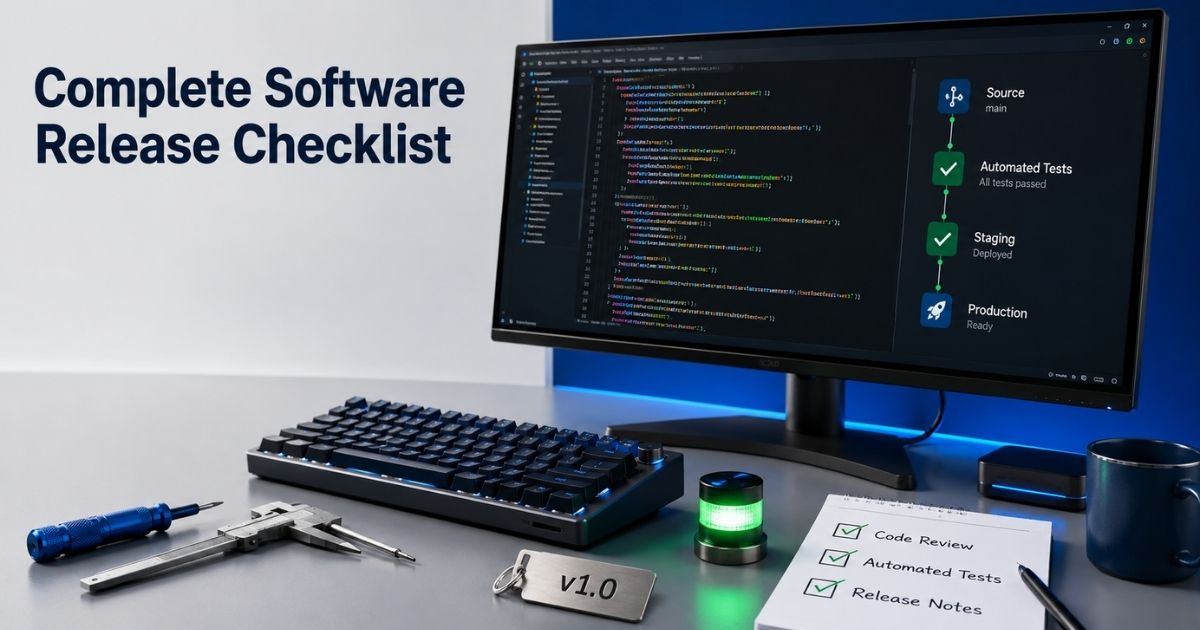
by Rhea Collins | Aug 16, 2026
Table of Contents
Shipping software without a plan is how small bugs turn into weekend fire drills. A solid release process protects your team from that chaos, and it starts with a clear release management checklist that everyone actually follows.
Engineering teams that skip this step often repeat the same mistakes across every release. Missed environment checks, unclear rollback steps, or a deployment that goes out without proper sign-off. None of these failures are random. They happen when teams rely on memory instead of a repeatable software development life cycle and release system.
Post release monitoring closes the loop by catching issues early, before they reach every user. Good habits here also protect future releases, since problems get documented and fixed at the source, especially when backed by robust SaaS monitoring tools that improve performance and UX. This guide breaks the release software release checklist into clear, actionable stages your team can reuse every time you ship.
What Is A Software Release Checklist
A software release checklist is a structured list of steps teams follow before, during, and after shipping code. It confirms every stage of the release cycle gets proper attention, from code freeze to final sign-off, and aligns closely with engineering KPIs that track delivery quality. Skipping steps often leads to bugs slipping into production unnoticed.
Post release validation matters just as much as pre-launch testing. A release checklist template gives teams a repeatable reference instead of relying on memory each time. Following a structured release checklist consistently improves release reliability, reduces downtime, and builds trust across engineering and business teams alike.
Pre-Release Checklist Items
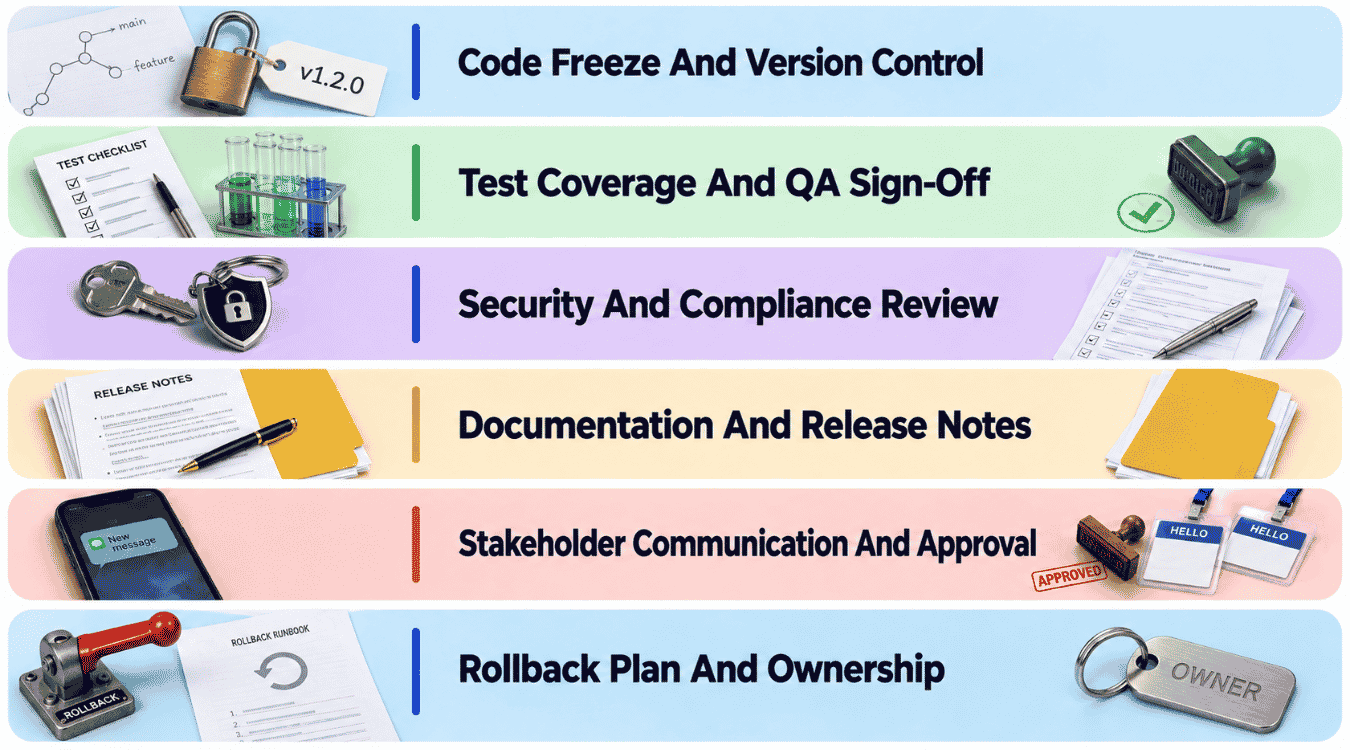
Shipping code without a clear plan invites avoidable risk. Teams that define release scope early and follow a well-defined release checklist catch problems before they reach users, not after.
Code Freeze And Version Control
Locking the codebase before release keeps last-minute changes from introducing new bugs. Release management depends on this discipline, since every merged commit after freeze adds risk to the production environment. Version control tags should mark exactly what's shipping, with no ambiguity about which commit maps to which release.
Branching strategy matters here too. Teams that skip proper tagging often struggle to trace issues back to their source once something breaks post-launch.
Test Coverage And QA Sign-Off
No release should go out without quality assurance clearing every critical path. Automated and manual testing together catch different classes of bugs, and applying structured software testing strategies for Agile and DevOps teams strengthens release success odds significantly.
QA sign-off should be a formal step, not an informal nod. Teams that treat testing as optional often trade short-term speed for long-term instability, which costs far more time to fix later.
Security And Compliance Review
Security teams need visibility into every release before it ships, not after. Running security and compliance checks early and following modern SaaS security best practices catches vulnerabilities while they're still cheap to fix, rather than after code reaches production.
This review should cover dependency scans, access control changes, and any new data handling logic. Regulated industries need this step formalized with clear sign-off, since gaps here carry real legal and financial consequences.
Documentation And Release Notes
Clear technical documentation helps internal teams understand what changed and why. Drawing on lessons from a software development and product delivery blog can improve how release notes explain new features, bug fixes, and any breaking changes in plain language, not just changelog shorthand.
Support and sales teams rely on this documentation to answer customer questions accurately. Skipping this step often means internal teams get blindsided by changes they didn't know were coming.
Stakeholder Communication And Approval
Releases affect more than engineering. Looping in stakeholders early to gather feedback prevents surprises after launch, especially when operations teams need to prepare for support load or infrastructure changes, and when custom software transformations across a business raise the stakes of each release.
Formal approval should come from someone accountable for the business impact, not just the technical execution. Skipping this step often leads to releases going out without the right people aware.
Rollback Plan And Ownership
Every release needs a clear rollback plan before it ships, not one improvised during an incident. Someone should own this responsibility explicitly, with clear steps for reverting changes if system health drops after deployment, and organizations should be just as deliberate when choosing the right software development partner or company to support those releases.
Watching key metrics and user feedback closely in the hours after release helps teams decide quickly whether a rollback is necessary, rather than waiting until the damage compounds.
How To Choose A Deployment Strategy
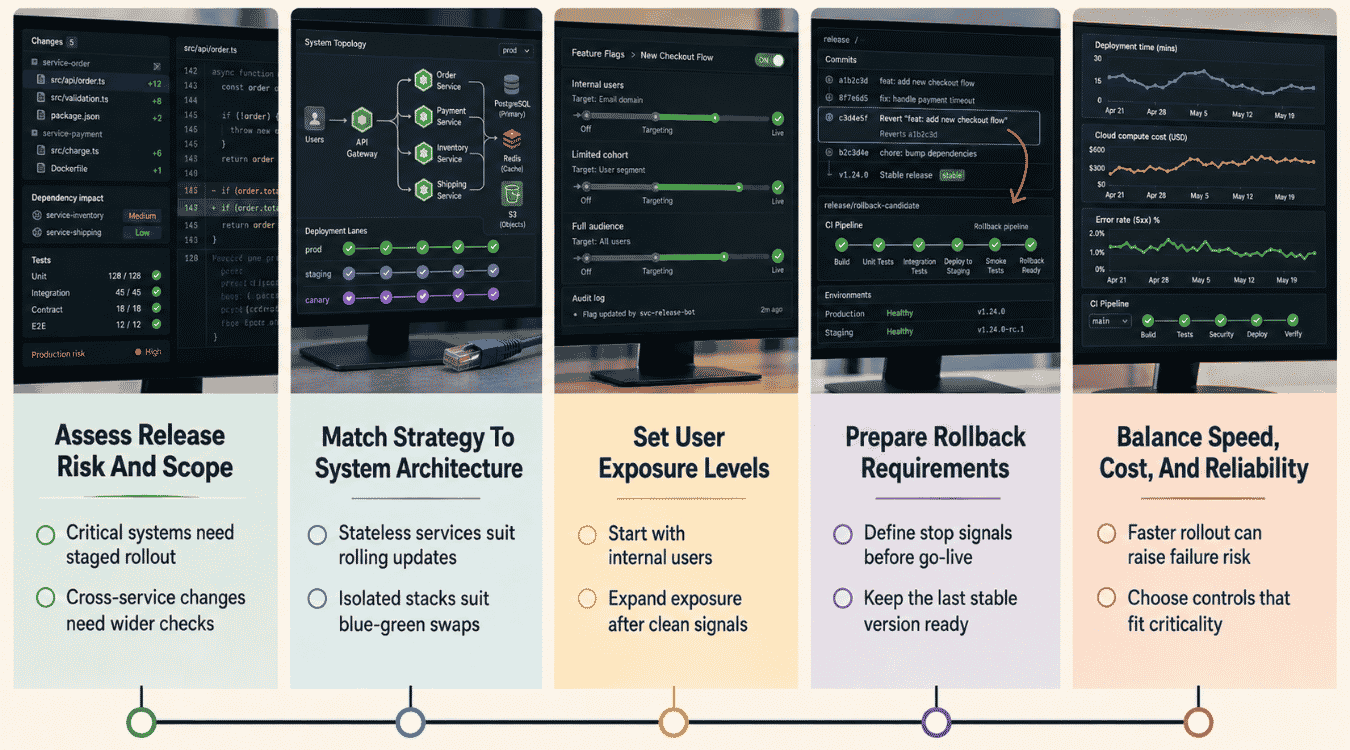
A structured release checklist doesn't stop at process steps. It also demands the right deployment approach. Matching strategy to release scope and system architecture helps teams reduce risk while continuing to deliver software updates reliably.
Assess Release Risk And Scope
Every release task starts with understanding what's actually changing. A small bug fix carries different risk than a major architecture shift, and release scope should shape how cautious the rollout needs to be.
Teams that skip this assessment often apply the same deployment approach to every release, regardless of risk level. Reviewing acceptance criteria early helps clarify what release quality actually requires before choosing a strategy.
Match Strategy To System Architecture
Not every system supports every deployment method. Microservices architectures often handle canary releases well, while monolithic systems may need a different approach entirely to avoid downtime across the whole application, so teams should decide whether microservices or a monolith fits their product before standardizing release patterns.
Testing this in a staging environment first reveals compatibility issues before they reach production. Release status should stay visible throughout, so teams catch architecture mismatches before they affect the release timeline.
Set User Exposure Levels
Deciding how many users see a release first shapes how much risk the rollout carries. Gradual exposure limits damage if something breaks, while a full rollout speeds up delivery but raises the stakes.
This decision should tie back to release readiness. Software testing results and confidence in the build should guide whether a slow rollout or a faster release timeline makes more sense for the next release.
Prepare Rollback Requirements
Every deployment strategy needs a rollback plan matched to it specifically. Canary and blue-green deployments simplify rollback, since only a portion of traffic gets affected before anyone notices a problem, and a phased monolith-to-microservices migration approach can further reduce rollback complexity during modernization.
Rolling deployments make rollback harder, since changes spread gradually across the system. Clear release notes documenting exactly what shipped helps teams act fast if the release meets quality standards but still needs reverting.
Balance Speed, Cost, And Reliability
Faster deployment strategies often cost more in infrastructure or engineering time. Blue-green deployments need duplicate environments running simultaneously, which helps teams reduce downtime but adds real operational cost.
Choosing the right balance depends on what the business actually needs from that release. Some teams prioritize reliability over speed, especially when a single release status update could affect customer trust broadly, or when weighing SaaS versus custom software for cost flexibility and scale.
Release Day Checklist Items
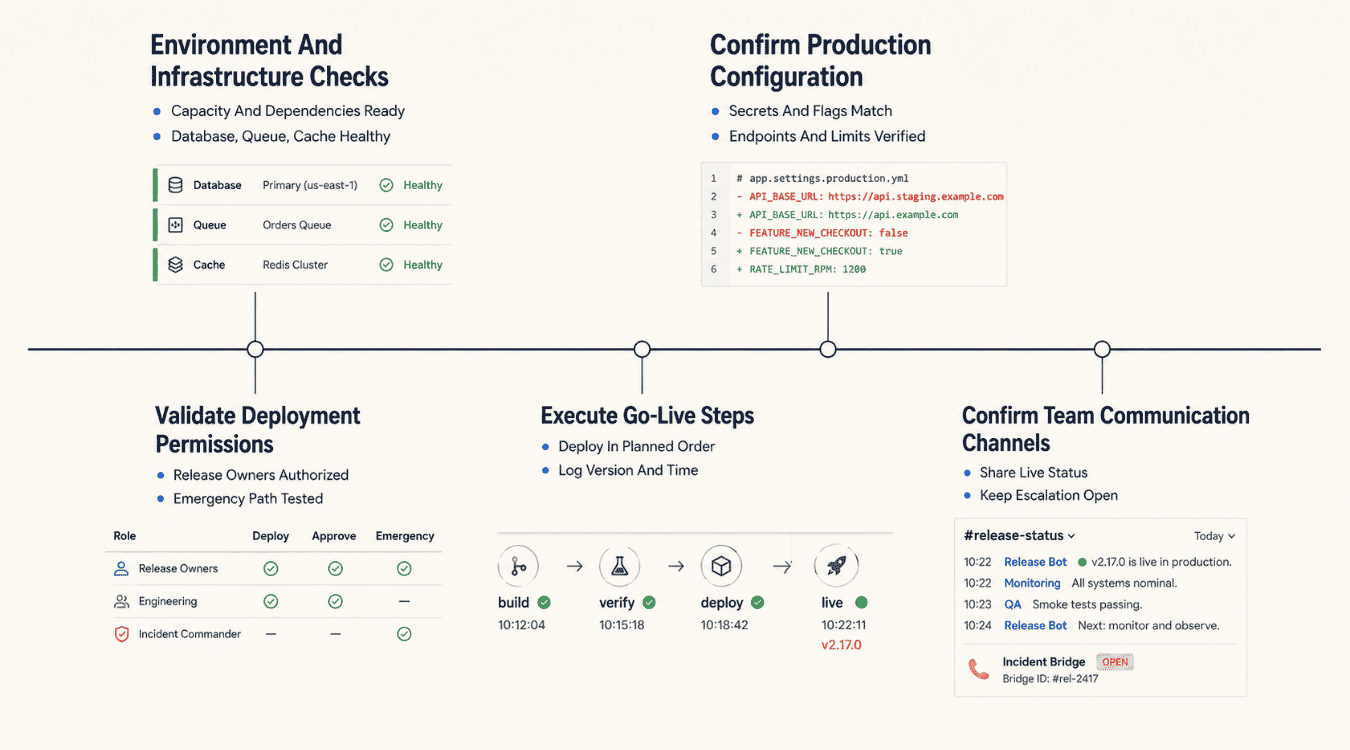
Deploying software reliably on release day depends on preparation, not luck. Managing releases well means development teams verify every system dependency before deployment begins, keeping reliable releases the standard rather than the exception.
Environment And Infrastructure Checks
Before deploying software, confirm every server, database, and dependency is ready for the release. Environment checks should include performance testing, SaaS monitoring tools for performance and UX, and integration testing to catch mismatches between staging and production before they surface.
Skipping this step often means problems appear only after real traffic hits the system. Regression testing here helps confirm nothing else broke while preparing for feature releases.
Confirm Production Configuration
Production configuration should match what was validated in staging, down to environment variables and service settings. Feature flags need explicit confirmation too, since a flag left in the wrong state can expose new features before they're ready.
Security testing should run one final pass here, checking access controls and configuration settings tied directly to this release. Small misconfigurations cause outsized problems once live.
Validate Deployment Permissions
Team members executing the deployment need the right access confirmed beforehand, not discovered mid-release. Permission gaps discovered during deployment slow everything down and increase pressure on the team at the worst possible moment.
Reviewing test plans against actual deployment steps helps confirm the right people have the right access for every action required during go-live.
Execute Go-Live Steps
Go-live steps should follow a documented sequence, not memory or improvisation. Each step ties back to earlier testing, so nothing gets deployed without passing through integration testing and validation first.
Following the sequence closely reduces the chance of missed steps under pressure. Development teams that rush this stage often introduce avoidable errors.
Confirm Team Communication Channels
Incident response depends on clear communication already in place before anything goes wrong. Team members need confirmed channels for updates, not a scramble to figure out who to notify if issues appear, especially for remote engineering team management at scale.
Document lessons from previous releases to improve this step further. Strong communication during release day often determines how quickly problems get resolved.
Post-Release Checklist Items
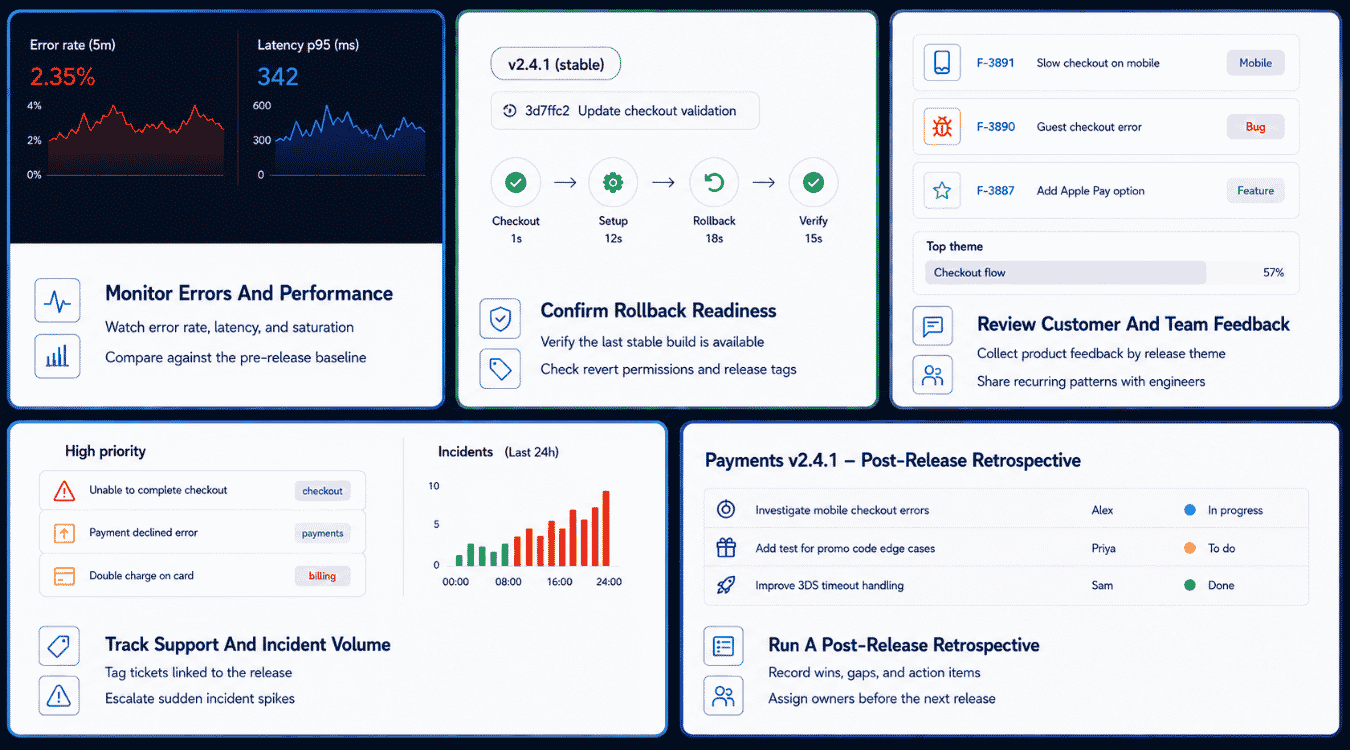
Releasing code doesn't end at deployment. Confirming system stability and reviewing real user impact matters just as much, and a solid checklist template keeps this phase from getting skipped once the release feels "done."
Monitor Errors And Performance
Watching error rates and performance metrics right after release reveals problems that testing code in staging never surfaces. Real traffic behaves differently than test environments, and issues often show up only under actual load.
Product managers should have visibility into these metrics too, not just engineering. Catching a spike early keeps small issues from becoming larger incidents that affect more users over time.
Confirm Rollback Readiness
Rollback plans made during pre-release still need confirmation once the release is live. Verify the rollback path actually works, since an untested plan on paper doesn't guarantee success criteria get met during an actual incident.
Teams that treat rollback as theoretical often discover gaps at the worst possible moment. Confirming readiness immediately after release removes that risk while memory of the deployment is still fresh.
Review Customer And Team Feedback
Customer feedback right after release often surfaces issues that internal testing missed entirely. Support tickets, in-app reports, and direct messages all carry signal worth reviewing closely in the first hours and days.
Internal team feedback matters too. Engineers and support staff often notice friction points that customers don't articulate clearly, and combining both sources gives a fuller picture of real impact.
Track Support And Incident Volume
A spike in support tickets or incidents right after release often points directly to the changes just shipped. Tracking volume against baseline numbers helps teams spot problems before they compound further.
System stability depends on catching these patterns early. Product managers and engineering leads should review this data together, since ticket volume alone rarely tells the whole story without context.
Run A Post-Release Retrospective
A retrospective works best when it happens soon after release, while details are still fresh. Reviewing what went well against success criteria set earlier helps teams improve the next release cycle.
Documenting findings in a shared checklist template ensures lessons don't get lost. Teams that skip this step often repeat the same mistakes across multiple releases without realizing it.
How To Adapt The Checklist By Release Type
.png)
Not every release needs the same level of scrutiny. Adjusting checks to match release risk helps teams deliver software efficiently without cutting corners on the releases that actually need deeper review.
Match Checks To Release Risk
Release risk should determine how much of the testing checklist gets applied. A minor copy change carries far less risk than a database migration, and treating both the same wastes time or, worse, misses real exposure on the risky one, which a structured software product audit for security and compliance can help uncover.
Assessing risk upfront helps teams decide where to spend review effort. Skipping this step often means over-testing safe changes while under-testing dangerous ones.
Adjust Steps For Hotfix Releases
Hotfixes move fast by nature, but speed shouldn't mean skipping unit tests entirely. Even a rushed fix needs basic validation before it reaches production, since an untested hotfix can introduce a second problem on top of the first.
Release timing matters here too. Hotfixes often go out outside normal windows, so communication steps need to stay in place even when testing gets compressed.
Add Controls For Major Releases
Major releases carry the highest stakes, so they need the fullest version of the checklist. Extra sign-offs, broader regression coverage, and more stakeholders reviewing the plan all belong here, supported by strong engineering team management for faster product delivery so controls don't stall progress.
Teams that shortcut major releases under deadline pressure often pay for it afterward. Adding controls upfront costs less than fixing a widespread failure later.
Simplify Routine Maintenance Releases
Routine maintenance releases, like dependency updates or small config changes, don't need the same weight as feature launches. A lighter version of the checklist keeps things moving without adding unnecessary friction.
Simplifying here doesn't mean skipping validation entirely. It means matching effort to actual risk, so teams can deliver software consistently without every release feeling like a major event.
Define Rules For Emergency Changes
Emergency changes need clear rules decided in advance, not invented during the incident. Knowing who can approve an emergency release and what minimum checks still apply keeps chaos from taking over during a real crisis, as seen in case studies comparing software build vs. buy decisions where control over releases proved critical.
Defining these rules ahead of time protects release timing from becoming inconsistent under pressure, while still allowing teams to move fast when it genuinely matters.
Tying Releases To DORA Metrics
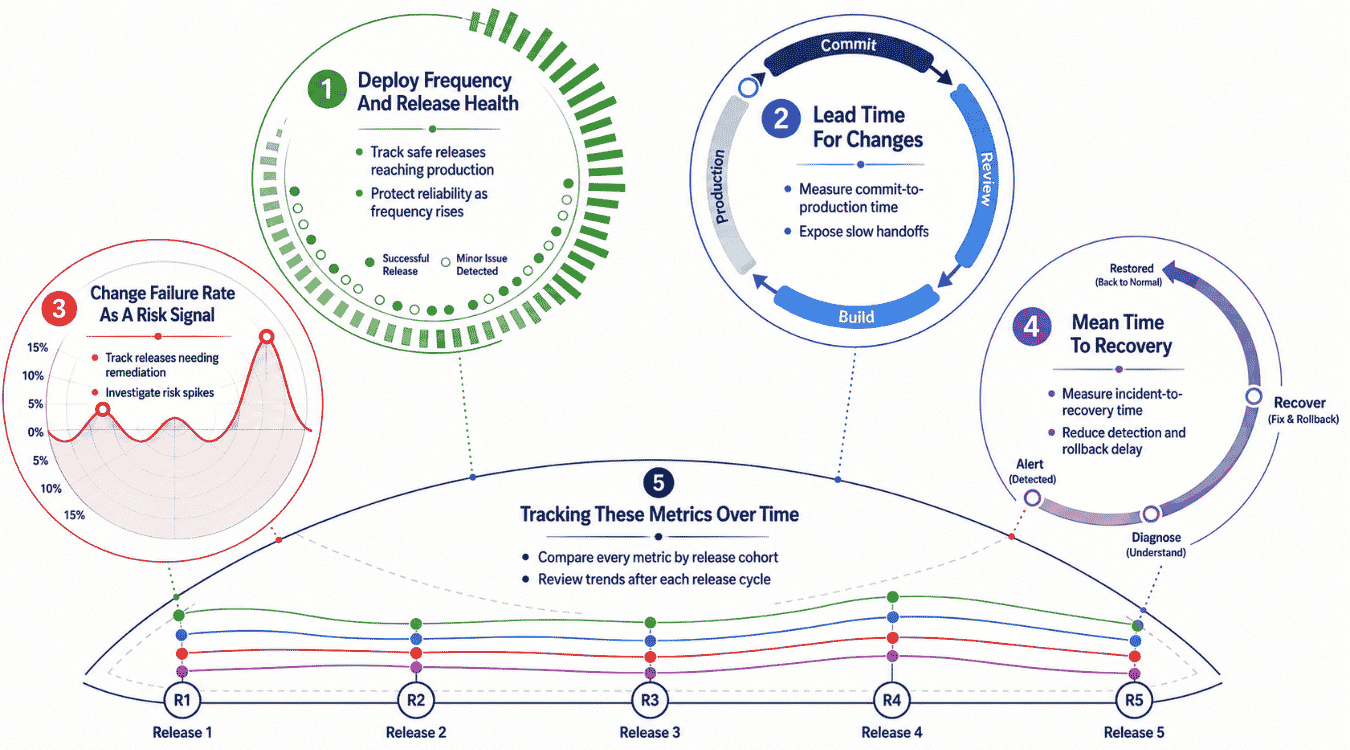
Release management works best when it's measured, not assumed. Deploy frequency, lead time, and other system metrics turn release management from guesswork into something teams can actually track and improve using clear success metrics over time, particularly when teams focus on improving deployment frequency and related metrics.
Deploy Frequency And Release Health
How often a team ships code says a lot about release health. Frequent, smaller deployments usually signal a mature release process, while rare, large releases often point to bottlenecks or excessive caution somewhere upstream; targeted work on improving deployment frequency metrics helps teams move toward healthier release patterns.
Tracking this metric over time helps teams spot trends early. A sudden drop in deploy frequency often means friction has crept into the pipeline, worth investigating before it slows things down further.
Lead Time For Changes
Lead time measures how long it takes code to go from commit to production. Shorter lead times usually reflect strong team coordination and fewer manual handoffs slowing the process down, and disciplined engineering KPIs for faster releases and better quality keep this metric aligned with business goals.
Long lead times often point to approval bottlenecks or excessive manual testing steps. Reducing friction here, without cutting corners on quality, tends to improve both speed and morale across development teams.
Change Failure Rate As A Risk Signal
Change failure rate tracks how often a release causes an incident or requires a fix. A high rate signals real risk, either in testing coverage, deployment practices, or how changes get reviewed before shipping; disciplined launch planning, like in successful SaaS product launch case studies, keeps this rate under control.
This metric works best alongside other system metrics rather than alone. A team shipping frequently with a low failure rate is in a healthier position than one shipping rarely but breaking things often.
Mean Time To Recovery
Mean time to recovery measures how fast a team restores existing functionality after something breaks. Fast recovery matters more than avoiding every failure, since no system stays perfect indefinitely, and recurring SaaS technical audits for security, performance, and scale often surface issues before they turn into prolonged outages.
Teams with strong incident response processes tend to recover faster, regardless of what caused the failure. This metric often reveals more about operational maturity than the failure itself.
Tracking These Metrics Over Time
Watching these four metrics together, rather than in isolation, gives a clearer picture of release process health. Trends matter more than single data points, since one bad release doesn't necessarily indicate a broader problem.
DORA Metric | Elite Performance | Low Performance |
|---|---|---|
Deploy Frequency | Multiple times per day | Fewer than once per month |
Lead Time For Changes | Less than one hour | More than six months |
Change Failure Rate | 0-15% | Over 45% |
Mean Time To Recovery | Less than one hour | More than six months |
How GainHQ Manages Software Releases
GainHQ builds and maintains software for clients across custom software development and SaaS solutions, and nearshore delivery engagements, which means release discipline isn't optional. Our team applies structured release practices across every project, whether we're shipping updates to a client's platform or maintaining our own products like Payrun or Gain.io CRM.
Each release follows a defined process, from code freeze through post-release monitoring, adjusted based on release risk and system architecture. Teams stay coordinated through clear communication channels, and rollback plans stay ready before any deployment goes live.
Working across web and mobile platforms for our own products as a full-stack web development partner has reinforced why this discipline matters. Consistent release practices protect uptime and user trust, whether we're deploying for a client or shipping updates to software we run ourselves.
.jpg)