How To Build An Effective Automation Strategy For Your Business

by GainHQ Editorial Team | Sep 27, 2026 | Technology & Innovation | Editorial policy
Table of Contents
- What Is An Automation Strategy
- Why Does Your Business Need An Automation Strategy
- How Do You Identify Processes Worth Automating
- How Do You Prioritize Automation Opportunities
- Which Automation Technology Fits Your Process
- What Should An Automation Roadmap Include
- How Do You Measure Automation ROI
- How Do You Scale An Automation Strategy
- Automation Strategy Vs. Other Approaches
- Automation Strategy Examples By Business Function
- Final Discussions
Most businesses already automate something, but few have an automation strategy behind it. One approval flow lives in a single tool, a script syncs data overnight, and a chatbot answers the easy support questions. When leaders ask what all that automation saves, few teams can give a clear answer, because each piece was added to fix a single problem rather than to serve a shared goal.
Current generative AI and other technologies could automate activities that absorb 60 to 70 percent of employees' time, according to McKinsey (June 2023). Potential that large-scale automation punishes random choices and rewards focus. With a solid automation strategy, you know which processes deserve attention first, which technology fits each one, and how to prove real results before scaling automation across every department.
What Is An Automation Strategy
An automation strategy is a business-wide plan that defines which processes to automate, in what order, with which tools, and how results get measured. Rather than scattered automation efforts, it gives every team one shared direction. Only about a third of organizations had one, according to Deloitte's 2020 intelligent automation survey.
Under that plan, each automation process gets picked for business value, not convenience. In software development, the idea narrows into a test automation strategy, also called an automation testing strategy, which decides only which tests run automatically and when.
Why Does Your Business Need An Automation Strategy
Automation without a plan creates scattered wins that never compound, while a clear strategy turns small fixes into measurable gains, cuts manual effort across teams, and shows exactly where your next automation investment should go.
Reduce Manual Work
Knowledge workers spend 58% of their day on work about work, according to Asana's 2023 Anatomy of Work Global Index. Status checks. Tool switching. Chasing updates. Respondents believed better processes could save them 4.9 hours every week.
A strategy points automation at that coordination layer first, where manual effort piles up quietly. Engineering teams see the same pattern with repetitive tests, which drain hours every sprint until someone automates them. Once those tasks run on their own, people finally get back to the skilled work they were hired for.
Improve Process Consistency
Only 38% of organizations have mature process definitions, standards, and management, according to Deloitte's 2020 intelligent automation survey. Everyone else runs on habit. One employee approves refunds in two steps; another takes five.
Automation fixes that by locking in one agreed version of every workflow. Same steps, same rules, same data checks, every single time. In software development, consistent pipelines protect software quality the same way, since every release passes identical checks. Consistency also creates a clean audit trail, which matters when regulators come asking.
Reduce Operational Errors
Human error is rarely about careless people. More often, it comes from busy people doing repetitive work at volume. Accounts payable shows the cost clearly: invoice exception rates average 14%, against 9% for best-in-class teams, according to Ardent Partners' AP Metrics That Matter in 2025.
Every exception means someone stops, investigates, and fixes it by hand. Automated validation catches wrong amounts and duplicate entries before they spread downstream. Fewer mistakes mean less rework and cleaner reports, plus a team that trusts its own data again.
Improve Process Visibility
You can't fix what you can't see. Yet only 27% of the average enterprise's applications are connected, according to MuleSoft's 2026 Connectivity Benchmark Report. Managers end up piecing together status updates from inboxes and spreadsheets.
Automated workflows log every step, timestamp, and handoff without anyone lifting a finger. Where do requests stall? Which approvals drag the longest? Dashboards answer both in seconds. With real data on hand, continuous improvement stops being a quarterly debate and becomes a weekly habit your whole team can act on.
Scale Business Operations
Growth exposes manual processes fast. Organizations adopting intelligent automation expect an average cost reduction of 31% over three years, up from 24% in 2020, according to Deloitte's 2022 Global Intelligent Automation survey.
Savings like that help companies optimize resource allocation instead of hiring every time volume spikes. Order surges, new markets, bigger customer bases: automated workflows absorb the extra load at a lower cost per transaction. Product teams feel it too. Better testing efficiency means faster, safer releases, even as the codebase keeps growing every quarter.
How Do You Identify Processes Worth Automating
Not every task deserves automation. Strong candidates are repetitive, rule-based, high-volume, and costly when done by hand, and finding them takes a structured, step-by-step review of how work actually flows across your teams and systems today.
Map Existing Business Processes
Process fragmentation was the main barrier to intelligent automation for 36% of executives, according to Deloitte's 2019 survey of 523 leaders. Teams rarely do the same job the same way.
Start by writing down how work really happens, not how the policy says it should, covering who starts each request and which tools touch it. Talk to the people doing the job. A QA lead, for example, can walk you through the full testing process in an hour, including every step manual testers repeat each release.
Find Repetitive And Time-Consuming Tasks
U.S. workers lose 308 hours a year to duplicated or outdated work, according to Asana's Anatomy of Work Index 2021.
Look for tasks that repeat daily or weekly, follow clear rules, and rarely change, like copying data between systems or running the same tests before every deploy. Manual testing of stable features fits perfectly, since those test cases barely change between releases. Anything that needs human judgment on every run belongs lower on the list, at least until the rules become clear enough to write down.
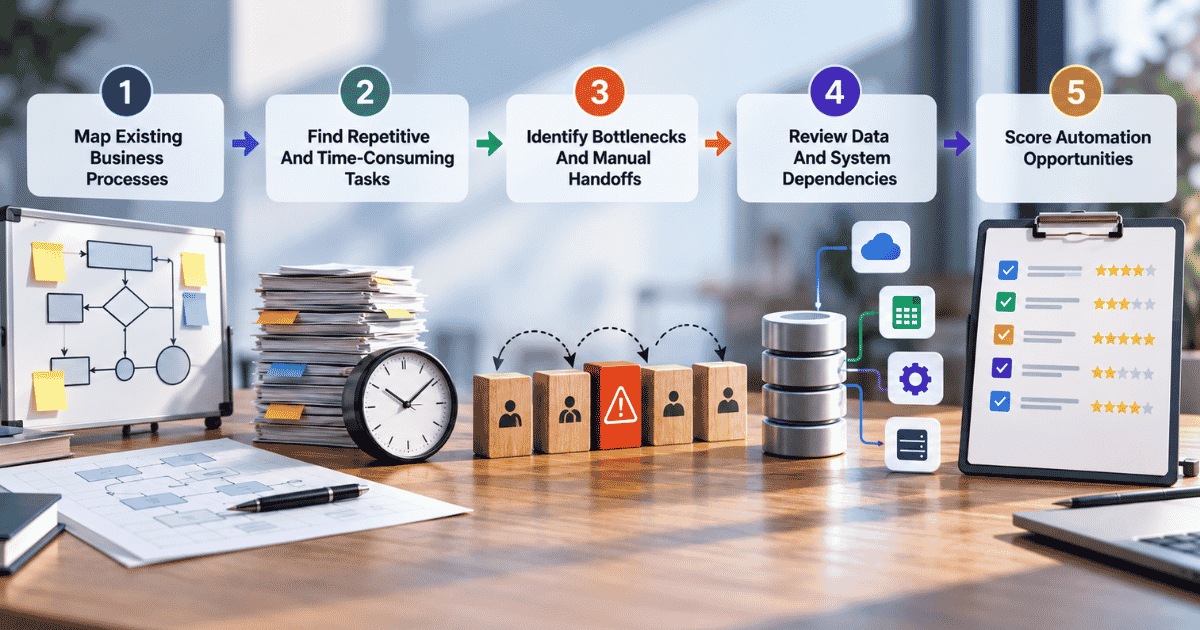
Identify Bottlenecks And Manual Handoffs
Work slows down where it changes hands. Best-in-class AP teams process invoices in 3.1 days, compared with 17.4 days for everyone else, according to Ardent Partners' AP Metrics That Matter in 2025. Ardent credits much of that gap to automation and AI-driven workflows.
Trace where requests sit idle longest, usually in approval queues, email forwards, and status checks between teams. In QA, waiting on a free tester can hold a finished release for days. Remove the wait, and cycle time drops without anyone working harder.
Review Data And System Dependencies
Automation breaks fastest when hidden dependencies surface too late in the project. Across IT teams, 71% of leaders agree their infrastructure makes systems overly dependent on each other, according to MuleSoft's 2026 Connectivity Benchmark Report.
Before automating anything, list every system, data source, and API a process touches, then check who owns the data and how clean it is. Test automation works the same way. Test cases that depend on unstable environments or shared data fail at random, and QA teams soon stop trusting the entire suite.
Score Automation Opportunities
Potential is not the same as priority. Even with 60 to 70% of work activities technically automatable, that potential doesn't necessarily extend to entire roles, according to McKinsey's State of AI in 2023 report.
Score each candidate task from 1 to 5 on volume, rule clarity, error cost, time saved, and data readiness. Add the scores up and rank them. Not all tests or tasks deserve a spot near the top, and the same tests you run once a quarter may never justify the build effort.
How Do You Prioritize Automation Opportunities
A long list of automation ideas means little without a ranking. Scoring each opportunity on impact, feasibility, return, and risk helps you fund the projects that pay back first and park the ones that don't.
Business Impact
Start with the processes that touch revenue, customers, or cost at scale. Volume changes everything. Processing a single invoice costs $9.40 on average, versus $2.78 for best-in-class teams, according to Ardent Partners' AP Metrics That Matter in 2025.
Multiply that gap by thousands of invoices a month, and the priority becomes obvious fast. QA teams apply the same logic when they prioritize critical tests first. Checkout, login, and payment flows carry the highest business impact, so they get automated before anything cosmetic or rarely used.
Automation Feasibility
Some processes look perfect on paper and fall apart in practice. Integration is the usual culprit: 95% of IT leaders report difficulty connecting AI to existing systems, according to MuleSoft's 2025 Connectivity Benchmark Report.
Check whether the rules are stable, the data is structured, and the systems expose APIs. Three clear yeses usually signal high feasibility. Smoke tests score well here, since they're short, predictable, and easy to script, which makes them a smart, low-risk first win for QA teams new to test automation tooling.
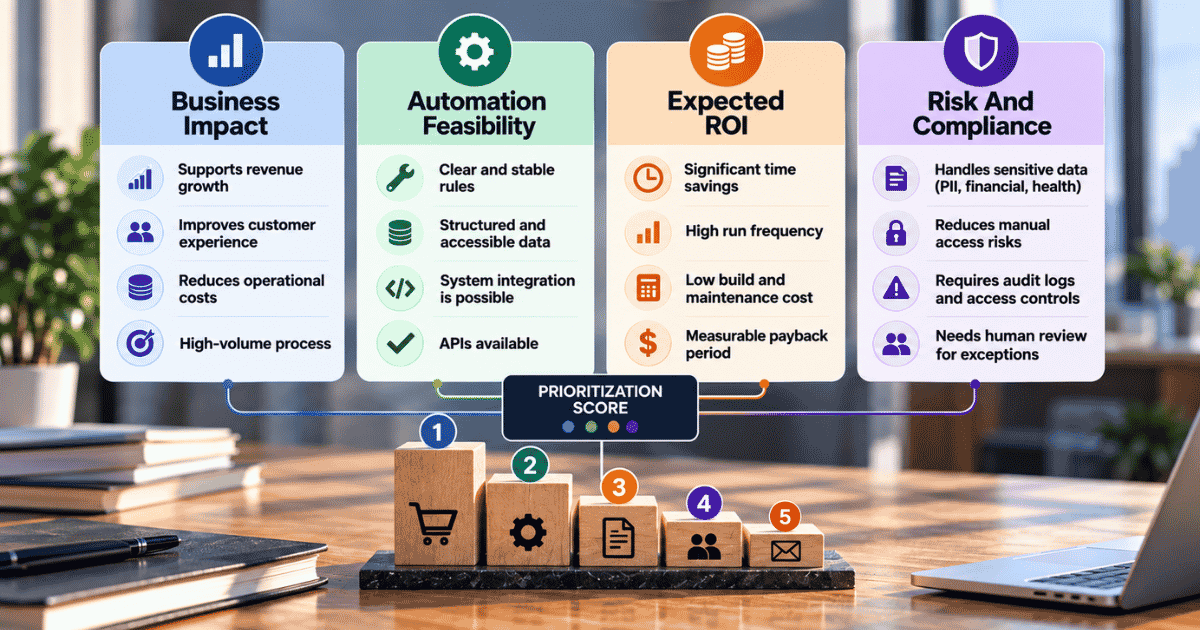
Expected ROI
ROI is simple math, but teams often skip the maintenance side. Companies combining RPA with AI saw an average revenue increase of 9%, versus 3% for those that didn't combine them, according to Deloitte's 2019 intelligent automation survey.
Estimate hours saved per run, multiply by run frequency, then subtract build and upkeep costs. Frequency usually drives most of the payback. Regression tests are a textbook case: they run on every release to confirm new code doesn't break existing functionality, so the savings compound surprisingly fast.
Risk And Compliance
A single data breach now costs $4.99 million on average, a 12% jump from last year, according to IBM's Cost of a Data Breach Report 2026.
Processes that handle personal, financial, or health data deserve extra weight in your scoring, in both directions. Automation can reduce exposure by removing manual access to sensitive records, while poorly governed bots can quietly widen it. Rank these opportunities high on your list, but pair each one with audit logs, access controls, and human review for every flagged exception.
Which Automation Technology Fits Your Process
Picking the right automation tool depends on how structured the work is, how many systems it touches, and how much judgment each step needs. Match the technology to the process, never the other way around.
Technology | Best Fit | Common Use Cases |
|---|---|---|
Workflow Automation | Rule-based business processes | Approvals, routing, notifications |
RPA | Repetitive, structured tasks | Data entry, legacy system tasks |
API Integration | Connected applications | Data synchronization, system integration |
AI Automation | Unstructured or decision-heavy work | Document processing, classification |
Intelligent Automation | Complex end-to-end processes | Claims, service, operational workflows |
Custom Software | Unique business requirements | Purpose-built business applications |
Most real processes combine two or three of these technologies. An invoice flow, for example, might use AI to read the document, an API integration to sync the ERP, and workflow automation to route approvals. Each layer handles the part it does best.
Adoption of low-code technologies reached 40% of organizations, up from 24% in 2020, according to Deloitte's 2022 Global Intelligent Automation survey. Low-code works well for simple approvals, but complex logic and legacy connections still push teams toward custom software.
Software teams apply the same logic to testing tools. Unit tests and API tests run well in lightweight test automation tools, while integration tests usually need a full test automation framework. Pick automated testing tools that support the programming languages your team already writes, or adoption stalls right after the pilot.
Before committing, ask one simple question: will this automation tool still fit when volume doubles or a new system joins the process? If the answer is unclear, run a small pilot first and measure results against your current baseline.
What Should An Automation Roadmap Include
An automation roadmap turns a ranked list of ideas into a sequenced plan. It balances quick wins with bigger builds, maps dependencies early, and sets milestones so every phase proves value before the next begins.
Define Short-Term Automation Wins
Early results buy you patience for everything else. Payback for organizations piloting intelligent automation stretched from 16 months in 2020 to 22 months in 2021/22, according to Deloitte's 2022 intelligent automation survey.
Waiting nearly two years for proof kills momentum. Pick two or three low-effort, high-frequency tasks that can go live within 60 days or less, such as report generation, approval reminders, or simple test scripts for a stable feature. Quick, visible savings give leadership a reason to keep funding the bigger, riskier work that follows.
Plan Strategic Automation Projects
Strategic projects are the heavy lifts. Scope creeps, budgets stretch, and timelines slip. Only 30% of companies fully meet timeline, budget, and scope expectations on large-scale tech programs, according to BCG's 2024 study.
Think end-to-end order processing, claims handling, or full business process automation across finance. Each one needs a named sponsor, a realistic budget, and a documented test plan before build starts. Break big projects into phases of eight to twelve weeks, so problems surface early instead of at the final, most expensive deadline.
Establish Pilot Programs
Just 8% of surveyed organizations were automating at scale, while 38% were still piloting, according to Deloitte's 2019 intelligent automation survey.
Pilots stall when they lack exit criteria, so define success before you start: time saved, error rate, and user adoption. Handle environment setup early, and run initial testing in isolated testing environments that mirror production closely, not a developer's laptop. Hit the targets within eight weeks, and the pilot earns a wider rollout. Miss them, and you fix the process or drop the idea without regret.
Map Integration Dependencies
Every automation leans on something else: an API, a database, a login, a file drop. Without proper integration, AI agents can add more complexity than value, according to 86% of IT leaders in MuleSoft's 2026 Connectivity Benchmark Report.
Draw the map before you build. List each system, who owns it, how it authenticates, and what breaks if it changes. Store automation scripts and configs in version control systems like Git, so every change to your own automation can be traced and rolled back within minutes.
Set Implementation Milestones
Milestones only work when they measure something real. Over half of organizations haven't calculated the cost reduction from intelligent automation, and 70% haven't calculated the expected revenue gain, according to Deloitte's 2022 intelligent automation survey.
Tie each milestone to a date and a number: discovery done by week two, test creation finished by week five, and the first process live by week eight. Track hours saved and errors avoided from day one. Review progress every sprint, and adjust scope before a slipped milestone becomes a slipped quarter.
Plan Long-Term Automation Goals
Long-term goals keep today's projects pointed somewhere useful. Work automation, combined with generative AI, could add 0.2 to 3.3 percentage points to annual productivity growth, according to McKinsey's June 2023 report on generative AI.
Set a three-year target, such as 40% of repetitive finance tasks automated or every release covered by automated regression tests. Revisit it yearly, since tools and priorities shift fast. Build a reusable library of connectors, workflows, and test scripts along the way, so each new project starts further ahead than the last.
How Do You Measure Automation ROI
Automation ROI compares what a process cost before automation with what it costs after. Track time, cost, errors, speed, productivity, and customer impact against a clear, documented baseline, then measure success at fixed monthly intervals.
Time Savings
Time saved is the easiest number to capture and the easiest to overstate. Software bots delivered an average of 20% full-time equivalent capacity in automated processes, according to Deloitte's 2017 Global RPA Survey.
Measure minutes per task before and after, then multiply by monthly volume. Be honest about freed time, since hours saved only count if people spend them on higher-value work instead of more busywork. In QA, compare manual test execution time against automated runs, and you'll quickly see exactly where each release actually gets faster.
Cost & Error Reduction
Cost savings depend heavily on the foundation underneath. Organizations with the right technology, infrastructure, and cybersecurity in place cut costs by 21%, compared with 13% for those without, according to Deloitte's 2019 intelligent automation survey.
Count labor hours, rework, penalties, and license fees on both sides of the ledger, and give errors their own line. Track defect rates, failed transactions, and escaped bugs, because poor test coverage often hides errors that reach customers later. Low test quality can make savings look better than they really are.
Process Cycle Time
Speed shows up where handoffs used to be. Elite software teams move changes to production 127 times faster than low performers, according to Google's 2024 DORA Accelerate State of DevOps Report.
Measure the full clock, from request to completion, not just the automated step in the middle. A bot that finishes in seconds means little if approvals still wait three days. For engineering teams, fast test execution inside CI shortens release cycles directly, as long as test results stay reliable enough for developers to trust.
Employee Productivity
Developers using GitHub Copilot completed tasks 56% faster than those without it, according to a study cited in McKinsey's June 2023 generative AI report.
Productivity is about output per person, not hours logged, so track tickets resolved, invoices processed, or releases shipped per team member before and after automation. Pair those numbers with a short quarterly survey, because burnout and frustration rarely show up in dashboards. For QA teams, watch test performance trends too: stable suites mean testers spend time investigating real bugs instead of rerunning flaky checks.
Customer Experience & Revenue Impact
Customers feel automation long before finance reports it. Yet 66% of organizations still don't deliver an integrated user experience across their channels, according to MuleSoft's 2025 Connectivity Benchmark Report.
Track response time, resolution time, CSAT, and churn for the customers each automated process touches. Then link those shifts directly to revenue: faster quotes, fewer abandoned orders, higher renewal and upsell rates. Software quality counts here too, since strong test coverage keeps broken releases away from paying users and protects revenue your team already earned.
How Do You Scale An Automation Strategy
Scaling automation means moving from a handful of successful bots to a repeatable system. Clear owners, shared standards, strong governance, and monitoring let every new project build on the last instead of starting over.
Establish Ownership
Automation without an owner slowly breaks. Lack of skills and experience was a top barrier to end-to-end automation for 55% of organizations, according to Deloitte's 2022 intelligent automation survey.
Assign every automation a business owner who defines the outcome and a technical owner who keeps it running. Many companies add a small center of excellence to coach teams and approve new builds. In software, the QA team usually owns test suites, while developers own the code those tests protect, a split worth writing down early.
Create Automation Standards
Standards are what separate a platform from a pile of scripts. Only 37% of organizations reported having appropriate IT standards for automation, according to Deloitte's 2020 intelligent automation survey.
Document naming rules, error handling, logging, security checks, and code review steps once, then apply them everywhere. Reusable templates cut build time and test maintenance on every new project. Skip this step entirely, and brittle bots quietly pile up as technical debt, especially when the testing team inherits scripts nobody wrote to one common pattern.
Build Governance & Manage Integrations
Governance decides who can build, change, and retire an automation. Among organizations hit by an AI-related breach, 92% had no AI access controls in place, according to IBM's Cost of a Data Breach Report 2026.
Set approval gates for anything touching sensitive data, and keep a central register of every bot, API, and connection. Integrations need the same care. Route changes through CI/CD pipelines so new versions get tested before they reach production, and version every connector so one vendor update doesn't break five workflows overnight.
Monitor Automation Performance
Only two in five organizations monitored transformation progress adequately, compared with 90% of those running winning programs, according to BCG's 2020 Flipping the Odds report.
Track uptime, failure rates, exception volume, and cost per run for every automation, then review the numbers monthly. Silent failures are the real danger, so set alerts through your monitoring tools so a broken bot gets flagged in minutes, not discovered by an angry customer. For software teams, continuous testing inside continuous integration catches regressions on every commit, long before they turn into production incidents.
Expand Across Departments
Once one department proves the model, others usually ask for it. Among organizations implementing or scaling automation, 92% were already building end-to-end automation or planning to within three years, according to Deloitte's 2022 intelligent automation survey.
Expand in waves, not all at once, so each wave inherits what worked and skips what didn't. Finance and HR often follow operations, reusing the same connectors, templates, and governance rules. Engineering follows its own path, extending CI/CD practices so every product squad gets automated builds and tests by default.
Automation Strategy Vs. Other Approaches
An automation strategy is the plan that sits above every other approach. Business process automation, RPA, intelligent automation, and custom software are the tools it chooses between, while digital transformation is the broader change it supports.
Strategy answers where and why, while every other approach answers how.
A strategy decides where each approach fits. RPA might handle invoice entry, intelligent automation might read claims documents, and custom software might cover a workflow no product supports. Without that plan, each team picks tools on its own, and the business ends up paying for overlap.
Test automation needs the same strategic view. Automated tests work best for stable, repeatable checks, while exploratory testing and usability testing still need people who can judge how a feature actually feels. Performance testing sits somewhere in between, since scripts generate the load but humans interpret the results.
Automation testing also fails quietly when suites grow without care. Flaky tests are usually the first warning sign that your testing efforts need a cleanup.
Test data is where many teams cut corners. Never point automated tests at raw production data. Use separate test data, apply data masking to anything sensitive, and maintain data integrity across environments so software testing results stay trustworthy.
Stakes are real here: healthcare breaches cost $6.64 million on average, the highest of any industry, according to IBM's Cost of a Data Breach Report 2026.
Approach | Primary Focus | Best Use |
|---|---|---|
Automation Strategy | Overall automation direction | Business-wide planning |
Business Process Automation | Process and workflow improvement | Operational efficiency |
RPA | Repetitive task automation | Structured, rule-based work |
Intelligent Automation | AI + automation | Complex processes |
Digital Transformation | Broad business modernization | Organization-wide change |
Custom Software Development | Purpose-built technology | Unique business requirements |
Automation Strategy Examples By Business Function
Every department automates differently, but the pattern stays the same: start with high-volume, rule-based work, prove the savings quickly, then expand carefully. Here's how that looks in practice across finance, HR, sales, support, and operations.
Finance
Accounts payable is usually the first stop. Invoice data entry and capture top the list of processes AP leaders plan to automate at 58%, followed by approval workflows at 47%, according to Ardent Partners' State of ePayables 2025.
A solid finance strategy pairs invoice capture with automated three-way matching, reconciliation, and month-end reporting. Before go-live, run every rule against synthetic data built to mimic real invoices, including duplicates, missing POs, and currency mismatches. Real financial records should never appear in test data used by outside vendors.
Human Resources
Nearly half of HR leaders, 46.4%, say onboarding a single new employee takes at least a full week of administrative time, according to Enboarder's 2025 HR leader survey.
Automation shrinks that week fast: offer acceptance triggers account creation, equipment requests, document signing, and training assignments without anyone chasing a checklist. Payroll changes, leave approvals, and offboarding follow the same pattern inside modern HR software. Because employee records are sensitive, strong test data management matters here: mask names, salaries, and ID numbers before any workflow testing begins.
Sales
Selling time is the scarcest resource on any sales team. Reps spend 60% of their week on non-selling work, according to Salesforce's State of Sales report, 7th edition (2026).
Lead scoring, routing, CRM updates, follow-up reminders, and quote generation are the usual, low-risk starting points. A custom CRM can tie them neatly together around your actual pipeline stages. Test each rule across multiple data sets, such as small deals, enterprise accounts, and international leads, so routing logic holds up once real pipeline volume finally arrives.
Customer Support
Support teams feel pressure from both sides: more tickets and higher expectations. Around-the-clock service is now expected by 74% of consumers, according to Zendesk's 2026 AI customer service report.
Start with ticket tagging, routing, and SLA alerts, then add AI-driven automation for common questions and suggested replies. Keep a clear handoff to humans for billing disputes, refunds, and genuinely upset customers. Before launch, run the bot through realistic testing scenarios, including vague questions, angry messages, and multi-issue tickets, not just the easy, happy-path ones.
Operations
Operations automation can pay back quickly in infrastructure alone. Idle servers and oversized instances are the usual culprits. Organizations waste 29% of their cloud spend, according to Flexera's 2026 State of the Cloud Report.
Auto-scaling rules, idle-resource shutdowns, inventory alerts, and purchase-order triggers are practical first moves. Logistics teams add shipment tracking and exception alerts for delayed orders. Each automation should run against synthetic data first, then a masked production sample, so edge cases like sudden demand spikes surface before they cost real money in production.
Final Discussions
An automation strategy works when it starts small, measures honestly, and scales with discipline. Pick high-volume, rule-based processes first, score every opportunity on impact and risk, and set milestones tied to real numbers instead of activity counts.
Governance and ownership matter as much as tools.
Software teams need the same thinking in their testing strategy. A robust test automation strategy covers stable, repeatable checks, keeps test data clean, and leaves exploratory work to people. A successful test automation strategy gets reviewed every quarter, since flaky tests and outdated scripts erode trust.
Treat each automated process as a product with an owner, a baseline, and a retirement date. Businesses that do this compound gains, while everyone else keeps rebuilding the same fixes.