Custom HR software development: process, cost drivers and when to build
by GainHQ Editorial Team | Nov 12, 2026 | Software Development Insights | Editorial policy
Table of Contents
- What is HR software development?
- Which HR modules should you build first?
- Build vs customize vs buy HR software at a glance
- Why is payroll the hardest HR module to build?
- What does a payroll calculation look like in code?
- What drives the cost of HR software development?
- Which tech stack and security controls does HR software need?
- When should you build custom HR software, and when is buying enough?
- How to run an HR software development project in 6 steps
- How GainHQ can help
Your HR team runs leave in a spreadsheet, payroll in another tool and hiring through email. Every month someone copies numbers between them, and every few months a payslip goes out wrong because a raise or an unpaid day didn't make it across.
Custom HR software can fix that, but it's one of the harder things to build well, because pay rules, effective dates and personal data leave no room for "close enough". This guide explains what HR software development involves, which modules to build first, what drives the effort, and when buying is the better answer.
Quick overview
HR software development is designing and building software for employee records, leave, time, hiring and payroll, either from scratch or by extending a bought platform. Build custom when your pay rules, workflows or integrations don't fit off-the-shelf tools; buy when they do. GainHQ (gainhq.com), Gain Solutions' software development team, builds and runs Payrun, its own HR and payroll-calculation SaaS.
Record-keeping and data protection rules last checked against GOV.UK and the European Commission on 12 November 2026.
Key takeaways
- Start with employee records. Every other HR module (leave, time, hiring, payroll) reads from the same person record, so get its data model right first.
- Payroll is the hardest module to build: pro-rating, effective dates, approvals and corrections all need exact rules, not best guesses.
- Store every pay change as a new dated record. Overwriting a salary destroys the history that audits and disputes depend on.
- Salary is the most sensitive field in the system, so access control, an audit log and encryption belong in the first release, not a later one.
- Cost depends on modules, pay-rule complexity, integrations, data migration and security needs. Scope those five before asking anyone for a number.
- Buy or customize when a platform covers most of your process. Build when the part it doesn't cover is what makes your business different.
This guide covers what HR software development is, which modules to build first, build vs customize vs buy at a glance, why payroll is the hardest part, a worked pay calculation in code, the cost drivers, the stack and security, when to build, and a 6-step project plan.
What is HR software development?
HR software development is the work of designing, building and running software that manages people data and processes: employee records, leave, time tracking, hiring, onboarding, performance and payroll. It covers fully custom systems, extensions on top of a bought platform, and the integrations that connect HR tools to finance and identity systems.
It's a specific kind of custom business application development, with two traits that set it apart. The data is personal and often sensitive, and the rules come from employment contracts, company policy and law, so they change. Software that hard-codes today's rules ends up rebuilt the first time a policy changes.
Most companies don't need everything custom. A common pattern is a bought core HR system plus custom internal tools for the one or two processes that don't fit, joined through an API integration strategy.
Which HR modules should you build first?
Build employee records first, then the module that hurts most today. Every other module reads from the person record, so its data model decides how hard everything after it will be.
| Module | What it does | Build complexity | Often bought instead? |
|---|---|---|---|
| Employee records | People, roles, departments, employment status, documents, history | Medium: the data model drives everything else | Sometimes, but usually customized |
| Leave and absence | Policies, balances, requests, approvals, holiday calendars | Medium: accrual and carry-over rules vary by contract | Often |
| Time tracking | Timesheets, attendance, overtime, approvals | Medium: overtime and rounding rules | Often |
| Hiring and applicant tracking | Job posts, candidates, pipeline, interviews | Medium | Very often |
| Payroll calculation | Salary structures, earnings, deductions, pro-rating, approvals, payslips | High: exact rules, effective dates, locked approvals | Very often, or the filing is outsourced |
| Performance and reviews | Goals, review cycles, feedback | Low to medium | Often |
Write the requirements per module before any code. A product requirements document and clear acceptance criteria stop the classic HR project failure: a leave module that works for the standard contract and breaks for part-timers.
Build vs customize vs buy HR software at a glance
Here is how the three options compare on the points that decide most HR projects.
| Buy (off-the-shelf HR software) | Customize (extend a platform) | Build (custom HR software) | |
|---|---|---|---|
| Fits your pay rules and workflows | Only if they're standard | Mostly, within the platform's limits | Exactly, if you specify them |
| Time to first use | Fastest | Medium | Slowest |
| Who maintains it | The vendor | The vendor plus your extensions | You or your development partner |
| Integrations | The vendor's list | The vendor's API | Anything with an API |
| Data ownership and hosting | The vendor's terms | The vendor's terms | Yours |
| Main risk | Workarounds that grow into a second system | Vendor lock-in as extensions pile up | Underestimating payroll and migration |
For the wider decision, our guide to SaaS vs custom software compares total cost and control across product types, and what a low-code platform is covers the middle route for simple HR workflows.
Why is payroll the hardest HR module to build?
Payroll is hardest because a small rule error becomes a wrong payslip, and a wrong payslip is a broken promise to a person. Four rules cause most of the work, and they're the same ones we had to get right building Payrun.
- Pro-rating. A joiner on the 15th, an unpaid day or a mid-month raise all change pay for part of a period. Each earning needs a flag for whether it's pro-rated or fixed.
- Effective dates. A raise approved on 18 March that starts on 1 April belongs in April's run. Store the date a change takes effect, separate from the date someone entered it.
- Locked approvals. Once a payroll is approved, its payslips should be final. Corrections go into the next run as their own lines, so the record shows what happened.
- Pre-run checks. Before calculating, flag employees with a missing salary structure, pending timesheets or pending leave, because each one changes the result.
In Payrun, our HR SaaS, earnings are set as a percentage of base salary or a fixed amount with a pro-rated toggle, salary changes are kept as a dated history, payroll flags profile issues and pending timesheets and leave before it calculates, and an approved payroll can't be edited. Payrun calculates pay, runs approvals and produces payslips; tax filing stays with an accountant or payroll provider. That split is a deliberate scope decision worth copying: filing rules differ by country and change often.
Keep the records long enough, too. In the UK, employers keep payroll records for 3 years from the end of the tax year they relate to (GOV.UK, PAYE keeping records, checked 12 November 2026). Design retention per country from the start, not as a cleanup job later.
What does a payroll calculation look like in code?
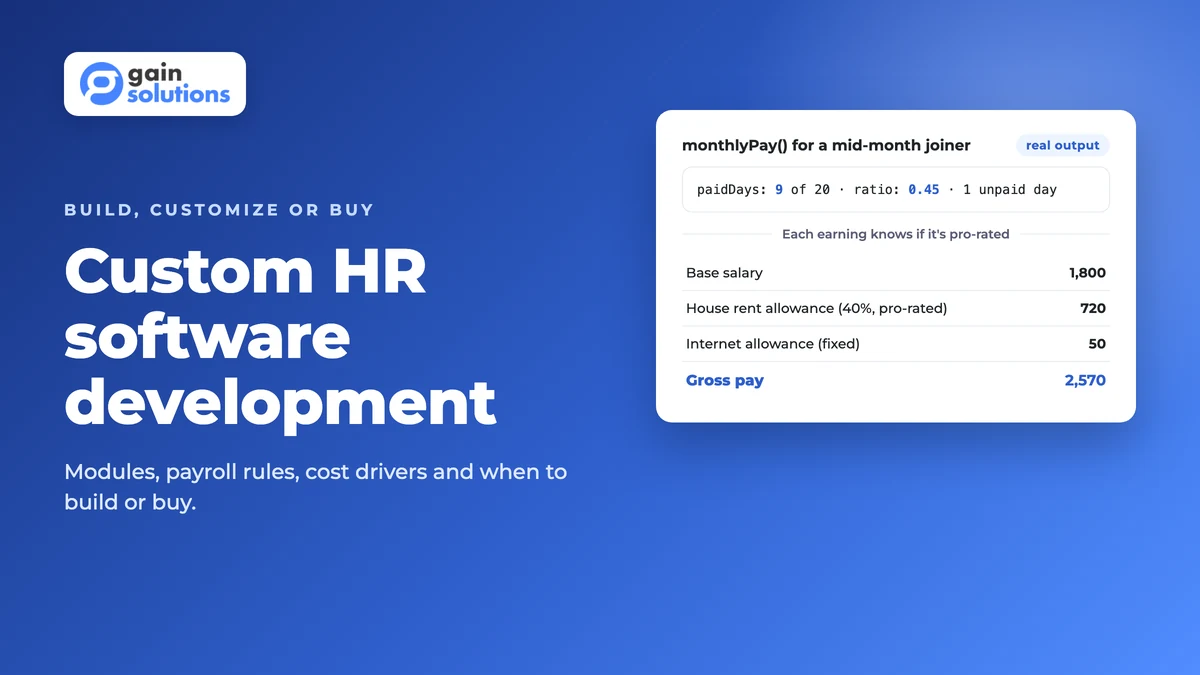
Here's a worked example: the gross pay for someone who joins halfway through a month and takes one unpaid day. Base salary is 4,000 a month, with a house rent allowance of 40% of base (pro-rated) and a fixed internet allowance of 50 (not pro-rated). We ran it with Node.js 22, and the output below is real, reformatted onto fewer lines.
const r2 = (n) => Math.round(n * 100) / 100;

export function monthlyPay({ base, earnings, workingDays, daysWorked, unpaidLeaveDays = 0 }) {
  const paidDays = daysWorked - unpaidLeaveDays;
  const ratio = paidDays / workingDays;
  const lines = [{ name: "Base salary", amount: r2(base * ratio) }];
  for (const e of earnings) {
    const full = e.type === "percent" ? (base * e.value) / 100 : e.value;
    lines.push({ name: e.name, amount: r2(e.proRated ? full * ratio : full) });
  }
  const gross = r2(lines.reduce((sum, l) => sum + l.amount, 0));
  return { paidDays, ratio: r2(ratio), lines, gross };
}

monthlyPay({
  base: 4000,
  earnings: [
    { name: "House rent allowance", type: "percent", value: 40, proRated: true },
    { name: "Internet allowance", type: "fixed", value: 50, proRated: false },
  ],
  workingDays: 20,
  daysWorked: 10,
  unpaidLeaveDays: 1,
});
Output:
{
  "paidDays": 9,
  "ratio": 0.45,
  "lines": [
    { "name": "Base salary", "amount": 1800 },
    { "name": "House rent allowance", "amount": 720 },
    { "name": "Internet allowance", "amount": 50 }
  ],
  "gross": 2570
}
Three things to notice. The pro-rated flag lives on each earning, not in the formula, so a policy change is a data change, not a code change. Rounding happens per line, the way a payslip shows it, so the lines always add up to the gross. And the inputs are the rules HR already writes down (working days, days worked, unpaid leave), which makes the code testable against real payslips. Cover cases like this with both kinds of tests from our unit vs integration testing guide before anyone gets paid from it.
What drives the cost of HR software development?
Five factors drive most of the effort, and scoping them is the only honest way to estimate a project. We don't publish prices because every project is scoped individually, but you can size yours with this table before you talk to anyone.
| Cost driver | Lower effort | Higher effort |
|---|---|---|
| Modules | Records and leave | Records, leave, time, hiring and payroll |
| Pay-rule complexity | One salary structure, monthly pay | Several structures, hourly and salaried staff, overtime, pro-rating, bonus runs |
| Integrations | Calendar and single sign-on | Accounting, banking, payroll providers, identity and existing HR systems |
| Data migration | A clean spreadsheet | Years of history from a legacy system, with gaps |
| Security and regulation | One country, role-based access | Several countries, field-level access, audit logs, data residency |
Migration is the driver teams underestimate most. Plan it with our legacy data migration guide. To turn the table into a budget, use our guides to software development budgets and a software development scope of work.
Which tech stack and security controls does HR software need?
Use a mainstream stack your team can hire for, and spend the effort on the data model and access control. HR software rarely fails on framework choice; it fails on who can see salaries.
| Layer | Common choice | Why it matters for HR |
|---|---|---|
| Database | A relational database such as PostgreSQL | Pay history and effective dates need transactions and strict schemas |
| Backend | Node.js or Python with typed validation | Pay rules need tests and predictable rounding |
| Web and mobile | React, plus Flutter or React Native for an employee app | Leave requests and payslips are used most on phones |
| Access control | Role-based access with field-level rules for salary | A manager may see a team's leave but not its pay |
| Audit log | Append-only log of who changed what and when | Disputes and audits need the full history |
| Multi-company or SaaS | Tenant isolation in the data layer | One customer's employees must never appear in another's |
If you employ people in the EU or EEA, the General Data Protection Regulation has applied since 25 May 2018 (European Commission, data protection in the EU, checked 12 November 2026), so design consent, access requests and deletion into the data model. Our guides to MySQL vs Postgres, Node.js vs Python for the backend, Flutter vs React Native, multi-tenant architecture, API security and DevSecOps go deeper on each layer. Health-related employee data adds its own rules; see HIPAA-compliant software development if that applies.
When should you build custom HR software, and when is buying enough?
Build when the part of HR that doesn't fit a product is the part that makes your business work. Buy when your process is standard and the main need is to stop using spreadsheets.
| Situation | What to do |
|---|---|
| Standard contracts, one country, under a few hundred people | Buy HR software and configure it |
| A bought platform covers most needs, but one workflow (such as shift pay or project-based pay) doesn't fit | Customize: build that workflow on the platform's API |
| Pay rules or workflows are unusual, or HR data must sit inside your own product | Build custom HR software |
| You're building an HR product to sell | Build it as a multi-tenant SaaS from the start |
| Nobody can write down your current pay and leave rules | Document the rules first; no option works until you do |
When you do build, the same patterns from our custom ERP development, custom CRM development and workflow automation guides apply: model the data first, then automate the approvals. An employee self-service area works much like a customer portal, and HR reporting follows our custom dashboard development approach.
How to run an HR software development project in 6 steps
- Write down every pay, leave and approval rule you use today, including the exceptions, and get HR and finance to sign them off. A product discovery phase is the right place for this.
- Decide build, customize or buy per module, using the decision table above.
- Design the employee record and the dated history model before any screens.
- Build the first module end to end, including access control and the audit log, and test it against real past payslips or leave balances.
- Migrate a copy of your data, reconcile it against the old system, and fix gaps before go-live. Use our software release checklist for the cutover.
- Run the old and new systems side by side for one pay cycle, then switch. Plan the next modules from what users asked for, following the software development life cycle.
If you're choosing who builds it, our guides to choosing a software development agency and working with a dedicated development team cover the questions to ask.
How GainHQ can help
GainHQ builds custom software, SaaS products and internal tools for founders and growing businesses. We also build and run our own HR SaaS, Payrun, so we've designed salary structures, pro-rating, approvals and payslips for real users, not just on paper. If you're weighing a custom HR system, from scoping the rules to a first module in production, talk to GainHQ.
Frequently asked questions
How much does custom HR software development cost?
It depends on five drivers: how many modules you build, how complex your pay rules are, how many systems it integrates with, how much data you migrate and what security and regulation it must meet. A records-and-leave tool for one country sits at the low end; payroll across several countries with legacy migration sits at the high end. GainHQ scopes every project individually, so write those five down before asking for an estimate.
How long does it take to build HR software?
It depends on scope more than on team size. Writing down your pay and leave rules, designing the employee record and migrating clean data usually take longer than building screens. Delivering one module end to end first, then adding the next, gets a working system to users sooner than building every module at once.
Which HR module should you build first?
Build employee records first, because leave, time, hiring and payroll all read from the person record. Then build the module that causes the most manual work today, which for many teams is leave or time tracking.
Should custom HR software include payroll?
Include payroll calculation if your pay rules don't fit standard tools, but think carefully before taking on tax filing. Filing rules differ by country and change often. Payrun, the HR SaaS GainHQ builds and runs, calculates pay, runs approvals and produces payslips, and leaves filing to an accountant or payroll provider.
Is low-code good enough for HR software?
Low-code works well for simple HR workflows such as leave requests, onboarding checklists and approvals. It struggles with payroll-grade rules, effective-dated pay history, field-level access to salaries and large data migrations. Many teams use low-code for internal workflows and custom code for pay and records.
Is it better to build or buy HR software?
Buy when your contracts and processes are standard and the main goal is to replace spreadsheets. Customize a platform when it covers most of your needs but one workflow doesn't fit. Build when your pay rules or workflows are unusual, when HR data must live inside your own product, or when you're building an HR product to sell.
What security does HR software need?
HR software needs role-based access with field-level rules for salary, an append-only audit log, encryption in transit and at rest, and data retention set per country. If you employ people in the EU or EEA, design for the General Data Protection Regulation, which has applied since 25 May 2018.