Customer portal development: features, security and when to build
by GainHQ Editorial Team | Nov 16, 2026 | Software Development Insights | Editorial policy
Table of Contents
- What is customer portal development?
- What features should a customer portal include?
- Customer portal development: build vs customize vs buy at a glance
- What does the customer portal development process look like?
- What does secure portal access look like in code?
- Which tech stack and security controls does a customer portal need?
- What drives the cost of customer portal development?
- Why do customer portals fail, and how do you avoid it?
- When do you need a custom customer portal, and when is portal software enough?
- How to build a customer portal in 6 steps
- How GainHQ can help
Your customers email to ask for an invoice copy, a ticket update or the status of an order. Someone on your team looks it up in three systems and replies by hand. The answer already exists in your data; your customers just can't reach it.
Customer portal development fixes that by giving each customer a secure login to their own records. The short answer on how to start: decide what customers should do without emailing you, check whether an off-the-shelf portal covers it, and build custom only where your data or workflow is the thing that makes you different. This guide shows the features, the trade-offs, a tested access-control example and a 6-step plan.
Quick overview
Customer portal development is building a secure, logged-in site or app where customers see their own data and handle routine tasks: invoices, orders, tickets, documents and account settings. Build custom when the portal must show data from your own systems in a way no product supports; buy or customize when it doesn't. GainHQ (gainhq.com), Gain Solutions' software development team, builds and runs Gain.io, whose public help centre and client portal serve its own customers.
Security and accessibility standards last checked against OWASP, the OpenID Foundation, OASIS, the W3C, the AICPA, the European Commission and Stripe's documentation on 16 November 2026.
Key takeaways
- A customer portal is only as useful as the data behind it. Integration with your CRM, billing and support systems is most of the work, not the screens.
- Start with the three tasks customers email you about most. A portal that does those well beats one with twenty half-finished features.
- Access control is the main security risk: broken access control is number one in the OWASP Top 10:2025, found in every application OWASP's contributors tested.
- Check the tenant first, then the role, then ownership, on the server, for every request. Hiding a button in the interface is not access control.
- Buy when your process is standard, customize when one workflow doesn't fit, and build when the portal is part of your product or shows data only your systems hold.
- Cost depends on integrations, user types, permissions, data migration and compliance needs. Scope those five before asking anyone for an estimate.
This guide covers what customer portal development is, the types of portal, the features to build first, build vs customize vs buy at a glance, the development process, a worked access-control example in code, the stack and security controls, the cost drivers, why portals fail, when to build, and a 6-step plan.
What is customer portal development?
Customer portal development is the work of designing, building and running a secure area where each customer logs in and sees only their own information. It usually means three things: a web or mobile front end, an access layer that decides who sees what, and integrations that pull data from the systems you already run.
It's a specific kind of custom business application development. Unlike custom internal tools, it serves customers who won't read a manual, so the bar for clarity and security is higher.
Portals go by several names, and the right one depends on who logs in:
| Portal type | Who logs in | Typical jobs |
|---|---|---|
| Customer self-service portal | Customers of a product or SaaS | Help articles, tickets, account settings, usage |
| Client portal | Clients of a services firm (agency, accountant, law firm) | Documents, approvals, project status, invoices |
| B2B customer portal | Buyers at business accounts | Orders, reorders, quotes, contract pricing, account users |
| Billing or account portal | Subscribers | Payment methods, invoices, plan changes, cancellation |
| Partner or dealer portal | Resellers and distributors | Leads, deal registration, marketing assets |
Client portal development uses the same building blocks as a customer portal; only the content shifts toward documents and approvals. Portals for developers using your API are a separate category, covered in our developer portal software guide.
What features should a customer portal include?
Build the features that remove your most common support emails first, then add the rest from real usage.
| Feature | What it does | First release? |
|---|---|---|
| Secure sign-in and account users | Login, password reset, single sign-on, inviting colleagues | Yes |
| Account overview | One page with status, open items and recent activity | Yes |
| Invoices and billing | Download invoices, update payment methods, see plan | Yes, if billing drives support emails |
| Tickets and requests | Raise a request, see its status, reply | Yes, if you run support |
| Knowledge base search | Answers customers can find before they write in | Often |
| Documents and approvals | Shared files, e-signature or approve buttons | Yes, for client portals |
| Orders and reorders | Order history, tracking, one-click reorder | Yes, for B2B portals |
| Notifications | Email or in-app alerts when something changes | Later |
| Feedback and roadmap | Feature requests and votes | Later |
| AI answers | Search or chat over your help content and the customer's own data | Later, once content and permissions are solid |
Plan the order with a feature prioritization method and write each feature up in a product requirements document. If you add AI later, the same permission rules must apply to it; our guides to RAG for SaaS and AI search for SaaS show how to keep answers inside one customer's data.
Customer portal development: build vs customize vs buy at a glance
Here is how the three options compare on the points that decide most portal projects.
| Buy (portal software) | Customize (extend a platform) | Build (custom portal) | |
|---|---|---|---|
| Fits your data and workflows | Only if they match the product | Mostly, within the platform's limits | Exactly, if you specify them |
| Time to first use | Fastest | Medium | Slowest |
| Branding and experience | Templates and themes | Themes plus custom pages | Fully yours |
| Integrations | The vendor's connectors | The vendor's API | Anything with an API |
| Who maintains it | The vendor | The vendor plus your extensions | You or your development partner |
| Main risk | Customers outgrow it and email you anyway | Vendor lock-in as extensions pile up | Underestimating integrations and permissions |
Many teams don't need to build billing at all. Stripe, for example, offers a hosted customer portal where subscribers update billing details, payment methods and subscription status (Stripe Docs, customer portal, checked 16 November 2026). Linking to a hosted piece like that is a common middle route. For the wider decision, see our guides to SaaS vs custom software and low-code platforms.
What does the customer portal development process look like?
Most portal projects move through five phases. Teams that skip the first two usually rebuild the access layer later.
| Phase | What happens | Output |
|---|---|---|
| Discovery | List the tasks customers email you about, the user types and the systems that hold the data | Task list, user types, system map |
| Data and access design | Decide which records each user type can see and change, and how tenants are separated | Permission matrix, data model |
| Design | Wireframes and prototypes tested with real customers | Approved screens, accessibility checks |
| Build and integrate | Front end, APIs and connections to CRM, billing and support | Working portal on staging |
| Test and launch | Security testing, permission tests, a pilot group, then everyone | Live portal, monitoring, feedback loop |
Run discovery as a proper product discovery phase, design with our UI/UX design for SaaS principles, and expose your data through an API-first architecture so the portal, your mobile app and future AI features all read from the same endpoints.
What does secure portal access look like in code?
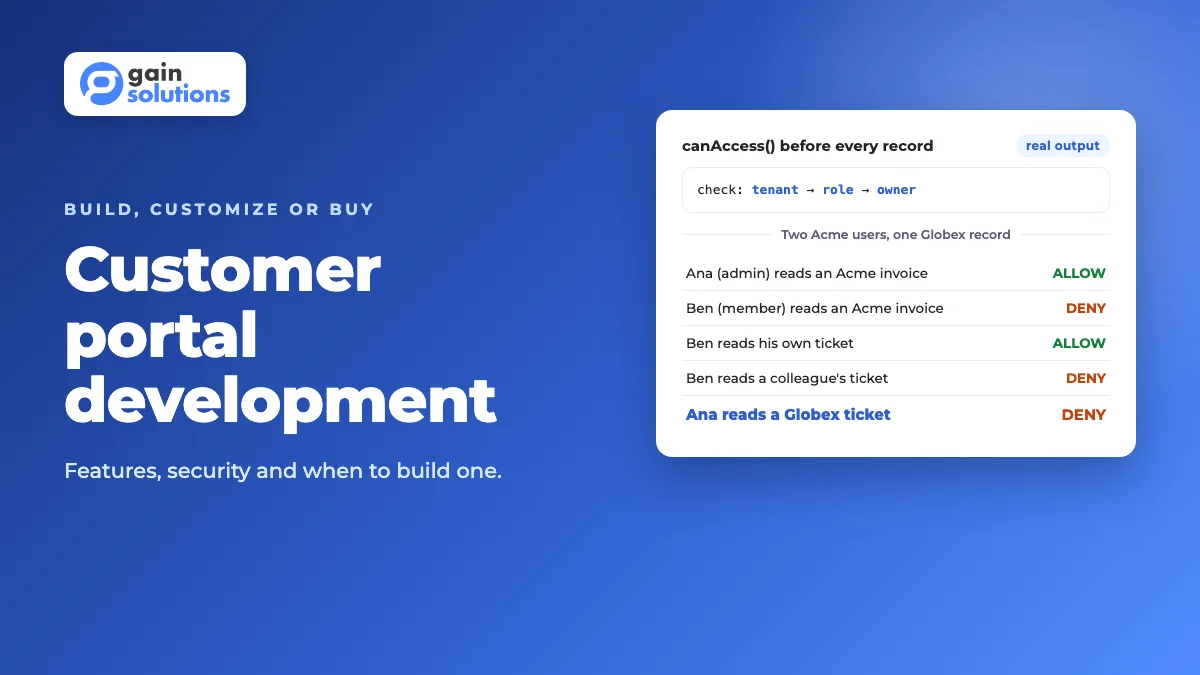
Here's a worked example: the permission check that runs before a portal returns any record. Two users work at the same customer, Acme. Ana is an account admin and Ben is a member. A second customer, Globex, shares the same system. We ran it with Node.js 22, and the output below is real.
const PERMISSIONS = {
  account_admin: ["invoice:read", "ticket:read", "ticket:create", "user:invite"],
  member: ["ticket:read", "ticket:create"],
};

export function canAccess(user, action, record) {
  if (record.tenantId !== user.tenantId)
    return { allowed: false, reason: "other tenant" };
  if (!PERMISSIONS[user.role]?.includes(action))
    return { allowed: false, reason: "role lacks " + action };
  if (user.role === "member" && record.ownerId !== user.id)
    return { allowed: false, reason: "not the owner" };
  return { allowed: true, reason: "ok" };
}

const ana = { id: "u1", tenantId: "acme", role: "account_admin" };
const ben = { id: "u2", tenantId: "acme", role: "member" };

canAccess(ana, "invoice:read", { tenantId: "acme", ownerId: "u9" });
canAccess(ben, "invoice:read", { tenantId: "acme", ownerId: "u2" });
canAccess(ben, "ticket:read", { tenantId: "acme", ownerId: "u2" });
canAccess(ben, "ticket:read", { tenantId: "acme", ownerId: "u3" });
canAccess(ana, "ticket:read", { tenantId: "globex", ownerId: "u7" });
Output:
Ana reads an Acme invoice        ALLOW (ok)
Ben reads an Acme invoice        DENY  (role lacks invoice:read)
Ben reads his own ticket         ALLOW (ok)
Ben reads a colleague's ticket   DENY  (not the owner)
Ana reads a Globex ticket        DENY  (other tenant)
Three things to notice. The tenant check runs first, so even an admin can never read another customer's data. Roles are data, not scattered if-statements, so adding a "billing contact" role is a one-line change.
The function also returns a reason, which you can log for audits and use in tests: write one test per row of your permission matrix, as our unit vs integration testing guide explains, before a single customer logs in. In production, enforce the same tenant filter in the database query too, as covered in our multi-tenant architecture guide.
Which tech stack and security controls does a customer portal need?
Use a mainstream stack your team can hire for, and spend the effort on identity, permissions and integrations. Portals rarely fail on framework choice; they fail when one customer sees another's data.
| Layer | Common choice | Why it matters for a portal |
|---|---|---|
| Front end | React, Angular or Vue; a native or cross-platform app if customers live on phones | Customers judge the whole company by this layer |
| Identity and sign-in | OpenID Connect for social and email login; SAML 2.0 for enterprise single sign-on | B2B customers often require their own identity provider |
| API layer | REST or GraphQL with rate limits | One API serves the portal, the app and integrations |
| Access control | Role-based access plus tenant and ownership checks on the server | Stops cross-customer data leaks |
| Content | A headless CMS for help articles and announcements | Support can publish without a release |
| Audit and monitoring | Append-only log of sign-ins, downloads and changes; uptime alerts | Answers "who saw this?" when a customer asks |
A few standards come up in almost every portal project:
- OWASP Top 10. Broken access control holds the number one spot in the OWASP Top 10:2025, and OWASP reports that 100% of the applications tested had some form of it (OWASP, A01:2025, checked 16 November 2026).
- OpenID Connect and SAML. OpenID Connect is an authentication protocol built on OAuth 2.0 (OpenID Foundation); SAML 2.0 is the OASIS standard many enterprises use for single sign-on (OASIS), both checked 16 November 2026.
- GDPR. If your customers include people in the EU or EEA, the General Data Protection Regulation has applied since 25 May 2018 (European Commission, checked 16 November 2026). A portal is also a natural place to let people see and export their own data.
- SOC 2. Enterprise buyers often ask for a SOC 2 report, an examination of controls relevant to security, availability, processing integrity, confidentiality or privacy (AICPA, checked 16 November 2026).
- WCAG 2.2. The W3C published WCAG 2.2 as a Recommendation on 12 December 2024 (W3C, checked 16 November 2026). Design forms, contrast and keyboard use to it from the start.
Our guides to React vs Angular vs Vue, GraphQL vs REST, API security best practices, API rate limiting, SaaS security best practices and accessible UX design go deeper on each layer.
What drives the cost of customer portal development?
Five factors drive most of the effort. We don't publish prices because every project is scoped individually, but you can size yours with this table before you talk to anyone.
| Cost driver | Lower effort | Higher effort |
|---|---|---|
| Integrations | One system with a clean API | CRM, ERP, billing and support systems, some without APIs |
| User types and permissions | One customer role | Admins, members, billing contacts, partners, each with different rights |
| Identity | Email and password | Enterprise single sign-on per customer, multi-factor rules |
| Data migration | Live data only | Years of documents and history from old systems |
| Compliance and audit | Standard security practices | Audit logs, data residency, SOC 2 evidence, accessibility audits |
Integrations are the driver teams underestimate most, so map them with our API integration strategy guide. Plan any history you move over with our legacy data migration guide, then turn the scope into a plan with a software development scope of work and a software development budget.
Why do customer portals fail, and how do you avoid it?
Most portals fail quietly: customers log in once, find stale data, and go back to email. Four causes come up again and again.
- Stale data. If the portal shows last night's export, customers stop trusting it. Read from live APIs so the portal and your team see the same thing.
- The wrong first features. A news feed without invoice downloads removes no emails. Start from the support inbox, not a wish list.
- Permissions bolted on late. Adding account roles after launch means rewriting queries everywhere. Design the permission matrix first.
- No one owns adoption. Put the portal link in every email reply, invoice and onboarding step, and track how many requests still arrive by email.
After launch, our guides to SaaS onboarding best practices, SaaS customer retention and SaaS monitoring tools cover what to measure.
When do you need a custom customer portal, and when is portal software enough?
Build when the portal shows data or workflows that only your systems have. Buy when your customers need standard self-service and your support or billing tool already includes it.
| Situation | What to do |
|---|---|
| Customers mainly need help articles and ticket status | Use the help centre in your support tool |
| Customers mainly need invoices and plan changes | Use your billing provider's hosted portal |
| A platform covers most needs, but one workflow (such as quotes with contract pricing) doesn't fit | Customize: build that workflow on the platform's API |
| The portal must combine data from several of your own systems in one view | Build a custom portal on top of your APIs |
| The portal is part of the product you sell | Build it as a white-label or multi-tenant product from the start |
| Nobody can say which tasks customers should do themselves | Read the support inbox first; no option works until you do |
When you do build, the patterns from our custom CRM development, custom ERP development and custom dashboard development guides apply: model the data, then the permissions, then the screens. An employee self-service area follows the same rules, as our HR software development guide shows.
How to build a customer portal in 6 steps
- Pull a recent batch of support emails and list the tasks customers ask you to do for them. Rank them by volume; the top three are your first release.
- Map every system that holds the data for those tasks, and check which ones have APIs you can use.
- Write a permission matrix: each user type, each record type, read or change, plus how customers are kept apart. Turn every row into a test.
- Decide build, customize or buy per feature, using the decision table above. Reuse hosted pieces such as billing where they fit.
- Build the first release end to end, including sign-in, the access checks and the audit log, then run security and permission tests with our API security testing guide.
- Launch to a pilot group of customers, fix what they hit, then roll out to everyone with our software release checklist. Track how many requests still arrive by email and plan the next features from that.
If you're choosing who builds it, our guides to choosing a software development agency and working with a dedicated development team cover the questions to ask.
How GainHQ can help
GainHQ builds custom software, SaaS products and internal tools for founders and growing businesses. We also build and run our own products: Gain.io's public help centre lets customers search guides and post feature requests, its client portal handles offers, and Payrun gives employees self-service on web and mobile. So we've designed sign-in, permissions and self-service for real users, not just on paper. If you're weighing a custom customer or client portal, from mapping the first tasks to a release in production, talk to GainHQ.
Frequently asked questions
What is customer portal development?
Customer portal development is designing and building a secure, logged-in website or app where each customer sees only their own data and handles routine tasks themselves, such as downloading invoices, raising tickets, tracking orders and managing account users. It combines a front end, an access-control layer and integrations with the systems that hold the data.
What is the difference between a customer portal and a client portal?
They use the same building blocks: sign-in, permissions and integrations. A client portal usually serves clients of a services firm and centres on documents, approvals and project status. A customer portal usually serves customers of a product and centres on account data, billing and support.
What features should a customer portal have?
Start with secure sign-in and account users, an account overview, and the two or three tasks customers email you about most, such as invoices, ticket status or order history. Add a searchable knowledge base, notifications, feedback and AI answers once the first release is used and the permissions are solid.
Should you build or buy a customer portal?
Buy when customers need standard self-service and your support or billing tool already includes a portal. Customize a platform when it covers most needs but one workflow doesn't fit. Build when the portal must combine data from several of your own systems, or when the portal is part of the product you sell.
How much does it cost to build a customer portal?
It depends on five drivers: the number and quality of integrations, how many user types and permissions you need, identity requirements such as enterprise single sign-on, data migration, and compliance needs such as audit logs or SOC 2 evidence. GainHQ scopes every project individually, so write those five down before asking for an estimate.
How long does customer portal development take?
It depends on scope more than on team size. Mapping the data, designing permissions and connecting existing systems usually take longer than building screens. Launching the top three customer tasks to a pilot group first, then adding features from real usage, gets a working portal to customers sooner than building everything at once.
How do you secure a customer portal?
Check the tenant, the role and record ownership on the server for every request, and apply the same tenant filter in database queries. Use OpenID Connect or SAML for sign-in, encrypt data in transit and at rest, keep an audit log of sign-ins and downloads, and test every row of your permission matrix. Broken access control is the number one risk in the OWASP Top 10:2025.